About billing for your app
Use Shopify App Pricing to monetize apps distributed through the Shopify App Store when it supports their pricing model. It's the default for new public apps and the recommended path for existing apps moving from Manual Pricing. Shopify App Pricing creates a predictable, trustworthy, and standardized experience for app users and makes pricing easier to set up and maintain.
Anchor to Which billing method should you use?Which billing method should you use?
Use the following rules to choose how to charge merchants for your app:
- New public apps: Use Shopify App Pricing. It's the default when you submit a new public app, and you configure subscription plans, usage-based pricing, and free trials in the Partner Dashboard instead of writing billing code.
- Existing public apps with supported pricing models: Shopify App Pricing is the recommended path. Learn about migrating to Shopify App Pricing.
- Existing Billing API integrations you're not migrating: Manual Pricing remains supported. You don't need to migrate to keep an existing
billing.requestorappSubscriptionCreateintegration running. - One-time purchases and unsupported pricing models: Use Manual Pricing with the Billing API. Shopify App Pricing doesn't support one-time app purchases.
- Subscriptions for merchant products: Selling your merchant's products on a recurring basis isn't app billing. Use purchase options with selling plans and subscription contracts instead.
Anchor to How Shopify App Pricing helpsHow Shopify App Pricing helps
Shopify App Pricing provides the following benefits:
-
Simplified payment process: Charges are directly added to the merchant's Shopify invoice.
-
Increased conversion rates: Apps that use Shopify App Pricing experience higher rates of customers transitioning from free to paid versions, because of higher trust and charges originating directly from Shopify.
-
Revenue sharing: Shopify collects the charge and automatically pays out your share, as defined in revenue share for Shopify App Store developers.
-
Chargeback handling: Shopify handles all chargeback-related processes.
-
Flexible pricing models: Shopify supports a wide range of common pricing models that merchants have come to expect.
Anchor to Shopify App PricingShopify App Pricing
Shopify App Pricing is the default for new public apps and the recommended approach for existing apps with supported pricing models. Define plans in the app submission form and let Shopify host your plan selection page and automate billing, trials, proration, upgrades, and downgrades. Shopify App Pricing supports recurring and usage charges, enabling you to send billable usage events via the App Events API. Learn more about Shopify App Pricing.
All apps published on the Shopify App Store are required to use a Shopify provided billing solution and adhere to the terms and conditions of the Shopify Partner Program Agreement.
All apps published on the Shopify App Store are required to use a Shopify provided billing solution and adhere to the terms and conditions of the Shopify Partner Program Agreement.
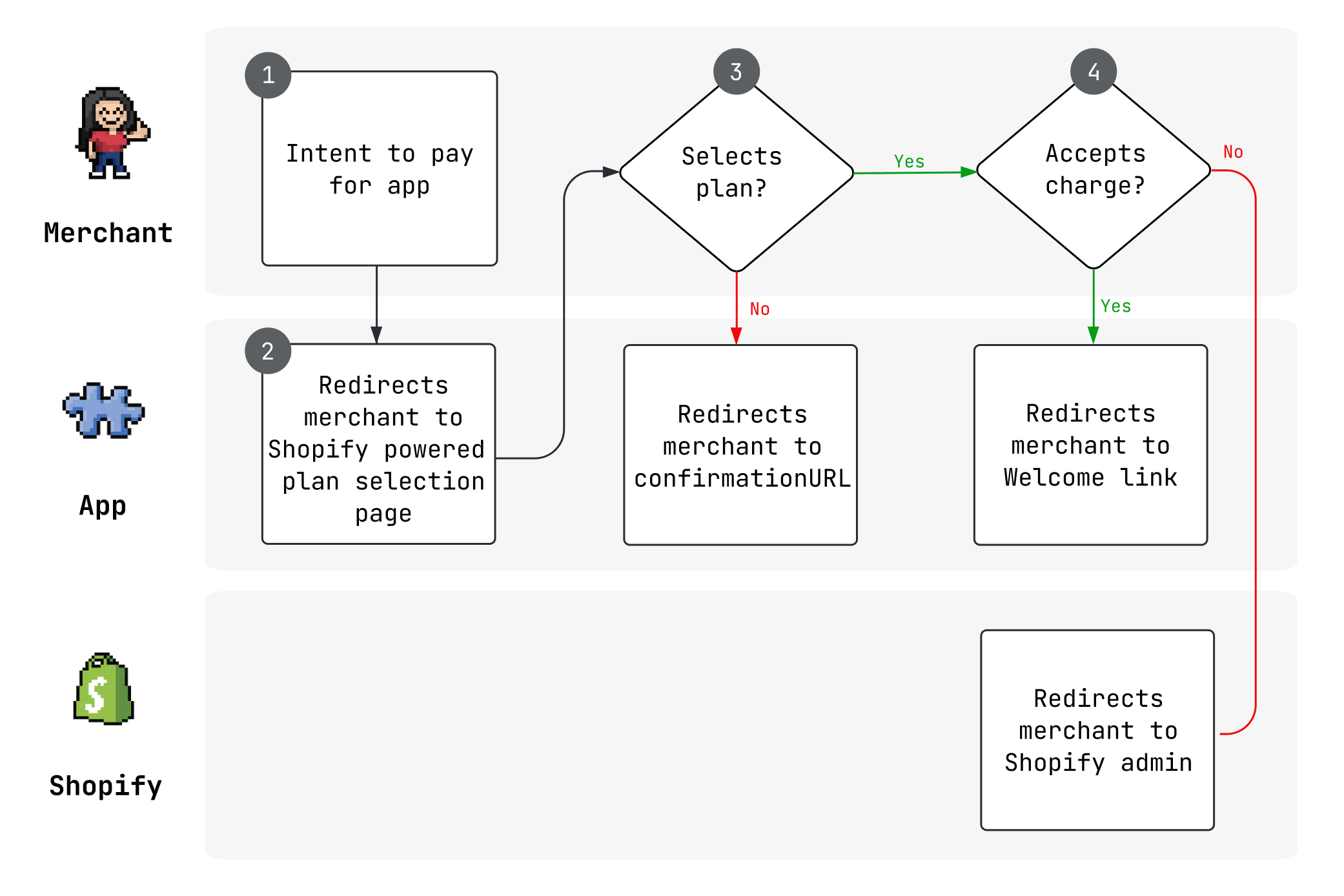
Shopify App Pricing is available for free, monthly and annual recurring, and various usage-based plan types.
Anchor to Manual Pricing (Legacy)Manual Pricing (Legacy)
Manual pricing is still supported but is the legacy method for handling app billing. With manual pricing, you build your own billing logic and pricing page using the Billing API to create recurring, usage, or one-time charges.
This option remains available for apps that have specific requirements not covered by Shopify App Pricing yet, and for existing app developers who are using it. Learn more about manual pricing.
Anchor to Supported currenciesSupported currencies
You can match your app charges to a merchant's local billing currency if they use one of the supported currencies.
Retrieve the merchant's local billing currency with the GraphQL Admin API's shopBillingPreferences query, passing the currency value as input.
Anchor to Estimated prices in local currenciesEstimated prices in local currencies
When a merchant is billed in a currency other than US dollars (USD), Shopify shows your app's USD prices to them as estimates in their billing currency. An estimate names its currency, for example $23.67 CAD/month or €17.67 EUR/month. The page shows a disclaimer with the exchange rate that it used, and explains that the amount charged depends on the exchange rate when the charge is issued. The disclaimer links to the Help Center article about local currency billing.
Merchants see estimates in the following places when they're logged in:
- The Shopify App Store: your app's listing and pricing section, and app cards in search results, categories, collections, and other app lists.
- The Shopify admin: the plan selection page, the charge approval page, the billing details on your app's page, and the list of installed apps in Settings > Apps.
Visitors who aren't logged in to the Shopify App Store see estimates for their location, in the currency that Shopify bills stores in their country. They see these estimates on your app's listing and in app cards, and the disclaimer says that the estimates are for their location. In countries where Shopify bills only in USD, visitors see your USD prices.
You don't need to change your app:
- You keep setting prices in USD, in the Partner Dashboard for Shopify App Pricing or with the Billing API for Manual Pricing. Your earnings are unchanged.
- Shopify converts each charge to the merchant's billing currency when it issues the charge, as it does today.
- A charge that you create in another supported currency with the Billing API is shown in that currency, as before.
- Prices that your app shows on its own pages aren't converted.
Anchor to Best practicesBest practices
Consider the following best practices when developing your app's pricing model:
| Practice | Benefit | Example |
|---|---|---|
| Provide simple and intuitive pricing | Makes it easier for merchants to understand the pricing model and encourages adoption. Merchants are more confident where costs are clear. | If your app provides a single set of features for all merchants, then consider setting up time-based subscriptions at 30 or 365-day intervals. |
| Limit the number of plans | Makes it easier for merchants to compare plans and identify which plan works best for them. Merchants want to quickly find the right plan and less options helps with that. | If your app provides tiered features, then consider setting up a basic plan and a pro plan Use usage based pricing where appropriate to differentiate plans. |
| Offer free trials | Encourages merchants and Partners that develop stores for merchants to try your app before they pay for it. This helps users learn your app's value and recommend the app to others. | Align with Shopify's free trial or $1 plan to encourage merchants to fully try your apps. |
| Create charges in the merchant's local billing currency | Enables merchants to better budget their app spend, which prevents confusion and provides a better app experience. | If a merchant is in India, then bill them in Indian Rupees (INR). If they're in Canada, then bill them in Canadian Dollars (CAD). |