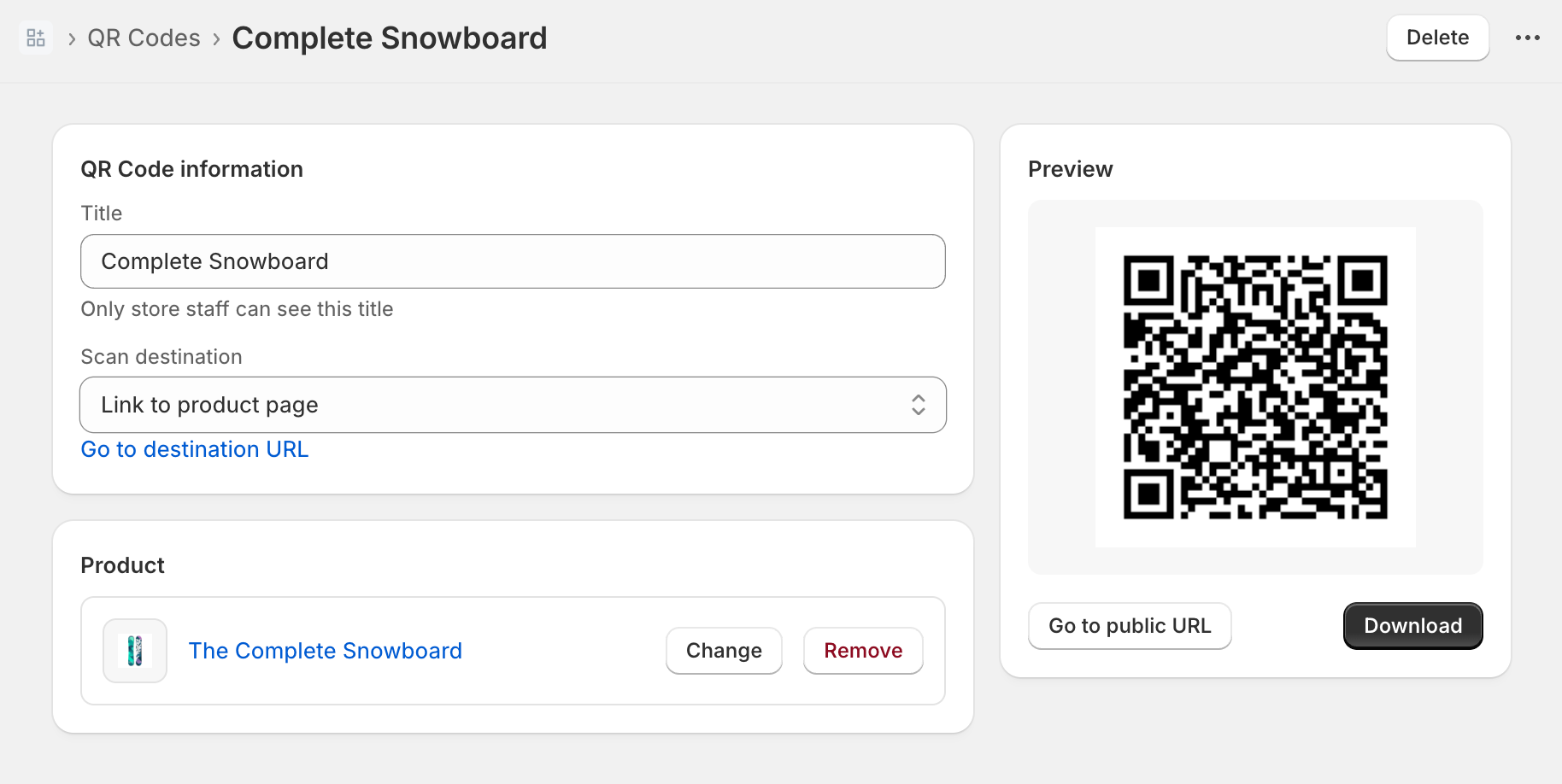
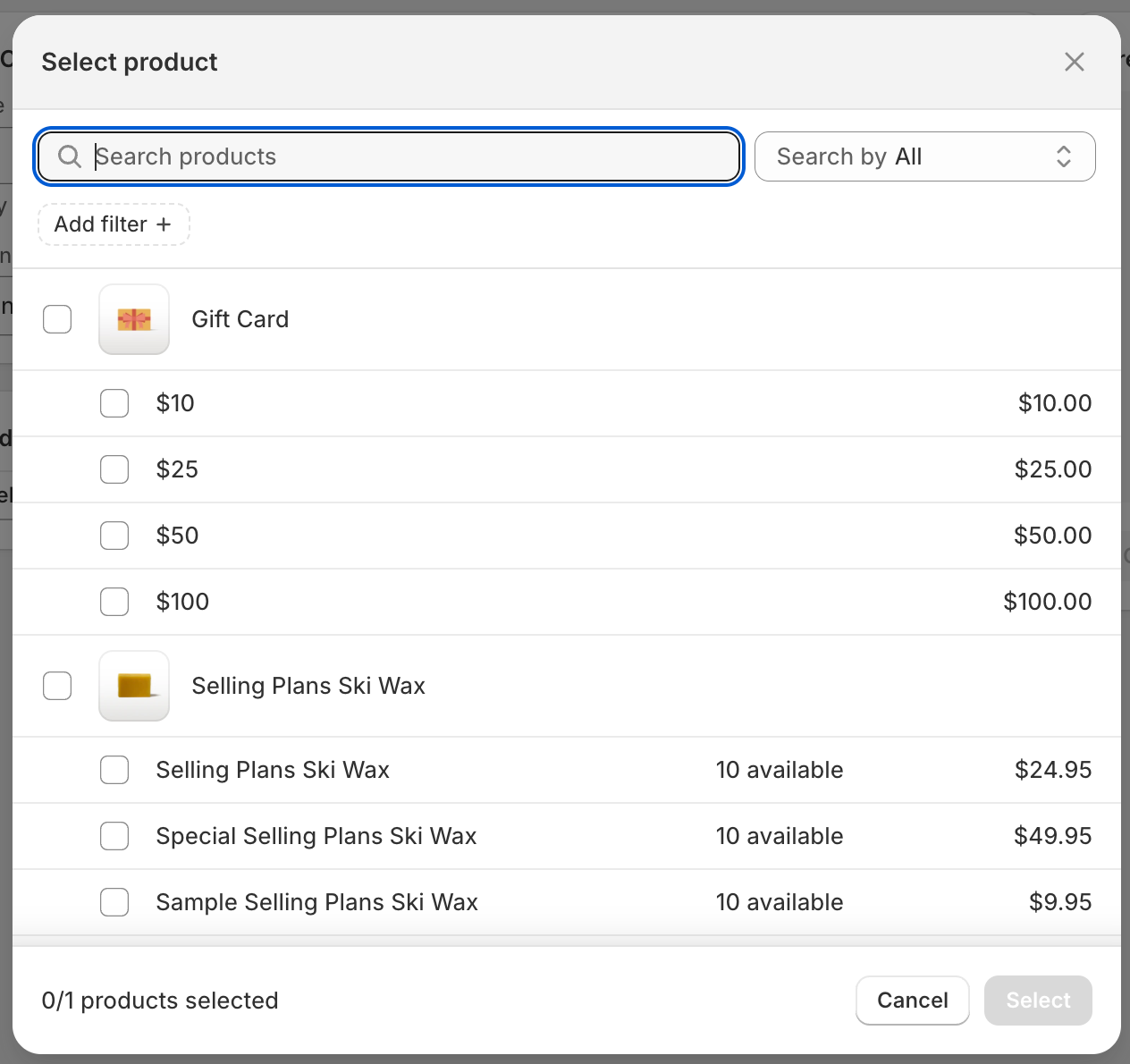
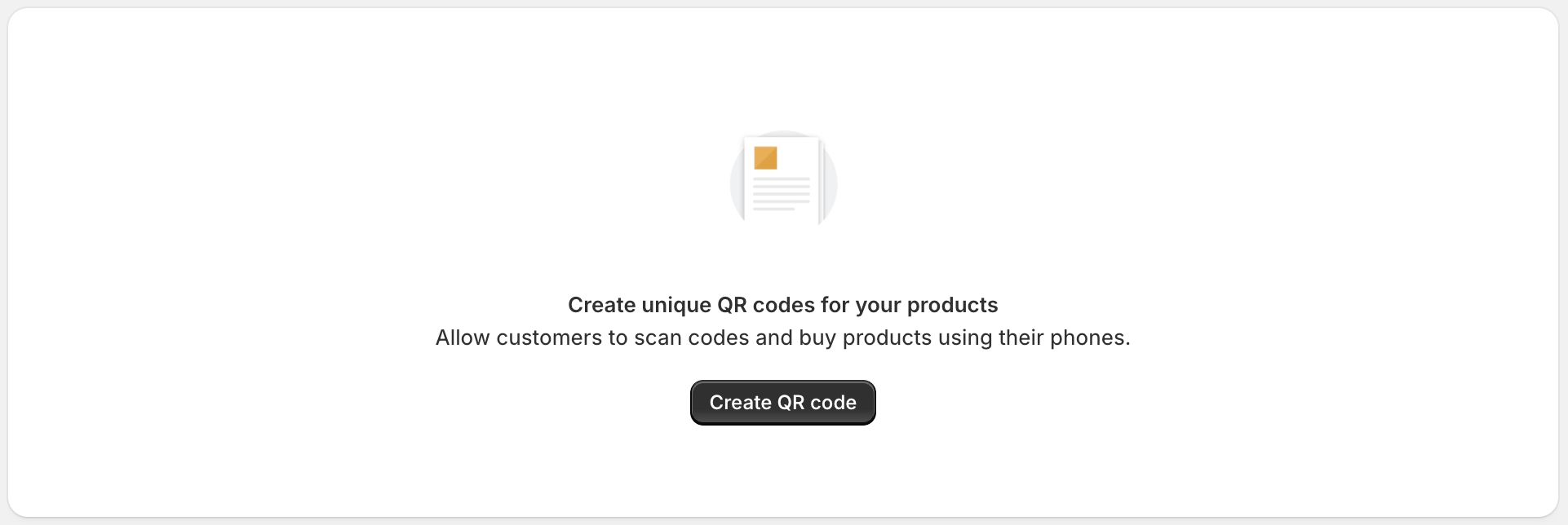
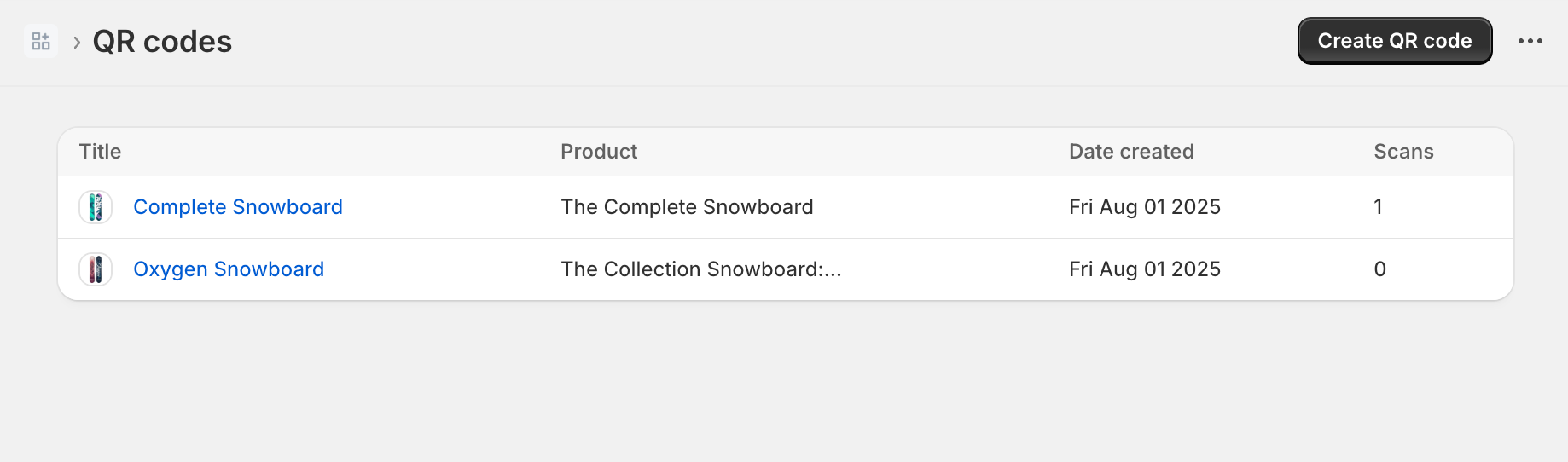
--- title: Build a Shopify app using React Router description: >- Learn how to build a Shopify app using React Router, Polaris web components, App Bridge, and metaobjects. source_url: html: 'https://shopify.dev/docs/apps/build/build?framework=reactRouter' md: 'https://shopify.dev/docs/apps/build/build.md?framework=reactRouter' --- # Build a Shopify app using React Router After you scaffold an app, you can add your own functionality to pages inside and outside of the Shopify admin. In this tutorial, you'll scaffold an app that makes QR codes for products. When the QR code is scanned, it takes the user to a checkout that's populated with the product, or to the product page. The app logs every time the QR code is scanned, and exposes scan metrics to the app user. Follow along with this tutorial to build a sample app, or clone the completed sample app. ## What you'll learn In this tutorial, you'll learn how to do the following tasks: * Use [Shopify metaobjects](https://shopify.dev/docs/apps/build/custom-data/metaobjects) to store app data using the [GraphQL Admin API](https://shopify.dev/docs/api/admin-graphql). * Use the [@shopify/shopify-app-react-router](https://www.npmjs.com/package/@shopify/shopify-app-react-router) package to authenticate users and query data. * Use [Polaris web components](https://shopify.dev/docs/api/app-home/polaris-web-components) to create a UI that adheres to Shopify's [App Design Guidelines](https://shopify.dev/docs/apps/design-guidelines). * Use [Shopify App Bridge](https://shopify.dev/docs/api/app-bridge) to add interactivity to your app. ## Requirements [Scaffold an app](https://shopify.dev/docs/apps/build/scaffold-app) Scaffold an app that uses the [React Router template](https://github.com/Shopify/shopify-app-template-react-router). [Install `qrcode`](https://www.npmjs.com/package/qrcode) Enables creation of QR codes. [Install `@shopify/polaris-icons`](https://www.npmjs.com/package/@shopify/polaris-icons) Provides placeholder images for the UI. [Install `tiny-invariant`](https://www.npmjs.com/package/tiny-invariant) Enables loaders to easily throw errors. ## Project [View on GitHub](https://github.com/Shopify/example-app--qr-code--remix/blob/main/) ## Define the QR code data model To store your QR codes, you'll use [Shopify metaobjects](https://shopify.dev/docs/apps/build/custom-data/metaobjects). Metaobjects let you define custom data structures that are stored in Shopify and accessed through the GraphQL Admin API. ### Add the metaobject definition Define a `$app:qrcode` metaobject type in your `shopify.app.toml` file. The metaobject should contain the following fields: * `title`: The app user-specified name for the QR code. * `product`: A product reference for the product that this QR code is for. * `product_variant`: A variant reference used to create the destination URL. * `destination`: The destination for the QR code (product page or cart). * `scans`: The number of times the QR code has been scanned. Set `admin = "merchant_read_write"` on the metaobject's access configuration so that merchants can view QR code data in the Shopify admin. *** When you run `shopify app dev`, Shopify CLI automatically creates the metaobject definition on your dev store based on the configuration in `shopify.app.toml`. ## /shopify.app.toml ```toml # Learn more about configuring your app at https://shopify.dev/docs/apps/tools/cli/configuration client_id = "" name = "" application_url = "" embedded = true [build] automatically_update_urls_on_dev = true include_config_on_deploy = true [webhooks] api_version = "2026-04" [[webhooks.subscriptions]] topics = [ "app/uninstalled" ] uri = "/webhooks/app/uninstalled" [[webhooks.subscriptions]] topics = [ "app/scopes_update" ] uri = "/webhooks/app/scopes_update" [access_scopes] # Learn more at https://shopify.dev/docs/apps/tools/cli/configuration#access_scopes scopes = "write_metaobject_definitions,write_metaobjects,write_products" [auth] redirect_urls = [ "https://example.com/api/auth" ] [product.metafields.app.demo_info] type = "single_line_text_field" name = "Demo Source Info" description = "Tracks products created by the Shopify app template for development" [product.metafields.app.demo_info.access] admin = "merchant_read_write" [metaobjects.app.qrcode] name = "QR Code" description = "QR codes that link to products" [metaobjects.app.qrcode.access] admin = "merchant_read_write" [metaobjects.app.qrcode.fields.title] name = "Title" type = "single_line_text_field" required = true [metaobjects.app.qrcode.fields.product] name = "Product" type = "product_reference" [metaobjects.app.qrcode.fields.product_variant] name = "Product Variant" type = "variant_reference" [metaobjects.app.qrcode.fields.destination] name = "Destination" type = "single_line_text_field" [metaobjects.app.qrcode.fields.scans] name = "Scans" type = "number_integer" ``` ### Verify access scopes Your app requires the following scopes in the `[access_scopes]` section of `shopify.app.toml`: * `write_metaobject_definitions`: Allows the app to create and manage metaobject type definitions. * `write_metaobjects`: Allows the app to create and manage metaobject entries. * `write_products`: Needed for the product picker. ## /shopify.app.toml ```toml # Learn more about configuring your app at https://shopify.dev/docs/apps/tools/cli/configuration client_id = "" name = "" application_url = "" embedded = true [build] automatically_update_urls_on_dev = true include_config_on_deploy = true [webhooks] api_version = "2026-04" [[webhooks.subscriptions]] topics = [ "app/uninstalled" ] uri = "/webhooks/app/uninstalled" [[webhooks.subscriptions]] topics = [ "app/scopes_update" ] uri = "/webhooks/app/scopes_update" [access_scopes] # Learn more at https://shopify.dev/docs/apps/tools/cli/configuration#access_scopes scopes = "write_metaobject_definitions,write_metaobjects,write_products" [auth] redirect_urls = [ "https://example.com/api/auth" ] [product.metafields.app.demo_info] type = "single_line_text_field" name = "Demo Source Info" description = "Tracks products created by the Shopify app template for development" [product.metafields.app.demo_info.access] admin = "merchant_read_write" [metaobjects.app.qrcode] name = "QR Code" description = "QR codes that link to products" [metaobjects.app.qrcode.access] admin = "merchant_read_write" [metaobjects.app.qrcode.fields.title] name = "Title" type = "single_line_text_field" required = true [metaobjects.app.qrcode.fields.product] name = "Product" type = "product_reference" [metaobjects.app.qrcode.fields.product_variant] name = "Product Variant" type = "variant_reference" [metaobjects.app.qrcode.fields.destination] name = "Destination" type = "single_line_text_field" [metaobjects.app.qrcode.fields.scans] name = "Scans" type = "number_integer" ``` ## Get QR code and product data After you define your metaobject, add code to retrieve and manage QR code data using the [GraphQL Admin API](https://shopify.dev/docs/api/admin-graphql). ### Create the model Create a model to get, save, delete, and validate QR codes. Create an `/app/models` folder. In that folder, create a new file called `QRCode.server.js`. ### Get QR codes Create a function to get a single QR code for your QR code form, and a second function to get multiple QR codes for your app's index page. You'll [create a QR code form](#create-a-qr-code-form) later in this tutorial. Use GraphQL queries to fetch metaobjects by handle or by type. The `getQRCode` function uses the `metaobjectByHandle` query to fetch a single QR code, while `getQRCodes` uses the `metaobjects` query to list all QR codes. Each query should retrieve the metaobject fields (`title`, `product`, `product_variant`, `destination`, `scans`) and use inline fragments to resolve product and variant references for display data like the product title, image, and handle. ## /app/models/QRCode.server.js ```javascript import qrcode from "qrcode"; import invariant from "tiny-invariant"; const METAOBJECT_TYPE = "$app:qrcode"; export async function getQRCode(handle, graphql, shop) { const response = await graphql( ` query GetQRCode($handle: MetaobjectHandleInput!) { metaobjectByHandle(handle: $handle) { id handle updatedAt title: field(key: "title") { jsonValue } product: field(key: "product") { jsonValue reference { ... on Product { handle title media(first: 1) { nodes { preview { image { url altText } } } } } } } productVariant: field(key: "product_variant") { reference { ... on ProductVariant { id legacyResourceId } } } destination: field(key: "destination") { jsonValue } ``` ### Get the QR code image A QR code takes the user to `/qrcodes/$id/scan`, where `$id` is the handle of the QR code. Create a function to construct this URL with a `shop` query parameter, and then use the `qrcode` package to return a base 64-encoded QR code image `src`. *** ## /app/models/QRCode.server.js ```javascript import qrcode from "qrcode"; import invariant from "tiny-invariant"; const METAOBJECT_TYPE = "$app:qrcode"; export async function getQRCode(handle, graphql, shop) { const response = await graphql( ` query GetQRCode($handle: MetaobjectHandleInput!) { metaobjectByHandle(handle: $handle) { id handle updatedAt title: field(key: "title") { jsonValue } product: field(key: "product") { jsonValue reference { ... on Product { handle title media(first: 1) { nodes { preview { image { url altText } } } } } } } productVariant: field(key: "product_variant") { reference { ... on ProductVariant { id legacyResourceId } } } destination: field(key: "destination") { jsonValue } ``` ### Get the destination URL Scanning a QR code takes the user to one of two places: * The product details page. * A checkout with the product in the cart. Create a function that accepts a QR code object and the shop domain, and conditionally constructs the destination URL depending on the destination that the merchant selects. ## /app/models/QRCode.server.js ```javascript import qrcode from "qrcode"; import invariant from "tiny-invariant"; const METAOBJECT_TYPE = "$app:qrcode"; export async function getQRCode(handle, graphql, shop) { const response = await graphql( ` query GetQRCode($handle: MetaobjectHandleInput!) { metaobjectByHandle(handle: $handle) { id handle updatedAt title: field(key: "title") { jsonValue } product: field(key: "product") { jsonValue reference { ... on Product { handle title media(first: 1) { nodes { preview { image { url altText } } } } } } } productVariant: field(key: "product_variant") { reference { ... on ProductVariant { id legacyResourceId } } } destination: field(key: "destination") { jsonValue } ``` ### Save QR codes Create a function to create or update a QR code using the `metaobjectUpsert` GraphQL mutation. The function should accept a handle, the form data, and the `graphql` client. The `metaobjectUpsert` mutation creates a new metaobject if the handle doesn't exist, or updates it if it does. Pass the QR code fields (`title`, `product`, `product_variant`, `destination`) as metaobject field values. *** [metaobject​Upsert mutation](https://shopify.dev/docs/api/admin-graphql/latest/mutations/metaobjectUpsert) ## /app/models/QRCode.server.js ```javascript import qrcode from "qrcode"; import invariant from "tiny-invariant"; const METAOBJECT_TYPE = "$app:qrcode"; export async function getQRCode(handle, graphql, shop) { const response = await graphql( ` query GetQRCode($handle: MetaobjectHandleInput!) { metaobjectByHandle(handle: $handle) { id handle updatedAt title: field(key: "title") { jsonValue } product: field(key: "product") { jsonValue reference { ... on Product { handle title media(first: 1) { nodes { preview { image { url altText } } } } } } } productVariant: field(key: "product_variant") { reference { ... on ProductVariant { id legacyResourceId } } } destination: field(key: "destination") { jsonValue } ``` ### Delete QR codes Create a function to delete a QR code using the `metaobjectDelete` GraphQL mutation. The function should accept the metaobject's global ID and the `graphql` client. *** [metaobject​Delete mutation](https://shopify.dev/docs/api/admin-graphql/latest/mutations/metaobjectDelete) ## /app/models/QRCode.server.js ```javascript import qrcode from "qrcode"; import invariant from "tiny-invariant"; const METAOBJECT_TYPE = "$app:qrcode"; export async function getQRCode(handle, graphql, shop) { const response = await graphql( ` query GetQRCode($handle: MetaobjectHandleInput!) { metaobjectByHandle(handle: $handle) { id handle updatedAt title: field(key: "title") { jsonValue } product: field(key: "product") { jsonValue reference { ... on Product { handle title media(first: 1) { nodes { preview { image { url altText } } } } } } } productVariant: field(key: "product_variant") { reference { ... on ProductVariant { id legacyResourceId } } } destination: field(key: "destination") { jsonValue } ``` ### Increment the scan count Create a function to increment the scan count for a QR code using the `metaobjectUpdate` GraphQL mutation. The function should accept the metaobject's global ID, the current scan count, and the `graphql` client. *** [metaobject​Update mutation](https://shopify.dev/docs/api/admin-graphql/latest/mutations/metaobjectUpdate) ## /app/models/QRCode.server.js ```javascript import qrcode from "qrcode"; import invariant from "tiny-invariant"; const METAOBJECT_TYPE = "$app:qrcode"; export async function getQRCode(handle, graphql, shop) { const response = await graphql( ` query GetQRCode($handle: MetaobjectHandleInput!) { metaobjectByHandle(handle: $handle) { id handle updatedAt title: field(key: "title") { jsonValue } product: field(key: "product") { jsonValue reference { ... on Product { handle title media(first: 1) { nodes { preview { image { url altText } } } } } } } productVariant: field(key: "product_variant") { reference { ... on ProductVariant { id legacyResourceId } } } destination: field(key: "destination") { jsonValue } ``` ### Validate QR codes To create a valid QR code, the app user needs to provide a title, and select a product and destination. Add a function to ensure that, when the user submits the form to create a QR code, values exist for all of the required fields. The action for the QR code form returns errors from this function. ## /app/models/QRCode.server.js ```javascript import qrcode from "qrcode"; import invariant from "tiny-invariant"; const METAOBJECT_TYPE = "$app:qrcode"; export async function getQRCode(handle, graphql, shop) { const response = await graphql( ` query GetQRCode($handle: MetaobjectHandleInput!) { metaobjectByHandle(handle: $handle) { id handle updatedAt title: field(key: "title") { jsonValue } product: field(key: "product") { jsonValue reference { ... on Product { handle title media(first: 1) { nodes { preview { image { url altText } } } } } } } productVariant: field(key: "product_variant") { reference { ... on ProductVariant { id legacyResourceId } } } destination: field(key: "destination") { jsonValue } ``` ### Generate a unique handle Create a `slugify` helper that converts a string to a URL-safe slug by lowercasing it, replacing non-alphanumeric characters with hyphens, and trimming leading or trailing hyphens. Then create a `generateHandle` function that combines the slugified title with a base-36 timestamp to produce a unique handle for each QR code metaobject. *** The handle is used as the metaobject's identifier when saving and retrieving QR codes. Using a timestamp suffix ensures that handles are unique even when titles are the same. ## /app/models/QRCode.server.js ```javascript import qrcode from "qrcode"; import invariant from "tiny-invariant"; const METAOBJECT_TYPE = "$app:qrcode"; export async function getQRCode(handle, graphql, shop) { const response = await graphql( ` query GetQRCode($handle: MetaobjectHandleInput!) { metaobjectByHandle(handle: $handle) { id handle updatedAt title: field(key: "title") { jsonValue } product: field(key: "product") { jsonValue reference { ... on Product { handle title media(first: 1) { nodes { preview { image { url altText } } } } } } } productVariant: field(key: "product_variant") { reference { ... on ProductVariant { id legacyResourceId } } } destination: field(key: "destination") { jsonValue } ``` ## Create a QR code form Create a form that enables the app user to manage QR codes. To create this form, you'll use a [Route module](https://reactrouter.com/start/framework/route-module), [Polaris web components](https://shopify.dev/docs/api/app-home/polaris-web-components) and [App Bridge](https://shopify.dev/docs/api/app-bridge). ### Set up the form route Create a form that can create, update, or delete a QR code. In the `app` > `routes` folder, create a new file called `app.qrcodes.$id.jsx`. *** #### Dynamic segments This route uses a [dynamic segment route](https://reactrouter.com/start/framework/routing#dynamic-segments) to match the URL for creating a new QR code and editing an existing one. If the user is creating a QR code, the URL is `/app/qrcodes/new`. If the user is updating a QR code, then the URL is `/app/qrcodes/{id}`, where `{id}` is the `$id` route parameter containing the handle of the QR code that the user is updating. #### React Router layouts The React Router template includes a [layout](https://reactrouter.com/start/framework/routing#layout-routes) at `app/routes/app.jsx`. This layout should be used for authenticated routes that render inside the Shopify admin. It's responsible for configuring App Bridge and Polaris web components, and authenticating the user using [shopify-app-react-router](https://www.npmjs.com/package/@shopify/shopify-app-react-router). *** [App Bridge](https://shopify.dev/docs/api/app-bridge) [Polaris web components](https://shopify.dev/docs/api/app-home/polaris-web-components) ### Authenticate the user Authenticate the route using `shopify-app-react-router`. *** If the user isn't authenticated, `authenticate.admin` handles the necessary redirects. If the user is authenticated, then the method returns an admin object. You can use the `authenticate.admin` method for the following purposes: * Getting information from the session, such as the `shop`. * Accessing the [GraphQL Admin API](https://shopify.dev/docs/api/admin-graphql). * Within methods to require and request billing. *** [Authenticating admin requests](https://shopify.dev/docs/api/shopify-app-react-router/v0/authenticate/admin) [Graph​QL Admin API](https://shopify.dev/docs/api/admin-graphql) ## /app/routes/app.qrcodes.$id.jsx ```jsx import { useState, useEffect, useRef } from "react"; import { useActionData, useLoaderData, useSubmit, useParams, } from "react-router"; import { authenticate } from "../shopify.server"; import { boundary } from "@shopify/shopify-app-react-router/server"; import { getQRCode, validateQRCode, saveQRCode, deleteQRCode, generateHandle, } from "../models/QRCode.server"; export async function loader({ request, params }) { const { admin, session } = await authenticate.admin(request); if (params.id === "new") { return { destination: "product", title: "", shop: session.shop, }; } const qrCode = await getQRCode(params.id, admin.graphql, session.shop); return { ...qrCode, shop: session.shop }; } export async function action({ request, params }) { const { admin, redirect } = await authenticate.admin(request); ``` ### Return a JSON response Return JSON data that can be used to populate the QR code form. If the `id` parameter is `new`, then return JSON with an empty title, a default destination, and the shop domain. If the `id` parameter isn't `new`, then it contains the metaobject's handle — use `getQRCode` to fetch the QR code metaobject by that handle and return the data to populate the form. *** [Graph​QL Admin API](https://shopify.dev/docs/api/admin-graphql) ## /app/routes/app.qrcodes.$id.jsx ```jsx import { useState, useEffect, useRef } from "react"; import { useActionData, useLoaderData, useSubmit, useParams, } from "react-router"; import { authenticate } from "../shopify.server"; import { boundary } from "@shopify/shopify-app-react-router/server"; import { getQRCode, validateQRCode, saveQRCode, deleteQRCode, generateHandle, } from "../models/QRCode.server"; export async function loader({ request, params }) { const { admin, session } = await authenticate.admin(request); if (params.id === "new") { return { destination: "product", title: "", shop: session.shop, }; } const qrCode = await getQRCode(params.id, admin.graphql, session.shop); return { ...qrCode, shop: session.shop }; } export async function action({ request, params }) { const { admin, redirect } = await authenticate.admin(request); ``` ### Manage the form state Maintain the QR code form state using the following variables: * `initialFormState`: The initial state of the form. This only changes when the user submits the form. This state is copied from `useLoaderData` into React state. * `formState`: When the user changes the title, selects a product, or changes the destination, this state is updated. This state is copied from `useLoaderData` into React state. * `errors`: If the app user doesn't fill all of the QR code form fields, then the action returns errors to display. This is the return value of `validateQRCode`, which is accessed through the `useActionData` hook. * `isDirty`: Determines if the form has changed. This is used to enable save buttons when the app user has changed the form contents, or disable them when the form contents haven't changed. *** ## /app/routes/app.qrcodes.$id.jsx ```jsx import { useState, useEffect, useRef } from "react"; import { useActionData, useLoaderData, useSubmit, useParams, } from "react-router"; import { authenticate } from "../shopify.server"; import { boundary } from "@shopify/shopify-app-react-router/server"; import { getQRCode, validateQRCode, saveQRCode, deleteQRCode, generateHandle, } from "../models/QRCode.server"; export async function loader({ request, params }) { const { admin, session } = await authenticate.admin(request); if (params.id === "new") { return { destination: "product", title: "", shop: session.shop, }; } const qrCode = await getQRCode(params.id, admin.graphql, session.shop); return { ...qrCode, shop: session.shop }; } export async function action({ request, params }) { const { admin, redirect } = await authenticate.admin(request); ``` ### Add a product selector Using the App Bridge `ResourcePicker` action, add a dialog that allows the user to select a product. Save the selection to form state. ## ![Screenshot showing an App Bridge modal for selecting products](https://shopify.dev/assets/assets/apps/select-product-react-router-K8Shzgr0.png) [Resource​Picker](https://shopify.dev/docs/api/app-home/apis/resource-picker) ## /app/routes/app.qrcodes.$id.jsx ```jsx import { useState, useEffect, useRef } from "react"; import { useActionData, useLoaderData, useSubmit, useParams, } from "react-router"; import { authenticate } from "../shopify.server"; import { boundary } from "@shopify/shopify-app-react-router/server"; import { getQRCode, validateQRCode, saveQRCode, deleteQRCode, generateHandle, } from "../models/QRCode.server"; export async function loader({ request, params }) { const { admin, session } = await authenticate.admin(request); if (params.id === "new") { return { destination: "product", title: "", shop: session.shop, }; } const qrCode = await getQRCode(params.id, admin.graphql, session.shop); return { ...qrCode, shop: session.shop }; } export async function action({ request, params }) { const { admin, redirect } = await authenticate.admin(request); ``` ### Submit Use `useSubmit` to add the ability to save and delete a QR Code. When saving, copy the data that the metaobject needs from `formState`. When deleting, submit the metaobject's global ID so the action can pass it to `deleteQRCode`. *** ## /app/routes/app.qrcodes.$id.jsx ```jsx import { useState, useEffect, useRef } from "react"; import { useActionData, useLoaderData, useSubmit, useParams, } from "react-router"; import { authenticate } from "../shopify.server"; import { boundary } from "@shopify/shopify-app-react-router/server"; import { getQRCode, validateQRCode, saveQRCode, deleteQRCode, generateHandle, } from "../models/QRCode.server"; export async function loader({ request, params }) { const { admin, session } = await authenticate.admin(request); if (params.id === "new") { return { destination: "product", title: "", shop: session.shop, }; } const qrCode = await getQRCode(params.id, admin.graphql, session.shop); return { ...qrCode, shop: session.shop }; } export async function action({ request, params }) { const { admin, redirect } = await authenticate.admin(request); ``` ### Lay out the form Using Polaris web components, build the layout for the form. Use `s-page`, `s-section`, and `s-box` with `slot="aside"` to structure the page. The page should have two columns. *** Polaris is the design system for the Shopify admin. Using Polaris web components ensures that your UI is accessible, responsive, and displays consistently with the Shopify admin. [Polaris web components](https://shopify.dev/docs/api/app-home/polaris-web-components) [s-page](https://shopify.dev/docs/api/app-home/polaris-web-components/structure/page) [s-section](https://shopify.dev/docs/api/app-home/polaris-web-components/layout-and-structure/section) [s-box](https://shopify.dev/docs/api/app-home/polaris-web-components/layout-and-structure/box) ## /app/routes/app.qrcodes.$id.jsx ```jsx import { useState, useEffect, useRef } from "react"; import { useActionData, useLoaderData, useSubmit, useParams, } from "react-router"; import { authenticate } from "../shopify.server"; import { boundary } from "@shopify/shopify-app-react-router/server"; import { getQRCode, validateQRCode, saveQRCode, deleteQRCode, generateHandle, } from "../models/QRCode.server"; export async function loader({ request, params }) { const { admin, session } = await authenticate.admin(request); if (params.id === "new") { return { destination: "product", title: "", shop: session.shop, }; } const qrCode = await getQRCode(params.id, admin.graphql, session.shop); return { ...qrCode, shop: session.shop }; } export async function action({ request, params }) { const { admin, redirect } = await authenticate.admin(request); ``` ### Add breadcrumbs Use an App Bridge `s-page` component to display a title that indicates to the user whether they're creating or editing a QR code. Include a breadcrumb link to go back to the [QR code list](#list-qr-codes). *** [Title Bar](https://shopify.dev/docs/api/app-home/app-bridge-web-components/title-bar) ## /app/routes/app.qrcodes.$id.jsx ```jsx import { useState, useEffect, useRef } from "react"; import { useActionData, useLoaderData, useSubmit, useParams, } from "react-router"; import { authenticate } from "../shopify.server"; import { boundary } from "@shopify/shopify-app-react-router/server"; import { getQRCode, validateQRCode, saveQRCode, deleteQRCode, generateHandle, } from "../models/QRCode.server"; export async function loader({ request, params }) { const { admin, session } = await authenticate.admin(request); if (params.id === "new") { return { destination: "product", title: "", shop: session.shop, }; } const qrCode = await getQRCode(params.id, admin.graphql, session.shop); return { ...qrCode, shop: session.shop }; } export async function action({ request, params }) { const { admin, redirect } = await authenticate.admin(request); ``` ### Add a title field Use `s-text-field` for updating the title. It should `setFormState`, have some `details` and show title errors from `useActionData`. *** [s-text-field](https://shopify.dev/docs/api/app-home/polaris-web-components/forms/textfield) ## /app/routes/app.qrcodes.$id.jsx ```jsx import { useState, useEffect, useRef } from "react"; import { useActionData, useLoaderData, useSubmit, useParams, } from "react-router"; import { authenticate } from "../shopify.server"; import { boundary } from "@shopify/shopify-app-react-router/server"; import { getQRCode, validateQRCode, saveQRCode, deleteQRCode, generateHandle, } from "../models/QRCode.server"; export async function loader({ request, params }) { const { admin, session } = await authenticate.admin(request); if (params.id === "new") { return { destination: "product", title: "", shop: session.shop, }; } const qrCode = await getQRCode(params.id, admin.graphql, session.shop); return { ...qrCode, shop: session.shop }; } export async function action({ request, params }) { const { admin, redirect } = await authenticate.admin(request); ``` ### Add a way to select the product If the user hasn't selected a product, then display a `s-button` with an `onClick` for `selectProduct`. If the user has selected a product, use `s-image` to display the product image. Use `s-clickable`, `s-box`, `s-image`, and `s-icon` to display the product image. Use `s-box` and `s-stack` to layout the UI. *** [s-button](https://shopify.dev/docs/api/app-home/polaris-web-components/actions/button) [s-clickable](https://shopify.dev/docs/api/app-home/polaris-web-components/actions/clickable) [s-image](https://shopify.dev/docs/api/app-home/polaris-web-components/media-and-visuals/image) [s-icon](https://shopify.dev/docs/api/app-home/polaris-web-components/media-and-visuals/icon) [s-box](https://shopify.dev/docs/api/app-home/polaris-web-components/layout-and-structure/box) [s-stack](https://shopify.dev/docs/api/app-home/polaris-web-components/layout-and-structure/stack) ## /app/routes/app.qrcodes.$id.jsx ```jsx import { useState, useEffect, useRef } from "react"; import { useActionData, useLoaderData, useSubmit, useParams, } from "react-router"; import { authenticate } from "../shopify.server"; import { boundary } from "@shopify/shopify-app-react-router/server"; import { getQRCode, validateQRCode, saveQRCode, deleteQRCode, generateHandle, } from "../models/QRCode.server"; export async function loader({ request, params }) { const { admin, session } = await authenticate.admin(request); if (params.id === "new") { return { destination: "product", title: "", shop: session.shop, }; } const qrCode = await getQRCode(params.id, admin.graphql, session.shop); return { ...qrCode, shop: session.shop }; } export async function action({ request, params }) { const { admin, redirect } = await authenticate.admin(request); ``` ### Add destination options Use `s-select` to render different destinations. It should `setFormState` when `onChange` occurs. If the user is editing a QR code, use a `s-link` to link to the destination URL in a new tab. *** [s-select](https://shopify.dev/docs/api/app-home/polaris-web-components/forms/select) [s-link](https://shopify.dev/docs/api/app-home/polaris-web-components/actions/link) ## /app/routes/app.qrcodes.$id.jsx ```jsx import { useState, useEffect, useRef } from "react"; import { useActionData, useLoaderData, useSubmit, useParams, } from "react-router"; import { authenticate } from "../shopify.server"; import { boundary } from "@shopify/shopify-app-react-router/server"; import { getQRCode, validateQRCode, saveQRCode, deleteQRCode, generateHandle, } from "../models/QRCode.server"; export async function loader({ request, params }) { const { admin, session } = await authenticate.admin(request); if (params.id === "new") { return { destination: "product", title: "", shop: session.shop, }; } const qrCode = await getQRCode(params.id, admin.graphql, session.shop); return { ...qrCode, shop: session.shop }; } export async function action({ request, params }) { const { admin, redirect } = await authenticate.admin(request); ``` ### Display a preview of the QR code After saving a QR code, or when editing an existing QR code, provide ways to preview the QR code that the app user created. Use `s-box` with `slot="aside"` to position the preview as an aside. If a QR code is available, then use `s-image` to render the QR code. If no QR code is available, then use `s-text` with `color="subdued"`. Add buttons to preview the public URL, and to download the QR code. *** [s-box](https://shopify.dev/docs/api/app-home/polaris-web-components/layout-and-structure/box) [s-image](https://shopify.dev/docs/api/app-home/polaris-web-components/media-and-visuals/image) [s-text](https://shopify.dev/docs/api/app-home/polaris-web-components/typography/text) [s-button](https://shopify.dev/docs/api/app-home/polaris-web-components/actions/button) ## /app/routes/app.qrcodes.$id.jsx ```jsx import { useState, useEffect, useRef } from "react"; import { useActionData, useLoaderData, useSubmit, useParams, } from "react-router"; import { authenticate } from "../shopify.server"; import { boundary } from "@shopify/shopify-app-react-router/server"; import { getQRCode, validateQRCode, saveQRCode, deleteQRCode, generateHandle, } from "../models/QRCode.server"; export async function loader({ request, params }) { const { admin, session } = await authenticate.admin(request); if (params.id === "new") { return { destination: "product", title: "", shop: session.shop, }; } const qrCode = await getQRCode(params.id, admin.graphql, session.shop); return { ...qrCode, shop: session.shop }; } export async function action({ request, params }) { const { admin, redirect } = await authenticate.admin(request); ``` ### Add save bar Use `shopify.saveBar` and `ui-save-bar` to render **Save** and **Discard** buttons. Use the `useSubmit` hook to save the form data. Copy the data that the metaobject needs from `formState` and set `initialFormState` to the current `formState`. *** [App Bridge save bar](https://shopify.dev/docs/api/app-home/app-bridge-web-components/ui-save-bar) ## /app/routes/app.qrcodes.$id.jsx ```jsx import { useState, useEffect, useRef } from "react"; import { useActionData, useLoaderData, useSubmit, useParams, } from "react-router"; import { authenticate } from "../shopify.server"; import { boundary } from "@shopify/shopify-app-react-router/server"; import { getQRCode, validateQRCode, saveQRCode, deleteQRCode, generateHandle, } from "../models/QRCode.server"; export async function loader({ request, params }) { const { admin, session } = await authenticate.admin(request); if (params.id === "new") { return { destination: "product", title: "", shop: session.shop, }; } const qrCode = await getQRCode(params.id, admin.graphql, session.shop); return { ...qrCode, shop: session.shop }; } export async function action({ request, params }) { const { admin, redirect } = await authenticate.admin(request); ``` ### Create, update, or delete a QR code Create an `action` to create, update, or delete a QR code. If the action deletes a QR code, then use `deleteQRCode` with the metaobject's global ID and redirect the app user to the index page. For creating or updating, generate a handle for new QR codes using `generateHandle`, or use the existing handle from the `id` URL parameter. Then call `saveQRCode` with the handle and form data. The action should return errors for incomplete data using your `validateQRCode` function. If the action creates or updates a QR code, then redirect to `app/qrcodes/$id`, where `$id` is the handle of the saved metaobject. *** ## /app/routes/app.qrcodes.$id.jsx ```jsx import { useState, useEffect, useRef } from "react"; import { useActionData, useLoaderData, useSubmit, useParams, } from "react-router"; import { authenticate } from "../shopify.server"; import { boundary } from "@shopify/shopify-app-react-router/server"; import { getQRCode, validateQRCode, saveQRCode, deleteQRCode, generateHandle, } from "../models/QRCode.server"; export async function loader({ request, params }) { const { admin, session } = await authenticate.admin(request); if (params.id === "new") { return { destination: "product", title: "", shop: session.shop, }; } const qrCode = await getQRCode(params.id, admin.graphql, session.shop); return { ...qrCode, shop: session.shop }; } export async function action({ request, params }) { const { admin, redirect } = await authenticate.admin(request); ``` ## List QR codes To allow app users to navigate to QR codes, list the QR codes in the app home. ### Load QR codes In the app's index route, load the QR codes using a `loader`. The `loader` should load QR codes using the `getQRCodes` function from [`app/models/QRCode.server.js`](#get-qr-code-and-product-data), passing the `graphql` client and the `shop` from the session. *** ## /app/routes/app.\_index.jsx ```jsx import { useLoaderData } from "react-router"; import { boundary } from "@shopify/shopify-app-react-router/server"; import { authenticate } from "../shopify.server"; import { getQRCodes } from "../models/QRCode.server"; export async function loader({ request }) { const { admin, session } = await authenticate.admin(request); const qrCodes = await getQRCodes(admin.graphql, session.shop); return { qrCodes, }; } const EmptyQRCodeState = () => ( Create unique QR codes for your products Allow customers to scan codes and buy products using their phones. Create QR code ); function truncate(str, { length = 25 } = {}) { if (!str) return ""; if (str.length <= length) return str; return str.slice(0, length) + "…"; } const QRTable = ({ qrCodes }) => ( Title Product Date created Scans {qrCodes.map((qrCode) => ( ))} ); const QRTableRow = ({ qrCode }) => ( {qrCode.productImage ? ( ) : ( )} {truncate(qrCode.title)} {qrCode.productDeleted ? ( Product has been deleted ) : ( truncate(qrCode.productTitle) )} {new Date(qrCode.createdAt).toDateString()} {qrCode.scans} ); export default function Index() { const { qrCodes } = useLoaderData(); return ( Create QR code {qrCodes.length === 0 ? ( ) : ( )} ); } export const headers = (headersArgs) => { return boundary.headers(headersArgs); }; ``` ### Create an empty state If there are no QR codes, construct an empty state display using `s-section`, `s-grid`, `s-box`, `s-heading` and `s-paragraph`. Use `s-button` to link to the QR code form for creating a new QR Code. ![Screenshot showing a Polaris EmptyState](https://shopify.dev/assets/assets/apps/empty-state-react-router-Cj2HaAfD.png) *** [s-section](https://shopify.dev/docs/api/app-home/polaris-web-components/layout-and-structure/section) [s-grid](https://shopify.dev/docs/api/app-home/polaris-web-components/layout-and-structure/grid) [s-box](https://shopify.dev/docs/api/app-home/polaris-web-components/layout-and-structure/box) [s-heading](https://shopify.dev/docs/api/app-home/polaris-web-components/typography/heading) [s-paragraph](https://shopify.dev/docs/api/app-home/polaris-web-components/typography/paragraph) [s-button](https://shopify.dev/docs/api/app-home/polaris-web-components/actions/button) ## /app/routes/app.\_index.jsx ```jsx import { useLoaderData } from "react-router"; import { boundary } from "@shopify/shopify-app-react-router/server"; import { authenticate } from "../shopify.server"; import { getQRCodes } from "../models/QRCode.server"; export async function loader({ request }) { const { admin, session } = await authenticate.admin(request); const qrCodes = await getQRCodes(admin.graphql, session.shop); return { qrCodes, }; } const EmptyQRCodeState = () => ( Create unique QR codes for your products Allow customers to scan codes and buy products using their phones. Create QR code ); function truncate(str, { length = 25 } = {}) { if (!str) return ""; if (str.length <= length) return str; return str.slice(0, length) + "…"; } const QRTable = ({ qrCodes }) => ( Title Product Date created Scans {qrCodes.map((qrCode) => ( ))} ); const QRTableRow = ({ qrCode }) => ( {qrCode.productImage ? ( ) : ( )} {truncate(qrCode.title)} {qrCode.productDeleted ? ( Product has been deleted ) : ( truncate(qrCode.productTitle) )} {new Date(qrCode.createdAt).toDateString()} {qrCode.scans} ); export default function Index() { const { qrCodes } = useLoaderData(); return ( Create QR code {qrCodes.length === 0 ? ( ) : ( )} ); } export const headers = (headersArgs) => { return boundary.headers(headersArgs); }; ``` ### Add a truncation helper Create a `truncate` function that shortens long strings to a given length (defaulting to 25 characters) and appends an ellipsis. This keeps the QR code table readable when titles or product names are long. ## /app/routes/app.\_index.jsx ```jsx import { useLoaderData } from "react-router"; import { boundary } from "@shopify/shopify-app-react-router/server"; import { authenticate } from "../shopify.server"; import { getQRCodes } from "../models/QRCode.server"; export async function loader({ request }) { const { admin, session } = await authenticate.admin(request); const qrCodes = await getQRCodes(admin.graphql, session.shop); return { qrCodes, }; } const EmptyQRCodeState = () => ( Create unique QR codes for your products Allow customers to scan codes and buy products using their phones. Create QR code ); function truncate(str, { length = 25 } = {}) { if (!str) return ""; if (str.length <= length) return str; return str.slice(0, length) + "…"; } const QRTable = ({ qrCodes }) => ( Title Product Date created Scans {qrCodes.map((qrCode) => ( ))} ); const QRTableRow = ({ qrCode }) => ( {qrCode.productImage ? ( ) : ( )} {truncate(qrCode.title)} {qrCode.productDeleted ? ( Product has been deleted ) : ( truncate(qrCode.productTitle) )} {new Date(qrCode.createdAt).toDateString()} {qrCode.scans} ); export default function Index() { const { qrCodes } = useLoaderData(); return ( Create QR code {qrCodes.length === 0 ? ( ) : ( )} ); } export const headers = (headersArgs) => { return boundary.headers(headersArgs); }; ``` ### Create an index table If there are QR codes present, then use a `s-table` to list them. The table should have columns for the QR code title, product, the date the QR code was created, and the number of times the QR code was scanned. The title `s-table-header` should use `listSlot="primary"`. ![Screenshot showing a Polaris table](https://shopify.dev/assets/assets/apps/index-table-react-router-N07JF0sI.png) *** [s-table](https://shopify.dev/docs/api/app-home/polaris-web-components/layout-and-structure/table) ## /app/routes/app.\_index.jsx ```jsx import { useLoaderData } from "react-router"; import { boundary } from "@shopify/shopify-app-react-router/server"; import { authenticate } from "../shopify.server"; import { getQRCodes } from "../models/QRCode.server"; export async function loader({ request }) { const { admin, session } = await authenticate.admin(request); const qrCodes = await getQRCodes(admin.graphql, session.shop); return { qrCodes, }; } const EmptyQRCodeState = () => ( Create unique QR codes for your products Allow customers to scan codes and buy products using their phones. Create QR code ); function truncate(str, { length = 25 } = {}) { if (!str) return ""; if (str.length <= length) return str; return str.slice(0, length) + "…"; } const QRTable = ({ qrCodes }) => ( Title Product Date created Scans {qrCodes.map((qrCode) => ( ))} ); const QRTableRow = ({ qrCode }) => ( {qrCode.productImage ? ( ) : ( )} {truncate(qrCode.title)} {qrCode.productDeleted ? ( Product has been deleted ) : ( truncate(qrCode.productTitle) )} {new Date(qrCode.createdAt).toDateString()} {qrCode.scans} ); export default function Index() { const { qrCodes } = useLoaderData(); return ( Create QR code {qrCodes.length === 0 ? ( ) : ( )} ); } export const headers = (headersArgs) => { return boundary.headers(headersArgs); }; ``` ### Create index table rows Map over each QR code and render a `s-table-row`. Make sure each row has an `s-table-cell` for the QR code title, product, the date the QR code was created, and the number of times the QR code was scanned. Use the QR code's `handle` for the row key and for linking to the edit form. *** [s-table-row](https://shopify.dev/docs/api/app-home/polaris-web-components/layout-and-structure/table) [s-table-cell](https://shopify.dev/docs/api/app-home/polaris-web-components/layout-and-structure/table) [s-image](https://shopify.dev/docs/api/app-home/polaris-web-components/media-and-visuals/image) [s-text](https://shopify.dev/docs/api/app-home/polaris-web-components/typography/text) [s-link](https://shopify.dev/docs/api/app-home/polaris-web-components/actions/link) ## /app/routes/app.\_index.jsx ```jsx import { useLoaderData } from "react-router"; import { boundary } from "@shopify/shopify-app-react-router/server"; import { authenticate } from "../shopify.server"; import { getQRCodes } from "../models/QRCode.server"; export async function loader({ request }) { const { admin, session } = await authenticate.admin(request); const qrCodes = await getQRCodes(admin.graphql, session.shop); return { qrCodes, }; } const EmptyQRCodeState = () => ( Create unique QR codes for your products Allow customers to scan codes and buy products using their phones. Create QR code ); function truncate(str, { length = 25 } = {}) { if (!str) return ""; if (str.length <= length) return str; return str.slice(0, length) + "…"; } const QRTable = ({ qrCodes }) => ( Title Product Date created Scans {qrCodes.map((qrCode) => ( ))} ); const QRTableRow = ({ qrCode }) => ( {qrCode.productImage ? ( ) : ( )} {truncate(qrCode.title)} {qrCode.productDeleted ? ( Product has been deleted ) : ( truncate(qrCode.productTitle) )} {new Date(qrCode.createdAt).toDateString()} {qrCode.scans} ); export default function Index() { const { qrCodes } = useLoaderData(); return ( Create QR code {qrCodes.length === 0 ? ( ) : ( )} ); } export const headers = (headersArgs) => { return boundary.headers(headersArgs); }; ``` ### Warn if a product is deleted A merchant can delete a product after creating a QR code for it. The data returned from the model includes a `productDeleted` property. `productDeleted` is true if the product reference can't be resolved — meaning the product ID exists in the metaobject but the product no longer exists in the store. Use `s-badge` to render a warning to the user if a product is deleted. *** [s-badge](https://shopify.dev/docs/api/app-home/polaris-web-components/feedback-and-status-indicators/badge) ## /app/routes/app.\_index.jsx ```jsx import { useLoaderData } from "react-router"; import { boundary } from "@shopify/shopify-app-react-router/server"; import { authenticate } from "../shopify.server"; import { getQRCodes } from "../models/QRCode.server"; export async function loader({ request }) { const { admin, session } = await authenticate.admin(request); const qrCodes = await getQRCodes(admin.graphql, session.shop); return { qrCodes, }; } const EmptyQRCodeState = () => ( Create unique QR codes for your products Allow customers to scan codes and buy products using their phones. Create QR code ); function truncate(str, { length = 25 } = {}) { if (!str) return ""; if (str.length <= length) return str; return str.slice(0, length) + "…"; } const QRTable = ({ qrCodes }) => ( Title Product Date created Scans {qrCodes.map((qrCode) => ( ))} ); const QRTableRow = ({ qrCode }) => ( {qrCode.productImage ? ( ) : ( )} {truncate(qrCode.title)} {qrCode.productDeleted ? ( Product has been deleted ) : ( truncate(qrCode.productTitle) )} {new Date(qrCode.createdAt).toDateString()} {qrCode.scans} ); export default function Index() { const { qrCodes } = useLoaderData(); return ( Create QR code {qrCodes.length === 0 ? ( ) : ( )} ); } export const headers = (headersArgs) => { return boundary.headers(headersArgs); }; ``` ### Lay out the page After you create your empty state and index table, adjust the layout of the index page to return the markup that you created. Create a layout using Polaris components. Render the empty state and table inside a Polaris `Card`. Use the Polaris `s-page` component to render the title bar with a title. Add a primary button to navigate to the QR code creation form. *** [s-page](https://shopify.dev/docs/api/app-home/polaris-web-components/structure/page) [s-button](https://shopify.dev/docs/api/app-home/polaris-web-components/actions/button) [Title Bar](https://shopify.dev/docs/api/app-home/app-bridge-web-components/title-bar) ## /app/routes/app.\_index.jsx ```jsx import { useLoaderData } from "react-router"; import { boundary } from "@shopify/shopify-app-react-router/server"; import { authenticate } from "../shopify.server"; import { getQRCodes } from "../models/QRCode.server"; export async function loader({ request }) { const { admin, session } = await authenticate.admin(request); const qrCodes = await getQRCodes(admin.graphql, session.shop); return { qrCodes, }; } const EmptyQRCodeState = () => ( Create unique QR codes for your products Allow customers to scan codes and buy products using their phones. Create QR code ); function truncate(str, { length = 25 } = {}) { if (!str) return ""; if (str.length <= length) return str; return str.slice(0, length) + "…"; } const QRTable = ({ qrCodes }) => ( Title Product Date created Scans {qrCodes.map((qrCode) => ( ))} ); const QRTableRow = ({ qrCode }) => ( {qrCode.productImage ? ( ) : ( )} {truncate(qrCode.title)} {qrCode.productDeleted ? ( Product has been deleted ) : ( truncate(qrCode.productTitle) )} {new Date(qrCode.createdAt).toDateString()} {qrCode.scans} ); export default function Index() { const { qrCodes } = useLoaderData(); return ( Create QR code {qrCodes.length === 0 ? ( ) : ( )} ); } export const headers = (headersArgs) => { return boundary.headers(headersArgs); }; ``` ## Add a public QR code route Make QR codes scannable by customers by exposing them using a public URL. When a customer scans a QR code, the scan count should increment, and the customer should be redirected to the destination URL. ### Create a public QR code route Create a public page to render a QR code. In the `app` > `routes` folder, create a new file called `qrcodes.$id.jsx`. *** Because the `qrcodes.$id.jsx` doesn't require authentication or need to be rendered inside of the Shopify admin, it doesn't use the [app layout](#set-up-the-form-route). ### Load the QR code Create a `loader` to load the QR code on the external route. In the function, check that there's an `id` parameter in the URL (which contains the QR code's handle) and a `shop` query parameter. If either is missing, then throw an error using `tiny-invariant`. Use `unauthenticated.admin` with the shop domain to get an admin client, then query the `metaobjectByHandle` endpoint to fetch the QR code's title. Use `getQRCodeImage` to generate the QR code image. *** ## /app/routes/qrcodes.$id.jsx ```jsx import invariant from "tiny-invariant"; import { useLoaderData } from "react-router"; import { unauthenticated } from "../shopify.server"; import { getQRCodeImage } from "../models/QRCode.server"; export const loader = async ({ request, params }) => { invariant(params.id, "Could not find QR code destination"); const url = new URL(request.url); const shop = url.searchParams.get("shop"); invariant(shop, "Missing shop parameter"); const { admin } = await unauthenticated.admin(shop); const response = await admin.graphql( ` query GetQRCodeTitle($handle: MetaobjectHandleInput!) { metaobjectByHandle(handle: $handle) { title: field(key: "title") { value } } } `, { variables: { handle: { type: "$app:qrcode", handle: params.id }, }, }, ); const { data } = await response.json(); const metaobject = data?.metaobjectByHandle; invariant(metaobject, "Could not find QR code destination"); return { title: metaobject.title.value, image: await getQRCodeImage(params.id, shop), }; }; export default function QRCode() { const { image, title } = useLoaderData(); return ( <>
{title}

{`QR ); } ``` ### Render a public QR code image In the route's default `export`, render an `img` tag for the QR code image. Scanning this image takes the user to the destination URL. This is the next route to implement. ## /app/routes/qrcodes.$id.jsx ```jsx import invariant from "tiny-invariant"; import { useLoaderData } from "react-router"; import { unauthenticated } from "../shopify.server"; import { getQRCodeImage } from "../models/QRCode.server"; export const loader = async ({ request, params }) => { invariant(params.id, "Could not find QR code destination"); const url = new URL(request.url); const shop = url.searchParams.get("shop"); invariant(shop, "Missing shop parameter"); const { admin } = await unauthenticated.admin(shop); const response = await admin.graphql( ` query GetQRCodeTitle($handle: MetaobjectHandleInput!) { metaobjectByHandle(handle: $handle) { title: field(key: "title") { value } } } `, { variables: { handle: { type: "$app:qrcode", handle: params.id }, }, }, ); const { data } = await response.json(); const metaobject = data?.metaobjectByHandle; invariant(metaobject, "Could not find QR code destination"); return { title: metaobject.title.value, image: await getQRCodeImage(params.id, shop), }; }; export default function QRCode() { const { image, title } = useLoaderData(); return ( <>

{title}

{`QR ); } ``` ## Redirect the customer to the destination URL When a QR code is scanned, redirect the customer to the destination URL. You can also increment the QR code scan count to reflect the number of times the QR code has been used. ### Create the scan route Create a public route that handles QR code scans. In the `app` > `routes` folder, create a new file called `qrcodes.$id.scan.jsx`. ### Validate the QR code handle Create a `loader` function that checks there's an `id` parameter in the URL (which contains the QR code's handle) and a `shop` query parameter. If either is missing, then throw an error using `tiny-invariant`. Use `unauthenticated.admin` with the shop domain to get an admin client for querying the metaobject. *** ## /app/routes/qrcodes.$id.scan.jsx ```jsx import { redirect } from "react-router"; import invariant from "tiny-invariant"; import { unauthenticated } from "../shopify.server"; import { getDestinationUrl, incrementQRCodeScans, } from "../models/QRCode.server"; export const loader = async ({ request, params }) => { invariant(params.id, "Could not find QR code destination"); const url = new URL(request.url); const shop = url.searchParams.get("shop"); invariant(shop, "Missing shop parameter"); const { admin } = await unauthenticated.admin(shop); const response = await admin.graphql( ` query GetQRCodeScan($handle: MetaobjectHandleInput!) { metaobjectByHandle(handle: $handle) { id product: field(key: "product") { reference { ... on Product { handle } } } productVariant: field(key: "product_variant") { reference { ... on ProductVariant { legacyResourceId } } } destination: field(key: "destination") { jsonValue } scans: field(key: "scans") { jsonValue } } } `, { variables: { handle: { type: "$app:qrcode", handle: params.id }, }, }, ); const { data } = await response.json(); const metaobject = data?.metaobjectByHandle; invariant(metaobject, "Could not find QR code destination"); const currentScans = metaobject.scans?.jsonValue ?? 0; await incrementQRCodeScans(metaobject.id, currentScans, admin.graphql); const qrCode = { destination: metaobject.destination?.jsonValue, productHandle: metaobject.product?.reference?.handle, productVariantLegacyId: metaobject.productVariant?.reference?.legacyResourceId, }; return redirect(getDestinationUrl(qrCode, shop)); }; ``` ### Fetch the QR code data Use the `metaobjectByHandle` GraphQL query to fetch the QR code's product, variant, destination, and scan count fields. If no matching metaobject is found, then throw an error using `tiny-invariant`. ## /app/routes/qrcodes.$id.scan.jsx ```jsx import { redirect } from "react-router"; import invariant from "tiny-invariant"; import { unauthenticated } from "../shopify.server"; import { getDestinationUrl, incrementQRCodeScans, } from "../models/QRCode.server"; export const loader = async ({ request, params }) => { invariant(params.id, "Could not find QR code destination"); const url = new URL(request.url); const shop = url.searchParams.get("shop"); invariant(shop, "Missing shop parameter"); const { admin } = await unauthenticated.admin(shop); const response = await admin.graphql( ` query GetQRCodeScan($handle: MetaobjectHandleInput!) { metaobjectByHandle(handle: $handle) { id product: field(key: "product") { reference { ... on Product { handle } } } productVariant: field(key: "product_variant") { reference { ... on ProductVariant { legacyResourceId } } } destination: field(key: "destination") { jsonValue } scans: field(key: "scans") { jsonValue } } } `, { variables: { handle: { type: "$app:qrcode", handle: params.id }, }, }, ); const { data } = await response.json(); const metaobject = data?.metaobjectByHandle; invariant(metaobject, "Could not find QR code destination"); const currentScans = metaobject.scans?.jsonValue ?? 0; await incrementQRCodeScans(metaobject.id, currentScans, admin.graphql); const qrCode = { destination: metaobject.destination?.jsonValue, productHandle: metaobject.product?.reference?.handle, productVariantLegacyId: metaobject.productVariant?.reference?.legacyResourceId, }; return redirect(getDestinationUrl(qrCode, shop)); }; ``` ### Increment the scan count If the `loader` returns a QR code, then increment the scan count using `incrementQRCodeScans` with the metaobject's global ID and current scan count. ## /app/routes/qrcodes.$id.scan.jsx ```jsx import { redirect } from "react-router"; import invariant from "tiny-invariant"; import { unauthenticated } from "../shopify.server"; import { getDestinationUrl, incrementQRCodeScans, } from "../models/QRCode.server"; export const loader = async ({ request, params }) => { invariant(params.id, "Could not find QR code destination"); const url = new URL(request.url); const shop = url.searchParams.get("shop"); invariant(shop, "Missing shop parameter"); const { admin } = await unauthenticated.admin(shop); const response = await admin.graphql( ` query GetQRCodeScan($handle: MetaobjectHandleInput!) { metaobjectByHandle(handle: $handle) { id product: field(key: "product") { reference { ... on Product { handle } } } productVariant: field(key: "product_variant") { reference { ... on ProductVariant { legacyResourceId } } } destination: field(key: "destination") { jsonValue } scans: field(key: "scans") { jsonValue } } } `, { variables: { handle: { type: "$app:qrcode", handle: params.id }, }, }, ); const { data } = await response.json(); const metaobject = data?.metaobjectByHandle; invariant(metaobject, "Could not find QR code destination"); const currentScans = metaobject.scans?.jsonValue ?? 0; await incrementQRCodeScans(metaobject.id, currentScans, admin.graphql); const qrCode = { destination: metaobject.destination?.jsonValue, productHandle: metaobject.product?.reference?.handle, productVariantLegacyId: metaobject.productVariant?.reference?.legacyResourceId, }; return redirect(getDestinationUrl(qrCode, shop)); }; ``` ### Redirect Construct a QR code object from the metaobject fields and use `getDestinationUrl` from [`app/models/QRCode.server.js`](#get-qr-code-and-product-data) to get the destination URL. Use `redirect` to redirect the user to that URL. *** ## /app/routes/qrcodes.$id.scan.jsx ```jsx import { redirect } from "react-router"; import invariant from "tiny-invariant"; import { unauthenticated } from "../shopify.server"; import { getDestinationUrl, incrementQRCodeScans, } from "../models/QRCode.server"; export const loader = async ({ request, params }) => { invariant(params.id, "Could not find QR code destination"); const url = new URL(request.url); const shop = url.searchParams.get("shop"); invariant(shop, "Missing shop parameter"); const { admin } = await unauthenticated.admin(shop); const response = await admin.graphql( ` query GetQRCodeScan($handle: MetaobjectHandleInput!) { metaobjectByHandle(handle: $handle) { id product: field(key: "product") { reference { ... on Product { handle } } } productVariant: field(key: "product_variant") { reference { ... on ProductVariant { legacyResourceId } } } destination: field(key: "destination") { jsonValue } scans: field(key: "scans") { jsonValue } } } `, { variables: { handle: { type: "$app:qrcode", handle: params.id }, }, }, ); const { data } = await response.json(); const metaobject = data?.metaobjectByHandle; invariant(metaobject, "Could not find QR code destination"); const currentScans = metaobject.scans?.jsonValue ?? 0; await incrementQRCodeScans(metaobject.id, currentScans, admin.graphql); const qrCode = { destination: metaobject.destination?.jsonValue, productHandle: metaobject.product?.reference?.handle, productVariantLegacyId: metaobject.productVariant?.reference?.legacyResourceId, }; return redirect(getDestinationUrl(qrCode, shop)); }; ``` ## Preview and test your app Use the CLI to preview your app. If you make changes, you'll see those changes hot reload in the browser. ### Start your server Run the Shopify CLI `dev` command to build your app and preview it on your dev store. 1. In a terminal, navigate to your app directory. 2. Either start or restart your server to build and preview your app: ## Terminal ```bash shopify app dev ``` 3. Press `p` to open your app home. ### Test the QR code index and form Follow these steps to test the routes that are exposed to the app user in the Shopify admin. These routes include the app index and the QR code form. 1. In the index page for your app home, click **Create QR code** to go to the QR code form. The QR code form opens at `/app/qrcode/new`. The title of the page is **Create QR code**. 2. Try to submit the QR code form with an empty title, or without selecting a product. An error is returned. 3. Create a few QR codes for different products and destinations. 4. Click the **QR codes** breadcrumb to return to the index page. The QR code list is populated with the QR codes that you created: ![Screenshot showing the QR code list](https://shopify.dev/assets/assets/apps/complete-react-router-app-Dk7P9Iqp.png) 5. Select a QR code from the list. The QR code form opens at `/app/qrcode/`. The title of the page is **Edit QR code**: ![Screenshot showing the QR code form](https://shopify.dev/assets/assets/apps/qr-code-form-react-router-BQP3lycb.png) 6. On the **Edit QR code** page, click **Delete**. You're taken back to the index page, and the deleted QR code is removed from the list. ### Test QR code scanning functionality Scan the QR code that you created in the previous step. 1. From the app index page, click an existing QR code or create a new one. 2. On the QR code form, click **Go to public URL**. A new tab opens for the public URL for the QR code. 3. Scan the QR code with your phone. You're taken to the destination URL. 4. Return to your app index page. The scan count for the QR code that just scanned is incremented. ## /shopify.app.toml ```toml # Learn more about configuring your app at https://shopify.dev/docs/apps/tools/cli/configuration client_id = "" name = "" application_url = "" embedded = true [build] automatically_update_urls_on_dev = true include_config_on_deploy = true [webhooks] api_version = "2026-04" [[webhooks.subscriptions]] topics = [ "app/uninstalled" ] uri = "/webhooks/app/uninstalled" [[webhooks.subscriptions]] topics = [ "app/scopes_update" ] uri = "/webhooks/app/scopes_update" [access_scopes] # Learn more at https://shopify.dev/docs/apps/tools/cli/configuration#access_scopes scopes = "write_metaobject_definitions,write_metaobjects,write_products" [auth] redirect_urls = [ "https://example.com/api/auth" ] [product.metafields.app.demo_info] type = "single_line_text_field" name = "Demo Source Info" description = "Tracks products created by the Shopify app template for development" [product.metafields.app.demo_info.access] admin = "merchant_read_write" [metaobjects.app.qrcode] name = "QR Code" description = "QR codes that link to products" [metaobjects.app.qrcode.access] admin = "merchant_read_write" [metaobjects.app.qrcode.fields.title] name = "Title" type = "single_line_text_field" required = true [metaobjects.app.qrcode.fields.product] name = "Product" type = "product_reference" [metaobjects.app.qrcode.fields.product_variant] name = "Product Variant" type = "variant_reference" [metaobjects.app.qrcode.fields.destination] name = "Destination" type = "single_line_text_field" [metaobjects.app.qrcode.fields.scans] name = "Scans" type = "number_integer" ``` ## /app/models/QRCode.server.js ```javascript import qrcode from "qrcode"; import invariant from "tiny-invariant"; const METAOBJECT_TYPE = "$app:qrcode"; export async function getQRCode(handle, graphql, shop) { const response = await graphql( ` query GetQRCode($handle: MetaobjectHandleInput!) { metaobjectByHandle(handle: $handle) { id handle updatedAt title: field(key: "title") { jsonValue } product: field(key: "product") { jsonValue reference { ... on Product { handle title media(first: 1) { nodes { preview { image { url altText } } } } } } } productVariant: field(key: "product_variant") { reference { ... on ProductVariant { id legacyResourceId } } } destination: field(key: "destination") { jsonValue } ``` ## /app/routes/app.qrcodes.$id.jsx ```jsx import { useState, useEffect, useRef } from "react"; import { useActionData, useLoaderData, useSubmit, useParams, } from "react-router"; import { authenticate } from "../shopify.server"; import { boundary } from "@shopify/shopify-app-react-router/server"; import { getQRCode, validateQRCode, saveQRCode, deleteQRCode, generateHandle, } from "../models/QRCode.server"; export async function loader({ request, params }) { const { admin, session } = await authenticate.admin(request); if (params.id === "new") { return { destination: "product", title: "", shop: session.shop, }; } const qrCode = await getQRCode(params.id, admin.graphql, session.shop); return { ...qrCode, shop: session.shop }; } export async function action({ request, params }) { const { admin, redirect } = await authenticate.admin(request); ``` ## /app/routes/app.\_index.jsx ```jsx import { useLoaderData } from "react-router"; import { boundary } from "@shopify/shopify-app-react-router/server"; import { authenticate } from "../shopify.server"; import { getQRCodes } from "../models/QRCode.server"; export async function loader({ request }) { const { admin, session } = await authenticate.admin(request); const qrCodes = await getQRCodes(admin.graphql, session.shop); return { qrCodes, }; } const EmptyQRCodeState = () => ( Create unique QR codes for your products Allow customers to scan codes and buy products using their phones. Create QR code ); function truncate(str, { length = 25 } = {}) { if (!str) return ""; if (str.length <= length) return str; return str.slice(0, length) + "…"; } const QRTable = ({ qrCodes }) => ( Title Product Date created Scans {qrCodes.map((qrCode) => ( ))} ); const QRTableRow = ({ qrCode }) => ( {qrCode.productImage ? ( ) : ( )} {truncate(qrCode.title)} {qrCode.productDeleted ? ( Product has been deleted ) : ( truncate(qrCode.productTitle) )} {new Date(qrCode.createdAt).toDateString()} {qrCode.scans} ); export default function Index() { const { qrCodes } = useLoaderData(); return ( Create QR code {qrCodes.length === 0 ? ( ) : ( )} ); } export const headers = (headersArgs) => { return boundary.headers(headersArgs); }; ``` ## /app/routes/qrcodes.$id.jsx ```jsx import invariant from "tiny-invariant"; import { useLoaderData } from "react-router"; import { unauthenticated } from "../shopify.server"; import { getQRCodeImage } from "../models/QRCode.server"; export const loader = async ({ request, params }) => { invariant(params.id, "Could not find QR code destination"); const url = new URL(request.url); const shop = url.searchParams.get("shop"); invariant(shop, "Missing shop parameter"); const { admin } = await unauthenticated.admin(shop); const response = await admin.graphql( ` query GetQRCodeTitle($handle: MetaobjectHandleInput!) { metaobjectByHandle(handle: $handle) { title: field(key: "title") { value } } } `, { variables: { handle: { type: "$app:qrcode", handle: params.id }, }, }, ); const { data } = await response.json(); const metaobject = data?.metaobjectByHandle; invariant(metaobject, "Could not find QR code destination"); return { title: metaobject.title.value, image: await getQRCodeImage(params.id, shop), }; }; export default function QRCode() { const { image, title } = useLoaderData(); return ( <>
{title}

{`QR ); } ``` ## /app/routes/qrcodes.$id.scan.jsx ```jsx import { redirect } from "react-router"; import invariant from "tiny-invariant"; import { unauthenticated } from "../shopify.server"; import { getDestinationUrl, incrementQRCodeScans, } from "../models/QRCode.server"; export const loader = async ({ request, params }) => { invariant(params.id, "Could not find QR code destination"); const url = new URL(request.url); const shop = url.searchParams.get("shop"); invariant(shop, "Missing shop parameter"); const { admin } = await unauthenticated.admin(shop); const response = await admin.graphql( ` query GetQRCodeScan($handle: MetaobjectHandleInput!) { metaobjectByHandle(handle: $handle) { id product: field(key: "product") { reference { ... on Product { handle } } } productVariant: field(key: "product_variant") { reference { ... on ProductVariant { legacyResourceId } } } destination: field(key: "destination") { jsonValue } scans: field(key: "scans") { jsonValue } } } `, { variables: { handle: { type: "$app:qrcode", handle: params.id }, }, }, ); const { data } = await response.json(); const metaobject = data?.metaobjectByHandle; invariant(metaobject, "Could not find QR code destination"); const currentScans = metaobject.scans?.jsonValue ?? 0; await incrementQRCodeScans(metaobject.id, currentScans, admin.graphql); const qrCode = { destination: metaobject.destination?.jsonValue, productHandle: metaobject.product?.reference?.handle, productVariantLegacyId: metaobject.productVariant?.reference?.legacyResourceId, }; return redirect(getDestinationUrl(qrCode, shop)); }; ``` ## Tutorial complete! Congratulations! You built a QR code app using React Router, Polaris web components, App Bridge, and metaobjects. Keep the momentum going with these related tutorials and resources. ### Next steps [Use webhooks\ \ ](https://shopify.dev/docs/apps/webhooks) [You can use webhooks to stay in sync with Shopify, or execute code after a specific event occurs in the store.](https://shopify.dev/docs/apps/webhooks) [For example, using the products/delete webhook to clean up or deactivate QR codes whose associated product has been deleted.](https://shopify.dev/docs/apps/webhooks) [Explore the GraphQL Admin API\ \ ](https://shopify.dev/docs/api/admin-graphql) [The GraphQL Admin API lets you read and write Shopify data, including products, customers, orders, inventory, fulfillment, and more.](https://shopify.dev/docs/api/admin-graphql) [Explore the GraphQL Admin API to learn about the available types and operations.](https://shopify.dev/docs/api/admin-graphql) [Learn more about extending Shopify\ \ ](https://shopify.dev/docs/apps/getting-started/app-surfaces) [Learn about the most common places where apps can add functionality to the Shopify platform, and the related APIs and tools available for building.](https://shopify.dev/docs/apps/getting-started/app-surfaces) [Select an app distribution method\ \ ](https://shopify.dev/docs/apps/distribution) [Decide how you want to share your app with users. For example, you might make your app available in the Shopify App Store, and bill customers for usage.](https://shopify.dev/docs/apps/distribution) [Deploy your app\ \ ](https://shopify.dev/docs/apps/launch/deployment) [Follow our guide to deploy your React Router app to a testing or production environment.](https://shopify.dev/docs/apps/launch/deployment)