Discover products with Shopify Catalog
The quickstart runs this same flow with the UCP CLI and Shopify AI Toolkit in about five minutes, and is the recommended way to get started. Follow this six-part series if you want to walk the protocol end-to-end against Shopify's MCP servers, integrate into an existing HTTP client, or build without the toolkit.
The quickstart runs this same flow with the UCP CLI and Shopify AI Toolkit in about five minutes, and is the recommended way to get started. Follow this six-part series if you want to walk the protocol end-to-end against Shopify's MCP servers, integrate into an existing HTTP client, or build without the toolkit.
This guide is the third part of a six-part tutorial series that describes how to build an agentic commerce application with the Universal Commerce Protocol (UCP) using Shopify's MCP servers. It demonstrates how to create a custom catalog, search for products using natural language queries, and walk a buyer through selecting a product variant.
By the end of this tutorial, you'll have extended the demo scripts from the Profile tutorial to search the Catalog, display results, and walk a buyer through selecting a product variant.
Anchor to What you'll learnWhat you'll learn
In this tutorial, you'll learn to:
- Create a custom catalog in the Dev Dashboard.
- Search for products using natural language queries.
- Apply filters to refine results.
- Retrieve product details and let a buyer select a variant.
Anchor to RequirementsRequirements
- Complete the Authenticate your agent and Profile tutorials.
Anchor to Step 1: Create a custom catalogStep 1: Create a custom catalog
Catalogs define the scope of products your agent can discover. That scope can be across all of Shopify platform, or a filtered subset you define.
-
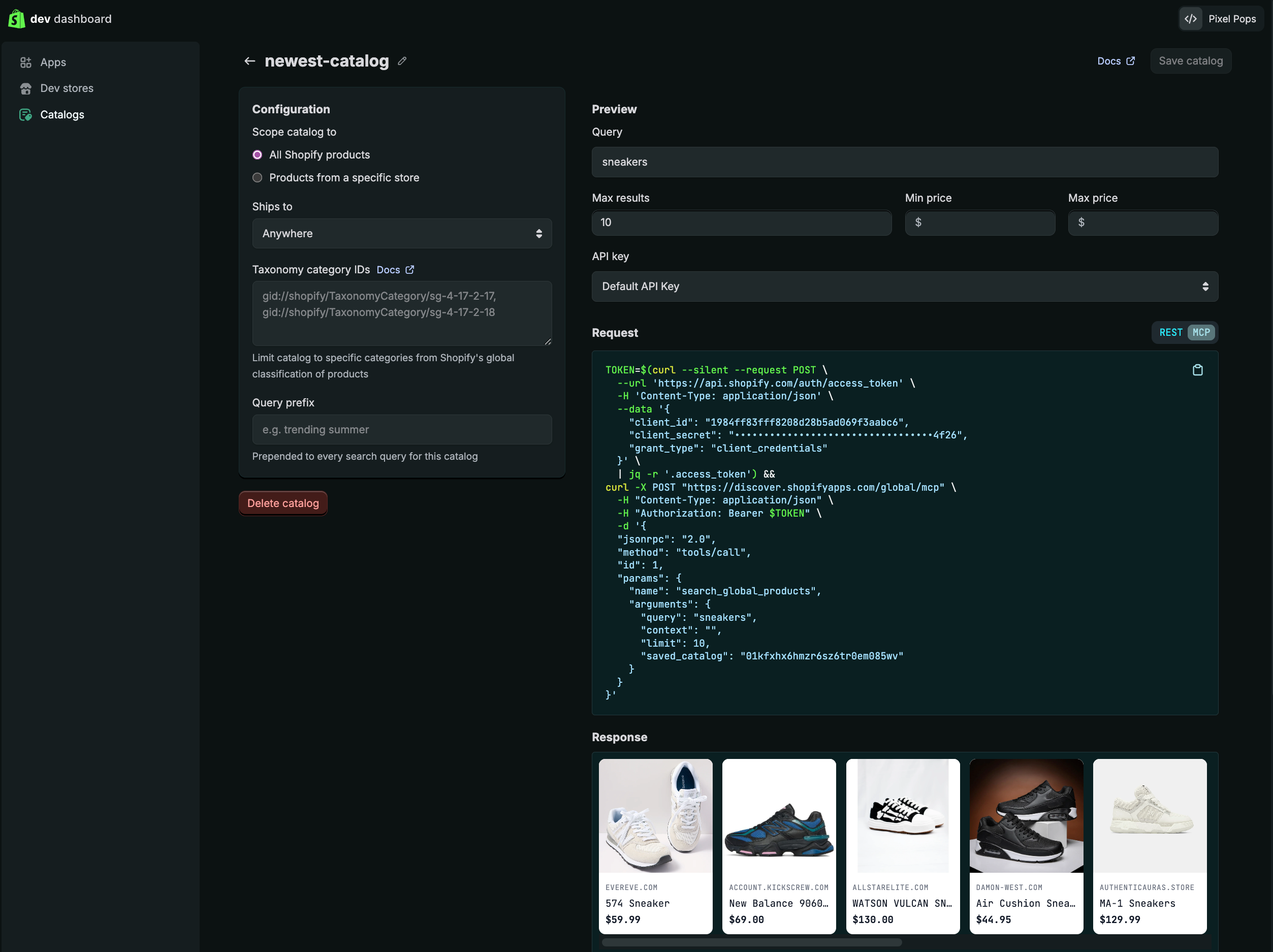
In Dev Dashboard click Catalogs from the sidebar.
-
Click Create a catalog.
-
Keep the defaults, which place no bounds on price and search across all of Shopify's products.
-
Click Save catalog.
-
On the Catalogs landing page, click Copy URL.
Anchor to Step 2: Set up searchStep 2: Set up search
Create a search.js file. Paste the URL you copied in the previous step (the MCP endpoint for your saved catalog) to the CATALOG_URL variable.
search.js
Update ucp_demo.js to import and call showCatalog():
ucp_demo.js
Run node ucp_demo.js again to see the changes:
Output
Anchor to Step 3: Create the prompt utilityStep 3: Create the prompt utility
Create a utils.js file, which defines a small helper that wraps Node's readline interface to handle interactive prompts throughout the tutorial.
utils.js
Anchor to Step 4: Search for productsStep 4: Search for products
Add a searchProducts function to the search.js file.
The function accepts a query pulled from the prompt utility, then passes it to a call to the search_catalog tool.
This step sends Shopify's hosted profile rather than the cart-and-checkout profile from the Profile tutorial. The Catalog returns only what your profile declares: to use your own profile here, add the catalog capabilities and Shopify's extensions, dev.shopify.catalog and dev.shopify.catalog.global, or results arrive without Shopify's enriched fields — Step 6 needs seller and checkout_url from them.
search.js
import { prompt } from './utils.js';

export const CATALOG_URL = '{your_catalog_url}';

export function showCatalog() {
  console.log('\n── 2. Search the Catalog ─────────────────────────\n');
  console.log(`  Catalog:  ${CATALOG_URL}\n`);
}

export function displayProducts(products) {
  console.log('\n── Results ────────────────────────────────────────\n');
  products.forEach((product, i) => {
    const price = `$${(product.price_range.min.amount / 100).toFixed(2)}`;
    const options = product.options?.map(o => `${o.name}: ${o.values.map(v => v.label).join(', ')}`).join('  |  ') ?? '—';
    console.log(`  [${i + 1}] ${product.title}  |  ${price}  |  ${options}`);
  });
  console.log();
}

export async function searchProducts(token, filters = {}) {
  const query = process.argv[2] || await prompt('\x1b[1m  Hello! What are you looking for today?\x1b[0m\n\n  > ');
  const res = await fetch(CATALOG_URL, {
    method: 'POST',
    headers: {
      'Content-Type': 'application/json',
      'Authorization': `Bearer ${token}`
    },
    body: JSON.stringify({
      jsonrpc: '2.0',
      method: 'tools/call',
      id: 1,
      params: {
        name: 'search_catalog',
        arguments: {
          meta: {
            'ucp-agent': {
              profile: 'https://shopify.dev/ucp/agent-profiles/examples/2026-08-25/valid-with-capabilities.json'
            }
          },
          catalog: { query, filters }
        }
      }
    })
  });
  const data = await res.json();
  return data.result?.structuredContent ?? null;
}
AI Toolkit / UCP CLI
ucp catalog search "I need a crewneck sweater" \
  --set /catalog/context/intent='buyer looking for sustainable fashion'
{} MCP input reference
{
  "jsonrpc": "2.0",
  "method": "tools/call",
  "id": 1,
  "params": {
    "name": "search_catalog",
    "arguments": {
      "meta": {
        "ucp-agent": {
          "profile": "https://shopify.dev/ucp/agent-profiles/examples/2026-08-25/valid-with-capabilities.json"
        }
      },
      "catalog": {
        "query": "I need a crewneck sweater",
        "context": {
          "intent": "buyer looking for sustainable fashion"
        }
      }
    }
  }
}
{} Response
{
  "jsonrpc": "2.0",
  "id": 1,
  "result": {
    "structuredContent": {
      "ucp": {
        "version": "2026-08-25",
        "capabilities": {
          "dev.ucp.shopping.catalog.search": [{"version": "2026-08-25"}],
          "dev.shopify.catalog.global": [{"version": "2026-08-25"}]
        }
      },
      "products": [
        {
          "id": "gid://shopify/p/abc123def456",
          "title": "Organic Cotton Crewneck Sweater",
          "options": [
            {
              "name": "Size",
              "values": [
                {"label": "S"},
                {"label": "M"},
                {"label": "L"}
              ]
            },
            {
              "name": "Color",
              "values": [
                {"label": "Oatmeal"},
                {"label": "Forest Green"}
              ]
            }
          ],
          "price_range": {
            "min": {"amount": 8900, "currency": "USD"},
            "max": {"amount": 8900, "currency": "USD"}
          }
        },
        {
          "id": "gid://shopify/p/bcd234efg567",
          "title": "Recycled Wool Blend Crewneck",
          "options": [
            {
              "name": "Size",
              "values": [
                {"label": "S"},
                {"label": "M"},
                {"label": "L"},
                {"label": "XL"}
              ]
            },
            {
              "name": "Color",
              "values": [
                {"label": "Charcoal"},
                {"label": "Navy"}
              ]
            }
          ],
          "price_range": {
            "min": {"amount": 11500, "currency": "USD"},
            "max": {"amount": 11500, "currency": "USD"}
          }
        },
        {
          "id": "gid://shopify/p/cde345fgh678",
          "title": "Hemp Cotton Crew Pullover",
          "options": [
            {
              "name": "Size",
              "values": [
                {"label": "XS"},
                {"label": "S"},
                {"label": "M"},
                {"label": "L"}
              ]
            }
          ],
          "price_range": {
            "min": {"amount": 7200, "currency": "USD"},
            "max": {"amount": 7200, "currency": "USD"}
          }
        }
      ]
    }
  }
}
Update ucp_demo.js to call searchProducts() and displayProducts():
ucp_demo.js
You can now interact with a chat in your terminal to search the catalog by running node ucp_demo.js:
Output
Anchor to Step 5: Refine results with filtersStep 5: Refine results with filters
searchProducts() accepts optional filters that are passed to the catalog.filters argument of search_catalog to narrow results. Update ucp_demo.js to pass a few filters:
ucp_demo.js
import { getAccessToken } from './auth.js';
import { searchProducts, displayProducts, showCatalog } from './search.js';

async function main() {
  // 1. Authentication
  const token = await getAccessToken();
  // 2. Search the Catalog
  showCatalog();
  const result = await searchProducts(token, {
    condition: ['secondhand'],
    price: { min: 5000, max: 20000 },
    ships_to: { country: 'US' },
  });
  if (!result?.products?.length) return;
  displayProducts(result.products);
}

main().catch(err => console.error('Request failed:', err));
AI Toolkit / UCP CLI
ucp catalog search "I need a crewneck sweater" \
  --set /context/intent='buyer looking for sustainable fashion' \
  --set /filters/condition='["secondhand"]' \
  --set /filters/price/min=5000 \
  --set /filters/price/max=20000 \
  --set /filters/ships_to/country=US
{} MCP input reference
{
  "jsonrpc": "2.0",
  "method": "tools/call",
  "id": 1,
  "params": {
    "name": "search_catalog",
    "arguments": {
      "meta": {
        "ucp-agent": {
          "profile": "https://shopify.dev/ucp/agent-profiles/examples/2026-08-25/valid-with-capabilities.json"
        }
      },
      "catalog": {
        "query": "I need a crewneck sweater",
        "context": {
          "intent": "buyer looking for sustainable fashion"
        },
        "filters": {
          "condition": ["secondhand"],
          "price": { "min": 5000, "max": 20000 },
          "ships_to": { "country": "US" }
        }
      }
    }
  }
}
{} Response
{
  "jsonrpc": "2.0",
  "id": 1,
  "result": {
    "structuredContent": {
      "ucp": {
        "version": "2026-08-25",
        "capabilities": {
          "dev.ucp.shopping.catalog.search": [{"version": "2026-08-25"}],
          "dev.shopify.catalog.global": [{"version": "2026-08-25"}]
        }
      },
      "products": [
        {
          "id": "gid://shopify/p/abc123def456",
          "title": "Organic Cotton Crewneck Sweater",
          "options": [
            {
              "name": "Size",
              "values": [
                {"label": "S"},
                {"label": "M"},
                {"label": "L"}
              ]
            },
            {
              "name": "Color",
              "values": [
                {"label": "Oatmeal"},
                {"label": "Forest Green"}
              ]
            }
          ],
          "price_range": {
            "min": {"amount": 8900, "currency": "USD"},
            "max": {"amount": 8900, "currency": "USD"}
          }
        },
        {
          "id": "gid://shopify/p/bcd234efg567",
          "title": "Recycled Wool Blend Crewneck",
          "options": [
            {
              "name": "Size",
              "values": [
                {"label": "S"},
                {"label": "M"},
                {"label": "L"},
                {"label": "XL"}
              ]
            },
            {
              "name": "Color",
              "values": [
                {"label": "Charcoal"},
                {"label": "Navy"}
              ]
            }
          ],
          "price_range": {
            "min": {"amount": 11500, "currency": "USD"},
            "max": {"amount": 11500, "currency": "USD"}
          }
        },
        {
          "id": "gid://shopify/p/cde345fgh678",
          "title": "Hemp Cotton Crew Pullover",
          "options": [
            {
              "name": "Size",
              "values": [
                {"label": "XS"},
                {"label": "S"},
                {"label": "M"},
                {"label": "L"}
              ]
            }
          ],
          "price_range": {
            "min": {"amount": 7200, "currency": "USD"},
            "max": {"amount": 7200, "currency": "USD"}
          }
        }
      ]
    }
  }
}
Anchor to Step 6: Select a product variantStep 6: Select a product variant
Once a buyer picks a result, you'll want to retrieve variant options for that product so they can narrow down to their final selection.
Create product.js, which handles fetching product details via get_product, displaying them, and walking the buyer through variant selection:
product.js
import { prompt } from './utils.js';
import { CATALOG_URL } from './search.js';

async function getProductDetails(token, productId, selected = []) {
  const res = await fetch(CATALOG_URL, {
    method: 'POST',
    headers: {
      'Content-Type': 'application/json',
      'Authorization': `Bearer ${token}`
    },
    body: JSON.stringify({
      jsonrpc: '2.0',
      method: 'tools/call',
      id: 2,
      params: {
        name: 'get_product',
        arguments: {
          meta: {
            'ucp-agent': {
              profile: 'https://shopify.dev/ucp/agent-profiles/examples/2026-08-25/valid-with-capabilities.json'
            }
          },
          catalog: {
            id: productId,
            ...(selected.length ? { selected } : {})
          }
        }
      }
    })
  });
  const data = await res.json();
  return data.result?.structuredContent ?? null;
}

function displayProduct(product) {
  const featuredVariant = product.variants?.[0];
  const price = featuredVariant ? `$${(featuredVariant.price.amount / 100).toFixed(2)}` : '';
  const sellerName = featuredVariant?.seller?.name ?? '';
  const variantTitle = featuredVariant?.title ?? '';
  console.log('\n── 3. Product Details ─────────────────────────────\n');
  console.log(`  ${product.title}${variantTitle ? ` - ${variantTitle}` : ''}`);
  console.log(`  ${[price, sellerName].filter(Boolean).join('  ·  ')}\n`);
  if (product.description?.html) console.log(`  ${product.description.html}\n`);
}

async function pickVariant(token, productId, product) {
  const selected = Object.fromEntries(
    (product.selected ?? []).map(s => [s.name, s.label])
  );

  if (product.options?.length) while (true) {
    const optionMap = [];
    console.log('\n  Options:');
    product.options.forEach(opt => {
      const lines = opt.values.map(v => {
        const n = optionMap.length + 1;
        const marker = selected[opt.name] === v.label ? '●' : '○';
        optionMap.push({ optName: opt.name, label: v.label });
        return `    [${n}] ${marker} ${v.label}${v.available === false ? ' (unavailable)' : ''}`;
      });
      console.log(`\n  ${opt.name}:`);
      lines.forEach(l => console.log(l));
    });

    const selectedDesc = product.options.map(o => selected[o.name]).join(' / ');
    console.log(`\n  \x1b[1mSelected: ${selectedDesc}\x1b[0m`);
    console.log('\n  [s] Select this variant  [number] Pick an option  [b] Back to results');
    const action = await prompt('\n  > ');
    const trimmed = action.trim();

    if (trimmed === 'b') return null;
    if (trimmed === 's') {
      const selectedArr = Object.entries(selected).map(([name, label]) => ({ name, label }));
      const details = await getProductDetails(token, productId, selectedArr);
      const variant = details?.product?.variants?.[0];
      return variant ? { variantId: variant.id, checkout_url: variant.checkout_url } : null;
    }

    const chosen = optionMap[parseInt(trimmed) - 1];
    if (chosen) selected[chosen.optName] = chosen.label;
  }

  const variant = product.variants?.[0];
  return variant ? { variantId: variant.id, checkout_url: variant.checkout_url } : null;
}

export async function selectProduct(token, products) {
  const pick = await prompt(`\x1b[1m  Lookup details on a result [1-${products.length}]:\x1b[0m  `);
  const index = parseInt(pick) - 1;
  const selectedProduct = products[index];
  const details = await getProductDetails(token, selectedProduct.id);
  const product = details?.product;
  if (!product) return null;
  displayProduct(product);
  const variant = await pickVariant(token, selectedProduct.id, product);
  return variant;
}
AI Toolkit / UCP CLI
ucp catalog get_product gid://shopify/p/abc123def456{} MCP input reference
{
  "jsonrpc": "2.0",
  "method": "tools/call",
  "id": 2,
  "params": {
    "name": "get_product",
    "arguments": {
      "meta": {
        "ucp-agent": {
          "profile": "https://shopify.dev/ucp/agent-profiles/examples/2026-08-25/valid-with-capabilities.json"
        }
      },
      "catalog": {
        "id": "gid://shopify/p/abc123def456"
      }
    }
  }
}
{} Response
{
  "jsonrpc": "2.0",
  "id": 2,
  "result": {
    "structuredContent": {
      "ucp": {
        "version": "2026-08-25",
        "capabilities": {
          "dev.ucp.shopping.catalog.lookup": [{"version": "2026-08-25"}],
          "dev.shopify.catalog.global": [{"version": "2026-08-25"}]
        }
      },
      "product": {
        "id": "gid://shopify/p/abc123def456",
        "title": "Organic Cotton Crewneck Sweater",
        "description": {
          "html": "A soft crewneck sweater crafted from 100% organic cotton with a relaxed fit for everyday comfort."
        },
        "options": [
          {
            "name": "Size",
            "values": [
              {"label": "S", "available": true, "exists": true},
              {"label": "M", "available": true, "exists": true},
              {"label": "L", "available": true, "exists": true}
            ]
          },
          {
            "name": "Color",
            "values": [
              {"label": "Oatmeal", "available": true, "exists": true},
              {"label": "Forest Green", "available": true, "exists": true}
            ]
          }
        ],
        "selected": [
          {"name": "Size", "label": "M"},
          {"name": "Color", "label": "Oatmeal"}
        ],
        "variants": [
          {
            "id": "gid://shopify/ProductVariant/11111111111",
            "title": "M / Oatmeal",
            "price": {"amount": 8900, "currency": "USD"},
            "checkout_url": "https://ecowear-example.myshopify.com/cart/11111111111:1?payment=shop_pay",
            "condition": ["new"],
            "eligible": {"native_checkout": true},
            "availability": {"available": true, "status": "in_stock", "running_low": false},
            "options": [
              {"name": "Size", "label": "M"},
              {"name": "Color", "label": "Oatmeal"}
            ],
            "seller": {
              "name": "EcoWear",
              "id": "gid://shopify/Shop/1111111111",
              "domain": "ecowear-example.myshopify.com",
              "url": "https://ecowear-example.myshopify.com"
            }
          }
        ]
      }
    }
  }
}
Update ucp_demo.js to use selectProduct():
ucp_demo.js
Then re-run node ucp_demo.js in your terminal and explore the added ability to select variants:
Output
At this point the buyer has chosen a variant from their initial query for a single merchant. You'll likely design agentic experiences that can handle checkout for multiple products across potentially many merchants.
This tutorial keeps things simple by assuming that the buyer is only interested in purchasing this selected product from a single merchant.
In the next step, your script will use this selection to build a cart so the buyer can review line items and estimated totals before committing to purchase.
