Admin UI extensions
Build extensions that integrate into the Shopify admin interface. For example, you can add custom content blocks to product or order detail pages, create action modals that launch from context menus, or build custom settings interfaces for Shopify Functions.
Extensions run in the context of key merchant workflows, so always prioritize performance.
Anchor to Getting startedGetting started
Admin UI extensions require a TOML configuration file and TSX (or JSX) files containing your Preact-based extension code.
Use Shopify CLI to scaffold your extension with the essential configuration and files. You can alter the default configuration later to customize the way your admin UI extension operates.
Generate scaffold


Anchor to Building your extensionBuilding your extension
Admin UI extensions are made up of three interconnected parts: targets that determine where your extension appears in the Shopify admin interface, target APIs that provide access to data and functionality based on your chosen target, and web components that define which interface elements you can use.
Anchor to Targets: Choose where your extension appearsTargets: Choose where your extension appears
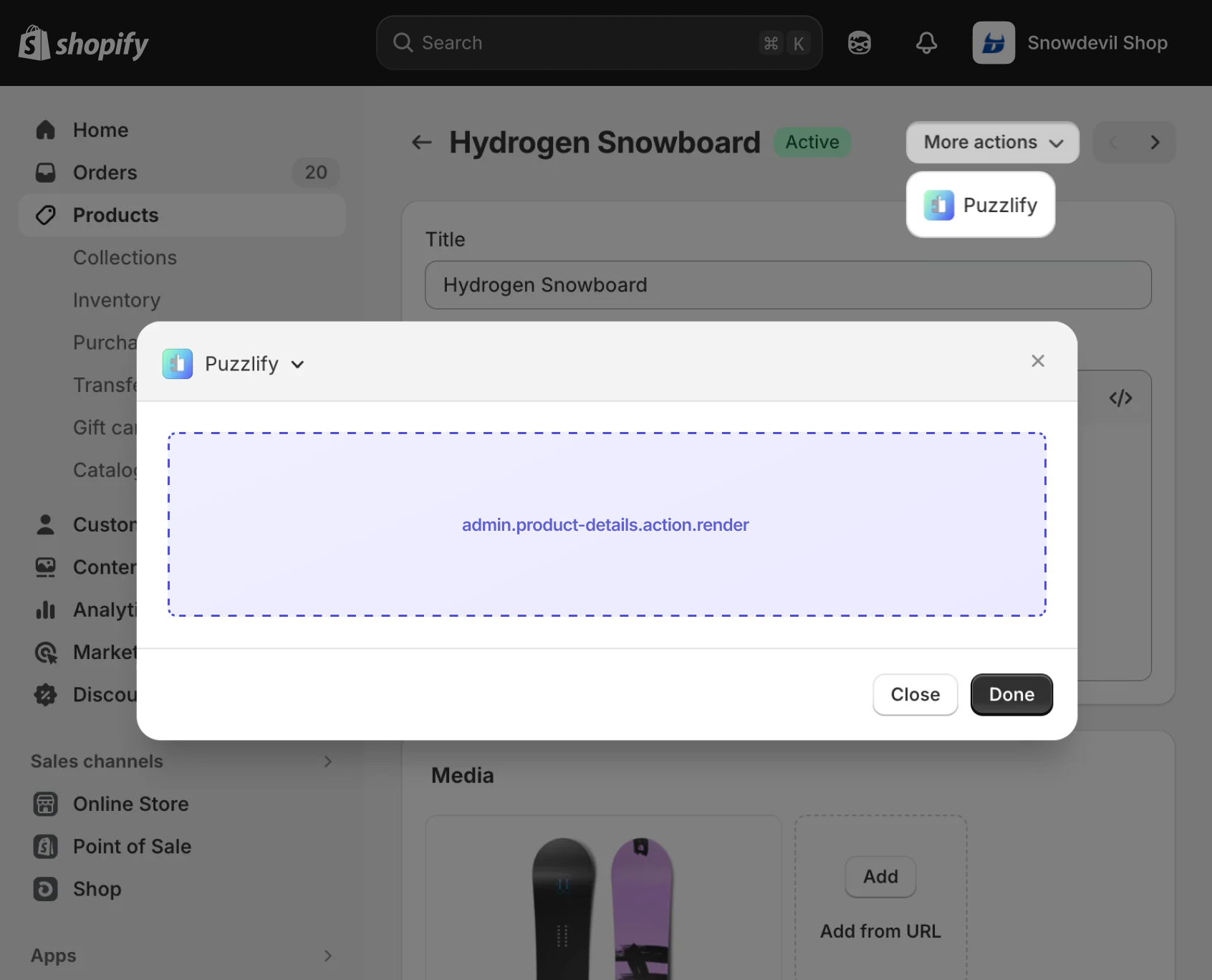
Targets define where your extensions appear within Shopify's admin interface and what capabilities they have. There are six types of targets:
| Target type | Description |
|---|---|
| Action | Add menu items to the More actions menu on details and index pages. When triggered, your UI extension displays in a modal. This target has two varieties that can be used together:
|
| Selection action | Add menu items to the More actions menu on index pages when merchants select multiple resources. Use for bulk operations on selected items, such as batch exports, bulk tagging, or multi-item processing. This target has two varieties that can be used together:
|
| Block | Render inline cards on resource pages like product details, order details, or customer details. Merchants must add and pin blocks to their pages before they can use them. You can launch action targets from block targets for complex interactions. |
| Configuration | Provide configuration interfaces for various admin features. This target has two varieties:
|
| Print action | Add menu items to the Print menu on order and product pages. This target has two varieties that can be used together:
|
| Runnable | Execute code and return data to Shopify without rendering UI. Used for extensions that supply data to Shopify features, such as Sidekick and customer segment templates. |


Anchor to Target APIs: Define what your extension doesTarget APIs: Define what your extension does
Your extension can display inventory alerts, add shipping label actions, or configure discount functions. Use target APIs to access the data and functionality for each scenario.
When your extension runs, Shopify provides a shopify global object that you use to access data and features. Most target APIs are properties on this object. For example, shopify.data gives you contextual resource data, shopify.query() runs GraphQL Admin API queries, and shopify.navigation.navigate() moves between pages.
If your app uses ESLint, update your configuration to include the global shopify object to prevent linting errors.


Block Extension API: Access product data
ESLint configuration
Anchor to Web components: Design your interfaceWeb components: Design your interface
Web components are the UI building blocks that you use to display data and trigger API functions. These components are native UI elements that follow Shopify's design system and are built with remote-dom, Shopify's library for building cross-platform user interfaces.
Use web components to build interfaces that integrate with Shopify's admin design system.


Admin action component: Configure an admin action modal

Anchor to ConfigurationConfiguration
Admin UI extensions rely on a shopify.extension.toml file that contains the extension's configuration.
This includes the extension name, type, API version, and targeting definitions.
The name value is what displays in the admin interface to merchants, so consider this value carefully.
We recommend that the api_version reflects the latest supported API version.
Anchor to PropertiesProperties
Admin UI extensions use the following configuration properties:
api_version required
The version of the API that's being used for the extension. If provided in the [[extensions]] array, then the specified API version is used instead of the root level api_version.
[[extensions]] required
The name of the array that contains all extensions listed in the TOML file. Contains the following properties:
-
type: required The extension type. For admin UI extensions, useui_extension. -
name: required The merchant-facing name of the extension. After you generate an extension, you're prompted to provide a name for your extension. Thenameproperty is translatable if it starts with at:and uses a key defined in your translation data.Limitations:
- 5 characters minimum
- 30 characters maximum
-
handle: required The unique internal identifier for the extension. After you create a draft version of the extension, or deploy an extension, you can't change thehandlevalue.Limitations:
- Allowed characters:
a-z,A-Z,0-9,- - 100 characters maximum
- Must be unique within the app
- Allowed characters:
-
uid: requiredThe extension user identifier. An app-scoped identifier that
shopify app deployuses to determine whether an extension is being created, updated, or deleted.uidis created and managed by Shopify: it's generated automatically when you scaffold the extension with Shopify CLI, so you don't need to set or edit it manually. It must be unique within the app. -
description: optional The merchant-facing description of the extension.
[[extensions.targeting]] required
The name of the array that contains a target and its associated module. Contains the following properties:
-
target: requiredAn identifier that specifies where you're injecting your extension into the admin interface.
-
module: requiredThe path to the JavaScript or TypeScript file that contains your extension code. This file exports the extension function that renders your UI or handles events.
shopify.extension.toml
Anchor to App authenticationApp authentication
Use authenticated requests when your extension needs to fetch data or trigger actions on your own backend service. For example, you might need to display external analytics data, sync inventory with a warehouse system, or validate custom business rules.
Admin UI extensions can make authenticated calls to your app's backend. When you use fetch() to make a request to your app's configured auth domain or any of its subdomains, an Authorization header is automatically added with a Shopify OpenID Connect ID Token. There's no need to manually manage ID tokens.
Relative URLs passed to fetch() are resolved against your app's app_url. This means if your app's backend is on the same domain as your app_url, you can make requests to it using fetch('/path').
If you need to make requests to a different domain, you can use the auth.idToken() method to retrieve the ID token and manually add it to your request headers.
Make requests to your app's backend
Get product data
import {render} from 'preact';
import {useEffect, useState} from 'preact/hooks';

export default async () => {
  render(<Extension />, document.body);
}

// Get product info from app backend
async function getProductInfo(id) {
  const res = await fetch(`/api/products/${id}`);
  return res.json();
}

function Extension() {
  // Contextual "input" data passed to this extension:
  const {data} = shopify;
  const productId = data.selected?.[0]?.id;

  const [productInfo, setProductInfo] = useState();
  useEffect(() => {
    getProductInfo(productId).then(setProductInfo);
  }, [productId]);

  return (
    <s-admin-block heading="Product Info">
      <s-text>Info: {productInfo?.title}</s-text>
    </s-admin-block>
  );
}
Get data from a different domain
import {render} from 'preact';
import {useEffect, useState} from 'preact/hooks';

export default async () => {
  render(<Extension />, document.body);
}

// Get product info from a different app backend
async function getProductInfo(id, auth) {
  const token = await auth.idToken();
  const res = await fetch(`https://app.example.com/api/products/${id}`, {
    headers: {
      Authorization: `Bearer ${token}`,
    },
  });
  return res.json();
}

function Extension() {
  // Contextual "input" data passed to this extension:
  const {data, auth} = shopify;
  const productId = data.selected?.[0]?.id;

  const [productInfo, setProductInfo] = useState();
  useEffect(() => {
    getProductInfo(productId, auth).then(setProductInfo);
  }, [productId, auth]);

  return (
    <s-admin-block heading="Product Info">
      <s-text>Info: {productInfo?.title}</s-text>
    </s-admin-block>
  );
}Your server must support CORS for https://extensions.shopifycdn.com. Include this origin in your Access-Control-Allow-Origin header. The Shopify App Remix template handles this automatically.
Your server must support CORS for https://extensions.shopifycdn.com. Include this origin in your Access-Control-Allow-Origin header. The Shopify App Remix template handles this automatically.
Anchor to Direct API accessDirect API access
Use direct API access when your extension needs to query or modify Shopify data in real-time. For example, you might want to update product metafields, fetch detailed order information, or modify inventory levels.
You can make GraphQL Admin API requests directly from your extension using the query method in the Standard API or the standard web fetch API. Any fetch() calls from your extension to the GraphQL Admin API are automatically authenticated by default. These requests are fast because Shopify handles them directly without requiring a round trip to your backend.
Direct API requests use online access mode by default. If you want to use offline access mode, you can set the direct_api_mode property to offline in your app TOML file.
You must declare all required access scopes in your app's TOML file.
Direct API can't be used to manage storefront access tokens.
Direct API can't be used to manage storefront access tokens.
Query Shopify data directly
Fetch product data
import {render} from 'preact';

export default async () => {
  const productId = shopify.data.selected?.[0]?.id;
  const product = await getProduct(productId);
  render(<Extension product={product} />, document.body);
};

async function getProduct(id) {
  const res = await fetch('shopify:admin/api/graphql.json', {
    method: 'POST',
    body: JSON.stringify({
      query: `
        query GetProduct($id: ID!) {
          product(id: $id) {
            title
          }
        }
      `,
      variables: {id},
    }),
  });
  const {data} = await res.json();
  return data.product;
}

function Extension({product}) {
  return (
    <s-admin-block heading="Product Info">
      <s-text>The selected product title is {product.title}</s-text>
    </s-admin-block>
  );
}
Query product data
import {render} from 'preact';

export default async () => {
  const productId = shopify.data.selected?.[0]?.id;
  const {
    data: {product},
  } = await shopify.query(
    `
    query GetProduct($id: ID!) {
      product(id: $id) {
        title
      }
    }
  `,
    {variables: {id: productId}},
  );
  render(<Extension product={product} />, document.body);
};

function Extension({product}) {
  return (
    <s-admin-block heading="Product Info">
      <s-text>The selected product title is {product.title}</s-text>
    </s-admin-block>
  );
}
Anchor to Custom protocolsCustom protocols
Custom protocols make it easier to navigate to common locations and construct URLs within your extensions.
Anchor to Shopify protocolShopify protocol
Use the shopify:admin protocol when you want to construct a URL with a root of the Shopify admin.
shopify:admin
Link to product page
<s-link href="shopify:admin/products/1234567890">Link to Product Page</s-link>;Fetch data
fetch('shopify:admin/api/graphql.json', {
  method: 'POST',
  body: JSON.stringify(simpleProductQuery),
});
Anchor to App protocolApp protocol
Use the app: protocol to construct a URL for your app. Shopify will handle constructing the base URL for your app. This works for both apps rendered in the Shopify admin and standalone apps.
app:
Anchor to Extension protocolExtension protocol
Trigger an action extension from a block extension using the extension: protocol. The extensionTarget is the target of the action extension. The handle is the handle of the action extension that will be opened.
extension:
Anchor to Relative URLsRelative URLs
Relative urls are relative to your app and are useful when you want to link to a route within your app. This works for both apps rendered in the Shopify admin and standalone apps.
/relative/urls
Anchor to Testing and deploymentTesting and deployment
After you've built your extension, test it thoroughly and deploy it to production.
Anchor to Local testingLocal testing
As of API version 2026-04, you can write unit tests for admin UI extensions using @shopify/ui-extensions-tester. Check out the example test suite to get started.
As of API version 2026-04, you can write unit tests for admin UI extensions using @shopify/ui-extensions-tester. Check out the example test suite to get started.
To run your extension locally during development, start a dev server using Shopify CLI. The dev command creates a preview of your extension on your chosen dev store. If your extension is built on an app with a backend, then this command also serves your backend locally using a Cloudflare tunnel.
The dev server automatically reloads your extension when you make changes to your code, so you can test updates in real-time.
Start development server
Anchor to DeploymentDeployment
When you're ready to go live, deploy your extension to production using Shopify CLI.
The Shopify CLI deploy command builds your extension bundle and uploads everything to Shopify. If your extension is built on an app with a backend, then you need to deploy your app to a hosting service first. Shopify hosts only your extension's code.
Your compiled UI extension bundle can't exceed 64 KB. Shopify enforces this limit at deployment to ensure fast loading times and optimal performance. Learn how to analyze your bundle size.
Your compiled UI extension bundle can't exceed 64 KB. Shopify enforces this limit at deployment to ensure fast loading times and optimal performance. Learn how to analyze your bundle size.
Deploy your extension
Anchor to VersioningVersioning
Polaris reference docs follow Shopify's API versioning policy. Each stable version is supported for a minimum of 12 months. Older versions continue to work, they just won't have dedicated docs on Shopify.dev. Shopify CLI already prevents deploys targeting API versions older than 12 months, so we recommend keeping your extensions on a supported version.
Anchor to Tutorials and resourcesTutorials and resources
Deepen your understanding of admin UI extensions with these tutorials and community resources.


