Version 2025-07 is the last API version to support React-based UI components. Later versions use web components, native UI elements with built-in accessibility, better performance, and consistent styling with Shopify's design system. Check out the upgrade guide to upgrade your extension.
Gift cards
Gift card details pages display balance, status, expiration dates, and transaction history for individual gift cards. Extensions on these pages help merchants manage gift card workflows, track usage patterns, and integrate with external loyalty or CRM systems.
Anchor to Use casesUse cases
- Balance adjustments: Merchants can add promotional credits or make balance corrections with full audit trails.
- Fraud detection: Display risk indicators and suspicious activity alerts to help merchants identify potentially fraudulent gift cards.
- Customer lookup: Show customer purchase history and gift card usage patterns to provide better customer service.
- Expiration management: Merchants can extend expiration dates or send reminder notifications to gift card holders.
- Transfer ownership: Merchants can reassign gift cards to different customers when needed.
Anchor to Gift cards targetsGift cards targets
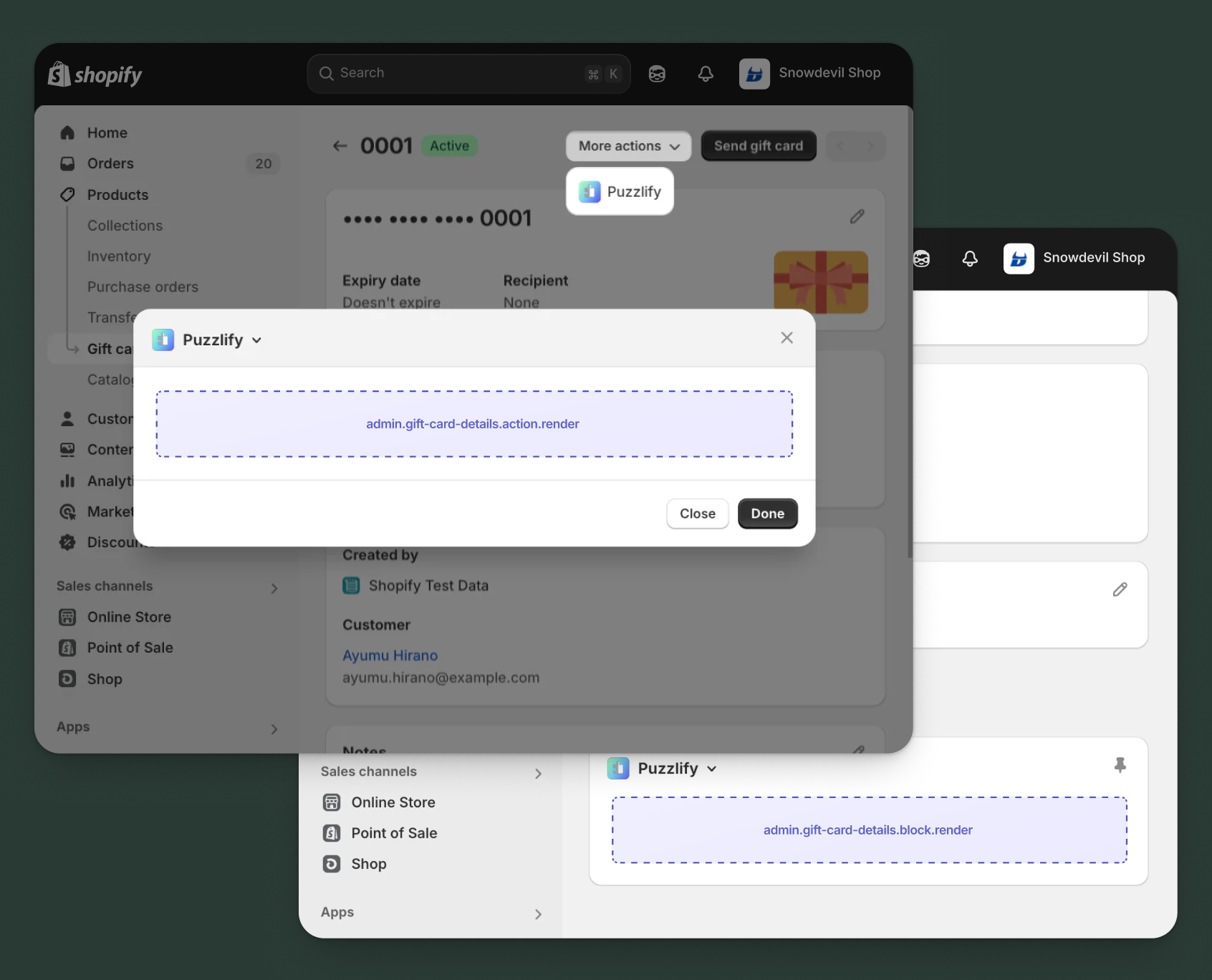
Use action and block targets to extend the gift cards details page with workflows and contextual information. Action targets open as modal overlays from the More actions menu, while block targets display as inline cards.
Extensions can query and mutate Shopify data using the direct API, or call your app's backend for custom business logic and external integrations.
Anchor to Gift card details action ,[object Object]Gift card details action target
admin.gift-card-details.action.render
Renders an admin action extension on the gift cards details page. Merchants can access this extension from the More actions menu. Use this target to provide workflows that operate on gift cards data, such as syncing with external systems, exporting gift cards information, or managing credit terms.
Extensions at this target can access gift card data through the data property in the Action Extension API. The action renders in a modal overlay, providing space for multi-step workflows, forms, and confirmations.
Supported components
- Admin
Action - Admin
Block - Admin
Print Action - Badge
- Banner
- Block
Stack - Box
- Button
- Checkbox
- Choice
List - Color
Picker - Date
Field - Date
Picker - Divider
- Email
Field - Form
- Function
Settings - Heading
- Heading
Group - Icon
- Image
- Inline
Stack - Link
- Money
Field - Number
Field - Paragraph
- Password
Field - Pressable
- Progress
Indicator - Section
- Select
- Text
- Text
Area - Text
Field - URLField
Available APIs
Supported components
- Admin
Action - Admin
Block - Admin
Print Action - Badge
- Banner
- Block
Stack - Box
- Button
- Checkbox
- Choice
List - Color
Picker - Date
Field - Date
Picker - Divider
- Email
Field - Form
- Function
Settings - Heading
- Heading
Group - Icon
- Image
- Inline
Stack - Link
- Money
Field - Number
Field - Paragraph
- Password
Field - Pressable
- Progress
Indicator - Section
- Select
- Text
- Text
Area - Text
Field - URLField
Available APIs
Examples
Description
Add an action extension that exports gift card transaction history and details to a CSV file. This example demonstrates calling your app backend to generate a downloadable export with customizable options for date range and data fields.
React
import React from 'react';
import { useState } from 'react';
import {
  reactExtension,
  useApi,
  AdminAction,
  Banner,
  BlockStack,
  Box,
  Button,
  Checkbox,
  ChoiceList,
  Divider,
} from '@shopify/ui-extensions-react/admin';

const TARGET = 'admin.gift-card-details.action.render';

export default reactExtension(TARGET, () => <App />);

function App() {
  const { data, close } = useApi(TARGET);
  const [loading, setLoading] = useState(false);
  const [success, setSuccess] = useState(false);
  const [error, setError] = useState<string | null>(null);
  const [dateRange, setDateRange] = useState(['all']);
  const [includeCustomerInfo, setIncludeCustomerInfo] = useState(true);
  const [includeTransactions, setIncludeTransactions] = useState(true);

  const handleExport = async () => {
    setLoading(true);
    setError(null);
    const giftCardId = data.selected[0].id;

    try {
      const response = await fetch('https://your-app.com/api/gift-cards/export', {
        method: 'POST',
        headers: { 'Content-Type': 'application/json' },
        body: JSON.stringify({
          giftCardId,
          dateRange: dateRange[0],
          includeCustomerInfo,
          includeTransactions,
        }),
      });

      if (response.ok) {
        const blob = await response.blob();
        const url = URL.createObjectURL(blob);
        const link = document.createElement('a');
        link.href = url;
        link.download = `gift-card-${giftCardId.split('/').pop()}.csv`;
        link.click();
        setSuccess(true);
        close();
      } else {
        const result = await response.json();
        setError(result.message || 'Export failed');
      }
    } catch (err) {
      setError('Failed to connect to export service');
    } finally {
      setLoading(false);
    }
  };

  return (
    <AdminAction
      title="Export Gift Card Data"
      primaryAction={
        <Button onPress={handleExport} disabled={loading || success}>
          {loading ? 'Generating...' : 'Export CSV'}
        </Button>
      }
      secondaryAction={<Button onPress={close}>Cancel</Button>}
    >
      <BlockStack gap="base">
        {success && <Banner tone="success">Export downloaded successfully!</Banner>}
        {error && <Banner tone="critical">{error}</Banner>}

        <Box>
          <ChoiceList
            title="Date Range"
            name="dateRange"
            choices={[
              { label: 'All time', id: 'all' },
              { label: 'Last 30 days', id: '30days' },
              { label: 'Last 90 days', id: '90days' },
              { label: 'This year', id: 'year' },
            ]}
            value={dateRange}
            onChange={setDateRange}
          />
        </Box>

        <Divider />

        <BlockStack gap="base">
          <Checkbox
            checked={includeCustomerInfo}
            onChange={setIncludeCustomerInfo}
          >
            Include customer information
          </Checkbox>
          <Checkbox
            checked={includeTransactions}
            onChange={setIncludeTransactions}
          >
            Include transaction history
          </Checkbox>
        </BlockStack>
      </BlockStack>
    </AdminAction>
  );
}
TS
import {
  extension,
  AdminAction,
  Banner,
  BlockStack,
  Box,
  Button,
  Checkbox,
  ChoiceList,
  Divider,
} from '@shopify/ui-extensions/admin';

export default extension(
  'admin.gift-card-details.action.render',
  (root, api) => {
    let loading = false;
    let success = false;
    let error: string | null = null;
    let dateRange = ['all'];
    let includeCustomerInfo = true;
    let includeTransactions = true;

    const content = root.createFragment();
    const primaryAction = root.createFragment();
    const secondaryAction = root.createFragment();

    const handleExport = async () => {
      loading = true;
      error = null;
      updateUI();
      const giftCardId = api.data.selected[0].id;

      try {
        const response = await fetch('https://your-app.com/api/gift-cards/export', {
          method: 'POST',
          headers: { 'Content-Type': 'application/json' },
          body: JSON.stringify({
            giftCardId,
            dateRange: dateRange[0],
            includeCustomerInfo,
            includeTransactions,
          }),
        });

        if (response.ok) {
          success = true;
          updateUI();
          api.close();
        } else {
          const result = await response.json();
          error = result.message || 'Export failed';
        }
      } catch (err) {
        error = 'Failed to connect to export service';
      } finally {
        loading = false;
        updateUI();
      }
    };

    const updateUI = () => {
      content.replaceChildren();
      primaryAction.replaceChildren();

      primaryAction.appendChild(
        root.createComponent(
          Button,
          { onPress: handleExport, disabled: loading || success },
          loading ? 'Generating...' : 'Export CSV'
        )
      );

      const stack = root.createComponent(BlockStack, { gap: 'base' });

      if (success) {
        stack.appendChild(
          root.createComponent(Banner, { tone: 'success' }, 'Export downloaded successfully!')
        );
      }
      if (error) {
        stack.appendChild(root.createComponent(Banner, { tone: 'critical' }, error));
      }

      stack.appendChild(
        root.createComponent(
          Box,
          {},
          root.createComponent(ChoiceList, {
            title: 'Date Range',
            name: 'dateRange',
            choices: [
              { label: 'All time', id: 'all' },
              { label: 'Last 30 days', id: '30days' },
              { label: 'Last 90 days', id: '90days' },
              { label: 'This year', id: 'year' },
            ],
            value: dateRange,
            onChange: (val: string[]) => { dateRange = val; updateUI(); },
          })
        )
      );

      stack.appendChild(root.createComponent(Divider, {}));

      const checkboxStack = root.createComponent(BlockStack, { gap: 'base' });
      checkboxStack.appendChild(
        root.createComponent(
          Checkbox,
          {
            checked: includeCustomerInfo,
            onChange: (val: boolean) => { includeCustomerInfo = val; updateUI(); },
          },
          'Include customer information'
        )
      );
      checkboxStack.appendChild(
        root.createComponent(
          Checkbox,
          {
            checked: includeTransactions,
            onChange: (val: boolean) => { includeTransactions = val; updateUI(); },
          },
          'Include transaction history'
        )
      );
      stack.appendChild(checkboxStack);

      content.appendChild(stack);
    };

    secondaryAction.appendChild(
      root.createComponent(Button, { onPress: () => api.close() }, 'Cancel')
    );

    updateUI();

    const adminAction = root.createComponent(AdminAction, {
      title: 'Export Gift Card Data',
      primaryAction,
      secondaryAction,
    });
    adminAction.appendChild(content);
    root.appendChild(adminAction);
    root.mount();
  }
);
Description
Add an action extension that fetches gift card details using the [direct API](/docs/api/admin-extensions/2025-07#direct-api-access) and syncs the balance and status with an external loyalty management system. This example demonstrates using the query() API to read gift card data directly from Shopify.
React
import React, { useState, useEffect } from 'react';
import {
  reactExtension,
  useApi,
  AdminAction,
  Banner,
  BlockStack,
  Box,
  Button,
  Checkbox,
  Divider,
} from '@shopify/ui-extensions-react/admin';

const TARGET = 'admin.gift-card-details.action.render';

export default reactExtension(TARGET, () => <App />);

function App() {
  const { data, close, query } = useApi(TARGET);
  const [loading, setLoading] = useState(false);
  const [syncing, setSyncing] = useState(false);
  const [success, setSuccess] = useState(false);
  const [error, setError] = useState('');
  const [giftCard, setGiftCard] = useState(null);
  const [syncBalance, setSyncBalance] = useState(true);
  const [syncStatus, setSyncStatus] = useState(true);
  const [notifyCustomer, setNotifyCustomer] = useState(false);

  useEffect(() => {
    fetchGiftCardDetails();
  }, []);

  const fetchGiftCardDetails = async () => {
    setLoading(true);
    const giftCardId = data.selected[0].id;

    try {
      const result = await query(
        `query GetGiftCard($id: ID!) {
          giftCard(id: $id) {
            id
            balance { amount currencyCode }
            initialValue { amount currencyCode }
            enabled
            expiresOn
            customer { id displayName email }
            lastCharacters
          }
        }`,
        { variables: { id: giftCardId } }
      );

      if (result.data?.giftCard) {
        setGiftCard(result.data.giftCard);
      } else {
        setError('Failed to load gift card details');
      }
    } catch (err) {
      setError('Error fetching gift card data');
    } finally {
      setLoading(false);
    }
  };

  const handleSync = async () => {
    setSyncing(true);
    setError('');

    try {
      const response = await fetch('https://your-loyalty-system.com/api/sync-gift-card', {
        method: 'POST',
        headers: { 'Content-Type': 'application/json' },
        body: JSON.stringify({
          giftCardId: giftCard.id,
          balance: syncBalance ? giftCard.balance : null,
          status: syncStatus ? giftCard.enabled : null,
          customerEmail: giftCard.customer?.email,
          notifyCustomer,
        }),
      });

      if (response.ok) {
        setSuccess(true);
        close();
      } else {
        setError('Sync failed. Please try again.');
      }
    } catch (err) {
      setError('Connection error. Check your network.');
    } finally {
      setSyncing(false);
    }
  };

  return (
    <AdminAction
      title="Sync with Loyalty System"
      primaryAction={
        <Button onPress={handleSync} disabled={loading || syncing || success || !giftCard}>
          {syncing ? 'Syncing...' : 'Sync Now'}
        </Button>
      }
      secondaryAction={<Button onPress={close}>Cancel</Button>}
    >
      <BlockStack gap="base">
        {success && <Banner tone="success">Gift card synced successfully!</Banner>}
        {error && <Banner tone="critical">{error}</Banner>}

        {loading && <Banner tone="info">Loading gift card details...</Banner>}

        {giftCard && (
          <>
            <Box padding="base">
              <BlockStack gap="tight">
                <Banner tone="info">
                  Card ending in {giftCard.lastCharacters} • Balance: {giftCard.balance.amount} {giftCard.balance.currencyCode}
                </Banner>
              </BlockStack>
            </Box>

            <Divider />

            <Box padding="base">
              <BlockStack gap="base">
                <Checkbox checked={syncBalance} onChange={setSyncBalance}>
                  Sync current balance
                </Checkbox>
                <Checkbox checked={syncStatus} onChange={setSyncStatus}>
                  Sync enabled/disabled status
                </Checkbox>
                <Checkbox checked={notifyCustomer} onChange={setNotifyCustomer}>
                  Notify customer of sync
                </Checkbox>
              </BlockStack>
            </Box>
          </>
        )}
      </BlockStack>
    </AdminAction>
  );
}
TS
import {
  extension,
  AdminAction,
  Banner,
  BlockStack,
  Box,
  Button,
  Checkbox,
  Divider,
} from '@shopify/ui-extensions/admin';

export default extension(
  'admin.gift-card-details.action.render',
  (root, api) => {
    let loading = true;
    let syncing = false;
    let success = false;
    let error = '';
    let giftCard: any = null;
    let syncBalance = true;
    let syncStatus = true;
    let notifyCustomer = false;

    const content = root.createFragment();
    const primaryAction = root.createFragment();
    const secondaryAction = root.createFragment();

    const updateUI = () => {
      content.replaceChildren();

      if (success) {
        content.appendChild(root.createComponent(Banner, { tone: 'success' }, 'Gift card synced successfully!'));
      }
      if (error) {
        content.appendChild(root.createComponent(Banner, { tone: 'critical' }, error));
      }
      if (loading) {
        content.appendChild(root.createComponent(Banner, { tone: 'info' }, 'Loading gift card details...'));
      }

      if (giftCard) {
        const stack = root.createComponent(BlockStack, { gap: 'base' });

        const infoBox = root.createComponent(Box, { padding: 'base' });
        infoBox.appendChild(
          root.createComponent(Banner, { tone: 'info' },
            `Card ending in ${giftCard.lastCharacters} • Balance: ${giftCard.balance.amount} ${giftCard.balance.currencyCode}`
          )
        );
        stack.appendChild(infoBox);

        stack.appendChild(root.createComponent(Divider));

        const optionsBox = root.createComponent(Box, { padding: 'base' });
        const optionsStack = root.createComponent(BlockStack, { gap: 'base' });

        optionsStack.appendChild(
          root.createComponent(Checkbox, {
            checked: syncBalance,
            onChange: (val: boolean) => { syncBalance = val; updateUI(); }
          }, 'Sync current balance')
        );
        optionsStack.appendChild(
          root.createComponent(Checkbox, {
            checked: syncStatus,
            onChange: (val: boolean) => { syncStatus = val; updateUI(); }
          }, 'Sync enabled/disabled status')
        );
        optionsStack.appendChild(
          root.createComponent(Checkbox, {
            checked: notifyCustomer,
            onChange: (val: boolean) => { notifyCustomer = val; updateUI(); }
          }, 'Notify customer of sync')
        );

        optionsBox.appendChild(optionsStack);
        stack.appendChild(optionsBox);
        content.appendChild(stack);
      }

      primaryAction.replaceChildren();
      primaryAction.appendChild(
        root.createComponent(Button, {
          onPress: handleSync,
          disabled: loading || syncing || success || !giftCard
        }, syncing ? 'Syncing...' : 'Sync Now')
      );
    };

    const fetchGiftCardDetails = async () => {
      const giftCardId = api.data.selected[0].id;

      try {
        const result = await api.query(
          `query GetGiftCard($id: ID!) {
            giftCard(id: $id) {
              id
              balance { amount currencyCode }
              initialValue { amount currencyCode }
              enabled
              expiresOn
              customer { id displayName email }
              lastCharacters
            }
          }`,
          { variables: { id: giftCardId } }
        );

        if (result.data?.giftCard) {
          giftCard = result.data.giftCard;
        } else {
          error = 'Failed to load gift card details';
        }
      } catch (err) {
        error = 'Error fetching gift card data';
      } finally {
        loading = false;
        updateUI();
      }
    };

    const handleSync = async () => {
      syncing = true;
      error = '';
      updateUI();

      try {
        const response = await fetch('https://your-loyalty-system.com/api/sync-gift-card', {
          method: 'POST',
          headers: { 'Content-Type': 'application/json' },
          body: JSON.stringify({
            giftCardId: giftCard.id,
            balance: syncBalance ? giftCard.balance : null,
            status: syncStatus ? giftCard.enabled : null,
            customerEmail: giftCard.customer?.email,
            notifyCustomer,
          }),
        });

        if (response.ok) {
          success = true;
          updateUI();
          api.close();
        } else {
          error = 'Sync failed. Please try again.';
        }
      } catch (err) {
        error = 'Connection error. Check your network.';
      } finally {
        syncing = false;
        updateUI();
      }
    };

    secondaryAction.appendChild(
      root.createComponent(Button, { onPress: () => api.close() }, 'Cancel')
    );

    updateUI();
    fetchGiftCardDetails();

    const adminAction = root.createComponent(AdminAction, {
      title: 'Sync with Loyalty System',
      primaryAction,
      secondaryAction,
    });
    adminAction.appendChild(content);
    root.appendChild(adminAction);
    root.mount();
  }
);
Anchor to Gift card details action (should render) ,[object Object]Gift card details action (should render) target
admin.gift-card-details.action.should-render
Controls the render state of an admin action extension on the gift cards details page. Use this target to conditionally show or hide your action extension based on the gift card's properties, such as status, configuration, or specific business requirements.
This target returns a boolean value that determines whether the corresponding action extension appears in the More actions menu. The extension evaluates each time the page loads.
Supported components
Available APIs
Supported components
Available APIs
Examples
Description
Add a should-render extension that checks if external analytics data exists for a gift card in your app backend. This example demonstrates calling your custom API to determine if usage analytics and redemption history are available for display.
React
import {extension} from '@shopify/ui-extensions/admin';

const TARGET = 'admin.gift-card-details.action.should-render';

export default extension(TARGET, async ({data}) => {
  const giftCardId = data.selected[0].id;
  const numericId = giftCardId.split('/').pop();

  try {
    // Check if external analytics exist for this gift card
    const response = await fetch(
      `https://your-app.com/api/gift-cards/${numericId}/analytics-available`,
      {
        method: 'GET',
        headers: {
          'Content-Type': 'application/json',
        },
      }
    );

    if (!response.ok) {
      return {display: false};
    }

    const analyticsData = await response.json();

    // Show action if analytics data exists and has meaningful content
    const hasAnalytics = analyticsData.hasRedemptionHistory ||
                         analyticsData.hasUsageMetrics ||
                         analyticsData.trackingEnabled;

    return {display: hasAnalytics};
  } catch (err) {
    // Hide action if backend is unavailable
    return {display: false};
  }
});
TS
import {extension} from '@shopify/ui-extensions/admin';

const TARGET = 'admin.gift-card-details.action.should-render';

export default extension(TARGET, async ({data}) => {
  const giftCardId = data.selected[0].id;
  const numericId = giftCardId.split('/').pop();

  try {
    // Check if external analytics exist for this gift card
    const response = await fetch(
      `https://your-app.com/api/gift-cards/${numericId}/analytics-available`,
      {
        method: 'GET',
        headers: {
          'Content-Type': 'application/json',
        },
      }
    );

    if (!response.ok) {
      return {display: false};
    }

    const analyticsData = await response.json();

    // Show action if analytics data exists and has meaningful content
    const hasAnalytics = analyticsData.hasRedemptionHistory ||
                         analyticsData.hasUsageMetrics ||
                         analyticsData.trackingEnabled;

    return {display: hasAnalytics};
  } catch (err) {
    // Hide action if backend is unavailable
    return {display: false};
  }
});
Description
Add a should-render extension that displays a status dashboard action only for gift cards that are enabled and have remaining balance, using the [direct API](/docs/api/admin-extensions/2025-07#direct-api-access) to check gift card status and balance.
React
import {extension} from '@shopify/ui-extensions/admin';

export default extension(
  'admin.gift-card-details.action.should-render',
  async ({data, query}) => {
    const giftCardId = data.selected[0].id;

    try {
      const {data: responseData, errors} = await query(`
        query GetGiftCardStatus($id: ID!) {
          giftCard(id: $id) {
            enabled
            balance {
              amount
              currencyCode
            }
            expiresOn
          }
        }
      `, { variables: { id: giftCardId } });

      if (errors?.length) {
        console.error('GraphQL errors:', errors);
        return { display: false };
      }

      const giftCard = responseData?.giftCard;

      if (!giftCard) {
        return { display: false };
      }

      // Show dashboard only for enabled gift cards with remaining balance
      const hasBalance = parseFloat(giftCard.balance?.amount || '0') > 0;
      const isEnabled = giftCard.enabled === true;

      // Also check if not expired
      const isNotExpired = !giftCard.expiresOn ||
        new Date(giftCard.expiresOn) > new Date();

      return {
        display: isEnabled && hasBalance && isNotExpired
      };
    } catch (err) {
      console.error('Failed to check gift card status:', err);
      return { display: false };
    }
  }
);
TS
import {extension} from '@shopify/ui-extensions/admin';

export default extension(
  'admin.gift-card-details.action.should-render',
  async ({data, query}) => {
    const giftCardId = data.selected[0].id;

    try {
      const {data: responseData, errors} = await query(`
        query GetGiftCardStatus($id: ID!) {
          giftCard(id: $id) {
            enabled
            balance {
              amount
              currencyCode
            }
            expiresOn
          }
        }
      `, { variables: { id: giftCardId } });

      if (errors?.length) {
        console.error('GraphQL errors:', errors);
        return { display: false };
      }

      const giftCard = responseData?.giftCard;

      if (!giftCard) {
        return { display: false };
      }

      // Show dashboard only for enabled gift cards with remaining balance
      const hasBalance = parseFloat(giftCard.balance?.amount || '0') > 0;
      const isEnabled = giftCard.enabled === true;

      // Also check if not expired
      const isNotExpired = !giftCard.expiresOn ||
        new Date(giftCard.expiresOn) > new Date();

      return {
        display: isEnabled && hasBalance && isNotExpired
      };
    } catch (err) {
      console.error('Failed to check gift card status:', err);
      return { display: false };
    }
  }
);
Anchor to Gift card details block ,[object Object]Gift card details block target
admin.gift-card-details.block.render
Renders an admin block extension inline on the gift cards details page. Use this target to display contextual information, analytics, or status updates related to the gift cards without requiring merchant interaction to open a modal.
Extensions at this target can access gift card data through the data property in the Block Extension API. Blocks appear as cards on the page and can show real-time data, insights, or quick actions, providing persistent visibility for information merchants need to see at a glance.
Supported components
- Admin
Action - Admin
Block - Admin
Print Action - Badge
- Banner
- Block
Stack - Box
- Button
- Checkbox
- Choice
List - Color
Picker - Date
Field - Date
Picker - Divider
- Email
Field - Form
- Function
Settings - Heading
- Heading
Group - Icon
- Image
- Inline
Stack - Link
- Money
Field - Number
Field - Paragraph
- Password
Field - Pressable
- Progress
Indicator - Section
- Select
- Text
- Text
Area - Text
Field - URLField
Available APIs
Supported components
- Admin
Action - Admin
Block - Admin
Print Action - Badge
- Banner
- Block
Stack - Box
- Button
- Checkbox
- Choice
List - Color
Picker - Date
Field - Date
Picker - Divider
- Email
Field - Form
- Function
Settings - Heading
- Heading
Group - Icon
- Image
- Inline
Stack - Link
- Money
Field - Number
Field - Paragraph
- Password
Field - Pressable
- Progress
Indicator - Section
- Select
- Text
- Text
Area - Text
Field - URLField
Available APIs
Examples
Description
Create a block extension that displays fraud risk analysis from an external fraud detection service. This example shows how to fetch and display external risk data with visual indicators for gift card security monitoring.
React
import React, { useState, useEffect } from 'react';
import {
  reactExtension,
  useApi,
  AdminBlock,
  Banner,
  BlockStack,
  Box,
  Button,
  Divider,
  Heading,
  Icon,
  Text,
} from '@shopify/ui-extensions-react/admin';

const TARGET = 'admin.gift-card-details.block.render';

export default reactExtension(TARGET, () => <App />);

function App() {
  const { data, query } = useApi(TARGET);
  const [loading, setLoading] = useState(true);
  const [riskData, setRiskData] = useState(null);
  const [error, setError] = useState(null);

  const fetchFraudAnalysis = async () => {
    setLoading(true);
    setError(null);

    try {
      const giftCardResponse = await query(`
        query GetGiftCard($id: ID!) {
          giftCard(id: $id) {
            id
            lastCharacters
            balance { amount currencyCode }
            customer { email }
          }
        }
      `, { variables: { id: data.selected[0].id } });

      const giftCard = giftCardResponse?.data?.giftCard;

      const response = await fetch('https://your-app.com/api/fraud-check', {
        method: 'POST',
        headers: { 'Content-Type': 'application/json' },
        body: JSON.stringify({
          giftCardId: data.selected[0].id,
          lastCharacters: giftCard?.lastCharacters,
          balance: giftCard?.balance?.amount,
          customerEmail: giftCard?.customer?.email,
        }),
      });

      if (!response.ok) throw new Error('Fraud check failed');

      const result = await response.json();
      setRiskData(result);
    } catch (err) {
      setError('Unable to fetch fraud analysis');
    } finally {
      setLoading(false);
    }
  };

  useEffect(() => {
    fetchFraudAnalysis();
  }, []);

  const getRiskIcon = (level) => {
    if (level === 'low') return 'CheckCircleFill';
    if (level === 'medium') return 'AlertCircle';
    return 'AlertTriangleFill';
  };

  return (
    <AdminBlock title="Fraud Risk Analysis">
      {loading && <Text>Analyzing gift card...</Text>}

      {error && (
        <Banner tone="critical">{error}</Banner>
      )}

      {riskData && (
        <BlockStack gap="base">
          <Box padding="base" background={riskData.riskLevel === 'low' ? 'success' : riskData.riskLevel === 'medium' ? 'warning' : 'critical'}>
            <BlockStack gap="tight">
              <Icon name={getRiskIcon(riskData.riskLevel)} />
              <Heading>Risk Level: {riskData.riskLevel.toUpperCase()}</Heading>
              <Text>Score: {riskData.score}/100</Text>
            </BlockStack>
          </Box>

          <Divider />

          <BlockStack gap="tight">
            <Text fontWeight="bold">Risk Factors:</Text>
            {riskData.factors?.map((factor, i) => (
              <Text key={i}>• {factor}</Text>
            ))}
          </BlockStack>

          <Divider />

          <Text appearance="subdued">
            Last checked: {new Date(riskData.checkedAt).toLocaleString()}
          </Text>

          <Button onPress={fetchFraudAnalysis}>Refresh Analysis</Button>
        </BlockStack>
      )}
    </AdminBlock>
  );
}
TS
import {
  extension,
  AdminBlock,
  Banner,
  BlockStack,
  Box,
  Button,
  Divider,
  Heading,
  Icon,
  Text,
} from '@shopify/ui-extensions/admin';

export default extension(
  'admin.gift-card-details.block.render',
  (root, api) => {
    let loading = true;
    let riskData = null;
    let error = null;

    const content = root.createFragment();

    const fetchFraudAnalysis = async () => {
      loading = true;
      error = null;
      updateUI();

      try {
        const giftCardResponse = await api.query(`
          query GetGiftCard($id: ID!) {
            giftCard(id: $id) {
              id
              lastCharacters
              balance { amount currencyCode }
              customer { email }
            }
          }
        `, { variables: { id: api.data.selected[0].id } });

        const giftCard = giftCardResponse?.data?.giftCard;

        const response = await fetch('https://your-app.com/api/fraud-check', {
          method: 'POST',
          headers: { 'Content-Type': 'application/json' },
          body: JSON.stringify({
            giftCardId: api.data.selected[0].id,
            lastCharacters: giftCard?.lastCharacters,
            balance: giftCard?.balance?.amount,
            customerEmail: giftCard?.customer?.email,
          }),
        });

        if (!response.ok) throw new Error('Fraud check failed');

        riskData = await response.json();
      } catch (err) {
        error = 'Unable to fetch fraud analysis';
      } finally {
        loading = false;
        updateUI();
      }
    };

    const getRiskIcon = (level) => {
      if (level === 'low') return 'CheckCircleFill';
      if (level === 'medium') return 'AlertCircle';
      return 'AlertTriangleFill';
    };

    const updateUI = () => {
      content.replaceChildren();

      if (loading) {
        content.appendChild(root.createComponent(Text, {}, 'Analyzing gift card...'));
        return;
      }

      if (error) {
        content.appendChild(root.createComponent(Banner, { tone: 'critical' }, error));
        return;
      }

      if (riskData) {
        const stack = root.createComponent(BlockStack, { gap: 'base' });

        const riskBox = root.createComponent(Box, {
          padding: 'base',
          background: riskData.riskLevel === 'low' ? 'success' : riskData.riskLevel === 'medium' ? 'warning' : 'critical',
        });
        const riskStack = root.createComponent(BlockStack, { gap: 'tight' });
        riskStack.appendChild(root.createComponent(Icon, { name: getRiskIcon(riskData.riskLevel) }));
        riskStack.appendChild(root.createComponent(Heading, {}, `Risk Level: ${riskData.riskLevel.toUpperCase()}`));
        riskStack.appendChild(root.createComponent(Text, {}, `Score: ${riskData.score}/100`));
        riskBox.appendChild(riskStack);
        stack.appendChild(riskBox);

        stack.appendChild(root.createComponent(Divider, {}));

        const factorsStack = root.createComponent(BlockStack, { gap: 'tight' });
        factorsStack.appendChild(root.createComponent(Text, { fontWeight: 'bold' }, 'Risk Factors:'));
        riskData.factors?.forEach((factor) => {
          factorsStack.appendChild(root.createComponent(Text, {}, `• ${factor}`));
        });
        stack.appendChild(factorsStack);

        stack.appendChild(root.createComponent(Divider, {}));
        stack.appendChild(root.createComponent(Text, { appearance: 'subdued' }, `Last checked: ${new Date(riskData.checkedAt).toLocaleString()}`));
        stack.appendChild(root.createComponent(Button, { onPress: fetchFraudAnalysis }, 'Refresh Analysis'));

        content.appendChild(stack);
      }
    };

    const adminBlock = root.createComponent(AdminBlock, { title: 'Fraud Risk Analysis' });
    adminBlock.appendChild(content);
    root.appendChild(adminBlock);

    fetchFraudAnalysis();
    root.mount();
  }
);
Description
Create a block extension that displays gift card details including balance, status, and customer information using the [direct API](/docs/api/admin-extensions/2025-07#direct-api-access) query. This example demonstrates fetching gift card data with GraphQL and presenting key metrics in a dashboard format.
React
import React, { useState, useEffect } from 'react';
import {
  reactExtension,
  useApi,
  AdminBlock,
  Banner,
  BlockStack,
  Box,
  Button,
  Divider,
  Heading,
  Icon,
} from '@shopify/ui-extensions-react/admin';

const TARGET = 'admin.gift-card-details.block.render';

export default reactExtension(TARGET, () => <App />);

function App() {
  const { data, query } = useApi(TARGET);
  const [giftCard, setGiftCard] = useState(null);
  const [loading, setLoading] = useState(true);
  const [error, setError] = useState(null);

  const fetchGiftCardDetails = async () => {
    setLoading(true);
    setError(null);

    try {
      const giftCardId = data.selected[0].id;
      const result = await query(`
        query GetGiftCard($id: ID!) {
          giftCard(id: $id) {
            id
            balance {
              amount
              currencyCode
            }
            initialValue {
              amount
              currencyCode
            }
            enabled
            expiresOn
            createdAt
            customer {
              displayName
              email
            }
          }
        }
      `, { variables: { id: giftCardId } });

      if (result.data?.giftCard) {
        setGiftCard(result.data.giftCard);
      } else {
        setError('Gift card not found');
      }
    } catch (err) {
      setError('Failed to load gift card details');
    } finally {
      setLoading(false);
    }
  };

  useEffect(() => {
    fetchGiftCardDetails();
  }, []);

  if (loading) {
    return (
      <AdminBlock title="Gift Card Status">
        <BlockStack gap="base">
          <Banner tone="info">Loading gift card details...</Banner>
        </BlockStack>
      </AdminBlock>
    );
  }

  if (error) {
    return (
      <AdminBlock title="Gift Card Status">
        <BlockStack gap="base">
          <Banner tone="critical">{error}</Banner>
          <Button onPress={fetchGiftCardDetails}>Retry</Button>
        </BlockStack>
      </AdminBlock>
    );
  }

  const usedAmount = parseFloat(giftCard.initialValue.amount) - parseFloat(giftCard.balance.amount);
  const usagePercent = ((usedAmount / parseFloat(giftCard.initialValue.amount)) * 100).toFixed(0);

  return (
    <AdminBlock title="Gift Card Status">
      <BlockStack gap="base">
        <Box padding="base">
          <BlockStack gap="tight">
            <Heading>Balance Overview</Heading>
            <BlockStack gap="extraTight">
              <Box>
                <Icon name="CashDollarMajor" />
                {` Current: ${giftCard.balance.currencyCode} ${giftCard.balance.amount}`}
              </Box>
              <Box>
                {`Initial: ${giftCard.initialValue.currencyCode} ${giftCard.initialValue.amount}`}
              </Box>
              <Box>{`Used: ${usagePercent}% (${giftCard.balance.currencyCode} ${usedAmount.toFixed(2)})`}</Box>
            </BlockStack>
          </BlockStack>
        </Box>

        <Divider />

        <Box padding="base">
          <BlockStack gap="tight">
            <Heading>Status</Heading>
            <Banner tone={giftCard.enabled ? 'success' : 'warning'}>
              {giftCard.enabled ? 'Active & Redeemable' : 'Disabled'}
            </Banner>
            {giftCard.expiresOn && (
              <Box>{`Expires: ${new Date(giftCard.expiresOn).toLocaleDateString()}`}</Box>
            )}
          </BlockStack>
        </Box>

        <Divider />

        <Box padding="base">
          <BlockStack gap="tight">
            <Heading>Customer</Heading>
            {giftCard.customer ? (
              <BlockStack gap="extraTight">
                <Box>{giftCard.customer.displayName}</Box>
                <Box>{giftCard.customer.email}</Box>
              </BlockStack>
            ) : (
              <Box>No customer assigned</Box>
            )}
          </BlockStack>
        </Box>

        <Button onPress={fetchGiftCardDetails}>Refresh</Button>
      </BlockStack>
    </AdminBlock>
  );
}
TS
import {
  extension,
  AdminBlock,
  Banner,
  BlockStack,
  Box,
  Button,
  Divider,
  Heading,
  Icon,
} from '@shopify/ui-extensions/admin';

export default extension(
  'admin.gift-card-details.block.render',
  (root, api) => {
    const content = root.createFragment();
    let giftCard = null;
    let loading = true;
    let error = null;

    const fetchGiftCardDetails = async () => {
      loading = true;
      error = null;
      updateUI();

      try {
        const giftCardId = api.data.selected[0].id;
        const result = await api.query(`
          query GetGiftCard($id: ID!) {
            giftCard(id: $id) {
              id
              balance { amount currencyCode }
              initialValue { amount currencyCode }
              enabled
              expiresOn
              createdAt
              customer { displayName email }
            }
          }
        `, { variables: { id: giftCardId } });

        if (result.data?.giftCard) {
          giftCard = result.data.giftCard;
        } else {
          error = 'Gift card not found';
        }
      } catch (err) {
        error = 'Failed to load gift card details';
      } finally {
        loading = false;
        updateUI();
      }
    };

    const updateUI = () => {
      content.replaceChildren();

      if (loading) {
        content.appendChild(
          root.createComponent(BlockStack, { gap: 'base' },
            root.createComponent(Banner, { tone: 'info' }, 'Loading gift card details...')
          )
        );
        return;
      }

      if (error) {
        const errorStack = root.createComponent(BlockStack, { gap: 'base' });
        errorStack.appendChild(root.createComponent(Banner, { tone: 'critical' }, error));
        errorStack.appendChild(root.createComponent(Button, { onPress: fetchGiftCardDetails }, 'Retry'));
        content.appendChild(errorStack);
        return;
      }

      const usedAmount = parseFloat(giftCard.initialValue.amount) - parseFloat(giftCard.balance.amount);
      const usagePercent = ((usedAmount / parseFloat(giftCard.initialValue.amount)) * 100).toFixed(0);

      const mainStack = root.createComponent(BlockStack, { gap: 'base' });

      // Balance section
      const balanceBox = root.createComponent(Box, { padding: 'base' });
      const balanceStack = root.createComponent(BlockStack, { gap: 'tight' });
      balanceStack.appendChild(root.createComponent(Heading, {}, 'Balance Overview'));
      const balanceDetails = root.createComponent(BlockStack, { gap: 'extraTight' });
      balanceDetails.appendChild(root.createComponent(Box, {}, `Current: ${giftCard.balance.currencyCode} ${giftCard.balance.amount}`));
      balanceDetails.appendChild(root.createComponent(Box, {}, `Initial: ${giftCard.initialValue.currencyCode} ${giftCard.initialValue.amount}`));
      balanceDetails.appendChild(root.createComponent(Box, {}, `Used: ${usagePercent}% (${giftCard.balance.currencyCode} ${usedAmount.toFixed(2)})`));
      balanceStack.appendChild(balanceDetails);
      balanceBox.appendChild(balanceStack);
      mainStack.appendChild(balanceBox);

      mainStack.appendChild(root.createComponent(Divider, {}));

      // Status section
      const statusBox = root.createComponent(Box, { padding: 'base' });
      const statusStack = root.createComponent(BlockStack, { gap: 'tight' });
      statusStack.appendChild(root.createComponent(Heading, {}, 'Status'));
      statusStack.appendChild(root.createComponent(Banner, { tone: giftCard.enabled ? 'success' : 'warning' }, giftCard.enabled ? 'Active & Redeemable' : 'Disabled'));
      if (giftCard.expiresOn) {
        statusStack.appendChild(root.createComponent(Box, {}, `Expires: ${new Date(giftCard.expiresOn).toLocaleDateString()}`));
      }
      statusBox.appendChild(statusStack);
      mainStack.appendChild(statusBox);

      mainStack.appendChild(root.createComponent(Divider, {}));

      // Customer section
      const customerBox = root.createComponent(Box, { padding: 'base' });
      const customerStack = root.createComponent(BlockStack, { gap: 'tight' });
      customerStack.appendChild(root.createComponent(Heading, {}, 'Customer'));
      if (giftCard.customer) {
        customerStack.appendChild(root.createComponent(Box, {}, giftCard.customer.displayName));
        customerStack.appendChild(root.createComponent(Box, {}, giftCard.customer.email));
      } else {
        customerStack.appendChild(root.createComponent(Box, {}, 'No customer assigned'));
      }
      customerBox.appendChild(customerStack);
      mainStack.appendChild(customerBox);

      mainStack.appendChild(root.createComponent(Button, { onPress: fetchGiftCardDetails }, 'Refresh'));
      content.appendChild(mainStack);
    };

    updateUI();
    fetchGiftCardDetails();

    const adminBlock = root.createComponent(AdminBlock, { title: 'Gift Card Status' });
    adminBlock.appendChild(content);
    root.appendChild(adminBlock);
    root.mount();
  }
);
Anchor to Best practicesBest practices
- Display balance context: Always show both current balance and initial value when displaying gift card information. This helps merchants understand usage patterns and whether a gift card is partially used, fully depleted, or unused.
- Check enabled status before operations: Gift cards can be disabled by merchants or automatically by the system. Before displaying actions like "send to customer" or "sync to external system," verify the gift card's
enabledstatus to avoid operations on disabled cards. - Handle balance adjustments with care: When building extensions that modify gift card balances using
giftCardCreditorgiftCardDebit, require explicit merchant confirmation and display the resulting balance before applying changes. Gift card balance errors can create customer service issues. - Reconcile external integrations: If your extension syncs gift cards with external loyalty platforms, ensure transaction histories stay synchronized. A mismatch between Shopify's balance and the external system's balance creates confusion and potential fraud issues.
- Respect expiration dates: When displaying or exporting gift card data, prominently show expiration dates if set. Merchants need this information to proactively reach out to customers before cards expire and to ensure compliance with gift card regulations in their jurisdiction.
Anchor to LimitationsLimitations
- Single target per module: Each
[[extensions.targeting]]entry in your TOML configuration maps one target to one module file. - Gift card code immutability: Gift card codes cannot be modified after creation. The API only exposes
lastCharacters(final 4 digits) andmaskedCode. ThegiftCardUpdatemutation has no code field. - Permanent deactivation: After you've used the
giftCardDeactivatemutation, gift cards can't be re-enabled. - Transaction history pagination: Gift card transaction history returns a maximum of 250 transactions per request.
- Block target visibility: Block extensions must be manually added and pinned by merchants before they appear.
- Block collapse behavior: Returning
nullfrom a block extension collapses the block rather than removing it from the page. Blocks can't be fully hidden at runtime.