Catalogs
Catalog details pages display information about a specific catalog, including its products, pricing rules, and buyer associations. Extensions on these pages help merchants manage B2B product offerings and customize catalog workflows.
Anchor to Use casesUse cases
- Export and sync workflows: Enable merchants to export catalog data to external systems, sync pricing with ERP platforms, or generate product feeds for third-party marketplaces.
- Pricing insights: Display analytics and recommendations for catalog pricing strategies, showing profit margins, competitive analysis, or price optimization suggestions.
- Catalog validation: Show real-time validation results for catalog configurations, highlighting missing product information, pricing conflicts, or incomplete buyer assignments.
- Third-party integrations: Connect catalog data with inventory management systems, accounting platforms, or B2B commerce tools to streamline catalog operations.
- Custom analytics: Display specialized metrics such as catalog performance by buyer group, product adoption rates, or pricing effectiveness across different market segments.
Anchor to Catalogs targetsCatalogs targets
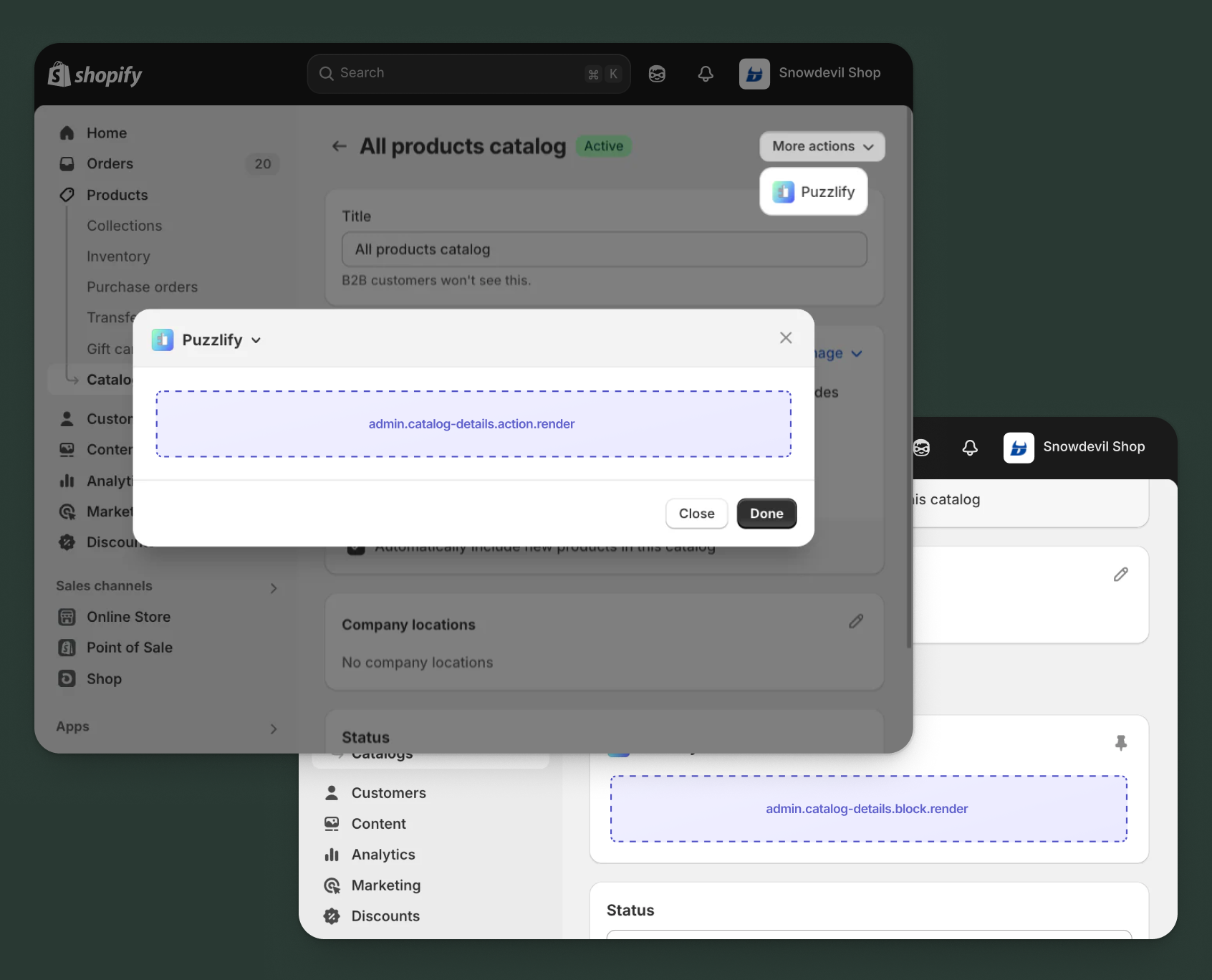
Use action and block targets to extend the catalog details page with workflows and contextual information that help merchants manage their B2B product offerings and pricing strategies.
Action targets open as modal overlays from the More actions menu, while block targets display as inline cards. The examples demonstrate fetching data from Shopify's direct API or your app's backend.
Anchor to Catalog details action ,[object Object]Catalog details action target
admin.catalog-details.action.render
Renders an admin action extension on the catalog details page. Merchants can access this extension from the More actions menu. Use this target to provide workflows that operate on the catalog data, such as exporting product lists, syncing pricing with external systems, or generating catalog reports.
Extensions at this target can access information about the catalog through the data property in the Action Extension API. The action renders in a modal overlay, providing space for multi-step workflows, forms, and confirmations.
Supported components
- Admin action
- Avatar
- Badge
- Banner
- Box
- Button
- Button group
- Checkbox
- Chip
- Choice list
- Clickable
- Clickable chip
- Color field
- Color picker
- Date field
- Date picker
- Divider
- Drop zone
- Email field
- Grid
- Heading
- Icon
- Image
- Link
- Menu
- Money field
- Number field
- Ordered list
- Paragraph
- Password field
- Query container
- Search field
- Section
- Select
- Spinner
- Stack
- Switch
- Table
- Text
- Text area
- Text field
- Thumbnail
- Tooltip
- Url field
- Unordered list
Available APIs
Supported components
- Admin action
- Avatar
- Badge
- Banner
- Box
- Button
- Button group
- Checkbox
- Chip
- Choice list
- Clickable
- Clickable chip
- Color field
- Color picker
- Date field
- Date picker
- Divider
- Drop zone
- Email field
- Grid
- Heading
- Icon
- Image
- Link
- Menu
- Money field
- Number field
- Ordered list
- Paragraph
- Password field
- Query container
- Search field
- Section
- Select
- Spinner
- Stack
- Switch
- Table
- Text
- Text area
- Text field
- Thumbnail
- Tooltip
- Url field
- Unordered list
Available APIs
jsx
Examples
Description
Add an action extension that exports catalog products and pricing to a CSV file. This example shows how to create a modal workflow that fetches catalog data and generates a downloadable export file.
jsx
import {render} from 'preact';
import {useState} from 'preact/hooks';

export default async () => {
  render(<Extension />, document.body);
};

const Extension = () => {
  const [loading, setLoading] = useState(false);
  const [includeVariants, setIncludeVariants] = useState(true);
  const [includePricing, setIncludePricing] = useState(true);
  const [success, setSuccess] = useState(false);
  const [error, setError] = useState(false);

  const handleExport = async () => {
    setLoading(true);
    setSuccess(false);
    setError(false);
    const catalogId = shopify.data.selected[0].id;

    try {
      // Export catalog data through your app's backend
      const response = await fetch('https://your-app.com/api/export-catalog', {
        method: 'POST',
        headers: {'Content-Type': 'application/json'},
        body: JSON.stringify({
          catalogId,
          includeVariants,
          includePricing,
        }),
      });

      if (response.ok) {
        const blob = await response.blob();
        const url = window.URL.createObjectURL(blob);
        const a = document.createElement('a');
        a.href = url;
        a.download = 'catalog-export.csv';
        a.click();
        setSuccess(true);
        shopify.close();
      } else {
        setError(true);
      }
    } catch (err) {
      setError(true);
    } finally {
      setLoading(false);
    }
  };

  return (
    <s-admin-action heading="Export Catalog">
      {success && (
        <s-banner tone="success" dismissible={false}>
          Catalog exported successfully!
        </s-banner>
      )}
      {error && (
        <s-banner tone="critical" dismissible={false}>
          Failed to export catalog. Please try again.
        </s-banner>
      )}

      <s-section heading="Export options">
        <s-stack gap="base">
          <s-checkbox
            label="Include product variants"
            checked={includeVariants}
            onChange={(event) => setIncludeVariants(event.currentTarget.checked)}
          />
          <s-checkbox
            label="Include pricing rules"
            checked={includePricing}
            onChange={(event) => setIncludePricing(event.currentTarget.checked)}
          />
        </s-stack>
      </s-section>

      <s-button
        slot="primary-action"
        onClick={handleExport}
        disabled={loading || success}
      >
        {loading ? 'Exporting...' : 'Export to CSV'}
      </s-button>
      <s-button slot="secondary-actions" onClick={() => shopify.close()}>
        Cancel
      </s-button>
    </s-admin-action>
  );
};
Description
Add an action extension that synchronizes catalog pricing with an external ERP system. This example demonstrates how to use the [GraphQL Admin API](/docs/api/admin-graphql) to fetch catalog details and push updates to an external system.
jsx
import {render} from 'preact';
import {useState} from 'preact/hooks';

export default async () => {
  render(<Extension />, document.body);
};

const Extension = () => {
  const [loading, setLoading] = useState(false);
  const [syncDirection, setSyncDirection] = useState('push');
  const [success, setSuccess] = useState(false);
  const [error, setError] = useState(false);

  const handleSync = async () => {
    setLoading(true);
    setSuccess(false);
    setError(false);
    const catalogId = shopify.data.selected[0].id;

    try {
      // Fetch catalog details from GraphQL Admin API
      const catalogResponse = await fetch('shopify:admin/api/graphql.json', {
        method: 'POST',
        headers: {'Content-Type': 'application/json'},
        body: JSON.stringify({
          query: `
            query GetCatalog($id: ID!) {
              catalog(id: $id) {
                id
                title
                priceList {
                  id
                  name
                  prices(first: 250) {
                    edges {
                      node {
                        variant {
                          id
                        }
                        price {
                          amount
                          currencyCode
                        }
                      }
                    }
                  }
                }
              }
            }
          `,
          variables: {id: catalogId},
        }),
      });

      const {data: catalogData} = await catalogResponse.json();

      // Sync catalog pricing through your app's backend
      const response = await fetch('https://your-app.com/api/sync-pricing', {
        method: 'POST',
        headers: {'Content-Type': 'application/json'},
        body: JSON.stringify({
          catalog: catalogData.catalog,
          direction: syncDirection,
        }),
      });

      if (response.ok) {
        setSuccess(true);
        shopify.close();
      } else {
        setError(true);
      }
    } catch (err) {
      setError(true);
    } finally {
      setLoading(false);
    }
  };

  return (
    <s-admin-action heading="Sync Pricing with ERP">
      {success && (
        <s-banner tone="success" dismissible={false}>
          Pricing synchronized successfully!
        </s-banner>
      )}
      {error && (
        <s-banner tone="critical" dismissible={false}>
          Failed to sync pricing. Please try again.
        </s-banner>
      )}

      <s-section heading="Sync settings">
        <s-choice-list
          label="Sync direction"
          name="sync-direction"
          onChange={(event) => setSyncDirection(event.currentTarget.values[0])}
        >
          <s-choice value="push" selected={syncDirection === 'push'}>
            Push to ERP (Shopify → ERP)
          </s-choice>
          <s-choice value="pull" selected={syncDirection === 'pull'}>
            Pull from ERP (ERP → Shopify)
          </s-choice>
        </s-choice-list>
      </s-section>

      <s-button
        slot="primary-action"
        onClick={handleSync}
        disabled={loading || success}
      >
        {loading ? 'Syncing...' : 'Sync Pricing'}
      </s-button>
      <s-button slot="secondary-actions" onClick={() => shopify.close()}>
        Cancel
      </s-button>
    </s-admin-action>
  );
};
Anchor to Catalog details action (should render) ,[object Object]Catalog details action (should render) target
admin.catalog-details.action.should-render
Controls the render state of an admin action extension on the catalog details page. Use this target to conditionally show or hide your action extension based on the catalog's properties, such as publication status, product count, or specific business requirements.
This target returns a boolean value that determines whether the corresponding action extension appears in the More actions menu. The extension is evaluated each time the page loads.
Supported components
Available APIs
Supported components
Available APIs
jsx
Examples
Description
Conditionally display an export action only for catalogs that are currently published. This example demonstrates how to use the `should-render` target to control extension visibility based on catalog status.
jsx
export default async () => {
  const catalogId = shopify.data.selected[0].id;

  try {
    // Fetch catalog details from GraphQL Admin API
    const response = await fetch(
      'shopify:admin/api/graphql.json',
      {
        method: 'POST',
        headers: {'Content-Type': 'application/json'},
        body: JSON.stringify({
          query: `
            query GetCatalog($id: ID!) {
              catalog(id: $id) {
                status
              }
            }
          `,
          variables: {id: catalogId},
        }),
      }
    );

    const {data} = await response.json();
    const status = data.catalog.status;

    // Only show action for published catalogs
    return {display: status === 'ACTIVE'};
  } catch (err) {
    console.error('Error fetching catalog:', err);
    return {display: false};
  }
};
Description
Conditionally display the sync action only for catalogs that contain products. This example demonstrates filtering based on catalog content using the [GraphQL Admin API](/docs/api/admin-graphql).
jsx
export default async () => {
  const catalogId = shopify.data.selected[0].id;

  try {
    // Fetch catalog product count
    const {data} = await shopify.query(
      `
        query GetCatalog($id: ID!) {
          catalog(id: $id) {
            products(first: 1) {
              edges {
                node {
                  id
                }
              }
            }
          }
        }
      `,
      {variables: {id: catalogId}}
    );

    const hasProducts = data.catalog.products.edges.length > 0;

    // Only show action for catalogs with products
    return {display: hasProducts};
  } catch (err) {
    console.error('Error fetching catalog:', err);
    return {display: false};
  }
};
Anchor to Catalog details block ,[object Object]Catalog details block target
admin.catalog-details.block.render
Renders an admin block extension inline on the catalog details page. Use this target to display contextual information, analytics, or status updates related to the catalog without requiring merchants to open a modal.
Extensions at this target appear as cards on the page and can show real-time data, insights, or quick actions. Blocks provide persistent visibility and are ideal for displaying information merchants need to see at a glance.
Supported components
- Admin block
- Avatar
- Badge
- Banner
- Box
- Button
- Button group
- Checkbox
- Chip
- Choice list
- Clickable
- Clickable chip
- Color field
- Color picker
- Date field
- Date picker
- Divider
- Drop zone
- Email field
- Form
- Grid
- Heading
- Icon
- Image
- Link
- Menu
- Money field
- Number field
- Ordered list
- Paragraph
- Password field
- Query container
- Search field
- Section
- Select
- Spinner
- Stack
- Switch
- Table
- Text
- Text area
- Text field
- Thumbnail
- Tooltip
- Url field
- Unordered list
Available APIs
Supported components
- Admin block
- Avatar
- Badge
- Banner
- Box
- Button
- Button group
- Checkbox
- Chip
- Choice list
- Clickable
- Clickable chip
- Color field
- Color picker
- Date field
- Date picker
- Divider
- Drop zone
- Email field
- Form
- Grid
- Heading
- Icon
- Image
- Link
- Menu
- Money field
- Number field
- Ordered list
- Paragraph
- Password field
- Query container
- Search field
- Section
- Select
- Spinner
- Stack
- Switch
- Table
- Text
- Text area
- Text field
- Thumbnail
- Tooltip
- Url field
- Unordered list
Available APIs
jsx
Examples
Description
Create a block extension that shows key performance metrics for the catalog, such as product count, total value, and buyer associations. This example demonstrates how to present valuable insights inline on the page.
jsx
import {render} from 'preact';
import {useState, useEffect} from 'preact/hooks';

export default async () => {
  render(<Extension />, document.body);
};

const Extension = () => {
  const [metrics, setMetrics] = useState(null);
  const [loading, setLoading] = useState(true);

  useEffect(() => {
    const fetchMetrics = async () => {
      const catalogId = shopify.data.selected[0].id;

      try {
        // Fetch metrics from your app's backend
        const response = await fetch(
          `https://your-app.com/api/catalog-metrics?id=${catalogId}`
        );
        const data = await response.json();
        setMetrics(data);
      } catch (err) {
        console.error('Error fetching metrics:', err);
      } finally {
        setLoading(false);
      }
    };

    fetchMetrics();
  }, []);

  if (loading) {
    return (
      <s-admin-block heading="Catalog Performance">
        <s-spinner size="base" /> Loading metrics...
      </s-admin-block>
    );
  }

  if (!metrics) {
    return (
      <s-admin-block heading="Catalog Performance">
        <s-text>Unable to load metrics</s-text>
      </s-admin-block>
    );
  }

  return (
    <s-admin-block heading="Catalog Performance">
      <s-stack gap="base">
        <s-box>
          <s-heading>Product Count</s-heading>
          <s-stack direction="inline" gap="small-300" alignItems="center">
            <s-text>{metrics.productCount}</s-text>
            <s-text color="subdued">products</s-text>
          </s-stack>
        </s-box>

        <s-divider />

        <s-stack gap="small-300">
          <s-heading>Total Catalog Value</s-heading>
          <s-text>${metrics.totalValue.toLocaleString()}</s-text>
        </s-stack>

        <s-divider />

        <s-box>
          <s-heading>Buyer Associations</s-heading>
          <s-stack gap="small-300">
            <s-text>
              {metrics.companyCount} companies
            </s-text>
            <s-text>
              {metrics.locationCount} locations
            </s-text>
          </s-stack>
        </s-box>

        <s-divider />

        <s-stack gap="small-300">
          <s-heading>Last Sync</s-heading>
          <s-text color="subdued">{metrics.lastSync}</s-text>
        </s-stack>
      </s-stack>
    </s-admin-block>
  );
};
Description
Create a block extension that shows real-time validation results for catalog pricing rules. This example demonstrates how to highlight pricing issues that need merchant attention.
jsx
import {render} from 'preact';
import {useState, useEffect} from 'preact/hooks';

export default async () => {
  render(<Extension />, document.body);
};

const Extension = () => {
  const [validation, setValidation] = useState(null);
  const [loading, setLoading] = useState(true);

  useEffect(() => {
    const fetchValidation = async () => {
      const catalogId = shopify.data.selected[0].id;

      try {
        // Fetch validation results from your app's backend
        const response = await fetch(
          `https://your-app.com/api/validate-pricing?catalogId=${catalogId}`
        );
        const data = await response.json();
        setValidation(data);
      } catch (err) {
        console.error('Error fetching validation:', err);
      } finally {
        setLoading(false);
      }
    };

    fetchValidation();
  }, []);

  if (loading) {
    return (
      <s-admin-block heading="Pricing Validation">
        <s-spinner size="base" />
      </s-admin-block>
    );
  }

  if (!validation) {
    return (
      <s-admin-block heading="Pricing Validation">
        <s-text>Unable to load validation results</s-text>
      </s-admin-block>
    );
  }

  const hasIssues = validation.errors.length > 0 || validation.warnings.length > 0;

  return (
    <s-admin-block heading="Pricing Validation">
      {!hasIssues && (
        <s-banner tone="success" dismissible={false}>
          All pricing rules are valid
        </s-banner>
      )}

      {validation.errors.length > 0 && (
        <s-stack gap="base">
          <s-banner tone="critical" dismissible={false}>
            {validation.errors.length} pricing errors found
          </s-banner>
          <s-stack gap="small-300">
            {validation.errors.map((error, index) => (
              <s-box key={index}>
                <s-stack gap="small-200">
                  <s-text type="strong">{error.product}</s-text>
                  <s-text color="subdued">{error.message}</s-text>
                </s-stack>
              </s-box>
            ))}
          </s-stack>
        </s-stack>
      )}

      {validation.warnings.length > 0 && (
        <s-stack gap="base">
          <s-banner tone="warning" dismissible={false}>
            {validation.warnings.length} pricing warnings
          </s-banner>
          <s-stack gap="small-300">
            {validation.warnings.map((warning, index) => (
              <s-box key={index}>
                <s-stack gap="small-200">
                  <s-text type="strong">{warning.product}</s-text>
                  <s-text color="subdued">{warning.message}</s-text>
                </s-stack>
              </s-box>
            ))}
          </s-stack>
        </s-stack>
      )}

      <s-button
        onClick={() => shopify.navigation.navigate('extension://validate-pricing-action')}
        variant="secondary"
      >
        View Detailed Report
      </s-button>
    </s-admin-block>
  );
};
Anchor to Best practicesBest practices
- Focus on B2B workflows: Catalogs are primarily used for B2B commerce, so design your extensions to support wholesale pricing, bulk operations, and company-specific product offerings that align with B2B merchant needs.
- Handle large product sets with pagination: Catalogs can contain thousands of products. When fetching catalog data, use cursor-based pagination to stay within the GraphQL query cost limits. For exports of catalogs with 500+ products, process them as background jobs rather than synchronous operations.
- Validate pricing rules: When displaying or manipulating catalog pricing, validate that custom pricing rules don't conflict with base prices.
- Show buyer context: Display information about which companies or locations have access to the catalog to help merchants understand the reach and impact of their pricing changes.
- Consider price list inheritance: Catalog pricing is generated from price lists that have context rules (markets, buyer tags, company locations). When displaying prices, show which rule determined the price to help merchants troubleshoot unexpected pricing.
Anchor to LimitationsLimitations
- Single target per module: Each
[[extensions.targeting]]entry in your TOML configuration maps one target to one module file. - Price list pagination: The catalog price lists query returns a maximum of 250 entries per request.
- Block target visibility: Block extensions must be manually added and pinned by merchants before they appear.
- Block collapse behavior: Returning
nullfrom a block extension collapses the block rather than removing it from the page. Blocks can't be fully hidden at runtime.