Collections
Collection pages display information about product groupings, including the products within each collection, collection rules, and display settings. Extensions on these pages help merchants organize inventory and streamline collection management workflows.
Anchor to Use casesUse cases
- Bulk product tagging: Automatically apply tags or metafields to all products within a collection based on custom rules or external data sources.
- Collection sync: Synchronize collection data with external platforms like marketplaces, PIM systems, or marketing tools.
- SEO optimization: Generate and apply SEO metadata, descriptions, or structured data for collections to improve search visibility.
- Inventory alerts: Check stock levels across collection products and notify merchants of low inventory or out-of-stock items.
- Collection analytics: Display performance metrics or generate reports for products within a collection from external analytics platforms.
Anchor to Collection details targetsCollection details targets
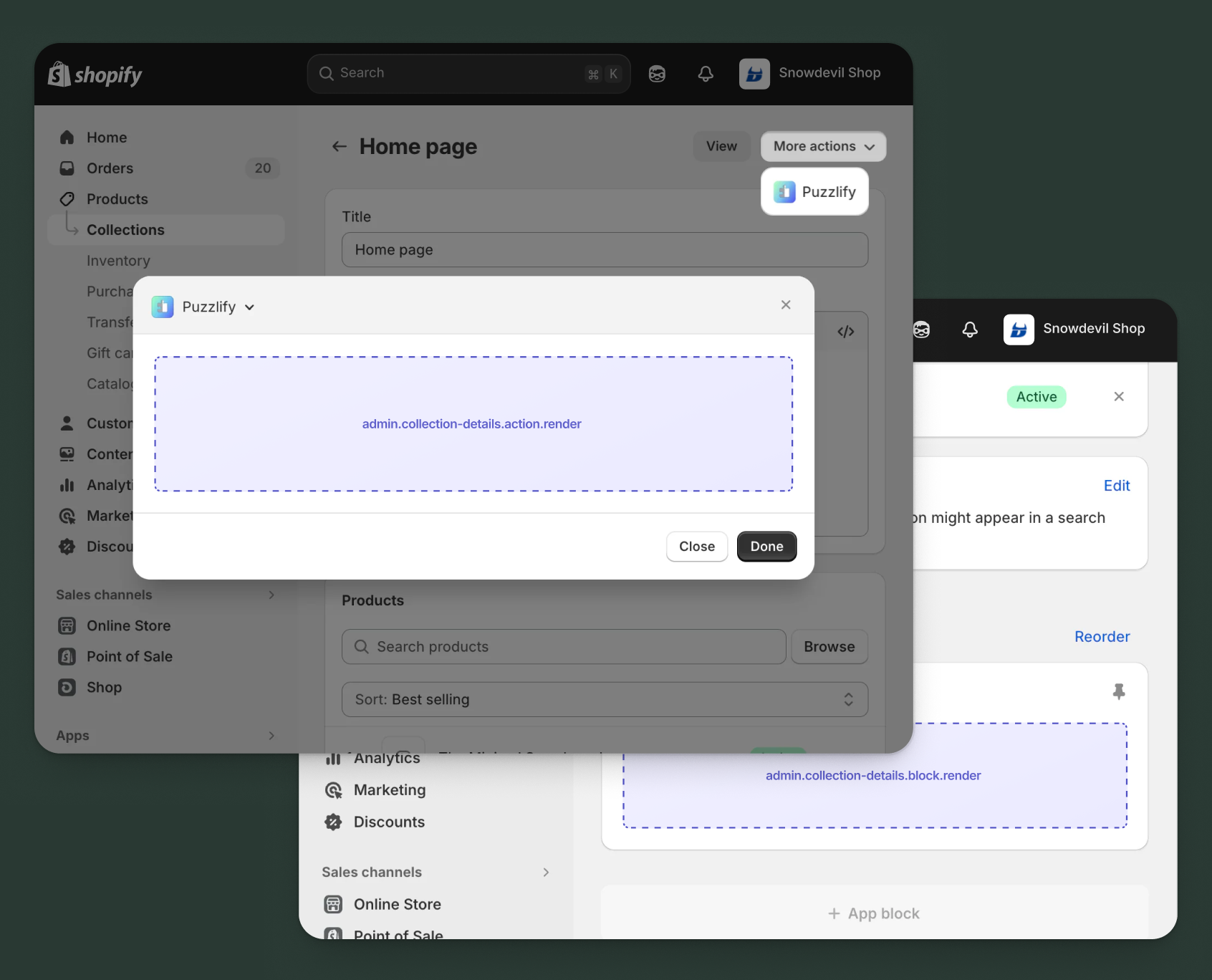
Use action and block targets to extend the collection details page. Add workflows and contextual information that help merchants manage collection relationships and access integrated collection data. Action targets open as modal overlays from the More actions menu, while block targets display as inline cards.
The examples demonstrate fetching data from Shopify's direct API or your app's backend.
Anchor to Collection details action targetCollection details action target
admin.collection-details.action.render
Renders an admin action extension on the collection details page. Merchants can access this extension from the More actions menu. Use this target to provide workflows that operate on collection data, such as syncing with external systems, exporting collection information, or managing credit terms.
Extensions at this target can access collection data through the data property in the Action Extension API. The action renders in a modal overlay, providing space for multi-step workflows, forms, and confirmations.
Supported components
- Admin action
- Avatar
- Badge
- Banner
- Box
- Button
- Button group
- Checkbox
- Chip
- Choice list
- Clickable
- Clickable chip
- Color field
- Color picker
- Date field
- Date picker
- Divider
- Drop zone
- Email field
- Grid
- Heading
- Icon
- Image
- Link
- Menu
- Money field
- Number field
- Ordered list
- Paragraph
- Password field
- Query container
- Search field
- Section
- Select
- Spinner
- Stack
- Switch
- Table
- Text
- Text area
- Text field
- Thumbnail
- Tooltip
- Url field
- Unordered list
Available APIs
Supported components
- Admin action
- Avatar
- Badge
- Banner
- Box
- Button
- Button group
- Checkbox
- Chip
- Choice list
- Clickable
- Clickable chip
- Color field
- Color picker
- Date field
- Date picker
- Divider
- Drop zone
- Email field
- Grid
- Heading
- Icon
- Image
- Link
- Menu
- Money field
- Number field
- Ordered list
- Paragraph
- Password field
- Query container
- Search field
- Section
- Select
- Spinner
- Stack
- Switch
- Table
- Text
- Text area
- Text field
- Thumbnail
- Tooltip
- Url field
- Unordered list
Available APIs
jsx
Examples
Description
Add an action extension that exports all products in a collection to a CSV file. This example demonstrates calling your app backend to generate and download a product export.
jsx
import {render} from 'preact';
import {useState} from 'preact/hooks';

export default async () => {
  render(<Extension />, document.body);
};

const Extension = () => {
  const [loading, setLoading] = useState(false);
  const [success, setSuccess] = useState(false);
  const [error, setError] = useState(false);
  const [includeVariants, setIncludeVariants] = useState(true);
  const [includePricing, setIncludePricing] = useState(true);
  const [includeInventory, setIncludeInventory] = useState(false);

  const handleExport = async () => {
    setLoading(true);
    setError(false);
    const collectionId = shopify.data.selected[0].id;

    try {
      const response = await fetch('https://your-app.com/api/collections/export', {
        method: 'POST',
        headers: {'Content-Type': 'application/json'},
        body: JSON.stringify({
          collectionId,
          options: {
            includeVariants,
            includePricing,
            includeInventory,
          },
        }),
      });

      if (response.ok) {
        const blob = await response.blob();
        const url = URL.createObjectURL(blob);
        const link = document.createElement('a');
        link.href = url;
        link.download = 'collection-products.csv';
        link.click();
        URL.revokeObjectURL(url);
        setSuccess(true);
        shopify.close();
      } else {
        setError(true);
      }
    } catch (err) {
      setError(true);
    } finally {
      setLoading(false);
    }
  };

  return (
    <s-admin-action heading="Export Collection Products">
      {success && (
        <s-banner tone="success" dismissible={false}>
          Export complete! Your download should start automatically.
        </s-banner>
      )}
      {error && (
        <s-banner tone="critical" dismissible={false}>
          Failed to export products. Please try again.
        </s-banner>
      )}

      <s-section heading="Export Options">
        <s-stack gap="base">
          <s-checkbox
            label="Include product variants"
            checked={includeVariants}
            onChange={(e) => setIncludeVariants(e.currentTarget.checked)}
          />
          <s-checkbox
            label="Include pricing information"
            checked={includePricing}
            onChange={(e) => setIncludePricing(e.currentTarget.checked)}
          />
          <s-checkbox
            label="Include inventory levels"
            checked={includeInventory}
            onChange={(e) => setIncludeInventory(e.currentTarget.checked)}
          />
        </s-stack>
      </s-section>

      <s-button
        slot="primary-action"
        onClick={handleExport}
        disabled={loading || success}
      >
        {loading ? 'Exporting...' : 'Export to CSV'}
      </s-button>
      <s-button slot="secondary-actions" onClick={() => shopify.close()}>
        Cancel
      </s-button>
    </s-admin-action>
  );
};
Description
Add an action extension that pushes collection data to an external content management system. This example demonstrates fetching collection details using [GraphQL Admin API](/docs/api/admin-graphql) and syncing to a CMS platform.
jsx
import {render} from 'preact';
import {useState} from 'preact/hooks';

export default async () => {
  render(<Extension />, document.body);
};

const Extension = () => {
  const [loading, setLoading] = useState(false);
  const [success, setSuccess] = useState(false);
  const [error, setError] = useState(null);
  const [includeProducts, setIncludeProducts] = useState(true);
  const [includeImages, setIncludeImages] = useState(true);

  const handleSync = async () => {
    setLoading(true);
    setError(null);
    const collectionId = shopify.data.selected[0].id;

    try {
      const response = await fetch('shopify:admin/api/graphql.json', {
        method: 'POST',
        headers: {'Content-Type': 'application/json'},
        body: JSON.stringify({
          query: `query GetCollection($id: ID!) {
            collection(id: $id) {
              id
              title
              description
              handle
              image { url altText }
              productsCount { count }
              seo { title description }
            }
          }`,
          variables: {id: collectionId},
        }),
      });

      const {data} = await response.json();

      if (data?.collection) {
        // Simulate CMS sync
        await new Promise((resolve) => setTimeout(resolve, 800));
        setSuccess(true);
        shopify.close();
      } else {
        setError('Collection not found');
      }
    } catch (err) {
      setError('Failed to sync collection to CMS');
    } finally {
      setLoading(false);
    }
  };

  return (
    <s-admin-action heading="Sync to CMS">
      {success && (
        <s-banner tone="success" dismissible={false}>
          Collection synced to CMS successfully!
        </s-banner>
      )}
      {error && (
        <s-banner tone="critical" dismissible={false}>
          {error}
        </s-banner>
      )}

      <s-section heading="Sync Options">
        <s-stack gap="base">
          <s-checkbox
            label="Include product references"
            checked={includeProducts}
            onChange={(e) => setIncludeProducts(e.currentTarget.checked)}
          />
          <s-checkbox
            label="Include collection images"
            checked={includeImages}
            onChange={(e) => setIncludeImages(e.currentTarget.checked)}
          />
          <s-text color="subdued">
            Collection data will be pushed to your connected CMS.
          </s-text>
        </s-stack>
      </s-section>

      <s-button
        slot="primary-action"
        onClick={handleSync}
        disabled={loading || success}
      >
        {loading ? 'Syncing...' : 'Sync to CMS'}
      </s-button>
      <s-button slot="secondary-actions" onClick={() => shopify.close()}>
        Cancel
      </s-button>
    </s-admin-action>
  );
};
Anchor to Collection details action (should render) targetCollection details action (should render) target
admin.collection-details.action.should-render
Controls the render state of an admin action extension on the collection details page. Use this target to conditionally show or hide your action extension based on the collection's properties, such as status, configuration, or specific business requirements.
This target returns a boolean value that determines whether the corresponding action extension appears in the More actions menu. The extension evaluates each time the page loads.
Supported components
Available APIs
Supported components
Available APIs
jsx
Examples
Description
Show the collection performance action only for collections that have analytics tracking enabled in your app backend.
jsx
export default async () => {
  const collectionId = shopify.data.selected[0].id;

  try {
    const response = await fetch('https://your-app.com/api/collection-tracking-status', {
      method: 'POST',
      headers: {
        'Content-Type': 'application/json',
      },
      body: JSON.stringify({
        collectionId,
        checkType: 'performance-metrics',
      }),
    });

    if (!response.ok) {
      console.error('Failed to check tracking status');
      return { display: false };
    }

    const result = await response.json();

    // Show action if collection has tracking enabled and has data
    return {
      display: result.trackingEnabled && result.hasMetricsData,
    };
  } catch (err) {
    console.error('Error checking collection tracking:', err);
    return { display: false };
  }
};
Description
Add an action extension that only displays when a collection contains products that are out of stock. This example demonstrates using the [GraphQL Admin API](/docs/api/admin-graphql) to check product inventory status within a collection.
jsx
export default async () => {
  const collectionId = shopify.data.selected[0].id;

  try {
    const response = await fetch('shopify:admin/api/graphql.json', {
      method: 'POST',
      headers: {'Content-Type': 'application/json'},
      body: JSON.stringify({
        query: `query GetCollectionProducts($id: ID!) {
          collection(id: $id) {
            products(first: 50) {
              nodes {
                totalInventory
              }
            }
          }
        }`,
        variables: {id: collectionId},
      }),
    });

    const {data} = await response.json();
    const products = data?.collection?.products?.nodes || [];

    // Check if any product in the collection is out of stock
    const hasOutOfStock = products.some(product => product.totalInventory <= 0);

    return {display: hasOutOfStock};
  } catch (err) {
    console.error('Error checking collection inventory:', err);
    return {display: false};
  }
};
Anchor to Collection details block targetCollection details block target
admin.collection-details.block.render
Renders an admin block extension inline on the collection details page. Use this target to display contextual information, analytics, or status updates related to the collection without requiring merchant interaction to open a modal.
Extensions at this target can access collection data through the data property in the Block Extension API. Blocks appear as cards on the page and can show real-time data, insights, or quick actions, providing persistent visibility for information merchants need to see at a glance.
Supported components
- Admin block
- Avatar
- Badge
- Banner
- Box
- Button
- Button group
- Checkbox
- Chip
- Choice list
- Clickable
- Clickable chip
- Color field
- Color picker
- Date field
- Date picker
- Divider
- Drop zone
- Email field
- Form
- Grid
- Heading
- Icon
- Image
- Link
- Menu
- Money field
- Number field
- Ordered list
- Paragraph
- Password field
- Query container
- Search field
- Section
- Select
- Spinner
- Stack
- Switch
- Table
- Text
- Text area
- Text field
- Thumbnail
- Tooltip
- Url field
- Unordered list
Available APIs
Supported components
- Admin block
- Avatar
- Badge
- Banner
- Box
- Button
- Button group
- Checkbox
- Chip
- Choice list
- Clickable
- Clickable chip
- Color field
- Color picker
- Date field
- Date picker
- Divider
- Drop zone
- Email field
- Form
- Grid
- Heading
- Icon
- Image
- Link
- Menu
- Money field
- Number field
- Ordered list
- Paragraph
- Password field
- Query container
- Search field
- Section
- Select
- Spinner
- Stack
- Switch
- Table
- Text
- Text area
- Text field
- Thumbnail
- Tooltip
- Url field
- Unordered list
Available APIs
jsx
Examples
Description
Create a block extension that displays sales and traffic metrics for a collection by fetching analytics data from your app backend.
jsx
import {render} from 'preact';
import {useState, useEffect} from 'preact/hooks';

export default async () => {
  render(<Extension />, document.body);
};

const Extension = () => {
  const [loading, setLoading] = useState(true);
  const [metrics, setMetrics] = useState(null);
  const [error, setError] = useState(false);
  const [period, setPeriod] = useState('7d');

  const fetchMetrics = async (timePeriod) => {
    setLoading(true);
    setError(false);
    const collectionId = shopify.data.selected[0].id;

    try {
      const response = await fetch('https://your-app.com/api/collection-metrics', {
        method: 'POST',
        headers: {'Content-Type': 'application/json'},
        body: JSON.stringify({collectionId, period: timePeriod}),
      });

      if (response.ok) {
        const data = await response.json();
        setMetrics(data);
      } else {
        setError(true);
      }
    } catch (err) {
      setError(true);
    } finally {
      setLoading(false);
    }
  };

  useEffect(() => {
    fetchMetrics(period);
  }, [period]);

  return (
    <s-admin-block heading="Collection Performance">
      {error && (
        <s-banner tone="critical" dismissible={false}>
          Unable to load performance metrics.
        </s-banner>
      )}

      <s-section>
        <s-select
          label="Time period"
          value={period}
          onChange={(e) => setPeriod(e.currentTarget.value)}
          options={[
            {value: '7d', label: 'Last 7 days'},
            {value: '30d', label: 'Last 30 days'},
            {value: '90d', label: 'Last 90 days'},
          ]}
        />
      </s-section>

      {loading ? (
        <s-box padding="large">
          <s-spinner size="base" />
        </s-box>
      ) : metrics && (
        <s-section heading="Metrics">
          <s-stack gap="base">
            <s-stack gap="small-300">
              <s-text color="subdued">Total Sales</s-text>
              <s-heading>{metrics.totalSales || '$0.00'}</s-heading>
            </s-stack>
            <s-divider />
            <s-stack gap="small-300">
              <s-text color="subdued">Page Views</s-text>
              <s-heading>{metrics.pageViews || '0'}</s-heading>
            </s-stack>
            <s-divider />
            <s-stack gap="small-300">
              <s-text color="subdued">Conversion Rate</s-text>
              <s-heading>{metrics.conversionRate || '0%'}</s-heading>
              <s-badge tone={metrics.conversionTrend > 0 ? 'success' : 'warning'}>
                {metrics.conversionTrend > 0 ? '↑' : '↓'} {Math.abs(metrics.conversionTrend || 0)}%
              </s-badge>
            </s-stack>
          </s-stack>
        </s-section>
      )}
    </s-admin-block>
  );
};
Description
Create a block extension that displays out-of-stock products within a collection. This example demonstrates fetching collection products using the [GraphQL Admin API](/docs/api/admin-graphql) and filtering by inventory status.
jsx
import {render} from 'preact';
import {useState, useEffect} from 'preact/hooks';

export default async () => {
  render(<Extension />, document.body);
};

const Extension = () => {
  const [loading, setLoading] = useState(true);
  const [outOfStock, setOutOfStock] = useState([]);
  const [error, setError] = useState(false);

  useEffect(() => {
    fetchCollectionProducts();
  }, []);

  const fetchCollectionProducts = async () => {
    const collectionId = shopify.data.selected[0].id;

    try {
      const response = await fetch('shopify:admin/api/graphql.json', {
        method: 'POST',
        headers: {'Content-Type': 'application/json'},
        body: JSON.stringify({
          query: `query GetCollectionProducts($id: ID!) {
            collection(id: $id) {
              products(first: 50) {
                nodes {
                  id
                  title
                  totalInventory
                  status
                }
              }
            }
          }`,
          variables: {id: collectionId},
        }),
      });

      const {data} = await response.json();
      const products = data?.collection?.products?.nodes || [];
      const unavailable = products.filter(p => p.totalInventory <= 0);
      setOutOfStock(unavailable);
    } catch (err) {
      setError(true);
    } finally {
      setLoading(false);
    }
  };

  if (loading) {
    return (
      <s-admin-block heading="Product Availability">
        <s-stack gap="base">
          <s-spinner size="base" />
          <s-text>Checking inventory...</s-text>
        </s-stack>
      </s-admin-block>
    );
  }

  return (
    <s-admin-block heading="Product Availability">
      {error && (
        <s-banner tone="critical" dismissible={false}>
          Failed to load product inventory.
        </s-banner>
      )}

      {!error && outOfStock.length === 0 && (
        <s-banner tone="success" dismissible={false}>
          All products in this collection are in stock!
        </s-banner>
      )}

      {!error && outOfStock.length > 0 && (
        <s-section heading={`Out of Stock (${outOfStock.length})`}>
          <s-stack gap="base">
            {outOfStock.map(product => (
              <s-box key={product.id} padding="base">
                <s-stack gap="small">
                  <s-text>{product.title}</s-text>
                  <s-badge tone="critical">Out of stock</s-badge>
                </s-stack>
              </s-box>
            ))}
          </s-stack>
        </s-section>
      )}
    </s-admin-block>
  );
};
Anchor to Collection index targetsCollection index targets
Use action targets to extend the collection index page with bulk operations and workflows that help merchants manage multiple collections efficiently.
Anchor to Collection index action targetCollection index action target
admin.collection-index.action.render
Renders an admin action extension on the collection index page. Merchants can access this extension from the More actions menu. Use this target to provide workflows that operate on collection data, such as syncing with external systems, exporting collection information, or managing credit terms.
Extensions at this target can access collection data through the data property in the Action Extension API. The action renders in a modal overlay, providing space for multi-step workflows, forms, and confirmations.
Supported components
- Admin action
- Avatar
- Badge
- Banner
- Box
- Button
- Button group
- Checkbox
- Chip
- Choice list
- Clickable
- Clickable chip
- Color field
- Color picker
- Date field
- Date picker
- Divider
- Drop zone
- Email field
- Grid
- Heading
- Icon
- Image
- Link
- Menu
- Money field
- Number field
- Ordered list
- Paragraph
- Password field
- Query container
- Search field
- Section
- Select
- Spinner
- Stack
- Switch
- Table
- Text
- Text area
- Text field
- Thumbnail
- Tooltip
- Url field
- Unordered list
Available APIs
Supported components
- Admin action
- Avatar
- Badge
- Banner
- Box
- Button
- Button group
- Checkbox
- Chip
- Choice list
- Clickable
- Clickable chip
- Color field
- Color picker
- Date field
- Date picker
- Divider
- Drop zone
- Email field
- Grid
- Heading
- Icon
- Image
- Link
- Menu
- Money field
- Number field
- Ordered list
- Paragraph
- Password field
- Query container
- Search field
- Section
- Select
- Spinner
- Stack
- Switch
- Table
- Text
- Text area
- Text field
- Thumbnail
- Tooltip
- Url field
- Unordered list
Available APIs
jsx
Examples
Description
Add an action extension that generates a comprehensive report of all collections in the store. This example demonstrates calling your app backend to compile collection statistics, product counts, and inventory totals across the entire catalog.
jsx
import {render} from 'preact';
import {useState} from 'preact/hooks';

export default async () => {
  render(<Extension />, document.body);
};

const Extension = () => {
  const [loading, setLoading] = useState(false);
  const [success, setSuccess] = useState(false);
  const [error, setError] = useState(false);
  const [includeVariants, setIncludeVariants] = useState(true);
  const [includePricing, setIncludePricing] = useState(true);
  const [includeInventory, setIncludeInventory] = useState(false);

  const handleExport = async () => {
    setLoading(true);
    setError(false);

    try {
      const response = await fetch('https://your-app.com/api/collections/export', {
        method: 'POST',
        headers: {'Content-Type': 'application/json'},
        body: JSON.stringify({
          includeVariants,
          includePricing,
          includeInventory,
        }),
      });

      if (response.ok) {
        const blob = await response.blob();
        const url = URL.createObjectURL(blob);
        const link = document.createElement('a');
        link.href = url;
        link.download = 'collection-products.csv';
        link.click();
        URL.revokeObjectURL(url);
        setSuccess(true);
        shopify.close();
      } else {
        setError(true);
      }
    } catch (err) {
      setError(true);
    } finally {
      setLoading(false);
    }
  };

  return (
    <s-admin-action heading="Export Collection Products">
      {success && (
        <s-banner tone="success" dismissible={false}>
          Export complete! Your download should start automatically.
        </s-banner>
      )}
      {error && (
        <s-banner tone="critical" dismissible={false}>
          Failed to export products. Please try again.
        </s-banner>
      )}

      <s-section heading="Export Options">
        <s-stack gap="base">
          <s-checkbox
            label="Include product variants"
            checked={includeVariants}
            onChange={(e) => setIncludeVariants(e.currentTarget.checked)}
          />
          <s-checkbox
            label="Include pricing information"
            checked={includePricing}
            onChange={(e) => setIncludePricing(e.currentTarget.checked)}
          />
          <s-checkbox
            label="Include inventory levels"
            checked={includeInventory}
            onChange={(e) => setIncludeInventory(e.currentTarget.checked)}
          />
        </s-stack>
      </s-section>

      <s-button
        slot="primary-action"
        onClick={handleExport}
        disabled={loading || success}
      >
        {loading ? 'Exporting...' : 'Export to CSV'}
      </s-button>
      <s-button slot="secondary-actions" onClick={() => shopify.close()}>
        Cancel
      </s-button>
    </s-admin-action>
  );
};
Description
Add an action extension that pushes all collections to an external marketing platform. This example demonstrates using the [GraphQL Admin API](/docs/api/admin-graphql) to retrieve all collection details before syncing to a third-party system.
jsx
import {render} from 'preact';
import {useState} from 'preact/hooks';

export default async () => {
  render(<Extension />, document.body);
};

const Extension = () => {
  const [loading, setLoading] = useState(false);
  const [success, setSuccess] = useState(false);
  const [error, setError] = useState(null);
  const [platform, setPlatform] = useState('contentful');
  const [includeProducts, setIncludeProducts] = useState(true);

  const handleSync = async () => {
    setLoading(true);
    setError(null);

    try {
      const collectionId = shopify.data.selected[0].id;

      const response = await fetch('shopify:admin/api/graphql.json', {
        method: 'POST',
        headers: {'Content-Type': 'application/json'},
        body: JSON.stringify({
          query: `query GetCollection($id: ID!) {
            collection(id: $id) {
              id
              title
              description
              handle
              image { url altText }
              productsCount { count }
            }
          }`,
          variables: {id: collectionId},
        }),
      });

      const {data} = await response.json();

      if (!data?.collection) {
        throw new Error('Collection not found');
      }

      // Sync to CMS platform
      const cmsResponse = await fetch(`https://your-app.com/api/cms/${platform}/sync`, {
        method: 'POST',
        headers: {'Content-Type': 'application/json'},
        body: JSON.stringify({
          collection: data.collection,
          includeProducts,
        }),
      });

      if (!cmsResponse.ok) throw new Error('CMS sync failed');

      setSuccess(true);
      shopify.close();
    } catch (err) {
      setError(err.message || 'Sync failed');
    } finally {
      setLoading(false);
    }
  };

  return (
    <s-admin-action heading="Sync to CMS">
      {success && (
        <s-banner tone="success" dismissible={false}>
          Collection synced to {platform} successfully!
        </s-banner>
      )}
      {error && (
        <s-banner tone="critical" dismissible={false}>
          {error}
        </s-banner>
      )}

      <s-section heading="CMS Settings">
        <s-stack gap="base">
          <s-select
            label="Target Platform"
            value={platform}
            onChange={(e) => setPlatform(e.currentTarget.value)}
            options={[
              {value: 'contentful', label: 'Contentful'},
              {value: 'sanity', label: 'Sanity'},
              {value: 'strapi', label: 'Strapi'},
            ]}
          />
          <s-checkbox
            label="Include product references"
            checked={includeProducts}
            onChange={(e) => setIncludeProducts(e.currentTarget.checked)}
          />
        </s-stack>
      </s-section>

      <s-button
        slot="primary-action"
        onClick={handleSync}
        disabled={loading || success}
      >
        {loading ? 'Syncing...' : 'Sync Collection'}
      </s-button>
      <s-button slot="secondary-actions" onClick={() => shopify.close()}>
        Cancel
      </s-button>
    </s-admin-action>
  );
};
Anchor to Collection index action (should render) targetCollection index action (should render) target
admin.collection-index.action.should-render
Controls the render state of an admin action extension on the collection index page. Use this target to conditionally show or hide your action extension based on the collection's properties, such as status, configuration, or specific business requirements.
This target returns a boolean value that determines whether the corresponding action extension appears in the More actions menu. The extension evaluates each time the page loads.
Supported components
Available APIs
Supported components
Available APIs
jsx
Examples
Description
Show the action only when the store has collection analytics enabled in your app's tracking system.
jsx
export default async () => {
  const selectedCollections = shopify.data.selected;

  if (!selectedCollections || selectedCollections.length === 0) {
    return { display: false };
  }

  const collectionIds = selectedCollections.map(item => item.id);

  try {
    const response = await fetch('https://your-app.com/api/collections/check-tracking', {
      method: 'POST',
      headers: {
        'Content-Type': 'application/json',
      },
      body: JSON.stringify({
        collectionIds,
        shop: shopify.data.shop.id,
      }),
    });

    if (!response.ok) {
      return { display: false };
    }

    const result = await response.json();

    // Show action if at least one collection has performance tracking enabled
    return { display: result.hasTrackedCollections };
  } catch (err) {
    console.error('Failed to check collection tracking status:', err);
    return { display: false };
  }
};
Description
Add an action extension that only displays when the store has collections containing products with low inventory, using the [GraphQL Admin API](/docs/api/admin-graphql) to check store-wide inventory status.
jsx
export default async () => {
  const collectionId = shopify.data.selected[0].id;

  try {
    const response = await fetch('shopify:admin/api/graphql.json', {
      method: 'POST',
      headers: { 'Content-Type': 'application/json' },
      body: JSON.stringify({
        query: `query GetCollectionProducts($id: ID!) {
          collection(id: $id) {
            products(first: 50) {
              nodes {
                totalInventory
                tracksInventory
              }
            }
          }
        }`,
        variables: { id: collectionId },
      }),
    });

    const { data } = await response.json();
    const products = data?.collection?.products?.nodes || [];

    // Check if any product in the collection is out of stock
    const hasOutOfStock = products.some(
      (product) => product.tracksInventory && product.totalInventory <= 0
    );

    return { display: hasOutOfStock };
  } catch (err) {
    console.error('Error checking collection inventory:', err);
    return { display: false };
  }
};
Anchor to Best practicesBest practices
- Account for automated collections: Collections can be manual (fixed product list) or automated (rule-based). When displaying collection analytics or inventory status, remember that automated collection membership changes when products are added/removed or when their properties change. Check
ruleSetto determine collection type. - Handle large product sets with pagination: Collections can contain thousands of products. When fetching collection products, use cursor-based pagination (for example, 50 products per page) and implement progressive loading for collections with more than 100 products to avoid timeouts and high query costs.
- Show product rankings within collections: If your extension displays collection analytics, consider showing product performance rankings within the collection. This helps merchants optimize product ordering and identify which items drive collection sales.
- Manage products in multiple collections: Products often belong to multiple collections. When building extensions that modify product metafields or tags based on collection membership, allow merchants to specify whether changes should be collection-specific or apply globally.
- Consider collection availability: Collections can be published to specific sales channels (online store, POS, and others). When syncing collections to external systems, include publication context so the external system knows where the collection is available.
Anchor to LimitationsLimitations
- Single target per module: Each
[[extensions.targeting]]entry in your TOML configuration maps one target to one module file. - Product pagination: The GraphQL API limits product queries to a maximum of 250 items per request.
- Smart collection restrictions: Smart collections reject manual product additions. GraphQL returns an error: "Can't manually add products to a smart collection."
- Block target visibility: Block extensions must be manually added and pinned by merchants before they appear.
- Block collapse behavior: Returning
nullfrom a block extension collapses the block rather than removing it from the page. Blocks can't be fully hidden at runtime.