Companies
The company details page displays information about a specific B2B company, including its profile, locations, contacts, and order history. Extensions on these pages help merchants manage B2B relationships and customize company workflows.
Anchor to Use casesUse cases
- CRM integration: Sync company data with external CRM systems, update contact information across platforms, or pull in additional customer intelligence to enrich merchant workflows.
- Credit management: Display real-time credit limits, outstanding balances, payment terms, or risk scores to help merchants make informed decisions about extending credit to B2B customers.
- Communication workflows: Initiate targeted email campaigns, send payment reminders, schedule follow-ups, or trigger notifications based on company activity and status changes.
- Compliance and verification: Show KYC (Know Your Customer) status, tax validation results, business license verification, or other compliance checks required for B2B transactions.
- Custom analytics: Display specialized metrics such as order frequency, average order value by location, product preferences, or seasonal purchasing patterns to inform sales strategies.
Anchor to Companies targetsCompanies targets
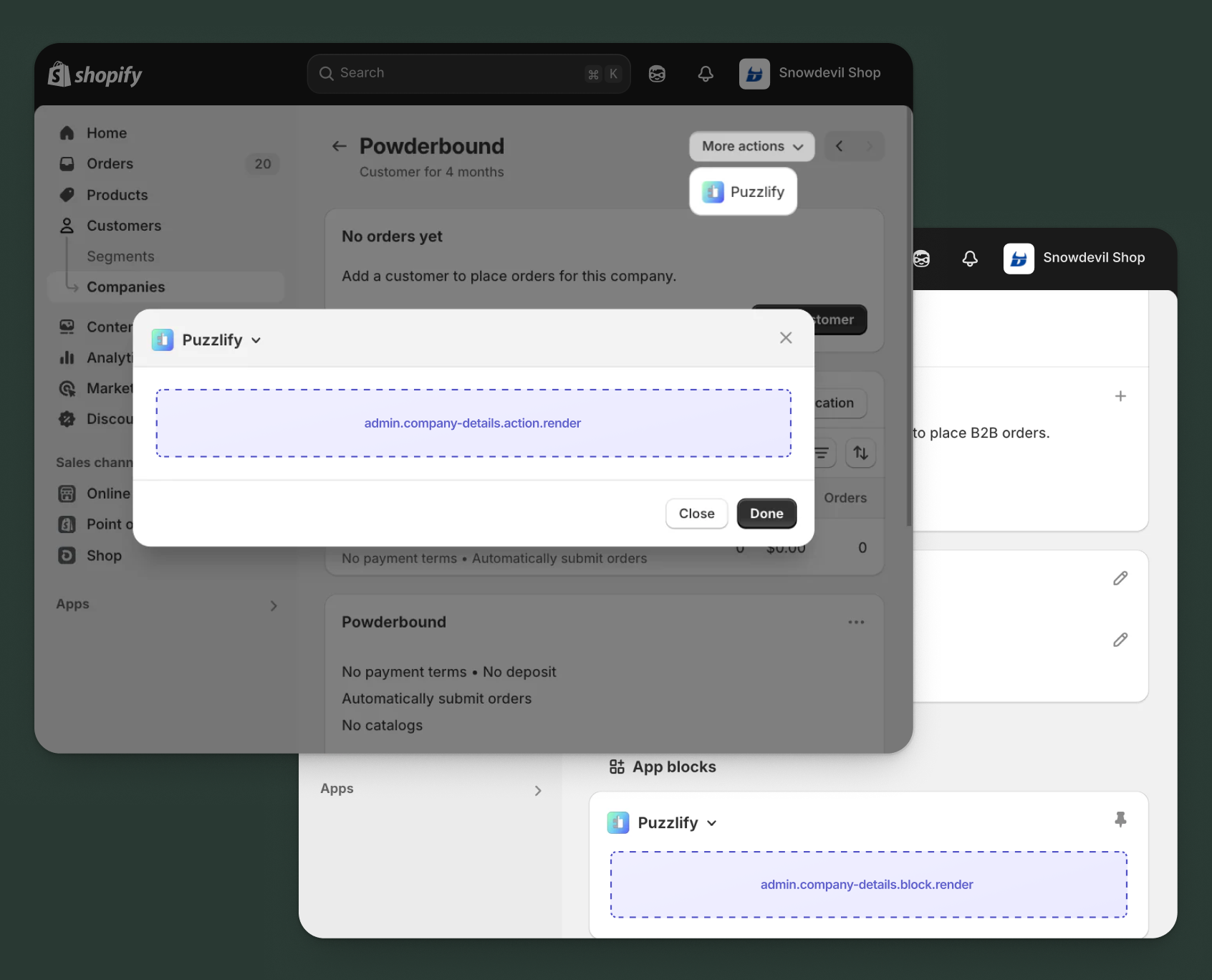
Use action and block targets to extend company pages with workflows and contextual information that help merchants manage their B2B relationships and company-specific operations.
Action targets open as modal overlays from the More actions menu, while block targets display as inline cards. The examples demonstrate fetching data from Shopify's direct API or your app's backend.
Anchor to Company details action ,[object Object]Company details action target
admin.company-details.action.render
Renders an admin action extension on the company details page. Merchants can access this extension from the More actions menu. Use this target to provide workflows that operate on company data, such as syncing with external systems, exporting company information, or managing credit terms.
Extensions at this target can access information about the company through the data property in the Action Extension API. The action renders in a modal overlay, providing space for multi-step workflows, forms, and confirmations.
Supported components
- Admin action
- Avatar
- Badge
- Banner
- Box
- Button
- Button group
- Checkbox
- Chip
- Choice list
- Clickable
- Clickable chip
- Color field
- Color picker
- Date field
- Date picker
- Divider
- Drop zone
- Email field
- Grid
- Heading
- Icon
- Image
- Link
- Menu
- Money field
- Number field
- Ordered list
- Paragraph
- Password field
- Query container
- Search field
- Section
- Select
- Spinner
- Stack
- Switch
- Table
- Text
- Text area
- Text field
- Thumbnail
- Tooltip
- Url field
- Unordered list
Available APIs
Supported components
- Admin action
- Avatar
- Badge
- Banner
- Box
- Button
- Button group
- Checkbox
- Chip
- Choice list
- Clickable
- Clickable chip
- Color field
- Color picker
- Date field
- Date picker
- Divider
- Drop zone
- Email field
- Grid
- Heading
- Icon
- Image
- Link
- Menu
- Money field
- Number field
- Ordered list
- Paragraph
- Password field
- Query container
- Search field
- Section
- Select
- Spinner
- Stack
- Switch
- Table
- Text
- Text area
- Text field
- Thumbnail
- Tooltip
- Url field
- Unordered list
Available APIs
jsx
Examples
Description
Add an action extension that exports company information to an external CRM system. This example shows how to fetch company details and push them to your app's backend for processing.
jsx
import {render} from 'preact';
import {useState} from 'preact/hooks';

export default async () => {
  render(<Extension />, document.body);
};

const Extension = () => {
  const [loading, setLoading] = useState(false);
  const [includeLocations, setIncludeLocations] = useState(true);
  const [includeContacts, setIncludeContacts] = useState(true);
  const [includeOrders, setIncludeOrders] = useState(false);
  const [success, setSuccess] = useState(false);
  const [error, setError] = useState(false);

  const handleExport = async () => {
    setLoading(true);
    setSuccess(false);
    setError(false);
    const companyId = shopify.data.selected[0].id;

    try {
      // Fetch company details from GraphQL Admin API
      const companyResponse = await fetch('shopify:admin/api/graphql.json', {
        method: 'POST',
        headers: {'Content-Type': 'application/json'},
        body: JSON.stringify({
          query: `
            query GetCompany($id: ID!) {
              company(id: $id) {
                id
                name
                externalId
                mainContact {
                  firstName
                  lastName
                  email
                }
                locations(first: 10) {
                  edges {
                    node {
                      id
                      name
                      shippingAddress {
                        address1
                        city
                        province
                        country
                        zip
                      }
                    }
                  }
                }
              }
            }
          `,
          variables: {id: companyId},
        }),
      });

      const {data: companyData} = await companyResponse.json();

      // Export to CRM through your app's backend
      const response = await fetch('https://your-app.com/api/export-to-crm', {
        method: 'POST',
        headers: {'Content-Type': 'application/json'},
        body: JSON.stringify({
          company: companyData.company,
          includeLocations,
          includeContacts,
          includeOrders,
        }),
      });

      if (response.ok) {
        setSuccess(true);
        shopify.close();
      } else {
        setError(true);
      }
    } catch (err) {
      setError(true);
    } finally {
      setLoading(false);
    }
  };

  return (
    <s-admin-action heading="Export to CRM">
      {success && (
        <s-banner tone="success" dismissible={false}>
          Company exported to CRM successfully!
        </s-banner>
      )}
      {error && (
        <s-banner tone="critical" dismissible={false}>
          Failed to export company. Please try again.
        </s-banner>
      )}

      <s-section heading="Export options">
        <s-stack gap="base">
          <s-checkbox
            label="Include locations"
            checked={includeLocations}
            onChange={(event) => setIncludeLocations(event.currentTarget.checked)}
          />
          <s-checkbox
            label="Include contacts"
            checked={includeContacts}
            onChange={(event) => setIncludeContacts(event.currentTarget.checked)}
          />
          <s-checkbox
            label="Include order history"
            checked={includeOrders}
            onChange={(event) => setIncludeOrders(event.currentTarget.checked)}
          />
        </s-stack>
      </s-section>

      <s-button
        slot="primary-action"
        onClick={handleExport}
        disabled={loading || success}
      >
        {loading ? 'Exporting...' : 'Export to CRM'}
      </s-button>
      <s-button slot="secondary-actions" onClick={() => shopify.close()}>
        Cancel
      </s-button>
    </s-admin-action>
  );
};
Description
Add an action extension that allows merchants to update credit terms for a company. This example demonstrates a multi-step workflow with form validation and confirmation.
jsx
import {render} from 'preact';
import {useState} from 'preact/hooks';

export default async () => {
  render(<Extension />, document.body);
};

const Extension = () => {
  const [loading, setLoading] = useState(false);
  const [creditLimit, setCreditLimit] = useState('');
  const [paymentTerms, setPaymentTerms] = useState('30');
  const [success, setSuccess] = useState(false);
  const [error, setError] = useState(false);

  const handleUpdate = async () => {
    if (!creditLimit || isNaN(parseFloat(creditLimit))) {
      setError(true);
      return;
    }

    setLoading(true);
    setSuccess(false);
    setError(false);
    const companyId = shopify.data.selected[0].id;

    try {
      // Fetch company details from GraphQL Admin API
      const {data} = await shopify.query(
        `
          query GetCompany($id: ID!) {
            company(id: $id) {
              id
              name
            }
          }
        `,
        {variables: {id: companyId}}
      );

      // Update credit terms through your app's backend
      const response = await fetch('https://your-app.com/api/update-credit', {
        method: 'POST',
        headers: {'Content-Type': 'application/json'},
        body: JSON.stringify({
          companyId: data.company.id,
          companyName: data.company.name,
          creditLimit: parseFloat(creditLimit),
          paymentTerms: parseInt(paymentTerms),
        }),
      });

      if (response.ok) {
        setSuccess(true);
        shopify.close();
      } else {
        setError(true);
      }
    } catch (err) {
      setError(true);
    } finally {
      setLoading(false);
    }
  };

  return (
    <s-admin-action heading="Update Credit Terms">
      {success && (
        <s-banner tone="success" dismissible={false}>
          Credit terms updated successfully!
        </s-banner>
      )}
      {error && (
        <s-banner tone="critical" dismissible={false}>
          Failed to update credit terms. Please check your input.
        </s-banner>
      )}

      <s-section heading="Credit settings">
        <s-stack gap="base">
          <s-number-field
            label="Credit limit"
            prefix="$"
            value={creditLimit}
            onChange={(event) => setCreditLimit(event.currentTarget.value)}
            details="Maximum credit available to this company"
          />
          <s-select
            label="Payment terms (days)"
            value={paymentTerms}
            onChange={(event) => setPaymentTerms(event.currentTarget.value)}
          >
            <option value="15">Net 15</option>
            <option value="30">Net 30</option>
            <option value="60">Net 60</option>
            <option value="90">Net 90</option>
          </s-select>
        </s-stack>
      </s-section>

      <s-button
        slot="primary-action"
        onClick={handleUpdate}
        disabled={loading || success || !creditLimit}
      >
        {loading ? 'Updating...' : 'Update Terms'}
      </s-button>
      <s-button slot="secondary-actions" onClick={() => shopify.close()}>
        Cancel
      </s-button>
    </s-admin-action>
  );
};
Anchor to Company details action (should render) ,[object Object]Company details action (should render) target
admin.company-details.action.should-render
Controls the render state of an admin action extension on the company details page. Use this target to conditionally show or hide your action extension based on the company's properties, such as status, order count, or specific business requirements.
This target returns a boolean value that determines whether the corresponding action extension appears in the More actions menu. The extension is evaluated each time the page loads.
Supported components
Available APIs
Supported components
Available APIs
jsx
Examples
Description
Conditionally display an action only for companies with active status. This example demonstrates how to use the `should-render` target to control extension visibility based on company status.
jsx
export default async () => {
  const companyId = shopify.data.selected[0].id;

  try {
    // Fetch company details from GraphQL Admin API
    const response = await fetch(
      'shopify:admin/api/graphql.json',
      {
        method: 'POST',
        headers: {'Content-Type': 'application/json'},
        body: JSON.stringify({
          query: `
            query GetCompany($id: ID!) {
              company(id: $id) {
                id
                name
                createdAt
              }
            }
          `,
          variables: {id: companyId},
        }),
      }
    );

    const {data} = await response.json();

    // Check if company has been active for at least 30 days
    const createdDate = new Date(data.company.createdAt);
    const daysSinceCreation = (Date.now() - createdDate.getTime()) / (1000 * 60 * 60 * 24);

    // Only show action for established companies
    return {display: daysSinceCreation >= 30};
  } catch (err) {
    console.error('Error fetching company:', err);
    return {display: false};
  }
};
Description
Conditionally display the action based on app-specific settings or merchant permissions. This example demonstrates checking app configuration before showing the action.
jsx
export default async () => {
  const companyId = shopify.data.selected[0].id;

  try {
    // Check app configuration through your backend
    const configResponse = await fetch(
      'https://your-app.com/api/check-feature-access',
      {
        method: 'POST',
        headers: {'Content-Type': 'application/json'},
        body: JSON.stringify({
          feature: 'crm-export',
          companyId,
        }),
      }
    );

    const {hasAccess} = await configResponse.json();

    // Only show action if merchant has enabled this feature
    return {display: hasAccess};
  } catch (err) {
    console.error('Error checking feature access:', err);
    return {display: false};
  }
};
Anchor to Company details block ,[object Object]Company details block target
admin.company-details.block.render
Renders an admin block extension inline on the company details page. Use this target to display contextual information, analytics, or status updates related to the company without requiring merchants to open a modal.
Extensions at this target appear as cards on the page and can show real-time data, insights, or quick actions. Blocks provide persistent visibility and are ideal for displaying information merchants need to see at a glance.
Supported components
- Admin block
- Avatar
- Badge
- Banner
- Box
- Button
- Button group
- Checkbox
- Chip
- Choice list
- Clickable
- Clickable chip
- Color field
- Color picker
- Date field
- Date picker
- Divider
- Drop zone
- Email field
- Form
- Grid
- Heading
- Icon
- Image
- Link
- Menu
- Money field
- Number field
- Ordered list
- Paragraph
- Password field
- Query container
- Search field
- Section
- Select
- Spinner
- Stack
- Switch
- Table
- Text
- Text area
- Text field
- Thumbnail
- Tooltip
- Url field
- Unordered list
Available APIs
Supported components
- Admin block
- Avatar
- Badge
- Banner
- Box
- Button
- Button group
- Checkbox
- Chip
- Choice list
- Clickable
- Clickable chip
- Color field
- Color picker
- Date field
- Date picker
- Divider
- Drop zone
- Email field
- Form
- Grid
- Heading
- Icon
- Image
- Link
- Menu
- Money field
- Number field
- Ordered list
- Paragraph
- Password field
- Query container
- Search field
- Section
- Select
- Spinner
- Stack
- Switch
- Table
- Text
- Text area
- Text field
- Thumbnail
- Tooltip
- Url field
- Unordered list
Available APIs
jsx
Examples
Description
Create a block extension that shows key financial metrics for the company, such as credit limit, outstanding balance, and payment history. This example demonstrates how to present valuable insights inline on the page.
jsx
import {render} from 'preact';
import {useState, useEffect} from 'preact/hooks';

export default async () => {
  render(<Extension />, document.body);
};

const Extension = () => {
  const [metrics, setMetrics] = useState(null);
  const [loading, setLoading] = useState(true);

  useEffect(() => {
    const fetchMetrics = async () => {
      const companyId = shopify.data.selected[0].id;

      try {
        // Fetch financial metrics from your app's backend
        const response = await fetch(
          `https://your-app.com/api/company-financials?id=${companyId}`
        );
        const data = await response.json();
        setMetrics(data);
      } catch (err) {
        console.error('Error fetching metrics:', err);
      } finally {
        setLoading(false);
      }
    };

    fetchMetrics();
  }, []);

  if (loading) {
    return (
      <s-admin-block heading="Credit & Payment Status">
        <s-spinner size="base" /> Loading metrics...
      </s-admin-block>
    );
  }

  if (!metrics) {
    return (
      <s-admin-block heading="Credit & Payment Status">
        <s-text>Unable to load financial metrics</s-text>
      </s-admin-block>
    );
  }

  const utilizationPercent = (metrics.outstandingBalance / metrics.creditLimit) * 100;
  const utilizationTone = utilizationPercent > 90 ? 'critical' :
                          utilizationPercent > 75 ? 'warning' : 'success';

  return (
    <s-admin-block heading="Credit & Payment Status">
      <s-stack gap="base">
        <s-box>
          <s-stack gap="small-300">
            <s-heading>Credit Limit</s-heading>
            <s-text type="strong" size="large">
              ${metrics.creditLimit.toLocaleString()}
            </s-text>
          </s-stack>
        </s-box>

        <s-divider />

        <s-box>
          <s-stack gap="small-300">
            <s-heading>Outstanding Balance</s-heading>
            <s-stack direction="inline" gap="small-300" alignItems="center">
              <s-text type="strong" size="large">
                ${metrics.outstandingBalance.toLocaleString()}
              </s-text>
              <s-badge tone={utilizationTone}>
                {utilizationPercent.toFixed(0)}% utilized
              </s-badge>
            </s-stack>
          </s-stack>
        </s-box>

        <s-divider />

        <s-box>
          <s-stack gap="small-300">
            <s-heading>Payment History</s-heading>
            <s-text>
              Average payment time: {metrics.avgPaymentDays} days
            </s-text>
            <s-text color="subdued">
              On-time payments: {metrics.onTimePaymentRate}%
            </s-text>
          </s-stack>
        </s-box>

        <s-divider />

        <s-box>
          <s-stack gap="small-300">
            <s-heading>Terms</s-heading>
            <s-text>Net {metrics.paymentTerms} days</s-text>
          </s-stack>
        </s-box>

        {metrics.pastDueAmount > 0 && (
          <>
            <s-divider />
            <s-banner tone="warning" dismissible={false}>
              Past due: ${metrics.pastDueAmount.toLocaleString()}
            </s-banner>
          </>
        )}
      </s-stack>
    </s-admin-block>
  );
};
Description
Create a block extension that shows the current synchronization status with an external CRM system. This example demonstrates how to display integration health and recent sync activity.
jsx
import {render} from 'preact';
import {useState, useEffect} from 'preact/hooks';

export default async () => {
  render(<Extension />, document.body);
};

const Extension = () => {
  const [syncStatus, setSyncStatus] = useState(null);
  const [loading, setLoading] = useState(true);

  useEffect(() => {
    const fetchSyncStatus = async () => {
      const companyId = shopify.data.selected[0].id;

      try {
        // Fetch CRM sync status from your app's backend
        const response = await fetch(
          `https://your-app.com/api/crm-sync-status?companyId=${companyId}`
        );
        const data = await response.json();
        setSyncStatus(data);
      } catch (err) {
        console.error('Error fetching sync status:', err);
      } finally {
        setLoading(false);
      }
    };

    fetchSyncStatus();
  }, []);

  const handleSync = async () => {
    const companyId = shopify.data.selected[0].id;
    setLoading(true);

    try {
      await fetch('https://your-app.com/api/trigger-sync', {
        method: 'POST',
        headers: {'Content-Type': 'application/json'},
        body: JSON.stringify({companyId}),
      });

      // Refresh sync status
      const response = await fetch(
        `https://your-app.com/api/crm-sync-status?companyId=${companyId}`
      );
      const data = await response.json();
      setSyncStatus(data);
    } catch (err) {
      console.error('Error triggering sync:', err);
    } finally {
      setLoading(false);
    }
  };

  if (loading) {
    return (
      <s-admin-block heading="CRM Integration">
        <s-spinner size="base" />
      </s-admin-block>
    );
  }

  if (!syncStatus) {
    return (
      <s-admin-block heading="CRM Integration">
        <s-text>Unable to load sync status</s-text>
      </s-admin-block>
    );
  }

  const getSyncTone = (status) => {
    switch (status) {
      case 'synced':
        return 'success';
      case 'pending':
        return 'info';
      case 'error':
        return 'critical';
      default:
        return 'subdued';
    }
  };

  return (
    <s-admin-block heading="CRM Integration">
      <s-stack gap="base">
        <s-box>
          <s-stack gap="small-300">
            <s-heading>Sync Status</s-heading>
            <s-badge tone={getSyncTone(syncStatus.status)}>
              {syncStatus.status === 'synced' && 'Up to date'}
              {syncStatus.status === 'pending' && 'Sync in progress'}
              {syncStatus.status === 'error' && 'Sync failed'}
            </s-badge>
          </s-stack>
        </s-box>

        <s-divider />

        <s-box>
          <s-stack gap="small-300">
            <s-heading>Last Sync</s-heading>
            <s-text>{syncStatus.lastSyncTime}</s-text>
            {syncStatus.lastSyncError && (
              <s-text tone="critical">{syncStatus.lastSyncError}</s-text>
            )}
          </s-stack>
        </s-box>

        <s-divider />

        <s-box>
          <s-stack gap="small-300">
            <s-heading>CRM Record</s-heading>
            {syncStatus.crmUrl ? (
              <s-link url={syncStatus.crmUrl} external>
                View in CRM
              </s-link>
            ) : (
              <s-text color="subdued">Not yet synced</s-text>
            )}
          </s-stack>
        </s-box>

        <s-button
          onClick={handleSync}
          disabled={loading || syncStatus.status === 'pending'}
          variant="secondary"
        >
          {syncStatus.status === 'pending' ? 'Syncing...' : 'Sync Now'}
        </s-button>
      </s-stack>
    </s-admin-block>
  );
};
Anchor to Company location details block ,[object Object]Company location details block target
admin.company-location-details.block.render
Renders an admin block extension inline on the company location details page. Use this target to display location-specific information, such as shipping preferences, inventory availability, or delivery schedules for a particular company location.
Extensions at this target appear as cards on the location page and can show data relevant to that specific location rather than the entire company. This is particularly useful for companies with multiple locations that require different handling or have unique attributes.
Supported components
- Admin block
- Avatar
- Badge
- Banner
- Box
- Button
- Button group
- Checkbox
- Chip
- Choice list
- Clickable
- Clickable chip
- Color field
- Color picker
- Date field
- Date picker
- Divider
- Drop zone
- Email field
- Form
- Grid
- Heading
- Icon
- Image
- Link
- Menu
- Money field
- Number field
- Ordered list
- Paragraph
- Password field
- Query container
- Search field
- Section
- Select
- Spinner
- Stack
- Switch
- Table
- Text
- Text area
- Text field
- Thumbnail
- Tooltip
- Url field
- Unordered list
Available APIs
Supported components
- Admin block
- Avatar
- Badge
- Banner
- Box
- Button
- Button group
- Checkbox
- Chip
- Choice list
- Clickable
- Clickable chip
- Color field
- Color picker
- Date field
- Date picker
- Divider
- Drop zone
- Email field
- Form
- Grid
- Heading
- Icon
- Image
- Link
- Menu
- Money field
- Number field
- Ordered list
- Paragraph
- Password field
- Query container
- Search field
- Section
- Select
- Spinner
- Stack
- Switch
- Table
- Text
- Text area
- Text field
- Thumbnail
- Tooltip
- Url field
- Unordered list
Available APIs
jsx
Examples
Description
Create a block extension that shows delivery preferences and scheduling information for a specific company location. This example demonstrates how to present location-specific operational details.
jsx
import {render} from 'preact';
import {useState, useEffect} from 'preact/hooks';

export default async () => {
  render(<Extension />, document.body);
};

const Extension = () => {
  const [locationData, setLocationData] = useState(null);
  const [loading, setLoading] = useState(true);

  useEffect(() => {
    const fetchLocationData = async () => {
      const locationId = shopify.data.selected[0].id;

      try {
        // Fetch location details from GraphQL Admin API
        const {data} = await shopify.query(
          `
            query GetCompanyLocation($id: ID!) {
              companyLocation(id: $id) {
                id
                name
                shippingAddress {
                  address1
                  city
                  province
                  zip
                }
                company {
                  id
                  name
                }
              }
            }
          `,
          {variables: {id: locationId}}
        );

        // Fetch custom delivery preferences from your app's backend
        const preferencesResponse = await fetch(
          `https://your-app.com/api/location-preferences?id=${locationId}`
        );
        const preferences = await preferencesResponse.json();

        setLocationData({
          location: data.companyLocation,
          preferences,
        });
      } catch (err) {
        console.error('Error fetching location data:', err);
      } finally {
        setLoading(false);
      }
    };

    fetchLocationData();
  }, []);

  if (loading) {
    return (
      <s-admin-block heading="Delivery Preferences">
        <s-spinner size="base" /> Loading preferences...
      </s-admin-block>
    );
  }

  if (!locationData) {
    return (
      <s-admin-block heading="Delivery Preferences">
        <s-text>Unable to load delivery preferences</s-text>
      </s-admin-block>
    );
  }

  const {location, preferences} = locationData;

  return (
    <s-admin-block heading="Delivery Preferences">
      <s-stack gap="base">
        <s-box>
          <s-stack gap="small-300">
            <s-heading>Preferred Delivery Days</s-heading>
            <s-text>{preferences.deliveryDays.join(', ')}</s-text>
          </s-stack>
        </s-box>

        <s-divider />

        <s-box>
          <s-stack gap="small-300">
            <s-heading>Delivery Window</s-heading>
            <s-text>
              {preferences.deliveryWindowStart} - {preferences.deliveryWindowEnd}
            </s-text>
          </s-stack>
        </s-box>

        <s-divider />

        <s-box>
          <s-stack gap="small-300">
            <s-heading>Special Instructions</s-heading>
            <s-text>
              {preferences.specialInstructions || 'No special instructions'}
            </s-text>
          </s-stack>
        </s-box>

        <s-divider />

        <s-box>
          <s-stack gap="small-300">
            <s-heading>Receiving Contact</s-heading>
            <s-text>{preferences.receivingContact.name}</s-text>
            <s-text color="subdued">{preferences.receivingContact.phone}</s-text>
          </s-stack>
        </s-box>

        {preferences.requiresAppointment && (
          <>
            <s-divider />
            <s-banner tone="info" dismissible={false}>
              Appointment required for delivery
            </s-banner>
          </>
        )}

        <s-button
          onClick={() => shopify.navigation.navigate('extension://edit-preferences-action')}
          variant="secondary"
        >
          Edit Preferences
        </s-button>
      </s-stack>
    </s-admin-block>
  );
};
Description
Create a block extension that shows product inventory allocated to this specific location based on custom allocation rules. This example demonstrates location-specific inventory management.
jsx
import {render} from 'preact';
import {useState, useEffect} from 'preact/hooks';

export default async () => {
  render(<Extension />, document.body);
};

const Extension = () => {
  const [inventory, setInventory] = useState(null);
  const [loading, setLoading] = useState(true);

  useEffect(() => {
    const fetchInventory = async () => {
      const locationId = shopify.data.selected[0].id;

      try {
        // Fetch inventory allocation from your app's backend
        const response = await fetch(
          `https://your-app.com/api/location-inventory?id=${locationId}`
        );
        const data = await response.json();
        setInventory(data);
      } catch (err) {
        console.error('Error fetching inventory:', err);
      } finally {
        setLoading(false);
      }
    };

    fetchInventory();
  }, []);

  if (loading) {
    return (
      <s-admin-block heading="Allocated Inventory">
        <s-spinner size="base" />
      </s-admin-block>
    );
  }

  if (!inventory || !inventory.items || inventory.items.length === 0) {
    return (
      <s-admin-block heading="Allocated Inventory">
        <s-text>No inventory allocated to this location</s-text>
      </s-admin-block>
    );
  }

  return (
    <s-admin-block heading="Allocated Inventory">
      <s-stack gap="base">
        <s-box>
          <s-stack gap="small-300">
            <s-heading>Total Items Allocated</s-heading>
            <s-text type="strong" size="large">
              {inventory.totalItems}
            </s-text>
            <s-text color="subdued">
              Across {inventory.items.length} product types
            </s-text>
          </s-stack>
        </s-box>

        <s-divider />

        <s-box>
          <s-heading>Top Allocated Products</s-heading>
          <s-stack gap="small-300">
            {inventory.items.slice(0, 5).map((item) => (
              <s-box key={item.productId}>
                <s-stack direction="inline" gap="base" justifyContent="space-between">
                  <s-text>{item.productName}</s-text>
                  <s-text type="strong">{item.quantity} units</s-text>
                </s-stack>
              </s-box>
            ))}
          </s-stack>
        </s-box>

        {inventory.lowStockItems > 0 && (
          <>
            <s-divider />
            <s-banner tone="warning" dismissible={false}>
              {inventory.lowStockItems} items below minimum threshold
            </s-banner>
          </>
        )}

        <s-button
          onClick={() => shopify.navigation.navigate('extension://manage-allocation-action')}
          variant="secondary"
        >
          Manage Allocation
        </s-button>
      </s-stack>
    </s-admin-block>
  );
};
Anchor to Best practicesBest practices
- Focus on B2B workflows: Companies are used for B2B commerce, so design your extensions to support wholesale operations, multi-location management, and credit-based purchasing that align with merchant needs.
- Handle multi-location scenarios: Companies often have multiple locations with different needs. Design your extensions to work effectively when dealing with company hierarchies and location-specific data.
- Display financial context clearly: When showing credit limits or outstanding balances, include context like credit utilization percentage, payment history metrics (on-time payment rate, average days to payment), and aging of receivables. Raw numbers without context don't help merchants make credit decisions.
Anchor to LimitationsLimitations
- Single target per module: Each
[[extensions.targeting]]entry in your TOML configuration maps one target to one module file. - Location context access: Extensions on the
admin.company-location-details.block.rendertarget receive a location ID, not the parent company ID. To access company information, query the location ID and access thecompanyfield on theCompanyLocationobject. - B2B requirement: The GraphQL
Companyobject requires the store to be on a plan that supports B2B capabilities. - Block target visibility: Block extensions must be manually added and pinned by merchants before they appear.
- Block collapse behavior: Returning
nullfrom a block extension collapses the block rather than removing it from the page. Blocks can't be fully hidden at runtime.