Customers
Customer pages display information about individual customers, customer lists, and customer segments. Extensions on these pages help merchants enhance customer relationships, manage customer data, and build targeted marketing campaigns.
Anchor to Use casesUse cases
- Enhanced customer insights: Display customer insights from external CRM systems, loyalty platforms, or analytics tools to provide merchants with a complete view of customer behavior and preferences.
- Marketing workflows: Enable merchants to export customer segments to email marketing platforms, create targeted campaigns, or sync customer data with advertising networks for personalized outreach.
- Loyalty and rewards: Show customer loyalty status, points balances, tier information, or special perks directly within the customer profile to help merchants provide better service.
- Data quality and verification: Verify customer information, flag duplicate records, enhance customer profiles with additional data from third-party sources, or validate addresses and contact details.
- Bulk customer operations: Process multiple customers at once for operations like tagging, exporting, updating custom fields, or triggering workflows in external systems.
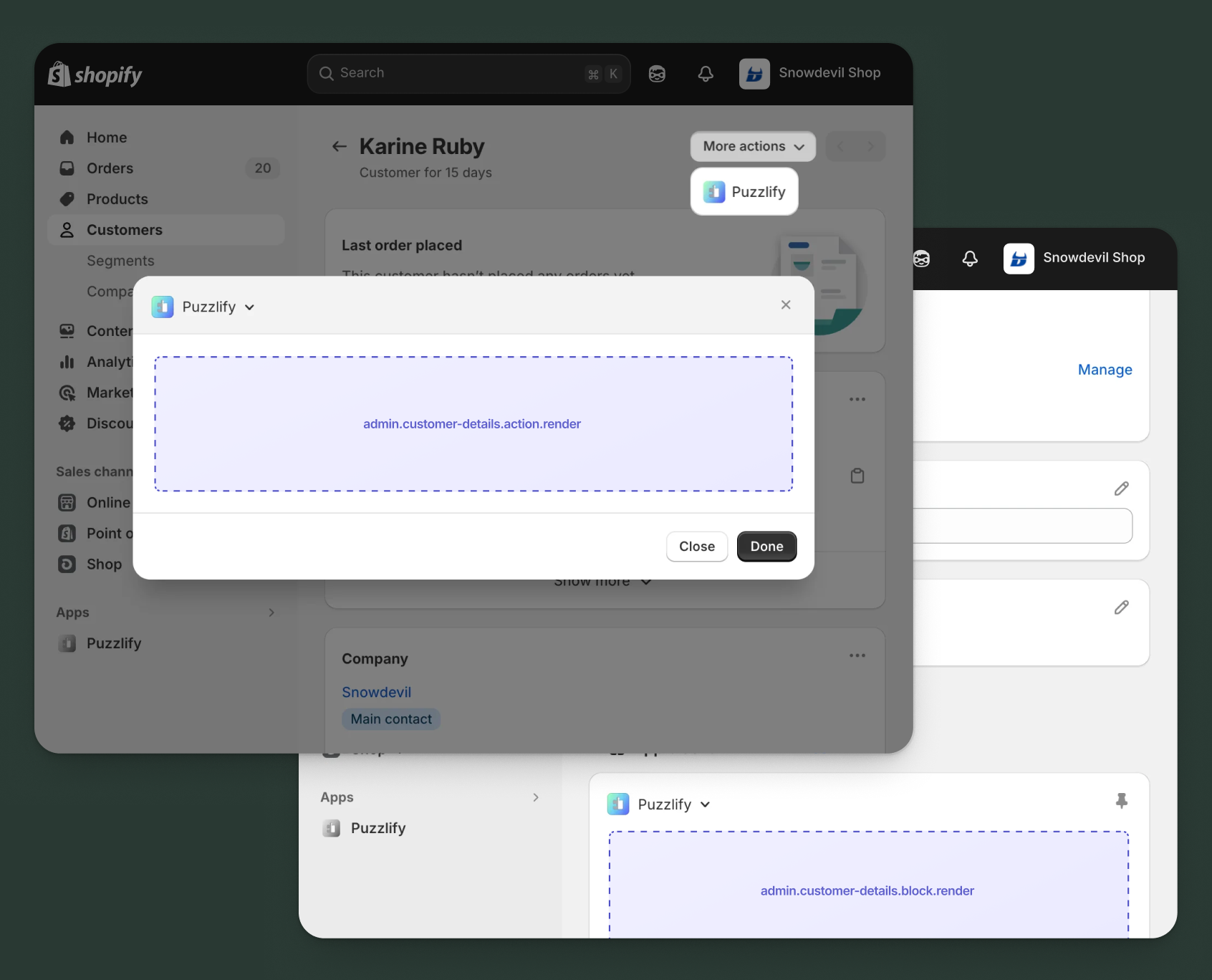
Anchor to Customer details targetsCustomer details targets
Use action and block targets to extend the customer details page. Add workflows and contextual information that help merchants manage customer relationships and access integrated customer data.
Action targets open as modal overlays from the More actions menu, while block targets display as inline cards. The examples demonstrate fetching data from Shopify's direct API or your app's backend.
Anchor to Customer details action ,[object Object]Customer details action target
admin.customer-details.action.render
Renders an admin action extension on the customer details page. Merchants can access this extension from the More actions menu. Use this target to provide workflows that operate on individual customer data, such as exporting customer information, syncing with CRM systems, or managing loyalty programs.
Extensions at this target can access information about the customer through the data property in the Action Extension API. The action renders in a modal overlay, providing space for multi-step workflows, forms, and confirmations.
Supported components
- Admin action
- Avatar
- Badge
- Banner
- Box
- Button
- Button group
- Checkbox
- Chip
- Choice list
- Clickable
- Clickable chip
- Color field
- Color picker
- Date field
- Date picker
- Divider
- Drop zone
- Email field
- Grid
- Heading
- Icon
- Image
- Link
- Menu
- Money field
- Number field
- Ordered list
- Paragraph
- Password field
- Query container
- Search field
- Section
- Select
- Spinner
- Stack
- Switch
- Table
- Text
- Text area
- Text field
- Thumbnail
- Tooltip
- Url field
- Unordered list
Available APIs
Supported components
- Admin action
- Avatar
- Badge
- Banner
- Box
- Button
- Button group
- Checkbox
- Chip
- Choice list
- Clickable
- Clickable chip
- Color field
- Color picker
- Date field
- Date picker
- Divider
- Drop zone
- Email field
- Grid
- Heading
- Icon
- Image
- Link
- Menu
- Money field
- Number field
- Ordered list
- Paragraph
- Password field
- Query container
- Search field
- Section
- Select
- Spinner
- Stack
- Switch
- Table
- Text
- Text area
- Text field
- Thumbnail
- Tooltip
- Url field
- Unordered list
Available APIs
jsx
Examples
Description
Add an action extension that exports customer data to an external CRM system. This example shows how to create a modal workflow that fetches customer details and sends them to a third-party service.
jsx
import {render} from 'preact';
import {useState} from 'preact/hooks';

export default async () => {
  render(<Extension />, document.body);
};

const Extension = () => {
  const [loading, setLoading] = useState(false);
  const [syncOrders, setSyncOrders] = useState(true);
  const [syncMetafields, setSyncMetafields] = useState(false);
  const [success, setSuccess] = useState(false);
  const [error, setError] = useState(false);

  const handleExport = async () => {
    setLoading(true);
    setSuccess(false);
    setError(false);
    const customerId = shopify.data.selected[0].id;

    try {
      // Fetch customer details from GraphQL Admin API
      const customerResponse = await fetch('shopify:admin/api/graphql.json', {
        method: 'POST',
        headers: {'Content-Type': 'application/json'},
        body: JSON.stringify({
          query: `
            query GetCustomer($id: ID!) {
              customer(id: $id) {
                id
                firstName
                lastName
                email
                phone
                ordersCount
                amountSpent {
                  amount
                  currencyCode
                }
                tags
                addresses {
                  address1
                  address2
                  city
                  province
                  country
                  zip
                }
              }
            }
          `,
          variables: {id: customerId},
        }),
      });

      const {data: customerData} = await customerResponse.json();

      // Export to CRM through your app's backend
      const response = await fetch('https://your-app.com/api/export-customer', {
        method: 'POST',
        headers: {'Content-Type': 'application/json'},
        body: JSON.stringify({
          customer: customerData.customer,
          includeOrders: syncOrders,
          includeMetafields: syncMetafields,
        }),
      });

      if (response.ok) {
        setSuccess(true);
        shopify.close();
      } else {
        setError(true);
      }
    } catch (err) {
      setError(true);
    } finally {
      setLoading(false);
    }
  };

  return (
    <s-admin-action heading="Export to CRM">
      {success && (
        <s-banner tone="success" dismissible={false}>
          Customer exported successfully!
        </s-banner>
      )}
      {error && (
        <s-banner tone="critical" dismissible={false}>
          Failed to export customer. Please try again.
        </s-banner>
      )}

      <s-section heading="Export options">
        <s-stack gap="base">
          <s-checkbox
            label="Include order history"
            checked={syncOrders}
            onChange={(event) => setSyncOrders(event.currentTarget.checked)}
          />
          <s-checkbox
            label="Include metafield data"
            checked={syncMetafields}
            onChange={(event) => setSyncMetafields(event.currentTarget.checked)}
          />
        </s-stack>
      </s-section>

      <s-button
        slot="primary-action"
        onClick={handleExport}
        disabled={loading || success}
      >
        {loading ? 'Exporting...' : 'Export Customer'}
      </s-button>
      <s-button slot="secondary-actions" onClick={() => shopify.close()}>
        Cancel
      </s-button>
    </s-admin-action>
  );
};
Description
Add an action extension that updates customer loyalty status in an external loyalty platform. This example demonstrates how to use the [GraphQL Admin API](/docs/api/admin-graphql) to fetch customer information and update their loyalty tier.
jsx
import {render} from 'preact';
import {useState, useEffect} from 'preact/hooks';

export default async () => {
  render(<Extension />, document.body);
};

const Extension = () => {
  const [loading, setLoading] = useState(false);
  const [fetching, setFetching] = useState(true);
  const [currentTier, setCurrentTier] = useState('');
  const [newTier, setNewTier] = useState('');
  const [success, setSuccess] = useState(false);
  const [error, setError] = useState(false);

  const tiers = ['Bronze', 'Silver', 'Gold', 'Platinum'];

  useEffect(() => {
    const fetchLoyaltyStatus = async () => {
      const customerId = shopify.data.selected[0].id;

      try {
        // Fetch current loyalty status from your app's backend
        const response = await fetch(
          `https://your-app.com/api/loyalty-status?customerId=${customerId}`
        );
        const data = await response.json();
        setCurrentTier(data.tier);
        setNewTier(data.tier);
      } catch (err) {
        console.error('Error fetching loyalty status:', err);
      } finally {
        setFetching(false);
      }
    };

    fetchLoyaltyStatus();
  }, []);

  const handleUpdate = async () => {
    setLoading(true);
    setSuccess(false);
    setError(false);
    const customerId = shopify.data.selected[0].id;

    try {
      // Update loyalty tier through your app's backend
      const response = await fetch('https://your-app.com/api/update-loyalty', {
        method: 'POST',
        headers: {'Content-Type': 'application/json'},
        body: JSON.stringify({
          customerId,
          tier: newTier,
        }),
      });

      if (response.ok) {
        setSuccess(true);
        shopify.close();
      } else {
        setError(true);
      }
    } catch (err) {
      setError(true);
    } finally {
      setLoading(false);
    }
  };

  if (fetching) {
    return (
      <s-admin-action heading="Update Loyalty Status">
        <s-spinner size="base" /> Loading loyalty information...
      </s-admin-action>
    );
  }

  return (
    <s-admin-action heading="Update Loyalty Status">
      {success && (
        <s-banner tone="success" dismissible={false}>
          Loyalty status updated successfully!
        </s-banner>
      )}
      {error && (
        <s-banner tone="critical" dismissible={false}>
          Failed to update loyalty status. Please try again.
        </s-banner>
      )}

      <s-section heading="Loyalty tier">
        <s-stack gap="base">
          <s-box>
            <s-text type="strong">Current tier:</s-text>
            <s-text> {currentTier}</s-text>
          </s-box>

          <s-select
            label="New tier"
            value={newTier}
            onChange={(event) => setNewTier(event.currentTarget.value)}
          >
            {tiers.map((tier) => (
              <option key={tier} value={tier}>
                {tier}
              </option>
            ))}
          </s-select>
        </s-stack>
      </s-section>

      <s-button
        slot="primary-action"
        onClick={handleUpdate}
        disabled={loading || success || newTier === currentTier}
      >
        {loading ? 'Updating...' : 'Update Tier'}
      </s-button>
      <s-button slot="secondary-actions" onClick={() => shopify.close()}>
        Cancel
      </s-button>
    </s-admin-action>
  );
};
Anchor to Customer details action (should render) ,[object Object]Customer details action (should render) target
admin.customer-details.action.should-render
Controls the render state of an admin action extension on the customer details page. Use this target to conditionally show or hide your action extension based on the customer's properties, such as order count, tags, or loyalty status.
This target returns a boolean value that determines whether the corresponding action extension appears in the More actions menu. The extension is evaluated each time the page loads.
Supported components
Available APIs
Supported components
Available APIs
jsx
Examples
Description
Conditionally display an action only for customers tagged as VIP. This example demonstrates how to use the `should-render` target to control extension visibility based on customer tags.
jsx
export default async () => {
  const customerId = shopify.data.selected[0].id;

  try {
    // Fetch customer tags from GraphQL Admin API
    const response = await fetch(
      'shopify:admin/api/graphql.json',
      {
        method: 'POST',
        headers: {'Content-Type': 'application/json'},
        body: JSON.stringify({
          query: `
            query GetCustomer($id: ID!) {
              customer(id: $id) {
                tags
              }
            }
          `,
          variables: {id: customerId},
        }),
      }
    );

    const {data} = await response.json();
    const tags = data.customer.tags;

    // Only show action for customers with VIP tag
    return {display: tags.includes('VIP')};
  } catch (err) {
    console.error('Error fetching customer:', err);
    return {display: false};
  }
};
Description
Conditionally display the action only for customers who have placed more than one order. This example demonstrates filtering based on order count using the [GraphQL Admin API](/docs/api/admin-graphql).
jsx
export default async () => {
  const customerId = shopify.data.selected[0].id;

  try {
    // Fetch customer order count
    // Tip: shopify.query() is a shorthand for GraphQL requests to the GraphQL Admin API
    const {data} = await shopify.query(
      `
        query GetCustomer($id: ID!) {
          customer(id: $id) {
            ordersCount
          }
        }
      `,
      {variables: {id: customerId}}
    );

    const ordersCount = data.customer.ordersCount;

    // Only show action for repeat customers
    return {display: ordersCount > 1};
  } catch (err) {
    console.error('Error fetching customer:', err);
    return {display: false};
  }
};
Anchor to Customer details block ,[object Object]Customer details block target
admin.customer-details.block.render
Renders an admin block extension inline on the customer details page. Use this target to display contextual information, analytics, or status updates related to the customer without requiring merchants to open a modal.
Extensions at this target appear as cards on the page and can show real-time data, insights, or quick actions. Blocks provide persistent visibility and are ideal for displaying information merchants need to see at a glance.
Supported components
- Admin block
- Avatar
- Badge
- Banner
- Box
- Button
- Button group
- Checkbox
- Chip
- Choice list
- Clickable
- Clickable chip
- Color field
- Color picker
- Date field
- Date picker
- Divider
- Drop zone
- Email field
- Form
- Grid
- Heading
- Icon
- Image
- Link
- Menu
- Money field
- Number field
- Ordered list
- Paragraph
- Password field
- Query container
- Search field
- Section
- Select
- Spinner
- Stack
- Switch
- Table
- Text
- Text area
- Text field
- Thumbnail
- Tooltip
- Url field
- Unordered list
Available APIs
Supported components
- Admin block
- Avatar
- Badge
- Banner
- Box
- Button
- Button group
- Checkbox
- Chip
- Choice list
- Clickable
- Clickable chip
- Color field
- Color picker
- Date field
- Date picker
- Divider
- Drop zone
- Email field
- Form
- Grid
- Heading
- Icon
- Image
- Link
- Menu
- Money field
- Number field
- Ordered list
- Paragraph
- Password field
- Query container
- Search field
- Section
- Select
- Spinner
- Stack
- Switch
- Table
- Text
- Text area
- Text field
- Thumbnail
- Tooltip
- Url field
- Unordered list
Available APIs
jsx
Examples
Description
Create a block extension that shows customer loyalty status, points balance, and tier information. This example demonstrates how to present valuable loyalty insights inline on the customer page.
jsx
import {render} from 'preact';
import {useState, useEffect} from 'preact/hooks';

export default async () => {
  render(<Extension />, document.body);
};

const Extension = () => {
  const [loyaltyData, setLoyaltyData] = useState(null);
  const [loading, setLoading] = useState(true);

  useEffect(() => {
    const fetchLoyaltyData = async () => {
      const customerId = shopify.data.selected[0].id;

      try {
        // Fetch loyalty data from your app's backend
        const response = await fetch(
          `https://your-app.com/api/loyalty-info?customerId=${customerId}`
        );
        const data = await response.json();
        setLoyaltyData(data);
      } catch (err) {
        console.error('Error fetching loyalty data:', err);
      } finally {
        setLoading(false);
      }
    };

    fetchLoyaltyData();
  }, []);

  if (loading) {
    return (
      <s-admin-block heading="Loyalty Status">
        <s-spinner size="base" /> Loading loyalty information...
      </s-admin-block>
    );
  }

  if (!loyaltyData) {
    return (
      <s-admin-block heading="Loyalty Status">
        <s-text>Unable to load loyalty information</s-text>
      </s-admin-block>
    );
  }

  return (
    <s-admin-block heading="Loyalty Status">
      <s-stack gap="base">
        <s-box>
          <s-badge tone={loyaltyData.tier === 'Platinum' ? 'success' : 'info'}>
            {loyaltyData.tier} Tier
          </s-badge>
        </s-box>

        <s-divider />

        <s-box>
          <s-heading>Points Balance</s-heading>
          <s-stack direction="inline" gap="small-300" alignItems="center">
            <s-text type="strong">{loyaltyData.points.toLocaleString()}</s-text>
            <s-text color="subdued">points</s-text>
          </s-stack>
        </s-box>

        <s-divider />

        <s-box>
          <s-heading>Lifetime Value</s-heading>
          <s-text>${loyaltyData.lifetimeValue.toLocaleString()}</s-text>
        </s-box>

        <s-divider />

        <s-box>
          <s-heading>Member Since</s-heading>
          <s-text color="subdued">{loyaltyData.memberSince}</s-text>
        </s-box>

        {loyaltyData.nextTier && (
          <>
            <s-divider />
            <s-box>
              <s-heading>Progress to {loyaltyData.nextTier}</s-heading>
              <s-text color="subdued">
                Spend ${loyaltyData.nextTierRequired} more to unlock
              </s-text>
            </s-box>
          </>
        )}
      </s-stack>
    </s-admin-block>
  );
};
Description
Create a block extension that shows customer information from an external CRM system. This example demonstrates how to enhance the customer profile with additional insights from third-party platforms.
jsx
import {render} from 'preact';
import {useState, useEffect} from 'preact/hooks';

export default async () => {
  render(<Extension />, document.body);
};

const Extension = () => {
  const [crmData, setCrmData] = useState(null);
  const [loading, setLoading] = useState(true);

  useEffect(() => {
    const fetchCrmData = async () => {
      const customerId = shopify.data.selected[0].id;

      try {
        // Fetch CRM data from your app's backend
        const response = await fetch(
          `https://your-app.com/api/crm-data?customerId=${customerId}`
        );
        const data = await response.json();
        setCrmData(data);
      } catch (err) {
        console.error('Error fetching CRM data:', err);
      } finally {
        setLoading(false);
      }
    };

    fetchCrmData();
  }, []);

  if (loading) {
    return (
      <s-admin-block heading="CRM Information">
        <s-spinner size="base" />
      </s-admin-block>
    );
  }

  if (!crmData) {
    return (
      <s-admin-block heading="CRM Information">
        <s-text>No CRM data available</s-text>
      </s-admin-block>
    );
  }

  return (
    <s-admin-block heading="CRM Information">
      <s-stack gap="base">
        <s-box>
          <s-heading>Account Status</s-heading>
          <s-badge tone={crmData.status === 'Active' ? 'success' : 'warning'}>
            {crmData.status}
          </s-badge>
        </s-box>

        <s-divider />

        <s-box>
          <s-heading>Last Contact</s-heading>
          <s-text>{crmData.lastContact}</s-text>
          <s-text color="subdued">via {crmData.contactMethod}</s-text>
        </s-box>

        <s-divider />

        <s-box>
          <s-heading>Assigned Sales Rep</s-heading>
          <s-text>{crmData.salesRep}</s-text>
        </s-box>

        <s-divider />

        <s-box>
          <s-heading>Open Tickets</s-heading>
          <s-text>{crmData.openTickets} active support tickets</s-text>
        </s-box>

        {crmData.notes && (
          <>
            <s-divider />
            <s-box>
              <s-heading>Recent Notes</s-heading>
              <s-text color="subdued">{crmData.notes}</s-text>
            </s-box>
          </>
        )}

        <s-button
          onClick={() => window.open(crmData.crmUrl, '_blank')}
          variant="secondary"
        >
          View in CRM
        </s-button>
      </s-stack>
    </s-admin-block>
  );
};
Anchor to Customer index targetsCustomer index targets
Use action targets to extend the customer index page with bulk operations and workflows that help merchants manage multiple customers efficiently.
Anchor to Customer index action ,[object Object]Customer index action target
admin.customer-index.action.render
Renders an admin action extension on the customer index page. Merchants can access this extension from the More actions menu. Use this target to provide workflows that operate on the customer list, such as exporting all customers, generating reports, or setting up batch operations.
Extensions at this target can access the page context through the Action Extension API. The action renders in a modal overlay, providing space for configuration and execution of list-wide operations.
Supported components
- Admin action
- Avatar
- Badge
- Banner
- Box
- Button
- Button group
- Checkbox
- Chip
- Choice list
- Clickable
- Clickable chip
- Color field
- Color picker
- Date field
- Date picker
- Divider
- Drop zone
- Email field
- Grid
- Heading
- Icon
- Image
- Link
- Menu
- Money field
- Number field
- Ordered list
- Paragraph
- Password field
- Query container
- Search field
- Section
- Select
- Spinner
- Stack
- Switch
- Table
- Text
- Text area
- Text field
- Thumbnail
- Tooltip
- Url field
- Unordered list
Available APIs
Supported components
- Admin action
- Avatar
- Badge
- Banner
- Box
- Button
- Button group
- Checkbox
- Chip
- Choice list
- Clickable
- Clickable chip
- Color field
- Color picker
- Date field
- Date picker
- Divider
- Drop zone
- Email field
- Grid
- Heading
- Icon
- Image
- Link
- Menu
- Money field
- Number field
- Ordered list
- Paragraph
- Password field
- Query container
- Search field
- Section
- Select
- Spinner
- Stack
- Switch
- Table
- Text
- Text area
- Text field
- Thumbnail
- Tooltip
- Url field
- Unordered list
Available APIs
jsx
Examples
Description
Add an action extension that generates a comprehensive customer report. This example shows how to create a modal workflow that allows merchants to configure and generate reports from the customer list.
jsx
import {render} from 'preact';
import {useState} from 'preact/hooks';

export default async () => {
  render(<Extension />, document.body);
};

const Extension = () => {
  const [loading, setLoading] = useState(false);
  const [reportType, setReportType] = useState('summary');
  const [dateRange, setDateRange] = useState('30days');
  const [success, setSuccess] = useState(false);
  const [error, setError] = useState(false);

  const handleGenerate = async () => {
    setLoading(true);
    setSuccess(false);
    setError(false);

    try {
      // Generate report through your app's backend
      const response = await fetch('https://your-app.com/api/generate-report', {
        method: 'POST',
        headers: {'Content-Type': 'application/json'},
        body: JSON.stringify({
          reportType,
          dateRange,
        }),
      });

      if (response.ok) {
        const blob = await response.blob();
        const url = window.URL.createObjectURL(blob);
        const a = document.createElement('a');
        a.href = url;
        a.download = `customer-report-${Date.now()}.pdf`;
        a.click();
        setSuccess(true);
        shopify.close();
      } else {
        setError(true);
      }
    } catch (err) {
      setError(true);
    } finally {
      setLoading(false);
    }
  };

  return (
    <s-admin-action heading="Generate Customer Report">
      {success && (
        <s-banner tone="success" dismissible={false}>
          Report generated successfully!
        </s-banner>
      )}
      {error && (
        <s-banner tone="critical" dismissible={false}>
          Failed to generate report. Please try again.
        </s-banner>
      )}

      <s-section heading="Report configuration">
        <s-stack gap="base">
          <s-select
            label="Report type"
            value={reportType}
            onChange={(event) => setReportType(event.currentTarget.value)}
          >
            <option value="summary">Customer Summary</option>
            <option value="lifetime-value">Lifetime Value Analysis</option>
            <option value="retention">Retention Report</option>
            <option value="segmentation">Segmentation Analysis</option>
          </s-select>

          <s-select
            label="Date range"
            value={dateRange}
            onChange={(event) => setDateRange(event.currentTarget.value)}
          >
            <option value="7days">Last 7 days</option>
            <option value="30days">Last 30 days</option>
            <option value="90days">Last 90 days</option>
            <option value="1year">Last year</option>
            <option value="all">All time</option>
          </s-select>
        </s-stack>
      </s-section>

      <s-button
        slot="primary-action"
        onClick={handleGenerate}
        disabled={loading || success}
      >
        {loading ? 'Generating...' : 'Generate Report'}
      </s-button>
      <s-button slot="secondary-actions" onClick={() => shopify.close()}>
        Cancel
      </s-button>
    </s-admin-action>
  );
};
Description
Add an action extension that syncs all customers to an external marketing or analytics platform. This example shows how to create a workflow that initiates a background sync job for the entire customer list.
jsx
import {render} from 'preact';
import {useState} from 'preact/hooks';

export default async () => {
  render(<Extension />, document.body);
};

const Extension = () => {
  const [loading, setLoading] = useState(false);
  const [platform, setPlatform] = useState('mailchimp');
  const [syncType, setSyncType] = useState('full');
  const [success, setSuccess] = useState(false);
  const [error, setError] = useState(false);

  const handleSync = async () => {
    setLoading(true);
    setSuccess(false);
    setError(false);

    try {
      // Initiate sync through your app's backend
      const response = await fetch('https://your-app.com/api/sync-customers', {
        method: 'POST',
        headers: {'Content-Type': 'application/json'},
        body: JSON.stringify({
          platform,
          syncType,
        }),
      });

      if (response.ok) {
        setSuccess(true);
        shopify.close();
      } else {
        setError(true);
      }
    } catch (err) {
      setError(true);
    } finally {
      setLoading(false);
    }
  };

  return (
    <s-admin-action heading="Sync Customers">
      {success && (
        <s-banner tone="success" dismissible={false}>
          Customer sync initiated successfully! You'll receive an email when complete.
        </s-banner>
      )}
      {error && (
        <s-banner tone="critical" dismissible={false}>
          Failed to initiate sync. Please try again.
        </s-banner>
      )}

      <s-section heading="Sync settings">
        <s-stack gap="base">
          <s-select
            label="Platform"
            value={platform}
            onChange={(event) => setPlatform(event.currentTarget.value)}
          >
            <option value="mailchimp">Mailchimp</option>
            <option value="klaviyo">Klaviyo</option>
            <option value="hubspot">HubSpot</option>
            <option value="salesforce">Salesforce</option>
          </s-select>

          <s-select
            label="Sync type"
            value={syncType}
            onChange={(event) => setSyncType(event.currentTarget.value)}
          >
            <option value="full">Full sync (all customers)</option>
            <option value="incremental">Incremental (changes only)</option>
            <option value="new">New customers only</option>
          </s-select>

          <s-banner tone="info" dismissible={false}>
            This will sync all customers in the background. Large customer lists may take several minutes to complete.
          </s-banner>
        </s-stack>
      </s-section>

      <s-button
        slot="primary-action"
        onClick={handleSync}
        disabled={loading || success}
      >
        {loading ? 'Starting Sync...' : 'Start Sync'}
      </s-button>
      <s-button slot="secondary-actions" onClick={() => shopify.close()}>
        Cancel
      </s-button>
    </s-admin-action>
  );
};
Anchor to Customer index action (should render) ,[object Object]Customer index action (should render) target
admin.customer-index.action.should-render
Controls the render state of an admin action extension on the customer index page. Use this target to conditionally show or hide your action extension based on business logic, user permissions, or app configuration.
This target returns a boolean value that determines whether the corresponding action extension appears in the More actions menu. The extension is evaluated each time the page loads.
Supported components
Available APIs
Supported components
Available APIs
jsx
Examples
Description
Conditionally display an action only when the app is properly configured. This example demonstrates how to check configuration status before showing the extension.
jsx
export default async () => {
  try {
    // Check if app is configured through your backend
    const response = await fetch(
      'https://your-app.com/api/check-configuration'
    );
    const {configured} = await response.json();

    // Only show action if app is configured
    return {display: configured};
  } catch (err) {
    console.error('Error checking configuration:', err);
    return {display: false};
  }
};
Description
Conditionally display an action only when the merchant's subscription plan includes customer analytics features. This example demonstrates checking plan entitlements before showing the extension.
jsx
export default async () => {
  try {
    // Check plan features through your app's backend
    const response = await fetch(
      'https://your-app.com/api/check-plan-features'
    );
    const {features} = await response.json();

    // Only show action if customer analytics feature is available
    return {display: features.includes('customer-analytics')};
  } catch (err) {
    console.error('Error checking plan features:', err);
    return {display: false};
  }
};
Anchor to Customer index selection action ,[object Object]Customer index selection action target
admin.customer-index.selection-action.render
Renders a selection action extension on the customer index page when multiple customers are selected. Merchants can access this extension from the More actions menu of the resource list. Use this target to provide bulk operations on selected customers, such as bulk export, bulk tagging, or bulk updates.
Extensions at this target can access the IDs of selected customers through the data property in the Action Extension API. The action renders in a modal overlay designed for batch processing.
Supported components
- Admin action
- Avatar
- Badge
- Banner
- Box
- Button
- Button group
- Checkbox
- Chip
- Choice list
- Clickable
- Clickable chip
- Color field
- Color picker
- Date field
- Date picker
- Divider
- Drop zone
- Email field
- Grid
- Heading
- Icon
- Image
- Link
- Menu
- Money field
- Number field
- Ordered list
- Paragraph
- Password field
- Query container
- Search field
- Section
- Select
- Spinner
- Stack
- Switch
- Table
- Text
- Text area
- Text field
- Thumbnail
- Tooltip
- Url field
- Unordered list
Available APIs
Supported components
- Admin action
- Avatar
- Badge
- Banner
- Box
- Button
- Button group
- Checkbox
- Chip
- Choice list
- Clickable
- Clickable chip
- Color field
- Color picker
- Date field
- Date picker
- Divider
- Drop zone
- Email field
- Grid
- Heading
- Icon
- Image
- Link
- Menu
- Money field
- Number field
- Ordered list
- Paragraph
- Password field
- Query container
- Search field
- Section
- Select
- Spinner
- Stack
- Switch
- Table
- Text
- Text area
- Text field
- Thumbnail
- Tooltip
- Url field
- Unordered list
Available APIs
jsx
Examples
Description
Add a selection action extension that exports selected customers to a marketing platform. This example shows how to process multiple customer IDs and sync them with an external service.
jsx
import {render} from 'preact';
import {useState, useEffect} from 'preact/hooks';

export default async () => {
  render(<Extension />, document.body);
};

const Extension = () => {
  const [loading, setLoading] = useState(false);
  const [customerCount, setCustomerCount] = useState(0);
  const [listId, setListId] = useState('');
  const [lists, setLists] = useState([]);
  const [success, setSuccess] = useState(false);
  const [error, setError] = useState(false);

  useEffect(() => {
    const selectedCustomers = shopify.data.selected || [];
    setCustomerCount(selectedCustomers.length);

    // Fetch available marketing lists
    const fetchLists = async () => {
      try {
        const response = await fetch('https://your-app.com/api/marketing-lists');
        const data = await response.json();
        setLists(data.lists);
        if (data.lists.length > 0) {
          setListId(data.lists[0].id);
        }
      } catch (err) {
        console.error('Error fetching lists:', err);
      }
    };

    fetchLists();
  }, []);

  const handleExport = async () => {
    setLoading(true);
    setSuccess(false);
    setError(false);
    const customerIds = shopify.data.selected.map((customer) => customer.id);

    try {
      // Fetch customer emails from GraphQL Admin API
      const customerResponse = await fetch('shopify:admin/api/graphql.json', {
        method: 'POST',
        headers: {'Content-Type': 'application/json'},
        body: JSON.stringify({
          query: `
            query GetCustomers($ids: [ID!]!) {
              nodes(ids: $ids) {
                ... on Customer {
                  id
                  email
                  firstName
                  lastName
                  tags
                }
              }
            }
          `,
          variables: {ids: customerIds},
        }),
      });

      const {data: customerData} = await customerResponse.json();

      // Export to marketing platform through your app's backend
      const response = await fetch('https://your-app.com/api/export-to-marketing', {
        method: 'POST',
        headers: {'Content-Type': 'application/json'},
        body: JSON.stringify({
          customers: customerData.nodes,
          listId,
        }),
      });

      if (response.ok) {
        setSuccess(true);
        shopify.close();
      } else {
        setError(true);
      }
    } catch (err) {
      setError(true);
    } finally {
      setLoading(false);
    }
  };

  return (
    <s-admin-action heading="Export to Marketing Platform">
      {success && (
        <s-banner tone="success" dismissible={false}>
          {customerCount} customers exported successfully!
        </s-banner>
      )}
      {error && (
        <s-banner tone="critical" dismissible={false}>
          Failed to export customers. Please try again.
        </s-banner>
      )}

      <s-section heading="Export settings">
        <s-stack gap="base">
          <s-text>
            Exporting {customerCount} selected customer{customerCount !== 1 ? 's' : ''}
          </s-text>

          <s-select
            label="Marketing list"
            value={listId}
            onChange={(event) => setListId(event.currentTarget.value)}
          >
            {lists.map((list) => (
              <option key={list.id} value={list.id}>
                {list.name} ({list.subscriberCount} subscribers)
              </option>
            ))}
          </s-select>
        </s-stack>
      </s-section>

      <s-button
        slot="primary-action"
        onClick={handleExport}
        disabled={loading || success || !listId}
      >
        {loading ? 'Exporting...' : 'Export Customers'}
      </s-button>
      <s-button slot="secondary-actions" onClick={() => shopify.close()}>
        Cancel
      </s-button>
    </s-admin-action>
  );
};
Description
Add a selection action extension that applies tags to multiple customers at once. This example demonstrates bulk operations using the Admin GraphQL API.
jsx
import {render} from 'preact';
import {useState} from 'preact/hooks';

export default async () => {
  render(<Extension />, document.body);
};

const Extension = () => {
  const [loading, setLoading] = useState(false);
  const [tags, setTags] = useState('');
  const [success, setSuccess] = useState(false);
  const [error, setError] = useState(false);
  const customerCount = shopify.data.selected?.length || 0;

  const handleTag = async () => {
    setLoading(true);
    setSuccess(false);
    setError(false);
    const customerIds = shopify.data.selected.map((customer) => customer.id);
    const tagArray = tags.split(',').map((tag) => tag.trim()).filter(Boolean);

    try {
      // Apply tags through your app's backend
      const response = await fetch('https://your-app.com/api/bulk-tag', {
        method: 'POST',
        headers: {'Content-Type': 'application/json'},
        body: JSON.stringify({
          customerIds,
          tags: tagArray,
        }),
      });

      if (response.ok) {
        setSuccess(true);
        shopify.close();
      } else {
        setError(true);
      }
    } catch (err) {
      setError(true);
    } finally {
      setLoading(false);
    }
  };

  return (
    <s-admin-action heading="Bulk Tag Customers">
      {success && (
        <s-banner tone="success" dismissible={false}>
          Tags applied to {customerCount} customers!
        </s-banner>
      )}
      {error && (
        <s-banner tone="critical" dismissible={false}>
          Failed to apply tags. Please try again.
        </s-banner>
      )}

      <s-section heading="Tag settings">
        <s-stack gap="base">
          <s-text>
            Apply tags to {customerCount} selected customer{customerCount !== 1 ? 's' : ''}
          </s-text>

          <s-text-field
            label="Tags (comma-separated)"
            value={tags}
            onChange={(event) => setTags(event.currentTarget.value)}
            placeholder="VIP, Newsletter, Holiday2024"
          />

          <s-text color="subdued">
            Enter one or more tags separated by commas
          </s-text>
        </s-stack>
      </s-section>

      <s-button
        slot="primary-action"
        onClick={handleTag}
        disabled={loading || success || !tags.trim()}
      >
        {loading ? 'Applying Tags...' : 'Apply Tags'}
      </s-button>
      <s-button slot="secondary-actions" onClick={() => shopify.close()}>
        Cancel
      </s-button>
    </s-admin-action>
  );
};
Anchor to Customer index selection action (should render) ,[object Object]Customer index selection action (should render) target
admin.customer-index.selection-action.should-render
Controls the render state of a selection action extension on the customer index page when multiple customers are selected. Use this target to conditionally show or hide your bulk action extension based on the number of selected customers, their properties, or app configuration.
This target returns a boolean value that determines whether the corresponding selection action extension appears in the More actions menu. The extension is evaluated each time the selection changes.
Supported components
Available APIs
Supported components
Available APIs
jsx
Examples
Description
Conditionally display a bulk action only when a reasonable number of customers are selected. This example demonstrates how to limit bulk operations based on selection size.
jsx
export default async () => {
  const selectedCount = shopify.data.selected?.length || 0;

  // Only show action if between 1 and 100 customers are selected
  return {display: selectedCount > 0 && selectedCount <= 100};
};
Description
Conditionally display a bulk action based on whether selected customers meet specific criteria. This example demonstrates checking customer properties before showing the extension.
jsx
export default async () => {
  const selectedIds = shopify.data.selected?.map((customer) => customer.id) || [];
  const selectedCount = selectedIds.length;

  // Don't show for empty selections
  if (selectedCount === 0) {
    return {display: false};
  }

  try {
    // Check if selected customers are eligible for the action
    const response = await fetch(
      'https://your-app.com/api/check-eligible-customers',
      {
        method: 'POST',
        headers: {'Content-Type': 'application/json'},
        body: JSON.stringify({customerIds: selectedIds}),
      }
    );
    const {eligibleCount} = await response.json();

    // Only show action if at least one selected customer is eligible
    return {display: eligibleCount > 0};
  } catch (err) {
    console.error('Error checking eligibility:', err);
    return {display: false};
  }
};
Anchor to Customer segment targetsCustomer segment targets
Use action and runnable targets to extend customer segment pages with workflows that help merchants use and export their customer segments for marketing and analysis. Action targets render UI workflows for segment operations, while runnable targets return data to populate pre-built customer segment templates.
Anchor to Customer segment details action ,[object Object]Customer segment details action target
admin.customer-segment-details.action.render
Renders an admin action extension on the customer segment details page. Merchants can access this extension from the Use segment button. Use this target to provide workflows that operate on customer segments, such as exporting segments to marketing platforms, creating targeted campaigns, or syncing with external analytics tools.
Extensions at this target can access information about the segment through the data property in the Action Extension API. The action renders in a modal overlay, providing space for segment-specific workflows.
Supported components
- Admin action
- Avatar
- Badge
- Banner
- Box
- Button
- Button group
- Checkbox
- Chip
- Choice list
- Clickable
- Clickable chip
- Color field
- Color picker
- Date field
- Date picker
- Divider
- Drop zone
- Email field
- Grid
- Heading
- Icon
- Image
- Link
- Menu
- Money field
- Number field
- Ordered list
- Paragraph
- Password field
- Query container
- Search field
- Section
- Select
- Spinner
- Stack
- Switch
- Table
- Text
- Text area
- Text field
- Thumbnail
- Tooltip
- Url field
- Unordered list
Available APIs
Supported components
- Admin action
- Avatar
- Badge
- Banner
- Box
- Button
- Button group
- Checkbox
- Chip
- Choice list
- Clickable
- Clickable chip
- Color field
- Color picker
- Date field
- Date picker
- Divider
- Drop zone
- Email field
- Grid
- Heading
- Icon
- Image
- Link
- Menu
- Money field
- Number field
- Ordered list
- Paragraph
- Password field
- Query container
- Search field
- Section
- Select
- Spinner
- Stack
- Switch
- Table
- Text
- Text area
- Text field
- Thumbnail
- Tooltip
- Url field
- Unordered list
Available APIs
jsx
Examples
Description
Add an action extension that exports a customer segment to an email marketing platform. This example shows how to fetch segment data and create a synchronized audience in an external service.
jsx
import {render} from 'preact';
import {useState, useEffect} from 'preact/hooks';

export default async () => {
  render(<Extension />, document.body);
};

const Extension = () => {
  const [loading, setLoading] = useState(false);
  const [fetching, setFetching] = useState(true);
  const [segmentName, setSegmentName] = useState('');
  const [customerCount, setCustomerCount] = useState(0);
  const [audienceName, setAudienceName] = useState('');
  const [success, setSuccess] = useState(false);
  const [error, setError] = useState(false);

  useEffect(() => {
    const fetchSegmentDetails = async () => {
      const segmentId = shopify.data.selected[0].id;

      try {
        // Fetch segment details from GraphQL Admin API
        const response = await fetch('shopify:admin/api/graphql.json', {
          method: 'POST',
          headers: {'Content-Type': 'application/json'},
          body: JSON.stringify({
            query: `
              query GetSegment($id: ID!) {
                segment(id: $id) {
                  name
                  query
                }
              }
            `,
            variables: {id: segmentId},
          }),
        });

        const {data} = await response.json();
        setSegmentName(data.segment.name);
        setAudienceName(data.segment.name);

        // Get customer count from your app's backend
        const countResponse = await fetch(
          `https://your-app.com/api/segment-count?segmentId=${segmentId}`
        );
        const countData = await countResponse.json();
        setCustomerCount(countData.count);
      } catch (err) {
        console.error('Error fetching segment:', err);
      } finally {
        setFetching(false);
      }
    };

    fetchSegmentDetails();
  }, []);

  const handleExport = async () => {
    setLoading(true);
    setSuccess(false);
    setError(false);
    const segmentId = shopify.data.selected[0].id;

    try {
      // Export segment through your app's backend
      const response = await fetch('https://your-app.com/api/export-segment', {
        method: 'POST',
        headers: {'Content-Type': 'application/json'},
        body: JSON.stringify({
          segmentId,
          audienceName,
        }),
      });

      if (response.ok) {
        setSuccess(true);
        shopify.close();
      } else {
        setError(true);
      }
    } catch (err) {
      setError(true);
    } finally {
      setLoading(false);
    }
  };

  if (fetching) {
    return (
      <s-admin-action heading="Export to Email Platform">
        <s-spinner size="base" /> Loading segment details...
      </s-admin-action>
    );
  }

  return (
    <s-admin-action heading="Export to Email Platform">
      {success && (
        <s-banner tone="success" dismissible={false}>
          Segment exported successfully! Audience "{audienceName}" created.
        </s-banner>
      )}
      {error && (
        <s-banner tone="critical" dismissible={false}>
          Failed to export segment. Please try again.
        </s-banner>
      )}

      <s-section heading="Segment information">
        <s-stack gap="base">
          <s-box>
            <s-heading>Source segment</s-heading>
            <s-text>{segmentName}</s-text>
          </s-box>

          <s-box>
            <s-heading>Customer count</s-heading>
            <s-text>{customerCount.toLocaleString()} customers</s-text>
          </s-box>

          <s-text-field
            label="Audience name"
            value={audienceName}
            onChange={(event) => setAudienceName(event.currentTarget.value)}
          />
        </s-stack>
      </s-section>

      <s-button
        slot="primary-action"
        onClick={handleExport}
        disabled={loading || success || !audienceName.trim()}
      >
        {loading ? 'Exporting...' : 'Create Audience'}
      </s-button>
      <s-button slot="secondary-actions" onClick={() => shopify.close()}>
        Cancel
      </s-button>
    </s-admin-action>
  );
};
Description
Add an action extension that creates a targeted advertising campaign based on a customer segment. This example demonstrates how to integrate segment data with advertising platforms.
jsx
import {render} from 'preact';
import {useState} from 'preact/hooks';

export default async () => {
  render(<Extension />, document.body);
};

const Extension = () => {
  const [loading, setLoading] = useState(false);
  const [campaignName, setCampaignName] = useState('');
  const [budget, setBudget] = useState('100');
  const [duration, setDuration] = useState('7days');
  const [success, setSuccess] = useState(false);
  const [error, setError] = useState(false);

  const handleCreate = async () => {
    setLoading(true);
    setSuccess(false);
    setError(false);
    const segmentId = shopify.data.selected[0].id;

    try {
      // Create campaign through your app's backend
      const response = await fetch('https://your-app.com/api/create-campaign', {
        method: 'POST',
        headers: {'Content-Type': 'application/json'},
        body: JSON.stringify({
          segmentId,
          campaignName,
          budget: parseFloat(budget),
          duration,
        }),
      });

      if (response.ok) {
        setSuccess(true);
        shopify.close();
      } else {
        setError(true);
      }
    } catch (err) {
      setError(true);
    } finally {
      setLoading(false);
    }
  };

  return (
    <s-admin-action heading="Create Ad Campaign">
      {success && (
        <s-banner tone="success" dismissible={false}>
          Campaign created successfully!
        </s-banner>
      )}
      {error && (
        <s-banner tone="critical" dismissible={false}>
          Failed to create campaign. Please try again.
        </s-banner>
      )}

      <s-section heading="Campaign settings">
        <s-stack gap="base">
          <s-text-field
            label="Campaign name"
            value={campaignName}
            onChange={(event) => setCampaignName(event.currentTarget.value)}
            placeholder="Holiday promotion for high-value customers"
          />

          <s-number-field
            label="Daily budget ($)"
            prefix="$"
            value={budget}
            onChange={(event) => setBudget(event.currentTarget.value)}
            min="10"
          />

          <s-select
            label="Campaign duration"
            value={duration}
            onChange={(event) => setDuration(event.currentTarget.value)}
          >
            <option value="7days">7 days</option>
            <option value="14days">14 days</option>
            <option value="30days">30 days</option>
            <option value="ongoing">Ongoing</option>
          </s-select>
        </s-stack>
      </s-section>

      <s-button
        slot="primary-action"
        onClick={handleCreate}
        disabled={loading || success || !campaignName.trim()}
      >
        {loading ? 'Creating...' : 'Create Campaign'}
      </s-button>
      <s-button slot="secondary-actions" onClick={() => shopify.close()}>
        Cancel
      </s-button>
    </s-admin-action>
  );
};
Anchor to Customer segment details action (should render) ,[object Object]Customer segment details action (should render) target
admin.customer-segment-details.action.should-render
Controls the render state of an admin action extension on the customer segment details page. Use this target to conditionally show or hide your action extension based on the segment's properties, such as customer count, segment query complexity, or app configuration.
This target returns a boolean value that determines whether the corresponding action extension appears in the Use segment button menu. The extension is evaluated each time the page loads.
Supported components
Available APIs
Supported components
Available APIs
jsx
Examples
Description
Conditionally display an action only for segments that contain customers. This example demonstrates how to check segment size before showing the extension.
jsx
export default async () => {
  const segmentId = shopify.data.selected[0].id;

  try {
    // Check segment size through your app's backend
    const response = await fetch(
      `https://your-app.com/api/segment-count?segmentId=${segmentId}`
    );
    const {count} = await response.json();

    // Only show action if segment has at least 10 customers
    return {display: count >= 10};
  } catch (err) {
    console.error('Error checking segment size:', err);
    return {display: false};
  }
};
Description
Conditionally display an action only for segments with valid query syntax. This example demonstrates validating segment queries through your app's backend before showing workflow actions.
jsx
export default async () => {
  const segmentId = shopify.data.selected[0].id;

  try {
    // Fetch segment query from GraphQL Admin API
    const response = await fetch('shopify:admin/api/graphql.json', {
      method: 'POST',
      headers: {'Content-Type': 'application/json'},
      body: JSON.stringify({
        query: `
          query GetSegment($id: ID!) {
            segment(id: $id) {
              query
            }
          }
        `,
        variables: {id: segmentId},
      }),
    });

    const {data} = await response.json();

    // Validate segment query through your app's backend
    const validationResponse = await fetch(
      'https://your-app.com/api/validate-segment-query',
      {
        method: 'POST',
        headers: {'Content-Type': 'application/json'},
        body: JSON.stringify({query: data.segment.query}),
      }
    );
    const {isValid} = await validationResponse.json();

    // Only show action if segment query is valid
    return {display: isValid};
  } catch (err) {
    console.error('Error validating segment:', err);
    return {display: false};
  }
};
Anchor to Customer segmentation templates ,[object Object]Customer segmentation templates target
admin.customers.segmentation-templates.data
Use this target to provide a customer segments template extension that returns an array of templates in the customer segment editor. The templates include a title, description, query, and optional dependencies.
This target provides merchants with pre-built customer segment queries for common use cases like identifying VIP customers, finding at-risk customers, or creating cohorts based on purchase behavior.
Extensions at this target use the Customer Segment Template Extension API to return template data. Templates appear in the segment editor's template gallery and can be inserted with a single click.
jsx
Examples
Description
Provide customer segment templates that help merchants identify and target their most valuable customers. This example shows how to create templates for high-value customer segments.
jsx
export default async () => {
  const templates = [
    {
      title: 'High Lifetime Value Customers',
      description: [
        'Identify your most valuable customers based on total spending.',
        'Perfect for VIP programs and exclusive promotions.',
      ],
      query: 'amount_spent > 1000',
      queryToInsert: 'amount_spent > 1000',
      createdOn: '2024-01-15T00:00:00Z',
    },
    {
      title: 'Frequent Buyers',
      description: 'Find customers who have purchased multiple times and are likely to buy again.',
      query: 'number_of_orders >= 5 AND last_order_date >= -90 days',
      queryToInsert: 'number_of_orders >= 5 AND last_order_date >= -90 days',
      createdOn: '2024-01-15T00:00:00Z',
    },
    {
      title: 'Recent High-Value Customers',
      description: [
        'Target high-value customers who have purchased recently.',
        'Perfect for loyalty programs and exclusive offers.',
      ],
      query: 'amount_spent > 500 AND last_order_date >= -30 days',
      queryToInsert: 'amount_spent > 500 AND last_order_date >= -30 days',
      createdOn: '2024-02-01T00:00:00Z',
    },
  ];

  return {templates};
};
Description
Provide customer segment templates that help merchants identify customers at risk of churning and opportunities for re-engagement. This example demonstrates templates focused on customer retention.
jsx
export default async () => {
  const templates = [
    {
      title: 'At-Risk Customers',
      description: [
        'Find customers who previously purchased but haven\'t ordered recently.',
        'Great for win-back campaigns and re-engagement emails.',
      ],
      query: 'number_of_orders >= 2 AND last_order_date <= -180 days',
      queryToInsert: 'number_of_orders >= 2 AND last_order_date <= -180 days',
      createdOn: '2024-01-15T00:00:00Z',
    },
    {
      title: 'One-Time Buyers',
      description: 'Identify customers who made only one purchase and encourage repeat orders.',
      query: 'number_of_orders = 1 AND last_order_date >= -90 days',
      queryToInsert: 'number_of_orders = 1 AND last_order_date >= -90 days',
      createdOn: '2024-01-15T00:00:00Z',
    },
    {
      title: 'Lapsed High-Value Customers',
      description: [
        'Target valuable customers who haven\'t purchased in a while.',
        'Combine high spending with recent inactivity.',
      ],
      query: 'amount_spent > 500 AND last_order_date <= -120 days',
      queryToInsert: 'amount_spent > 500 AND last_order_date <= -120 days',
      createdOn: '2024-01-15T00:00:00Z',
    },
    {
      title: 'Email Subscribers Without Orders',
      description: 'Find customers who subscribed to marketing but never purchased.',
      query: 'email_marketing_consent.state = SUBSCRIBED AND number_of_orders = 0',
      queryToInsert: 'email_marketing_consent.state = SUBSCRIBED AND number_of_orders = 0',
      createdOn: '2024-01-15T00:00:00Z',
    },
  ];

  return {templates};
};
Description
Provide customer segment templates that help merchants create cohorts based on customer acquisition and behavior patterns. This example shows templates for cohort analysis.
jsx
export default async () => {
  const templates = [
    {
      title: 'New Customers This Month',
      description: 'Target customers who made their first purchase within the last 30 days.',
      query: 'first_order_date >= -30 days',
      queryToInsert: 'first_order_date >= -30 days',
      createdOn: '2024-01-15T00:00:00Z',
    },
    {
      title: 'Recent Holiday Shoppers',
      description: [
        'Find customers who purchased in the last quarter of the year.',
        'Perfect for planning seasonal campaigns.',
      ],
      query: 'last_order_date >= -120 days',
      queryToInsert: 'last_order_date >= -120 days',
      createdOn: '2024-01-15T00:00:00Z',
    },
    {
      title: 'Active Newsletter Subscribers',
      description: 'Identify customers who accept email marketing and have purchased recently.',
      query: 'email_marketing_consent.state = SUBSCRIBED AND last_order_date >= -60 days',
      queryToInsert: 'email_marketing_consent.state = SUBSCRIBED AND last_order_date >= -60 days',
      createdOn: '2024-01-15T00:00:00Z',
    },
    {
      title: 'Engaged Recent Customers',
      description: [
        'Target customers who joined recently and are actively purchasing.',
        'Great for onboarding campaigns and early engagement.',
      ],
      query: 'first_order_date >= -60 days AND number_of_orders >= 2',
      queryToInsert: 'first_order_date >= -60 days AND number_of_orders >= 2',
      createdOn: '2024-03-01T00:00:00Z',
    },
  ];

  return {templates};
};
Anchor to Best practicesBest practices
- Respect customer privacy: Customer data is sensitive. Always handle customer information securely, comply with privacy regulations (GDPR, CCPA), and only request the data your extension truly needs to function.
- Handle email consent properly: When exporting customers for marketing purposes, always respect email marketing consent status and provide merchants with information about consent requirements to maintain compliance.
- Support segmentation use cases: When creating customer segment templates, focus on actionable segments that help merchants make business decisions. Include clear descriptions explaining when and why to use each template.
Anchor to LimitationsLimitations
- Single target per module: Each
[[extensions.targeting]]entry in your TOML configuration maps one target to one module file. - Segment template query validation: Customer segment template queries aren't validated at deployment. Invalid queries fail silently when merchants use the template. Test your template queries in the segment editor before deploying them to ensure they work correctly and return expected results.
- Segment action location: The
admin.customer-segment-details.action.rendertarget appears under the Use segment button, not in More actions. - Block target visibility: Block extensions must be manually added and pinned by merchants before they appear.
- Block collapse behavior: Returning
nullfrom a block extension collapses the block rather than removing it from the page. Blocks can't be fully hidden at runtime.