Draft orders
Draft orders allow merchants to create orders on behalf of customers for scenarios like phone orders, wholesale quotes, custom orders, and manual invoicing. Draft order pages display information about individual draft orders and draft order lists. Extensions on these pages help merchants enhance these workflows with custom functionality.
Anchor to Use casesUse cases
- External order management: Sync draft orders with external order management systems, ERPs, or wholesale platforms to maintain consistent order data across systems and support B2B workflows.
- Custom pricing and quotes: Display custom pricing, apply special discounts, calculate complex wholesale pricing, or generate professional quotes with pricing from external systems before converting draft orders.
- Order validation and verification: Validate draft order data against external systems, verify customer credit limits, check inventory availability across warehouses, or flag potential issues before order completion.
- Payment processing workflows: Integrate custom payment workflows, generate payment links for draft orders, process deposits or partial payments, or send payment requests to customers through external payment gateways.
- Bulk draft order operations: Process multiple draft orders at once for operations like bulk conversion, batch invoice generation, mass updates, or exporting draft order data to accounting systems.
Anchor to Draft order details targetsDraft order details targets
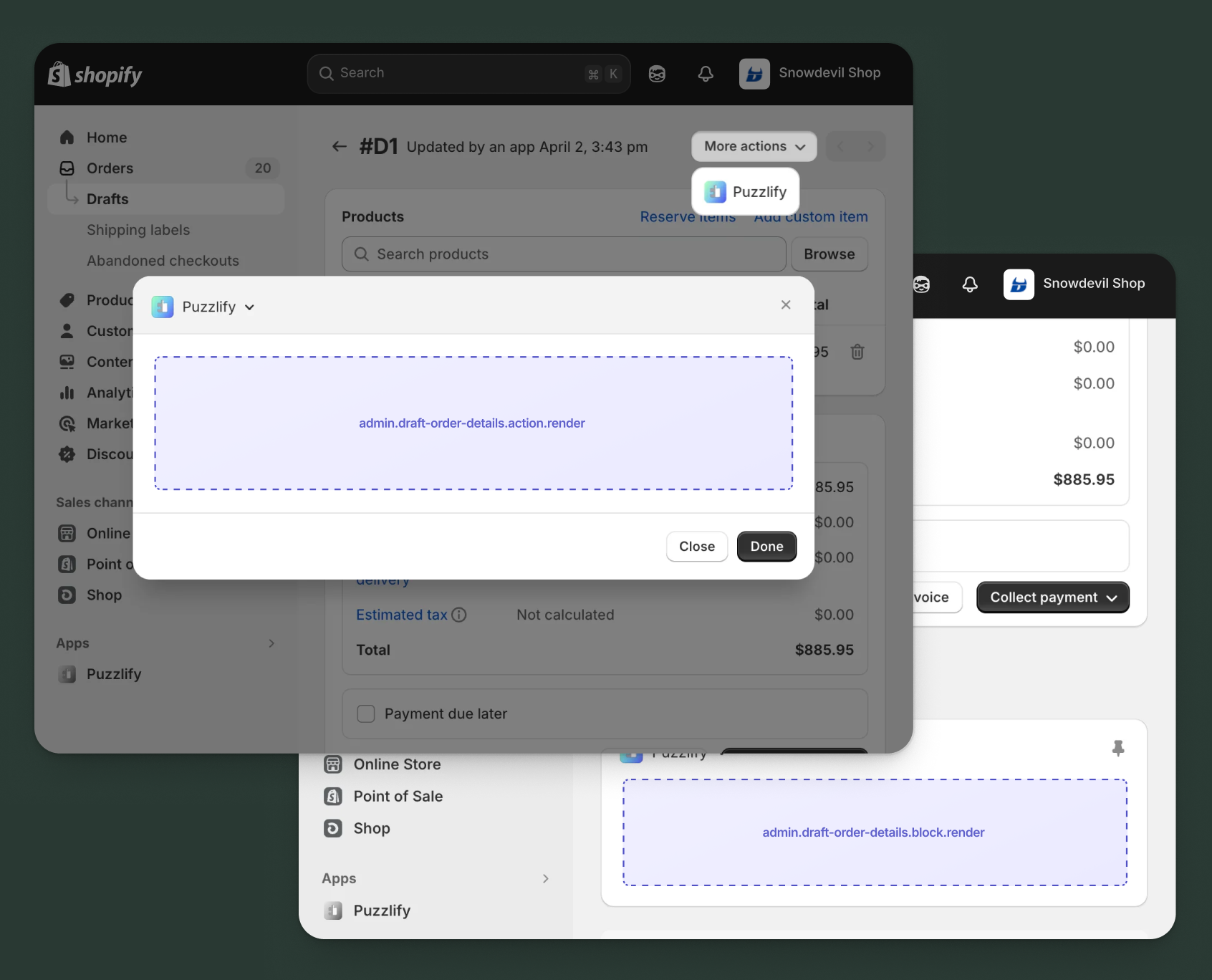
Use action and block targets to extend the draft order details page. Add workflows and contextual information that help merchants manage individual draft orders and improve order creation processes.
Action targets open as modal overlays from the More actions menu, while block targets display as inline cards. The examples demonstrate fetching data from Shopify's direct API or your app's backend.
Anchor to Draft order details action ,[object Object]Draft order details action target
admin.draft-order-details.action.render
Renders an admin action extension on the draft order details page. Merchants can access this extension from the More actions menu. Use this target to provide workflows that operate on individual draft orders, such as syncing with external systems, generating quotes, processing payments, or applying custom pricing.
Extensions at this target can access information about the draft order through the data property in the Action Extension API. The action renders in a modal overlay, providing space for multi-step workflows, forms, and confirmations.
Supported components
- Admin action
- Avatar
- Badge
- Banner
- Box
- Button
- Button group
- Checkbox
- Chip
- Choice list
- Clickable
- Clickable chip
- Color field
- Color picker
- Date field
- Date picker
- Divider
- Drop zone
- Email field
- Grid
- Heading
- Icon
- Image
- Link
- Menu
- Money field
- Number field
- Ordered list
- Paragraph
- Password field
- Query container
- Search field
- Section
- Select
- Spinner
- Stack
- Switch
- Table
- Text
- Text area
- Text field
- Thumbnail
- Tooltip
- Url field
- Unordered list
Available APIs
Supported components
- Admin action
- Avatar
- Badge
- Banner
- Box
- Button
- Button group
- Checkbox
- Chip
- Choice list
- Clickable
- Clickable chip
- Color field
- Color picker
- Date field
- Date picker
- Divider
- Drop zone
- Email field
- Grid
- Heading
- Icon
- Image
- Link
- Menu
- Money field
- Number field
- Ordered list
- Paragraph
- Password field
- Query container
- Search field
- Section
- Select
- Spinner
- Stack
- Switch
- Table
- Text
- Text area
- Text field
- Thumbnail
- Tooltip
- Url field
- Unordered list
Available APIs
jsx
Examples
Description
Add an action extension that generates a payment link for a draft order. This example shows how to create a workflow that generates a payment URL and sends it to the customer.
jsx
import {render} from 'preact';
import {useState, useEffect} from 'preact/hooks';

export default async () => {
  render(<Extension />, document.body);
};

const Extension = () => {
  const [loading, setLoading] = useState(false);
  const [fetching, setFetching] = useState(true);
  const [draftOrder, setDraftOrder] = useState(null);
  const [sendEmail, setSendEmail] = useState(true);
  const [success, setSuccess] = useState(false);
  const [error, setError] = useState(false);
  const [paymentLink, setPaymentLink] = useState('');

  useEffect(() => {
    const fetchDraftOrder = async () => {
      const draftOrderId = shopify.data.selected[0].id;

      try {
        // Fetch draft order details from GraphQL Admin API
        const response = await fetch('shopify:admin/api/graphql.json', {
          method: 'POST',
          headers: {'Content-Type': 'application/json'},
          body: JSON.stringify({
            query: `
              query GetDraftOrder($id: ID!) {
                draftOrder(id: $id) {
                  id
                  name
                  customer {
                    email
                    firstName
                    lastName
                  }
                  totalPriceSet {
                    presentmentMoney {
                      amount
                      currencyCode
                    }
                  }
                }
              }
            `,
            variables: {id: draftOrderId},
          }),
        });

        const {data} = await response.json();
        setDraftOrder(data.draftOrder);
      } catch (err) {
        console.error('Error fetching draft order:', err);
      } finally {
        setFetching(false);
      }
    };

    fetchDraftOrder();
  }, []);

  const handleGenerate = async () => {
    setLoading(true);
    setSuccess(false);
    setError(false);
    const draftOrderId = shopify.data.selected[0].id;

    try {
      // Generate payment link through your app's backend
      const response = await fetch('https://your-app.com/api/generate-payment-link', {
        method: 'POST',
        headers: {'Content-Type': 'application/json'},
        body: JSON.stringify({
          draftOrderId,
          sendEmail,
        }),
      });

      if (response.ok) {
        const {paymentUrl} = await response.json();
        setPaymentLink(paymentUrl);
        setSuccess(true);
      } else {
        setError(true);
      }
    } catch (err) {
      setError(true);
    } finally {
      setLoading(false);
    }
  };

  if (fetching) {
    return (
      <s-admin-action heading="Generate Payment Link">
        <s-spinner size="base" /> Loading draft order details...
      </s-admin-action>
    );
  }

  return (
    <s-admin-action heading="Generate Payment Link">
      {success && (
        <s-banner tone="success" dismissible={false}>
          Payment link generated successfully!
          {sendEmail && ' Email sent to customer.'}
        </s-banner>
      )}
      {error && (
        <s-banner tone="critical" dismissible={false}>
          Failed to generate payment link. Please try again.
        </s-banner>
      )}

      <s-section heading="Draft order information">
        <s-stack gap="base">
          <s-stack gap="small-300">
            <s-text type="strong">Draft order:</s-text>
            <s-text> {draftOrder.name}</s-text>
          </s-stack>

          {draftOrder.customer && (
            <s-stack gap="small-300">
              <s-text type="strong">Customer:</s-text>
              <s-text> {draftOrder.customer.firstName} {draftOrder.customer.lastName}</s-text>
              <s-text color="subdued"> ({draftOrder.customer.email})</s-text>
            </s-stack>
          )}

          <s-stack gap="small-300">
            <s-text type="strong">Total:</s-text>
            <s-text> {draftOrder.totalPriceSet.presentmentMoney.currencyCode} {draftOrder.totalPriceSet.presentmentMoney.amount}</s-text>
          </s-stack>
        </s-stack>
      </s-section>

      <s-section heading="Payment link options">
        <s-stack gap="base">
          <s-checkbox
            label="Send payment link to customer via email"
            checked={sendEmail}
            onChange={(event) => setSendEmail(event.currentTarget.checked)}
            disabled={!draftOrder.customer?.email}
          />
          {!draftOrder.customer?.email && (
            <s-text color="subdued">No customer email available</s-text>
          )}
        </s-stack>
      </s-section>

      {paymentLink && (
        <s-section heading="Payment link">
          <s-stack gap="base">
            <s-text-field
              label="Payment URL"
              value={paymentLink}
              readOnly
            />
            <s-button
              onClick={() => navigator.clipboard.writeText(paymentLink)}
              variant="secondary"
            >
              Copy to clipboard
            </s-button>
          </s-stack>
        </s-section>
      )}

      <s-button
        slot="primary-action"
        onClick={handleGenerate}
        disabled={loading || success}
      >
        {loading ? 'Generating...' : 'Generate Link'}
      </s-button>
      <s-button slot="secondary-actions" onClick={() => shopify.close()}>
        {success ? 'Close' : 'Cancel'}
      </s-button>
    </s-admin-action>
  );
};
Description
Add an action extension that applies wholesale pricing from an external system to a draft order. This example demonstrates how to fetch pricing rules and update draft order line items with custom wholesale prices.
jsx
import {render} from 'preact';
import {useState, useEffect} from 'preact/hooks';

export default async () => {
  render(<Extension />, document.body);
};

const Extension = () => {
  const [loading, setLoading] = useState(false);
  const [fetching, setFetching] = useState(true);
  const [pricingTiers, setPricingTiers] = useState([]);
  const [selectedTier, setSelectedTier] = useState('');
  const [lineItems, setLineItems] = useState([]);
  const [success, setSuccess] = useState(false);
  const [error, setError] = useState(false);

  useEffect(() => {
    const fetchData = async () => {
      const draftOrderId = shopify.data.selected[0].id;

      try {
        // Fetch draft order line items
        const draftOrderResponse = await fetch('shopify:admin/api/graphql.json', {
          method: 'POST',
          headers: {'Content-Type': 'application/json'},
          body: JSON.stringify({
            query: `
              query GetDraftOrder($id: ID!) {
                draftOrder(id: $id) {
                  id
                  customer {
                    id
                  }
                  lineItems(first: 50) {
                    edges {
                      node {
                        id
                        name
                        quantity
                        originalUnitPriceSet {
                          presentmentMoney {
                            amount
                          }
                        }
                      }
                    }
                  }
                }
              }
            `,
            variables: {id: draftOrderId},
          }),
        });

        const {data: draftOrderData} = await draftOrderResponse.json();
        const items = draftOrderData.draftOrder.lineItems.edges.map(edge => edge.node);
        setLineItems(items);

        // Fetch wholesale pricing tiers from your app's backend
        const customerId = draftOrderData.draftOrder.customer?.id;
        if (customerId) {
          const pricingResponse = await fetch(
            `https://your-app.com/api/wholesale-tiers?customerId=${customerId}`
          );
          const {tiers} = await pricingResponse.json();
          setPricingTiers(tiers);
          if (tiers.length > 0) {
            setSelectedTier(tiers[0].id);
          }
        }
      } catch (err) {
        console.error('Error fetching data:', err);
      } finally {
        setFetching(false);
      }
    };

    fetchData();
  }, []);

  const handleApply = async () => {
    setLoading(true);
    setSuccess(false);
    setError(false);
    const draftOrderId = shopify.data.selected[0].id;

    try {
      // Apply wholesale pricing through your app's backend
      const response = await fetch('https://your-app.com/api/apply-wholesale-pricing', {
        method: 'POST',
        headers: {'Content-Type': 'application/json'},
        body: JSON.stringify({
          draftOrderId,
          tierId: selectedTier,
        }),
      });

      if (response.ok) {
        setSuccess(true);
        setTimeout(() => {
          shopify.close();
          // Reload the page to show updated prices
          window.location.reload();
        }, 1500);
      } else {
        setError(true);
      }
    } catch (err) {
      setError(true);
    } finally {
      setLoading(false);
    }
  };

  if (fetching) {
    return (
      <s-admin-action heading="Apply Wholesale Pricing">
        <s-spinner size="base" /> Loading pricing information...
      </s-admin-action>
    );
  }

  if (pricingTiers.length === 0) {
    return (
      <s-admin-action heading="Apply Wholesale Pricing">
        <s-banner tone="info" dismissible={false}>
          No wholesale pricing tiers available for this customer.
        </s-banner>
        <s-button slot="secondary-actions" onClick={() => shopify.close()}>
          Close
        </s-button>
      </s-admin-action>
    );
  }

  return (
    <s-admin-action heading="Apply Wholesale Pricing">
      {success && (
        <s-banner tone="success" dismissible={false}>
          Wholesale pricing applied successfully!
        </s-banner>
      )}
      {error && (
        <s-banner tone="critical" dismissible={false}>
          Failed to apply wholesale pricing. Please try again.
        </s-banner>
      )}

      <s-section heading="Pricing tier">
        <s-stack gap="base">
          <s-select
            label="Select wholesale tier"
            value={selectedTier}
            onChange={(event) => setSelectedTier(event.currentTarget.value)}
          >
            {pricingTiers.map((tier) => (
              <option key={tier.id} value={tier.id}>
                {tier.name} ({tier.discount}% off)
              </option>
            ))}
          </s-select>

          <s-stack gap="small-300">
            <s-text type="strong">Line items to update:</s-text>
            <s-text> {lineItems.length} items</s-text>
          </s-stack>
        </s-stack>
      </s-section>

      <s-banner tone="info" dismissible={false}>
        This will update all line item prices according to the selected wholesale tier.
      </s-banner>

      <s-button
        slot="primary-action"
        onClick={handleApply}
        disabled={loading || success || !selectedTier}
      >
        {loading ? 'Applying...' : 'Apply Pricing'}
      </s-button>
      <s-button slot="secondary-actions" onClick={() => shopify.close()}>
        Cancel
      </s-button>
    </s-admin-action>
  );
};
Anchor to Draft order details action (should render) ,[object Object]Draft order details action (should render) target
admin.draft-order-details.action.should-render
Controls the render state of an admin action extension on the draft order details page. Use this target to conditionally show or hide your action extension based on the draft order's properties, such as status, customer type, or total amount.
This target returns a boolean value that determines whether the corresponding action extension appears in the More actions menu. The extension is evaluated each time the page loads.
Supported components
Available APIs
Supported components
Available APIs
jsx
Examples
Description
Conditionally display an action only for draft orders that have a customer assigned. This example demonstrates how to check if a customer is associated with the draft order.
jsx
export default async () => {
  const draftOrderId = shopify.data.selected[0].id;

  try {
    // Fetch draft order customer information
    const response = await fetch(
      'shopify:admin/api/graphql.json',
      {
        method: 'POST',
        headers: {'Content-Type': 'application/json'},
        body: JSON.stringify({
          query: `
            query GetDraftOrder($id: ID!) {
              draftOrder(id: $id) {
                customer {
                  id
                }
              }
            }
          `,
          variables: {id: draftOrderId},
        }),
      }
    );

    const {data} = await response.json();

    // Only show action if draft order has a customer
    return {display: !!data.draftOrder.customer};
  } catch (err) {
    console.error('Error fetching draft order:', err);
    return {display: false};
  }
};
Description
Conditionally display an action only for draft orders above a certain threshold. This example demonstrates filtering based on draft order total using the [GraphQL Admin API](/docs/api/admin-graphql).
jsx
export default async () => {
  const draftOrderId = shopify.data.selected[0].id;

  try {
    // Fetch draft order total
    const {data} = await shopify.query(
      `
        query GetDraftOrder($id: ID!) {
          draftOrder(id: $id) {
            totalPriceSet {
              presentmentMoney {
                amount
              }
            }
          }
        }
      `,
      {variables: {id: draftOrderId}}
    );

    const totalPrice = parseFloat(data.draftOrder.totalPriceSet.presentmentMoney.amount);

    // Only show action for draft orders over $1000
    return {display: totalPrice > 1000};
  } catch (err) {
    console.error('Error fetching draft order:', err);
    return {display: false};
  }
};
Anchor to Draft order details block ,[object Object]Draft order details block target
admin.draft-order-details.block.render
Renders an admin block extension inline on the draft order details page. Use this target to display contextual information, validation status, external system data, or payment status related to the draft order without requiring merchants to open a modal.
Extensions at this target appear as cards on the page and can show real-time data, insights, or quick actions. Blocks provide persistent visibility and are ideal for displaying information merchants need to see at a glance.
Supported components
- Admin block
- Avatar
- Badge
- Banner
- Box
- Button
- Button group
- Checkbox
- Chip
- Choice list
- Clickable
- Clickable chip
- Color field
- Color picker
- Date field
- Date picker
- Divider
- Drop zone
- Email field
- Form
- Grid
- Heading
- Icon
- Image
- Link
- Menu
- Money field
- Number field
- Ordered list
- Paragraph
- Password field
- Query container
- Search field
- Section
- Select
- Spinner
- Stack
- Switch
- Table
- Text
- Text area
- Text field
- Thumbnail
- Tooltip
- Url field
- Unordered list
Available APIs
Supported components
- Admin block
- Avatar
- Badge
- Banner
- Box
- Button
- Button group
- Checkbox
- Chip
- Choice list
- Clickable
- Clickable chip
- Color field
- Color picker
- Date field
- Date picker
- Divider
- Drop zone
- Email field
- Form
- Grid
- Heading
- Icon
- Image
- Link
- Menu
- Money field
- Number field
- Ordered list
- Paragraph
- Password field
- Query container
- Search field
- Section
- Select
- Spinner
- Stack
- Switch
- Table
- Text
- Text area
- Text field
- Thumbnail
- Tooltip
- Url field
- Unordered list
Available APIs
jsx
Examples
Description
Create a block extension that shows draft order status from an external order management system. This example demonstrates how to present order processing insights inline on the draft order page.
jsx
import {render} from 'preact';
import {useState, useEffect} from 'preact/hooks';

export default async () => {
  render(<Extension />, document.body);
};

const Extension = () => {
  const [orderStatus, setOrderStatus] = useState(null);
  const [loading, setLoading] = useState(true);

  useEffect(() => {
    const fetchOrderStatus = async () => {
      const draftOrderId = shopify.data.selected[0].id;

      try {
        // Fetch order status from your app's backend
        const response = await fetch(
          `https://your-app.com/api/draft-order-status?draftOrderId=${draftOrderId}`
        );
        const data = await response.json();
        setOrderStatus(data);
      } catch (err) {
        console.error('Error fetching order status:', err);
      } finally {
        setLoading(false);
      }
    };

    fetchOrderStatus();
  }, []);

  if (loading) {
    return (
      <s-admin-block heading="External Order Status">
        <s-spinner size="base" /> Loading order status...
      </s-admin-block>
    );
  }

  if (!orderStatus) {
    return (
      <s-admin-block heading="External Order Status">
        <s-text color="subdued">Not synced with external system</s-text>
      </s-admin-block>
    );
  }

  return (
    <s-admin-block heading="External Order Status">
      <s-stack gap="base">
        <s-stack gap="small-300">
          <s-heading>Sync Status</s-heading>
          <s-badge tone={orderStatus.synced ? 'success' : 'warning'}>
            {orderStatus.synced ? 'Synced' : 'Pending'}
          </s-badge>
        </s-stack>

        <s-divider />

        <s-stack gap="small-300">
          <s-heading>External Order ID</s-heading>
          <s-text>{orderStatus.externalOrderId || 'Not assigned'}</s-text>
        </s-stack>

        <s-divider />

        <s-stack gap="small-300">
          <s-heading>Processing Status</s-heading>
          <s-text>{orderStatus.processingStatus}</s-text>
        </s-stack>

        {orderStatus.warehouse && (
          <>
            <s-divider />
            <s-stack gap="small-300">
              <s-heading>Assigned Warehouse</s-heading>
              <s-text>{orderStatus.warehouse}</s-text>
            </s-stack>
          </>
        )}

        {orderStatus.lastSyncedAt && (
          <>
            <s-divider />
            <s-stack gap="small-300">
              <s-heading>Last Synced</s-heading>
              <s-text color="subdued">{orderStatus.lastSyncedAt}</s-text>
            </s-stack>
          </>
        )}

        {orderStatus.externalUrl && (
          <s-button
            onClick={() => window.open(orderStatus.externalUrl, '_blank')}
            variant="secondary"
          >
            View in external system
          </s-button>
        )}
      </s-stack>
    </s-admin-block>
  );
};
Description
Create a block extension that shows payment request status for a draft order. This example demonstrates how to display payment link information and payment status from an external payment gateway.
jsx
import {render} from 'preact';
import {useState, useEffect} from 'preact/hooks';

export default async () => {
  render(<Extension />, document.body);
};

const Extension = () => {
  const [paymentData, setPaymentData] = useState(null);
  const [loading, setLoading] = useState(true);

  useEffect(() => {
    const fetchPaymentData = async () => {
      const draftOrderId = shopify.data.selected[0].id;

      try {
        // Fetch payment data from your app's backend
        const response = await fetch(
          `https://your-app.com/api/payment-status?draftOrderId=${draftOrderId}`
        );
        const data = await response.json();
        setPaymentData(data);
      } catch (err) {
        console.error('Error fetching payment data:', err);
      } finally {
        setLoading(false);
      }
    };

    fetchPaymentData();
  }, []);

  if (loading) {
    return (
      <s-admin-block heading="Payment Status">
        <s-spinner size="base" />
      </s-admin-block>
    );
  }

  if (!paymentData || !paymentData.paymentLinkSent) {
    return (
      <s-admin-block heading="Payment Status">
        <s-text color="subdued">No payment request sent</s-text>
      </s-admin-block>
    );
  }

  return (
    <s-admin-block heading="Payment Status">
      <s-stack gap="base">
        <s-stack gap="small-300">
          <s-heading>Payment Link Status</s-heading>
          <s-badge tone={paymentData.status === 'paid' ? 'success' : 'info'}>
            {paymentData.status === 'paid' ? 'Paid' : 'Pending Payment'}
          </s-badge>
        </s-stack>

        <s-divider />

        <s-stack gap="small-300">
          <s-heading>Sent To</s-heading>
          <s-text>{paymentData.customerEmail}</s-text>
        </s-stack>

        <s-divider />

        <s-stack gap="small-300">
          <s-heading>Amount Due</s-heading>
          <s-text type="strong">
            {paymentData.currency} {paymentData.amountDue}
          </s-text>
        </s-stack>

        {paymentData.status === 'paid' && paymentData.paidAt && (
          <>
            <s-divider />
            <s-stack gap="small-300">
              <s-heading>Paid On</s-heading>
              <s-text color="subdued">{paymentData.paidAt}</s-text>
            </s-stack>
          </>
        )}

        {paymentData.status !== 'paid' && paymentData.linkExpiresAt && (
          <>
            <s-divider />
            <s-stack gap="small-300">
              <s-heading>Link Expires</s-heading>
              <s-text color="subdued">{paymentData.linkExpiresAt}</s-text>
            </s-stack>
          </>
        )}

        {paymentData.status !== 'paid' && (
          <s-stack gap="small-300">
            <s-heading>Payment Reminders Sent</s-heading>
            <s-text>{paymentData.remindersSent || 0}</s-text>
          </s-stack>
        )}

        {paymentData.paymentUrl && paymentData.status !== 'paid' && (
          <s-button
            onClick={() => window.open(paymentData.paymentUrl, '_blank')}
            variant="secondary"
          >
            View payment page
          </s-button>
        )}
      </s-stack>
    </s-admin-block>
  );
};
Anchor to Draft order index targetsDraft order index targets
Use action targets to extend the draft order index page with bulk operations and workflows that help merchants manage multiple draft orders efficiently.
Anchor to Draft order index action ,[object Object]Draft order index action target
admin.draft-order-index.action.render
Renders an admin action extension on the draft order index page. Merchants can access this extension from the More actions menu. Use this target to provide workflows that operate on the draft order list, such as batch processing, bulk exports, or generating reports.
Extensions at this target can access the page context through the Action Extension API. The action renders in a modal overlay, providing space for configuration and execution of list-wide operations.
Supported components
- Admin action
- Avatar
- Badge
- Banner
- Box
- Button
- Button group
- Checkbox
- Chip
- Choice list
- Clickable
- Clickable chip
- Color field
- Color picker
- Date field
- Date picker
- Divider
- Drop zone
- Email field
- Grid
- Heading
- Icon
- Image
- Link
- Menu
- Money field
- Number field
- Ordered list
- Paragraph
- Password field
- Query container
- Search field
- Section
- Select
- Spinner
- Stack
- Switch
- Table
- Text
- Text area
- Text field
- Thumbnail
- Tooltip
- Url field
- Unordered list
Available APIs
Supported components
- Admin action
- Avatar
- Badge
- Banner
- Box
- Button
- Button group
- Checkbox
- Chip
- Choice list
- Clickable
- Clickable chip
- Color field
- Color picker
- Date field
- Date picker
- Divider
- Drop zone
- Email field
- Grid
- Heading
- Icon
- Image
- Link
- Menu
- Money field
- Number field
- Ordered list
- Paragraph
- Password field
- Query container
- Search field
- Section
- Select
- Spinner
- Stack
- Switch
- Table
- Text
- Text area
- Text field
- Thumbnail
- Tooltip
- Url field
- Unordered list
Available APIs
jsx
Examples
Description
Add an action extension that exports all draft orders to an external ERP system. This example shows how to create a workflow that initiates a background sync job for draft orders.
jsx
import {render} from 'preact';
import {useState} from 'preact/hooks';

export default async () => {
  render(<Extension />, document.body);
};

const Extension = () => {
  const [loading, setLoading] = useState(false);
  const [exportType, setExportType] = useState('all');
  const [dateRange, setDateRange] = useState('7days');
  const [success, setSuccess] = useState(false);
  const [error, setError] = useState(false);

  const handleExport = async () => {
    setLoading(true);
    setSuccess(false);
    setError(false);

    try {
      // Export draft orders through your app's backend
      const response = await fetch('https://your-app.com/api/export-draft-orders', {
        method: 'POST',
        headers: {'Content-Type': 'application/json'},
        body: JSON.stringify({
          exportType,
          dateRange,
        }),
      });

      if (response.ok) {
        setSuccess(true);
        shopify.close();
      } else {
        setError(true);
      }
    } catch (err) {
      setError(true);
    } finally {
      setLoading(false);
    }
  };

  return (
    <s-admin-action heading="Export to ERP System">
      {success && (
        <s-banner tone="success" dismissible={false}>
          Draft order export initiated! You'll receive an email when complete.
        </s-banner>
      )}
      {error && (
        <s-banner tone="critical" dismissible={false}>
          Failed to initiate export. Please try again.
        </s-banner>
      )}

      <s-section heading="Export settings">
        <s-stack gap="base">
          <s-select
            label="Export type"
            value={exportType}
            onChange={(event) => setExportType(event.currentTarget.value)}
          >
            <option value="all">All draft orders</option>
            <option value="open">Open draft orders only</option>
            <option value="completed">Completed draft orders only</option>
            <option value="invoiced">Invoiced draft orders only</option>
          </s-select>

          <s-select
            label="Date range"
            value={dateRange}
            onChange={(event) => setDateRange(event.currentTarget.value)}
          >
            <option value="7days">Last 7 days</option>
            <option value="30days">Last 30 days</option>
            <option value="90days">Last 90 days</option>
            <option value="1year">Last year</option>
            <option value="all">All time</option>
          </s-select>

          <s-banner tone="info" dismissible={false}>
            This will export all matching draft orders to your ERP system. Large exports may take several minutes to complete.
          </s-banner>
        </s-stack>
      </s-section>

      <s-button
        slot="primary-action"
        onClick={handleExport}
        disabled={loading || success}
      >
        {loading ? 'Starting Export...' : 'Start Export'}
      </s-button>
      <s-button slot="secondary-actions" onClick={() => shopify.close()}>
        Cancel
      </s-button>
    </s-admin-action>
  );
};
Description
Add an action extension that generates invoices for multiple draft orders. This example shows how to create a workflow that processes draft orders and generates PDF invoices.
jsx
import {render} from 'preact';
import {useState} from 'preact/hooks';

export default async () => {
  render(<Extension />, document.body);
};

const Extension = () => {
  const [loading, setLoading] = useState(false);
  const [invoiceFormat, setInvoiceFormat] = useState('pdf');
  const [includePaymentTerms, setIncludePaymentTerms] = useState(true);
  const [success, setSuccess] = useState(false);
  const [error, setError] = useState(false);

  const handleGenerate = async () => {
    setLoading(true);
    setSuccess(false);
    setError(false);

    try {
      // Generate invoices through your app's backend
      const response = await fetch('https://your-app.com/api/generate-invoices', {
        method: 'POST',
        headers: {'Content-Type': 'application/json'},
        body: JSON.stringify({
          format: invoiceFormat,
          includePaymentTerms,
        }),
      });

      if (response.ok) {
        const blob = await response.blob();
        const url = window.URL.createObjectURL(blob);
        const a = document.createElement('a');
        a.href = url;
        a.download = `invoices-${Date.now()}.zip`;
        a.click();
        setSuccess(true);
        shopify.close();
      } else {
        setError(true);
      }
    } catch (err) {
      setError(true);
    } finally {
      setLoading(false);
    }
  };

  return (
    <s-admin-action heading="Generate Invoices">
      {success && (
        <s-banner tone="success" dismissible={false}>
          Invoices generated successfully!
        </s-banner>
      )}
      {error && (
        <s-banner tone="critical" dismissible={false}>
          Failed to generate invoices. Please try again.
        </s-banner>
      )}

      <s-section heading="Invoice settings">
        <s-stack gap="base">
          <s-select
            label="Invoice format"
            value={invoiceFormat}
            onChange={(event) => setInvoiceFormat(event.currentTarget.value)}
          >
            <option value="pdf">PDF</option>
            <option value="html">HTML</option>
            <option value="csv">CSV (Summary)</option>
          </s-select>

          <s-checkbox
            label="Include payment terms and due dates"
            checked={includePaymentTerms}
            onChange={(event) => setIncludePaymentTerms(event.currentTarget.checked)}
          />

          <s-text color="subdued">
            Invoices will be generated for all open draft orders with customers.
          </s-text>
        </s-stack>
      </s-section>

      <s-button
        slot="primary-action"
        onClick={handleGenerate}
        disabled={loading || success}
      >
        {loading ? 'Generating...' : 'Generate Invoices'}
      </s-button>
      <s-button slot="secondary-actions" onClick={() => shopify.close()}>
        Cancel
      </s-button>
    </s-admin-action>
  );
};
Anchor to Draft order index action (should render) ,[object Object]Draft order index action (should render) target
admin.draft-order-index.action.should-render
Controls the render state of an admin action extension on the draft order index page. Use this target to conditionally show or hide your action extension based on business logic, user permissions, or app configuration.
This target returns a boolean value that determines whether the corresponding action extension appears in the More actions menu. The extension is evaluated each time the page loads.
Supported components
Available APIs
Supported components
Available APIs
jsx
Examples
Description
Conditionally display an action only when the app is properly configured. This example demonstrates how to check configuration status before showing the extension.
jsx
export default async () => {
  try {
    // Check if app is configured through your backend
    const response = await fetch(
      'https://your-app.com/api/check-configuration'
    );
    const {configured, erpConnected} = await response.json();

    // Only show action if app is configured and ERP is connected
    return {display: configured && erpConnected};
  } catch (err) {
    console.error('Error checking configuration:', err);
    return {display: false};
  }
};
Description
Conditionally display an action only when the merchant's subscription plan includes advanced draft order features. This example demonstrates checking plan entitlements.
jsx
export default async () => {
  try {
    // Check plan features through your app's backend
    const response = await fetch(
      'https://your-app.com/api/check-plan-features'
    );
    const {features} = await response.json();

    // Only show action if bulk operations feature is available
    return {display: features.includes('bulk-draft-order-operations')};
  } catch (err) {
    console.error('Error checking plan features:', err);
    return {display: false};
  }
};
Anchor to Draft order index selection action ,[object Object]Draft order index selection action target
admin.draft-order-index.selection-action.render
Renders a selection action extension on the draft order index page when multiple draft orders are selected. Merchants can access this extension from the More actions menu of the resource list. Use this target to provide bulk operations on selected draft orders, such as bulk conversion, batch invoice generation, or bulk status updates.
Extensions at this target can access the IDs of selected draft orders through the data property in the Action Extension API. The action renders in a modal overlay designed for batch processing.
Supported components
- Admin action
- Avatar
- Badge
- Banner
- Box
- Button
- Button group
- Checkbox
- Chip
- Choice list
- Clickable
- Clickable chip
- Color field
- Color picker
- Date field
- Date picker
- Divider
- Drop zone
- Email field
- Grid
- Heading
- Icon
- Image
- Link
- Menu
- Money field
- Number field
- Ordered list
- Paragraph
- Password field
- Query container
- Search field
- Section
- Select
- Spinner
- Stack
- Switch
- Table
- Text
- Text area
- Text field
- Thumbnail
- Tooltip
- Url field
- Unordered list
Available APIs
Supported components
- Admin action
- Avatar
- Badge
- Banner
- Box
- Button
- Button group
- Checkbox
- Chip
- Choice list
- Clickable
- Clickable chip
- Color field
- Color picker
- Date field
- Date picker
- Divider
- Drop zone
- Email field
- Grid
- Heading
- Icon
- Image
- Link
- Menu
- Money field
- Number field
- Ordered list
- Paragraph
- Password field
- Query container
- Search field
- Section
- Select
- Spinner
- Stack
- Switch
- Table
- Text
- Text area
- Text field
- Thumbnail
- Tooltip
- Url field
- Unordered list
Available APIs
jsx
Examples
Description
Add a selection action extension that sends payment requests for multiple draft orders. This example shows how to process multiple draft order IDs and generate payment links for each.
jsx
import {render} from 'preact';
import {useState, useEffect} from 'preact/hooks';

export default async () => {
  render(<Extension />, document.body);
};

const Extension = () => {
  const [loading, setLoading] = useState(false);
  const [draftOrderCount, setDraftOrderCount] = useState(0);
  const [sendMethod, setSendMethod] = useState('email');
  const [emailTemplate, setEmailTemplate] = useState('default');
  const [success, setSuccess] = useState(false);
  const [error, setError] = useState(false);
  const [eligibleCount, setEligibleCount] = useState(0);

  useEffect(() => {
    const checkEligibility = async () => {
      const selectedDraftOrders = shopify.data.selected || [];
      setDraftOrderCount(selectedDraftOrders.length);

      // Check how many draft orders have customers with email addresses
      try {
        const draftOrderIds = selectedDraftOrders.map((draftOrder) => draftOrder.id);
        const response = await fetch('https://your-app.com/api/check-payment-eligibility', {
          method: 'POST',
          headers: {'Content-Type': 'application/json'},
          body: JSON.stringify({draftOrderIds}),
        });
        const {eligibleCount: count} = await response.json();
        setEligibleCount(count);
      } catch (err) {
        console.error('Error checking eligibility:', err);
      }
    };

    checkEligibility();
  }, []);

  const handleSend = async () => {
    setLoading(true);
    setSuccess(false);
    setError(false);
    const draftOrderIds = shopify.data.selected.map((draftOrder) => draftOrder.id);

    try {
      // Send payment requests through your app's backend
      const response = await fetch('https://your-app.com/api/send-payment-requests', {
        method: 'POST',
        headers: {'Content-Type': 'application/json'},
        body: JSON.stringify({
          draftOrderIds,
          sendMethod,
          emailTemplate,
        }),
      });

      if (response.ok) {
        setSuccess(true);
        shopify.close();
      } else {
        setError(true);
      }
    } catch (err) {
      setError(true);
    } finally {
      setLoading(false);
    }
  };

  return (
    <s-admin-action heading="Send Payment Requests">
      {success && (
        <s-banner tone="success" dismissible={false}>
          Payment requests sent successfully to {eligibleCount} customers!
        </s-banner>
      )}
      {error && (
        <s-banner tone="critical" dismissible={false}>
          Failed to send payment requests. Please try again.
        </s-banner>
      )}

      <s-section heading="Payment request settings">
        <s-stack gap="base">
          <s-stack gap="small-300">
            <s-text type="strong">Selected draft orders:</s-text>
            <s-text> {draftOrderCount}</s-text>
          </s-stack>

          <s-stack gap="small-300">
            <s-text type="strong">Eligible for payment requests:</s-text>
            <s-text> {eligibleCount}</s-text>
            <s-text color="subdued"> (with customer email)</s-text>
          </s-stack>

          <s-select
            label="Delivery method"
            value={sendMethod}
            onChange={(event) => setSendMethod(event.currentTarget.value)}
          >
            <option value="email">Email</option>
            <option value="sms">SMS (if available)</option>
          </s-select>

          <s-select
            label="Email template"
            value={emailTemplate}
            onChange={(event) => setEmailTemplate(event.currentTarget.value)}
          >
            <option value="default">Default payment request</option>
            <option value="friendly">Friendly reminder</option>
            <option value="professional">Professional invoice</option>
            <option value="urgent">Urgent payment request</option>
          </s-select>

          {eligibleCount < draftOrderCount && (
            <s-banner tone="warning" dismissible={false}>
              {draftOrderCount - eligibleCount} draft orders will be skipped (missing customer email).
            </s-banner>
          )}
        </s-stack>
      </s-section>

      <s-button
        slot="primary-action"
        onClick={handleSend}
        disabled={loading || success || eligibleCount === 0}
      >
        {loading ? 'Sending...' : `Send ${eligibleCount} Payment Requests`}
      </s-button>
      <s-button slot="secondary-actions" onClick={() => shopify.close()}>
        Cancel
      </s-button>
    </s-admin-action>
  );
};
Description
Add a selection action extension that converts multiple draft orders to orders at once. This example demonstrates bulk operations with confirmation and progress tracking.
jsx
import {render} from 'preact';
import {useState} from 'preact/hooks';

export default async () => {
  render(<Extension />, document.body);
};

const Extension = () => {
  const [loading, setLoading] = useState(false);
  const [sendInvoices, setSendInvoices] = useState(true);
  const [markAsPaid, setMarkAsPaid] = useState(false);
  const [success, setSuccess] = useState(false);
  const [error, setError] = useState(false);
  const draftOrderCount = shopify.data.selected?.length || 0;

  const handleConvert = async () => {
    setLoading(true);
    setSuccess(false);
    setError(false);
    const draftOrderIds = shopify.data.selected.map((draftOrder) => draftOrder.id);

    try {
      // Convert draft orders through your app's backend
      const response = await fetch('https://your-app.com/api/bulk-convert-draft-orders', {
        method: 'POST',
        headers: {'Content-Type': 'application/json'},
        body: JSON.stringify({
          draftOrderIds,
          sendInvoices,
          markAsPaid,
        }),
      });

      if (response.ok) {
        setSuccess(true);
        setTimeout(() => {
          shopify.close();
          // Reload the page to show updated list
          window.location.reload();
        }, 1500);
      } else {
        setError(true);
      }
    } catch (err) {
      setError(true);
    } finally {
      setLoading(false);
    }
  };

  return (
    <s-admin-action heading="Bulk Convert to Orders">
      {success && (
        <s-banner tone="success" dismissible={false}>
          {draftOrderCount} draft orders converted successfully!
        </s-banner>
      )}
      {error && (
        <s-banner tone="critical" dismissible={false}>
          Failed to convert draft orders. Please try again.
        </s-banner>
      )}

      <s-section heading="Conversion settings">
        <s-stack gap="base">
          <s-text>
            Converting {draftOrderCount} selected draft order{draftOrderCount !== 1 ? 's' : ''} to orders
          </s-text>

          <s-checkbox
            label="Send invoice emails to customers"
            checked={sendInvoices}
            onChange={(event) => setSendInvoices(event.currentTarget.checked)}
          />

          <s-checkbox
            label="Mark orders as paid"
            checked={markAsPaid}
            onChange={(event) => setMarkAsPaid(event.currentTarget.checked)}
          />

          <s-banner tone="info" dismissible={false}>
            This action will convert all selected draft orders to orders. This operation cannot be undone.
          </s-banner>
        </s-stack>
      </s-section>

      <s-button
        slot="primary-action"
        onClick={handleConvert}
        disabled={loading || success}
      >
        {loading ? 'Converting...' : `Convert ${draftOrderCount} Orders`}
      </s-button>
      <s-button slot="secondary-actions" onClick={() => shopify.close()}>
        Cancel
      </s-button>
    </s-admin-action>
  );
};
Anchor to Draft order index selection action (should render) ,[object Object]Draft order index selection action (should render) target
admin.draft-order-index.selection-action.should-render
Controls the render state of a selection action extension on the draft order index page when multiple draft orders are selected. Use this target to conditionally show or hide your bulk action extension based on the number of selected draft orders, their properties, or app configuration.
This target returns a boolean value that determines whether the corresponding selection action extension appears in the More actions menu. The extension is evaluated each time the selection changes.
Supported components
Available APIs
Supported components
Available APIs
jsx
Examples
Description
Conditionally display a bulk action only when a reasonable number of draft orders are selected. This example demonstrates how to limit bulk operations based on selection size.
jsx
export default async () => {
  const selectedCount = shopify.data.selected?.length || 0;

  // Only show action if between 1 and 50 draft orders are selected
  return {display: selectedCount > 0 && selectedCount <= 50};
};
Description
Conditionally display a bulk action based on whether selected draft orders meet specific criteria. This example demonstrates checking draft order properties before showing the extension.
jsx
export default async () => {
  const selectedIds = shopify.data.selected?.map((draftOrder) => draftOrder.id) || [];
  const selectedCount = selectedIds.length;

  // Don't show for empty selections
  if (selectedCount === 0) {
    return {display: false};
  }

  try {
    // Check if selected draft orders are eligible for the action
    const response = await fetch(
      'https://your-app.com/api/check-eligible-draft-orders',
      {
        method: 'POST',
        headers: {'Content-Type': 'application/json'},
        body: JSON.stringify({draftOrderIds: selectedIds}),
      }
    );
    const {eligibleCount} = await response.json();

    // Only show action if at least one selected draft order is eligible
    return {display: eligibleCount > 0};
  } catch (err) {
    console.error('Error checking eligibility:', err);
    return {display: false};
  }
};
Anchor to Best practicesBest practices
- Handle draft order states properly: Draft orders can be in different states (open, invoice sent, completed). Always check the draft order status before performing operations, and provide clear feedback when operations aren't applicable to certain states.
- Validate customer information: Many draft order workflows require customer information. Always validate that required customer data (for example, email and address) exists before attempting operations like sending payment links or converting to orders.
- Provide clear conversion workflows: When building workflows that convert draft orders to orders, provide clear confirmation steps and explain what will happen. Draft order conversion is a significant action that merchants need to understand.
- Respect payment status: Be mindful of existing payment requests and payment status. Avoid sending duplicate payment requests or conflicting payment workflows that could confuse customers.
Anchor to LimitationsLimitations
- Single target per module: Each
[[extensions.targeting]]entry in your TOML configuration maps one target to one module file. - Data retention: Draft orders created on or after April 1, 2025 are automatically purged after one year of inactivity.
- Block target visibility: Block extensions must be manually added and pinned by merchants before they appear.
- Block collapse behavior: Returning
nullfrom a block extension collapses the block rather than removing it from the page. Blocks can't be fully hidden at runtime.