Orders
Order pages display customer purchases, including line items, payment status, fulfillment details, and shipping information. Extensions help merchants streamline fulfillment workflows, integrate with external logistics systems, and provide real-time order insights. Learn more about managing orders in the Shopify admin.
Anchor to Use casesUse cases
- Fulfillment and shipping integration: Connect orders with external fulfillment providers, 3PLs, or shipping carriers to automate label generation, track shipments, and sync fulfillment status across systems.
- Customer communication workflows: Send order confirmations, shipping updates, or custom notifications through external communication platforms like email services, SMS gateways, or messaging apps.
- Fraud detection and risk assessment: Flag potentially fraudulent orders, display risk scores from external fraud prevention services, or trigger manual review workflows for suspicious transactions.
- Order analytics and reporting: Display order insights, export data to business intelligence tools, or generate custom reports for sales analysis, inventory planning, or financial reconciliation.
- Bulk order operations: Process multiple orders at once for batch fulfillment, mass invoice generation, bulk status updates, or exporting order data to accounting and ERP systems.
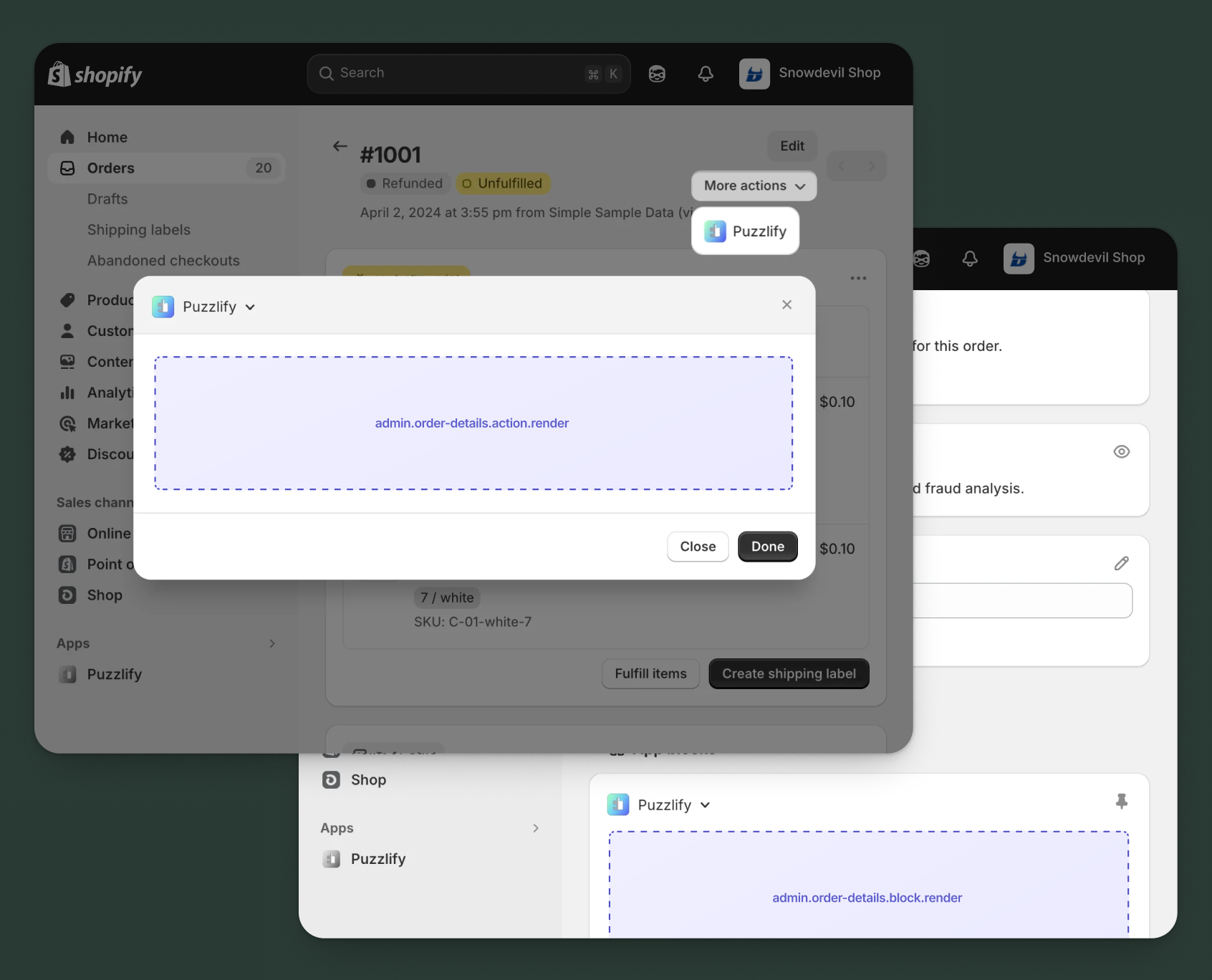
Anchor to Order details targetsOrder details targets
Use action and block targets to extend the order details page with workflows and contextual information.
Action targets open as modal overlays from the More actions menu, while block targets display as inline cards. The examples demonstrate fetching data from the direct API or your app's backend.
Anchor to Order details action ,[object Object]Order details action target
admin.order-details.action.render
Renders an admin action extension on the order details page. Merchants can access this extension from the More actions menu. Use this target to provide workflows that operate on order data, such as syncing with external systems, exporting order information, or managing credit terms.
Extensions at this target can access order data through the data property in the Action Extension API. The action renders in a modal overlay, providing space for multi-step workflows, forms, and confirmations.
Supported components
- Admin action
- Avatar
- Badge
- Banner
- Box
- Button
- Button group
- Checkbox
- Chip
- Choice list
- Clickable
- Clickable chip
- Color field
- Color picker
- Date field
- Date picker
- Divider
- Drop zone
- Email field
- Grid
- Heading
- Icon
- Image
- Link
- Menu
- Money field
- Number field
- Ordered list
- Paragraph
- Password field
- Query container
- Search field
- Section
- Select
- Spinner
- Stack
- Switch
- Table
- Text
- Text area
- Text field
- Thumbnail
- Tooltip
- Url field
- Unordered list
Available APIs
Supported components
- Admin action
- Avatar
- Badge
- Banner
- Box
- Button
- Button group
- Checkbox
- Chip
- Choice list
- Clickable
- Clickable chip
- Color field
- Color picker
- Date field
- Date picker
- Divider
- Drop zone
- Email field
- Grid
- Heading
- Icon
- Image
- Link
- Menu
- Money field
- Number field
- Ordered list
- Paragraph
- Password field
- Query container
- Search field
- Section
- Select
- Spinner
- Stack
- Switch
- Table
- Text
- Text area
- Text field
- Thumbnail
- Tooltip
- Url field
- Unordered list
Available APIs
jsx
Examples
Description
Add an action extension that pushes order data to your ERP system. This example demonstrates calling your app backend with order details and handling the sync response.
jsx
import {render} from 'preact';
import {useState} from 'preact/hooks';

export default async () => {
  render(<Extension />, document.body);
};

const Extension = () => {
  const [loading, setLoading] = useState(false);
  const [success, setSuccess] = useState(false);
  const [error, setError] = useState(null);
  const [includeLineItems, setIncludeLineItems] = useState(true);
  const [includeCustomer, setIncludeCustomer] = useState(true);
  const [priority, setPriority] = useState('normal');

  const handleExport = async () => {
    setLoading(true);
    setError(null);
    const orderId = shopify.data.selected[0].id;

    try {
      const response = await fetch('https://your-app.com/api/erp/export-order', {
        method: 'POST',
        headers: {'Content-Type': 'application/json'},
        body: JSON.stringify({
          orderId,
          includeLineItems,
          includeCustomer,
          priority,
        }),
      });

      if (response.ok) {
        setSuccess(true);
        shopify.close();
      } else {
        const data = await response.json();
        setError(data.message || 'Failed to export order to ERP');
      }
    } catch (err) {
      setError('Connection error. Please try again.');
    } finally {
      setLoading(false);
    }
  };

  return (
    <s-admin-action heading="Export to ERP">
      {success && (
        <s-banner tone="success" dismissible={false}>
          Order successfully exported to ERP system!
        </s-banner>
      )}
      {error && (
        <s-banner tone="critical" dismissible={false}>
          {error}
        </s-banner>
      )}

      <s-section heading="Export Options">
        <s-stack gap="base">
          <s-checkbox
            label="Include line items"
            checked={includeLineItems}
            onChange={(e) => setIncludeLineItems(e.currentTarget.checked)}
          />
          <s-checkbox
            label="Include customer data"
            checked={includeCustomer}
            onChange={(e) => setIncludeCustomer(e.currentTarget.checked)}
          />
          <s-select
            label="Processing priority"
            value={priority}
            onChange={(e) => setPriority(e.currentTarget.value)}
          >
            <s-option value="low">Low</s-option>
            <s-option value="normal">Normal</s-option>
            <s-option value="high">High (Rush)</s-option>
          </s-select>
        </s-stack>
      </s-section>

      <s-button
        slot="primary-action"
        onClick={handleExport}
        disabled={loading || success}
      >
        {loading ? 'Exporting...' : 'Export to ERP'}
      </s-button>
      <s-button slot="secondary-actions" onClick={() => shopify.close()}>
        Cancel
      </s-button>
    </s-admin-action>
  );
};
Description
Add an action extension that generates a custom packing slip PDF for an order. This example demonstrates fetching order details using the [GraphQL Admin API](/docs/api/admin-graphql) and creating a downloadable document.
jsx
import {render} from 'preact';
import {useState} from 'preact/hooks';

export default async () => {
  render(<Extension />, document.body);
};

const Extension = () => {
  const [loading, setLoading] = useState(false);
  const [success, setSuccess] = useState(false);
  const [error, setError] = useState(null);
  const [includeBarcode, setIncludeBarcode] = useState(true);
  const [includePrices, setIncludePrices] = useState(false);
  const [copies, setCopies] = useState('1');

  const handleGenerate = async () => {
    setLoading(true);
    setError(null);
    const orderId = shopify.data.selected[0].id;

    try {
      const response = await fetch('shopify:admin/api/graphql.json', {
        method: 'POST',
        headers: {'Content-Type': 'application/json'},
        body: JSON.stringify({
          query: `query GetOrder($id: ID!) {
            order(id: $id) {
              name
              createdAt
              shippingAddress { formatted }
              lineItems(first: 50) {
                nodes { title quantity sku }
              }
            }
          }`,
          variables: {id: orderId},
        }),
      });

      const {data} = await response.json();

      if (data?.order) {
        setSuccess(true);
        shopify.close();
      } else {
        setError('Could not fetch order details');
      }
    } catch (err) {
      setError('Failed to generate packing slip');
    } finally {
      setLoading(false);
    }
  };

  return (
    <s-admin-action heading="Generate Packing Slip">
      {success && (
        <s-banner tone="success" dismissible={false}>
          Packing slip generated! Download starting...
        </s-banner>
      )}
      {error && (
        <s-banner tone="critical" dismissible={false}>{error}</s-banner>
      )}

      <s-section heading="Packing Slip Options">
        <s-stack gap="base">
          <s-checkbox
            label="Include barcode"
            checked={includeBarcode}
            onChange={(e) => setIncludeBarcode(e.currentTarget.checked)}
          />
          <s-checkbox
            label="Include item prices"
            checked={includePrices}
            onChange={(e) => setIncludePrices(e.currentTarget.checked)}
          />
          <s-select
            label="Number of copies"
            value={copies}
            onChange={(e) => setCopies(e.currentTarget.value)}
          >
            <s-option value="1">1 copy</s-option>
            <s-option value="2">2 copies</s-option>
            <s-option value="3">3 copies</s-option>
          </s-select>
        </s-stack>
      </s-section>

      <s-button
        slot="primary-action"
        onClick={handleGenerate}
        disabled={loading || success}
      >
        {loading ? 'Generating...' : 'Generate PDF'}
      </s-button>
      <s-button slot="secondary-actions" onClick={() => shopify.close()}>
        Cancel
      </s-button>
    </s-admin-action>
  );
};
Anchor to Order details action (should render) ,[object Object]Order details action (should render) target
admin.order-details.action.should-render
Controls the render state of an admin action extension on the order details page. Use this target to conditionally show or hide your action extension based on the order's properties, such as status, configuration, or specific business requirements.
This target returns a boolean value that determines whether the corresponding action extension appears in the More actions menu. The extension evaluates each time the page loads.
Supported components
Available APIs
Supported components
Available APIs
jsx
Examples
Description
Show the action only when your app backend confirms the order has active fulfillment tracking available, demonstrating how to call an external API to determine extension visibility.
jsx
export default async () => {
  const orderId = shopify.data.selected[0].id;

  try {
    // Call your app backend to check fulfillment tracking status
    const response = await fetch('https://your-app.com/api/fulfillment/check-tracking', {
      method: 'POST',
      headers: {
        'Content-Type': 'application/json',
      },
      body: JSON.stringify({
        orderId,
        checkType: 'active-tracking',
      }),
    });

    if (!response.ok) {
      console.error('Backend returned error:', response.status);
      return { display: false };
    }

    const result = await response.json();

    // Show action if order has active fulfillment tracking
    return {
      display: result.hasActiveTracking && result.trackingEnabled,
    };
  } catch (err) {
    console.error('Failed to check fulfillment status:', err);
    return { display: false };
  }
};
Description
Show the fraud risk assessment action only for orders that have a high or medium risk level, using the GraphQL Admin API to check the order's risk assessment data.
jsx
export default async () => {
  const orderId = shopify.data.selected[0].id;

  try {
    const response = await fetch('shopify:admin/api/graphql.json', {
      method: 'POST',
      headers: {'Content-Type': 'application/json'},
      body: JSON.stringify({
        query: `query GetOrderRisk($id: ID!) {
          order(id: $id) {
            risk {
              assessments {
                riskLevel
                provider {
                  title
                }
              }
            }
          }
        }`,
        variables: {id: orderId},
      }),
    });

    const {data} = await response.json();
    const assessments = data?.order?.risk?.assessments || [];

    // Show action if any assessment indicates HIGH or MEDIUM risk
    const hasElevatedRisk = assessments.some(
      (assessment) =>
        assessment.riskLevel === 'HIGH' ||
        assessment.riskLevel === 'MEDIUM'
    );

    return {display: hasElevatedRisk};
  } catch (err) {
    console.error('Error checking order risk:', err);
    return {display: false};
  }
};
Anchor to Order details block ,[object Object]Order details block target
admin.order-details.block.render
Renders an admin block extension inline on the order details page. Use this target to display contextual information, analytics, or status updates related to the order without requiring merchant interaction to open a modal.
Extensions at this target can access order data through the data property in the Block Extension API. Blocks appear as cards on the page and can show real-time data, insights, or quick actions, providing persistent visibility for information merchants need to see at a glance.
Supported components
- Admin block
- Avatar
- Badge
- Banner
- Box
- Button
- Button group
- Checkbox
- Chip
- Choice list
- Clickable
- Clickable chip
- Color field
- Color picker
- Date field
- Date picker
- Divider
- Drop zone
- Email field
- Form
- Grid
- Heading
- Icon
- Image
- Link
- Menu
- Money field
- Number field
- Ordered list
- Paragraph
- Password field
- Query container
- Search field
- Section
- Select
- Spinner
- Stack
- Switch
- Table
- Text
- Text area
- Text field
- Thumbnail
- Tooltip
- Url field
- Unordered list
Available APIs
Supported components
- Admin block
- Avatar
- Badge
- Banner
- Box
- Button
- Button group
- Checkbox
- Chip
- Choice list
- Clickable
- Clickable chip
- Color field
- Color picker
- Date field
- Date picker
- Divider
- Drop zone
- Email field
- Form
- Grid
- Heading
- Icon
- Image
- Link
- Menu
- Money field
- Number field
- Ordered list
- Paragraph
- Password field
- Query container
- Search field
- Section
- Select
- Spinner
- Stack
- Switch
- Table
- Text
- Text area
- Text field
- Thumbnail
- Tooltip
- Url field
- Unordered list
Available APIs
jsx
Examples
Description
Create a block extension that displays real-time fulfillment progress by fetching tracking data from your app backend and showing shipment status with carrier information.
jsx
import {render} from 'preact';
import {useState, useEffect} from 'preact/hooks';

export default async () => {
  render(<Extension />, document.body);
};

const Extension = () => {
  const [loading, setLoading] = useState(true);
  const [error, setError] = useState(false);
  const [fulfillment, setFulfillment] = useState(null);

  useEffect(() => {
    fetchFulfillmentStatus();
  }, []);

  const fetchFulfillmentStatus = async () => {
    setLoading(true);
    const orderId = shopify.data.selected[0].id;

    try {
      const response = await fetch('https://your-app.com/api/fulfillment/status', {
        method: 'POST',
        headers: {'Content-Type': 'application/json'},
        body: JSON.stringify({orderId}),
      });

      if (response.ok) {
        const data = await response.json();
        setFulfillment(data);
      } else {
        setError(true);
      }
    } catch (err) {
      setError(true);
    } finally {
      setLoading(false);
    }
  };

  const getStatusBadge = (status) => {
    const tones = {
      pending: 'warning',
      in_transit: 'info',
      delivered: 'success',
      failed: 'critical',
    };
    return <s-badge tone={tones[status] || 'info'}>{status.replace('_', ' ')}</s-badge>;
  };

  if (loading) {
    return (
      <s-admin-block heading="Fulfillment Status">
        <s-box padding="base">
          <s-spinner size="base" />
        </s-box>
      </s-admin-block>
    );
  }

  if (error) {
    return (
      <s-admin-block heading="Fulfillment Status">
        <s-banner tone="critical" dismissible={false}>
          Unable to fetch fulfillment status.
        </s-banner>
      </s-admin-block>
    );
  }

  return (
    <s-admin-block heading="Fulfillment Status">
      <s-stack gap="base">
        <s-box>
          <s-stack gap="small">
            <s-text type="strong">Status</s-text>
            {getStatusBadge(fulfillment?.status || 'pending')}
          </s-stack>
        </s-box>
        <s-divider />
        <s-box>
          <s-stack gap="small">
            <s-text type="strong">Carrier</s-text>
            <s-text>{fulfillment?.carrier || 'Not assigned'}</s-text>
          </s-stack>
        </s-box>
        <s-box>
          <s-stack gap="small">
            <s-text type="strong">Tracking Number</s-text>
            {fulfillment?.trackingNumber ? (
              <s-link href={fulfillment.trackingUrl}>{fulfillment.trackingNumber}</s-link>
            ) : (
              <s-text color="subdued">Not available</s-text>
            )}
          </s-stack>
        </s-box>
        <s-box>
          <s-stack gap="small">
            <s-text type="strong">Estimated Delivery</s-text>
            <s-text>{fulfillment?.estimatedDelivery || 'Calculating...'}</s-text>
          </s-stack>
        </s-box>
        <s-button onClick={fetchFulfillmentStatus}>Refresh Status</s-button>
      </s-stack>
    </s-admin-block>
  );
};
Description
Create a block extension that displays fraud risk assessment for an order by fetching order data using the GraphQL Admin API and calculating a risk score based on order attributes.
jsx
import {render} from 'preact';
import {useState, useEffect} from 'preact/hooks';

export default async () => {
  render(<Extension />, document.body);
};

const Extension = () => {
  const [loading, setLoading] = useState(true);
  const [riskData, setRiskData] = useState(null);
  const [error, setError] = useState(false);

  useEffect(() => {
    fetchRiskData();
  }, []);

  const fetchRiskData = async () => {
    const orderId = shopify.data.selected[0].id;

    try {
      const response = await fetch('shopify:admin/api/graphql.json', {
        method: 'POST',
        headers: {'Content-Type': 'application/json'},
        body: JSON.stringify({
          query: `query GetOrderRisk($id: ID!) {
            order(id: $id) {
              riskLevel
              totalPriceSet { shopMoney { amount currencyCode } }
              billingAddressMatchesShippingAddress
              customer { numberOfOrders }
              paymentGatewayNames
            }
          }`,
          variables: {id: orderId},
        }),
      });

      const {data} = await response.json();
      const order = data.order;

      const score = calculateRiskScore(order);
      setRiskData({...order, score});
    } catch (err) {
      setError(true);
    } finally {
      setLoading(false);
    }
  };

  const calculateRiskScore = (order) => {
    let score = 0;
    if (order.riskLevel === 'HIGH') score += 40;
    else if (order.riskLevel === 'MEDIUM') score += 20;
    if (!order.billingAddressMatchesShippingAddress) score += 15;
    if (order.customer?.numberOfOrders === '0') score += 25;
    if (parseFloat(order.totalPriceSet?.shopMoney?.amount) > 500) score += 20;
    return Math.min(score, 100);
  };

  const getRiskTone = (score) => {
    if (score >= 60) return 'critical';
    if (score >= 30) return 'warning';
    return 'success';
  };

  if (loading) {
    return (
      <s-admin-block heading="Fraud Risk Assessment">
        <s-box padding="base"><s-spinner size="base" /></s-box>
      </s-admin-block>
    );
  }

  if (error) {
    return (
      <s-admin-block heading="Fraud Risk Assessment">
        <s-banner tone="critical" dismissible={false}>Unable to load risk data</s-banner>
      </s-admin-block>
    );
  }

  return (
    <s-admin-block heading="Fraud Risk Assessment">
      <s-stack gap="base">
        <s-box padding="base">
          <s-stack gap="small">
            <s-text type="strong">Risk Score</s-text>
            <s-badge tone={getRiskTone(riskData.score)}>{riskData.score}/100</s-badge>
          </s-stack>
        </s-box>
        <s-divider />
        <s-section heading="Risk Factors">
          <s-stack gap="small">
            <s-text>Platform Risk: <s-badge tone={riskData.riskLevel === 'HIGH' ? 'critical' : 'success'}>{riskData.riskLevel || 'NONE'}</s-badge></s-text>
            <s-text>Address Match: {riskData.billingAddressMatchesShippingAddress ? '✓ Yes' : '✗ No'}</s-text>
            <s-text>Customer Orders: {riskData.customer?.numberOfOrders || '0'}</s-text>
            <s-text color="subdued">Payment: {riskData.paymentGatewayNames?.join(', ') || 'N/A'}</s-text>
          </s-stack>
        </s-section>
      </s-stack>
    </s-admin-block>
  );
};
Anchor to Order details print action ,[object Object]Order details print action target
admin.order-details.print-action.render
Renders an admin print action extension on the order details page. Merchants access this extension from the Print menu in the toolbar. Use this target to provide custom print workflows such as generating packing slips, shipping labels, invoices, or other order-related documents. The extension contains special APIs to display a preview of the document and send it to a printer.
Supported components
- Admin print action
- Avatar
- Badge
- Banner
- Box
- Button
- Button group
- Checkbox
- Chip
- Choice list
- Clickable
- Clickable chip
- Color field
- Color picker
- Date field
- Date picker
- Divider
- Drop zone
- Email field
- Grid
- Heading
- Icon
- Image
- Link
- Menu
- Money field
- Number field
- Ordered list
- Paragraph
- Password field
- Query container
- Search field
- Section
- Select
- Spinner
- Stack
- Switch
- Table
- Text
- Text area
- Text field
- Thumbnail
- Tooltip
- Url field
- Unordered list
Available APIs
Supported components
- Admin print action
- Avatar
- Badge
- Banner
- Box
- Button
- Button group
- Checkbox
- Chip
- Choice list
- Clickable
- Clickable chip
- Color field
- Color picker
- Date field
- Date picker
- Divider
- Drop zone
- Email field
- Grid
- Heading
- Icon
- Image
- Link
- Menu
- Money field
- Number field
- Ordered list
- Paragraph
- Password field
- Query container
- Search field
- Section
- Select
- Spinner
- Stack
- Switch
- Table
- Text
- Text area
- Text field
- Thumbnail
- Tooltip
- Url field
- Unordered list
Available APIs
jsx
Examples
Description
Add an action extension that pushes order data to your ERP system for inventory and accounting sync. This example demonstrates calling an app backend API with order details and handling the response.
jsx
import {render} from 'preact';
import {useState} from 'preact/hooks';

export default async () => {
  render(<Extension />, document.body);
};

const Extension = () => {
  const [loading, setLoading] = useState(false);
  const [success, setSuccess] = useState(false);
  const [error, setError] = useState(null);
  const [includeNotes, setIncludeNotes] = useState(true);
  const [priority, setPriority] = useState('normal');

  const handleExport = async () => {
    setLoading(true);
    setError(null);
    const orderId = shopify.data.selected[0].id;

    try {
      const response = await fetch('https://your-app.com/api/erp/export-order', {
        method: 'POST',
        headers: {'Content-Type': 'application/json'},
        body: JSON.stringify({
          orderId,
          includeNotes,
          priority,
        }),
      });

      if (response.ok) {
        setSuccess(true);
        shopify.close();
      } else {
        const data = await response.json();
        setError(data.message || 'Failed to export order');
      }
    } catch (err) {
      setError('Connection failed. Please try again.');
    } finally {
      setLoading(false);
    }
  };

  return (
    <s-admin-action heading="Export to ERP">
      {success && (
        <s-banner tone="success" dismissible={false}>
          Order successfully exported to ERP system!
        </s-banner>
      )}
      {error && (
        <s-banner tone="critical" dismissible={false}>
          {error}
        </s-banner>
      )}

      <s-section heading="Export Options">
        <s-stack gap="base">
          <s-text color="subdued">
            This will sync the order with your ERP for inventory and accounting.
          </s-text>
          <s-checkbox
            label="Include order notes"
            checked={includeNotes}
            onChange={(e) => setIncludeNotes(e.currentTarget.checked)}
          />
          <s-select
            label="Processing priority"
            value={priority}
            onChange={(e) => setPriority(e.currentTarget.value)}
          >
            <s-option value="low">Low - Process overnight</s-option>
            <s-option value="normal">Normal - Process within 1 hour</s-option>
            <s-option value="high">High - Process immediately</s-option>
          </s-select>
        </s-stack>
      </s-section>

      <s-button
        slot="primary-action"
        onClick={handleExport}
        disabled={loading || success}
      >
        {loading ? 'Exporting...' : 'Export to ERP'}
      </s-button>
      <s-button slot="secondary-actions" onClick={() => shopify.close()}>
        Cancel
      </s-button>
    </s-admin-action>
  );
};
Description
Add an action extension that generates a custom packing slip for an order. This example demonstrates fetching order details using the GraphQL Admin API and preparing print-ready content with line items and shipping information.
jsx
import {render} from 'preact';
import {useState, useEffect} from 'preact/hooks';

export default async () => {
  render(<Extension />, document.body);
};

const Extension = () => {
  const [loading, setLoading] = useState(true);
  const [generating, setGenerating] = useState(false);
  const [order, setOrder] = useState(null);
  const [includeBarcode, setIncludeBarcode] = useState(true);
  const [includeNotes, setIncludeNotes] = useState(false);
  const [error, setError] = useState(null);

  useEffect(() => {
    fetchOrderDetails();
  }, []);

  const fetchOrderDetails = async () => {
    const orderId = shopify.data.selected[0].id;
    const query = `query GetOrder($id: ID!) {
      order(id: $id) {
        name
        createdAt
        shippingAddress { name address1 city provinceCode zip country }
        lineItems(first: 20) {
          nodes { title quantity sku }
        }
        note
      }
    }`;

    try {
      const response = await fetch('shopify:admin/api/graphql.json', {
        method: 'POST',
        headers: {'Content-Type': 'application/json'},
        body: JSON.stringify({query, variables: {id: orderId}}),
      });
      const {data} = await response.json();
      setOrder(data.order);
    } catch (err) {
      setError('Failed to load order details');
    } finally {
      setLoading(false);
    }
  };

  const handleGenerate = () => {
    setGenerating(true);
    setTimeout(() => {
      window.print();
      setGenerating(false);
      shopify.close();
    }, 500);
  };

  if (loading) {
    return (
      <s-admin-action heading="Generate Packing Slip">
        <s-box padding="large"><s-spinner size="base" /></s-box>
      </s-admin-action>
    );
  }

  return (
    <s-admin-action heading="Generate Packing Slip">
      {error && <s-banner tone="critical" dismissible={false}>{error}</s-banner>}

      <s-section heading={`Order ${order?.name}`}>
        <s-stack gap="small">
          <s-text color="subdued">
            {order?.lineItems.nodes.length} items to pack
          </s-text>
          <s-text color="subdued">
            Ship to: {order?.shippingAddress?.name}, {order?.shippingAddress?.city}
          </s-text>
        </s-stack>
      </s-section>

      <s-section heading="Print Options">
        <s-stack gap="base">
          <s-checkbox
            label="Include barcode"
            checked={includeBarcode}
            onChange={(e) => setIncludeBarcode(e.currentTarget.checked)}
          />
          <s-checkbox
            label="Include order notes"
            checked={includeNotes}
            onChange={(e) => setIncludeNotes(e.currentTarget.checked)}
          />
        </s-stack>
      </s-section>

      <s-button slot="primary-action" onClick={handleGenerate} disabled={generating}>
        {generating ? 'Generating...' : 'Print Packing Slip'}
      </s-button>
      <s-button slot="secondary-actions" onClick={() => shopify.close()}>
        Cancel
      </s-button>
    </s-admin-action>
  );
};
Anchor to Order details print action (should render) ,[object Object]Order details print action (should render) target
admin.order-details.print-action.should-render
Controls the render state of an admin action extension on the order details page. Use this target to conditionally show or hide your action extension based on the order's properties, such as status, configuration, or specific business requirements.
This target returns a boolean value that determines whether the corresponding action extension appears in the More actions menu. The extension evaluates each time the page loads.
Supported components
Available APIs
Supported components
Available APIs
jsx
Examples
Description
Add an action extension that pushes order data to your external ERP system. This example demonstrates calling your app backend API to sync order information for inventory and fulfillment tracking.
jsx
import {render} from 'preact';
import {useState} from 'preact/hooks';

export default async () => {
  render(<Extension />, document.body);
};

const Extension = () => {
  const [loading, setLoading] = useState(false);
  const [success, setSuccess] = useState(false);
  const [error, setError] = useState(null);
  const [includeCustomer, setIncludeCustomer] = useState(true);
  const [includeLineItems, setIncludeLineItems] = useState(true);
  const [priority, setPriority] = useState('normal');

  const handleExport = async () => {
    setLoading(true);
    setError(null);
    const orderId = shopify.data.selected[0].id;

    try {
      const response = await fetch('https://your-app.com/api/erp/export-order', {
        method: 'POST',
        headers: {'Content-Type': 'application/json'},
        body: JSON.stringify({
          orderId,
          includeCustomer,
          includeLineItems,
          priority,
        }),
      });

      if (response.ok) {
        setSuccess(true);
        shopify.close();
      } else {
        const data = await response.json();
        setError(data.message || 'Failed to export order to ERP');
      }
    } catch (err) {
      setError('Connection failed. Please try again.');
    } finally {
      setLoading(false);
    }
  };

  return (
    <s-admin-action heading="Export to ERP">
      {success && (
        <s-banner tone="success" dismissible={false}>
          Order successfully exported to ERP system!
        </s-banner>
      )}
      {error && (
        <s-banner tone="critical" dismissible={false}>
          {error}
        </s-banner>
      )}

      <s-section heading="Export Options">
        <s-stack gap="base">
          <s-checkbox
            label="Include customer details"
            checked={includeCustomer}
            onChange={(e) => setIncludeCustomer(e.currentTarget.checked)}
          />
          <s-checkbox
            label="Include line items"
            checked={includeLineItems}
            onChange={(e) => setIncludeLineItems(e.currentTarget.checked)}
          />
          <s-select
            label="Processing priority"
            value={priority}
            onChange={(e) => setPriority(e.currentTarget.value)}
          >
            <s-option value="low">Low</s-option>
            <s-option value="normal">Normal</s-option>
            <s-option value="high">High (Rush)</s-option>
          </s-select>
        </s-stack>
      </s-section>

      <s-button
        slot="primary-action"
        onClick={handleExport}
        disabled={loading || success}
      >
        {loading ? 'Exporting...' : 'Export to ERP'}
      </s-button>
      <s-button slot="secondary-actions" onClick={() => shopify.close()}>
        Cancel
      </s-button>
    </s-admin-action>
  );
};
Description
Add an action extension that generates a custom packing slip PDF for an order. This example demonstrates fetching order details using [direct API](/docs/api/admin-extensions/2025-10#direct-api-access) GraphQL endpoint and creating a downloadable packing slip.
jsx
import {render} from 'preact';
import {useState} from 'preact/hooks';

export default async () => {
  render(<Extension />, document.body);
};

const Extension = () => {
  const [loading, setLoading] = useState(false);
  const [success, setSuccess] = useState(false);
  const [error, setError] = useState(null);
  const [includeBarcode, setIncludeBarcode] = useState(true);
  const [includePrices, setIncludePrices] = useState(false);

  const handleGenerate = async () => {
    setLoading(true);
    setError(null);
    const orderId = shopify.data.selected[0].id;

    try {
      const response = await fetch('shopify:admin/api/graphql.json', {
        method: 'POST',
        headers: {'Content-Type': 'application/json'},
        body: JSON.stringify({
          query: `query GetOrderForPackingSlip($id: ID!) {
            order(id: $id) {
              name
              createdAt
              shippingAddress {
                name
                address1
                city
                provinceCode
                zip
                country
              }
              lineItems(first: 50) {
                nodes {
                  title
                  quantity
                  sku
                }
              }
            }
          }`,
          variables: {id: orderId}
        }),
      });

      const {data, errors} = await response.json();

      if (errors) {
        throw new Error(errors[0].message);
      }

      const order = data.order;
      console.log('Packing slip data:', order, {includeBarcode, includePrices});

      setSuccess(true);
      shopify.close();
    } catch (err) {
      setError(err.message || 'Failed to generate packing slip');
    } finally {
      setLoading(false);
    }
  };

  return (
    <s-admin-action heading="Generate Packing Slip">
      {success && (
        <s-banner tone="success" dismissible={false}>
          Packing slip generated! Opening print dialog...
        </s-banner>
      )}
      {error && (
        <s-banner tone="critical" dismissible={false}>{error}</s-banner>
      )}

      <s-section heading="Packing Slip Options">
        <s-stack gap="base">
          <s-checkbox
            label="Include barcode"
            checked={includeBarcode}
            onChange={(e) => setIncludeBarcode(e.currentTarget.checked)}
          />
          <s-checkbox
            label="Include item prices"
            checked={includePrices}
            onChange={(e) => setIncludePrices(e.currentTarget.checked)}
          />
          <s-text color="subdued">
            The packing slip will include shipping address and line items.
          </s-text>
        </s-stack>
      </s-section>

      <s-button
        slot="primary-action"
        onClick={handleGenerate}
        disabled={loading || success}
      >
        {loading ? 'Generating...' : 'Generate & Print'}
      </s-button>
      <s-button slot="secondary-actions" onClick={() => shopify.close()}>
        Cancel
      </s-button>
    </s-admin-action>
  );
};
Anchor to Order index targetsOrder index targets
Use action targets to extend the order index page with workflows and operations.
Anchor to Order index action ,[object Object]Order index action target
admin.order-index.action.render
Renders an admin action extension on the order index page. Merchants can access this extension from the More actions menu. Use this target to provide workflows that operate on order data, such as syncing with external systems, exporting order information, or managing credit terms.
Extensions at this target can access order data through the data property in the Action Extension API. The action renders in a modal overlay, providing space for multi-step workflows, forms, and confirmations.
Supported components
- Admin action
- Avatar
- Badge
- Banner
- Box
- Button
- Button group
- Checkbox
- Chip
- Choice list
- Clickable
- Clickable chip
- Color field
- Color picker
- Date field
- Date picker
- Divider
- Drop zone
- Email field
- Grid
- Heading
- Icon
- Image
- Link
- Menu
- Money field
- Number field
- Ordered list
- Paragraph
- Password field
- Query container
- Search field
- Section
- Select
- Spinner
- Stack
- Switch
- Table
- Text
- Text area
- Text field
- Thumbnail
- Tooltip
- Url field
- Unordered list
Available APIs
Supported components
- Admin action
- Avatar
- Badge
- Banner
- Box
- Button
- Button group
- Checkbox
- Chip
- Choice list
- Clickable
- Clickable chip
- Color field
- Color picker
- Date field
- Date picker
- Divider
- Drop zone
- Email field
- Grid
- Heading
- Icon
- Image
- Link
- Menu
- Money field
- Number field
- Ordered list
- Paragraph
- Password field
- Query container
- Search field
- Section
- Select
- Spinner
- Stack
- Switch
- Table
- Text
- Text area
- Text field
- Thumbnail
- Tooltip
- Url field
- Unordered list
Available APIs
jsx
Examples
Description
Add an action extension that pushes selected orders to your ERP system. This example demonstrates calling your app backend with selected order IDs and handling the sync response.
jsx
import {render} from 'preact';
import {useState} from 'preact/hooks';

export default async () => {
  render(<Extension />, document.body);
};

const Extension = () => {
  const [loading, setLoading] = useState(false);
  const [success, setSuccess] = useState(false);
  const [error, setError] = useState(null);
  const [includeLineItems, setIncludeLineItems] = useState(true);
  const [includeCustomer, setIncludeCustomer] = useState(true);

  const selectedOrders = shopify.data.selected;
  const orderCount = selectedOrders.length;

  const handleExport = async () => {
    setLoading(true);
    setError(null);

    try {
      const response = await fetch('https://your-app.com/api/erp/export-orders', {
        method: 'POST',
        headers: {'Content-Type': 'application/json'},
        body: JSON.stringify({
          orderIds: selectedOrders.map(order => order.id),
          options: {
            includeLineItems,
            includeCustomer,
          },
        }),
      });

      if (response.ok) {
        setSuccess(true);
        shopify.close();
      } else {
        const data = await response.json();
        setError(data.message || 'Failed to export orders to ERP');
      }
    } catch (err) {
      setError('Connection error. Please try again.');
    } finally {
      setLoading(false);
    }
  };

  return (
    <s-admin-action heading="Export to ERP">
      {success && (
        <s-banner tone="success" dismissible={false}>
          Successfully exported {orderCount} order(s) to ERP system!
        </s-banner>
      )}
      {error && (
        <s-banner tone="critical" dismissible={false}>
          {error}
        </s-banner>
      )}

      <s-section heading="Export Options">
        <s-stack gap="base">
          <s-text color="subdued">
            {orderCount} order(s) selected for export
          </s-text>
          <s-checkbox
            label="Include line items"
            checked={includeLineItems}
            onChange={(e) => setIncludeLineItems(e.currentTarget.checked)}
          />
          <s-checkbox
            label="Include customer details"
            checked={includeCustomer}
            onChange={(e) => setIncludeCustomer(e.currentTarget.checked)}
          />
        </s-stack>
      </s-section>

      <s-button
        slot="primary-action"
        onClick={handleExport}
        disabled={loading || success || orderCount === 0}
      >
        {loading ? 'Exporting...' : `Export ${orderCount} Order(s)`}
      </s-button>
      <s-button slot="secondary-actions" onClick={() => shopify.close()}>
        Cancel
      </s-button>
    </s-admin-action>
  );
};
Description
Add an action extension that generates a custom packing slip PDF for selected orders. This example demonstrates using the [direct API](/docs/api/admin-extensions/2025-10#direct-api-access) using fetch to query order details including line items and shipping address.
jsx
import {render} from 'preact';
import {useState} from 'preact/hooks';

export default async () => {
  render(<Extension />, document.body);
};

const Extension = () => {
  const [loading, setLoading] = useState(false);
  const [success, setSuccess] = useState(false);
  const [error, setError] = useState(null);
  const [includeBarcode, setIncludeBarcode] = useState(true);
  const [includePrices, setIncludePrices] = useState(false);

  const handleGenerate = async () => {
    setLoading(true);
    setError(null);
    const orderId = shopify.data.selected[0].id;

    try {
      const response = await fetch('shopify:admin/api/graphql.json', {
        method: 'POST',
        headers: {'Content-Type': 'application/json'},
        body: JSON.stringify({
          query: `query GetOrder($id: ID!) {
            order(id: $id) {
              name
              createdAt
              shippingAddress {
                name
                address1
                city
                provinceCode
                zip
                country
              }
              lineItems(first: 50) {
                nodes {
                  title
                  quantity
                  sku
                }
              }
            }
          }`,
          variables: {id: orderId},
        }),
      });

      const {data} = await response.json();

      if (data?.order) {
        const itemCount = data.order.lineItems.nodes.length;
        setSuccess(true);
        shopify.close();
      } else {
        setError('Order not found');
      }
    } catch (err) {
      setError('Failed to generate packing slip');
    } finally {
      setLoading(false);
    }
  };

  return (
    <s-admin-action heading="Generate Packing Slip">
      {success && (
        <s-banner tone="success" dismissible={false}>
          Packing slip generated and ready for download!
        </s-banner>
      )}
      {error && (
        <s-banner tone="critical" dismissible={false}>{error}</s-banner>
      )}

      <s-section heading="Packing Slip Options">
        <s-stack gap="base">
          <s-checkbox
            label="Include barcode"
            checked={includeBarcode}
            onChange={(e) => setIncludeBarcode(e.currentTarget.checked)}
          />
          <s-checkbox
            label="Include item prices"
            checked={includePrices}
            onChange={(e) => setIncludePrices(e.currentTarget.checked)}
          />
          <s-text color="subdued">
            PDF will include shipping address and line items
          </s-text>
        </s-stack>
      </s-section>

      <s-button
        slot="primary-action"
        onClick={handleGenerate}
        disabled={loading || success}
      >
        {loading ? 'Generating...' : 'Generate PDF'}
      </s-button>
      <s-button slot="secondary-actions" onClick={() => shopify.close()}>
        Cancel
      </s-button>
    </s-admin-action>
  );
};
Anchor to Order index action (should render) ,[object Object]Order index action (should render) target
admin.order-index.action.should-render
Controls the render state of an admin action extension on the order index page. Use this target to conditionally show or hide your action extension based on the order's properties, such as status, configuration, or specific business requirements.
This target returns a boolean value that determines whether the corresponding action extension appears in the More actions menu. The extension evaluates each time the page loads.
Supported components
Available APIs
Supported components
Available APIs
jsx
Examples
Description
Show the action only when your app backend confirms the selected orders have active fulfillment tracking and real-time progress data available.
jsx
export default async () => {
  const selectedOrders = shopify.data.selected;

  if (!selectedOrders || selectedOrders.length === 0) {
    return { display: false };
  }

  try {
    const orderIds = selectedOrders.map(order => order.id);

    const response = await fetch('https://your-app.com/api/fulfillment/check-tracking', {
      method: 'POST',
      headers: {
        'Content-Type': 'application/json',
      },
      body: JSON.stringify({
        orderIds,
        checkType: 'active_tracking',
      }),
    });

    if (!response.ok) {
      return { display: false };
    }

    const result = await response.json();

    // Show action if any selected orders have active fulfillment tracking
    return { display: result.hasActiveTracking && result.trackableCount > 0 };
  } catch (err) {
    console.error('Fulfillment tracking check failed:', err);
    return { display: false };
  }
};
Description
Show the fraud risk assessment action only for orders that have a high or medium risk level, using the GraphQL Admin API to check the order's risk assessment data.
jsx
export default async () => {
  const orderId = shopify.data.selected[0].id;

  try {
    const response = await fetch('shopify:admin/api/graphql.json', {
      method: 'POST',
      headers: {'Content-Type': 'application/json'},
      body: JSON.stringify({
        query: `query GetOrderRisk($id: ID!) {
          order(id: $id) {
            risk {
              assessments {
                riskLevel
              }
            }
          }
        }`,
        variables: {id: orderId},
      }),
    });

    const {data} = await response.json();
    const assessments = data?.order?.risk?.assessments || [];

    // Show action if any assessment indicates HIGH or MEDIUM risk
    const hasElevatedRisk = assessments.some(
      (assessment) => assessment.riskLevel === 'HIGH' || assessment.riskLevel === 'MEDIUM'
    );

    return {display: hasElevatedRisk};
  } catch (err) {
    console.error('Error checking order risk:', err);
    return {display: false};
  }
};
Anchor to Order index selection action ,[object Object]Order index selection action target
admin.order-index.selection-action.render
Renders a selection action extension on the order index page when one or more orders are selected. Merchants can access this extension from the bulk actions menu when selecting orders. Use this target to provide batch operations like bulk fulfillment, mass exports, or multi-order processing workflows.
Extensions at this target receive a list of selected order IDs through the data.selected property, enabling bulk processing of multiple orders in a single action.
Supported components
- Admin action
- Avatar
- Badge
- Banner
- Box
- Button
- Button group
- Checkbox
- Chip
- Choice list
- Clickable
- Clickable chip
- Color field
- Color picker
- Date field
- Date picker
- Divider
- Drop zone
- Email field
- Grid
- Heading
- Icon
- Image
- Link
- Menu
- Money field
- Number field
- Ordered list
- Paragraph
- Password field
- Query container
- Search field
- Section
- Select
- Spinner
- Stack
- Switch
- Table
- Text
- Text area
- Text field
- Thumbnail
- Tooltip
- Url field
- Unordered list
Available APIs
Supported components
- Admin action
- Avatar
- Badge
- Banner
- Box
- Button
- Button group
- Checkbox
- Chip
- Choice list
- Clickable
- Clickable chip
- Color field
- Color picker
- Date field
- Date picker
- Divider
- Drop zone
- Email field
- Grid
- Heading
- Icon
- Image
- Link
- Menu
- Money field
- Number field
- Ordered list
- Paragraph
- Password field
- Query container
- Search field
- Section
- Select
- Spinner
- Stack
- Switch
- Table
- Text
- Text area
- Text field
- Thumbnail
- Tooltip
- Url field
- Unordered list
Available APIs
jsx
Examples
Description
Add an action extension that exports selected orders to an external ERP system. This example demonstrates how to send multiple order IDs to your app backend for batch processing.
jsx
import {render} from 'preact';
import {useState} from 'preact/hooks';

export default async () => {
  render(<Extension />, document.body);
};

const Extension = () => {
  const [loading, setLoading] = useState(false);
  const [success, setSuccess] = useState(false);
  const [error, setError] = useState(null);
  const [includeLineItems, setIncludeLineItems] = useState(true);
  const [includeCustomer, setIncludeCustomer] = useState(true);

  const selectedOrders = shopify.data.selected;
  const orderCount = selectedOrders.length;

  const handleExport = async () => {
    setLoading(true);
    setError(null);

    try {
      const orderIds = selectedOrders.map(order => order.id);

      const response = await fetch('https://your-app.com/api/erp/export-orders', {
        method: 'POST',
        headers: {'Content-Type': 'application/json'},
        body: JSON.stringify({
          orderIds,
          options: {
            includeLineItems,
            includeCustomer,
          },
        }),
      });

      if (response.ok) {
        setSuccess(true);
        shopify.close();
      } else {
        const data = await response.json();
        setError(data.message || 'Export failed');
      }
    } catch (err) {
      setError('Connection to ERP failed. Please try again.');
    } finally {
      setLoading(false);
    }
  };

  return (
    <s-admin-action heading="Export to ERP">
      {success && (
        <s-banner tone="success" dismissible={false}>
          Successfully exported {orderCount} order(s) to ERP system!
        </s-banner>
      )}
      {error && (
        <s-banner tone="critical" dismissible={false}>
          {error}
        </s-banner>
      )}

      <s-section heading="Export Summary">
        <s-text>
          <s-text type="strong">{orderCount}</s-text> order(s) selected for export
        </s-text>
      </s-section>

      <s-section heading="Export Options">
        <s-stack gap="base">
          <s-checkbox
            label="Include line items"
            checked={includeLineItems}
            onChange={(e) => setIncludeLineItems(e.currentTarget.checked)}
          />
          <s-checkbox
            label="Include customer details"
            checked={includeCustomer}
            onChange={(e) => setIncludeCustomer(e.currentTarget.checked)}
          />
        </s-stack>
      </s-section>

      <s-button
        slot="primary-action"
        onClick={handleExport}
        disabled={loading || success}
      >
        {loading ? 'Exporting...' : `Export ${orderCount} Order(s)`}
      </s-button>
      <s-button slot="secondary-actions" onClick={() => shopify.close()}>
        Cancel
      </s-button>
    </s-admin-action>
  );
};
Description
Add an action extension that generates custom packing slip PDFs for selected orders. This example demonstrates using the [direct API](/docs/api/admin-extensions/2025-10#direct-api-access) using fetch to query order details including line items and shipping addresses.
jsx
import {render} from 'preact';
import {useState} from 'preact/hooks';

export default async () => {
  render(<Extension />, document.body);
};

const Extension = () => {
  const [loading, setLoading] = useState(false);
  const [success, setSuccess] = useState(false);
  const [error, setError] = useState(null);
  const [includeBarcode, setIncludeBarcode] = useState(true);
  const [includePrices, setIncludePrices] = useState(false);

  const selectedCount = shopify.data.selected.length;

  const handleGenerate = async () => {
    setLoading(true);
    setError(null);

    try {
      const orderIds = shopify.data.selected.map(s => s.id);

      const response = await fetch('shopify:admin/api/graphql.json', {
        method: 'POST',
        headers: {'Content-Type': 'application/json'},
        body: JSON.stringify({
          query: `query GetOrders($ids: [ID!]!) {
            nodes(ids: $ids) {
              ... on Order {
                id
                name
                shippingAddress { address1 city provinceCode zip country }
                lineItems(first: 50) {
                  edges { node { title quantity sku } }
                }
              }
            }
          }`,
          variables: { ids: orderIds }
        }),
      });

      const { data, errors } = await response.json();

      if (errors) {
        throw new Error(errors[0].message);
      }

      console.log('Packing slip data:', data.nodes, { includeBarcode, includePrices });
      setSuccess(true);
      shopify.close();
    } catch (err) {
      setError(err.message || 'Failed to generate packing slips');
    } finally {
      setLoading(false);
    }
  };

  return (
    <s-admin-action heading="Generate Packing Slips">
      {success && (
        <s-banner tone="success" dismissible={false}>
          Generated {selectedCount} packing slip(s)! Download starting...
        </s-banner>
      )}
      {error && (
        <s-banner tone="critical" dismissible={false}>{error}</s-banner>
      )}

      <s-section heading="Options">
        <s-stack gap="base">
          <s-text color="subdued">
            Generate packing slips for {selectedCount} selected order(s)
          </s-text>
          <s-checkbox
            label="Include barcode for scanning"
            checked={includeBarcode}
            onChange={(e) => setIncludeBarcode(e.currentTarget.checked)}
          />
          <s-checkbox
            label="Include item prices"
            checked={includePrices}
            onChange={(e) => setIncludePrices(e.currentTarget.checked)}
          />
        </s-stack>
      </s-section>

      <s-button
        slot="primary-action"
        onClick={handleGenerate}
        disabled={loading || success}
      >
        {loading ? 'Generating...' : `Generate ${selectedCount} Slip(s)`}
      </s-button>
      <s-button slot="secondary-actions" onClick={() => shopify.close()}>
        Cancel
      </s-button>
    </s-admin-action>
  );
};
Anchor to Order index selection action (should render) ,[object Object]Order index selection action (should render) target
admin.order-index.selection-action.should-render
Controls the render state of a selection action extension on the order index page. Use this target to conditionally show or hide your action extension based on the order's properties, such as status, configuration, or specific business requirements.
This target returns a boolean value that determines whether the corresponding action extension appears in the More actions menu. The extension evaluates each time the page loads.
Supported components
Available APIs
Supported components
Available APIs
jsx
Examples
Description
Show the order action only when your app backend confirms the selected orders have pending fulfillment tasks that can be processed.
jsx
export default async () => {
  const selectedIds = shopify.data.selected.map(item => item.id);

  try {
    const response = await fetch('https://your-app.com/api/fulfillment/check-status', {
      method: 'POST',
      headers: {
        'Content-Type': 'application/json',
      },
      body: JSON.stringify({
        orderIds: selectedIds,
      }),
    });

    if (!response.ok) {
      console.error('Backend returned error:', response.status);
      return { display: false };
    }

    const result = await response.json();

    // Show action if any selected orders have pending fulfillment tasks
    return { display: result.hasPendingFulfillments };
  } catch (err) {
    console.error('Failed to check fulfillment status:', err);
    return { display: false };
  }
};
Description
Show the fraud risk assessment action only for orders that have a high or medium risk level, using GraphQL Admin API to check the order's risk assessment data.
jsx
export default async () => {
  const orderId = shopify.data.selected[0].id;

  try {
    const response = await fetch('shopify:admin/api/graphql.json', {
      method: 'POST',
      headers: {'Content-Type': 'application/json'},
      body: JSON.stringify({
        query: `query GetOrderRisk($id: ID!) {
          order(id: $id) {
            risk {
              assessments {
                riskLevel
                provider {
                  title
                }
              }
            }
          }
        }`,
        variables: {id: orderId},
      }),
    });

    const {data} = await response.json();
    const assessments = data?.order?.risk?.assessments || [];

    // Show action if any assessment indicates HIGH or MEDIUM risk
    const hasElevatedRisk = assessments.some(
      (assessment) =>
        assessment.riskLevel === 'HIGH' ||
        assessment.riskLevel === 'MEDIUM'
    );

    return {display: hasElevatedRisk};
  } catch (err) {
    console.error('Error checking order risk:', err);
    return {display: false};
  }
};
Anchor to Order index selection print action ,[object Object]Order index selection print action target
admin.order-index.selection-print-action.render
Renders an admin print action extension on the order index page when multiple orders are selected. Merchants access this extension from the Print menu in the bulk actions toolbar. Use this target to provide bulk print workflows such as generating packing slips, shipping labels, or invoices for multiple orders at once.
Supported components
- Admin print action
- Avatar
- Badge
- Banner
- Box
- Button
- Button group
- Checkbox
- Chip
- Choice list
- Clickable
- Clickable chip
- Color field
- Color picker
- Date field
- Date picker
- Divider
- Drop zone
- Email field
- Grid
- Heading
- Icon
- Image
- Link
- Menu
- Money field
- Number field
- Ordered list
- Paragraph
- Password field
- Query container
- Search field
- Section
- Select
- Spinner
- Stack
- Switch
- Table
- Text
- Text area
- Text field
- Thumbnail
- Tooltip
- Url field
- Unordered list
Available APIs
Supported components
- Admin print action
- Avatar
- Badge
- Banner
- Box
- Button
- Button group
- Checkbox
- Chip
- Choice list
- Clickable
- Clickable chip
- Color field
- Color picker
- Date field
- Date picker
- Divider
- Drop zone
- Email field
- Grid
- Heading
- Icon
- Image
- Link
- Menu
- Money field
- Number field
- Ordered list
- Paragraph
- Password field
- Query container
- Search field
- Section
- Select
- Spinner
- Stack
- Switch
- Table
- Text
- Text area
- Text field
- Thumbnail
- Tooltip
- Url field
- Unordered list
Available APIs
jsx
Examples
Description
Add an action extension that exports selected orders to an external ERP system. This example demonstrates how to send multiple selected order IDs to your app backend for batch processing.
jsx
import {render} from 'preact';
import {useState} from 'preact/hooks';

export default async () => {
  render(<Extension />, document.body);
};

const Extension = () => {
  const [loading, setLoading] = useState(false);
  const [success, setSuccess] = useState(false);
  const [error, setError] = useState(null);
  const [includeLineItems, setIncludeLineItems] = useState(true);
  const [includeCustomer, setIncludeCustomer] = useState(true);

  const selectedOrders = shopify.data.selected;
  const orderCount = selectedOrders.length;

  const handleExport = async () => {
    setLoading(true);
    setError(null);

    try {
      const orderIds = selectedOrders.map(order => order.id);

      const response = await fetch('https://your-app.com/api/erp/export-orders', {
        method: 'POST',
        headers: {'Content-Type': 'application/json'},
        body: JSON.stringify({
          orderIds,
          includeLineItems,
          includeCustomer,
        }),
      });

      if (response.ok) {
        setSuccess(true);
        shopify.close();
      } else {
        const result = await response.json();
        setError(result.message || 'Export failed');
      }
    } catch (err) {
      setError('Connection to ERP failed. Please try again.');
    } finally {
      setLoading(false);
    }
  };

  return (
    <s-admin-action heading="Export to ERP">
      {success && (
        <s-banner tone="success" dismissible={false}>
          Successfully exported {orderCount} order(s) to ERP system!
        </s-banner>
      )}
      {error && (
        <s-banner tone="critical" dismissible={false}>
          {error}
        </s-banner>
      )}

      <s-section heading="Export Options">
        <s-stack gap="base">
          <s-text color="subdued">
            {orderCount} order(s) selected for export
          </s-text>
          <s-checkbox
            label="Include line items"
            checked={includeLineItems}
            onChange={(e) => setIncludeLineItems(e.currentTarget.checked)}
          />
          <s-checkbox
            label="Include customer details"
            checked={includeCustomer}
            onChange={(e) => setIncludeCustomer(e.currentTarget.checked)}
          />
        </s-stack>
      </s-section>

      <s-button
        slot="primary-action"
        onClick={handleExport}
        disabled={loading || success}
      >
        {loading ? 'Exporting...' : `Export ${orderCount} Order(s)`}
      </s-button>
      <s-button slot="secondary-actions" onClick={() => shopify.close()}>
        Cancel
      </s-button>
    </s-admin-action>
  );
};
Description
Add an action extension that generates a custom packing slip for selected orders. This example demonstrates fetching order details using [direct API](/docs/api/admin-extensions/2025-10#direct-api-access) GraphQL endpoint and preparing print-ready content.
jsx
import {render} from 'preact';
import {useState} from 'preact/hooks';

export default async () => {
  render(<Extension />, document.body);
};

const Extension = () => {
  const [loading, setLoading] = useState(false);
  const [success, setSuccess] = useState(false);
  const [error, setError] = useState(null);
  const [includeBarcode, setIncludeBarcode] = useState(true);
  const [includePrices, setIncludePrices] = useState(false);

  const handleGenerate = async () => {
    setLoading(true);
    setError(null);
    const selectedIds = shopify.data.selected.map(s => s.id);

    try {
      const query = `
        query GetOrders($ids: [ID!]!) {
          nodes(ids: $ids) {
            ... on Order {
              id
              name
              createdAt
              shippingAddress {
                name
                address1
                city
                provinceCode
                zip
                country
              }
              lineItems(first: 50) {
                nodes {
                  title
                  quantity
                  sku
                }
              }
            }
          }
        }
      `;

      const response = await fetch('shopify:admin/api/graphql.json', {
        method: 'POST',
        headers: {'Content-Type': 'application/json'},
        body: JSON.stringify({query, variables: {ids: selectedIds}}),
      });

      const {data, errors} = await response.json();

      if (errors) {
        throw new Error(errors[0].message);
      }

      console.log('Packing slip data:', data.nodes, {includeBarcode, includePrices});
      setSuccess(true);
      setTimeout(() => window.print(), 500);
    } catch (err) {
      setError(err.message || 'Failed to generate packing slip');
    } finally {
      setLoading(false);
    }
  };

  const orderCount = shopify.data.selected.length;

  return (
    <s-admin-action heading="Generate Packing Slip">
      {success && (
        <s-banner tone="success" dismissible={false}>
          Packing slip ready! Print dialog opening...
        </s-banner>
      )}
      {error && (
        <s-banner tone="critical" dismissible={false}>{error}</s-banner>
      )}

      <s-section heading="Packing Slip Options">
        <s-stack gap="base">
          <s-text color="subdued">
            Generating packing slip for {orderCount} order{orderCount > 1 ? 's' : ''}
          </s-text>
          <s-checkbox
            label="Include barcode for scanning"
            checked={includeBarcode}
            onChange={(e) => setIncludeBarcode(e.currentTarget.checked)}
          />
          <s-checkbox
            label="Include item prices"
            checked={includePrices}
            onChange={(e) => setIncludePrices(e.currentTarget.checked)}
          />
        </s-stack>
      </s-section>

      <s-button
        slot="primary-action"
        onClick={handleGenerate}
        disabled={loading || success}
      >
        {loading ? 'Generating...' : 'Generate & Print'}
      </s-button>
      <s-button slot="secondary-actions" onClick={() => shopify.close()}>
        Cancel
      </s-button>
    </s-admin-action>
  );
};
Anchor to Order index selection print action (should render) ,[object Object]Order index selection print action (should render) target
admin.order-index.selection-print-action.should-render
Controls the render state of an admin action extension on the order index page. Use this target to conditionally show or hide your action extension based on the order's properties, such as status, configuration, or specific business requirements.
This target returns a boolean value that determines whether the corresponding action extension appears in the More actions menu. The extension evaluates each time the page loads.
Supported components
Available APIs
Supported components
Available APIs
jsx
Examples
Description
Add an action extension that exports selected orders to your ERP system. This example demonstrates how to send multiple selected order IDs to your app backend for batch processing.
jsx
import {render} from 'preact';
import {useState} from 'preact/hooks';

export default async () => {
  render(<Extension />, document.body);
};

const Extension = () => {
  const [loading, setLoading] = useState(false);
  const [success, setSuccess] = useState(false);
  const [error, setError] = useState(null);
  const [includeLineItems, setIncludeLineItems] = useState(true);
  const [includeCustomer, setIncludeCustomer] = useState(true);

  const selectedOrders = shopify.data.selected;
  const orderCount = selectedOrders.length;

  const handleExport = async () => {
    setLoading(true);
    setError(null);

    try {
      const orderIds = selectedOrders.map(order => order.id);

      const response = await fetch('https://your-app.com/api/erp/export-orders', {
        method: 'POST',
        headers: {'Content-Type': 'application/json'},
        body: JSON.stringify({
          orderIds,
          includeLineItems,
          includeCustomer,
        }),
      });

      if (response.ok) {
        setSuccess(true);
        shopify.close();
      } else {
        const result = await response.json();
        setError(result.message || 'Export failed');
      }
    } catch (err) {
      setError('Connection to ERP failed');
    } finally {
      setLoading(false);
    }
  };

  return (
    <s-admin-action heading="Export to ERP">
      {success && (
        <s-banner tone="success" dismissible={false}>
          {orderCount} order(s) exported to ERP successfully!
        </s-banner>
      )}
      {error && (
        <s-banner tone="critical" dismissible={false}>
          {error}
        </s-banner>
      )}

      <s-section heading="Export Options">
        <s-stack gap="base">
          <s-text color="subdued">
            Exporting {orderCount} selected order(s) to your ERP system.
          </s-text>
          <s-checkbox
            label="Include line items"
            checked={includeLineItems}
            onChange={(e) => setIncludeLineItems(e.currentTarget.checked)}
          />
          <s-checkbox
            label="Include customer details"
            checked={includeCustomer}
            onChange={(e) => setIncludeCustomer(e.currentTarget.checked)}
          />
        </s-stack>
      </s-section>

      <s-button
        slot="primary-action"
        onClick={handleExport}
        disabled={loading || success}
      >
        {loading ? 'Exporting...' : `Export ${orderCount} Order(s)`}
      </s-button>
      <s-button slot="secondary-actions" onClick={() => shopify.close()}>
        Cancel
      </s-button>
    </s-admin-action>
  );
};
Description
Add an action extension that generates a custom packing slip PDF for selected orders. This example demonstrates fetching order details using [direct API](/docs/api/admin-extensions/2025-10#direct-api-access) GraphQL endpoint and preparing print-ready content.
jsx
import {render} from 'preact';
import {useState} from 'preact/hooks';

export default async () => {
  render(<Extension />, document.body);
};

const Extension = () => {
  const [loading, setLoading] = useState(false);
  const [success, setSuccess] = useState(false);
  const [error, setError] = useState(null);
  const [includeBarcode, setIncludeBarcode] = useState(true);
  const [includeNotes, setIncludeNotes] = useState(false);

  const handleGenerate = async () => {
    setLoading(true);
    setError(null);
    const selectedIds = shopify.data.selected.map(s => s.id);

    try {
      const response = await fetch('shopify:admin/api/graphql.json', {
        method: 'POST',
        headers: {'Content-Type': 'application/json'},
        body: JSON.stringify({
          query: `query GetOrders($ids: [ID!]!) {
            nodes(ids: $ids) {
              ... on Order {
                id
                name
                shippingAddress { formatted }
                lineItems(first: 50) {
                  nodes { title quantity sku }
                }
                note
              }
            }
          }`,
          variables: {ids: selectedIds},
        }),
      });

      const {data, errors} = await response.json();

      if (errors) {
        throw new Error(errors[0].message);
      }

      console.log('Packing slip data:', data.nodes, {includeBarcode, includeNotes});
      setSuccess(true);
      shopify.close();
    } catch (err) {
      setError(err.message || 'Failed to generate packing slip');
    } finally {
      setLoading(false);
    }
  };

  const orderCount = shopify.data.selected.length;

  return (
    <s-admin-action heading="Generate Packing Slip">
      {success && (
        <s-banner tone="success" dismissible={false}>
          Packing slip generated for {orderCount} order(s)! Opening print dialog...
        </s-banner>
      )}
      {error && (
        <s-banner tone="critical" dismissible={false}>{error}</s-banner>
      )}

      <s-section heading="Packing Slip Options">
        <s-stack gap="base">
          <s-text color="subdued">
            Generate packing slips for {orderCount} selected order(s)
          </s-text>
          <s-checkbox
            label="Include barcode for scanning"
            checked={includeBarcode}
            onChange={(e) => setIncludeBarcode(e.currentTarget.checked)}
          />
          <s-checkbox
            label="Include order notes"
            checked={includeNotes}
            onChange={(e) => setIncludeNotes(e.currentTarget.checked)}
          />
        </s-stack>
      </s-section>

      <s-button
        slot="primary-action"
        onClick={handleGenerate}
        disabled={loading || success}
      >
        {loading ? 'Generating...' : 'Generate & Print'}
      </s-button>
      <s-button slot="secondary-actions" onClick={() => shopify.close()}>
        Cancel
      </s-button>
    </s-admin-action>
  );
};
Anchor to Order fulfilled card targetsOrder fulfilled card targets
Use action targets to extend the order fulfilled card page with workflows and operations.
Anchor to Order fulfilled card action ,[object Object]Order fulfilled card action target
admin.order-fulfilled-card.action.render
Renders an admin action extension on the order details page. Merchants can access this extension from the More actions menu. Use this target to provide workflows that operate on order data, such as syncing with external systems, exporting order information, or managing credit terms.
Extensions at this target can access order data through the data property in the Action Extension API. The action renders in a modal overlay, providing space for multi-step workflows, forms, and confirmations.
Supported components
- Admin action
- Avatar
- Badge
- Banner
- Box
- Button
- Button group
- Checkbox
- Chip
- Choice list
- Clickable
- Clickable chip
- Color field
- Color picker
- Date field
- Date picker
- Divider
- Drop zone
- Email field
- Grid
- Heading
- Icon
- Image
- Link
- Menu
- Money field
- Number field
- Ordered list
- Paragraph
- Password field
- Query container
- Search field
- Section
- Select
- Spinner
- Stack
- Switch
- Table
- Text
- Text area
- Text field
- Thumbnail
- Tooltip
- Url field
- Unordered list
Available APIs
Supported components
- Admin action
- Avatar
- Badge
- Banner
- Box
- Button
- Button group
- Checkbox
- Chip
- Choice list
- Clickable
- Clickable chip
- Color field
- Color picker
- Date field
- Date picker
- Divider
- Drop zone
- Email field
- Grid
- Heading
- Icon
- Image
- Link
- Menu
- Money field
- Number field
- Ordered list
- Paragraph
- Password field
- Query container
- Search field
- Section
- Select
- Spinner
- Stack
- Switch
- Table
- Text
- Text area
- Text field
- Thumbnail
- Tooltip
- Url field
- Unordered list
Available APIs
jsx
Examples
Description
Add an action extension that pushes fulfilled order data to your ERP system. This example demonstrates calling an app backend API with order details and handling the sync response.
jsx
import {render} from 'preact';
import {useState} from 'preact/hooks';

export default async () => {
  render(<Extension />, document.body);
};

const Extension = () => {
  const [loading, setLoading] = useState(false);
  const [success, setSuccess] = useState(false);
  const [error, setError] = useState(null);
  const [includeTracking, setIncludeTracking] = useState(true);
  const [includeCustomer, setIncludeCustomer] = useState(true);

  const handleExport = async () => {
    setLoading(true);
    setError(null);
    const orderId = shopify.data.selected[0].id;

    try {
      const response = await fetch('https://your-app.com/api/erp/export-fulfillment', {
        method: 'POST',
        headers: {'Content-Type': 'application/json'},
        body: JSON.stringify({
          orderId,
          includeTracking,
          includeCustomer,
        }),
      });

      if (response.ok) {
        setSuccess(true);
        shopify.close();
      } else {
        const data = await response.json();
        setError(data.message || 'Failed to export to ERP');
      }
    } catch (err) {
      setError('Connection error. Please try again.');
    } finally {
      setLoading(false);
    }
  };

  return (
    <s-admin-action heading="Export to ERP">
      {success && (
        <s-banner tone="success" dismissible={false}>
          Fulfilled order successfully exported to ERP!
        </s-banner>
      )}
      {error && (
        <s-banner tone="critical" dismissible={false}>
          {error}
        </s-banner>
      )}

      <s-section heading="Export Options">
        <s-stack gap="base">
          <s-text color="subdued">
            Send this fulfilled order to your ERP system for inventory and accounting sync.
          </s-text>
          <s-checkbox
            label="Include tracking information"
            checked={includeTracking}
            onChange={(e) => setIncludeTracking(e.currentTarget.checked)}
          />
          <s-checkbox
            label="Include customer details"
            checked={includeCustomer}
            onChange={(e) => setIncludeCustomer(e.currentTarget.checked)}
          />
        </s-stack>
      </s-section>

      <s-button
        slot="primary-action"
        onClick={handleExport}
        disabled={loading || success}
      >
        {loading ? 'Exporting...' : 'Export to ERP'}
      </s-button>
      <s-button slot="secondary-actions" onClick={() => shopify.close()}>
        Cancel
      </s-button>
    </s-admin-action>
  );
};
Description
Add an action extension that generates a custom packing slip PDF for fulfilled orders. This example demonstrates using the [direct API](/docs/api/admin-extensions/2025-10#direct-api-access) using fetch to query order and fulfillment details, then triggering PDF generation.
jsx
import {render} from 'preact';
import {useState, useEffect} from 'preact/hooks';

export default async () => {
  render(<Extension />, document.body);
};

const Extension = () => {
  const [loading, setLoading] = useState(false);
  const [generating, setGenerating] = useState(false);
  const [success, setSuccess] = useState(false);
  const [error, setError] = useState(null);
  const [orderData, setOrderData] = useState(null);
  const [includeBarcode, setIncludeBarcode] = useState(true);
  const [includeGiftMessage, setIncludeGiftMessage] = useState(false);

  useEffect(() => {
    fetchOrderDetails();
  }, []);

  const fetchOrderDetails = async () => {
    setLoading(true);
    const orderId = shopify.data.selected[0].id;

    const query = `query GetOrder($id: ID!) {
      order(id: $id) {
        name
        shippingAddress { name address1 city provinceCode zip country }
        fulfillments(first: 1) {
          nodes {
            trackingInfo { number company }
            fulfillmentLineItems(first: 10) {
              nodes { quantity lineItem { title sku } }
            }
          }
        }
      }
    }`;

    try {
      const response = await fetch('shopify:admin/api/graphql.json', {
        method: 'POST',
        headers: {'Content-Type': 'application/json'},
        body: JSON.stringify({query, variables: {id: orderId}}),
      });
      const {data} = await response.json();
      setOrderData(data.order);
    } catch (err) {
      setError('Failed to load order details');
    } finally {
      setLoading(false);
    }
  };

  const handleGenerate = async () => {
    setGenerating(true);
    try {
      await new Promise(resolve => setTimeout(resolve, 1500));
      setSuccess(true);
      shopify.close();
    } catch (err) {
      setError('Failed to generate packing slip');
    } finally {
      setGenerating(false);
    }
  };

  if (loading) {
    return (
      <s-admin-action heading="Generate Packing Slip">
        <s-box padding="large"><s-spinner size="base" /></s-box>
      </s-admin-action>
    );
  }

  return (
    <s-admin-action heading="Generate Packing Slip">
      {success && <s-banner tone="success" dismissible={false}>Packing slip generated and ready for download!</s-banner>}
      {error && <s-banner tone="critical" dismissible={false}>{error}</s-banner>}

      {orderData && (
        <s-section heading={`Order ${orderData.name}`}>
          <s-stack gap="small">
            <s-text type="strong">Ship to: {orderData.shippingAddress?.name}</s-text>
            <s-text color="subdued">{orderData.shippingAddress?.address1}, {orderData.shippingAddress?.city}</s-text>
            <s-text color="subdued">Items: {orderData.fulfillments?.nodes[0]?.fulfillmentLineItems?.nodes?.length || 0}</s-text>
          </s-stack>
        </s-section>
      )}

      <s-section heading="Options">
        <s-stack gap="base">
          <s-checkbox label="Include barcode" checked={includeBarcode} onChange={(e) => setIncludeBarcode(e.currentTarget.checked)} />
          <s-checkbox label="Include gift message" checked={includeGiftMessage} onChange={(e) => setIncludeGiftMessage(e.currentTarget.checked)} />
        </s-stack>
      </s-section>

      <s-button slot="primary-action" onClick={handleGenerate} disabled={generating || success}>
        {generating ? 'Generating...' : 'Generate PDF'}
      </s-button>
      <s-button slot="secondary-actions" onClick={() => shopify.close()}>Cancel</s-button>
    </s-admin-action>
  );
};
Anchor to Order fulfilled card action (should render) ,[object Object]Order fulfilled card action (should render) target
admin.order-fulfilled-card.action.should-render
Controls the render state of an admin action extension on the order details page. Use this target to conditionally show or hide your action extension based on the order's properties, such as status, configuration, or specific business requirements.
This target returns a boolean value that determines whether the corresponding action extension appears in the More actions menu. The extension evaluates each time the page loads.
Supported components
Available APIs
Supported components
Available APIs
jsx
Examples
Description
Show the action only when the app backend confirms tracking information is available and ready for display on the fulfilled order card.
jsx
export default async () => {
  const orderId = shopify.data.selected[0].id;

  try {
    const response = await fetch('https://your-app.com/api/fulfillment/tracking-status', {
      method: 'POST',
      headers: {
        'Content-Type': 'application/json',
      },
      body: JSON.stringify({
        orderId,
        checkType: 'tracking_available',
      }),
    });

    if (!response.ok) {
      return { display: false };
    }

    const result = await response.json();

    // Show action if tracking data exists and has updates
    const hasTracking = result.trackingAvailable && result.hasRecentUpdates;

    return { display: hasTracking };
  } catch (err) {
    console.error('Failed to check tracking status:', err);
    return { display: false };
  }
};
Description
Show the fraud risk assessment action only for fulfilled orders that have a high or medium risk level, using GraphQL Admin API to check the order's risk assessment data.
jsx
export default async () => {
  const orderId = shopify.data.selected[0].id;

  try {
    const response = await fetch('shopify:admin/api/graphql.json', {
      method: 'POST',
      headers: {'Content-Type': 'application/json'},
      body: JSON.stringify({
        query: `query GetOrderRisk($id: ID!) {
          order(id: $id) {
            id
            risk {
              assessments {
                riskLevel
                provider {
                  title
                }
              }
            }
          }
        }`,
        variables: { id: orderId },
      }),
    });

    const { data } = await response.json();
    const assessments = data?.order?.risk?.assessments || [];

    // Show action if any assessment indicates HIGH or MEDIUM risk
    const hasElevatedRisk = assessments.some(
      (assessment) =>
        assessment.riskLevel === 'HIGH' ||
        assessment.riskLevel === 'MEDIUM'
    );

    return { display: hasElevatedRisk };
  } catch (err) {
    console.error('Error checking order risk:', err);
    return { display: false };
  }
};
Anchor to Best practicesBest practices
- Check fulfillment status before action: Before displaying fulfillment-related actions, verify the order's fulfillment status using
displayFulfillmentStatus. This prevents showing "ship order" actions on already-fulfilled orders or offering refunds on cancelled orders. - Batch bulk operations intelligently: When processing multiple orders, work in batches to stay within GraphQL query cost limits. Display progress for operations on more than 10 orders so merchants can track completion of long-running tasks.
- Provide clear feedback: Order workflows often involve external systems. Always provide clear success and error messages, and help merchants understand what happened and what to do next if something goes wrong.
- Handle financial fields carefully: Order financial data includes complex fields like refunds, discounts, and tax lines. When calculating totals or displaying financial information, use
MoneyV2fields (amount and currencyCode) and respect the order's presentment currency for accuracy. - Consider order editability: Orders have different editability states based on their status and payment state. Before showing data modification actions, check if the order can be edited using order edit workflows rather than direct mutations.
Anchor to LimitationsLimitations
- Single target per module: Each
[[extensions.targeting]]entry in your TOML configuration maps one target to one module file. - Fulfilled card visibility: The
admin.order-fulfilled-card.action.rendertarget only appears on orders fulfilled by your app's fulfillment service. If your app doesn't act as a fulfillment service or an order was fulfilled by Shopify or another fulfillment provider, this target won't appear. - Print menu location: Print actions appear in the Print menu, not the More actions menu.
- Block target visibility: Block extensions must be manually added and pinned by merchants before they appear.
- Block collapse behavior: Returning
nullfrom a block extension collapses the block rather than removing it from the page. Blocks can't be fully hidden at runtime.