Product variants
Product variant pages display information about individual product variations, including SKU, price, inventory levels, and option values like size or color. Extensions on these pages help merchants manage variant-specific workflows, sync inventory with external systems, and configure purchase options.
Anchor to Use casesUse cases
- Inventory synchronization: Sync variant inventory levels with external warehouse management systems, 3PLs, or ERP platforms to maintain accurate stock counts across multiple locations and sales channels.
- Pricing and cost management: Display cost information from suppliers, calculate margins, apply bulk pricing rules, or sync variant prices with external pricing engines and wholesale platforms.
- Marketplace publishing: Push variant data to external marketplaces like Amazon, eBay, or Google Shopping, including SKU mappings, inventory levels, and marketplace-specific attributes.
- Subscription and purchase options: Configure variant-specific subscription settings, bundle configurations, or pre-order options through external subscription management platforms.
- Variant analytics: Display variant-level performance metrics, sales velocity, or demand forecasting data from external analytics platforms to help merchants optimize inventory.
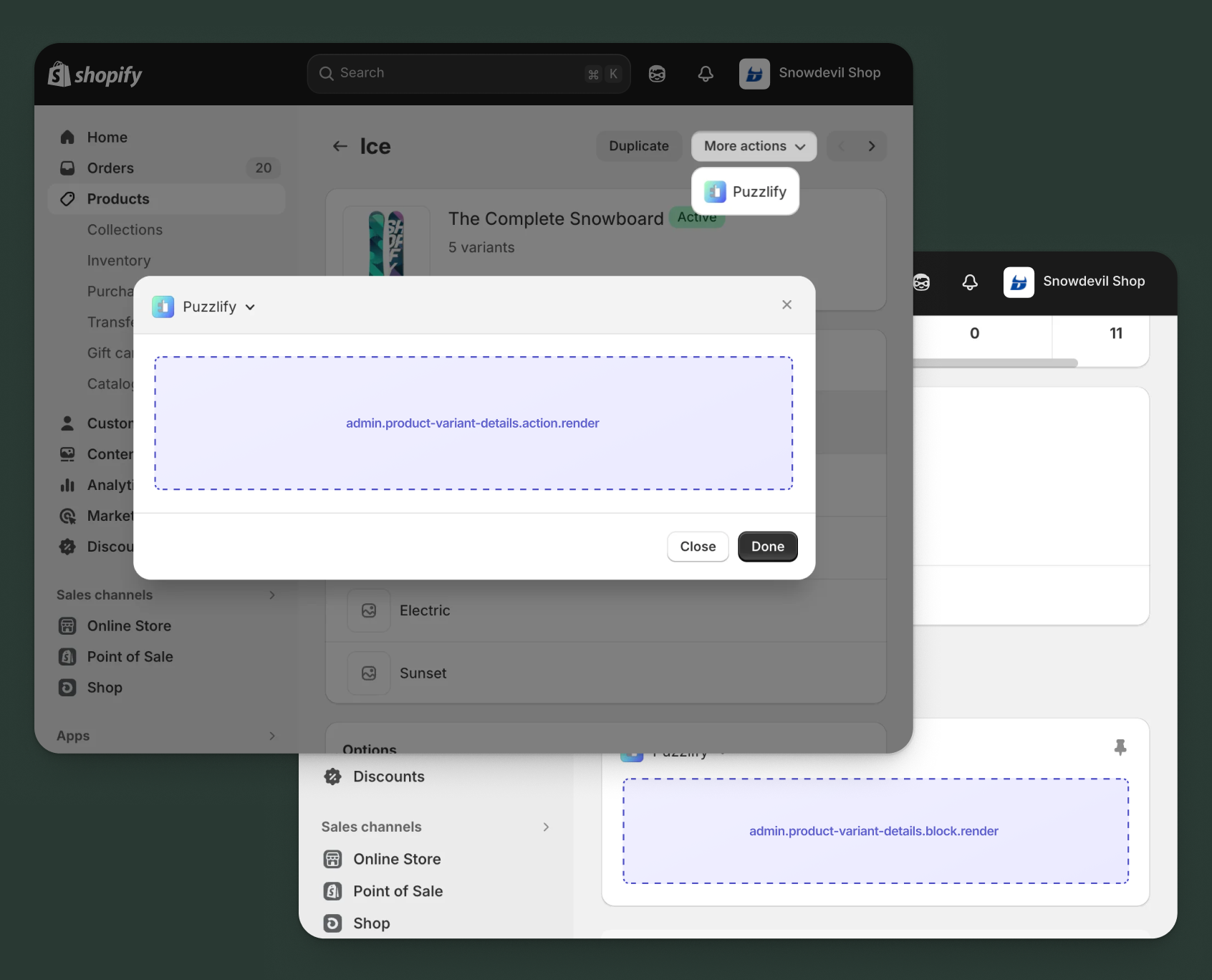
Anchor to Product variant details targetsProduct variant details targets
Use action and block targets to extend the product variant details page with workflows and contextual information.
Extensions can query and mutate Shopify data using the direct API, or call your app's backend for custom business logic and external integrations.
Anchor to Product variant details action ,[object Object]Product variant details action target
admin.product-variant-details.action.render
Renders an admin action extension on the product variants details page. Merchants can access this extension from the More actions menu. Use this target to provide workflows that operate on product variants data, such as syncing with external systems, exporting product variants information, or managing credit terms.
Extensions at this target can access product variants data through the data property in the Action Extension API. The action renders in a modal overlay, providing space for multi-step workflows, forms, and confirmations.
Supported components
- Admin action
- Avatar
- Badge
- Banner
- Box
- Button
- Button group
- Checkbox
- Chip
- Choice list
- Clickable
- Clickable chip
- Color field
- Color picker
- Date field
- Date picker
- Divider
- Drop zone
- Email field
- Grid
- Heading
- Icon
- Image
- Link
- Menu
- Money field
- Number field
- Ordered list
- Paragraph
- Password field
- Query container
- Search field
- Section
- Select
- Spinner
- Stack
- Switch
- Table
- Text
- Text area
- Text field
- Thumbnail
- Tooltip
- Url field
- Unordered list
Available APIs
Supported components
- Admin action
- Avatar
- Badge
- Banner
- Box
- Button
- Button group
- Checkbox
- Chip
- Choice list
- Clickable
- Clickable chip
- Color field
- Color picker
- Date field
- Date picker
- Divider
- Drop zone
- Email field
- Grid
- Heading
- Icon
- Image
- Link
- Menu
- Money field
- Number field
- Ordered list
- Paragraph
- Password field
- Query container
- Search field
- Section
- Select
- Spinner
- Stack
- Switch
- Table
- Text
- Text area
- Text field
- Thumbnail
- Tooltip
- Url field
- Unordered list
Available APIs
jsx
Examples
Description
Add an action extension that syncs product variant inventory levels from an external warehouse management system. This example demonstrates calling your app backend to fetch real-time stock data and update the variant.
jsx
import {render} from 'preact';
import {useState} from 'preact/hooks';

export default async () => {
  render(<Extension />, document.body);
};

const Extension = () => {
  const [loading, setLoading] = useState(false);
  const [success, setSuccess] = useState(false);
  const [error, setError] = useState(false);
  const [warehouse, setWarehouse] = useState('main');
  const [updateThreshold, setUpdateThreshold] = useState(false);

  const handleSync = async () => {
    setLoading(true);
    setError(false);
    const variantId = shopify.data.selected[0].id;

    try {
      const response = await fetch('https://your-app.com/api/inventory/sync', {
        method: 'POST',
        headers: {'Content-Type': 'application/json'},
        body: JSON.stringify({
          variantId,
          warehouse,
          updateThreshold,
        }),
      });

      if (response.ok) {
        setSuccess(true);
        shopify.close();
      } else {
        setError(true);
      }
    } catch (err) {
      setError(true);
    } finally {
      setLoading(false);
    }
  };

  return (
    <s-admin-action heading="Sync Inventory">
      {success && (
        <s-banner tone="success" dismissible={false}>
          Inventory synced successfully from warehouse!
        </s-banner>
      )}
      {error && (
        <s-banner tone="critical" dismissible={false}>
          Failed to sync inventory. Please try again.
        </s-banner>
      )}

      <s-section heading="Warehouse Settings">
        <s-stack gap="base">
          <s-select
            label="Source Warehouse"
            value={warehouse}
            onChange={(event) => setWarehouse(event.currentTarget.value)}
          >
            <s-option value="main">Main Warehouse</s-option>
            <s-option value="east">East Coast DC</s-option>
            <s-option value="west">West Coast DC</s-option>
          </s-select>

          <s-checkbox
            label="Update low stock threshold"
            checked={updateThreshold}
            onChange={(event) => setUpdateThreshold(event.currentTarget.checked)}
          />

          <s-text color="subdued">
            This will fetch the latest inventory count from your warehouse system.
          </s-text>
        </s-stack>
      </s-section>

      <s-button
        slot="primary-action"
        onClick={handleSync}
        disabled={loading || success}
      >
        {loading ? 'Syncing...' : 'Sync Inventory'}
      </s-button>
      <s-button slot="secondary-actions" onClick={() => shopify.close()}>
        Cancel
      </s-button>
    </s-admin-action>
  );
};
Description
Add an action extension that publishes a product variant to an external marketplace using the [direct API](/docs/api/admin-extensions/2025-10#direct-api-access). This example demonstrates fetching variant details using the [GraphQL Admin API](/docs/api/admin-graphql) and configuring marketplace listing options before publishing.
jsx
import {render} from 'preact';
import {useState, useEffect} from 'preact/hooks';

export default async () => {
  render(<Extension />, document.body);
};

const Extension = () => {
  const [loading, setLoading] = useState(false);
  const [publishing, setPublishing] = useState(false);
  const [success, setSuccess] = useState(false);
  const [error, setError] = useState(null);
  const [variant, setVariant] = useState(null);
  const [marketplace, setMarketplace] = useState('amazon');
  const [markupPercent, setMarkupPercent] = useState('10');

  useEffect(() => {
    fetchVariantDetails();
  }, []);

  const fetchVariantDetails = async () => {
    setLoading(true);
    const variantId = shopify.data.selected[0].id;

    const response = await fetch('shopify:admin/api/graphql.json', {
      method: 'POST',
      headers: {'Content-Type': 'application/json'},
      body: JSON.stringify({
        query: `query GetVariant($id: ID!) {
          productVariant(id: $id) {
            id
            title
            sku
            price
            inventoryQuantity
            product { title }
          }
        }`,
        variables: {id: variantId},
      }),
    });

    const {data} = await response.json();
    setVariant(data.productVariant);
    setLoading(false);
  };

  const handlePublish = async () => {
    setPublishing(true);
    setError(null);

    try {
      const listingPrice = parseFloat(variant.price) * (1 + parseFloat(markupPercent) / 100);

      // Simulate marketplace API call
      await new Promise(resolve => setTimeout(resolve, 1000));

      setSuccess(true);
      shopify.close();
    } catch (err) {
      setError('Failed to publish to marketplace');
    } finally {
      setPublishing(false);
    }
  };

  if (loading) {
    return (
      <s-admin-action heading="Publish to Marketplace">
        <s-box padding="large"><s-spinner size="base" /></s-box>
      </s-admin-action>
    );
  }

  return (
    <s-admin-action heading="Publish to Marketplace">
      {success && (
        <s-banner tone="success" dismissible={false}>
          Variant published to {marketplace} successfully!
        </s-banner>
      )}
      {error && <s-banner tone="critical" dismissible={false}>{error}</s-banner>}

      <s-section heading="Variant Details">
        <s-stack gap="small">
          <s-text type="strong">{variant?.product?.title}</s-text>
          <s-text color="subdued">Variant: {variant?.title} • SKU: {variant?.sku || 'N/A'}</s-text>
          <s-text>Base Price: ${variant?.price} • Stock: {variant?.inventoryQuantity}</s-text>
        </s-stack>
      </s-section>

      <s-section heading="Marketplace Settings">
        <s-stack gap="base">
          <s-select
            label="Target Marketplace"
            value={marketplace}
            onChange={(e) => setMarketplace(e.currentTarget.value)}
          >
            <s-option value="amazon">Amazon</s-option>
            <s-option value="ebay">eBay</s-option>
            <s-option value="walmart">Walmart</s-option>
          </s-select>
          <s-number-field
            label="Price Markup (%)"
            suffix="%"
            value={markupPercent}
            onChange={(e) => setMarkupPercent(e.currentTarget.value)}
          />
        </s-stack>
      </s-section>

      <s-button slot="primary-action" onClick={handlePublish} disabled={publishing || success}>
        {publishing ? 'Publishing...' : 'Publish Variant'}
      </s-button>
      <s-button slot="secondary-actions" onClick={() => shopify.close()}>
        Cancel
      </s-button>
    </s-admin-action>
  );
};
Anchor to Product variant details action (should render) ,[object Object]Product variant details action (should render) target
admin.product-variant-details.action.should-render
Controls the render state of an admin action extension on the product variants details page. Use this target to conditionally show or hide your action extension based on the product variant's properties, such as status, configuration, or specific business requirements.
This target returns a boolean value that determines whether the corresponding action extension appears in the More actions menu. The extension evaluates each time the page loads.
Supported components
Available APIs
Supported components
Available APIs
jsx
Examples
Description
Add a should-render extension that checks your app backend to determine if a product variant has inventory synchronization enabled before displaying the action.
jsx
export default async () => {
  const variantId = shopify.data.selected[0].id;

  try {
    // Check with app backend if this variant has inventory sync enabled
    const response = await fetch('https://your-app.com/api/check-inventory-sync', {
      method: 'POST',
      headers: {
        'Content-Type': 'application/json',
      },
      body: JSON.stringify({ variantId }),
    });

    if (!response.ok) {
      console.error('Backend check failed:', response.status);
      return { display: false };
    }

    const result = await response.json();

    // Only show action if variant is enrolled in inventory sync
    return { display: result.syncEnabled === true };
  } catch (err) {
    console.error('Error checking inventory sync status:', err);
    return { display: false };
  }
};
Description
Add a should-render extension that displays the action only for product variants with stock available. This example uses the [direct API](/docs/api/admin-extensions/2025-10#direct-api-access) to query the [GraphQL Admin API](/docs/api/admin-graphql) and check the variant's inventory quantity.
jsx
export default async () => {
  const variantId = shopify.data.selected[0].id;

  try {
    const response = await fetch('shopify:admin/api/graphql.json', {
      method: 'POST',
      headers: {'Content-Type': 'application/json'},
      body: JSON.stringify({
        query: `query GetVariantInventory($id: ID!) {
          productVariant(id: $id) {
            inventoryQuantity
            inventoryPolicy
          }
        }`,
        variables: {id: variantId},
      }),
    });

    const {data} = await response.json();
    const variant = data?.productVariant;

    if (!variant) {
      return {display: false};
    }

    // Show action only for variants with available stock
    const hasStock = variant.inventoryQuantity > 0;

    return {display: hasStock};
  } catch (err) {
    console.error('Error checking variant inventory:', err);
    return {display: false};
  }
};
Anchor to Product variant details block ,[object Object]Product variant details block target
admin.product-variant-details.block.render
Renders an admin block extension inline on the product variants details page. Use this target to display contextual information, analytics, or status updates related to the product variants without requiring merchant interaction to open a modal.
Extensions at this target can access product variants data through the data property in the Block Extension API. Blocks appear as cards on the page and can show real-time data, insights, or quick actions, providing persistent visibility for information merchants need to see at a glance.
Supported components
- Admin block
- Avatar
- Badge
- Banner
- Box
- Button
- Button group
- Checkbox
- Chip
- Choice list
- Clickable
- Clickable chip
- Color field
- Color picker
- Date field
- Date picker
- Divider
- Drop zone
- Email field
- Form
- Grid
- Heading
- Icon
- Image
- Link
- Menu
- Money field
- Number field
- Ordered list
- Paragraph
- Password field
- Query container
- Search field
- Section
- Select
- Spinner
- Stack
- Switch
- Table
- Text
- Text area
- Text field
- Thumbnail
- Tooltip
- Url field
- Unordered list
Available APIs
Supported components
- Admin block
- Avatar
- Badge
- Banner
- Box
- Button
- Button group
- Checkbox
- Chip
- Choice list
- Clickable
- Clickable chip
- Color field
- Color picker
- Date field
- Date picker
- Divider
- Drop zone
- Email field
- Form
- Grid
- Heading
- Icon
- Image
- Link
- Menu
- Money field
- Number field
- Ordered list
- Paragraph
- Password field
- Query container
- Search field
- Section
- Select
- Spinner
- Stack
- Switch
- Table
- Text
- Text area
- Text field
- Thumbnail
- Tooltip
- Url field
- Unordered list
Available APIs
jsx
Examples
Description
Create a block extension that shows competitor prices for the current product variant by fetching pricing data from your app backend. This example demonstrates how to call an external API endpoint and display comparison data in a block.
jsx
import {render} from 'preact';
import {useState, useEffect} from 'preact/hooks';

export default async () => {
  render(<Extension />, document.body);
};

const Extension = () => {
  const [loading, setLoading] = useState(true);
  const [error, setError] = useState(false);
  const [competitors, setCompetitors] = useState([]);
  const [variantPrice, setVariantPrice] = useState(null);

  useEffect(() => {
    fetchCompetitorPricing();
  }, []);

  const fetchCompetitorPricing = async () => {
    const variantId = shopify.data.selected[0].id;

    try {
      const response = await fetch('https://your-app.com/api/competitor-pricing', {
        method: 'POST',
        headers: {'Content-Type': 'application/json'},
        body: JSON.stringify({variantId}),
      });

      if (response.ok) {
        const data = await response.json();
        setCompetitors(data.competitors || []);
        setVariantPrice(data.yourPrice);
      } else {
        setError(true);
      }
    } catch (err) {
      setError(true);
    } finally {
      setLoading(false);
    }
  };

  if (loading) {
    return (
      <s-admin-block heading="Competitor Pricing">
        <s-stack gap="base">
          <s-spinner size="base" />
          <s-text color="subdued">Loading competitor data...</s-text>
        </s-stack>
      </s-admin-block>
    );
  }

  if (error) {
    return (
      <s-admin-block heading="Competitor Pricing">
        <s-banner tone="critical" dismissible={false}>
          Unable to fetch competitor pricing data.
        </s-banner>
      </s-admin-block>
    );
  }

  return (
    <s-admin-block heading="Competitor Pricing">
      <s-stack gap="base">
        <s-box>
          <s-text type="strong">Your price: </s-text>
          <s-text>{variantPrice || '$29.99'}</s-text>
        </s-box>

        <s-divider />

        <s-section heading="Market Comparison">
          <s-stack gap="small">
            <s-box>
              <s-text>Amazon: $32.99 </s-text>
              <s-badge tone="success">You're lower</s-badge>
            </s-box>
            <s-box>
              <s-text>Walmart: $27.99 </s-text>
              <s-badge tone="warning">$2 cheaper</s-badge>
            </s-box>
            <s-box>
              <s-text>Target: $29.99 </s-text>
              <s-badge>Same price</s-badge>
            </s-box>
          </s-stack>
        </s-section>

        <s-text color="subdued">Last updated: 2 hours ago</s-text>
      </s-stack>
    </s-admin-block>
  );
};
Description
Create a block extension that shows low stock warnings and reorder points for product variants using the [direct API](/docs/api/admin-extensions/2025-10#direct-api-access). This example demonstrates fetching variant inventory data from the [GraphQL Admin API](/docs/api/admin-graphql) and displaying stock level alerts.
jsx
import {render} from 'preact';
import {useState, useEffect} from 'preact/hooks';

export default async () => {
  render(<Extension />, document.body);
};

const Extension = () => {
  const [loading, setLoading] = useState(true);
  const [inventory, setInventory] = useState(null);
  const [error, setError] = useState(false);

  const reorderPoint = 10;
  const criticalLevel = 5;

  useEffect(() => {
    fetchInventory();
  }, []);

  const fetchInventory = async () => {
    const variantId = shopify.data.selected[0].id;

    try {
      const response = await fetch('shopify:admin/api/graphql.json', {
        method: 'POST',
        headers: {'Content-Type': 'application/json'},
        body: JSON.stringify({
          query: `query GetVariantInventory($id: ID!) {
            productVariant(id: $id) {
              displayName
              sku
              inventoryQuantity
              inventoryItem {
                tracked
              }
            }
          }`,
          variables: {id: variantId},
        }),
      });

      const {data} = await response.json();
      setInventory(data.productVariant);
    } catch (err) {
      setError(true);
    } finally {
      setLoading(false);
    }
  };

  const getStockStatus = (quantity) => {
    if (quantity <= criticalLevel) return {tone: 'critical', label: 'Critical'};
    if (quantity <= reorderPoint) return {tone: 'warning', label: 'Low Stock'};
    return {tone: 'success', label: 'In Stock'};
  };

  if (loading) {
    return (
      <s-admin-block heading="Inventory Alerts">
        <s-box padding="base"><s-spinner size="base" /></s-box>
      </s-admin-block>
    );
  }

  if (error || !inventory) {
    return (
      <s-admin-block heading="Inventory Alerts">
        <s-banner tone="critical" dismissible={false}>
          Unable to load inventory data.
        </s-banner>
      </s-admin-block>
    );
  }

  const status = getStockStatus(inventory.inventoryQuantity);

  return (
    <s-admin-block heading="Inventory Alerts">
      <s-stack gap="base">
        {inventory.inventoryQuantity <= reorderPoint && (
          <s-banner tone={status.tone} dismissible={false}>
            {inventory.inventoryQuantity <= criticalLevel
              ? 'Critical stock level! Immediate reorder required.'
              : 'Stock below reorder point. Consider restocking soon.'}
          </s-banner>
        )}

        <s-box padding="small" background="subdued" borderRadius="base">
          <s-stack gap="small">
            <s-stack gap="small">
              <s-text type="strong">Current Stock</s-text>
              <s-badge tone={status.tone}>{inventory.inventoryQuantity} units</s-badge>
            </s-stack>
            <s-divider />
            <s-stack gap="small">
              <s-text color="subdued">Reorder Point: {reorderPoint} units</s-text>
              <s-text color="subdued">Critical Level: {criticalLevel} units</s-text>
              {inventory.sku && <s-text color="subdued">SKU: {inventory.sku}</s-text>}
            </s-stack>
          </s-stack>
        </s-box>
      </s-stack>
    </s-admin-block>
  );
};
Anchor to Product variant details configuration ,[object Object]Product variant details configuration target
admin.product-variant-details.configuration.render
Renders a configuration interface for product bundles on product variant details pages. This target allows merchants to configure component products, quantities, and pricing for bundle configurations directly from the variant editor. Use this target when your app needs to provide merchant-facing configuration UI for bundle components and options.
Learn how to add a product configuration extension.
Supported components
- Admin block
- Avatar
- Badge
- Banner
- Box
- Button
- Button group
- Checkbox
- Chip
- Choice list
- Clickable
- Clickable chip
- Color field
- Color picker
- Date field
- Date picker
- Divider
- Drop zone
- Email field
- Form
- Grid
- Heading
- Icon
- Image
- Link
- Menu
- Money field
- Number field
- Ordered list
- Paragraph
- Password field
- Query container
- Search field
- Section
- Select
- Spinner
- Stack
- Switch
- Table
- Text
- Text area
- Text field
- Thumbnail
- Tooltip
- Url field
- Unordered list
Available APIs
Supported components
- Admin block
- Avatar
- Badge
- Banner
- Box
- Button
- Button group
- Checkbox
- Chip
- Choice list
- Clickable
- Clickable chip
- Color field
- Color picker
- Date field
- Date picker
- Divider
- Drop zone
- Email field
- Form
- Grid
- Heading
- Icon
- Image
- Link
- Menu
- Money field
- Number field
- Ordered list
- Paragraph
- Password field
- Query container
- Search field
- Section
- Select
- Spinner
- Stack
- Switch
- Table
- Text
- Text area
- Text field
- Thumbnail
- Tooltip
- Url field
- Unordered list
Available APIs
jsx
Examples
Description
Add a configuration extension that lets merchants define inventory rules for product bundles. This example demonstrates setting up component-level stock requirements and availability thresholds for bundled variants.
jsx
import {render} from 'preact';
import {useState} from 'preact/hooks';

export default async () => {
  render(<Extension />, document.body);
};

const Extension = () => {
  const [loading, setLoading] = useState(false);
  const [success, setSuccess] = useState(false);
  const [error, setError] = useState(null);
  const [updateBackorder, setUpdateBackorder] = useState(true);
  const [syncResult, setSyncResult] = useState(null);

  const handleSync = async () => {
    setLoading(true);
    setError(null);
    const variantId = shopify.data.selected[0].id;

    try {
      const response = await fetch('https://your-app.com/api/inventory/sync', {
        method: 'POST',
        headers: {'Content-Type': 'application/json'},
        body: JSON.stringify({
          variantId,
          updateBackorder,
        }),
      });

      if (response.ok) {
        const result = await response.json();
        setSyncResult(result);
        setSuccess(true);
        shopify.close();
      } else {
        const errorData = await response.json();
        setError(errorData.message || 'Failed to sync inventory');
      }
    } catch (err) {
      setError('Connection error. Please try again.');
    } finally {
      setLoading(false);
    }
  };

  return (
    <s-admin-action heading="Sync Variant Inventory">
      {success && syncResult && (
        <s-banner tone="success" dismissible={false}>
          Inventory synced! New quantity: {syncResult.quantity} units
        </s-banner>
      )}
      {error && (
        <s-banner tone="critical" dismissible={false}>
          {error}
        </s-banner>
      )}

      <s-section heading="Sync Options">
        <s-stack gap="base">
          <s-text color="subdued">
            Pull the latest inventory count from your warehouse system.
          </s-text>
          <s-checkbox
            label="Update backorder availability"
            checked={updateBackorder}
            onChange={(event) => setUpdateBackorder(event.currentTarget.checked)}
          />
        </s-stack>
      </s-section>

      <s-button
        slot="primary-action"
        onClick={handleSync}
        disabled={loading || success}
      >
        {loading ? 'Syncing...' : 'Sync Inventory'}
      </s-button>
      <s-button slot="secondary-actions" onClick={() => shopify.close()}>
        Cancel
      </s-button>
    </s-admin-action>
  );
};
Description
Add an action extension that publishes a configured product variant to an external marketplace. This example demonstrates using the [direct API](/docs/api/admin-extensions/2025-10#direct-api-access) to fetch variant details from the [GraphQL Admin API](/docs/api/admin-graphql) and sync them to a sales channel.
jsx
import {render} from 'preact';
import {useState, useEffect} from 'preact/hooks';

export default async () => {
  render(<Extension />, document.body);
};

const Extension = () => {
  const [loading, setLoading] = useState(false);
  const [fetching, setFetching] = useState(true);
  const [success, setSuccess] = useState(false);
  const [error, setError] = useState(null);
  const [variant, setVariant] = useState(null);
  const [marketplace, setMarketplace] = useState('amazon');

  useEffect(() => {
    fetchVariantDetails();
  }, []);

  const fetchVariantDetails = async () => {
    const variantId = shopify.data.selected[0].id;

    const response = await fetch('shopify:admin/api/graphql.json', {
      method: 'POST',
      headers: {'Content-Type': 'application/json'},
      body: JSON.stringify({
        query: `query GetVariant($id: ID!) {
          productVariant(id: $id) {
            id
            title
            sku
            price
            inventoryQuantity
            product { title }
          }
        }`,
        variables: {id: variantId}
      }),
    });

    const {data} = await response.json();
    setVariant(data.productVariant);
    setFetching(false);
  };

  const handlePublish = async () => {
    setLoading(true);
    setError(null);

    try {
      const response = await fetch('https://your-app.com/api/publish-variant', {
        method: 'POST',
        headers: {'Content-Type': 'application/json'},
        body: JSON.stringify({
          variantId: variant.id,
          sku: variant.sku,
          price: variant.price,
          inventory: variant.inventoryQuantity,
          marketplace
        }),
      });

      if (response.ok) {
        setSuccess(true);
        shopify.close();
      } else {
        setError('Failed to publish variant to marketplace');
      }
    } catch (err) {
      setError('Connection error. Please try again.');
    } finally {
      setLoading(false);
    }
  };

  if (fetching) {
    return (
      <s-admin-action heading="Publish to Marketplace">
        <s-box padding="large">
          <s-spinner size="base" />
        </s-box>
      </s-admin-action>
    );
  }

  return (
    <s-admin-action heading="Publish to Marketplace">
      {success && (
        <s-banner tone="success" dismissible={false}>
          Variant published to {marketplace} successfully!
        </s-banner>
      )}
      {error && (
        <s-banner tone="critical" dismissible={false}>
          {error}
        </s-banner>
      )}

      <s-section heading="Variant Details">
        <s-stack gap="small">
          <s-text type="strong">{variant.product.title} - {variant.title}</s-text>
          <s-text color="subdued">SKU: {variant.sku || 'Not set'}</s-text>
          <s-text color="subdued">Price: ${variant.price} • Stock: {variant.inventoryQuantity}</s-text>
        </s-stack>
      </s-section>

      <s-section heading="Destination">
        <s-select
          label="Marketplace"
          value={marketplace}
          onChange={(event) => setMarketplace(event.currentTarget.value)}
        >
          <s-option value="amazon">Amazon</s-option>
          <s-option value="ebay">eBay</s-option>
          <s-option value="walmart">Walmart</s-option>
        </s-select>
      </s-section>

      <s-button
        slot="primary-action"
        onClick={handlePublish}
        disabled={loading || success}
      >
        {loading ? 'Publishing...' : 'Publish Variant'}
      </s-button>
      <s-button slot="secondary-actions" onClick={() => shopify.close()}>
        Cancel
      </s-button>
    </s-admin-action>
  );
};
Anchor to Product variant purchase option targetsProduct variant purchase option targets
Use action targets to extend the product variant purchase option page with workflows and operations.
Extensions can query and mutate Shopify data using the direct API, or call your app's backend for custom business logic and external integrations.
Anchor to Product variant purchase option action ,[object Object]Product variant purchase option action target
admin.product-variant-purchase-option.action.render
Renders an admin action extension on the product variants details page. Merchants can access this extension from the More actions menu. Use this target to provide workflows that operate on product variants data, such as syncing with external systems, exporting product variants information, or managing credit terms.
Extensions at this target can access product variants data through the data property in the Action Extension API. The action renders in a modal overlay, providing space for multi-step workflows, forms, and confirmations.
Supported components
- Admin action
- Avatar
- Badge
- Banner
- Box
- Button
- Button group
- Checkbox
- Chip
- Choice list
- Clickable
- Clickable chip
- Color field
- Color picker
- Date field
- Date picker
- Divider
- Drop zone
- Email field
- Grid
- Heading
- Icon
- Image
- Link
- Menu
- Money field
- Number field
- Ordered list
- Paragraph
- Password field
- Query container
- Search field
- Section
- Select
- Spinner
- Stack
- Switch
- Table
- Text
- Text area
- Text field
- Thumbnail
- Tooltip
- Url field
- Unordered list
Available APIs
Supported components
- Admin action
- Avatar
- Badge
- Banner
- Box
- Button
- Button group
- Checkbox
- Chip
- Choice list
- Clickable
- Clickable chip
- Color field
- Color picker
- Date field
- Date picker
- Divider
- Drop zone
- Email field
- Grid
- Heading
- Icon
- Image
- Link
- Menu
- Money field
- Number field
- Ordered list
- Paragraph
- Password field
- Query container
- Search field
- Section
- Select
- Spinner
- Stack
- Switch
- Table
- Text
- Text area
- Text field
- Thumbnail
- Tooltip
- Url field
- Unordered list
Available APIs
jsx
Examples
Description
Add an action extension that manages inventory allocation for subscription-based variants. This example demonstrates syncing reserved stock quantities for active subscriptions and updating availability for new subscribers.
jsx
import {render} from 'preact';
import {useState} from 'preact/hooks';

export default async () => {
  render(<Extension />, document.body);
};

const Extension = () => {
  const [loading, setLoading] = useState(false);
  const [success, setSuccess] = useState(false);
  const [error, setError] = useState(null);
  const [warehouse, setWarehouse] = useState('main');
  const [updateThreshold, setUpdateThreshold] = useState(false);

  const handleSync = async () => {
    setLoading(true);
    setError(null);
    const variantId = shopify.data.selected[0].id;

    try {
      const response = await fetch('https://your-app.com/api/inventory/sync', {
        method: 'POST',
        headers: {'Content-Type': 'application/json'},
        body: JSON.stringify({
          variantId,
          warehouse,
          updateThreshold,
        }),
      });

      if (response.ok) {
        setSuccess(true);
        shopify.close();
      } else {
        const data = await response.json();
        setError(data.message || 'Failed to sync inventory');
      }
    } catch (err) {
      setError('Connection error. Please try again.');
    } finally {
      setLoading(false);
    }
  };

  return (
    <s-admin-action heading="Sync Inventory">
      {success && (
        <s-banner tone="success" dismissible={false}>
          Inventory synced successfully!
        </s-banner>
      )}
      {error && (
        <s-banner tone="critical" dismissible={false}>
          {error}
        </s-banner>
      )}

      <s-section heading="Sync Settings">
        <s-stack gap="base">
          <s-select
            label="Source Warehouse"
            value={warehouse}
            onChange={(event) => setWarehouse(event.currentTarget.value)}
          >
            <s-option value="main">Main Warehouse</s-option>
            <s-option value="east">East Coast DC</s-option>
            <s-option value="west">West Coast DC</s-option>
          </s-select>

          <s-checkbox
            label="Update low stock threshold"
            checked={updateThreshold}
            onChange={(event) => setUpdateThreshold(event.currentTarget.checked)}
          />

          <s-text color="subdued">
            This will fetch the latest inventory count from your warehouse system.
          </s-text>
        </s-stack>
      </s-section>

      <s-button
        slot="primary-action"
        onClick={handleSync}
        disabled={loading || success}
      >
        {loading ? 'Syncing...' : 'Sync Inventory'}
      </s-button>
      <s-button slot="secondary-actions" onClick={() => shopify.close()}>
        Cancel
      </s-button>
    </s-admin-action>
  );
};
Description
Add an action extension that publishes a product variant with its purchase option to an external marketplace. This example demonstrates using the [direct API](/docs/api/admin-extensions/2025-10#direct-api-access) to fetch variant details from the [GraphQL Admin API](/docs/api/admin-graphql) and sync them to a sales channel.
jsx
import {render} from 'preact';
import {useState} from 'preact/hooks';

export default async () => {
  render(<Extension />, document.body);
};

const Extension = () => {
  const [loading, setLoading] = useState(false);
  const [success, setSuccess] = useState(false);
  const [error, setError] = useState(null);
  const [marketplace, setMarketplace] = useState('amazon');
  const [includeSubscription, setIncludeSubscription] = useState(true);

  const handlePublish = async () => {
    setLoading(true);
    setError(null);
    const variantId = shopify.data.selected[0].id;

    try {
      // Fetch variant details using direct API
      const response = await fetch('shopify:admin/api/graphql.json', {
        method: 'POST',
        headers: {'Content-Type': 'application/json'},
        body: JSON.stringify({
          query: `query GetVariant($id: ID!) {
            productVariant(id: $id) {
              id
              title
              sku
              price
              product {
                title
              }
              sellingPlanGroups(first: 5) {
                edges {
                  node {
                    name
                    sellingPlans(first: 5) {
                      edges {
                        node {
                          name
                          billingPolicy {
                            ... on SellingPlanRecurringBillingPolicy {
                              interval
                              intervalCount
                            }
                          }
                        }
                      }
                    }
                  }
                }
              }
            }
          }`,
          variables: {id: variantId},
        }),
      });

      const {data} = await response.json();
      const variant = data?.productVariant;

      if (!variant) {
        throw new Error('Variant not found');
      }

      // Simulate publishing to marketplace
      console.log(`Publishing ${variant.sku} to ${marketplace}`, {
        includeSubscription,
        sellingPlans: variant.sellingPlanGroups?.edges,
      });

      setSuccess(true);
      shopify.close();
    } catch (err) {
      setError(err.message || 'Failed to publish variant');
    } finally {
      setLoading(false);
    }
  };

  return (
    <s-admin-action heading="Publish to Marketplace">
      {success && (
        <s-banner tone="success" dismissible={false}>
          Variant published successfully!
        </s-banner>
      )}
      {error && (
        <s-banner tone="critical" dismissible={false}>
          {error}
        </s-banner>
      )}

      <s-section heading="Marketplace Settings">
        <s-stack gap="base">
          <s-select
            label="Target marketplace"
            value={marketplace}
            onChange={(e) => setMarketplace(e.currentTarget.value)}
          >
            <s-option value="amazon">Amazon</s-option>
            <s-option value="ebay">eBay</s-option>
            <s-option value="walmart">Walmart</s-option>
          </s-select>

          <s-checkbox
            label="Include subscription options"
            checked={includeSubscription}
            onChange={(e) => setIncludeSubscription(e.currentTarget.checked)}
          />

          <s-text color="subdued">
            Purchase options and pricing will be synced to the selected marketplace.
          </s-text>
        </s-stack>
      </s-section>

      <s-button
        slot="primary-action"
        onClick={handlePublish}
        disabled={loading || success}
      >
        {loading ? 'Publishing...' : 'Publish Variant'}
      </s-button>
      <s-button slot="secondary-actions" onClick={() => shopify.close()}>
        Cancel
      </s-button>
    </s-admin-action>
  );
};
Anchor to Best practicesBest practices
- Display variant context clearly: Always show which product a variant belongs to (product title) alongside variant-specific details (option values, SKU). Merchants often view variants out of context and need this information to make decisions.
- Aggregate inventory across locations: When displaying variant inventory, show total inventory by default but allow filtering by location. Merchants with multi-location setups need location-specific visibility for fulfillment decisions.
- Validate marketplace requirements: Before publishing variants to external marketplaces, validate that required variant fields (SKU, barcode, weight, dimensions) are populated. Many marketplaces reject variants missing these fields, and early validation prevents failed sync attempts.
- Handle option combinations carefully: Variants are defined by option combinations (for example, Size: Large, Color: Red). When building extensions that manipulate variants, preserve the option structure and validate that option combinations remain unique within the product.
- Check inventory tracking status: Use
inventoryItem.trackedto determine if a variant tracks inventory before displaying inventory-related actions. Extensions that assume all variants track inventory will fail for digital products or services.
Anchor to LimitationsLimitations
- Single target per module: Each
[[extensions.targeting]]entry in your TOML configuration maps one target to one module file. - Purchase option target visibility: The
admin.product-variant-purchase-option.action.rendertarget only appears when the product variant has a selling plan group associated with it. - Configuration target availability: The
admin.product-variant-details.configuration.rendertarget only appears for product variants configured as bundles. - Block target visibility: Block extensions must be manually added and pinned by merchants before they appear.
- Block collapse behavior: Returning
nullfrom a block extension collapses the block rather than removing it from the page. Blocks can't be fully hidden at runtime.