Products
Product pages allow merchants to create and manage their product catalog, including product details, variants, inventory, pricing, and media. Extensions on these pages help merchants enrich product data, configure bundles, manage purchase options, or integrate with external systems.
Anchor to Use casesUse cases
- Product data enrichment: Enhance product information with supplier data, certifications, sustainability metrics, or extended attributes from external product information management (PIM) systems.
- Bundle and kit configuration: Configure product bundles, multi-packs, or kits with component selection, pricing rules, and inventory management across bundle components.
- Subscription and purchase options: Set up subscription plans, pre-order options, or custom purchase terms for products through integrated subscription management platforms.
- Marketplace publishing: Sync product data to external marketplaces like Amazon, eBay, or Google Shopping, including descriptions, pricing, inventory, and marketplace-specific attributes.
- Custom label and document generation: Generate product labels, barcodes, spec sheets, or compliance documents based on product attributes and external data sources.
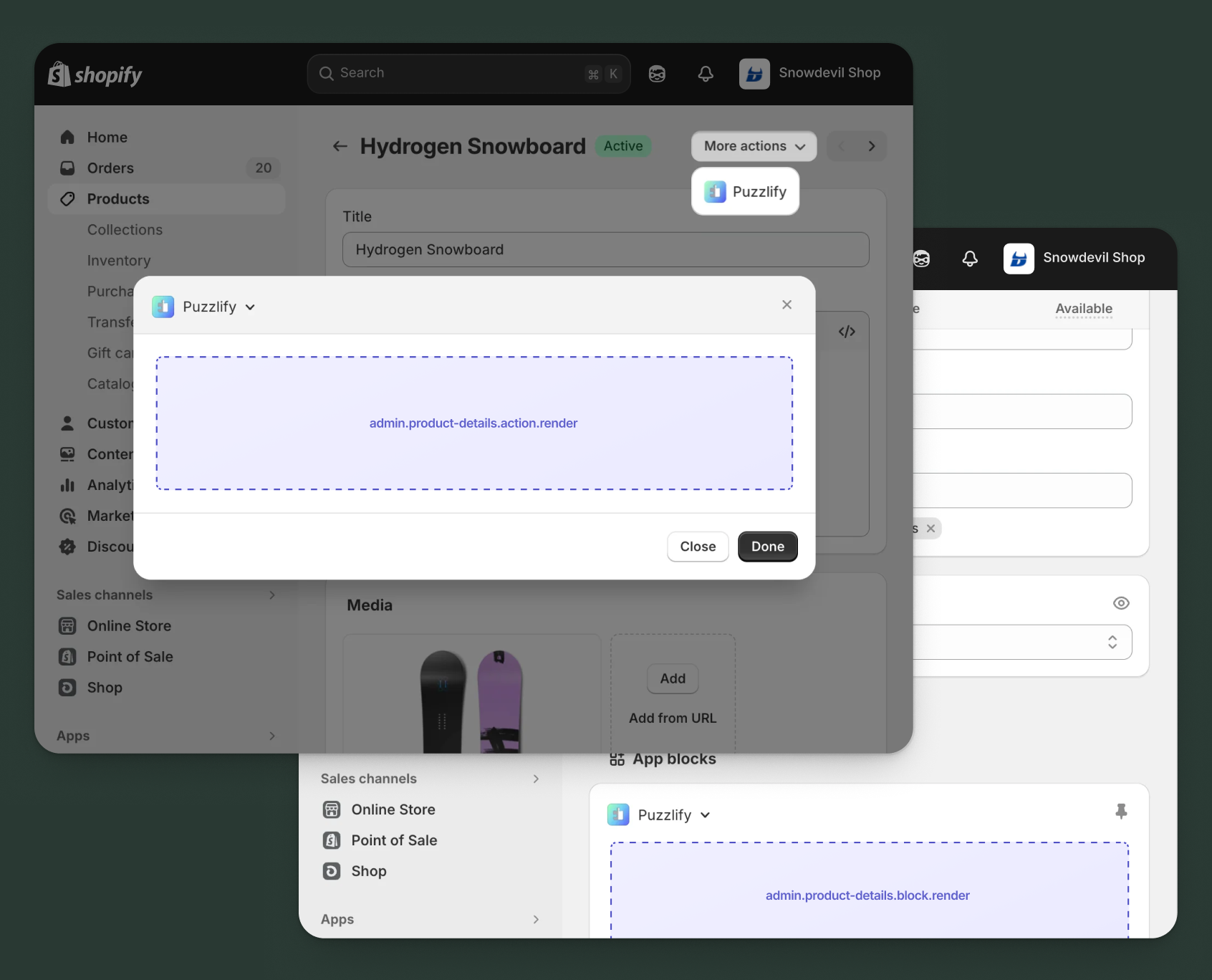
Anchor to Product details targetsProduct details targets
Use action and block targets to extend the product details page with workflows and contextual information.
Extensions can query and mutate Shopify data using the direct API, or call your app's backend for custom business logic and external integrations.
Anchor to Product details action ,[object Object]Product details action target
admin.product-details.action.render
Renders an admin action extension on the product details page. Merchants can access this extension from the More actions menu. Use this target to provide workflows that operate on product data, such as syncing with external systems, exporting product information, or managing credit terms.
Extensions at this target can access product data through the data property in the Action Extension API. The action renders in a modal overlay, providing space for multi-step workflows, forms, and confirmations.
Supported components
- Admin action
- Avatar
- Badge
- Banner
- Box
- Button
- Button group
- Checkbox
- Chip
- Choice list
- Clickable
- Clickable chip
- Color field
- Color picker
- Date field
- Date picker
- Divider
- Drop zone
- Email field
- Grid
- Heading
- Icon
- Image
- Link
- Menu
- Money field
- Number field
- Ordered list
- Paragraph
- Password field
- Query container
- Search field
- Section
- Select
- Spinner
- Stack
- Switch
- Table
- Text
- Text area
- Text field
- Thumbnail
- Tooltip
- Url field
- Unordered list
Available APIs
Supported components
- Admin action
- Avatar
- Badge
- Banner
- Box
- Button
- Button group
- Checkbox
- Chip
- Choice list
- Clickable
- Clickable chip
- Color field
- Color picker
- Date field
- Date picker
- Divider
- Drop zone
- Email field
- Grid
- Heading
- Icon
- Image
- Link
- Menu
- Money field
- Number field
- Ordered list
- Paragraph
- Password field
- Query container
- Search field
- Section
- Select
- Spinner
- Stack
- Switch
- Table
- Text
- Text area
- Text field
- Thumbnail
- Tooltip
- Url field
- Unordered list
Available APIs
jsx
Examples
Description
Add an action extension that syncs product inventory levels from an external warehouse management system. This example demonstrates calling your app backend to fetch current stock levels and update the product.
jsx
import {render} from 'preact';
import {useState} from 'preact/hooks';

export default async () => {
  render(<Extension />, document.body);
};

const Extension = () => {
  const [loading, setLoading] = useState(false);
  const [success, setSuccess] = useState(false);
  const [error, setError] = useState(null);
  const [warehouse, setWarehouse] = useState('main');
  const [updateAll, setUpdateAll] = useState(true);

  const handleSync = async () => {
    setLoading(true);
    setError(null);
    const productId = shopify.data.selected[0].id;

    try {
      const response = await fetch('https://your-app.com/api/inventory/sync', {
        method: 'POST',
        headers: {'Content-Type': 'application/json'},
        body: JSON.stringify({
          productId,
          warehouse,
          updateAllVariants: updateAll,
        }),
      });

      if (response.ok) {
        setSuccess(true);
        shopify.close();
      } else {
        const data = await response.json();
        setError(data.message || 'Failed to sync inventory');
      }
    } catch (err) {
      setError('Connection error. Please try again.');
    } finally {
      setLoading(false);
    }
  };

  return (
    <s-admin-action heading="Sync Inventory">
      {success && (
        <s-banner tone="success" dismissible={false}>
          Inventory synced successfully!
        </s-banner>
      )}
      {error && (
        <s-banner tone="critical" dismissible={false}>
          {error}
        </s-banner>
      )}

      <s-section heading="Sync Options">
        <s-stack gap="base">
          <s-select
            label="Warehouse"
            value={warehouse}
            onChange={(event) => setWarehouse(event.currentTarget.value)}
          >
            <s-option value="main">Main Warehouse</s-option>
            <s-option value="east">East Coast DC</s-option>
            <s-option value="west">West Coast DC</s-option>
          </s-select>

          <s-checkbox
            label="Update all variants"
            checked={updateAll}
            onChange={(event) => setUpdateAll(event.currentTarget.checked)}
          />

          <s-text color="subdued">
            Inventory levels will be fetched from your warehouse system.
          </s-text>
        </s-stack>
      </s-section>

      <s-button
        slot="primary-action"
        onClick={handleSync}
        disabled={loading || success}
      >
        {loading ? 'Syncing...' : 'Sync Inventory'}
      </s-button>
      <s-button slot="secondary-actions" onClick={() => shopify.close()}>
        Cancel
      </s-button>
    </s-admin-action>
  );
};
Description
Add an action extension that publishes a product to an external marketplace using the [direct API](/docs/api/admin-extensions/2025-10#direct-api-access). This example demonstrates fetching product details using the [GraphQL Admin API](/docs/api/admin-graphql) and syncing them to a sales channel.
jsx
import {render} from 'preact';
import {useState} from 'preact/hooks';

export default async () => {
  render(<Extension />, document.body);
};

const Extension = () => {
  const [loading, setLoading] = useState(false);
  const [success, setSuccess] = useState(false);
  const [error, setError] = useState(null);
  const [marketplace, setMarketplace] = useState('amazon');
  const [syncInventory, setSyncInventory] = useState(true);

  const handlePublish = async () => {
    setLoading(true);
    setError(null);
    const productId = shopify.data.selected[0].id;

    try {
      // Fetch product details using direct API
      const response = await fetch('shopify:admin/api/graphql.json', {
        method: 'POST',
        headers: {'Content-Type': 'application/json'},
        body: JSON.stringify({
          query: `query GetProduct($id: ID!) {
            product(id: $id) {
              title
              description
              status
              variants(first: 10) {
                nodes { sku price inventoryQuantity }
              }
            }
          }`,
          variables: {id: productId},
        }),
      });

      const {data} = await response.json();

      if (!data?.product) {
        throw new Error('Product not found');
      }

      // Simulate marketplace API call
      console.log(`Publishing to ${marketplace}:`, data.product);

      setSuccess(true);
      shopify.close();
    } catch (err) {
      setError(err.message || 'Failed to publish product');
    } finally {
      setLoading(false);
    }
  };

  return (
    <s-admin-action heading="Publish to Marketplace">
      {success && (
        <s-banner tone="success" dismissible={false}>
          Product successfully published to marketplace!
        </s-banner>
      )}
      {error && (
        <s-banner tone="critical" dismissible={false}>
          {error}
        </s-banner>
      )}

      <s-section heading="Marketplace Settings">
        <s-stack gap="base">
          <s-select
            label="Target Marketplace"
            value={marketplace}
            onChange={(e) => setMarketplace(e.currentTarget.value)}
          >
            <s-option value="amazon">Amazon</s-option>
            <s-option value="ebay">eBay</s-option>
            <s-option value="walmart">Walmart</s-option>
          </s-select>
          <s-checkbox
            label="Sync inventory levels"
            checked={syncInventory}
            onChange={(e) => setSyncInventory(e.currentTarget.checked)}
          />
          <s-text color="subdued">
            Product data will be synced to the selected marketplace.
          </s-text>
        </s-stack>
      </s-section>

      <s-button
        slot="primary-action"
        onClick={handlePublish}
        disabled={loading || success}
      >
        {loading ? 'Publishing...' : 'Publish'}
      </s-button>
      <s-button slot="secondary-actions" onClick={() => shopify.close()}>
        Cancel
      </s-button>
    </s-admin-action>
  );
};
Anchor to Product details action (should render) ,[object Object]Product details action (should render) target
admin.product-details.action.should-render
Controls the render state of an admin action extension on the product details page. Use this target to conditionally show or hide your action extension based on the product's properties, such as status, configuration, or specific business requirements.
This target returns a boolean value that determines whether the corresponding action extension appears in the More actions menu. The extension evaluates each time the page loads.
Supported components
Available APIs
Supported components
Available APIs
jsx
Examples
Description
Add a should-render extension that checks with your app backend whether a product is registered in your external catalog system before displaying the action. This example demonstrates calling your app's API endpoint to verify product eligibility.
jsx
export default async () => {
  const productId = shopify.data.selected[0].id;

  try {
    // Check with your app backend if product is in catalog
    const response = await fetch('https://your-app.com/api/check-catalog', {
      method: 'POST',
      headers: {
        'Content-Type': 'application/json',
      },
      body: JSON.stringify({
        productId,
        checkType: 'catalog-membership',
      }),
    });

    if (!response.ok) {
      console.error('Catalog check failed:', response.status);
      return { display: false };
    }

    const result = await response.json();

    // Only show action if product exists in external catalog
    return { display: result.isInCatalog === true };
  } catch (err) {
    console.error('Error checking catalog status:', err);
    return { display: false };
  }
};
Description
Add a should-render extension that only displays the action for products that have stock available. This example uses the [direct API](/docs/api/admin-extensions/2025-10#direct-api-access) to query the [GraphQL Admin API](/docs/api/admin-graphql) and check inventory levels across all variants.
jsx
export default async () => {
  const productId = shopify.data.selected[0].id;

  try {
    const response = await fetch('shopify:admin/api/graphql.json', {
      method: 'POST',
      headers: {'Content-Type': 'application/json'},
      body: JSON.stringify({
        query: `query GetProductInventory($id: ID!) {
          product(id: $id) {
            totalInventory
            status
          }
        }`,
        variables: {id: productId},
      }),
    });

    const {data} = await response.json();
    const product = data?.product;

    // Only show action for active products with available inventory
    const hasStock = product?.totalInventory > 0;
    const isActive = product?.status === 'ACTIVE';

    return {display: hasStock && isActive};
  } catch (err) {
    console.error('Inventory check failed:', err);
    return {display: false};
  }
};
Anchor to Product details block ,[object Object]Product details block target
admin.product-details.block.render
Renders an admin block extension inline on the product details page. Use this target to display contextual information, analytics, or status updates related to the product without requiring merchant interaction to open a modal.
Extensions at this target can access product data through the data property in the Block Extension API. Blocks appear as cards on the page and can show real-time data, insights, or quick actions. They provide persistent visibility for information merchants need to see at a glance.
Supported components
- Admin block
- Avatar
- Badge
- Banner
- Box
- Button
- Button group
- Checkbox
- Chip
- Choice list
- Clickable
- Clickable chip
- Color field
- Color picker
- Date field
- Date picker
- Divider
- Drop zone
- Email field
- Form
- Grid
- Heading
- Icon
- Image
- Link
- Menu
- Money field
- Number field
- Ordered list
- Paragraph
- Password field
- Query container
- Search field
- Section
- Select
- Spinner
- Stack
- Switch
- Table
- Text
- Text area
- Text field
- Thumbnail
- Tooltip
- Url field
- Unordered list
Available APIs
Supported components
- Admin block
- Avatar
- Badge
- Banner
- Box
- Button
- Button group
- Checkbox
- Chip
- Choice list
- Clickable
- Clickable chip
- Color field
- Color picker
- Date field
- Date picker
- Divider
- Drop zone
- Email field
- Form
- Grid
- Heading
- Icon
- Image
- Link
- Menu
- Money field
- Number field
- Ordered list
- Paragraph
- Password field
- Query container
- Search field
- Section
- Select
- Spinner
- Stack
- Switch
- Table
- Text
- Text area
- Text field
- Thumbnail
- Tooltip
- Url field
- Unordered list
Available APIs
jsx
Examples
Description
Create a block extension that shows competitor prices for the current product by fetching data from your app backend. This example demonstrates how to call an external API endpoint and display pricing comparison data in a product details block.
jsx
import {render} from 'preact';
import {useState, useEffect} from 'preact/hooks';

export default async () => {
  render(<Extension />, document.body);
};

const Extension = () => {
  const [loading, setLoading] = useState(true);
  const [error, setError] = useState(false);
  const [competitors, setCompetitors] = useState([]);
  const [lastUpdated, setLastUpdated] = useState(null);

  useEffect(() => {
    fetchCompetitorPricing();
  }, []);

  const fetchCompetitorPricing = async () => {
    setLoading(true);
    setError(false);
    const productId = shopify.data.selected[0].id;

    try {
      const response = await fetch('https://your-app.com/api/competitor-pricing', {
        method: 'POST',
        headers: {'Content-Type': 'application/json'},
        body: JSON.stringify({productId}),
      });

      if (response.ok) {
        const data = await response.json();
        setCompetitors(data.competitors || []);
        setLastUpdated(new Date().toLocaleTimeString());
      } else {
        setError(true);
      }
    } catch (err) {
      setError(true);
    } finally {
      setLoading(false);
    }
  };

  return (
    <s-admin-block heading="Competitor Pricing">
      {loading && <s-spinner size="base" />}

      {error && (
        <s-banner tone="critical" dismissible={false}>
          Failed to load competitor pricing data.
        </s-banner>
      )}

      {!loading && !error && competitors.length === 0 && (
        <s-text color="subdued">No competitor data available for this product.</s-text>
      )}

      {!loading && !error && competitors.length > 0 && (
        <s-stack gap="base">
          {competitors.map((competitor, index) => (
            <s-box key={index}>
              <s-stack gap="small">
                <s-text type="strong">{competitor.name}</s-text>
                <s-stack gap="small">
                  <s-text>Price: ${competitor.price}</s-text>
                  {competitor.price < competitor.yourPrice ? (
                    <s-badge tone="critical">Lower</s-badge>
                  ) : (
                    <s-badge tone="success">Higher</s-badge>
                  )}
                </s-stack>
              </s-stack>
            </s-box>
          ))}
          <s-divider />
          <s-text color="subdued">Last updated: {lastUpdated}</s-text>
          <s-button onClick={fetchCompetitorPricing}>Refresh Prices</s-button>
        </s-stack>
      )}
    </s-admin-block>
  );
};
Description
Create a block extension that shows low stock warnings and reorder points for product variants. This example demonstrates using the [direct API](/docs/api/admin-extensions/2025-10#direct-api-access) to fetch inventory levels from the [GraphQL Admin API](/docs/api/admin-graphql) and display actionable alerts.
jsx
import {render} from 'preact';
import {useState, useEffect} from 'preact/hooks';

export default async () => {
  render(<Extension />, document.body);
};

const Extension = () => {
  const [loading, setLoading] = useState(true);
  const [variants, setVariants] = useState([]);
  const [error, setError] = useState(false);

  const reorderThreshold = 10;

  useEffect(() => {
    fetchInventory();
  }, []);

  const fetchInventory = async () => {
    const productId = shopify.data.selected[0].id;

    try {
      const response = await fetch('shopify:admin/api/graphql.json', {
        method: 'POST',
        headers: {'Content-Type': 'application/json'},
        body: JSON.stringify({
          query: `query GetInventory($id: ID!) {
            product(id: $id) {
              variants(first: 10) {
                nodes {
                  id
                  displayName
                  inventoryQuantity
                }
              }
            }
          }`,
          variables: {id: productId},
        }),
      });

      const {data} = await response.json();
      setVariants(data?.product?.variants?.nodes || []);
    } catch (err) {
      setError(true);
    } finally {
      setLoading(false);
    }
  };

  const lowStockVariants = variants.filter(v => v.inventoryQuantity <= reorderThreshold);

  if (loading) {
    return (
      <s-admin-block heading="Inventory Alerts">
        <s-box>
          <s-spinner size="base" />
        </s-box>
      </s-admin-block>
    );
  }

  return (
    <s-admin-block heading="Inventory Alerts">
      {error && (
        <s-banner tone="critical" dismissible={false}>
          Failed to load inventory data.
        </s-banner>
      )}

      {!error && lowStockVariants.length === 0 && (
        <s-banner tone="success" dismissible={false}>
          All variants are well stocked!
        </s-banner>
      )}

      {lowStockVariants.length > 0 && (
        <s-stack gap="base">
          <s-banner tone="warning" dismissible={false}>
            {lowStockVariants.length} variant(s) below reorder point ({reorderThreshold} units)
          </s-banner>

          {lowStockVariants.map((variant) => (
            <s-box key={variant.id}>
              <s-stack gap="small">
                <s-text type="strong">{variant.displayName}</s-text>
                <s-stack gap="small">
                  <s-badge tone={variant.inventoryQuantity <= 0 ? 'critical' : 'warning'}>
                    {variant.inventoryQuantity} in stock
                  </s-badge>
                  <s-text color="subdued">
                    Reorder point: {reorderThreshold} units
                  </s-text>
                </s-stack>
              </s-stack>
            </s-box>
          ))}
        </s-stack>
      )}
    </s-admin-block>
  );
};
Anchor to Product details configuration ,[object Object]Product details configuration target
admin.product-details.configuration.render
Renders a configuration interface for product bundles on product details pages. This target allows merchants to configure component products, quantities, and pricing for bundle configurations at the product level. Use this target when your app needs to provide merchant-facing configuration UI for bundle components and options.
Learn how to add a product configuration extension.
Supported components
- Admin block
- Avatar
- Badge
- Banner
- Box
- Button
- Button group
- Checkbox
- Chip
- Choice list
- Clickable
- Clickable chip
- Color field
- Color picker
- Date field
- Date picker
- Divider
- Drop zone
- Email field
- Form
- Grid
- Heading
- Icon
- Image
- Link
- Menu
- Money field
- Number field
- Ordered list
- Paragraph
- Password field
- Query container
- Search field
- Section
- Select
- Spinner
- Stack
- Switch
- Table
- Text
- Text area
- Text field
- Thumbnail
- Tooltip
- Url field
- Unordered list
Available APIs
Supported components
- Admin block
- Avatar
- Badge
- Banner
- Box
- Button
- Button group
- Checkbox
- Chip
- Choice list
- Clickable
- Clickable chip
- Color field
- Color picker
- Date field
- Date picker
- Divider
- Drop zone
- Email field
- Form
- Grid
- Heading
- Icon
- Image
- Link
- Menu
- Money field
- Number field
- Ordered list
- Paragraph
- Password field
- Query container
- Search field
- Section
- Select
- Spinner
- Stack
- Switch
- Table
- Text
- Text area
- Text field
- Thumbnail
- Tooltip
- Url field
- Unordered list
Available APIs
jsx
Examples
Description
Add an action extension that syncs product inventory levels from an external warehouse management system. This example demonstrates calling your app backend to fetch current stock levels and update the product.
jsx
import {render} from 'preact';
import {useState} from 'preact/hooks';

export default async () => {
  render(<Extension />, document.body);
};

const Extension = () => {
  const [loading, setLoading] = useState(false);
  const [success, setSuccess] = useState(false);
  const [error, setError] = useState(null);
  const [warehouse, setWarehouse] = useState('main');
  const [updateAll, setUpdateAll] = useState(true);

  const handleSync = async () => {
    setLoading(true);
    setError(null);
    const productId = shopify.data.selected[0].id;

    try {
      const response = await fetch('https://your-app.com/api/inventory/sync', {
        method: 'POST',
        headers: {'Content-Type': 'application/json'},
        body: JSON.stringify({
          productId,
          warehouse,
          updateAllVariants: updateAll,
        }),
      });

      if (response.ok) {
        setSuccess(true);
        shopify.close();
      } else {
        const data = await response.json();
        setError(data.message || 'Failed to sync inventory');
      }
    } catch (err) {
      setError('Connection error. Please try again.');
    } finally {
      setLoading(false);
    }
  };

  return (
    <s-admin-action heading="Sync Inventory">
      {success && (
        <s-banner tone="success" dismissible={false}>
          Inventory synced successfully!
        </s-banner>
      )}
      {error && (
        <s-banner tone="critical" dismissible={false}>
          {error}
        </s-banner>
      )}

      <s-section heading="Sync Settings">
        <s-stack gap="base">
          <s-select
            label="Warehouse"
            value={warehouse}
            onChange={(event) => setWarehouse(event.currentTarget.value)}
          >
            <s-option value="main">Main Warehouse</s-option>
            <s-option value="east">East Coast DC</s-option>
            <s-option value="west">West Coast DC</s-option>
          </s-select>

          <s-checkbox
            label="Update all variants"
            checked={updateAll}
            onChange={(event) => setUpdateAll(event.currentTarget.checked)}
          />

          <s-text color="subdued">
            Inventory levels will be fetched from your warehouse system.
          </s-text>
        </s-stack>
      </s-section>

      <s-button
        slot="primary-action"
        onClick={handleSync}
        disabled={loading || success}
      >
        {loading ? 'Syncing...' : 'Sync Inventory'}
      </s-button>
      <s-button slot="secondary-actions" onClick={() => shopify.close()}>
        Cancel
      </s-button>
    </s-admin-action>
  );
};
Description
Add a configuration extension that lets merchants define pricing rules for product bundles, including component discounts and bundle-level adjustments.
jsx
import {render} from 'preact';
import {useState} from 'preact/hooks';

export default async () => {
  render(<Extension />, document.body);
};

const Extension = () => {
  const [loading, setLoading] = useState(false);
  const [success, setSuccess] = useState(false);
  const [error, setError] = useState(null);
  const [marketplace, setMarketplace] = useState('amazon');
  const [syncInventory, setSyncInventory] = useState(true);
  const [syncPricing, setSyncPricing] = useState(true);

  const handlePublish = async () => {
    setLoading(true);
    setError(null);
    const productId = shopify.data.selected[0].id;

    try {
      // Fetch product details using direct API
      const response = await fetch('shopify:admin/api/graphql.json', {
        method: 'POST',
        headers: {'Content-Type': 'application/json'},
        body: JSON.stringify({
          query: `query GetProduct($id: ID!) {
            product(id: $id) {
              title
              description
              vendor
              variants(first: 10) {
                nodes {
                  sku
                  price
                  inventoryQuantity
                }
              }
            }
          }`,
          variables: {id: productId},
        }),
      });

      const {data} = await response.json();

      if (data?.product) {
        // Product data ready for marketplace sync
        setSuccess(true);
        shopify.close();
      } else {
        setError('Product not found');
      }
    } catch (err) {
      setError('Failed to publish product');
    } finally {
      setLoading(false);
    }
  };

  return (
    <s-admin-action heading="Publish to Marketplace">
      {success && (
        <s-banner tone="success" dismissible={false}>
          Product successfully published to marketplace!
        </s-banner>
      )}
      {error && (
        <s-banner tone="critical" dismissible={false}>
          {error}
        </s-banner>
      )}

      <s-section heading="Marketplace Settings">
        <s-stack gap="base">
          <s-select
            label="Target Marketplace"
            value={marketplace}
            onChange={(event) => setMarketplace(event.currentTarget.value)}
          >
            <s-option value="amazon">Amazon</s-option>
            <s-option value="ebay">eBay</s-option>
            <s-option value="walmart">Walmart</s-option>
          </s-select>
          <s-checkbox
            label="Sync inventory levels"
            checked={syncInventory}
            onChange={(event) => setSyncInventory(event.currentTarget.checked)}
          />
          <s-checkbox
            label="Sync pricing"
            checked={syncPricing}
            onChange={(event) => setSyncPricing(event.currentTarget.checked)}
          />
          <s-text color="subdued">
            Product data will be synced to the selected marketplace.
          </s-text>
        </s-stack>
      </s-section>

      <s-button
        slot="primary-action"
        onClick={handlePublish}
        disabled={loading || success}
      >
        {loading ? 'Publishing...' : 'Publish'}
      </s-button>
      <s-button slot="secondary-actions" onClick={() => shopify.close()}>
        Cancel
      </s-button>
    </s-admin-action>
  );
};
Anchor to Product details print action ,[object Object]Product details print action target
admin.product-details.print-action.render
Renders a print action extension on the product details page that merchants can access from the Print menu. Use this target to generate custom printable documents like product labels, barcodes, specification sheets, or compliance documents. Extensions at this target can access the product ID through the data property in the Action Extension API and use the direct API to fetch complete product details before generating print output.
Supported components
- Admin print action
- Avatar
- Badge
- Banner
- Box
- Button
- Button group
- Checkbox
- Chip
- Choice list
- Clickable
- Clickable chip
- Color field
- Color picker
- Date field
- Date picker
- Divider
- Drop zone
- Email field
- Grid
- Heading
- Icon
- Image
- Link
- Menu
- Money field
- Number field
- Ordered list
- Paragraph
- Password field
- Query container
- Search field
- Section
- Select
- Spinner
- Stack
- Switch
- Table
- Text
- Text area
- Text field
- Thumbnail
- Tooltip
- Url field
- Unordered list
Available APIs
Supported components
- Admin print action
- Avatar
- Badge
- Banner
- Box
- Button
- Button group
- Checkbox
- Chip
- Choice list
- Clickable
- Clickable chip
- Color field
- Color picker
- Date field
- Date picker
- Divider
- Drop zone
- Email field
- Grid
- Heading
- Icon
- Image
- Link
- Menu
- Money field
- Number field
- Ordered list
- Paragraph
- Password field
- Query container
- Search field
- Section
- Select
- Spinner
- Stack
- Switch
- Table
- Text
- Text area
- Text field
- Thumbnail
- Tooltip
- Url field
- Unordered list
Available APIs
jsx
Examples
Description
Add an action extension that syncs product inventory levels from an external warehouse management system. This example demonstrates calling your app backend to fetch current stock levels and update the product.
jsx
import {render} from 'preact';
import {useState} from 'preact/hooks';

export default async () => {
  render(<Extension />, document.body);
};

const Extension = () => {
  const [loading, setLoading] = useState(false);
  const [success, setSuccess] = useState(false);
  const [error, setError] = useState(null);
  const [warehouse, setWarehouse] = useState('main');
  const [updateAll, setUpdateAll] = useState(true);

  const handleSync = async () => {
    setLoading(true);
    setError(null);
    const productId = shopify.data.selected[0].id;

    try {
      const response = await fetch('https://your-app.com/api/inventory/sync', {
        method: 'POST',
        headers: {'Content-Type': 'application/json'},
        body: JSON.stringify({
          productId,
          warehouse,
          updateAllVariants: updateAll,
        }),
      });

      if (response.ok) {
        setSuccess(true);
        shopify.close();
      } else {
        const data = await response.json();
        setError(data.message || 'Failed to sync inventory');
      }
    } catch (err) {
      setError('Connection error. Please try again.');
    } finally {
      setLoading(false);
    }
  };

  return (
    <s-admin-action heading="Sync Inventory">
      {success && (
        <s-banner tone="success" dismissible={false}>
          Inventory synced successfully!
        </s-banner>
      )}
      {error && (
        <s-banner tone="critical" dismissible={false}>
          {error}
        </s-banner>
      )}

      <s-section heading="Sync Settings">
        <s-stack gap="base">
          <s-select
            label="Warehouse"
            value={warehouse}
            onChange={(event) => setWarehouse(event.currentTarget.value)}
          >
            <s-option value="main">Main Warehouse</s-option>
            <s-option value="east">East Coast DC</s-option>
            <s-option value="west">West Coast DC</s-option>
          </s-select>

          <s-checkbox
            label="Update all variants"
            checked={updateAll}
            onChange={(event) => setUpdateAll(event.currentTarget.checked)}
          />

          <s-text color="subdued">
            Inventory levels will be fetched from your warehouse system.
          </s-text>
        </s-stack>
      </s-section>

      <s-button
        slot="primary-action"
        onClick={handleSync}
        disabled={loading || success}
      >
        {loading ? 'Syncing...' : 'Sync Inventory'}
      </s-button>
      <s-button slot="secondary-actions" onClick={() => shopify.close()}>
        Cancel
      </s-button>
    </s-admin-action>
  );
};
Description
Add an action extension that generates a printable product specification sheet with detailed attributes, dimensions, and compliance information using the [direct API](/docs/api/admin-extensions/2025-10#direct-api-access) to fetch complete product data including metafields and variant specifications.
jsx
import {render} from 'preact';
import {useState, useEffect} from 'preact/hooks';

export default async () => {
  render(<Extension />, document.body);
};

const Extension = () => {
  const [loading, setLoading] = useState(false);
  const [product, setProduct] = useState(null);
  const [marketplace, setMarketplace] = useState('amazon');
  const [success, setSuccess] = useState(false);
  const [error, setError] = useState(null);

  useEffect(() => {
    fetchProduct();
  }, []);

  const fetchProduct = async () => {
    const productId = shopify.data.selected[0].id;
    const response = await fetch('shopify:admin/api/graphql.json', {
      method: 'POST',
      headers: {'Content-Type': 'application/json'},
      body: JSON.stringify({
        query: `query GetProduct($id: ID!) {
          product(id: $id) {
            title
            status
            totalInventory
            priceRangeV2 { minVariantPrice { amount currencyCode } }
          }
        }`,
        variables: {id: productId},
      }),
    });
    const {data} = await response.json();
    setProduct(data.product);
  };

  const handlePublish = async () => {
    setLoading(true);
    setError(null);
    try {
      const response = await fetch('https://your-app.com/api/publish-marketplace', {
        method: 'POST',
        headers: {'Content-Type': 'application/json'},
        body: JSON.stringify({
          productId: shopify.data.selected[0].id,
          marketplace,
          productData: product,
        }),
      });
      if (response.ok) {
        setSuccess(true);
        shopify.close();
      } else {
        setError('Failed to publish product');
      }
    } catch (err) {
      setError('Connection error');
    } finally {
      setLoading(false);
    }
  };

  return (
    <s-admin-action heading="Publish to Marketplace">
      {success && (
        <s-banner tone="success" dismissible={false}>
          Product published to {marketplace}!
        </s-banner>
      )}
      {error && (
        <s-banner tone="critical" dismissible={false}>{error}</s-banner>
      )}

      {product ? (
        <s-section heading="Product Details">
          <s-stack gap="base">
            <s-text type="strong">{product.title}</s-text>
            <s-text color="subdued">
              Inventory: {product.totalInventory} • Price: {product.priceRangeV2.minVariantPrice.amount} {product.priceRangeV2.minVariantPrice.currencyCode}
            </s-text>
            <s-select
              label="Target Marketplace"
              value={marketplace}
              onChange={(e) => setMarketplace(e.currentTarget.value)}
            >
              <s-option value="amazon">Amazon</s-option>
              <s-option value="ebay">eBay</s-option>
              <s-option value="walmart">Walmart</s-option>
            </s-select>
          </s-stack>
        </s-section>
      ) : (
        <s-spinner size="base" />
      )}

      <s-button slot="primary-action" onClick={handlePublish} disabled={loading || success || !product}>
        {loading ? 'Publishing...' : 'Publish'}
      </s-button>
      <s-button slot="secondary-actions" onClick={() => shopify.close()}>Cancel</s-button>
    </s-admin-action>
  );
};
Anchor to Product details print action (should render) ,[object Object]Product details print action (should render) target
admin.product-details.print-action.should-render
Controls the render state of an admin action extension on the product details page. Use this target to conditionally show or hide your action extension based on the product's properties, such as status, configuration, or specific business requirements.
This target returns a boolean value that determines whether the corresponding action extension appears in the More actions menu. The extension evaluates each time the page loads.
Supported components
Available APIs
Supported components
Available APIs
jsx
Examples
Description
Add a should-render extension that checks with your app backend whether a product has printable labels configured before showing the print action. This example demonstrates calling your app's API to verify print eligibility.
jsx
export default async () => {
  const productId = shopify.data.selected[0].id;

  try {
    const response = await fetch('https://your-app.com/api/check-print-labels', {
      method: 'POST',
      headers: {
        'Content-Type': 'application/json',
      },
      body: JSON.stringify({ productId }),
    });

    if (!response.ok) {
      console.error('Print label check failed:', response.status);
      return { display: false };
    }

    const result = await response.json();

    return { display: result.hasLabels === true };
  } catch (err) {
    console.error('Error checking print label status:', err);
    return { display: false };
  }
};
Description
Add a should-render extension that only displays the print action for products that are published and have inventory. This example uses the [direct API](/docs/api/admin-extensions/2025-10#direct-api-access) to query the [GraphQL Admin API](/docs/api/admin-graphql) and check product availability.
jsx
export default async () => {
  const productId = shopify.data.selected[0].id;

  try {
    const response = await fetch('shopify:admin/api/graphql.json', {
      method: 'POST',
      headers: { 'Content-Type': 'application/json' },
      body: JSON.stringify({
        query: `query GetProductStatus($id: ID!) {
          product(id: $id) {
            status
            totalInventory
            publishedAt
          }
        }`,
        variables: { id: productId },
      }),
    });

    const { data } = await response.json();
    const product = data?.product;

    const isActive = product?.status === 'ACTIVE';
    const isPublished = product?.publishedAt !== null;
    const hasStock = product?.totalInventory > 0;

    return { display: isActive && isPublished && hasStock };
  } catch (err) {
    console.error('Error checking product status:', err);
    return { display: false };
  }
};
Anchor to Product details reorder ,[object Object]Product details reorder target
admin.product-details.reorder.render
Renders a block extension that provides custom reordering functionality on the product details page. This target allows you to display reorder controls, quick reorder buttons, or inventory replenishment workflows directly within the product editor. Use this target when your app needs to help merchants quickly restock or reorder products based on inventory levels or sales velocity.
Supported components
- Admin block
- Avatar
- Badge
- Banner
- Box
- Button
- Button group
- Checkbox
- Chip
- Choice list
- Clickable
- Clickable chip
- Color field
- Color picker
- Date field
- Date picker
- Divider
- Drop zone
- Email field
- Form
- Grid
- Heading
- Icon
- Image
- Link
- Menu
- Money field
- Number field
- Ordered list
- Paragraph
- Password field
- Query container
- Search field
- Section
- Select
- Spinner
- Stack
- Switch
- Table
- Text
- Text area
- Text field
- Thumbnail
- Tooltip
- Url field
- Unordered list
Available APIs
Supported components
- Admin block
- Avatar
- Badge
- Banner
- Box
- Button
- Button group
- Checkbox
- Chip
- Choice list
- Clickable
- Clickable chip
- Color field
- Color picker
- Date field
- Date picker
- Divider
- Drop zone
- Email field
- Form
- Grid
- Heading
- Icon
- Image
- Link
- Menu
- Money field
- Number field
- Ordered list
- Paragraph
- Password field
- Query container
- Search field
- Section
- Select
- Spinner
- Stack
- Switch
- Table
- Text
- Text area
- Text field
- Thumbnail
- Tooltip
- Url field
- Unordered list
Available APIs
jsx
Examples
Description
Add a reorder extension that lets merchants arrange the display order of product variants. This example demonstrates managing variant sequence using drag-and-drop or manual reordering.
jsx
import {render} from 'preact';
import {useState} from 'preact/hooks';

export default async () => {
  render(<Extension />, document.body);
};

const Extension = () => {
  const [loading, setLoading] = useState(false);
  const [success, setSuccess] = useState(false);
  const [error, setError] = useState(null);
  const [warehouse, setWarehouse] = useState('main');
  const [updateThreshold, setUpdateThreshold] = useState(false);

  const handleSync = async () => {
    setLoading(true);
    setError(null);
    const productId = shopify.data.selected[0].id;

    try {
      const response = await fetch('https://your-app.com/api/inventory/sync', {
        method: 'POST',
        headers: {'Content-Type': 'application/json'},
        body: JSON.stringify({
          productId,
          warehouse,
          updateThreshold,
        }),
      });

      if (response.ok) {
        setSuccess(true);
        shopify.close();
      } else {
        const data = await response.json();
        setError(data.message || 'Failed to sync inventory');
      }
    } catch (err) {
      setError('Connection error. Please try again.');
    } finally {
      setLoading(false);
    }
  };

  return (
    <s-admin-action heading="Sync Inventory">
      {success && (
        <s-banner tone="success" dismissible={false}>
          Inventory synced successfully!
        </s-banner>
      )}
      {error && (
        <s-banner tone="critical" dismissible={false}>
          {error}
        </s-banner>
      )}

      <s-section heading="Sync Settings">
        <s-stack gap="base">
          <s-select
            label="Warehouse"
            value={warehouse}
            onChange={(e) => setWarehouse(e.currentTarget.value)}
          >
            <s-option value="main">Main Warehouse</s-option>
            <s-option value="east">East Coast DC</s-option>
            <s-option value="west">West Coast DC</s-option>
          </s-select>

          <s-checkbox
            label="Update low stock threshold"
            checked={updateThreshold}
            onChange={(e) => setUpdateThreshold(e.currentTarget.checked)}
          />

          <s-text color="subdued">
            This will fetch the latest inventory counts from your warehouse system.
          </s-text>
        </s-stack>
      </s-section>

      <s-button
        slot="primary-action"
        onClick={handleSync}
        disabled={loading || success}
      >
        {loading ? 'Syncing...' : 'Sync Inventory'}
      </s-button>
      <s-button slot="secondary-actions" onClick={() => shopify.close()}>
        Cancel
      </s-button>
    </s-admin-action>
  );
};
Description
Add a reorder extension that lets merchants arrange the display order of product images and videos. This example demonstrates managing media sequence.
jsx
import {render} from 'preact';
import {useState} from 'preact/hooks';

export default async () => {
  render(<Extension />, document.body);
};

const Extension = () => {
  const [loading, setLoading] = useState(false);
  const [success, setSuccess] = useState(false);
  const [error, setError] = useState(null);
  const [marketplace, setMarketplace] = useState('amazon');
  const [markupPercent, setMarkupPercent] = useState('10');

  const handlePublish = async () => {
    setLoading(true);
    setError(null);
    const productId = shopify.data.selected[0].id;

    try {
      // Fetch product details using direct API
      const response = await fetch('shopify:admin/api/graphql.json', {
        method: 'POST',
        headers: {'Content-Type': 'application/json'},
        body: JSON.stringify({
          query: `query GetProduct($id: ID!) {
            product(id: $id) {
              title
              description
              status
              variants(first: 10) {
                nodes {
                  id
                  sku
                  price
                  inventoryQuantity
                }
              }
            }
          }`,
          variables: {id: productId},
        }),
      });

      const {data} = await response.json();

      if (!data?.product) {
        throw new Error('Product not found');
      }

      if (data.product.status !== 'ACTIVE') {
        throw new Error('Only active products can be published');
      }

      // Simulate marketplace API call
      await new Promise((resolve) => setTimeout(resolve, 800));

      setSuccess(true);
      shopify.close();
    } catch (err) {
      setError(err.message || 'Failed to publish product');
    } finally {
      setLoading(false);
    }
  };

  return (
    <s-admin-action heading="Publish to Marketplace">
      {success && (
        <s-banner tone="success" dismissible={false}>
          Product published successfully!
        </s-banner>
      )}
      {error && (
        <s-banner tone="critical" dismissible={false}>
          {error}
        </s-banner>
      )}

      <s-section heading="Marketplace Settings">
        <s-stack gap="base">
          <s-select
            label="Target Marketplace"
            value={marketplace}
            onChange={(event) => setMarketplace(event.currentTarget.value)}
          >
            <s-option value="amazon">Amazon</s-option>
            <s-option value="ebay">eBay</s-option>
            <s-option value="walmart">Walmart</s-option>
          </s-select>
          <s-number-field
            label="Price Markup (%)"
            suffix="%"
            value={markupPercent}
            onChange={(event) => setMarkupPercent(event.currentTarget.value)}
          />
          <s-text color="subdued">
            Product will be listed with adjusted pricing on the selected marketplace.
          </s-text>
        </s-stack>
      </s-section>

      <s-button
        slot="primary-action"
        onClick={handlePublish}
        disabled={loading || success}
      >
        {loading ? 'Publishing...' : 'Publish'}
      </s-button>
      <s-button slot="secondary-actions" onClick={() => shopify.close()}>
        Cancel
      </s-button>
    </s-admin-action>
  );
};
Anchor to Product index targetsProduct index targets
Use action targets to extend the product index page with bulk operations and workflows that help merchants manage multiple products efficiently.
Anchor to Product index action ,[object Object]Product index action target
admin.product-index.action.render
Renders an admin action extension on the product index page. Merchants can access this extension from the More actions menu. Use this target to provide workflows that operate on product data, such as syncing with external systems, exporting product information, or managing credit terms.
Extensions at this target can access product data through the data property in the Action Extension API. The action renders in a modal overlay, providing space for multi-step workflows, forms, and confirmations.
Supported components
- Admin action
- Avatar
- Badge
- Banner
- Box
- Button
- Button group
- Checkbox
- Chip
- Choice list
- Clickable
- Clickable chip
- Color field
- Color picker
- Date field
- Date picker
- Divider
- Drop zone
- Email field
- Grid
- Heading
- Icon
- Image
- Link
- Menu
- Money field
- Number field
- Ordered list
- Paragraph
- Password field
- Query container
- Search field
- Section
- Select
- Spinner
- Stack
- Switch
- Table
- Text
- Text area
- Text field
- Thumbnail
- Tooltip
- Url field
- Unordered list
Available APIs
Supported components
- Admin action
- Avatar
- Badge
- Banner
- Box
- Button
- Button group
- Checkbox
- Chip
- Choice list
- Clickable
- Clickable chip
- Color field
- Color picker
- Date field
- Date picker
- Divider
- Drop zone
- Email field
- Grid
- Heading
- Icon
- Image
- Link
- Menu
- Money field
- Number field
- Ordered list
- Paragraph
- Password field
- Query container
- Search field
- Section
- Select
- Spinner
- Stack
- Switch
- Table
- Text
- Text area
- Text field
- Thumbnail
- Tooltip
- Url field
- Unordered list
Available APIs
jsx
Examples
Description
Add an action extension on the products index page to sync inventory levels for multiple products at once from an external warehouse. This example demonstrates batch inventory updates.
jsx
import {render} from 'preact';
import {useState} from 'preact/hooks';

export default async () => {
  render(<Extension />, document.body);
};

const Extension = () => {
  const [loading, setLoading] = useState(false);
  const [success, setSuccess] = useState(false);
  const [error, setError] = useState(null);
  const [warehouse, setWarehouse] = useState('main');
  const [updateZeroStock, setUpdateZeroStock] = useState(true);

  const selectedCount = shopify.data.selected.length;

  const handleSync = async () => {
    setLoading(true);
    setError(null);

    const productIds = shopify.data.selected.map(item => item.id);

    try {
      const response = await fetch('https://your-app.com/api/inventory/sync', {
        method: 'POST',
        headers: {'Content-Type': 'application/json'},
        body: JSON.stringify({
          productIds,
          warehouse,
          updateZeroStock,
        }),
      });

      if (response.ok) {
        setSuccess(true);
        shopify.close();
      } else {
        const data = await response.json();
        setError(data.message || 'Failed to sync inventory');
      }
    } catch (err) {
      setError('Connection failed. Please try again.');
    } finally {
      setLoading(false);
    }
  };

  return (
    <s-admin-action heading="Sync Inventory">
      {success && (
        <s-banner tone="success" dismissible={false}>
          Successfully synced inventory for {selectedCount} product(s)!
        </s-banner>
      )}
      {error && (
        <s-banner tone="critical" dismissible={false}>
          {error}
        </s-banner>
      )}

      <s-section heading="Sync Settings">
        <s-stack gap="base">
          <s-text color="subdued">
            Syncing {selectedCount} selected product(s) from warehouse system.
          </s-text>

          <s-select
            label="Warehouse Location"
            value={warehouse}
            onChange={(e) => setWarehouse(e.currentTarget.value)}
          >
            <s-option value="main">Main Warehouse</s-option>
            <s-option value="east">East Distribution Center</s-option>
            <s-option value="west">West Distribution Center</s-option>
          </s-select>

          <s-checkbox
            label="Update products with zero stock"
            checked={updateZeroStock}
            onChange={(e) => setUpdateZeroStock(e.currentTarget.checked)}
          />
        </s-stack>
      </s-section>

      <s-button
        slot="primary-action"
        onClick={handleSync}
        disabled={loading || success}
      >
        {loading ? 'Syncing...' : 'Sync Inventory'}
      </s-button>
      <s-button slot="secondary-actions" onClick={() => shopify.close()}>
        Cancel
      </s-button>
    </s-admin-action>
  );
};
Description
Add an action extension that publishes selected products to an external marketplace using the [direct API](/docs/api/admin-extensions/2025-10#direct-api-access) to fetch product details from the [GraphQL Admin API](/docs/api/admin-graphql) before syncing.
jsx
import {render} from 'preact';
import {useState} from 'preact/hooks';

export default async () => {
  render(<Extension />, document.body);
};

const Extension = () => {
  const [loading, setLoading] = useState(false);
  const [success, setSuccess] = useState(false);
  const [error, setError] = useState(null);
  const [marketplace, setMarketplace] = useState('amazon');
  const [syncInventory, setSyncInventory] = useState(true);

  const selectedCount = shopify.data.selected.length;

  const handlePublish = async () => {
    setLoading(true);
    setError(null);

    try {
      const productIds = shopify.data.selected.map(item => item.id);

      // Fetch product details using direct API
      const response = await fetch('shopify:admin/api/graphql.json', {
        method: 'POST',
        headers: {'Content-Type': 'application/json'},
        body: JSON.stringify({
          query: `query GetProducts($ids: [ID!]!) {
            nodes(ids: $ids) {
              ... on Product {
                id
                title
                status
                totalInventory
                priceRangeV2 { minVariantPrice { amount currencyCode } }
              }
            }
          }`,
          variables: {ids: productIds},
        }),
      });

      const {data} = await response.json();
      const products = data.nodes.filter(Boolean);

      if (products.length === 0) {
        throw new Error('No valid products found');
      }

      // Sync to marketplace backend
      await fetch('https://your-app.com/api/marketplace/publish', {
        method: 'POST',
        headers: {'Content-Type': 'application/json'},
        body: JSON.stringify({products, marketplace, syncInventory}),
      });

      setSuccess(true);
      shopify.close();
    } catch (err) {
      setError(err.message || 'Failed to publish products');
    } finally {
      setLoading(false);
    }
  };

  return (
    <s-admin-action heading="Publish to Marketplace">
      {success && (
        <s-banner tone="success" dismissible={false}>
          Successfully published {selectedCount} product(s) to {marketplace}!
        </s-banner>
      )}
      {error && (
        <s-banner tone="critical" dismissible={false}>{error}</s-banner>
      )}

      <s-section heading="Marketplace Settings">
        <s-stack gap="base">
          <s-text color="subdued">
            Publishing {selectedCount} selected product(s)
          </s-text>
          <s-select
            label="Target Marketplace"
            value={marketplace}
            onChange={(e) => setMarketplace(e.currentTarget.value)}
          >
            <s-option value="amazon">Amazon</s-option>
            <s-option value="ebay">eBay</s-option>
            <s-option value="walmart">Walmart</s-option>
            <s-option value="etsy">Etsy</s-option>
          </s-select>
          <s-checkbox
            label="Sync inventory levels automatically"
            checked={syncInventory}
            onChange={(e) => setSyncInventory(e.currentTarget.checked)}
          />
        </s-stack>
      </s-section>

      <s-button
        slot="primary-action"
        onClick={handlePublish}
        disabled={loading || success}
      >
        {loading ? 'Publishing...' : `Publish to ${marketplace}`}
      </s-button>
      <s-button slot="secondary-actions" onClick={() => shopify.close()}>
        Cancel
      </s-button>
    </s-admin-action>
  );
};
Anchor to Product index action (should render) ,[object Object]Product index action (should render) target
admin.product-index.action.should-render
Controls the render state of an admin action extension on the product index page. Use this target to conditionally show or hide your action extension based on the product's properties, such as status, configuration, or specific business requirements.
This target returns a boolean value that determines whether the corresponding action extension appears in the More actions menu. The extension evaluates each time the page loads.
Supported components
Available APIs
Supported components
Available APIs
jsx
Examples
Description
Add a should-render extension that checks your app backend to determine if selected products are registered in your product catalog system before displaying the action.
jsx
export default async () => {
  const selectedIds = shopify.data.selected.map(item => item.id);

  try {
    // Check with your app backend if products are in your catalog
    const response = await fetch('https://your-app.com/api/check-catalog-products', {
      method: 'POST',
      headers: {
        'Content-Type': 'application/json',
      },
      body: JSON.stringify({
        productIds: selectedIds,
      }),
    });

    if (!response.ok) {
      console.error('Catalog check failed:', response.status);
      return { display: false };
    }

    const result = await response.json();

    // Only show action if all selected products are in the catalog
    return { display: result.allProductsInCatalog };
  } catch (err) {
    console.error('Error checking product catalog:', err);
    return { display: false };
  }
};
Description
Add an action extension that only displays on the products index page when the store has significant inventory. This example checks total store inventory levels before showing the action.
jsx
export default async () => {
  const productId = shopify.data.selected[0].id;

  try {
    const response = await fetch('shopify:admin/api/graphql.json', {
      method: 'POST',
      headers: {'Content-Type': 'application/json'},
      body: JSON.stringify({
        query: `query GetProductInventory($id: ID!) {
          product(id: $id) {
            totalInventory
            status
          }
        }`,
        variables: {id: productId},
      }),
    });

    const {data} = await response.json();

    // Only show action for active products with available inventory
    const hasStock = data?.product?.totalInventory > 0;
    const isActive = data?.product?.status === 'ACTIVE';

    return {display: hasStock && isActive};
  } catch (err) {
    console.error('Inventory check failed:', err);
    return {display: false};
  }
};
Anchor to Product index selection action ,[object Object]Product index selection action target
admin.product-index.selection-action.render
Renders a selection action extension on the product index page when merchants select multiple products. Merchants can access this extension from the More actions menu. Use this target to provide bulk operations that work on multiple products simultaneously, such as batch tagging, bulk export, price updates, or marketplace publishing. Extensions at this target can access all selected product IDs through the data property in the Action Extension API.
Supported components
- Admin action
- Avatar
- Badge
- Banner
- Box
- Button
- Button group
- Checkbox
- Chip
- Choice list
- Clickable
- Clickable chip
- Color field
- Color picker
- Date field
- Date picker
- Divider
- Drop zone
- Email field
- Grid
- Heading
- Icon
- Image
- Link
- Menu
- Money field
- Number field
- Ordered list
- Paragraph
- Password field
- Query container
- Search field
- Section
- Select
- Spinner
- Stack
- Switch
- Table
- Text
- Text area
- Text field
- Thumbnail
- Tooltip
- Url field
- Unordered list
Available APIs
Supported components
- Admin action
- Avatar
- Badge
- Banner
- Box
- Button
- Button group
- Checkbox
- Chip
- Choice list
- Clickable
- Clickable chip
- Color field
- Color picker
- Date field
- Date picker
- Divider
- Drop zone
- Email field
- Grid
- Heading
- Icon
- Image
- Link
- Menu
- Money field
- Number field
- Ordered list
- Paragraph
- Password field
- Query container
- Search field
- Section
- Select
- Spinner
- Stack
- Switch
- Table
- Text
- Text area
- Text field
- Thumbnail
- Tooltip
- Url field
- Unordered list
Available APIs
jsx
Examples
Description
Add an action extension that exports selected products to a CSV file or external system. This example demonstrates processing multiple selected products and generating export data.
jsx
import {render} from 'preact';
import {useState} from 'preact/hooks';

export default async () => {
  render(<Extension />, document.body);
};

const Extension = () => {
  const [loading, setLoading] = useState(false);
  const [success, setSuccess] = useState(false);
  const [error, setError] = useState(null);
  const [overwriteManual, setOverwriteManual] = useState(false);
  const [syncedCount, setSyncedCount] = useState(0);

  const selectedProducts = shopify.data.selected;

  const handleSync = async () => {
    setLoading(true);
    setError(null);

    try {
      const productIds = selectedProducts.map(item => item.id);

      const response = await fetch('https://your-app.com/api/inventory/sync', {
        method: 'POST',
        headers: {'Content-Type': 'application/json'},
        body: JSON.stringify({
          productIds,
          overwriteManualAdjustments: overwriteManual,
        }),
      });

      if (response.ok) {
        const result = await response.json();
        setSyncedCount(result.syncedCount || productIds.length);
        setSuccess(true);
        shopify.close();
      } else {
        const errorData = await response.json();
        setError(errorData.message || 'Failed to sync inventory');
      }
    } catch (err) {
      setError('Connection error. Please try again.');
    } finally {
      setLoading(false);
    }
  };

  return (
    <s-admin-action heading="Sync Inventory from Warehouse">
      {success && (
        <s-banner tone="success" dismissible={false}>
          Successfully synced inventory for {syncedCount} products!
        </s-banner>
      )}
      {error && (
        <s-banner tone="critical" dismissible={false}>
          {error}
        </s-banner>
      )}

      <s-section heading="Sync Options">
        <s-stack gap="base">
          <s-text color="subdued">
            {selectedProducts.length} product(s) selected for inventory sync
          </s-text>
          <s-checkbox
            label="Overwrite manual inventory adjustments"
            checked={overwriteManual}
            onChange={(event) => setOverwriteManual(event.currentTarget.checked)}
          />
        </s-stack>
      </s-section>

      <s-button
        slot="primary-action"
        onClick={handleSync}
        disabled={loading || success}
      >
        {loading ? 'Syncing...' : 'Sync Inventory'}
      </s-button>
      <s-button slot="secondary-actions" onClick={() => shopify.close()}>
        Cancel
      </s-button>
    </s-admin-action>
  );
};
Description
Add an action extension that publishes selected products to an external marketplace using the [direct API](/docs/api/admin-extensions/2025-10#direct-api-access) to fetch product details from the [GraphQL Admin API](/docs/api/admin-graphql) before syncing.
jsx
import {render} from 'preact';
import {useState} from 'preact/hooks';

export default async () => {
  render(<Extension />, document.body);
};

const Extension = () => {
  const [loading, setLoading] = useState(false);
  const [success, setSuccess] = useState(false);
  const [error, setError] = useState(null);
  const [marketplace, setMarketplace] = useState('amazon');
  const [syncInventory, setSyncInventory] = useState(true);

  const selectedCount = shopify.data.selected.length;

  const handlePublish = async () => {
    setLoading(true);
    setError(null);

    try {
      const productIds = shopify.data.selected.map(item => item.id);

      // Fetch product details using direct API
      const response = await fetch('shopify:admin/api/graphql.json', {
        method: 'POST',
        headers: {'Content-Type': 'application/json'},
        body: JSON.stringify({
          query: `query GetProducts($ids: [ID!]!) {
            nodes(ids: $ids) {
              ... on Product {
                id
                title
                status
                totalInventory
                priceRangeV2 { minVariantPrice { amount currencyCode } }
              }
            }
          }`,
          variables: {ids: productIds},
        }),
      });

      const {data} = await response.json();
      const products = data.nodes.filter(Boolean);

      if (products.length === 0) {
        throw new Error('No valid products found');
      }

      // Sync to marketplace backend
      await fetch('https://your-app.com/api/marketplace/publish', {
        method: 'POST',
        headers: {'Content-Type': 'application/json'},
        body: JSON.stringify({products, marketplace, syncInventory}),
      });

      setSuccess(true);
      shopify.close();
    } catch (err) {
      setError(err.message || 'Failed to publish products');
    } finally {
      setLoading(false);
    }
  };

  return (
    <s-admin-action heading="Publish to Marketplace">
      {success && (
        <s-banner tone="success" dismissible={false}>
          Successfully published {selectedCount} product(s) to marketplace!
        </s-banner>
      )}
      {error && (
        <s-banner tone="critical" dismissible={false}>{error}</s-banner>
      )}

      <s-section heading="Marketplace Settings">
        <s-stack gap="base">
          <s-text color="subdued">
            Publishing {selectedCount} selected product(s)
          </s-text>
          <s-select
            label="Target Marketplace"
            value={marketplace}
            onChange={(e) => setMarketplace(e.currentTarget.value)}
          >
            <s-option value="amazon">Amazon</s-option>
            <s-option value="ebay">eBay</s-option>
            <s-option value="walmart">Walmart</s-option>
            <s-option value="etsy">Etsy</s-option>
          </s-select>
          <s-checkbox
            label="Sync inventory levels automatically"
            checked={syncInventory}
            onChange={(e) => setSyncInventory(e.currentTarget.checked)}
          />
        </s-stack>
      </s-section>

      <s-button
        slot="primary-action"
        onClick={handlePublish}
        disabled={loading || success}
      >
        {loading ? 'Publishing...' : `Publish ${selectedCount} Product(s)`}
      </s-button>
      <s-button slot="secondary-actions" onClick={() => shopify.close()}>
        Cancel
      </s-button>
    </s-admin-action>
  );
};
Anchor to Product index selection action (should render) ,[object Object]Product index selection action (should render) target
admin.product-index.selection-action.should-render
Controls the render state of a selection action extension on the product index page. Use this target to conditionally show or hide your action extension based on the product's properties, such as status, configuration, or specific business requirements.
This target returns a boolean value that determines whether the corresponding action extension appears in the More actions menu. The extension evaluates each time the page loads.
Supported components
Available APIs
Supported components
Available APIs
jsx
Examples
Description
Add a should-render extension that checks your app backend to determine if selected products are part of a managed catalog before displaying the action.
jsx
export default async () => {
  const selectedIds = shopify.data.selected.map(item => item.id);

  try {
    // Check with app backend if products are in managed catalog
    const response = await fetch('https://your-app.com/api/check-catalog-products', {
      method: 'POST',
      headers: {
        'Content-Type': 'application/json',
      },
      body: JSON.stringify({
        productIds: selectedIds,
      }),
    });

    if (!response.ok) {
      console.error('Backend check failed');
      return { display: false };
    }

    const result = await response.json();

    // Only show action if all selected products are in the catalog
    return { display: result.allInCatalog };
  } catch (err) {
    console.error('Error checking catalog status:', err);
    return { display: false };
  }
};
Description
Add a should-render extension that checks if all selected products have available inventory. This example validates that bulk actions only appear when all selected items meet the criteria.
jsx
export default async () => {
  const productId = shopify.data.selected[0].id;

  try {
    const response = await fetch('shopify:admin/api/graphql.json', {
      method: 'POST',
      headers: {'Content-Type': 'application/json'},
      body: JSON.stringify({
        query: `query GetProductInventory($id: ID!) {
          product(id: $id) {
            totalInventory
            status
          }
        }`,
        variables: {id: productId},
      }),
    });

    const {data} = await response.json();
    const product = data?.product;

    // Only show action for active products with available inventory
    const hasStock = product?.totalInventory > 0;
    const isActive = product?.status === 'ACTIVE';

    return {display: hasStock && isActive};
  } catch (err) {
    console.error('Failed to check inventory status:', err);
    return {display: false};
  }
};
Anchor to Product index selection print action ,[object Object]Product index selection print action target
admin.product-index.selection-print-action.render
Renders a print action extension on the product index page when merchants select multiple products. Merchants can access this extension from the Print menu. Use this target to generate batch print documents like barcode labels, price tags, inventory sheets, or product catalogs for multiple products at once. Extensions at this target can access all selected product IDs through the data property in the Action Extension API and use the direct API to fetch complete product details for print generation.
Supported components
- Admin print action
- Avatar
- Badge
- Banner
- Box
- Button
- Button group
- Checkbox
- Chip
- Choice list
- Clickable
- Clickable chip
- Color field
- Color picker
- Date field
- Date picker
- Divider
- Drop zone
- Email field
- Grid
- Heading
- Icon
- Image
- Link
- Menu
- Money field
- Number field
- Ordered list
- Paragraph
- Password field
- Query container
- Search field
- Section
- Select
- Spinner
- Stack
- Switch
- Table
- Text
- Text area
- Text field
- Thumbnail
- Tooltip
- Url field
- Unordered list
Available APIs
Supported components
- Admin print action
- Avatar
- Badge
- Banner
- Box
- Button
- Button group
- Checkbox
- Chip
- Choice list
- Clickable
- Clickable chip
- Color field
- Color picker
- Date field
- Date picker
- Divider
- Drop zone
- Email field
- Grid
- Heading
- Icon
- Image
- Link
- Menu
- Money field
- Number field
- Ordered list
- Paragraph
- Password field
- Query container
- Search field
- Section
- Select
- Spinner
- Stack
- Switch
- Table
- Text
- Text area
- Text field
- Thumbnail
- Tooltip
- Url field
- Unordered list
Available APIs
jsx
Examples
Description
Add a print action extension that generates barcode labels for selected products. This example demonstrates fetching SKU data and rendering printable barcode labels.
jsx
import {render} from 'preact';
import {useState} from 'preact/hooks';

export default async () => {
  render(<Extension />, document.body);
};

const Extension = () => {
  const [loading, setLoading] = useState(false);
  const [success, setSuccess] = useState(false);
  const [error, setError] = useState(null);
  const [warehouse, setWarehouse] = useState('main');
  const [overwriteManual, setOverwriteManual] = useState(false);

  const selectedCount = shopify.data.selected.length;

  const handleSync = async () => {
    setLoading(true);
    setError(null);

    const productIds = shopify.data.selected.map(item => item.id);

    try {
      const response = await fetch('https://your-app.com/api/inventory/sync', {
        method: 'POST',
        headers: {'Content-Type': 'application/json'},
        body: JSON.stringify({
          productIds,
          warehouse,
          overwriteManual,
        }),
      });

      if (response.ok) {
        const result = await response.json();
        setSuccess(true);
        shopify.close();
      } else {
        const errorData = await response.json();
        setError(errorData.message || 'Failed to sync inventory');
      }
    } catch (err) {
      setError('Connection error. Please try again.');
    } finally {
      setLoading(false);
    }
  };

  return (
    <s-admin-action heading="Sync Inventory">
      {success && (
        <s-banner tone="success" dismissible={false}>
          Successfully synced inventory for {selectedCount} product(s)!
        </s-banner>
      )}
      {error && (
        <s-banner tone="critical" dismissible={false}>
          {error}
        </s-banner>
      )}

      <s-section heading="Sync Settings">
        <s-stack gap="base">
          <s-text color="subdued">
            Syncing {selectedCount} selected product(s) from warehouse system.
          </s-text>

          <s-select
            label="Warehouse Location"
            value={warehouse}
            onChange={(event) => setWarehouse(event.currentTarget.value)}
          >
            <s-option value="main">Main Warehouse</s-option>
            <s-option value="east">East Distribution Center</s-option>
            <s-option value="west">West Distribution Center</s-option>
          </s-select>

          <s-checkbox
            label="Overwrite manually adjusted quantities"
            checked={overwriteManual}
            onChange={(event) => setOverwriteManual(event.currentTarget.checked)}
          />
        </s-stack>
      </s-section>

      <s-button
        slot="primary-action"
        onClick={handleSync}
        disabled={loading || success}
      >
        {loading ? 'Syncing...' : 'Sync Inventory'}
      </s-button>
      <s-button slot="secondary-actions" onClick={() => shopify.close()}>
        Cancel
      </s-button>
    </s-admin-action>
  );
};
Description
Add an action extension that publishes selected products to an external marketplace using the [direct API](/docs/api/admin-extensions/2025-10#direct-api-access). This example demonstrates fetching product details using the [GraphQL Admin API](/docs/api/admin-graphql) and preparing them for marketplace listing.
jsx
import {render} from 'preact';
import {useState} from 'preact/hooks';

export default async () => {
  render(<Extension />, document.body);
};

const Extension = () => {
  const [loading, setLoading] = useState(false);
  const [success, setSuccess] = useState(false);
  const [error, setError] = useState(null);
  const [marketplace, setMarketplace] = useState('amazon');
  const [includeInventory, setIncludeInventory] = useState(true);

  const selectedCount = shopify.data.selected.length;

  const handlePublish = async () => {
    setLoading(true);
    setError(null);

    try {
      const productIds = shopify.data.selected.map(item => item.id);

      const response = await fetch('shopify:admin/api/graphql.json', {
        method: 'POST',
        headers: {'Content-Type': 'application/json'},
        body: JSON.stringify({
          query: `query GetProducts($ids: [ID!]!) {
            nodes(ids: $ids) {
              ... on Product {
                id
                title
                status
                totalInventory
                priceRangeV2 { minVariantPrice { amount currencyCode } }
              }
            }
          }`,
          variables: {ids: productIds},
        }),
      });

      const {data} = await response.json();
      const products = data.nodes.filter(Boolean);

      console.log(`Publishing ${products.length} products to ${marketplace}`, {
        includeInventory,
        products,
      });

      setSuccess(true);
      shopify.close();
    } catch (err) {
      setError('Failed to publish products. Please try again.');
    } finally {
      setLoading(false);
    }
  };

  return (
    <s-admin-action heading="Publish to Marketplace">
      {success && (
        <s-banner tone="success" dismissible={false}>
          Successfully published {selectedCount} product(s) to marketplace!
        </s-banner>
      )}
      {error && (
        <s-banner tone="critical" dismissible={false}>{error}</s-banner>
      )}

      <s-section heading="Marketplace Settings">
        <s-stack gap="base">
          <s-text color="subdued">
            Publishing {selectedCount} selected product(s)
          </s-text>
          <s-select
            label="Target Marketplace"
            value={marketplace}
            onChange={(e) => setMarketplace(e.currentTarget.value)}
          >
            <s-option value="amazon">Amazon</s-option>
            <s-option value="ebay">eBay</s-option>
            <s-option value="walmart">Walmart</s-option>
            <s-option value="etsy">Etsy</s-option>
          </s-select>
          <s-checkbox
            label="Include inventory levels"
            checked={includeInventory}
            onChange={(e) => setIncludeInventory(e.currentTarget.checked)}
          />
        </s-stack>
      </s-section>

      <s-button
        slot="primary-action"
        onClick={handlePublish}
        disabled={loading || success}
      >
        {loading ? 'Publishing...' : `Publish to ${marketplace}`}
      </s-button>
      <s-button slot="secondary-actions" onClick={() => shopify.close()}>
        Cancel
      </s-button>
    </s-admin-action>
  );
};
Anchor to Product index selection print action (should render) ,[object Object]Product index selection print action (should render) target
admin.product-index.selection-print-action.should-render
Controls the render state of an admin action extension on the product index page. Use this target to conditionally show or hide your action extension based on the product's properties, such as status, configuration, or specific business requirements.
This target returns a boolean value that determines whether the corresponding action extension appears in the More actions menu. The extension evaluates each time the page loads.
Supported components
Available APIs
Supported components
Available APIs
jsx
Examples
Description
Add a should-render extension that shows the print action only for products that have barcodes configured. This example demonstrates checking product data through your app backend to conditionally display the print option.
jsx
export default async () => {
  const selectedIds = shopify.data.selected.map(item => item.id);

  try {
    const response = await fetch('https://your-app.com/api/check-barcodes', {
      method: 'POST',
      headers: {
        'Content-Type': 'application/json',
      },
      body: JSON.stringify({ productIds: selectedIds }),
    });

    if (!response.ok) {
      console.error('Barcode check failed:', response.status);
      return { display: false };
    }

    const result = await response.json();

    return { display: result.allHaveBarcodes === true };
  } catch (err) {
    console.error('Error checking barcode status:', err);
    return { display: false };
  }
};
Description
Add a should-render extension that checks if all selected products are active and have available inventory before showing the print action. This example uses the [direct API](/docs/api/admin-extensions/2025-10#direct-api-access) to query the [GraphQL Admin API](/docs/api/admin-graphql) and validate product eligibility.
jsx
export default async () => {
  const selectedIds = shopify.data.selected.map(item => item.id);

  const response = await fetch('shopify:admin/api/graphql.json', {
    method: 'POST',
    headers: {'Content-Type': 'application/json'},
    body: JSON.stringify({
      query: `query GetProductStatus($ids: [ID!]!) {
        nodes(ids: $ids) {
          ... on Product {
            id
            status
            totalInventory
          }
        }
      }`,
      variables: {ids: selectedIds},
    }),
  });

  const {data} = await response.json();

  const allProductsEligible = data?.nodes?.every(
    product => product?.status === 'ACTIVE' && product?.totalInventory > 0
  );

  return {display: allProductsEligible};
};
Anchor to Product purchase option targetsProduct purchase option targets
Use action targets to extend the product purchase option page with workflows and operations.
Extensions can query and mutate Shopify data using the direct API, or call your app's backend for custom business logic and external integrations.
Anchor to Product purchase option action ,[object Object]Product purchase option action target
admin.product-purchase-option.action.render
Renders an admin action extension on the product details page. Merchants can access this extension from the More actions menu. Use this target to provide workflows that operate on product data, such as syncing with external systems, exporting product information, or managing credit terms.
Extensions at this target can access product data through the data property in the Action Extension API. The action renders in a modal overlay, providing space for multi-step workflows, forms, and confirmations.
Supported components
- Admin action
- Avatar
- Badge
- Banner
- Box
- Button
- Button group
- Checkbox
- Chip
- Choice list
- Clickable
- Clickable chip
- Color field
- Color picker
- Date field
- Date picker
- Divider
- Drop zone
- Email field
- Grid
- Heading
- Icon
- Image
- Link
- Menu
- Money field
- Number field
- Ordered list
- Paragraph
- Password field
- Query container
- Search field
- Section
- Select
- Spinner
- Stack
- Switch
- Table
- Text
- Text area
- Text field
- Thumbnail
- Tooltip
- Url field
- Unordered list
Available APIs
Supported components
- Admin action
- Avatar
- Badge
- Banner
- Box
- Button
- Button group
- Checkbox
- Chip
- Choice list
- Clickable
- Clickable chip
- Color field
- Color picker
- Date field
- Date picker
- Divider
- Drop zone
- Email field
- Grid
- Heading
- Icon
- Image
- Link
- Menu
- Money field
- Number field
- Ordered list
- Paragraph
- Password field
- Query container
- Search field
- Section
- Select
- Spinner
- Stack
- Switch
- Table
- Text
- Text area
- Text field
- Thumbnail
- Tooltip
- Url field
- Unordered list
Available APIs
jsx
Examples
Description
Add an action extension that syncs product purchase option inventory levels with an external inventory management system. This example demonstrates calling your app backend to update stock quantities and sync subscription or pre-order availability.
jsx
import {render} from 'preact';
import {useState} from 'preact/hooks';

export default async () => {
  render(<Extension />, document.body);
};

const Extension = () => {
  const [loading, setLoading] = useState(false);
  const [success, setSuccess] = useState(false);
  const [error, setError] = useState(null);
  const [syncType, setSyncType] = useState('full');
  const [updatePricing, setUpdatePricing] = useState(false);

  const handleSync = async () => {
    setLoading(true);
    setError(null);
    const purchaseOptionId = shopify.data.selected[0].id;

    try {
      const response = await fetch('https://your-app.com/api/inventory/sync', {
        method: 'POST',
        headers: {'Content-Type': 'application/json'},
        body: JSON.stringify({
          purchaseOptionId,
          syncType,
          updatePricing,
        }),
      });

      if (response.ok) {
        setSuccess(true);
        shopify.close();
      } else {
        const data = await response.json();
        setError(data.message || 'Sync failed. Please try again.');
      }
    } catch (err) {
      setError('Connection error. Check your network.');
    } finally {
      setLoading(false);
    }
  };

  return (
    <s-admin-action heading="Sync Purchase Option Inventory">
      {success && (
        <s-banner tone="success" dismissible={false}>
          Inventory synced successfully!
        </s-banner>
      )}
      {error && (
        <s-banner tone="critical" dismissible={false}>
          {error}
        </s-banner>
      )}

      <s-section heading="Sync Settings">
        <s-stack gap="base">
          <s-select
            label="Sync type"
            value={syncType}
            onChange={(event) => setSyncType(event.currentTarget.value)}
          >
            <s-option value="full">Full sync (all variants)</s-option>
            <s-option value="delta">Delta sync (changes only)</s-option>
            <s-option value="availability">Availability only</s-option>
          </s-select>

          <s-checkbox
            label="Also update pricing from external system"
            checked={updatePricing}
            onChange={(event) => setUpdatePricing(event.currentTarget.checked)}
          />

          <s-text color="subdued">
            This will sync inventory levels for subscriptions and pre-orders.
          </s-text>
        </s-stack>
      </s-section>

      <s-button
        slot="primary-action"
        onClick={handleSync}
        disabled={loading || success}
      >
        {loading ? 'Syncing...' : 'Sync Inventory'}
      </s-button>
      <s-button slot="secondary-actions" onClick={() => shopify.close()}>
        Cancel
      </s-button>
    </s-admin-action>
  );
};
Description
Add an action extension that publishes a product's purchase option (subscription or pre-order) to an external marketplace. This example demonstrates using the [direct API](/docs/api/admin-extensions/2025-10#direct-api-access) to fetch selling plan group details using the [GraphQL Admin API](/docs/api/admin-graphql) before syncing to an external service.
jsx
import {render} from 'preact';
import {useState, useEffect} from 'preact/hooks';

export default async () => {
  render(<Extension />, document.body);
};

const Extension = () => {
  const [loading, setLoading] = useState(false);
  const [fetching, setFetching] = useState(true);
  const [success, setSuccess] = useState(false);
  const [error, setError] = useState(null);
  const [planDetails, setPlanDetails] = useState(null);
  const [marketplace, setMarketplace] = useState('amazon');

  useEffect(() => {
    fetchPlanDetails();
  }, []);

  const fetchPlanDetails = async () => {
    const sellingPlanGroupId = shopify.data.selected[0].id;

    try {
      const response = await fetch('shopify:admin/api/graphql.json', {
        method: 'POST',
        headers: {'Content-Type': 'application/json'},
        body: JSON.stringify({
          query: `query GetSellingPlanGroup($id: ID!) {
            sellingPlanGroup(id: $id) {
              name
              merchantCode
              sellingPlans(first: 5) {
                nodes {
                  name
                  billingPolicy {
                    ... on SellingPlanRecurringBillingPolicy {
                      interval
                      intervalCount
                    }
                  }
                }
              }
            }
          }`,
          variables: {id: sellingPlanGroupId},
        }),
      });

      const {data} = await response.json();
      setPlanDetails(data.sellingPlanGroup);
    } catch (err) {
      setError('Failed to load purchase option details');
    } finally {
      setFetching(false);
    }
  };

  const handlePublish = async () => {
    setLoading(true);
    setError(null);

    try {
      // Sync to external marketplace
      await new Promise(resolve => setTimeout(resolve, 1200));
      setSuccess(true);
      shopify.close();
    } catch (err) {
      setError('Failed to publish to marketplace');
    } finally {
      setLoading(false);
    }
  };

  if (fetching) {
    return (
      <s-admin-action heading="Publish to Marketplace">
        <s-box padding="large">
          <s-spinner size="base" />
        </s-box>
      </s-admin-action>
    );
  }

  return (
    <s-admin-action heading="Publish to Marketplace">
      {success && (
        <s-banner tone="success" dismissible={false}>
          Purchase option published to {marketplace}!
        </s-banner>
      )}
      {error && (
        <s-banner tone="critical" dismissible={false}>
          {error}
        </s-banner>
      )}

      <s-section heading="Purchase Option Details">
        <s-stack gap="small">
          <s-text type="strong">{planDetails?.name || 'Unknown Plan'}</s-text>
          <s-text color="subdued">
            Code: {planDetails?.merchantCode || 'N/A'}
          </s-text>
          <s-text color="subdued">
            {planDetails?.sellingPlans?.nodes?.length || 0} selling plan(s)
          </s-text>
        </s-stack>
      </s-section>

      <s-section heading="Marketplace">
        <s-select
          label="Target marketplace"
          value={marketplace}
          onChange={(event) => setMarketplace(event.currentTarget.value)}
        >
          <s-option value="amazon">Amazon Subscribe & Save</s-option>
          <s-option value="walmart">Walmart Subscriptions</s-option>
          <s-option value="ebay">eBay Recurring</s-option>
        </s-select>
      </s-section>

      <s-button
        slot="primary-action"
        onClick={handlePublish}
        disabled={loading || success}
      >
        {loading ? 'Publishing...' : 'Publish'}
      </s-button>
      <s-button slot="secondary-actions" onClick={() => shopify.close()}>
        Cancel
      </s-button>
    </s-admin-action>
  );
};
Anchor to Best practicesBest practices
- Query only the fields you need: When fetching product data using GraphQL, request only the specific fields your extension displays. For example, if you're showing inventory levels, don't fetch media or metafields. This reduces query costs and improves extension load times.
- Handle product status in workflows: Before syncing products to external systems or marketplaces, check the product's status (active, draft, archived). Some workflows should only operate on active products, while others may need to handle all statuses differently.
- Validate bundle components before saving: When building bundle configuration extensions, verify that all component products are active and have available inventory before allowing merchants to save the bundle configuration. This prevents merchants from creating bundles with unavailable components.
- Consider variant count in displays: Products with many variants require different UI approaches than simple products. When displaying variant data, implement pagination or collapsible sections for products with many variants to maintain good performance.
- Handle product-level vs variant-level data correctly: Some data lives at the product level (title, description, media) while other data is variant-specific (SKU, price, inventory). When syncing to external systems, ensure you're pulling data from the correct level to avoid inconsistencies.
Anchor to LimitationsLimitations
- Single target per module: Each
[[extensions.targeting]]entry in your TOML configuration maps one target to one module file. - Purchase option target visibility: The
admin.product-purchase-option.action.rendertarget only appears when the product has a selling plan group associated with it. - Configuration target availability: The
admin.product-details.configuration.rendertarget only appears for products configured as bundles. - Print menu location: Print actions appear in the Print menu, not the More actions menu.
- Block target visibility: Block extensions must be manually added and pinned by merchants before they appear.
- Block collapse behavior: Returning
nullfrom a block extension collapses the block rather than removing it from the page. Blocks can't be fully hidden at runtime.