Discounts
Discount details pages display information about a specific discount, including its type, value, conditions, and usage limits. Extensions on these pages help merchants manage promotional campaigns and customize discount workflows.
Anchor to Use casesUse cases
- Sync with marketing platforms: Automatically sync discount codes with external marketing tools like email campaigns, social media ads, or affiliate networks.
- Validate discount rules: Check discount configurations against business rules or inventory levels before merchants activate promotions.
- Track promotion performance: Display real-time analytics and conversion metrics for active discount campaigns from external analytics systems.
- Bulk discount management: Enable merchants to update, duplicate, or archive multiple discounts at once from the discount index page.
- Generate unique codes: Create batches of unique discount codes for influencer campaigns or customer loyalty programs.
Anchor to Discount details targetsDiscount details targets
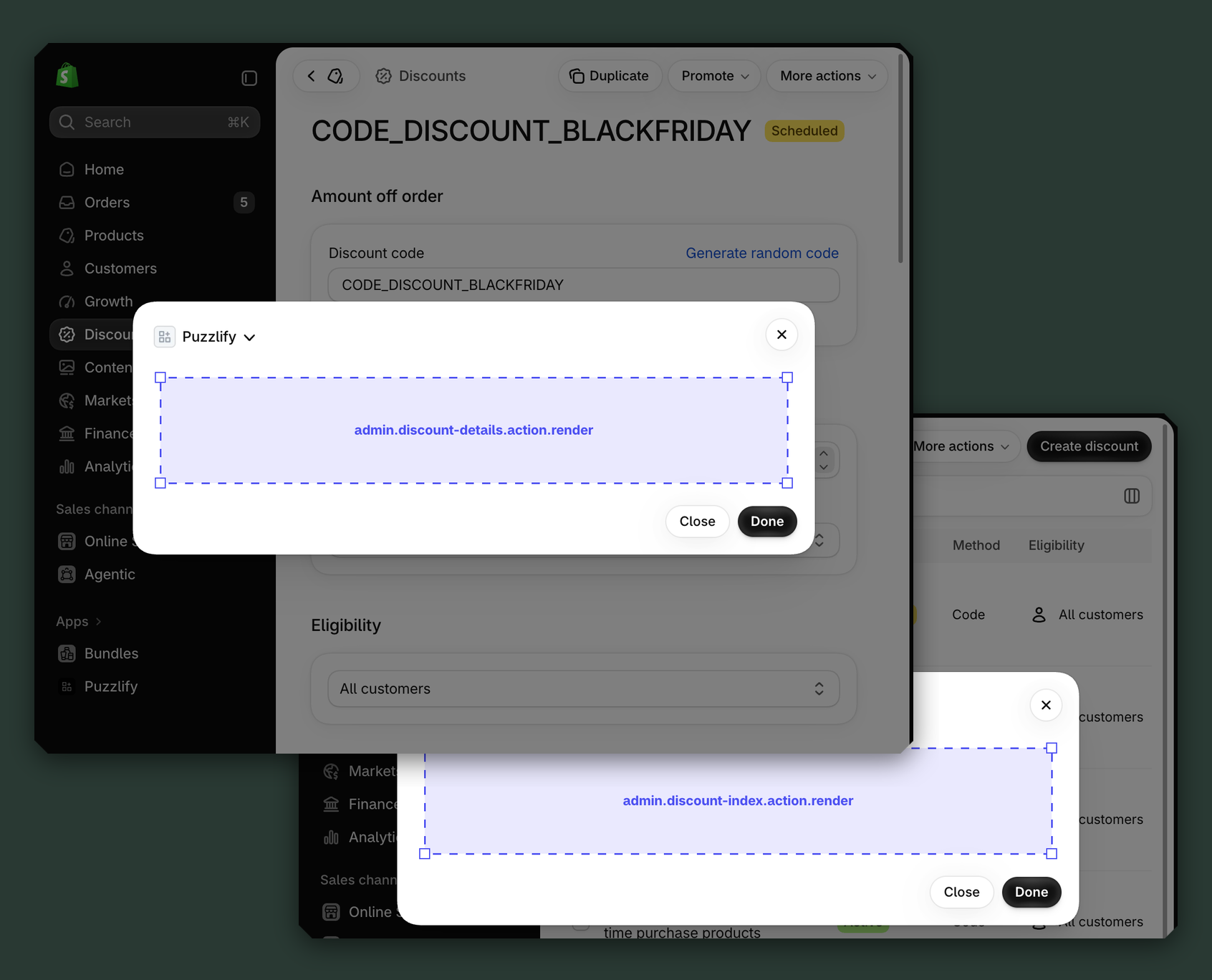
Use action targets to extend the discount details page with workflows. Action targets open as modal overlays from the More actions menu.
The examples demonstrate fetching data from Shopify's direct API or your app's backend.
Anchor to Discount details action ,[object Object]Discount details action target
admin.discount-details.action.render
Renders an admin action extension on the discounts details page. Merchants can access this extension from the More actions menu. Use this target to provide workflows that operate on discounts data, such as syncing with external systems, exporting discounts information, or managing credit terms.
Extensions at this target can access discount data through the data property in the Action Extension API. The action renders in a modal overlay, providing space for multi-step workflows, forms, and confirmations.
Supported components
- Admin action
- Avatar
- Badge
- Banner
- Box
- Button
- Button group
- Checkbox
- Chip
- Choice list
- Clickable
- Clickable chip
- Color field
- Color picker
- Date field
- Date picker
- Divider
- Drop zone
- Email field
- Grid
- Heading
- Icon
- Image
- Link
- Menu
- Money field
- Number field
- Ordered list
- Paragraph
- Password field
- Query container
- Search field
- Section
- Select
- Spinner
- Stack
- Switch
- Table
- Text
- Text area
- Text field
- Thumbnail
- Tooltip
- Url field
- Unordered list
Available APIs
Supported components
- Admin action
- Avatar
- Badge
- Banner
- Box
- Button
- Button group
- Checkbox
- Chip
- Choice list
- Clickable
- Clickable chip
- Color field
- Color picker
- Date field
- Date picker
- Divider
- Drop zone
- Email field
- Grid
- Heading
- Icon
- Image
- Link
- Menu
- Money field
- Number field
- Ordered list
- Paragraph
- Password field
- Query container
- Search field
- Section
- Select
- Spinner
- Stack
- Switch
- Table
- Text
- Text area
- Text field
- Thumbnail
- Tooltip
- Url field
- Unordered list
Available APIs
jsx
Examples
Sync discount to POS
Description
Add an action extension that syncs the current discount to an external POS system. This example demonstrates calling your app backend to push discount details to third-party point-of-sale systems.
jsx
import {render} from 'preact';
import {useState} from 'preact/hooks';

export default async () => {
  render(<Extension />, document.body);
};

const Extension = () => {
  const [loading, setLoading] = useState(false);
  const [success, setSuccess] = useState(false);
  const [error, setError] = useState(null);
  const [posSystem, setPosSystem] = useState('square');
  const [syncAllLocations, setSyncAllLocations] = useState(true);

  const handleSync = async () => {
    setLoading(true);
    setError(null);
    const discountId = shopify.data.selected[0].id;

    try {
      const response = await fetch('https://your-app.com/api/sync-discount-to-pos', {
        method: 'POST',
        headers: {'Content-Type': 'application/json'},
        body: JSON.stringify({
          discountId,
          posSystem,
          syncAllLocations,
        }),
      });

      if (response.ok) {
        setSuccess(true);
        shopify.close();
      } else {
        const data = await response.json();
        setError(data.message || 'Failed to sync discount');
      }
    } catch (err) {
      setError('Connection error. Please try again.');
    } finally {
      setLoading(false);
    }
  };

  return (
    <s-admin-action heading="Sync Discount to POS">
      <s-stack direction="block" gap="base">
        {success && (
          <s-banner tone="success" dismissible={false}>
            Discount synced to POS successfully!
          </s-banner>
        )}
        {error && (
          <s-banner tone="critical" dismissible={false}>
            {error}
          </s-banner>
        )}

        <s-section heading="POS Configuration">
          <s-stack direction="block" gap="small">
            <s-select
              label="POS System"
              value={posSystem}
              onChange={(e) => setPosSystem(e.currentTarget.value)}
            >
              <s-option value="square">Square</s-option>
              <s-option value="clover">Clover</s-option>
              <s-option value="lightspeed">Lightspeed</s-option>
            </s-select>
            <s-checkbox
              label="Sync to all store locations"
              checked={syncAllLocations}
              onChange={(e) => setSyncAllLocations(e.currentTarget.checked)}
            />
          </s-stack>
        </s-section>

        <s-button-group>
          <s-button
            variant="primary"
            onClick={handleSync}
            disabled={loading || success}
          >
            {loading ? 'Syncing...' : 'Sync to POS'}
          </s-button>
          <s-button onClick={() => shopify.close()}>Cancel</s-button>
        </s-button-group>
      </s-stack>
    </s-admin-action>
  );
};
Analyze discount performance
Description
Add an action extension that displays performance analytics for the current discount by fetching usage data from the GraphQL Admin API, showing key metrics like total redemptions and usage limits.
jsx
import {render} from 'preact';
import {useState, useEffect} from 'preact/hooks';

export default async () => {
  render(<Extension />, document.body);
};

const Extension = () => {
  const [loading, setLoading] = useState(true);
  const [analytics, setAnalytics] = useState(null);
  const [error, setError] = useState(false);

  useEffect(() => {
    fetchAnalytics();
  }, []);

  const fetchAnalytics = async () => {
    const discountId = shopify.data.selected[0].id;

    try {
      const response = await fetch('shopify:admin/api/graphql.json', {
        method: 'POST',
        headers: {'Content-Type': 'application/json'},
        body: JSON.stringify({
          query: `query GetDiscount($id: ID!) {
            discountNode(id: $id) {
              id
              discount {
                ... on DiscountCodeBasic {
                  title
                  usageLimit
                  asyncUsageCount
                  startsAt
                  endsAt
                }
                ... on DiscountCodeFreeShipping {
                  title
                  usageLimit
                  asyncUsageCount
                  startsAt
                }
              }
            }
          }`,
          variables: {id: discountId},
        }),
      });

      const {data} = await response.json();
      const discount = data?.discountNode?.discount;

      setAnalytics({
        title: discount?.title || 'Unknown',
        usageCount: discount?.asyncUsageCount || 0,
        usageLimit: discount?.usageLimit || 'Unlimited',
        startsAt: discount?.startsAt,
        endsAt: discount?.endsAt,
      });
    } catch (err) {
      setError(true);
    } finally {
      setLoading(false);
    }
  };

  if (loading) {
    return (
      <s-admin-action heading="Discount Analytics">
        <s-stack direction="block" gap="base">
          <s-spinner />
          <s-text>Loading analytics...</s-text>
        </s-stack>
      </s-admin-action>
    );
  }

  return (
    <s-admin-action heading="Discount Analytics">
      <s-stack direction="block" gap="base">
        {error && (
          <s-banner tone="critical" dismissible={false}>
            Failed to load discount analytics.
          </s-banner>
        )}

        {analytics && (
          <s-section heading={analytics.title}>
            <s-stack direction="block" gap="small">
              <s-stack direction="inline" gap="base">
                <s-text color="subdued">Total Redemptions:</s-text>
                <s-badge tone="success">{analytics.usageCount}</s-badge>
              </s-stack>
              <s-stack direction="inline" gap="base">
                <s-text color="subdued">Usage Limit:</s-text>
                <s-text>{analytics.usageLimit}</s-text>
              </s-stack>
              <s-divider />
              <s-text color="subdued">
                Active since: {new Date(analytics.startsAt).toLocaleDateString()}
              </s-text>
            </s-stack>
          </s-section>
        )}

        <s-button-group>
          <s-button variant="primary" onClick={fetchAnalytics}>
            Refresh
          </s-button>
          <s-button onClick={() => shopify.close()}>
            Close
          </s-button>
        </s-button-group>
      </s-stack>
    </s-admin-action>
  );
};
Anchor to Discount details action (should render) ,[object Object]Discount details action (should render) target
admin.discount-details.action.should-render
Controls the render state of an admin action extension on the discounts details page. Use this target to conditionally show or hide your action extension based on the discount's properties, such as status, configuration, or specific business requirements.
This target returns a boolean value that determines whether the corresponding action extension appears in the More actions menu. The extension evaluates each time the page loads.
Supported components
Available APIs
Supported components
Available APIs
jsx
Examples
Show analytics action for tracked discounts
Description
Add an action extension that only appears when the discount is being tracked by your analytics platform, checking with your app backend to determine if performance data is available for this discount.
jsx
export default async () => {
  const discountId = shopify.data.selected[0].id;

  try {
    // Check with app backend if this discount has analytics tracking enabled
    const response = await fetch('https://your-app.com/api/discount-tracking/check', {
      method: 'POST',
      headers: {
        'Content-Type': 'application/json',
      },
      body: JSON.stringify({
        discountId,
        checkType: 'performance_data',
      }),
    });

    if (!response.ok) {
      console.error('Failed to check discount tracking status');
      return { display: false };
    }

    const result = await response.json();

    // Show action if discount is tracked and has performance data
    return {
      display: result.isTracked && result.hasPerformanceData,
    };
  } catch (err) {
    console.error('Error checking discount analytics:', error);
    return { display: false };
  }
};
Show action only for product-specific discounts
Description
Display the action button only when the discount has specific products or collections assigned, allowing merchants to view and manage eligible items.
jsx
export default async () => {
  const discountId = shopify.data.selected[0].id;

  try {
    const response = await fetch('shopify:admin/api/graphql.json', {
      method: 'POST',
      headers: { 'Content-Type': 'application/json' },
      body: JSON.stringify({
        query: `query GetDiscountDetails($id: ID!) {
          discountNode(id: $id) {
            discount {
              ... on DiscountCodeBasic {
                customerGets {
                  items {
                    ... on DiscountProducts {
                      productVariantsCount { count }
                      collectionsCount: collections { totalCount }
                    }
                  }
                }
              }
              ... on DiscountAutomaticBasic {
                customerGets {
                  items {
                    ... on DiscountProducts {
                      productVariantsCount { count }
                      collectionsCount: collections { totalCount }
                    }
                  }
                }
              }
            }
          }
        }`,
        variables: { id: discountId },
      }),
    });

    const { data } = await response.json();
    const discount = data?.discountNode?.discount;
    const items = discount?.customerGets?.items;

    // Show action if discount targets specific products or collections
    const hasProducts = items?.productVariantsCount?.count > 0;
    const hasCollections = items?.collectionsCount?.totalCount > 0;

    return { display: hasProducts || hasCollections };
  } catch (err) {
    console.error('Error checking discount eligibility:', error);
    return { display: false };
  }
};
Anchor to Discount index targetsDiscount index targets
Use action targets to extend the discount index page with bulk operations and workflows that help merchants manage multiple discounts efficiently.
Anchor to Discount index action ,[object Object]Discount index action target
admin.discount-index.action.render
Renders an admin action extension on the discounts index page. Merchants can access this extension from the More actions menu. Use this target to provide workflows that operate on discounts data, such as syncing with external systems, exporting discounts information, or managing credit terms.
Extensions at this target can access discount data through the data property in the Action Extension API. The action renders in a modal overlay, providing space for multi-step workflows, forms, and confirmations.
Supported components
- Admin action
- Avatar
- Badge
- Banner
- Box
- Button
- Button group
- Checkbox
- Chip
- Choice list
- Clickable
- Clickable chip
- Color field
- Color picker
- Date field
- Date picker
- Divider
- Drop zone
- Email field
- Grid
- Heading
- Icon
- Image
- Link
- Menu
- Money field
- Number field
- Ordered list
- Paragraph
- Password field
- Query container
- Search field
- Section
- Select
- Spinner
- Stack
- Switch
- Table
- Text
- Text area
- Text field
- Thumbnail
- Tooltip
- Url field
- Unordered list
Available APIs
Supported components
- Admin action
- Avatar
- Badge
- Banner
- Box
- Button
- Button group
- Checkbox
- Chip
- Choice list
- Clickable
- Clickable chip
- Color field
- Color picker
- Date field
- Date picker
- Divider
- Drop zone
- Email field
- Grid
- Heading
- Icon
- Image
- Link
- Menu
- Money field
- Number field
- Ordered list
- Paragraph
- Password field
- Query container
- Search field
- Section
- Select
- Spinner
- Stack
- Switch
- Table
- Text
- Text area
- Text field
- Thumbnail
- Tooltip
- Url field
- Unordered list
Available APIs
jsx
Examples
Bulk sync discounts to external system
Description
Add an action extension that syncs selected discounts to an external POS or marketing system. This example demonstrates batch syncing with configurable options for location targeting and overwrite behavior.
jsx
import {render} from 'preact';
import {useState} from 'preact/hooks';

export default async () => {
  render(<Extension />, document.body);
};

const Extension = () => {
  const [loading, setLoading] = useState(false);
  const [success, setSuccess] = useState(false);
  const [error, setError] = useState(null);
  const [syncAllLocations, setSyncAllLocations] = useState(true);
  const [posSystem, setPosSystem] = useState('square');

  const handleSync = async () => {
    setLoading(true);
    setError(null);

    try {
      const response = await fetch('https://your-app.com/api/pos/sync-discount', {
        method: 'POST',
        headers: {'Content-Type': 'application/json'},
        body: JSON.stringify({
          discountIds: shopify.data.selected.map(item => item.id),
          posSystem,
          syncAllLocations,
        }),
      });

      if (response.ok) {
        setSuccess(true);
        shopify.close();
      } else {
        const data = await response.json();
        setError(data.message || 'Failed to sync discount to POS');
      }
    } catch (err) {
      setError('Connection error. Please try again.');
    } finally {
      setLoading(false);
    }
  };

  const selectedCount = shopify.data.selected.length;

  return (
    <s-admin-action heading="Sync to POS System">
      <s-stack direction="block" gap="base">
        {success && (
          <s-banner tone="success" dismissible={false}>
            {selectedCount} discount(s) synced to POS successfully!
          </s-banner>
        )}
        {error && (
          <s-banner tone="critical" dismissible={false}>
            {error}
          </s-banner>
        )}

        <s-text>
          Sync {selectedCount} selected discount(s) to your POS terminals.
        </s-text>

        <s-section heading="POS Settings">
          <s-stack direction="block" gap="small">
            <s-select
              label="POS System"
              value={posSystem}
              onChange={(e) => setPosSystem(e.currentTarget.value)}
            >
              <s-option value="square">Square</s-option>
              <s-option value="clover">Clover</s-option>
              <s-option value="lightspeed">Lightspeed</s-option>
            </s-select>
            <s-checkbox
              label="Sync to all store locations"
              checked={syncAllLocations}
              onChange={(e) => setSyncAllLocations(e.currentTarget.checked)}
            />
          </s-stack>
        </s-section>

        <s-button-group>
          <s-button
            variant="primary"
            onClick={handleSync}
            disabled={loading || success}
          >
            {loading ? 'Syncing...' : `Sync ${selectedCount} Discount(s)`}
          </s-button>
          <s-button onClick={() => shopify.close()}>Cancel</s-button>
        </s-button-group>
      </s-stack>
    </s-admin-action>
  );
};
Tag discounts by campaign
Description
Add an action extension that lets merchants tag selected discounts with a campaign name for organization. This example demonstrates working with selected items from the index page and sending batch updates to your app backend.
jsx
import {render} from 'preact';
import {useState} from 'preact/hooks';

export default async () => {
  render(<Extension />, document.body);
};

const Extension = () => {
  const [campaignTag, setCampaignTag] = useState('');
  const [loading, setLoading] = useState(false);
  const [success, setSuccess] = useState(false);
  const [error, setError] = useState(null);

  const selectedCount = shopify.data.selected?.length || 0;
  const discountIds = shopify.data.selected?.map((item) => item.id) || [];

  const handleTagDiscounts = async () => {
    if (!campaignTag.trim()) {
      setError('Please enter a campaign tag');
      return;
    }

    setLoading(true);
    setError(null);

    try {
      const response = await fetch('https://your-app.com/api/discounts/tag', {
        method: 'POST',
        headers: {'Content-Type': 'application/json'},
        body: JSON.stringify({
          discountIds,
          tag: campaignTag.trim(),
        }),
      });

      if (response.ok) {
        setSuccess(true);
        shopify.close();
      } else {
        const result = await response.json();
        setError(result.message || 'Failed to tag discounts');
      }
    } catch (err) {
      setError('Network error. Please try again.');
    } finally {
      setLoading(false);
    }
  };

  return (
    <s-admin-action heading="Tag Discounts by Campaign">
      <s-stack direction="block" gap="base">
        {success && (
          <s-banner tone="success" dismissible={false}>
            Successfully tagged {selectedCount} discount{selectedCount !== 1 ? 's' : ''} with "{campaignTag}"
          </s-banner>
        )}
        {error && (
          <s-banner tone="critical" dismissible={false}>
            {error}
          </s-banner>
        )}

        <s-text>
          Add a campaign tag to {selectedCount} selected discount{selectedCount !== 1 ? 's' : ''} for easier organization and filtering.
        </s-text>

        <s-text-field
          label="Campaign tag"
          value={campaignTag}
          onChange={(e) => setCampaignTag(e.currentTarget.value)}
          placeholder="e.g., Summer Sale 2025, Black Friday"
        />

        <s-button-group>
          <s-button
            variant="primary"
            onClick={handleTagDiscounts}
            disabled={loading || success || !campaignTag.trim()}
          >
            {loading ? 'Tagging...' : `Tag ${selectedCount} Discount${selectedCount !== 1 ? 's' : ''}`}
          </s-button>
          <s-button onClick={() => shopify.close()}>Cancel</s-button>
        </s-button-group>
      </s-stack>
    </s-admin-action>
  );
};
Anchor to Discount index action (should render) ,[object Object]Discount index action (should render) target
admin.discount-index.action.should-render
Controls the render state of an admin action extension on the discounts index page. Use this target to conditionally show or hide your action extension based on the discount's properties, such as status, configuration, or specific business requirements.
This target returns a boolean value that determines whether the corresponding action extension appears in the More actions menu. The extension evaluates each time the page loads.
Supported components
Available APIs
Supported components
Available APIs
jsx
Examples
Show bulk action when tracking is enabled
Description
Show the discount performance action only when the app backend confirms the selected discount has tracking enabled and sufficient redemption data available for analysis.
jsx
export default async () => {
  const discountId = shopify.data.selected[0].id;

  try {
    const response = await fetch('https://your-app.com/api/discount-tracking/check', {
      method: 'POST',
      headers: {
        'Content-Type': 'application/json',
      },
      body: JSON.stringify({
        discountId,
        checkType: 'performance-eligibility',
      }),
    });

    if (!response.ok) {
      console.error('Failed to check discount tracking status');
      return { display: false };
    }

    const result = await response.json();

    // Show action if discount has tracking enabled and has redemption data
    const hasTrackingEnabled = result.trackingEnabled === true;
    const hasRedemptionData = result.redemptionCount > 0;

    return { display: hasTrackingEnabled && hasRedemptionData };
  } catch (err) {
    console.error('Error checking discount performance eligibility:', error);
    return { display: false };
  }
};
Show action for active discounts only
Description
Display the bulk action only when the selected discount is currently active, checking the discount status using the GraphQL Admin API.
jsx
export default async () => {
  const discountId = shopify.data.selected[0].id;

  try {
    const response = await fetch('shopify:admin/api/graphql.json', {
      method: 'POST',
      headers: { 'Content-Type': 'application/json' },
      body: JSON.stringify({
        query: `query GetDiscountStatus($id: ID!) {
          discountNode(id: $id) {
            discount {
              ... on DiscountCodeBasic {
                status
                startsAt
                endsAt
              }
              ... on DiscountCodeFreeShipping {
                status
                startsAt
                endsAt
              }
              ... on DiscountAutomaticBasic {
                status
                startsAt
                endsAt
              }
            }
          }
        }`,
        variables: { id: discountId },
      }),
    });

    const { data } = await response.json();
    const discount = data?.discountNode?.discount;

    // Only show action for active discounts
    const isActive = discount?.status === 'ACTIVE';

    return { display: isActive };
  } catch (err) {
    console.error('Error checking discount status:', error);
    return { display: false };
  }
};
Anchor to Best practicesBest practices
- Differentiate discount types: Discounts come in multiple types (basic, BXGY, free shipping, automatic vs code-based). Before displaying discount actions, check the discount type using GraphQL to ensure your extension supports it. For example, POS sync may only work with certain discount types.
- Validate discount dates: Always check
startsAtandendsAtwhen displaying or syncing discounts. Syncing expired or not-yet-active discounts to external systems can create customer confusion and needs special handling or filtering. - Show usage vs limits clearly: When displaying discount analytics, show both
asyncUsageCountandusageLimittogether. Merchants need to see how close a discount is to its usage limit to decide whether to extend it or create a new code. - Handle discount combinations: Shopify has complex discount combination rules. If your extension recommends or creates discounts, validate that they're compatible with existing discount configurations to avoid conflicts that prevent customers from completing checkouts.
- Account for attribution delays: Discount usage counts (
asyncUsageCount) update asynchronously and may lag by several minutes. When displaying real-time analytics, indicate that counts are approximate and mention the last update time if available from your system.
Anchor to LimitationsLimitations
- Single target per module: Each
[[extensions.targeting]]entry in your TOML configuration maps one target to one module file. - Multiple discount type schemas: Discounts are a GraphQL union type with eight possible types:
DiscountAutomaticBasic,DiscountCodeBasic,DiscountAutomaticBxgy,DiscountCodeBxgy,DiscountAutomaticFreeShipping,DiscountCodeFreeShipping,DiscountCodeApp,DiscountAutomaticApp. Each type has different fields. - Asynchronous usage count: The
asyncUsageCountfield on GraphQLDiscountunion types is updated asynchronously and might show a lower count until the process is completed.