---
title: Draft orders
description: >-
Draft orders allow merchants to create orders on behalf of customers. Draft
order pages display information about individual draft orders and draft order
lists.
api_version: 2026-04-rc
source_url:
html: >-
https://shopify.dev/docs/api/admin-extensions/2026-04-rc/targets/draft-orders
md: >-
https://shopify.dev/docs/api/admin-extensions/2026-04-rc/targets/draft-orders.md
---
# Draft orders
[Draft orders](https://help.shopify.com/manual/orders/create-orders) allow merchants to create orders on behalf of customers for scenarios like phone orders, wholesale quotes, custom orders, and manual invoicing. Draft order pages display information about individual draft orders and draft order lists. Extensions on these pages help merchants enhance these workflows with custom functionality.
### Use cases
* **External order management:** Sync draft orders with external order management systems, ERPs, or wholesale platforms to maintain consistent order data across systems and support B2B workflows.
* **Custom pricing and quotes:** Display custom pricing, apply special discounts, calculate complex wholesale pricing, or generate professional quotes with pricing from external systems before converting draft orders.
* **Order validation and verification:** Validate draft order data against external systems, verify customer credit limits, check inventory availability across warehouses, or flag potential issues before order completion.
* **Payment processing workflows:** Integrate custom payment workflows, generate payment links for draft orders, process deposits or partial payments, or send payment requests to customers through external payment gateways.
* **Bulk draft order operations:** Process multiple draft orders at once for operations like bulk conversion, batch invoice generation, mass updates, or exporting draft order data to accounting systems.
***
## Draft order details targets
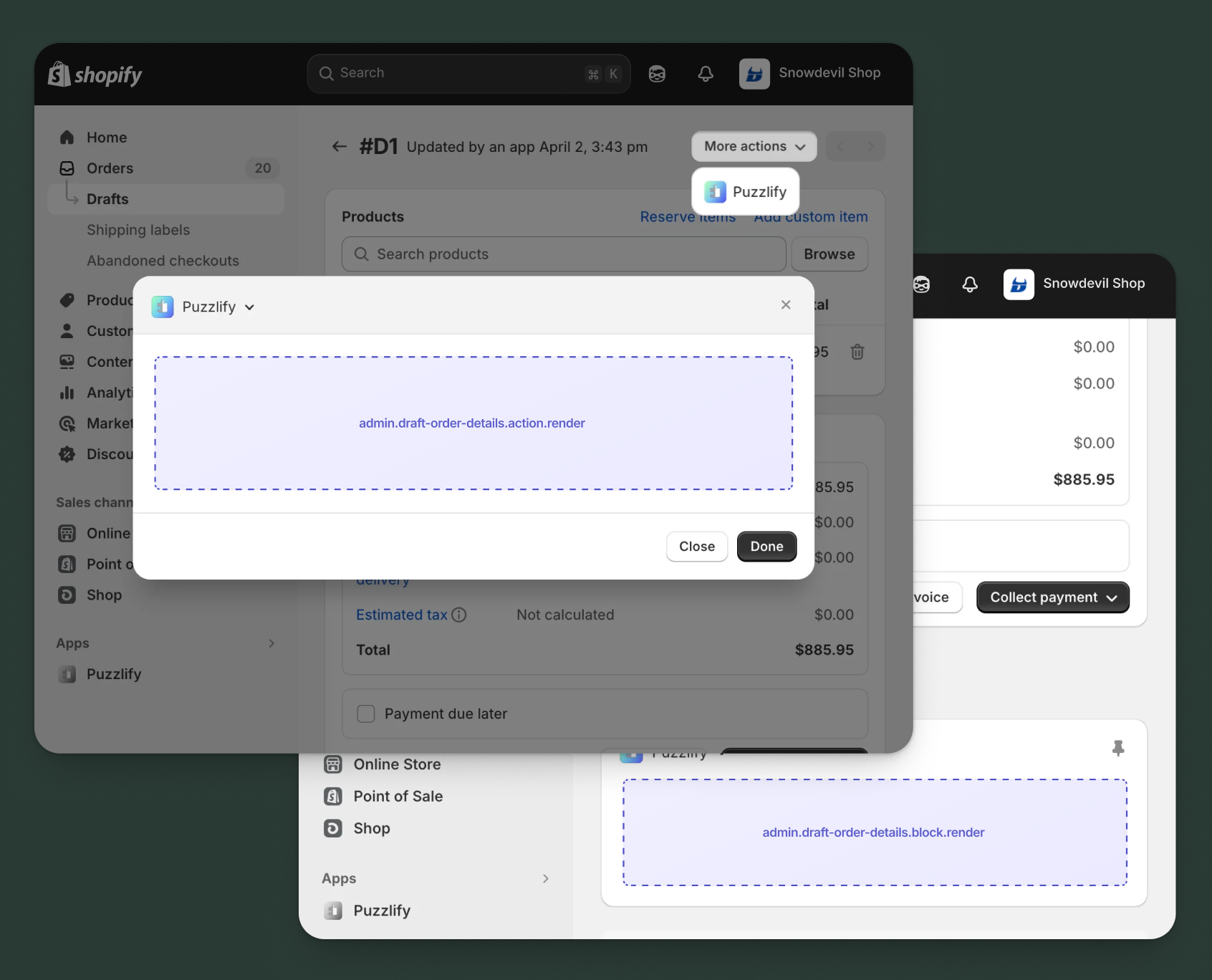
Use [action and block targets](https://shopify.dev/docs/api/admin-extensions/2026-04-rc#building-your-extension) to extend the draft order details page. Add workflows and contextual information that help merchants manage individual draft orders and improve order creation processes.
Action targets open as modal overlays from the **More actions** menu, while block targets display as inline cards. The examples demonstrate fetching data from Shopify's [direct API](https://shopify.dev/docs/api/admin-extensions/2026-04-rc#direct-api-access) or your [app's backend](https://shopify.dev/docs/api/admin-extensions/2026-04-rc#app-authentication).
### Draft order details action target
`admin.draft-order-details.action.render`
Renders an admin action extension on the draft order details page. Merchants can access this extension from the **More actions** menu. Use this target to provide workflows that operate on individual draft orders, such as syncing with external systems, generating quotes, processing payments, or applying custom pricing.
Extensions at this target can access information about the draft order through the `data` property in the [Action Extension API](https://shopify.dev/docs/api/admin-extensions/2026-04-rc/target-apis/core-apis/action-extension-api). The action renders in a modal overlay, providing space for multi-step workflows, forms, and confirmations.
### Support Components (45) APIs (1)
### Supported components
* [Admin action](https://shopify.dev/docs/api/admin-extensions/2026-04-rc/web-components/settings-and-templates/admin-action)
* [Avatar](https://shopify.dev/docs/api/admin-extensions/2026-04-rc/web-components/media-and-visuals/avatar)
* [Badge](https://shopify.dev/docs/api/admin-extensions/2026-04-rc/web-components/feedback-and-status-indicators/badge)
* [Banner](https://shopify.dev/docs/api/admin-extensions/2026-04-rc/web-components/feedback-and-status-indicators/banner)
* [Box](https://shopify.dev/docs/api/admin-extensions/2026-04-rc/web-components/layout-and-structure/box)
* [Button](https://shopify.dev/docs/api/admin-extensions/2026-04-rc/web-components/actions/button)
* [Button group](https://shopify.dev/docs/api/admin-extensions/2026-04-rc/web-components/actions/button-group)
* [Checkbox](https://shopify.dev/docs/api/admin-extensions/2026-04-rc/web-components/forms/checkbox)
* [Chip](https://shopify.dev/docs/api/admin-extensions/2026-04-rc/web-components/typography-and-content/chip)
* [Choice list](https://shopify.dev/docs/api/admin-extensions/2026-04-rc/web-components/forms/choice-list)
* [Clickable](https://shopify.dev/docs/api/admin-extensions/2026-04-rc/web-components/actions/clickable)
* [Clickable chip](https://shopify.dev/docs/api/admin-extensions/2026-04-rc/web-components/actions/clickable-chip)
* [Color field](https://shopify.dev/docs/api/admin-extensions/2026-04-rc/web-components/forms/color-field)
* [Color picker](https://shopify.dev/docs/api/admin-extensions/2026-04-rc/web-components/forms/color-picker)
* [Date field](https://shopify.dev/docs/api/admin-extensions/2026-04-rc/web-components/forms/date-field)
* [Date picker](https://shopify.dev/docs/api/admin-extensions/2026-04-rc/web-components/forms/date-picker)
* [Divider](https://shopify.dev/docs/api/admin-extensions/2026-04-rc/web-components/layout-and-structure/divider)
* [Drop zone](https://shopify.dev/docs/api/admin-extensions/2026-04-rc/web-components/forms/drop-zone)
* [Email field](https://shopify.dev/docs/api/admin-extensions/2026-04-rc/web-components/forms/email-field)
* [Grid](https://shopify.dev/docs/api/admin-extensions/2026-04-rc/web-components/layout-and-structure/grid)
* [Heading](https://shopify.dev/docs/api/admin-extensions/2026-04-rc/web-components/typography-and-content/heading)
* [Icon](https://shopify.dev/docs/api/admin-extensions/2026-04-rc/web-components/media-and-visuals/icon)
* [Image](https://shopify.dev/docs/api/admin-extensions/2026-04-rc/web-components/media-and-visuals/image)
* [Link](https://shopify.dev/docs/api/admin-extensions/2026-04-rc/web-components/actions/link)
* [Menu](https://shopify.dev/docs/api/admin-extensions/2026-04-rc/web-components/actions/menu)
* [Money field](https://shopify.dev/docs/api/admin-extensions/2026-04-rc/web-components/forms/money-field)
* [Number field](https://shopify.dev/docs/api/admin-extensions/2026-04-rc/web-components/forms/number-field)
* [Ordered list](https://shopify.dev/docs/api/admin-extensions/2026-04-rc/web-components/layout-and-structure/ordered-list)
* [Paragraph](https://shopify.dev/docs/api/admin-extensions/2026-04-rc/web-components/typography-and-content/paragraph)
* [Password field](https://shopify.dev/docs/api/admin-extensions/2026-04-rc/web-components/forms/password-field)
* [Query container](https://shopify.dev/docs/api/admin-extensions/2026-04-rc/web-components/layout-and-structure/query-container)
* [Search field](https://shopify.dev/docs/api/admin-extensions/2026-04-rc/web-components/forms/search-field)
* [Section](https://shopify.dev/docs/api/admin-extensions/2026-04-rc/web-components/layout-and-structure/section)
* [Select](https://shopify.dev/docs/api/admin-extensions/2026-04-rc/web-components/forms/select)
* [Spinner](https://shopify.dev/docs/api/admin-extensions/2026-04-rc/web-components/feedback-and-status-indicators/spinner)
* [Stack](https://shopify.dev/docs/api/admin-extensions/2026-04-rc/web-components/layout-and-structure/stack)
* [Switch](https://shopify.dev/docs/api/admin-extensions/2026-04-rc/web-components/forms/switch)
* [Table](https://shopify.dev/docs/api/admin-extensions/2026-04-rc/web-components/layout-and-structure/table)
* [Text](https://shopify.dev/docs/api/admin-extensions/2026-04-rc/web-components/typography-and-content/text)
* [Text area](https://shopify.dev/docs/api/admin-extensions/2026-04-rc/web-components/forms/text-area)
* [Text field](https://shopify.dev/docs/api/admin-extensions/2026-04-rc/web-components/forms/text-field)
* [Thumbnail](https://shopify.dev/docs/api/admin-extensions/2026-04-rc/web-components/media-and-visuals/thumbnail)
* [Tooltip](https://shopify.dev/docs/api/admin-extensions/2026-04-rc/web-components/typography-and-content/tooltip)
* [Url field](https://shopify.dev/docs/api/admin-extensions/2026-04-rc/web-components/forms/url-field)
* [Unordered list](https://shopify.dev/docs/api/admin-extensions/2026-04-rc/web-components/layout-and-structure/unordered-list)
### Available APIs
* [Action Extension API](https://shopify.dev/docs/api/admin-extensions/2026-04-rc/target-apis/core-apis/action-extension-api)
Examples
### Examples
* ####
##### Description
Add an action extension that generates a payment link for a draft order. This example shows how to create a workflow that generates a payment URL and sends it to the customer.
##### jsx
```jsx
import {render} from 'preact';
import {useState, useEffect} from 'preact/hooks';
export default async () => {
render(, document.body);
};
const Extension = () => {
const [loading, setLoading] = useState(false);
const [fetching, setFetching] = useState(true);
const [draftOrder, setDraftOrder] = useState(null);
const [sendEmail, setSendEmail] = useState(true);
const [success, setSuccess] = useState(false);
const [error, setError] = useState(false);
const [paymentLink, setPaymentLink] = useState('');
useEffect(() => {
const fetchDraftOrder = async () => {
const draftOrderId = shopify.data.selected[0].id;
try {
// Fetch draft order details from GraphQL Admin API
const response = await fetch('shopify:admin/api/graphql.json', {
method: 'POST',
headers: {'Content-Type': 'application/json'},
body: JSON.stringify({
query: `
query GetDraftOrder($id: ID!) {
draftOrder(id: $id) {
id
name
customer {
email
firstName
lastName
}
totalPriceSet {
presentmentMoney {
amount
currencyCode
}
}
}
}
`,
variables: {id: draftOrderId},
}),
});
const {data} = await response.json();
setDraftOrder(data.draftOrder);
} catch (err) {
console.error('Error fetching draft order:', err);
} finally {
setFetching(false);
}
};
fetchDraftOrder();
}, []);
const handleGenerate = async () => {
setLoading(true);
setSuccess(false);
setError(false);
const draftOrderId = shopify.data.selected[0].id;
try {
// Generate payment link through your app's backend
const response = await fetch('https://your-app.com/api/generate-payment-link', {
method: 'POST',
headers: {'Content-Type': 'application/json'},
body: JSON.stringify({
draftOrderId,
sendEmail,
}),
});
if (response.ok) {
const {paymentUrl} = await response.json();
setPaymentLink(paymentUrl);
setSuccess(true);
} else {
setError(true);
}
} catch (err) {
setError(true);
} finally {
setLoading(false);
}
};
if (fetching) {
return (
Loading draft order details...
);
}
return (
{success && (
Payment link generated successfully!
{sendEmail && ' Email sent to customer.'}
)}
{error && (
Failed to generate payment link. Please try again.
)}
Draft order:
{draftOrder.name}
{draftOrder.customer && (
Customer:
{draftOrder.customer.firstName} {draftOrder.customer.lastName}
({draftOrder.customer.email})
)}
Total:
{draftOrder.totalPriceSet.presentmentMoney.currencyCode} {draftOrder.totalPriceSet.presentmentMoney.amount}
setSendEmail(event.currentTarget.checked)}
disabled={!draftOrder.customer?.email}
/>
{!draftOrder.customer?.email && (
No customer email available
)}
{paymentLink && (
navigator.clipboard.writeText(paymentLink)}
variant="secondary"
>
Copy to clipboard
)}
{loading ? 'Generating...' : 'Generate Link'}
shopify.close()}>
{success ? 'Close' : 'Cancel'}
);
};
```
* ####
##### Description
Add an action extension that applies wholesale pricing from an external system to a draft order. This example demonstrates how to fetch pricing rules and update draft order line items with custom wholesale prices.
##### jsx
```jsx
import {render} from 'preact';
import {useState, useEffect} from 'preact/hooks';
export default async () => {
render(, document.body);
};
const Extension = () => {
const [loading, setLoading] = useState(false);
const [fetching, setFetching] = useState(true);
const [pricingTiers, setPricingTiers] = useState([]);
const [selectedTier, setSelectedTier] = useState('');
const [lineItems, setLineItems] = useState([]);
const [success, setSuccess] = useState(false);
const [error, setError] = useState(false);
useEffect(() => {
const fetchData = async () => {
const draftOrderId = shopify.data.selected[0].id;
try {
// Fetch draft order line items
const draftOrderResponse = await fetch('shopify:admin/api/graphql.json', {
method: 'POST',
headers: {'Content-Type': 'application/json'},
body: JSON.stringify({
query: `
query GetDraftOrder($id: ID!) {
draftOrder(id: $id) {
id
customer {
id
}
lineItems(first: 50) {
edges {
node {
id
name
quantity
originalUnitPriceSet {
presentmentMoney {
amount
}
}
}
}
}
}
}
`,
variables: {id: draftOrderId},
}),
});
const {data: draftOrderData} = await draftOrderResponse.json();
const items = draftOrderData.draftOrder.lineItems.edges.map(edge => edge.node);
setLineItems(items);
// Fetch wholesale pricing tiers from your app's backend
const customerId = draftOrderData.draftOrder.customer?.id;
if (customerId) {
const pricingResponse = await fetch(
`https://your-app.com/api/wholesale-tiers?customerId=${customerId}`
);
const {tiers} = await pricingResponse.json();
setPricingTiers(tiers);
if (tiers.length > 0) {
setSelectedTier(tiers[0].id);
}
}
} catch (err) {
console.error('Error fetching data:', err);
} finally {
setFetching(false);
}
};
fetchData();
}, []);
const handleApply = async () => {
setLoading(true);
setSuccess(false);
setError(false);
const draftOrderId = shopify.data.selected[0].id;
try {
// Apply wholesale pricing through your app's backend
const response = await fetch('https://your-app.com/api/apply-wholesale-pricing', {
method: 'POST',
headers: {'Content-Type': 'application/json'},
body: JSON.stringify({
draftOrderId,
tierId: selectedTier,
}),
});
if (response.ok) {
setSuccess(true);
setTimeout(() => {
shopify.close();
// Reload the page to show updated prices
window.location.reload();
}, 1500);
} else {
setError(true);
}
} catch (err) {
setError(true);
} finally {
setLoading(false);
}
};
if (fetching) {
return (
Loading pricing information...
);
}
if (pricingTiers.length === 0) {
return (
No wholesale pricing tiers available for this customer.
shopify.close()}>
Close
);
}
return (
{success && (
Wholesale pricing applied successfully!
)}
{error && (
Failed to apply wholesale pricing. Please try again.
)}
setSelectedTier(event.currentTarget.value)}
>
{pricingTiers.map((tier) => (
))}
Line items to update:
{lineItems.length} items
This will update all line item prices according to the selected wholesale tier.
{loading ? 'Applying...' : 'Apply Pricing'}
shopify.close()}>
Cancel
);
};
```
### Draft order details action (should render) target
`admin.draft-order-details.action.should-render`
Controls the render state of an admin action extension on the draft order details page. Use this target to conditionally show or hide your action extension based on the draft order's properties, such as status, customer type, or total amount.
This target returns a boolean value that determines whether the corresponding action extension appears in the **More actions** menu. The extension is evaluated each time the page loads.
### Support Components (0) APIs (1)
### Supported components
\-
### Available APIs
* [Should Render API](https://shopify.dev/docs/api/admin-extensions/2026-04-rc/target-apis/utility-apis/should-render-api)
Examples
### Examples
* ####
##### Description
Conditionally display an action only for draft orders that have a customer assigned. This example demonstrates how to check if a customer is associated with the draft order.
##### jsx
```jsx
export default async () => {
const draftOrderId = shopify.data.selected[0].id;
try {
// Fetch draft order customer information
const response = await fetch(
'shopify:admin/api/graphql.json',
{
method: 'POST',
headers: {'Content-Type': 'application/json'},
body: JSON.stringify({
query: `
query GetDraftOrder($id: ID!) {
draftOrder(id: $id) {
customer {
id
}
}
}
`,
variables: {id: draftOrderId},
}),
}
);
const {data} = await response.json();
// Only show action if draft order has a customer
return {display: !!data.draftOrder.customer};
} catch (err) {
console.error('Error fetching draft order:', err);
return {display: false};
}
};
```
* ####
##### Description
Conditionally display an action only for draft orders above a certain threshold. This example demonstrates filtering based on draft order total using the \[GraphQL Admin API]\(/docs/api/admin-graphql).
##### jsx
```jsx
export default async () => {
const draftOrderId = shopify.data.selected[0].id;
try {
// Fetch draft order total
const {data} = await shopify.query(
`
query GetDraftOrder($id: ID!) {
draftOrder(id: $id) {
totalPriceSet {
presentmentMoney {
amount
}
}
}
}
`,
{variables: {id: draftOrderId}}
);
const totalPrice = parseFloat(data.draftOrder.totalPriceSet.presentmentMoney.amount);
// Only show action for draft orders over $1000
return {display: totalPrice > 1000};
} catch (err) {
console.error('Error fetching draft order:', err);
return {display: false};
}
};
```
### Draft order details block target
`admin.draft-order-details.block.render`
Renders an admin block extension inline on the draft order details page. Use this target to display contextual information, validation status, external system data, or payment status related to the draft order without requiring merchants to open a modal.
Extensions at this target appear as cards on the page and can show real-time data, insights, or quick actions. Blocks provide persistent visibility and are ideal for displaying information merchants need to see at a glance.
### Support Components (46) APIs (1)
### Supported components
* [Admin block](https://shopify.dev/docs/api/admin-extensions/2026-04-rc/web-components/settings-and-templates/admin-block)
* [Avatar](https://shopify.dev/docs/api/admin-extensions/2026-04-rc/web-components/media-and-visuals/avatar)
* [Badge](https://shopify.dev/docs/api/admin-extensions/2026-04-rc/web-components/feedback-and-status-indicators/badge)
* [Banner](https://shopify.dev/docs/api/admin-extensions/2026-04-rc/web-components/feedback-and-status-indicators/banner)
* [Box](https://shopify.dev/docs/api/admin-extensions/2026-04-rc/web-components/layout-and-structure/box)
* [Button](https://shopify.dev/docs/api/admin-extensions/2026-04-rc/web-components/actions/button)
* [Button group](https://shopify.dev/docs/api/admin-extensions/2026-04-rc/web-components/actions/button-group)
* [Checkbox](https://shopify.dev/docs/api/admin-extensions/2026-04-rc/web-components/forms/checkbox)
* [Chip](https://shopify.dev/docs/api/admin-extensions/2026-04-rc/web-components/typography-and-content/chip)
* [Choice list](https://shopify.dev/docs/api/admin-extensions/2026-04-rc/web-components/forms/choice-list)
* [Clickable](https://shopify.dev/docs/api/admin-extensions/2026-04-rc/web-components/actions/clickable)
* [Clickable chip](https://shopify.dev/docs/api/admin-extensions/2026-04-rc/web-components/actions/clickable-chip)
* [Color field](https://shopify.dev/docs/api/admin-extensions/2026-04-rc/web-components/forms/color-field)
* [Color picker](https://shopify.dev/docs/api/admin-extensions/2026-04-rc/web-components/forms/color-picker)
* [Date field](https://shopify.dev/docs/api/admin-extensions/2026-04-rc/web-components/forms/date-field)
* [Date picker](https://shopify.dev/docs/api/admin-extensions/2026-04-rc/web-components/forms/date-picker)
* [Divider](https://shopify.dev/docs/api/admin-extensions/2026-04-rc/web-components/layout-and-structure/divider)
* [Drop zone](https://shopify.dev/docs/api/admin-extensions/2026-04-rc/web-components/forms/drop-zone)
* [Email field](https://shopify.dev/docs/api/admin-extensions/2026-04-rc/web-components/forms/email-field)
* [Form](https://shopify.dev/docs/api/admin-extensions/2026-04-rc/web-components/forms/form)
* [Grid](https://shopify.dev/docs/api/admin-extensions/2026-04-rc/web-components/layout-and-structure/grid)
* [Heading](https://shopify.dev/docs/api/admin-extensions/2026-04-rc/web-components/typography-and-content/heading)
* [Icon](https://shopify.dev/docs/api/admin-extensions/2026-04-rc/web-components/media-and-visuals/icon)
* [Image](https://shopify.dev/docs/api/admin-extensions/2026-04-rc/web-components/media-and-visuals/image)
* [Link](https://shopify.dev/docs/api/admin-extensions/2026-04-rc/web-components/actions/link)
* [Menu](https://shopify.dev/docs/api/admin-extensions/2026-04-rc/web-components/actions/menu)
* [Money field](https://shopify.dev/docs/api/admin-extensions/2026-04-rc/web-components/forms/money-field)
* [Number field](https://shopify.dev/docs/api/admin-extensions/2026-04-rc/web-components/forms/number-field)
* [Ordered list](https://shopify.dev/docs/api/admin-extensions/2026-04-rc/web-components/layout-and-structure/ordered-list)
* [Paragraph](https://shopify.dev/docs/api/admin-extensions/2026-04-rc/web-components/typography-and-content/paragraph)
* [Password field](https://shopify.dev/docs/api/admin-extensions/2026-04-rc/web-components/forms/password-field)
* [Query container](https://shopify.dev/docs/api/admin-extensions/2026-04-rc/web-components/layout-and-structure/query-container)
* [Search field](https://shopify.dev/docs/api/admin-extensions/2026-04-rc/web-components/forms/search-field)
* [Section](https://shopify.dev/docs/api/admin-extensions/2026-04-rc/web-components/layout-and-structure/section)
* [Select](https://shopify.dev/docs/api/admin-extensions/2026-04-rc/web-components/forms/select)
* [Spinner](https://shopify.dev/docs/api/admin-extensions/2026-04-rc/web-components/feedback-and-status-indicators/spinner)
* [Stack](https://shopify.dev/docs/api/admin-extensions/2026-04-rc/web-components/layout-and-structure/stack)
* [Switch](https://shopify.dev/docs/api/admin-extensions/2026-04-rc/web-components/forms/switch)
* [Table](https://shopify.dev/docs/api/admin-extensions/2026-04-rc/web-components/layout-and-structure/table)
* [Text](https://shopify.dev/docs/api/admin-extensions/2026-04-rc/web-components/typography-and-content/text)
* [Text area](https://shopify.dev/docs/api/admin-extensions/2026-04-rc/web-components/forms/text-area)
* [Text field](https://shopify.dev/docs/api/admin-extensions/2026-04-rc/web-components/forms/text-field)
* [Thumbnail](https://shopify.dev/docs/api/admin-extensions/2026-04-rc/web-components/media-and-visuals/thumbnail)
* [Tooltip](https://shopify.dev/docs/api/admin-extensions/2026-04-rc/web-components/typography-and-content/tooltip)
* [Url field](https://shopify.dev/docs/api/admin-extensions/2026-04-rc/web-components/forms/url-field)
* [Unordered list](https://shopify.dev/docs/api/admin-extensions/2026-04-rc/web-components/layout-and-structure/unordered-list)
### Available APIs
* [Block Extension API](https://shopify.dev/docs/api/admin-extensions/2026-04-rc/target-apis/core-apis/block-extension-api)
Examples
### Examples
* ####
##### Description
Create a block extension that shows draft order status from an external order management system. This example demonstrates how to present order processing insights inline on the draft order page.
##### jsx
```jsx
import {render} from 'preact';
import {useState, useEffect} from 'preact/hooks';
export default async () => {
render(, document.body);
};
const Extension = () => {
const [orderStatus, setOrderStatus] = useState(null);
const [loading, setLoading] = useState(true);
useEffect(() => {
const fetchOrderStatus = async () => {
const draftOrderId = shopify.data.selected[0].id;
try {
// Fetch order status from your app's backend
const response = await fetch(
`https://your-app.com/api/draft-order-status?draftOrderId=${draftOrderId}`
);
const data = await response.json();
setOrderStatus(data);
} catch (err) {
console.error('Error fetching order status:', err);
} finally {
setLoading(false);
}
};
fetchOrderStatus();
}, []);
if (loading) {
return (
Loading order status...
);
}
if (!orderStatus) {
return (
Not synced with external system
);
}
return (
Sync Status
{orderStatus.synced ? 'Synced' : 'Pending'}
External Order ID
{orderStatus.externalOrderId || 'Not assigned'}
Processing Status
{orderStatus.processingStatus}
{orderStatus.warehouse && (
<>
Assigned Warehouse
{orderStatus.warehouse}
)}
{orderStatus.lastSyncedAt && (
<>
Last Synced
{orderStatus.lastSyncedAt}
)}
{orderStatus.externalUrl && (
window.open(orderStatus.externalUrl, '_blank')}
variant="secondary"
>
View in external system
)}
);
};
```
* ####
##### Description
Create a block extension that shows payment request status for a draft order. This example demonstrates how to display payment link information and payment status from an external payment gateway.
##### jsx
```jsx
import {render} from 'preact';
import {useState, useEffect} from 'preact/hooks';
export default async () => {
render(, document.body);
};
const Extension = () => {
const [paymentData, setPaymentData] = useState(null);
const [loading, setLoading] = useState(true);
useEffect(() => {
const fetchPaymentData = async () => {
const draftOrderId = shopify.data.selected[0].id;
try {
// Fetch payment data from your app's backend
const response = await fetch(
`https://your-app.com/api/payment-status?draftOrderId=${draftOrderId}`
);
const data = await response.json();
setPaymentData(data);
} catch (err) {
console.error('Error fetching payment data:', err);
} finally {
setLoading(false);
}
};
fetchPaymentData();
}, []);
if (loading) {
return (
);
}
if (!paymentData || !paymentData.paymentLinkSent) {
return (
No payment request sent
);
}
return (
Payment Link Status
{paymentData.status === 'paid' ? 'Paid' : 'Pending Payment'}
Sent To
{paymentData.customerEmail}
Amount Due
{paymentData.currency} {paymentData.amountDue}
{paymentData.status === 'paid' && paymentData.paidAt && (
<>
Paid On
{paymentData.paidAt}
)}
{paymentData.status !== 'paid' && paymentData.linkExpiresAt && (
<>
Link Expires
{paymentData.linkExpiresAt}
)}
{paymentData.status !== 'paid' && (
Payment Reminders Sent
{paymentData.remindersSent || 0}
)}
{paymentData.paymentUrl && paymentData.status !== 'paid' && (
window.open(paymentData.paymentUrl, '_blank')}
variant="secondary"
>
View payment page
)}
);
};
```
***
## Draft order index targets
Use [action targets](https://shopify.dev/docs/api/admin-extensions/2026-04-rc#building-your-extension) to extend the draft order index page with bulk operations and workflows that help merchants manage multiple draft orders efficiently.
### Draft order index action target
`admin.draft-order-index.action.render`
Renders an admin action extension on the draft order index page. Merchants can access this extension from the **More actions** menu. Use this target to provide workflows that operate on the draft order list, such as batch processing, bulk exports, or generating reports.
Extensions at this target can access the page context through the [Action Extension API](https://shopify.dev/docs/api/admin-extensions/2026-04-rc/target-apis/core-apis/action-extension-api). The action renders in a modal overlay, providing space for configuration and execution of list-wide operations.
### Support Components (45) APIs (1)
### Supported components
* [Admin action](https://shopify.dev/docs/api/admin-extensions/2026-04-rc/web-components/settings-and-templates/admin-action)
* [Avatar](https://shopify.dev/docs/api/admin-extensions/2026-04-rc/web-components/media-and-visuals/avatar)
* [Badge](https://shopify.dev/docs/api/admin-extensions/2026-04-rc/web-components/feedback-and-status-indicators/badge)
* [Banner](https://shopify.dev/docs/api/admin-extensions/2026-04-rc/web-components/feedback-and-status-indicators/banner)
* [Box](https://shopify.dev/docs/api/admin-extensions/2026-04-rc/web-components/layout-and-structure/box)
* [Button](https://shopify.dev/docs/api/admin-extensions/2026-04-rc/web-components/actions/button)
* [Button group](https://shopify.dev/docs/api/admin-extensions/2026-04-rc/web-components/actions/button-group)
* [Checkbox](https://shopify.dev/docs/api/admin-extensions/2026-04-rc/web-components/forms/checkbox)
* [Chip](https://shopify.dev/docs/api/admin-extensions/2026-04-rc/web-components/typography-and-content/chip)
* [Choice list](https://shopify.dev/docs/api/admin-extensions/2026-04-rc/web-components/forms/choice-list)
* [Clickable](https://shopify.dev/docs/api/admin-extensions/2026-04-rc/web-components/actions/clickable)
* [Clickable chip](https://shopify.dev/docs/api/admin-extensions/2026-04-rc/web-components/actions/clickable-chip)
* [Color field](https://shopify.dev/docs/api/admin-extensions/2026-04-rc/web-components/forms/color-field)
* [Color picker](https://shopify.dev/docs/api/admin-extensions/2026-04-rc/web-components/forms/color-picker)
* [Date field](https://shopify.dev/docs/api/admin-extensions/2026-04-rc/web-components/forms/date-field)
* [Date picker](https://shopify.dev/docs/api/admin-extensions/2026-04-rc/web-components/forms/date-picker)
* [Divider](https://shopify.dev/docs/api/admin-extensions/2026-04-rc/web-components/layout-and-structure/divider)
* [Drop zone](https://shopify.dev/docs/api/admin-extensions/2026-04-rc/web-components/forms/drop-zone)
* [Email field](https://shopify.dev/docs/api/admin-extensions/2026-04-rc/web-components/forms/email-field)
* [Grid](https://shopify.dev/docs/api/admin-extensions/2026-04-rc/web-components/layout-and-structure/grid)
* [Heading](https://shopify.dev/docs/api/admin-extensions/2026-04-rc/web-components/typography-and-content/heading)
* [Icon](https://shopify.dev/docs/api/admin-extensions/2026-04-rc/web-components/media-and-visuals/icon)
* [Image](https://shopify.dev/docs/api/admin-extensions/2026-04-rc/web-components/media-and-visuals/image)
* [Link](https://shopify.dev/docs/api/admin-extensions/2026-04-rc/web-components/actions/link)
* [Menu](https://shopify.dev/docs/api/admin-extensions/2026-04-rc/web-components/actions/menu)
* [Money field](https://shopify.dev/docs/api/admin-extensions/2026-04-rc/web-components/forms/money-field)
* [Number field](https://shopify.dev/docs/api/admin-extensions/2026-04-rc/web-components/forms/number-field)
* [Ordered list](https://shopify.dev/docs/api/admin-extensions/2026-04-rc/web-components/layout-and-structure/ordered-list)
* [Paragraph](https://shopify.dev/docs/api/admin-extensions/2026-04-rc/web-components/typography-and-content/paragraph)
* [Password field](https://shopify.dev/docs/api/admin-extensions/2026-04-rc/web-components/forms/password-field)
* [Query container](https://shopify.dev/docs/api/admin-extensions/2026-04-rc/web-components/layout-and-structure/query-container)
* [Search field](https://shopify.dev/docs/api/admin-extensions/2026-04-rc/web-components/forms/search-field)
* [Section](https://shopify.dev/docs/api/admin-extensions/2026-04-rc/web-components/layout-and-structure/section)
* [Select](https://shopify.dev/docs/api/admin-extensions/2026-04-rc/web-components/forms/select)
* [Spinner](https://shopify.dev/docs/api/admin-extensions/2026-04-rc/web-components/feedback-and-status-indicators/spinner)
* [Stack](https://shopify.dev/docs/api/admin-extensions/2026-04-rc/web-components/layout-and-structure/stack)
* [Switch](https://shopify.dev/docs/api/admin-extensions/2026-04-rc/web-components/forms/switch)
* [Table](https://shopify.dev/docs/api/admin-extensions/2026-04-rc/web-components/layout-and-structure/table)
* [Text](https://shopify.dev/docs/api/admin-extensions/2026-04-rc/web-components/typography-and-content/text)
* [Text area](https://shopify.dev/docs/api/admin-extensions/2026-04-rc/web-components/forms/text-area)
* [Text field](https://shopify.dev/docs/api/admin-extensions/2026-04-rc/web-components/forms/text-field)
* [Thumbnail](https://shopify.dev/docs/api/admin-extensions/2026-04-rc/web-components/media-and-visuals/thumbnail)
* [Tooltip](https://shopify.dev/docs/api/admin-extensions/2026-04-rc/web-components/typography-and-content/tooltip)
* [Url field](https://shopify.dev/docs/api/admin-extensions/2026-04-rc/web-components/forms/url-field)
* [Unordered list](https://shopify.dev/docs/api/admin-extensions/2026-04-rc/web-components/layout-and-structure/unordered-list)
### Available APIs
* [Action Extension API](https://shopify.dev/docs/api/admin-extensions/2026-04-rc/target-apis/core-apis/action-extension-api)
Examples
### Examples
* ####
##### Description
Add an action extension that exports all draft orders to an external ERP system. This example shows how to create a workflow that initiates a background sync job for draft orders.
##### jsx
```jsx
import {render} from 'preact';
import {useState} from 'preact/hooks';
export default async () => {
render(, document.body);
};
const Extension = () => {
const [loading, setLoading] = useState(false);
const [exportType, setExportType] = useState('all');
const [dateRange, setDateRange] = useState('7days');
const [success, setSuccess] = useState(false);
const [error, setError] = useState(false);
const handleExport = async () => {
setLoading(true);
setSuccess(false);
setError(false);
try {
// Export draft orders through your app's backend
const response = await fetch('https://your-app.com/api/export-draft-orders', {
method: 'POST',
headers: {'Content-Type': 'application/json'},
body: JSON.stringify({
exportType,
dateRange,
}),
});
if (response.ok) {
setSuccess(true);
shopify.close();
} else {
setError(true);
}
} catch (err) {
setError(true);
} finally {
setLoading(false);
}
};
return (
{success && (
Draft order export initiated! You'll receive an email when complete.
)}
{error && (
Failed to initiate export. Please try again.
)}
setExportType(event.currentTarget.value)}
>
setDateRange(event.currentTarget.value)}
>
This will export all matching draft orders to your ERP system. Large exports may take several minutes to complete.
{loading ? 'Starting Export...' : 'Start Export'}
shopify.close()}>
Cancel
);
};
```
* ####
##### Description
Add an action extension that generates invoices for multiple draft orders. This example shows how to create a workflow that processes draft orders and generates PDF invoices.
##### jsx
```jsx
import {render} from 'preact';
import {useState} from 'preact/hooks';
export default async () => {
render(, document.body);
};
const Extension = () => {
const [loading, setLoading] = useState(false);
const [invoiceFormat, setInvoiceFormat] = useState('pdf');
const [includePaymentTerms, setIncludePaymentTerms] = useState(true);
const [success, setSuccess] = useState(false);
const [error, setError] = useState(false);
const handleGenerate = async () => {
setLoading(true);
setSuccess(false);
setError(false);
try {
// Generate invoices through your app's backend
const response = await fetch('https://your-app.com/api/generate-invoices', {
method: 'POST',
headers: {'Content-Type': 'application/json'},
body: JSON.stringify({
format: invoiceFormat,
includePaymentTerms,
}),
});
if (response.ok) {
const blob = await response.blob();
const url = window.URL.createObjectURL(blob);
const a = document.createElement('a');
a.href = url;
a.download = `invoices-${Date.now()}.zip`;
a.click();
setSuccess(true);
shopify.close();
} else {
setError(true);
}
} catch (err) {
setError(true);
} finally {
setLoading(false);
}
};
return (
{success && (
Invoices generated successfully!
)}
{error && (
Failed to generate invoices. Please try again.
)}
setInvoiceFormat(event.currentTarget.value)}
>
setIncludePaymentTerms(event.currentTarget.checked)}
/>
Invoices will be generated for all open draft orders with customers.
{loading ? 'Generating...' : 'Generate Invoices'}
shopify.close()}>
Cancel
);
};
```
### Draft order index action (should render) target
`admin.draft-order-index.action.should-render`
Controls the render state of an admin action extension on the draft order index page. Use this target to conditionally show or hide your action extension based on business logic, user permissions, or app configuration.
This target returns a boolean value that determines whether the corresponding action extension appears in the **More actions** menu. The extension is evaluated each time the page loads.
### Support Components (0) APIs (1)
### Supported components
\-
### Available APIs
* [Should Render API](https://shopify.dev/docs/api/admin-extensions/2026-04-rc/target-apis/utility-apis/should-render-api)
Examples
### Examples
* ####
##### Description
Conditionally display an action only when the app is properly configured. This example demonstrates how to check configuration status before showing the extension.
##### jsx
```jsx
export default async () => {
try {
// Check if app is configured through your backend
const response = await fetch(
'https://your-app.com/api/check-configuration'
);
const {configured, erpConnected} = await response.json();
// Only show action if app is configured and ERP is connected
return {display: configured && erpConnected};
} catch (err) {
console.error('Error checking configuration:', err);
return {display: false};
}
};
```
* ####
##### Description
Conditionally display an action only when the merchant's subscription plan includes advanced draft order features. This example demonstrates checking plan entitlements.
##### jsx
```jsx
export default async () => {
try {
// Check plan features through your app's backend
const response = await fetch(
'https://your-app.com/api/check-plan-features'
);
const {features} = await response.json();
// Only show action if bulk operations feature is available
return {display: features.includes('bulk-draft-order-operations')};
} catch (err) {
console.error('Error checking plan features:', err);
return {display: false};
}
};
```
### Draft order index selection action target
`admin.draft-order-index.selection-action.render`
Renders a selection action extension on the draft order index page when multiple draft orders are selected. Merchants can access this extension from the **More actions** menu of the resource list. Use this target to provide bulk operations on selected draft orders, such as bulk conversion, batch invoice generation, or bulk status updates.
Extensions at this target can access the IDs of selected draft orders through the `data` property in the [Action Extension API](https://shopify.dev/docs/api/admin-extensions/2026-04-rc/target-apis/core-apis/action-extension-api). The action renders in a modal overlay designed for batch processing.
### Support Components (45) APIs (1)
### Supported components
* [Admin action](https://shopify.dev/docs/api/admin-extensions/2026-04-rc/web-components/settings-and-templates/admin-action)
* [Avatar](https://shopify.dev/docs/api/admin-extensions/2026-04-rc/web-components/media-and-visuals/avatar)
* [Badge](https://shopify.dev/docs/api/admin-extensions/2026-04-rc/web-components/feedback-and-status-indicators/badge)
* [Banner](https://shopify.dev/docs/api/admin-extensions/2026-04-rc/web-components/feedback-and-status-indicators/banner)
* [Box](https://shopify.dev/docs/api/admin-extensions/2026-04-rc/web-components/layout-and-structure/box)
* [Button](https://shopify.dev/docs/api/admin-extensions/2026-04-rc/web-components/actions/button)
* [Button group](https://shopify.dev/docs/api/admin-extensions/2026-04-rc/web-components/actions/button-group)
* [Checkbox](https://shopify.dev/docs/api/admin-extensions/2026-04-rc/web-components/forms/checkbox)
* [Chip](https://shopify.dev/docs/api/admin-extensions/2026-04-rc/web-components/typography-and-content/chip)
* [Choice list](https://shopify.dev/docs/api/admin-extensions/2026-04-rc/web-components/forms/choice-list)
* [Clickable](https://shopify.dev/docs/api/admin-extensions/2026-04-rc/web-components/actions/clickable)
* [Clickable chip](https://shopify.dev/docs/api/admin-extensions/2026-04-rc/web-components/actions/clickable-chip)
* [Color field](https://shopify.dev/docs/api/admin-extensions/2026-04-rc/web-components/forms/color-field)
* [Color picker](https://shopify.dev/docs/api/admin-extensions/2026-04-rc/web-components/forms/color-picker)
* [Date field](https://shopify.dev/docs/api/admin-extensions/2026-04-rc/web-components/forms/date-field)
* [Date picker](https://shopify.dev/docs/api/admin-extensions/2026-04-rc/web-components/forms/date-picker)
* [Divider](https://shopify.dev/docs/api/admin-extensions/2026-04-rc/web-components/layout-and-structure/divider)
* [Drop zone](https://shopify.dev/docs/api/admin-extensions/2026-04-rc/web-components/forms/drop-zone)
* [Email field](https://shopify.dev/docs/api/admin-extensions/2026-04-rc/web-components/forms/email-field)
* [Grid](https://shopify.dev/docs/api/admin-extensions/2026-04-rc/web-components/layout-and-structure/grid)
* [Heading](https://shopify.dev/docs/api/admin-extensions/2026-04-rc/web-components/typography-and-content/heading)
* [Icon](https://shopify.dev/docs/api/admin-extensions/2026-04-rc/web-components/media-and-visuals/icon)
* [Image](https://shopify.dev/docs/api/admin-extensions/2026-04-rc/web-components/media-and-visuals/image)
* [Link](https://shopify.dev/docs/api/admin-extensions/2026-04-rc/web-components/actions/link)
* [Menu](https://shopify.dev/docs/api/admin-extensions/2026-04-rc/web-components/actions/menu)
* [Money field](https://shopify.dev/docs/api/admin-extensions/2026-04-rc/web-components/forms/money-field)
* [Number field](https://shopify.dev/docs/api/admin-extensions/2026-04-rc/web-components/forms/number-field)
* [Ordered list](https://shopify.dev/docs/api/admin-extensions/2026-04-rc/web-components/layout-and-structure/ordered-list)
* [Paragraph](https://shopify.dev/docs/api/admin-extensions/2026-04-rc/web-components/typography-and-content/paragraph)
* [Password field](https://shopify.dev/docs/api/admin-extensions/2026-04-rc/web-components/forms/password-field)
* [Query container](https://shopify.dev/docs/api/admin-extensions/2026-04-rc/web-components/layout-and-structure/query-container)
* [Search field](https://shopify.dev/docs/api/admin-extensions/2026-04-rc/web-components/forms/search-field)
* [Section](https://shopify.dev/docs/api/admin-extensions/2026-04-rc/web-components/layout-and-structure/section)
* [Select](https://shopify.dev/docs/api/admin-extensions/2026-04-rc/web-components/forms/select)
* [Spinner](https://shopify.dev/docs/api/admin-extensions/2026-04-rc/web-components/feedback-and-status-indicators/spinner)
* [Stack](https://shopify.dev/docs/api/admin-extensions/2026-04-rc/web-components/layout-and-structure/stack)
* [Switch](https://shopify.dev/docs/api/admin-extensions/2026-04-rc/web-components/forms/switch)
* [Table](https://shopify.dev/docs/api/admin-extensions/2026-04-rc/web-components/layout-and-structure/table)
* [Text](https://shopify.dev/docs/api/admin-extensions/2026-04-rc/web-components/typography-and-content/text)
* [Text area](https://shopify.dev/docs/api/admin-extensions/2026-04-rc/web-components/forms/text-area)
* [Text field](https://shopify.dev/docs/api/admin-extensions/2026-04-rc/web-components/forms/text-field)
* [Thumbnail](https://shopify.dev/docs/api/admin-extensions/2026-04-rc/web-components/media-and-visuals/thumbnail)
* [Tooltip](https://shopify.dev/docs/api/admin-extensions/2026-04-rc/web-components/typography-and-content/tooltip)
* [Url field](https://shopify.dev/docs/api/admin-extensions/2026-04-rc/web-components/forms/url-field)
* [Unordered list](https://shopify.dev/docs/api/admin-extensions/2026-04-rc/web-components/layout-and-structure/unordered-list)
### Available APIs
* [Action Extension API](https://shopify.dev/docs/api/admin-extensions/2026-04-rc/target-apis/core-apis/action-extension-api)
Examples
### Examples
* ####
##### Description
Add a selection action extension that sends payment requests for multiple draft orders. This example shows how to process multiple draft order IDs and generate payment links for each.
##### jsx
```jsx
import {render} from 'preact';
import {useState, useEffect} from 'preact/hooks';
export default async () => {
render(, document.body);
};
const Extension = () => {
const [loading, setLoading] = useState(false);
const [draftOrderCount, setDraftOrderCount] = useState(0);
const [sendMethod, setSendMethod] = useState('email');
const [emailTemplate, setEmailTemplate] = useState('default');
const [success, setSuccess] = useState(false);
const [error, setError] = useState(false);
const [eligibleCount, setEligibleCount] = useState(0);
useEffect(() => {
const checkEligibility = async () => {
const selectedDraftOrders = shopify.data.selected || [];
setDraftOrderCount(selectedDraftOrders.length);
// Check how many draft orders have customers with email addresses
try {
const draftOrderIds = selectedDraftOrders.map((draftOrder) => draftOrder.id);
const response = await fetch('https://your-app.com/api/check-payment-eligibility', {
method: 'POST',
headers: {'Content-Type': 'application/json'},
body: JSON.stringify({draftOrderIds}),
});
const {eligibleCount: count} = await response.json();
setEligibleCount(count);
} catch (err) {
console.error('Error checking eligibility:', err);
}
};
checkEligibility();
}, []);
const handleSend = async () => {
setLoading(true);
setSuccess(false);
setError(false);
const draftOrderIds = shopify.data.selected.map((draftOrder) => draftOrder.id);
try {
// Send payment requests through your app's backend
const response = await fetch('https://your-app.com/api/send-payment-requests', {
method: 'POST',
headers: {'Content-Type': 'application/json'},
body: JSON.stringify({
draftOrderIds,
sendMethod,
emailTemplate,
}),
});
if (response.ok) {
setSuccess(true);
shopify.close();
} else {
setError(true);
}
} catch (err) {
setError(true);
} finally {
setLoading(false);
}
};
return (
{success && (
Payment requests sent successfully to {eligibleCount} customers!
)}
{error && (
Failed to send payment requests. Please try again.
)}
Selected draft orders:
{draftOrderCount}
Eligible for payment requests:
{eligibleCount}
(with customer email)
setSendMethod(event.currentTarget.value)}
>
setEmailTemplate(event.currentTarget.value)}
>
{eligibleCount < draftOrderCount && (
{draftOrderCount - eligibleCount} draft orders will be skipped (missing customer email).
)}
{loading ? 'Sending...' : `Send ${eligibleCount} Payment Requests`}
shopify.close()}>
Cancel
);
};
```
* ####
##### Description
Add a selection action extension that converts multiple draft orders to orders at once. This example demonstrates bulk operations with confirmation and progress tracking.
##### jsx
```jsx
import {render} from 'preact';
import {useState} from 'preact/hooks';
export default async () => {
render(, document.body);
};
const Extension = () => {
const [loading, setLoading] = useState(false);
const [sendInvoices, setSendInvoices] = useState(true);
const [markAsPaid, setMarkAsPaid] = useState(false);
const [success, setSuccess] = useState(false);
const [error, setError] = useState(false);
const draftOrderCount = shopify.data.selected?.length || 0;
const handleConvert = async () => {
setLoading(true);
setSuccess(false);
setError(false);
const draftOrderIds = shopify.data.selected.map((draftOrder) => draftOrder.id);
try {
// Convert draft orders through your app's backend
const response = await fetch('https://your-app.com/api/bulk-convert-draft-orders', {
method: 'POST',
headers: {'Content-Type': 'application/json'},
body: JSON.stringify({
draftOrderIds,
sendInvoices,
markAsPaid,
}),
});
if (response.ok) {
setSuccess(true);
setTimeout(() => {
shopify.close();
// Reload the page to show updated list
window.location.reload();
}, 1500);
} else {
setError(true);
}
} catch (err) {
setError(true);
} finally {
setLoading(false);
}
};
return (
{success && (
{draftOrderCount} draft orders converted successfully!
)}
{error && (
Failed to convert draft orders. Please try again.
)}
Converting {draftOrderCount} selected draft order{draftOrderCount !== 1 ? 's' : ''} to orders
setSendInvoices(event.currentTarget.checked)}
/>
setMarkAsPaid(event.currentTarget.checked)}
/>
This action will convert all selected draft orders to orders. This operation cannot be undone.
{loading ? 'Converting...' : `Convert ${draftOrderCount} Orders`}
shopify.close()}>
Cancel
);
};
```
### Draft order index selection action (should render) target
`admin.draft-order-index.selection-action.should-render`
Controls the render state of a selection action extension on the draft order index page when multiple draft orders are selected. Use this target to conditionally show or hide your bulk action extension based on the number of selected draft orders, their properties, or app configuration.
This target returns a boolean value that determines whether the corresponding selection action extension appears in the **More actions** menu. The extension is evaluated each time the selection changes.
### Support Components (0) APIs (1)
### Supported components
\-
### Available APIs
* [Should Render API](https://shopify.dev/docs/api/admin-extensions/2026-04-rc/target-apis/utility-apis/should-render-api)
Examples
### Examples
* ####
##### Description
Conditionally display a bulk action only when a reasonable number of draft orders are selected. This example demonstrates how to limit bulk operations based on selection size.
##### jsx
```jsx
export default async () => {
const selectedCount = shopify.data.selected?.length || 0;
// Only show action if between 1 and 50 draft orders are selected
return {display: selectedCount > 0 && selectedCount <= 50};
};
```
* ####
##### Description
Conditionally display a bulk action based on whether selected draft orders meet specific criteria. This example demonstrates checking draft order properties before showing the extension.
##### jsx
```jsx
export default async () => {
const selectedIds = shopify.data.selected?.map((draftOrder) => draftOrder.id) || [];
const selectedCount = selectedIds.length;
// Don't show for empty selections
if (selectedCount === 0) {
return {display: false};
}
try {
// Check if selected draft orders are eligible for the action
const response = await fetch(
'https://your-app.com/api/check-eligible-draft-orders',
{
method: 'POST',
headers: {'Content-Type': 'application/json'},
body: JSON.stringify({draftOrderIds: selectedIds}),
}
);
const {eligibleCount} = await response.json();
// Only show action if at least one selected draft order is eligible
return {display: eligibleCount > 0};
} catch (err) {
console.error('Error checking eligibility:', err);
return {display: false};
}
};
```
***
## Best practices
* **Handle draft order states properly:** Draft orders can be in different [states](https://shopify.dev/docs/api/admin-graphql/latest/enums/DraftOrderStatus) (open, invoice sent, completed). Always check the draft order status before performing operations, and provide clear feedback when operations aren't applicable to certain states.
* **Validate customer information:** Many draft order workflows require customer information. Always validate that required customer data (for example, email and address) exists before attempting operations like sending payment links or [converting to orders](https://shopify.dev/docs/api/admin-graphql/latest/mutations/draftOrderComplete).
* **Provide clear conversion workflows:** When building workflows that convert draft orders to orders, provide clear confirmation steps and explain what will happen. Draft order conversion is a significant action that merchants need to understand.
* **Respect payment status:** Be mindful of existing payment requests and payment status. Avoid sending duplicate payment requests or conflicting payment workflows that could confuse customers.
***
## Limitations
* **Single target per module:** Each `[[extensions.targeting]]` entry in your [TOML configuration](https://shopify.dev/docs/api/admin-extensions/2026-04-rc#configuration) maps one target to one module file.
* **Data retention:** [Draft orders](https://shopify.dev/docs/api/admin-graphql/latest/objects/DraftOrder) created on or after April 1, 2025 are automatically purged after one year of inactivity.
* **Block target visibility:** Block extensions must be manually [added and pinned](https://help.shopify.com/manual/apps/working-with-apps#add-app-blocks-to-your-shopify-admin) by merchants before they appear.
* **Block collapse behavior:** Returning `null` from a block extension collapses the block rather than removing it from the page. Blocks can't be fully hidden at runtime.
***