---
title: Gift cards
description: >-
Gift card details pages display balance, status, expiration dates, and
transaction history for individual gift cards. Extensions help merchants
manage gift card workflows, track usage patterns, and integrate with external
loyalty or CRM systems.
api_version: 2026-04-rc
source_url:
html: 'https://shopify.dev/docs/api/admin-extensions/2026-04-rc/targets/gift-cards'
md: >-
https://shopify.dev/docs/api/admin-extensions/2026-04-rc/targets/gift-cards.md
---
# Gift cards
Gift card details pages display balance, status, expiration dates, and transaction history for individual [gift cards](https://help.shopify.com/manual/products/gift-card-products). Extensions on these pages help merchants manage gift card workflows, track usage patterns, and integrate with external loyalty or CRM systems.
### Use cases
* **Balance adjustments:** Merchants can add or deduct gift card balances with custom approval workflows and audit logging.
* **Fraud detection:** Display risk indicators and suspicious activity alerts based on gift card usage patterns and transaction history.
* **Loyalty integration:** Connect gift cards to external loyalty programs, enabling point conversions and reward redemptions.
* **Expiration management:** Help merchants extend expiration dates or send reminder notifications to customers before gift cards expire.
* **Transaction history export:** Merchants can export detailed gift card transaction records for accounting and compliance purposes.
***
## Gift cards targets
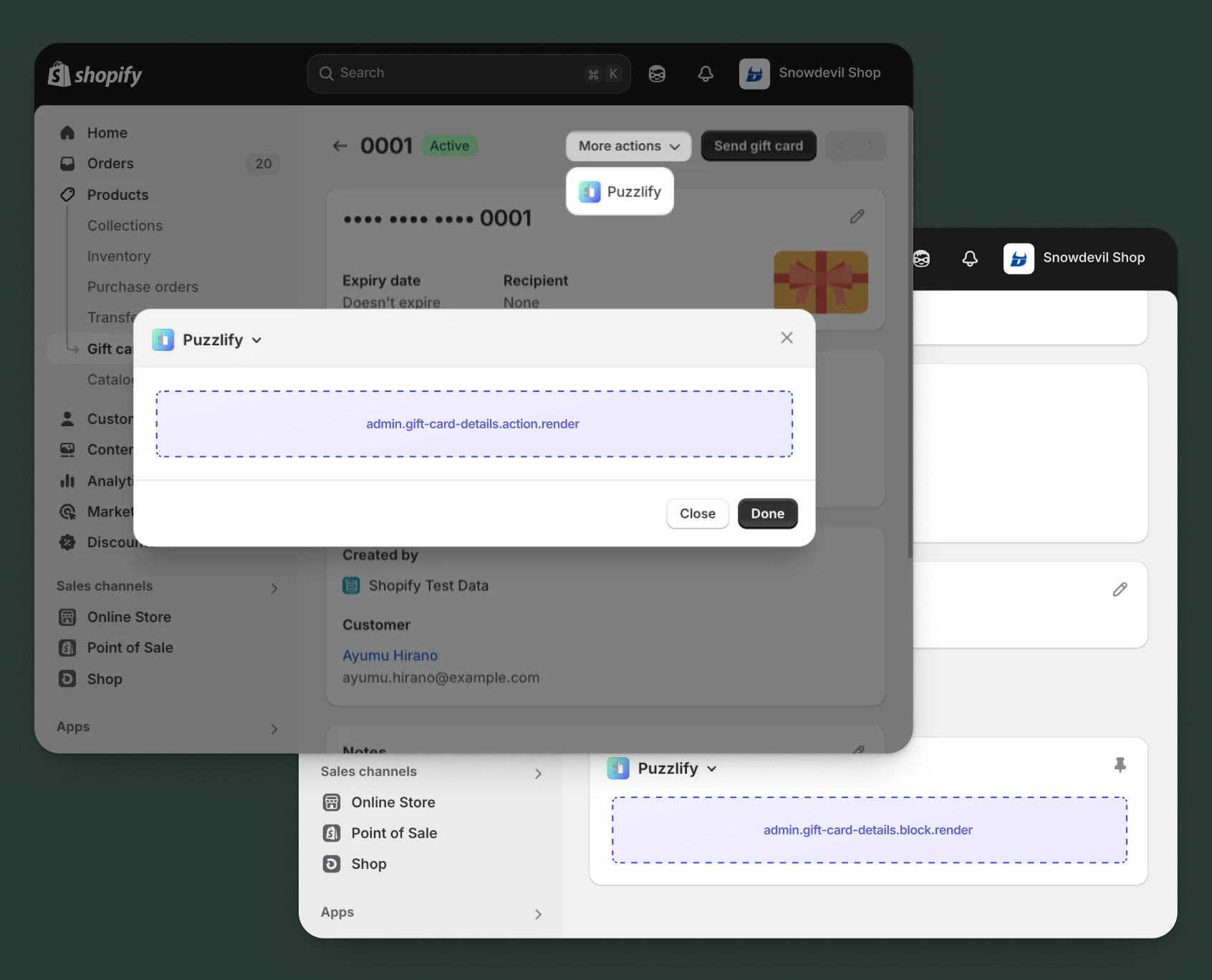
Use [action and block targets](https://shopify.dev/docs/api/admin-extensions/2026-04-rc#building-your-extension) to extend the gift cards details page with workflows and contextual information. Action targets open as modal overlays from the **More actions** menu, while block targets display as inline cards.
Extensions can query and mutate Shopify data using the [direct API](https://shopify.dev/docs/api/admin-extensions/2026-04-rc#direct-api-access), or call your [app's backend](https://shopify.dev/docs/api/admin-extensions/2026-04-rc#app-authentication) for custom business logic and external integrations.
### Gift card details action target
`admin.gift-card-details.action.render`
Renders an admin action extension on the gift cards details page. Merchants can access this extension from the **More actions** menu. Use this target to provide workflows that operate on gift cards data, such as syncing with external systems, exporting gift cards information, or managing credit terms.
Extensions at this target can access gift card data through the `data` property in the [Action Extension API](https://shopify.dev/docs/api/admin-extensions/2026-04-rc/target-apis/core-apis/action-extension-api). The action renders in a modal overlay, providing space for multi-step workflows, forms, and confirmations.
### Support Components (45) APIs (1)
### Supported components
* [Admin action](https://shopify.dev/docs/api/admin-extensions/2026-04-rc/web-components/settings-and-templates/admin-action)
* [Avatar](https://shopify.dev/docs/api/admin-extensions/2026-04-rc/web-components/media-and-visuals/avatar)
* [Badge](https://shopify.dev/docs/api/admin-extensions/2026-04-rc/web-components/feedback-and-status-indicators/badge)
* [Banner](https://shopify.dev/docs/api/admin-extensions/2026-04-rc/web-components/feedback-and-status-indicators/banner)
* [Box](https://shopify.dev/docs/api/admin-extensions/2026-04-rc/web-components/layout-and-structure/box)
* [Button](https://shopify.dev/docs/api/admin-extensions/2026-04-rc/web-components/actions/button)
* [Button group](https://shopify.dev/docs/api/admin-extensions/2026-04-rc/web-components/actions/button-group)
* [Checkbox](https://shopify.dev/docs/api/admin-extensions/2026-04-rc/web-components/forms/checkbox)
* [Chip](https://shopify.dev/docs/api/admin-extensions/2026-04-rc/web-components/typography-and-content/chip)
* [Choice list](https://shopify.dev/docs/api/admin-extensions/2026-04-rc/web-components/forms/choice-list)
* [Clickable](https://shopify.dev/docs/api/admin-extensions/2026-04-rc/web-components/actions/clickable)
* [Clickable chip](https://shopify.dev/docs/api/admin-extensions/2026-04-rc/web-components/actions/clickable-chip)
* [Color field](https://shopify.dev/docs/api/admin-extensions/2026-04-rc/web-components/forms/color-field)
* [Color picker](https://shopify.dev/docs/api/admin-extensions/2026-04-rc/web-components/forms/color-picker)
* [Date field](https://shopify.dev/docs/api/admin-extensions/2026-04-rc/web-components/forms/date-field)
* [Date picker](https://shopify.dev/docs/api/admin-extensions/2026-04-rc/web-components/forms/date-picker)
* [Divider](https://shopify.dev/docs/api/admin-extensions/2026-04-rc/web-components/layout-and-structure/divider)
* [Drop zone](https://shopify.dev/docs/api/admin-extensions/2026-04-rc/web-components/forms/drop-zone)
* [Email field](https://shopify.dev/docs/api/admin-extensions/2026-04-rc/web-components/forms/email-field)
* [Grid](https://shopify.dev/docs/api/admin-extensions/2026-04-rc/web-components/layout-and-structure/grid)
* [Heading](https://shopify.dev/docs/api/admin-extensions/2026-04-rc/web-components/typography-and-content/heading)
* [Icon](https://shopify.dev/docs/api/admin-extensions/2026-04-rc/web-components/media-and-visuals/icon)
* [Image](https://shopify.dev/docs/api/admin-extensions/2026-04-rc/web-components/media-and-visuals/image)
* [Link](https://shopify.dev/docs/api/admin-extensions/2026-04-rc/web-components/actions/link)
* [Menu](https://shopify.dev/docs/api/admin-extensions/2026-04-rc/web-components/actions/menu)
* [Money field](https://shopify.dev/docs/api/admin-extensions/2026-04-rc/web-components/forms/money-field)
* [Number field](https://shopify.dev/docs/api/admin-extensions/2026-04-rc/web-components/forms/number-field)
* [Ordered list](https://shopify.dev/docs/api/admin-extensions/2026-04-rc/web-components/layout-and-structure/ordered-list)
* [Paragraph](https://shopify.dev/docs/api/admin-extensions/2026-04-rc/web-components/typography-and-content/paragraph)
* [Password field](https://shopify.dev/docs/api/admin-extensions/2026-04-rc/web-components/forms/password-field)
* [Query container](https://shopify.dev/docs/api/admin-extensions/2026-04-rc/web-components/layout-and-structure/query-container)
* [Search field](https://shopify.dev/docs/api/admin-extensions/2026-04-rc/web-components/forms/search-field)
* [Section](https://shopify.dev/docs/api/admin-extensions/2026-04-rc/web-components/layout-and-structure/section)
* [Select](https://shopify.dev/docs/api/admin-extensions/2026-04-rc/web-components/forms/select)
* [Spinner](https://shopify.dev/docs/api/admin-extensions/2026-04-rc/web-components/feedback-and-status-indicators/spinner)
* [Stack](https://shopify.dev/docs/api/admin-extensions/2026-04-rc/web-components/layout-and-structure/stack)
* [Switch](https://shopify.dev/docs/api/admin-extensions/2026-04-rc/web-components/forms/switch)
* [Table](https://shopify.dev/docs/api/admin-extensions/2026-04-rc/web-components/layout-and-structure/table)
* [Text](https://shopify.dev/docs/api/admin-extensions/2026-04-rc/web-components/typography-and-content/text)
* [Text area](https://shopify.dev/docs/api/admin-extensions/2026-04-rc/web-components/forms/text-area)
* [Text field](https://shopify.dev/docs/api/admin-extensions/2026-04-rc/web-components/forms/text-field)
* [Thumbnail](https://shopify.dev/docs/api/admin-extensions/2026-04-rc/web-components/media-and-visuals/thumbnail)
* [Tooltip](https://shopify.dev/docs/api/admin-extensions/2026-04-rc/web-components/typography-and-content/tooltip)
* [Url field](https://shopify.dev/docs/api/admin-extensions/2026-04-rc/web-components/forms/url-field)
* [Unordered list](https://shopify.dev/docs/api/admin-extensions/2026-04-rc/web-components/layout-and-structure/unordered-list)
### Available APIs
* [Action Extension API](https://shopify.dev/docs/api/admin-extensions/2026-04-rc/target-apis/core-apis/action-extension-api)
Examples
### Examples
* ####
##### Description
Add an action extension that exports gift card details to a CSV file using your app backend. This example demonstrates calling an external API endpoint to generate and download gift card transaction history.
##### jsx
```jsx
import {render} from 'preact';
import {useState} from 'preact/hooks';
export default async () => {
render(, document.body);
};
const Extension = () => {
const [loading, setLoading] = useState(false);
const [success, setSuccess] = useState(false);
const [error, setError] = useState(null);
const [includeTransactions, setIncludeTransactions] = useState(true);
const [includeCustomer, setIncludeCustomer] = useState(true);
const handleExport = async () => {
setLoading(true);
setError(null);
const giftCardId = shopify.data.selected[0].id;
try {
const response = await fetch('https://your-app.com/api/gift-cards/export', {
method: 'POST',
headers: {'Content-Type': 'application/json'},
body: JSON.stringify({
giftCardId,
includeTransactions,
includeCustomer,
}),
});
if (response.ok) {
const blob = await response.blob();
const url = URL.createObjectURL(blob);
const link = document.createElement('a');
link.href = url;
link.download = `gift-card-${giftCardId.split('/').pop()}.csv`;
link.click();
setSuccess(true);
shopify.close();
} else {
const data = await response.json();
setError(data.message || 'Export failed');
}
} catch (err) {
setError('Failed to connect to export service');
} finally {
setLoading(false);
}
};
return (
{success && (
CSV exported successfully! Download starting...
)}
{error && (
{error}
)}
setIncludeTransactions(e.currentTarget.checked)}
/>
setIncludeCustomer(e.currentTarget.checked)}
/>
Export includes gift card balance, status, and selected details.
{loading ? 'Exporting...' : 'Export CSV'}
shopify.close()}>Cancel
);
};
```
* ####
##### Description
Add an action extension that syncs gift card details to an external loyalty platform using the \[direct API]\(/docs/api/admin-extensions/2026-04-rc#direct-api-access). This example demonstrates fetching gift card data and pushing it to an external system.
##### jsx
```jsx
import {render} from 'preact';
import {useState} from 'preact/hooks';
export default async () => {
render(, document.body);
};
const Extension = () => {
const [loading, setLoading] = useState(false);
const [success, setSuccess] = useState(false);
const [error, setError] = useState(null);
const [includeTransactions, setIncludeTransactions] = useState(true);
const [syncNotes, setSyncNotes] = useState(true);
const handleSync = async () => {
setLoading(true);
setError(null);
const giftCardId = shopify.data.selected[0].id;
try {
const response = await fetch('shopify:admin/api/graphql.json', {
method: 'POST',
headers: {'Content-Type': 'application/json'},
body: JSON.stringify({
query: `query GetGiftCard($id: ID!) {
giftCard(id: $id) {
id
balance { amount currencyCode }
initialValue { amount currencyCode }
lastCharacters
expiresOn
createdAt
customer { id email displayName }
}
}`,
variables: {id: giftCardId},
}),
});
const {data} = await response.json();
if (data?.giftCard) {
// Sync to external loyalty platform
await fetch('https://your-loyalty-platform.com/api/gift-cards/sync', {
method: 'POST',
headers: {'Content-Type': 'application/json'},
body: JSON.stringify({
giftCard: data.giftCard,
includeTransactions,
syncNotes,
}),
});
setSuccess(true);
shopify.close();
} else {
setError('Gift card not found');
}
} catch (err) {
setError('Failed to sync gift card');
} finally {
setLoading(false);
}
};
return (
{success && (
Gift card synced to loyalty platform!
)}
{error && (
{error}
)}
Sync this gift card's details to your external loyalty platform for unified tracking.
setIncludeTransactions(e.currentTarget.checked)}
/>
setSyncNotes(e.currentTarget.checked)}
/>
{loading ? 'Syncing...' : 'Sync Gift Card'}
shopify.close()}>Cancel
);
};
```
### Gift card details action (should render) target
`admin.gift-card-details.action.should-render`
Controls the render state of an admin action extension on the gift cards details page. Use this target to conditionally show or hide your action extension based on the gift card's properties, such as status, configuration, or specific business requirements.
This target returns a boolean value that determines whether the corresponding action extension appears in the **More actions** menu. The extension evaluates each time the page loads.
### Support Components (0) APIs (1)
### Supported components
\-
### Available APIs
* [Should Render API](https://shopify.dev/docs/api/admin-extensions/2026-04-rc/target-apis/utility-apis/should-render-api)
Examples
### Examples
* ####
##### Description
Add an action extension that only displays when your external analytics system has tracking data available for the gift card, enabling merchants to view usage patterns and redemption history.
##### jsx
```jsx
export default async () => {
const giftCardId = shopify.data.selected[0].id;
try {
// Check if external analytics system has data for this gift card
const response = await fetch('https://your-app.com/api/gift-card-analytics/check', {
method: 'POST',
headers: {
'Content-Type': 'application/json',
},
body: JSON.stringify({
giftCardId,
checkType: 'has_analytics_data',
}),
});
if (!response.ok) {
console.error('Analytics API error:', response.status);
return { display: false };
}
const result = await response.json();
// Show action if analytics data exists and has meaningful insights
return {
display: result.hasData && result.transactionCount > 0,
};
} catch (err) {
console.error('Failed to check gift card analytics:', err);
return { display: false };
}
};
```
* ####
##### Description
Display a status dashboard action only for gift cards with a balance above a threshold, using the \[GraphQL Admin API]\(/docs/api/admin-graphql) to check the gift card's current balance.
##### jsx
```jsx
export default async () => {
const giftCardId = shopify.data.selected[0].id;
const HIGH_VALUE_THRESHOLD = 100;
try {
const response = await fetch('shopify:admin/api/graphql.json', {
method: 'POST',
headers: {'Content-Type': 'application/json'},
body: JSON.stringify({
query: `query GetGiftCardBalance($id: ID!) {
giftCard(id: $id) {
balance {
amount
currencyCode
}
enabled
}
}`,
variables: { id: giftCardId },
}),
});
const { data } = await response.json();
const giftCard = data?.giftCard;
if (!giftCard || !giftCard.enabled) {
return { display: false };
}
const balance = parseFloat(giftCard.balance.amount);
const isHighValue = balance >= HIGH_VALUE_THRESHOLD;
return { display: isHighValue };
} catch (err) {
console.error('Failed to check gift card balance:', err);
return { display: false };
}
};
```
### Gift card details block target
`admin.gift-card-details.block.render`
Renders an admin block extension inline on the gift cards details page. Use this target to display contextual information, analytics, or status updates related to the gift cards without requiring merchant interaction to open a modal.
Extensions at this target can access gift card data through the `data` property in the [Block Extension API](https://shopify.dev/docs/api/admin-extensions/2026-04-rc/target-apis/core-apis/block-extension-api). Blocks appear as cards on the page and can show real-time data, insights, or quick actions, providing persistent visibility for information merchants need to see at a glance.
### Support Components (46) APIs (1)
### Supported components
* [Admin block](https://shopify.dev/docs/api/admin-extensions/2026-04-rc/web-components/settings-and-templates/admin-block)
* [Avatar](https://shopify.dev/docs/api/admin-extensions/2026-04-rc/web-components/media-and-visuals/avatar)
* [Badge](https://shopify.dev/docs/api/admin-extensions/2026-04-rc/web-components/feedback-and-status-indicators/badge)
* [Banner](https://shopify.dev/docs/api/admin-extensions/2026-04-rc/web-components/feedback-and-status-indicators/banner)
* [Box](https://shopify.dev/docs/api/admin-extensions/2026-04-rc/web-components/layout-and-structure/box)
* [Button](https://shopify.dev/docs/api/admin-extensions/2026-04-rc/web-components/actions/button)
* [Button group](https://shopify.dev/docs/api/admin-extensions/2026-04-rc/web-components/actions/button-group)
* [Checkbox](https://shopify.dev/docs/api/admin-extensions/2026-04-rc/web-components/forms/checkbox)
* [Chip](https://shopify.dev/docs/api/admin-extensions/2026-04-rc/web-components/typography-and-content/chip)
* [Choice list](https://shopify.dev/docs/api/admin-extensions/2026-04-rc/web-components/forms/choice-list)
* [Clickable](https://shopify.dev/docs/api/admin-extensions/2026-04-rc/web-components/actions/clickable)
* [Clickable chip](https://shopify.dev/docs/api/admin-extensions/2026-04-rc/web-components/actions/clickable-chip)
* [Color field](https://shopify.dev/docs/api/admin-extensions/2026-04-rc/web-components/forms/color-field)
* [Color picker](https://shopify.dev/docs/api/admin-extensions/2026-04-rc/web-components/forms/color-picker)
* [Date field](https://shopify.dev/docs/api/admin-extensions/2026-04-rc/web-components/forms/date-field)
* [Date picker](https://shopify.dev/docs/api/admin-extensions/2026-04-rc/web-components/forms/date-picker)
* [Divider](https://shopify.dev/docs/api/admin-extensions/2026-04-rc/web-components/layout-and-structure/divider)
* [Drop zone](https://shopify.dev/docs/api/admin-extensions/2026-04-rc/web-components/forms/drop-zone)
* [Email field](https://shopify.dev/docs/api/admin-extensions/2026-04-rc/web-components/forms/email-field)
* [Form](https://shopify.dev/docs/api/admin-extensions/2026-04-rc/web-components/forms/form)
* [Grid](https://shopify.dev/docs/api/admin-extensions/2026-04-rc/web-components/layout-and-structure/grid)
* [Heading](https://shopify.dev/docs/api/admin-extensions/2026-04-rc/web-components/typography-and-content/heading)
* [Icon](https://shopify.dev/docs/api/admin-extensions/2026-04-rc/web-components/media-and-visuals/icon)
* [Image](https://shopify.dev/docs/api/admin-extensions/2026-04-rc/web-components/media-and-visuals/image)
* [Link](https://shopify.dev/docs/api/admin-extensions/2026-04-rc/web-components/actions/link)
* [Menu](https://shopify.dev/docs/api/admin-extensions/2026-04-rc/web-components/actions/menu)
* [Money field](https://shopify.dev/docs/api/admin-extensions/2026-04-rc/web-components/forms/money-field)
* [Number field](https://shopify.dev/docs/api/admin-extensions/2026-04-rc/web-components/forms/number-field)
* [Ordered list](https://shopify.dev/docs/api/admin-extensions/2026-04-rc/web-components/layout-and-structure/ordered-list)
* [Paragraph](https://shopify.dev/docs/api/admin-extensions/2026-04-rc/web-components/typography-and-content/paragraph)
* [Password field](https://shopify.dev/docs/api/admin-extensions/2026-04-rc/web-components/forms/password-field)
* [Query container](https://shopify.dev/docs/api/admin-extensions/2026-04-rc/web-components/layout-and-structure/query-container)
* [Search field](https://shopify.dev/docs/api/admin-extensions/2026-04-rc/web-components/forms/search-field)
* [Section](https://shopify.dev/docs/api/admin-extensions/2026-04-rc/web-components/layout-and-structure/section)
* [Select](https://shopify.dev/docs/api/admin-extensions/2026-04-rc/web-components/forms/select)
* [Spinner](https://shopify.dev/docs/api/admin-extensions/2026-04-rc/web-components/feedback-and-status-indicators/spinner)
* [Stack](https://shopify.dev/docs/api/admin-extensions/2026-04-rc/web-components/layout-and-structure/stack)
* [Switch](https://shopify.dev/docs/api/admin-extensions/2026-04-rc/web-components/forms/switch)
* [Table](https://shopify.dev/docs/api/admin-extensions/2026-04-rc/web-components/layout-and-structure/table)
* [Text](https://shopify.dev/docs/api/admin-extensions/2026-04-rc/web-components/typography-and-content/text)
* [Text area](https://shopify.dev/docs/api/admin-extensions/2026-04-rc/web-components/forms/text-area)
* [Text field](https://shopify.dev/docs/api/admin-extensions/2026-04-rc/web-components/forms/text-field)
* [Thumbnail](https://shopify.dev/docs/api/admin-extensions/2026-04-rc/web-components/media-and-visuals/thumbnail)
* [Tooltip](https://shopify.dev/docs/api/admin-extensions/2026-04-rc/web-components/typography-and-content/tooltip)
* [Url field](https://shopify.dev/docs/api/admin-extensions/2026-04-rc/web-components/forms/url-field)
* [Unordered list](https://shopify.dev/docs/api/admin-extensions/2026-04-rc/web-components/layout-and-structure/unordered-list)
### Available APIs
* [Block Extension API](https://shopify.dev/docs/api/admin-extensions/2026-04-rc/target-apis/core-apis/block-extension-api)
Examples
### Examples
* ####
##### Description
Create a block extension that displays gift card usage history and balance information from an external loyalty system, demonstrating how to fetch and display data from your app backend.
##### jsx
```jsx
import {render} from 'preact';
import {useState, useEffect} from 'preact/hooks';
export default async () => {
render(, document.body);
};
const Extension = () => {
const [loading, setLoading] = useState(true);
const [error, setError] = useState(false);
const [externalData, setExternalData] = useState(null);
useEffect(() => {
fetchExternalData();
}, []);
const fetchExternalData = async () => {
setLoading(true);
setError(false);
const giftCardId = shopify.data.selected[0].id;
try {
const response = await fetch('https://your-app.com/api/gift-card/external-data', {
method: 'POST',
headers: {'Content-Type': 'application/json'},
body: JSON.stringify({giftCardId}),
});
if (response.ok) {
const data = await response.json();
setExternalData(data);
} else {
setError(true);
}
} catch (err) {
setError(true);
} finally {
setLoading(false);
}
};
if (loading) {
return (
Loading external data...
);
}
if (error) {
return (
Failed to load external data.
Retry
);
}
return (
{externalData?.isActive ? 'Active' : 'Inactive'}
Tier: {externalData?.tier || 'Standard'}
Total Redemptions: {externalData?.redemptions || 0}
Points Earned: {externalData?.pointsEarned || 0}
Last synced: {externalData?.lastSync || 'Never'}
View full history in dashboard →
);
};
```
* ####
##### Description
Create a block extension that displays gift card metrics and status information. This example shows how to fetch gift card details using the \[direct API]\(/docs/api/admin-extensions/2026-04-rc#direct-api-access) and display balance, status, and transaction history.
##### jsx
```jsx
import {render} from 'preact';
import {useState, useEffect} from 'preact/hooks';
export default async () => {
render(, document.body);
};
const Extension = () => {
const [loading, setLoading] = useState(true);
const [giftCard, setGiftCard] = useState(null);
const [error, setError] = useState(false);
useEffect(() => {
fetchGiftCardDetails();
}, []);
const fetchGiftCardDetails = async () => {
try {
const giftCardId = shopify.data.selected[0].id;
const response = await fetch('shopify:admin/api/graphql.json', {
method: 'POST',
headers: {'Content-Type': 'application/json'},
body: JSON.stringify({
query: `query GetGiftCard($id: ID!) {
giftCard(id: $id) {
id
balance { amount currencyCode }
initialValue { amount currencyCode }
enabled
expiresOn
createdAt
customer { displayName email }
}
}`,
variables: {id: giftCardId}
}),
});
const {data} = await response.json();
if (data?.giftCard) {
setGiftCard(data.giftCard);
} else {
setError(true);
}
} catch (err) {
setError(true);
} finally {
setLoading(false);
}
};
if (loading) {
return (
);
}
if (error) {
return (
Unable to load gift card details.
);
}
const usedAmount = (parseFloat(giftCard.initialValue.amount) - parseFloat(giftCard.balance.amount)).toFixed(2);
const usagePercent = ((usedAmount / parseFloat(giftCard.initialValue.amount)) * 100).toFixed(0);
return (
{giftCard.enabled ? 'Active' : 'Disabled'}
{giftCard.expiresOn && (
Expires: {giftCard.expiresOn}
)}
Current Balance: {giftCard.balance.amount} {giftCard.balance.currencyCode}
Initial Value: {giftCard.initialValue.amount} {giftCard.initialValue.currencyCode}
Used: {usedAmount} ({usagePercent}% redeemed)
{giftCard.customer && (
{giftCard.customer.displayName}
{giftCard.customer.email}
)}
);
};
```
***
## Best practices
* **Display balance context:** Always show both current balance and initial value when displaying gift card information. This helps merchants understand usage patterns and whether a gift card is partially used, fully depleted, or unused.
* **Check enabled status before operations:** Gift cards can be [disabled](https://shopify.dev/docs/api/admin-graphql/latest/objects/GiftCard#field-GiftCard.fields.enabled) by merchants or automatically by the system. Before displaying actions like "send to customer" or "sync to external system," verify the gift card's `enabled` status to avoid operations on disabled cards.
* **Handle balance adjustments with care:** When building extensions that modify gift card balances using [`giftCardCredit`](https://shopify.dev/docs/api/admin-graphql/latest/mutations/giftCardCredit) or [`giftCardDebit`](https://shopify.dev/docs/api/admin-graphql/latest/mutations/giftCardDebit), require explicit merchant confirmation and display the resulting balance before applying changes. Gift card balance errors can create customer service issues.
* **Reconcile external integrations:** If your extension syncs gift cards with external loyalty platforms, ensure transaction histories stay synchronized. A mismatch between Shopify's balance and the external system's balance creates confusion and potential fraud issues.
* **Respect expiration dates:** When displaying or exporting gift card data, prominently show expiration dates if set. Merchants need this information to proactively reach out to customers before cards expire and to ensure compliance with gift card regulations in their jurisdiction.
***
## Limitations
* **Single target per module:** Each `[[extensions.targeting]]` entry in your [TOML configuration](https://shopify.dev/docs/api/admin-extensions/2026-04-rc#configuration) maps one target to one module file.
* **Gift card code immutability:** [Gift card](https://shopify.dev/docs/api/admin-graphql/latest/objects/GiftCard) codes cannot be modified after creation. The API only exposes [`lastCharacters`](https://shopify.dev/docs/api/admin-graphql/latest/objects/GiftCard#field-GiftCard.fields.lastCharacters) (final 4 digits) and [`maskedCode`](https://shopify.dev/docs/api/admin-graphql/latest/objects/GiftCard#field-GiftCard.fields.maskedCode). The [`giftCardUpdate` mutation](https://shopify.dev/docs/api/admin-graphql/latest/mutations/giftCardUpdate) has no code field.
* **Permanent deactivation:** After you've used the [`giftCardDeactivate`](https://shopify.dev/docs/api/admin-graphql/latest/mutations/giftCardDeactivate) mutation, gift cards can't be re-enabled.
* **Transaction history pagination:** Gift card transaction history returns a maximum of 250 transactions per request.
* **Block target visibility:** Block extensions must be manually [added and pinned](https://help.shopify.com/manual/apps/working-with-apps#add-app-blocks-to-your-shopify-admin) by merchants before they appear.
* **Block collapse behavior:** Returning `null` from a block extension collapses the block rather than removing it from the page. Blocks can't be fully hidden at runtime.
***