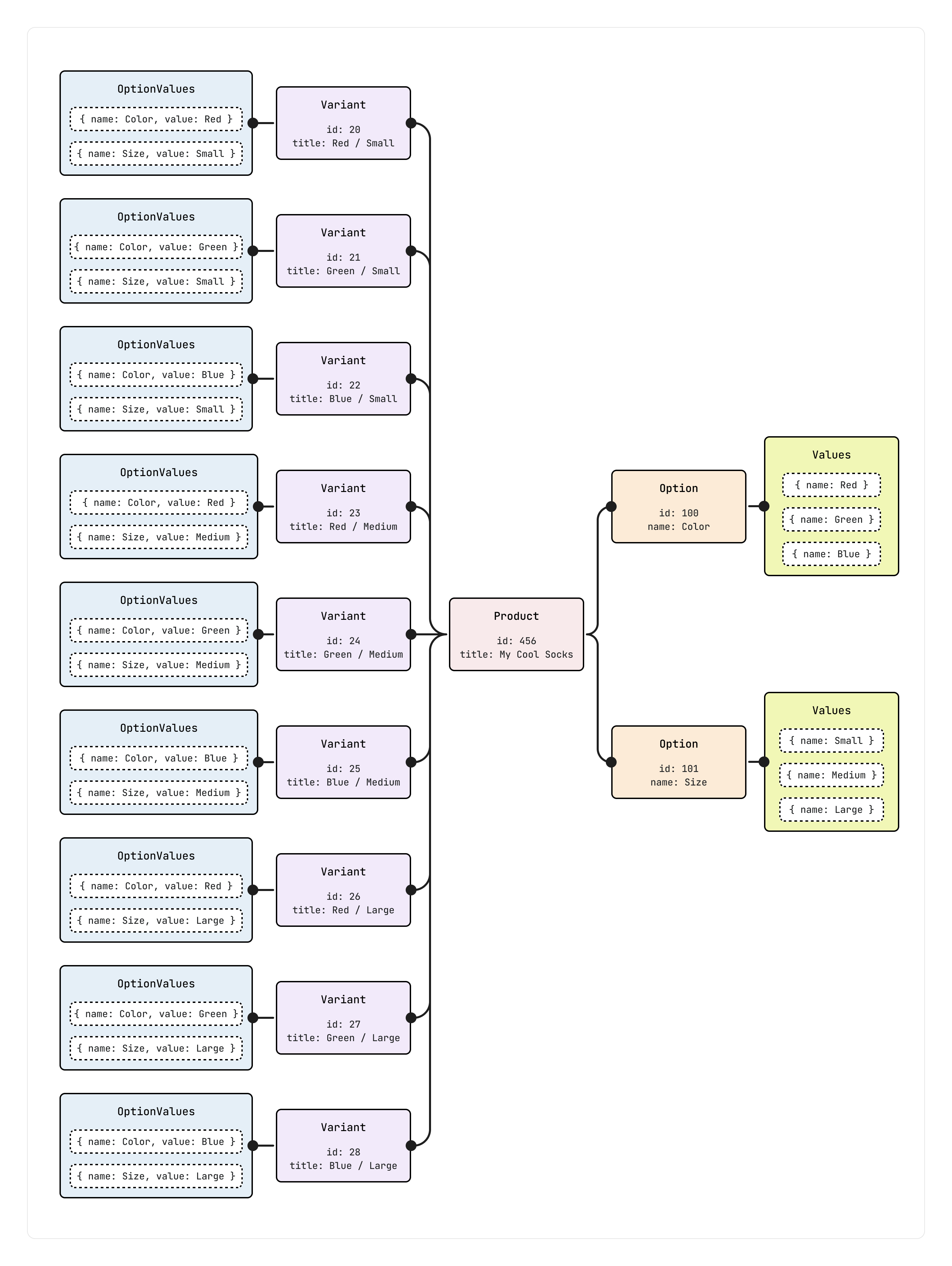
--- title: About products and collections description: Learn how to work with products and collections using the GraphQL Admin API. source_url: html: >- https://shopify.dev/docs/apps/build/product-merchandising/products-and-collections md: >- https://shopify.dev/docs/apps/build/product-merchandising/products-and-collections.md --- ExpandOn this page * [How it works](https://shopify.dev/docs/apps/build/product-merchandising/products-and-collections.md#how-it-works) * [Product model](https://shopify.dev/docs/apps/build/product-merchandising/products-and-collections.md#product-model) * [API operations](https://shopify.dev/docs/apps/build/product-merchandising/products-and-collections.md#api-operations) * [Working with large product catalogs](https://shopify.dev/docs/apps/build/product-merchandising/products-and-collections.md#working-with-large-product-catalogs) * [Get started](https://shopify.dev/docs/apps/build/product-merchandising/products-and-collections.md#get-started) * [Developer tools and resources](https://shopify.dev/docs/apps/build/product-merchandising/products-and-collections.md#developer-tools-and-resources) # About products and collections Products represent individual items for sale in a Shopify store, including all the information needed to display, sell, and fulfill those items. Collections are groupings of products that merchants create to organize their catalogs and make their stores easier to browse. This guide introduces how to work with products and collections using the [GraphQL Admin API](https://shopify.dev/docs/api/admin-graphql). *** ## How it works The GraphQL Admin API supports two different workflows for managing products. Choose your workflow based on your data source: * **Shopify is your source of truth**: Use targeted mutations to [add](https://shopify.dev/docs/apps/build/product-merchandising/products-and-collections/add-data) and [update](https://shopify.dev/docs/apps/build/product-merchandising/products-and-collections/update-data) products. This approach works well when you need to modify specific fields without affecting the rest of the product data. * **An external system is your source of truth**: Use the declarative [sync mutation](https://shopify.dev/docs/apps/build/product-merchandising/products-and-collections/sync-data) to replace complete product state in one operation. This approach is ideal for batch imports or scheduled syncs from systems like ERPs and PIMs. Both workflows operate on the same [product model](#product-model), where products contain options (like color and size) and variants represent specific purchasable combinations. You upload [media files](https://shopify.dev/docs/apps/build/product-merchandising/products-and-collections/manage-media) separately and you can reuse them across multiple products and variants. Use separate mutations to [organize and reorder](https://shopify.dev/docs/apps/build/product-merchandising/products-and-collections/reorder-products) products in collections. *** ## Product model The GraphQL Admin API models products using a three-tier hierarchy: * **Product**: The container for all product information (title, description, vendor). One product can have multiple options and variants. * **Options**: Characteristics customers choose from, like color or size. Each option has a name and multiple values. * **Variants**: Specific purchasable SKUs representing combinations of option values, like "Red / Small". Each variant has its own price, inventory, and barcode. The following diagram shows how products, options, and variants relate to each other. Each variant represents a specific combination of option values, like "Red / Small". ![The relationship between products, options, option values, and variants](https://shopify.dev/assets/assets/images/api/admin/new-product-model/original-state-mHTZWgf5.png) The following example shows the data structure: ## Product data structure ```json { "id": "gid://shopify/Product/456", "title": "My Cool Socks", "variants": { "edges": [ { "node": { "id": "gid://shopify/ProductVariant/20", "title": "Red / Small", "selectedOptions": [ { "name": "Color", "value": "Red" }, { "name": "Size", "value": "Small" } ] } }, { "node": { "id": "gid://shopify/ProductVariant/21", "title": "Green / Small", "selectedOptions": [ { "name": "Color", "value": "Green" }, { "name": "Size", "value": "Small" } ] } ``` *** ## API operations The following tables show the available mutations for each type of operation. ### Incremental update mutations Use these mutations to make targeted changes to products, options, variants, and collections: | Operation | Mutations | What they do | | - | - | - | | **Products** | [`productCreate`](https://shopify.dev/docs/api/admin-graphql/latest/mutations/productCreate), [`productUpdate`](https://shopify.dev/docs/api/admin-graphql/latest/mutations/productUpdate) | Create products or modify specific fields. | | **Options** | [`productOptionsCreate`](https://shopify.dev/docs/api/admin-graphql/latest/mutations/productOptionsCreate), [`productOptionUpdate`](https://shopify.dev/docs/api/admin-graphql/latest/mutations/productOptionUpdate), [`productOptionsReorder`](https://shopify.dev/docs/api/admin-graphql/latest/mutations/productOptionsReorder), [`productOptionsDelete`](https://shopify.dev/docs/api/admin-graphql/latest/mutations/productOptionsDelete) | Add, modify, reorder, or remove options. | | **Variants** | [`productVariantsBulkCreate`](https://shopify.dev/docs/api/admin-graphql/latest/mutations/productVariantsBulkCreate), [`productVariantsBulkUpdate`](https://shopify.dev/docs/api/admin-graphql/latest/mutations/productVariantsBulkUpdate), [`productVariantsBulkDelete`](https://shopify.dev/docs/api/admin-graphql/latest/mutations/productVariantsBulkDelete), [`productVariantsBulkReorder`](https://shopify.dev/docs/api/admin-graphql/latest/mutations/productVariantsBulkReorder) | Create, update, or reorder up to 2,048 variants at a time. Delete up to 250 variants at a time. | | **Collections** | [`collectionCreate`](https://shopify.dev/docs/api/admin-graphql/latest/mutations/collectionCreate), [`collectionUpdate`](https://shopify.dev/docs/api/admin-graphql/latest/mutations/collectionUpdate), [`collectionDelete`](https://shopify.dev/docs/api/admin-graphql/latest/mutations/collectionDelete), [`collectionReorderProducts`](https://shopify.dev/docs/api/admin-graphql/latest/mutations/collectionReorderProducts) | Create, update, or delete collections. Reorder up to 250 products at a time. | ### Database sync mutation Use this mutation to sync complete product state from external systems: | Mutation | What it does | | - | - | | [`productSet`](https://shopify.dev/docs/api/admin-graphql/latest/mutations/productSet) | Creates or updates entire product state. Replaces all data (not a merge). Supports async/sync modes. Exempt from variant limits. | ### Media mutations Use these mutations for managing files and media: | Operation | Mutations | What they do | | - | - | - | | **Files** | [`fileCreate`](https://shopify.dev/docs/api/admin-graphql/latest/mutations/fileCreate), [`fileUpdate`](https://shopify.dev/docs/api/admin-graphql/latest/mutations/fileUpdate), [`fileDelete`](https://shopify.dev/docs/api/admin-graphql/latest/mutations/fileDelete) | Upload files to Shopify's CDN, update properties, or delete files. | | **Product media** | [`productSet`](https://shopify.dev/docs/api/admin-graphql/latest/mutations/productSet), [`productCreate`](https://shopify.dev/docs/api/admin-graphql/latest/mutations/productCreate), [`productUpdate`](https://shopify.dev/docs/api/admin-graphql/latest/mutations/productUpdate), [`productReorderMedia`](https://shopify.dev/docs/api/admin-graphql/latest/mutations/productReorderMedia), [`productDeleteMedia`](https://shopify.dev/docs/api/admin-graphql/latest/mutations/productDeleteMedia) | Associate files with products, reorder media, or remove media associations. | | **Variant media** | [`productVariantAppendMedia`](https://shopify.dev/docs/api/admin-graphql/latest/mutations/productVariantAppendMedia), [`productVariantDetachMedia`](https://shopify.dev/docs/api/admin-graphql/latest/mutations/productVariantDetachMedia) | Associate media with variants or remove associations. | *** ## Working with large product catalogs When working with high-variant products, you need to account for pagination limits and batch creation constraints. ### Pagination when querying The GraphQL Admin API returns a maximum of 250 items for each page. However, when querying variants on a single product, you can request up to 2,048 variants in one request using the `first` argument on the [`variants`](https://shopify.dev/docs/api/admin-graphql/latest/objects/Product#field-Product.fields.variants) connection. If you're querying variants across multiple products, use [cursor-based pagination](https://shopify.dev/docs/api/usage/pagination-graphql) to retrieve results across multiple pages. Tip To quickly check how many variants a product has, query the [`variantsCount`](https://shopify.dev/docs/api/admin-graphql/latest/objects/Product#field-Product.fields.variantsCount) field on the `Product` object. ### Batch creation The [`productVariantsBulkCreate`](https://shopify.dev/docs/api/admin-graphql/latest/mutations/productVariantsBulkCreate) mutation accepts up to 2,048 variants in a single operation—enough to create all variants for a product at once. If you're using the [`REMOVE_STANDALONE_VARIANT`](https://shopify.dev/docs/api/admin-graphql/latest/enums/ProductVariantsBulkCreateStrategy#enums-REMOVE_STANDALONE_VARIANT) strategy, you can create all 2,048 variants. Otherwise, you can create up to 2,047 variants alongside the auto-created standalone variant. ### Bulk operations For very large-scale operations (like importing thousands of products with variants), consider using [bulk operations](https://shopify.dev/docs/api/usage/bulk-operations/imports) instead of individual mutations. Bulk operations let you queue large data sets for asynchronous processing, avoiding rate limits and pagination complexity. *** ## Get started Follow these guides to start working with products and collections. [Add product data\ \ ](https://shopify.dev/docs/apps/build/product-merchandising/products-and-collections/add-data) [Learn how to create products with options and variants using the GraphQL Admin API.](https://shopify.dev/docs/apps/build/product-merchandising/products-and-collections/add-data) [Update product data\ \ ](https://shopify.dev/docs/apps/build/product-merchandising/products-and-collections/update-data) [Learn how to edit existing products, variants, and options.](https://shopify.dev/docs/apps/build/product-merchandising/products-and-collections/update-data) [Sync product data\ \ ](https://shopify.dev/docs/apps/build/product-merchandising/products-and-collections/sync-data) [Learn how to sync product data from an external source into Shopify.](https://shopify.dev/docs/apps/build/product-merchandising/products-and-collections/sync-data) [Link metafields to product options\ \ ](https://shopify.dev/docs/apps/build/product-merchandising/products-and-collections/metafield-linked) [Learn how to link metafields to product options for enhanced product taxonomy.](https://shopify.dev/docs/apps/build/product-merchandising/products-and-collections/metafield-linked) [Manage media for products and collections\ \ ](https://shopify.dev/docs/apps/build/product-merchandising/products-and-collections/manage-media) [Learn how to manage product media asynchronously using the GraphQL Admin API.](https://shopify.dev/docs/apps/build/product-merchandising/products-and-collections/manage-media) [Reorder products in collections\ \ ](https://shopify.dev/docs/apps/build/product-merchandising/products-and-collections/reorder-products) [Learn how to efficiently reorder products within a collection using minimal moves.](https://shopify.dev/docs/apps/build/product-merchandising/products-and-collections/reorder-products) *** ## Developer tools and resources Explore these tools and resources to enhance your development workflow. [GraphQL Admin API reference\ \ ](https://shopify.dev/docs/api/admin-graphql) [Explore the complete GraphQL Admin API reference documentation for all available objects, queries, mutations, and enums.](https://shopify.dev/docs/api/admin-graphql) [Dev MCP server\ \ ](https://shopify.dev/docs/apps/build/devmcp) [Use AI-powered assistance to generate GraphQL operations, convert REST to GraphQL, and get interactive help with Shopify's MCP server in compatible AI tools.](https://shopify.dev/docs/apps/build/devmcp) [GraphiQL explorer\ \ ](https://shopify.dev/docs/api/usage/api-exploration/admin-graphiql-explorer) [Test your GraphQL queries and mutations interactively with the GraphiQL explorer tool.](https://shopify.dev/docs/api/usage/api-exploration/admin-graphiql-explorer) *** * [How it works](https://shopify.dev/docs/apps/build/product-merchandising/products-and-collections.md#how-it-works) * [Product model](https://shopify.dev/docs/apps/build/product-merchandising/products-and-collections.md#product-model) * [API operations](https://shopify.dev/docs/apps/build/product-merchandising/products-and-collections.md#api-operations) * [Working with large product catalogs](https://shopify.dev/docs/apps/build/product-merchandising/products-and-collections.md#working-with-large-product-catalogs) * [Get started](https://shopify.dev/docs/apps/build/product-merchandising/products-and-collections.md#get-started) * [Developer tools and resources](https://shopify.dev/docs/apps/build/product-merchandising/products-and-collections.md#developer-tools-and-resources)