Reviews API
App Bridge isn't versioned with Polaris. App Bridge APIs and web components are identical in every App Home reference version.
App Bridge isn't versioned with Polaris. App Bridge APIs and web components are identical in every App Home reference version.
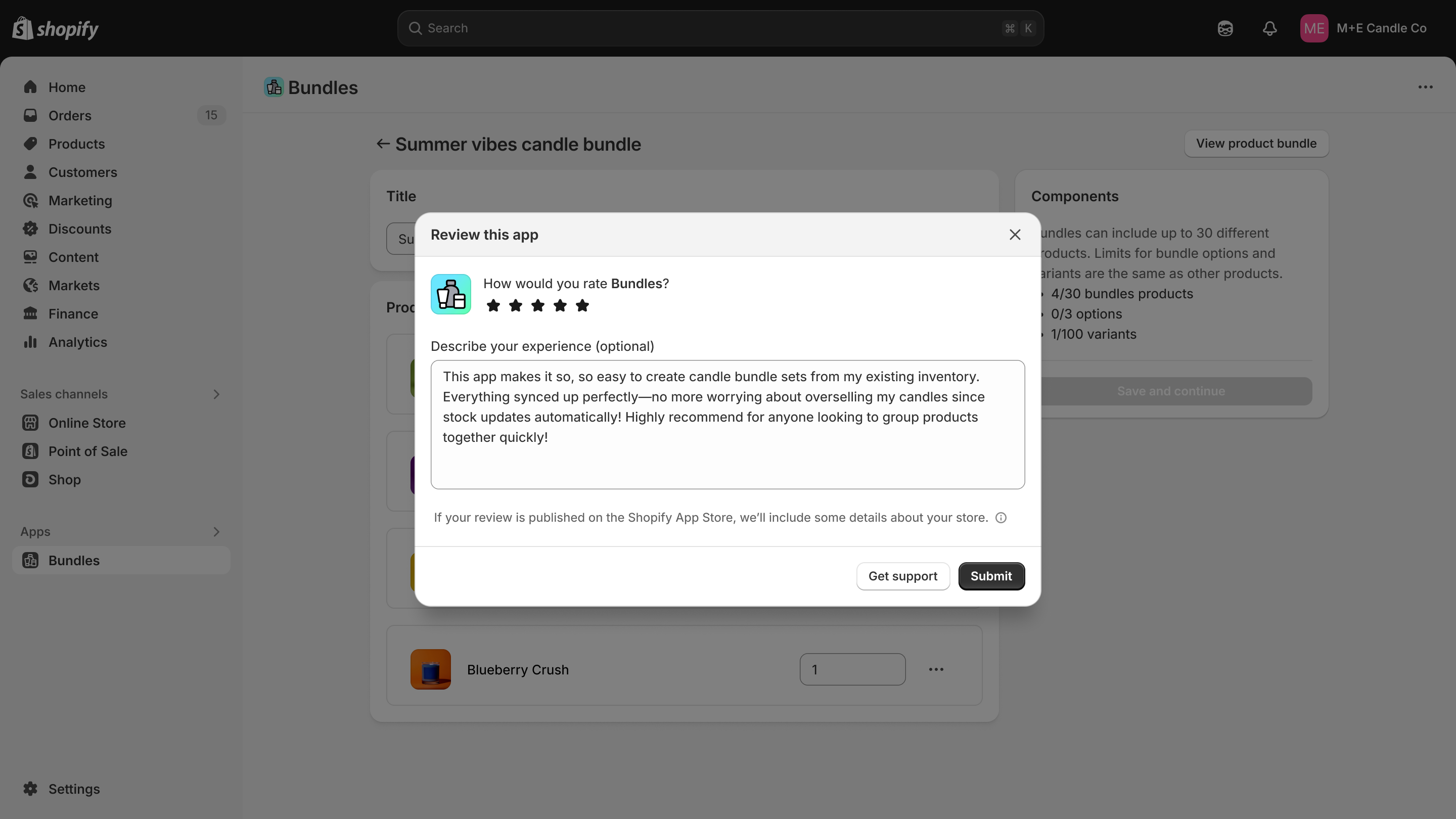
The Reviews API lets you request an app review modal overlaid on your app in the Shopify admin. You control when to request the modal, but it only displays if certain conditions are met. Use this API to prompt merchants for feedback at the right moment in your app workflow.
It's better to request a review at the end of a successful workflow than when a merchant first opens your app, or at any point that interrupts their task. Don't trigger a request with a merchant action, as rate-limiting might prevent the modal from displaying, making your app appear to be broken.
You can use your development store to test the Reviews API, which bypasses the rate limits and restrictions. Reviews submitted from development stores are not published on the Shopify App Store.
Anchor to Use casesUse cases
- Review prompts: Request an app review modal at strategic moments like after a successful merchant action.
- Rating collection: Prompt merchants to leave app store ratings and reviews.
- Timing control: Choose when to request a review modal, though display is subject to Shopify's rate limits and conditions.
- Feedback collection: Gather merchant feedback through the native Shopify review flow.
Anchor to MethodsMethods
The reviews object provides methods for requesting app review modals from merchants.
- Anchor to requestrequestrequest() => Promise<ReviewRequestResponse>() => Promise<ReviewRequestResponse>requiredrequired
Requests an app review modal. The modal only displays if rate limits and eligibility conditions are met. Returns a Promise that resolves to a response object with
success,code, andmessageproperties indicating whether the modal was shown and, if not, the reason why.
ReviewRequestResponse
The response from a review request. Either a success response when the modal was displayed, or a declined response with a code and message explaining why it was not.
ReviewRequestSuccessResponse | ReviewRequestDeclinedResponseReviewRequestSuccessResponse
The response returned when the review modal is successfully displayed to the merchant.
- code
The response code. Always `'success'` for a successful request.
'success' - message
A human-readable message confirming the modal was shown.
'Review modal shown successfully' - success
Indicates the review modal was successfully displayed.
true
ReviewRequestDeclinedResponse
The response returned when the review modal could not be displayed, including the reason why.
- code
A code identifying why the modal was not displayed, such as rate limits or merchant eligibility.
ReviewRequestDeclinedCode - message
A human-readable message explaining why the modal was not displayed.
string - success
Indicates the review modal was not displayed.
false
ReviewRequestDeclinedCode
A string code indicating why the review modal was not displayed.
'mobile-app' | 'already-reviewed' | 'annual-limit-reached' | 'cooldown-period' | 'merchant-ineligible' | 'recently-installed' | 'already-open' | 'open-in-progress' | 'cancelled'js
Preview
Examples
Request a review modal
Description
Request a review modal. This example calls the `request()` method and handles the response. If `success` is false, the response includes a `code` and `message` explaining why the modal was not displayed, such as rate limits or merchant eligibility.
js
try {
  const result = await shopify.reviews.request();
  if (!result.success) {
    console.log(`Review modal not displayed. Reason: ${result.code}: ${result.message}`);
  }
} catch (error) {
  console.error('Error requesting review:', error);
}
Anchor to Response codes and messagesResponse codes and messages
A successful request to the Reviews API has a single response code:
success:truecode:successmessage: Review modal displayed
If a request is unsuccessful (success is false), the response includes a code and message explaining why the modal was not displayed, such as rate limits or merchant eligibility.
already-open: Review modal is already openalready-reviewed: Merchant already reviewed this appannual-limit-reached: Review modal already displayed the maximum number of times within the last 365 dayscancelled: Review modal opening was cancelledcooldown-period: Review modal already displayed within the last 60 daysmerchant-ineligible: Merchant isn't eligible to review this appmobile-app: Review modal not supported on mobile devicesopen-in-progress: Review modal opening is already in progressrecently-installed: Merchant installed this app for less than 24 hours
Anchor to Rate limits and restrictionsRate limits and restrictions
A review modal will only be displayed to the merchant if certain conditions are met. For each condition below, the corresponding error code is listed as a reference.
Anchor to Rate limitsRate limits
The Reviews API applies rate limits to ensure a good merchant experience and to prevent abuse. A review modal is only displayed to a merchant:
- Once within any 60-day period (
cooldown-period). - Three times within any 365-day period (
annual-limit-reached).
Anchor to RestrictionsRestrictions
A review modal is never displayed in the following cases:
- The merchant already reviewed your app (
already-reviewed). - The merchant is on a mobile device (
mobile-app). - The merchant is ineligible to leave a review (
merchant-ineligible). - The merchant has installed your app for less than 24 hours (
recently-installed).