---
title: unstable_Picker
description: Learn more about the unstable_Picker action set in App Bridge.
source_url:
html: https://shopify.dev/docs/api/app-bridge/previous-versions/actions/picker
md: https://shopify.dev/docs/api/app-bridge/previous-versions/actions/picker.md
---
# unstable\_Picker
The `Picker` action set provides a search-based interface to help users find and select one or more resources. Unlike the [ResourcePicker](https://shopify.dev/docs/api/app-bridge/previous-versions/actions/resourcepicker), it provides a lower-level API where you are in charge of providing the data as well as implementing search or pagination features.
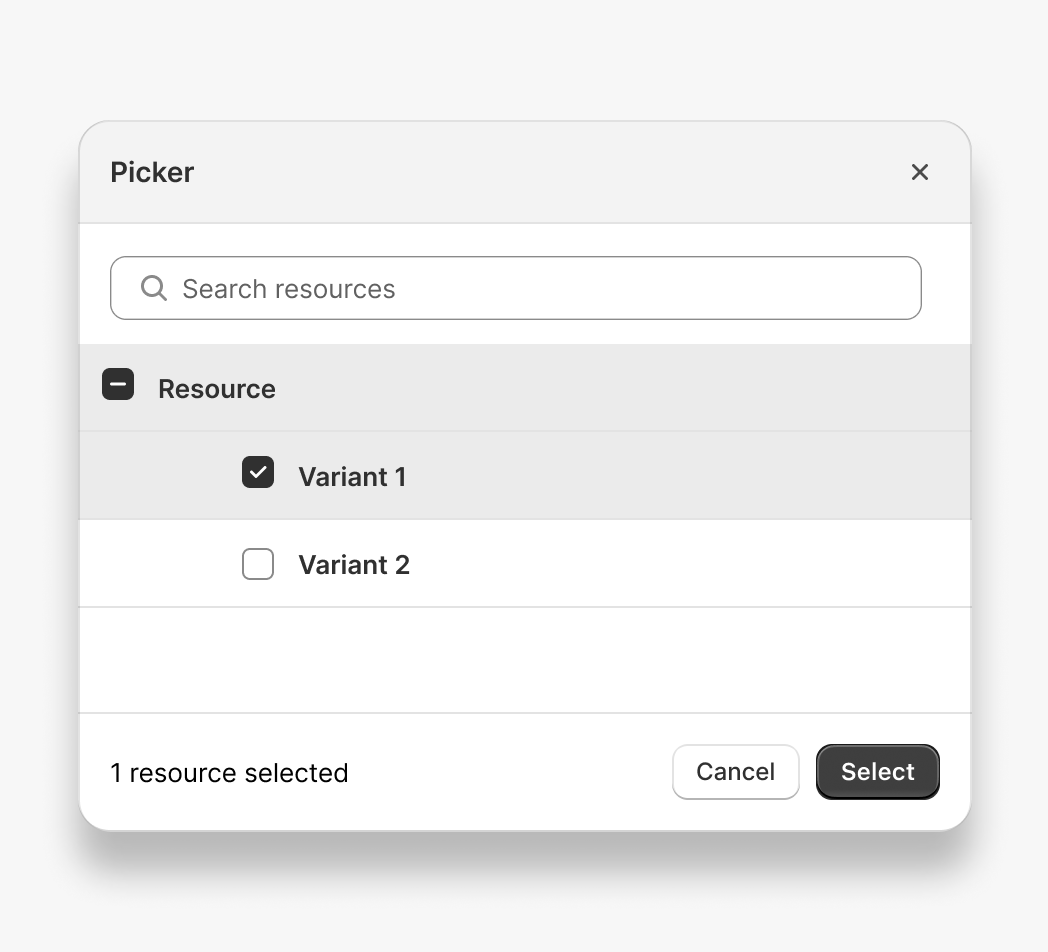
You can use the contextual save bar in the following ways:
1. [Plain JavaScript](#plain-javascript)
2. [React component](#react)
**Caution:**
This feature is still under development. As such, the API might be updated without warning.
***
## Plain JavaScript
Create an app and import the `unstable_Picker` module from `@shopify/app-bridge/actions`. This sample app is used throughout the examples below.
**Note:**
In the following example, `config` is a valid App Bridge configuration object. Learn more about [configuring App Bridge](https://shopify.dev/docs/api/app-bridge/previous-versions/app-bridge-from-npm/app-setup#initialize-shopify-app-bridge-in-your-app).
```js
import createApp from '@shopify/app-bridge';
import {unstable_Picker} from '@shopify/app-bridge/actions';
const app = createApp(config);
```
### Create a picker to display a list of resources
The following snippet creates a `Picker` with 2 resources. The first resource has 2 options. We're also specifying the title, search placeholder, and action labels.
```js
const picker = unstable_Picker.create(app, {
items: [
{
id: 'resource1',
name: 'Resource 1',
options: [
{
id: 'option1',
name: 'Option1',
},
{
id: 'option2',
name: 'Option2',
},
],
},
{
id: 'resource2',
name: 'Resource 2',
},
],
title: 'Select Resource',
searchQueryPlaceholder: 'Search resources',
primaryActionLabel: 'Save',
secondaryActionLabel: 'Cancel',
});
```
### Common Picker actions
#### Selection and Cancellation
The `Picker` has two main actions that you can subscribe to:
`unstable_Picker.Action.SELECT` - This action is dispatched when the user triggers the primary action. This action generally corresponds to a selection event. It receives a `SelectPayload` argument, which is an `Object` with `id` and `selection` keys. The `selection` key is an array of all the selected items.
`unstable_Picker.Action.CANCEL` - This action is dispatched when the user triggers the secondary action. This action generally corresponds to a cancelled event.
```js
const picker = unstable_Picker.create(app, {
items: [...],
...
});
picker.subscribe(unstable_Picker.Action.SELECT, ({selection}) => {
// Do something with `selection`
});
picker.subscribe(unstable_Picker.Action.CANCEL, () => {
// Picker was cancelled
});
```
#### Search
The `Picker` has the `unstable_Picker.Action.SEARCH` search action that you can subscribe to.
This action is dispatched when the user enters a search query string. It receives a `SearchPayload` argument, which is an `Object` with `id` and `searchQuery`. The `searchQuery` is a string.
```js
const picker = unstable_Picker.create(app, {
items: [...],
...
});
picker.subscribe(unstable_Picker.Action.SEARCH, ({searchQuery}) => {
// Do something with the searchQuery
// You can then call picker.set({items: [...]}) in order to update the items with the result of the search query.
});
```
#### Pagination
The `Picker` has the `unstable_Picker.Action.LOAD_MORE` pagination action that you can subscribe to. To enable this option make sure to set `canLoadMore` to `true` when creating your picker instance.
This action is dispatched when the user reaches the bottom of the list of items. It does not have any arguments.
```js
const picker = unstable_Picker.create(app, {
items: [...],
...
});
picker.subscribe(unstable_Picker.Action.LOAD_MORE, () => {
// Do something to load additional data
// You can then call picker.set({items: [...]}) in order to update the items the additional items loaded.
});
```
### Options
#### items
* default value: `[]`
* optional
* type: `BaseResource[]`
* note: `items` takes an array of minimal resource objects, which only need to contain a resource `id` and a `name` value. A resource may also contain child options. For example:
```js
const picker = unstable_Picker.create(app, {
items: [
{
id: 'customResource1',
name: 'Custom Resource 1',
options: [
{
id: 'option1',
name: 'Option1',
},
{
id: 'option2',
name: 'Option2',
},
],
},
{
id: 'customResource2',
name: 'Custom Resource 2',
},
],
...
});
```
#### selectedItems
* default value: `[]`
* optional
* type: `BaseResource[]`
* note: `selectedItems` takes an array of minimal resource objects, which only need to contain a resource id (in GraphQL ID format, ie 'gid://shopify/Product/1'). Resources may also contain selected options. If no option is specified, all options are selected.
#### maxSelectable
* default value: `0`
* optional
* type: `number`
* note: Limits the total number of selections to a maximum of the passed value, or `0` for no limit.
#### title
* default value: `undefined`
* optional
* type: `string`
* note: Used as the title of the modal.
#### loading
* default value: `false`
* optional
* type: `boolean`
* note: Indicates if the picker should be in a loading state.
#### searchQueryPlaceholder
* default value: `undefined`
* optional
* type: `string`
* note: Used as the placeholder in the search input.
#### searchQuery
* default value: `undefined`
* optional
* type: `string`
* note: The search query to be displayed in the search input field.
#### primaryActionLabel
* default value: `undefined`
* optional
* type: `string`
* note: Label to be used on the primary action button.
#### secondaryActionLabel
* default value: `undefined`
* optional
* type: `string`
* note: Label to be used on the secondary action button.
#### canLoadMore
* default value: `false`
* optional
* type: `boolean`
* note: Whether the Picker can load more items on the list.
#### loadingMore
* default value: `false`
* optional
* type: `boolean`
* note: Indicates if the Picker is currently loading more items.
#### emptySearchLabel
* default value: `undefined`
* optional
* type: `EmptySearchLabel`
* note: `emptySearchLabel` takes an object that describes the interface of the picker when there is no item to display. For example:
```js
const picker = unstable_Picker.create(app, {
items: [],
emptySearchLabel: {
title: 'No resources',
description: 'There are no resources to display',
withIllustration: true,
}
});
```
### Subscribe to actions
You can subscribe to `Picker` actions by calling subscribe. This returns a method that you can call to unsubscribe from the action. For example:
```js
const picker = unstable_Picker.create(app, {
...
});
const selectUnsubscribe = picker.subscribe(unstable_Picker.Action.SELECT, ({selection}) => {
// Do something with `selection`
});
const cancelUnsubscribe = picker.subscribe(unstable_Picker.Action.CANCEL, () => {
// Picker was cancelled
});
// Unsubscribe to actions
selectUnsubscribe();
cancelUnsubscribe();
```
### Unsubscribe
You can call unsubscribe to remove all subscriptions on the picker:
```js
const picker = unstable_Picker.create(app, {
...
});
picker.subscribe(unstable_Picker.Action.SELECT, () => {
// Do something with `selection`
});
picker.subscribe(unstable_Picker.Action.CANCEL, () => {
// Picker was cancelled
});
// Unsubscribe from all actions
picker.unsubscribe();
```
### Dispatch actions
```js
const picker = unstable_Picker.create(app, {
...
});
// Open the picker
picker.dispatch(unstable_Picker.Action.OPEN);
```
### Update options
You can call the `set` method with partial picker options. This automatically triggers the update action on the picker and merges the given options with the existing options:
```js
const picker = unstable_Picker.create(app, {
...
});
picker.set({items: [/* a list of items*/]});
```
***
## React
### Example code
Import the `Provider` and `unstable_Picker` component from `@shopify/app-bridge-react`.
**Note:**
In the following example, `config` is a valid App Bridge configuration object. Learn more about [configuring App Bridge](https://shopify.dev/docs/api/app-bridge/previous-versions/app-bridge-from-npm/app-setup#initialize-shopify-app-bridge-in-your-app).
**Note:**
When using the App Bridge React library, you need to wrap all of your App Bridge React code inside of a single App Bridge [`Provider`](https://shopify.dev/docs/api/app-bridge/previous-versions/app-bridge-from-npm/using-react#provider).
```jsx
import React from 'react';
import ReactDOM from 'react-dom';
import {
Provider,
unstable_Picker as Picker
} from '@shopify/app-bridge-react';
function MyApp() {
return (
);
}
const root = document.createElement('div');
document.body.appendChild(root);
ReactDOM.createRoot(root).render();
```
### Props
| Name | Type | Description | Required |
| - | - | - | - |
| open | `boolean` | Whether the picker is open or not. | Yes |
| items | `BaseResource[]` | The list of items to display. | Yes |
| canLoadMore | `boolean` | Whether the Picker can load more items on the list. | No |
| selectedItems | `BaseResource[]` | The items which are selected. | No |
| maxSelectable | `number` | Limits the total number of selections to a maximum of the passed value, or `0` for no limit. | No |
| title | `string` | Used as the title of the modal. | No |
| loading | `boolean` | Indicates if the Picker should be in a loading state. | No |
| loadingMore | `boolean` | Indicates if the Picker is currently loading more items. | No |
| searchQueryPlaceholder | `string` | Used as the placeholder in the search input. | No |
| searchQuery | `string` | The search query to be displayed in the search input field. | No |
| primaryActionLabel | `string` | Label to be used on the primary action button. | No |
| secondaryActionLabel | `string` | Label to be used on the secondary action button. | No |
| emptySearchLabel | `EmptySearchLabel` | An object that describes the interface of the picker when there is no item to display. | No |
| onCancel | `() => void` | Callback when the user triggers the secondary action. | No |
| onSelect | `(selectPayload: SelectPayload) => void` | Callback when a selection has been made. It receives a `SelectPayload` argument, which is an `Object` with `id` and `selection` keys. The `selection` key is an array of all the selected resources. | No |
| onSearch | `(searchPayload: SearchPayload) => void` | Callback when the user enters a search query string. It receives a SearchPayload argument, which is an Object with id and `searchQuery`. The `searchQuery` is a string. | No |
| onLoadMore | `() => void` | Callback when the user reaches the bottom of the list of items. It does not have any argument. | No |
***