Title bar
Info
App Bridge isn't versioned with Polaris. App Bridge APIs and web components are identical in every App Home reference version.
Info:
App Bridge isn't versioned with Polaris. App Bridge APIs and web components are identical in every App Home reference version.
The page component lets you customize the title bar that appears at the top of your app. Use it to display the current page context, provide action buttons for saving or canceling changes, and add breadcrumb links for navigation. The title bar helps merchants understand where they are in your app and what actions they can take.
Use this component when you need to set the admin's native title bar (title, breadcrumbs, actions) without a styled page layout. For apps that need a complete page layout with Polaris styling, use the Polaris page component instead.
To trigger navigation programmatically (such as navigating after a user action), use the Navigation API.
Anchor to Use casesUse cases
- Page context: Display the current page title so merchants understand where they are in your app.
- Action buttons: Add primary and secondary action buttons for page-level operations like saving or creating resources.
- Breadcrumb navigation: Provide breadcrumb links to help merchants navigate back to parent pages.
- Status indicators: Show page status using badge accessories in the title bar for at-a-glance context.
Anchor to PropertiesProperties
Properties for the page element. This element configures the title bar in the Shopify admin.
- Anchor to childrenchildrenchildrenSPageChildrenSPageChildren
Child elements that populate the title bar slots. Use slots to add action buttons, breadcrumb navigation, and status badges to the title bar.
- Anchor to headingheadingheadingstringstring
The page title displayed in the title bar. Use a clear, descriptive heading that helps merchants understand the current context, such as "Edit Product" or "Order #1234".
SPageChildren
Available slots for the page component. Each slot accepts specific elements that appear in designated areas of the title bar.
- accessory
A status badge displayed next to the page heading. Use to indicate page state such as "Draft", "Published", or "Archived". Use `slot="accessory"` on an `s-badge` element with a `tone` attribute (`info`, `success`, `warning`, or `critical`) to convey status.
HTMLElement - breadcrumbActions
A navigation link that appears before the page heading, typically used for "Back" navigation. Helps merchants understand their location and return to parent pages. Use `slot="breadcrumb-actions"` on a Link element with an `href` attribute.
HTMLElement - primaryAction
The main call-to-action button, typically "Save" or "Create". Appears prominently on the right side of the title bar. Only one primary action should be used per page to maintain clear visual hierarchy. Use `slot="primary-action"` on an `s-button` element.
HTMLElement - secondaryActions
Additional action buttons that appear next to the primary action. Use for secondary operations like "Cancel", "Delete", or grouped actions using `s-menu`. Multiple buttons can be added. Use `slot="secondary-actions"` on `s-button` elements. For dropdown menus, combine with [`commandFor`](/docs/api/app-home/latest/web-components/actions/button#properties-propertydetail-commandFor) attribute and an `s-menu` element.
HTMLElement[]
Anchor to ExamplesExamples
Anchor to Primary and secondary actionsPrimary and secondary actions
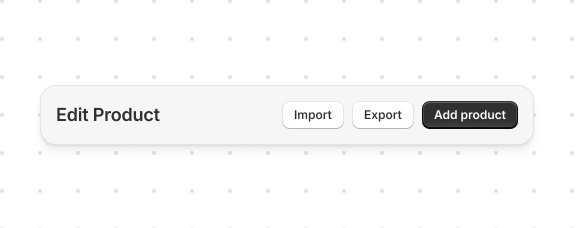
Configure the title bar for your page. This example sets a heading and adds primary and secondary action buttons.
Primary and secondary actions
html
<s-page heading="Edit Product">
<s-button slot="primary-action" onClick="shopify.toast.show('Add product')">Add product</s-button>
<s-button slot="secondary-actions" onClick="shopify.toast.show('Import')">Import</s-button>
<s-button slot="secondary-actions" onClick="shopify.toast.show('Export')">Export</s-button>
</s-page>
Anchor to Accessory badgeAccessory badge
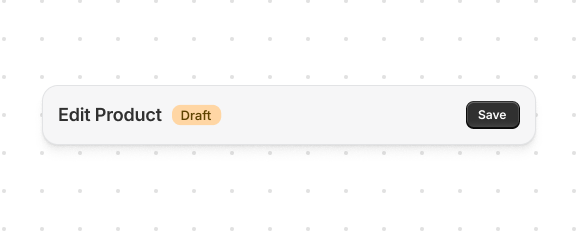
Show page status in the title bar. This example displays a status badge using the accessory slot with s-badge and tone.
Accessory badge
html
<s-page heading="Edit Product">
<s-badge slot="accessory" tone="warning">Draft</s-badge>
<s-button slot="primary-action">Save</s-button>
</s-page>
Anchor to Grouped secondary actionsGrouped secondary actions
Organize multiple actions in a dropdown menu. This example groups secondary actions using s-menu with the commandFor attribute.
Grouped secondary actions
 attribute.](https://shopify-assets.shopifycdn.com/shopifycloud/shopify-dev/production/assets/assets/images/templated-apis-screenshots/admin/app-bridge-web-components/title-bar-grouped-secondary-DKcZrsFM.png)
html
<s-page heading="Edit Product">
<s-button slot="primary-action" onClick="shopify.toast.show('Save')">Save</s-button>
<s-button slot="secondary-actions" commandFor="more-actions-id">More actions</s-button>
<s-menu id="more-actions-id">
<s-button icon="view" onClick="shopify.toast.show('Action 1')">Preview</s-button>
<s-button icon="import" onClick="shopify.toast.show('Action 2')">Import</s-button>
<s-button icon="export" onClick="shopify.toast.show('Action 3')">Export</s-button>
</s-menu>
</s-page>
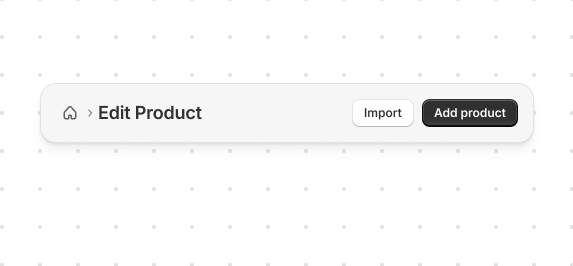
Help users navigate back to previous pages. This example adds breadcrumb navigation using the breadcrumb-actions slot.
Breadcrumb actions
html
<s-page heading="Edit Product">
<s-button slot="primary-action" onClick="shopify.toast.show('Add product')">Add product</s-button>
<s-button slot="secondary-actions" onClick="shopify.toast.show('Import')">Import</s-button>
<s-link slot="breadcrumb-actions" href="/">Home</s-link>
</s-page>
Anchor to Complete exampleComplete example
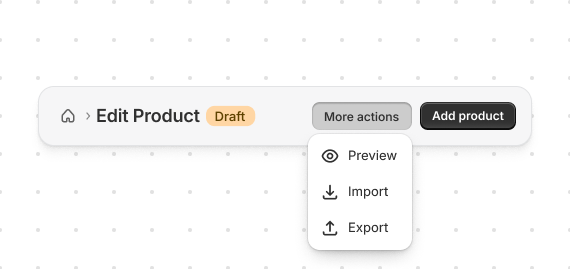
Build a complete title bar configuration. This example combines heading, actions, badges, and breadcrumbs.
Complete example
html
<s-page heading="Edit Product">
<s-badge slot="accessory" tone="warning">Draft</s-badge>
<s-button slot="primary-action" onClick="shopify.toast.show('Save')">Add product</s-button>
<s-button slot="secondary-actions" commandFor="more-actions-id">More actions</s-button>
<s-menu id="more-actions-id">
<s-button icon="view" onClick="shopify.toast.show('Preview')">Preview</s-button>
<s-button icon="import" onClick="shopify.toast.show('Import')">Import</s-button>
<s-button icon="export" onClick="shopify.toast.show('Export')">Export</s-button>
</s-menu>
<s-link slot="breadcrumb-actions" href="/">Home</s-link>
</s-page>
Anchor to Best practicesBest practices
- Use descriptive headings: The page heading should clearly describe the current context.
- Limit primary actions: Only one primary action per page for clear hierarchy.
- Group related secondary actions: Use
s-menuwithcommandforto group related actions in dropdowns. - Use breadcrumbs for navigation: Help users understand where they are and how to go back.
- Add status badges when relevant: Use the
accessoryslot withs-badgeto show page status.
Anchor to LimitationsLimitations
Anchor tags (<a>) aren't supported in Remix apps. Use Remix's <Link> component instead.
Was this page helpful?