---
title: Homepage
description: |-
The app URL specified in the Partner Dashboard should point to your app homepage. The home page of your app is the first thing merchants will see, and it should provide daily value to them. Design the page to provide status updates and show merchants what actions they can take.
| Used to | Examples |
| --- | --- |
| Teach merchants how to use the app | Onboarding, how-to guides |
| Display app functionalities | Call-to-actions to app features, resource tables |
| Show updates | Status banners, company news |
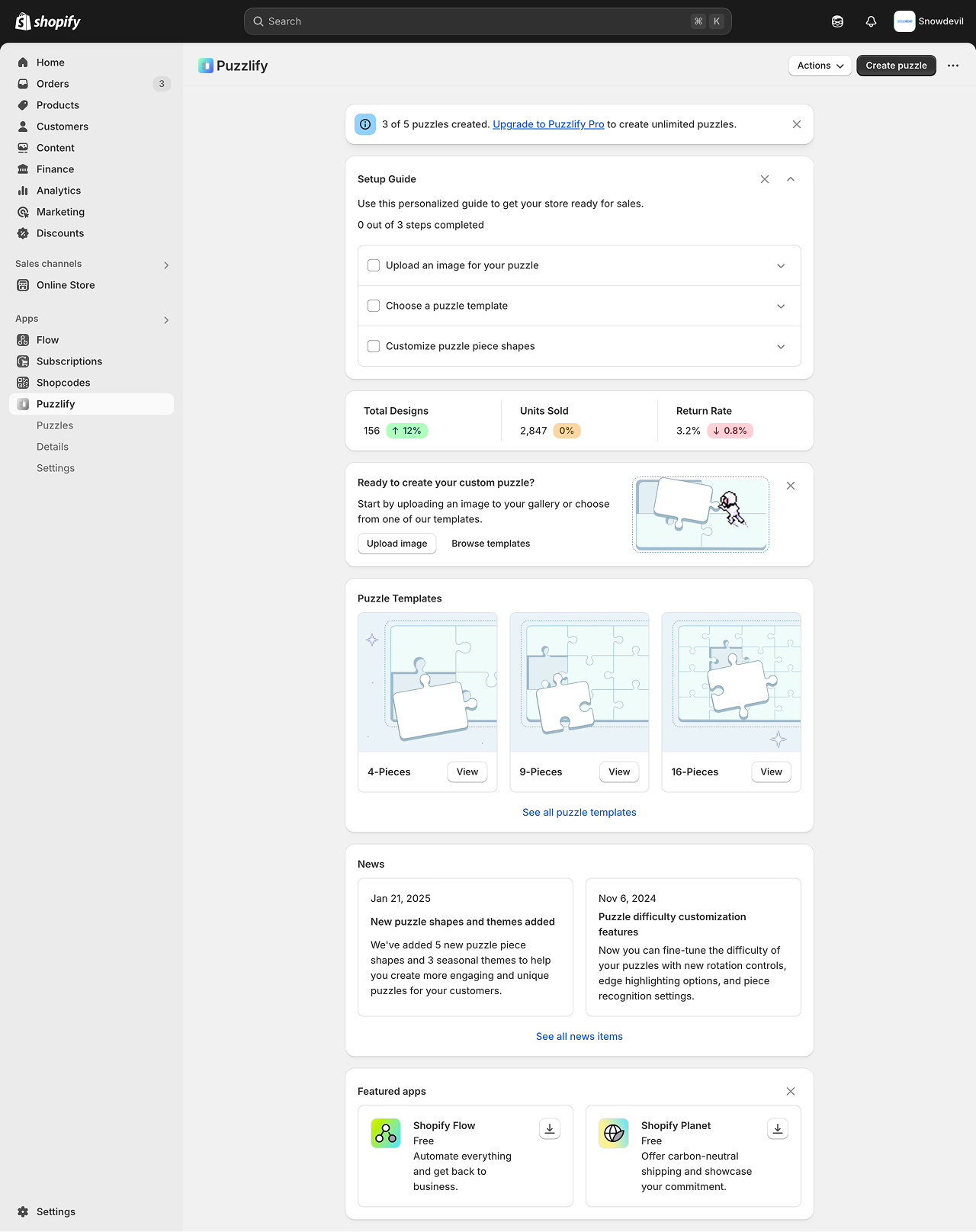
This pattern uses `Badge`, `Banner`, `Box`, `Button`, `Checkbox`, `Clickable`, `Divider`, `Grid`, `Heading`, `Image`, `Link`, `Paragraph`, `Section`, `Stack`, and `Text` components.
---
## Design guidelines
Your app home page should be designed to provide users with relevant, timely information like quick statistics, status updates, or information that’s immediately actionable.
### Onboarding
The onboarding experience quickly introduces users to your app's essential features. A good onboarding should be self-guided, easy to follow and make users feel they understand how the app works after finishing it. If the onboarding is long or complex, give users the option to complete it at a later time to avoid stopping their workflow.
* Onboarding must be brief and direct. Provide clear instructions and guide users to completion
* Only request information from users if it's necessary
* If your onboarding isn't essential, then make it dismissible
* Don't have more than five steps in your onboarding process. This can lead users to drop off and not use your app
---
### Visual design
* Design your app to be responsive and adapt to different screen sizes and devices. This ensures a seamless user experience across various platforms.
* Use looser spacing for low-density layouts. Use tighter spacing for high-density layouts.
* Use high-resolution photos and images to ensure a professional, high-quality experience.
---
api_name: app-home
source_url:
html: https://shopify.dev/docs/api/app-home/patterns/homepage
md: https://shopify.dev/docs/api/app-home/patterns/homepage.md
---
# Homepage
The app URL specified in the Partner Dashboard should point to your app homepage. The home page of your app is the first thing merchants will see, and it should provide daily value to them. Design the page to provide status updates and show merchants what actions they can take.
| Used to | Examples |
| - | - |
| Teach merchants how to use the app | Onboarding, how-to guides |
| Display app functionalities | Call-to-actions to app features, resource tables |
| Show updates | Status banners, company news |

This pattern uses `Badge`, `Banner`, `Box`, `Button`, `Checkbox`, `Clickable`, `Divider`, `Grid`, `Heading`, `Image`, `Link`, `Paragraph`, `Section`, `Stack`, and `Text` components.
***
## Design guidelines
Your app home page should be designed to provide users with relevant, timely information like quick statistics, status updates, or information that’s immediately actionable.
### Onboarding
The onboarding experience quickly introduces users to your app's essential features. A good onboarding should be self-guided, easy to follow and make users feel they understand how the app works after finishing it. If the onboarding is long or complex, give users the option to complete it at a later time to avoid stopping their workflow.
* Onboarding must be brief and direct. Provide clear instructions and guide users to completion
* Only request information from users if it's necessary
* If your onboarding isn't essential, then make it dismissible
* Don't have more than five steps in your onboarding process. This can lead users to drop off and not use your app
***
### Visual design
* Design your app to be responsive and adapt to different screen sizes and devices. This ensures a seamless user experience across various platforms.
* Use looser spacing for low-density layouts. Use tighter spacing for high-density layouts.
* Use high-resolution photos and images to ensure a professional, high-quality experience.
***
Examples
### Examples
* #### Homepage
##### jsx
```jsx
const [visible, setVisible] = useState({
banner: true,
setupGuide: true,
calloutCard: true,
featuredApps: true,
});
const [expanded, setExpanded] = useState({
setupGuide: true,
step1: false,
step2: false,
step3: false,
});
const [progress, setProgress] = useState(0);
return (
Create puzzle
Browse templates
Import image
{/* === */}
{/* Banner */}
{/* Use banners sparingly. Only one banner should be visible at a time. */}
{/* If dismissed, use local storage or a database entry to avoid showing this section again to the same user. */}
{/* === */}
{visible.banner && (
setVisible({ ...visible, banner: false })}
>
3 of 5 puzzles created.{" "}
Upgrade to Puzzlify Pro to create unlimited
puzzles.
)}
{/* === */}
{/* Setup Guide */}
{/* Keep instructions brief and direct. Only ask merchants for required information. */}
{/* If dismissed, use local storage or a database entry to avoid showing this section again to the same user. */}
{/* === */}
{visible.setupGuide && (
{/* Header */}
Setup Guide
setVisible({ ...visible, setupGuide: false })}
variant="tertiary"
tone="neutral"
icon="x"
>
setExpanded({
...expanded,
setupGuide: !expanded.setupGuide,
})
}
variant="tertiary"
tone="neutral"
icon={expanded.setupGuide ? "chevron-up" : "chevron-down"}
>
Use this personalized guide to get your store ready for sales.
{progress} out of 3 steps completed
{/* Steps Container */}
{/* Step 1 */}
setProgress(e.currentTarget.checked ? progress + 1 : progress - 1)
}
>
{
setExpanded({ ...expanded, step1: !expanded.step1 });
}}
accessibilityLabel="Toggle step 1 details"
variant="tertiary"
icon={expanded.step1 ? "chevron-up" : "chevron-down"}
>
Start by uploading a high-quality image that will be
used to create your puzzle. For best results, use
images that are at least 1200x1200 pixels.
Upload image
Image requirements
{/* Step 2 */}
setProgress(e.currentTarget.checked ? progress + 1 : progress - 1)
}
>
setExpanded({ ...expanded, step2: !expanded.step2 })
}
accessibilityLabel="Toggle step 2 details"
variant="tertiary"
icon={expanded.step2 ? "chevron-up" : "chevron-down"}
>
Select a template for your puzzle - choose between
9-piece (beginner), 16-piece (intermediate), or
25-piece (advanced) layouts.
Choose template
See all templates
{/* Step 3 */}
setProgress(e.currentTarget.checked ? progress + 1 : progress - 1)
}
>
setExpanded({ ...expanded, step3: !expanded.step3 })
}
accessibilityLabel="Toggle step 3 details"
variant="tertiary"
icon={expanded.step3 ? "chevron-up" : "chevron-down"}
>
Make your puzzle unique by customizing the shapes of
individual pieces. Choose from classic, curved, or
themed piece styles.
Customize pieces
Learn about piece styles
{/* Add additional steps here... */}
)}
{/* === */}
{/* Metrics cards */}
{/* Your app homepage should provide merchants with quick statistics or status updates that help them understand how the app is performing for them. */}
{/* === */}
Total Designs
156
12%
Units Sold
2,847
0%
Return Rate
3.2%
0.8%
{/* === */}
{/* Callout Card */}
{/* If dismissed, use local storage or a database entry to avoid showing this section again to the same user. */}
{/* === */}
{visible.calloutCard && (
Ready to create your custom puzzle?
Start by uploading an image to your gallery or choose from one
of our templates.
Upload image
{" "}
Browse templates{" "}
setVisible({ ...visible, calloutCard: false })}
icon="x"
tone="neutral"
variant="tertiary"
accessibilityLabel="Dismiss card"
>
)}
{/* === */}
{/* Puzzle templates */}
{/* === */}
Puzzle Templates
{/* Featured template 1 */}
4-Pieces
View
{/* Featured template 2 */}
9-Pieces
View
{/* Featured template 3 */}
16-Pieces
View
See all puzzle templates
{/* === */}
{/* News */}
{/* === */}
News
{/* News item 1 */}
Jan 21, 2025
New puzzle shapes and themes added
We've added 5 new puzzle piece shapes and 3 seasonal themes to
help you create more engaging and unique puzzles for your
customers.
{/* News item 2 */}
Nov 6, 2024
Puzzle difficulty customization features
Now you can fine-tune the difficulty of your puzzles with new
rotation controls, edge highlighting options, and piece
recognition settings.
See all news items
{/* === */}
{/* Featured apps */}
{/* If dismissed, use local storage or a database entry to avoid showing this section again to the same user. */}
{/* === */}
{visible.featuredApps && (
Featured apps
setVisible({ ...visible, featuredApps: false })}
icon="x"
tone="neutral"
variant="tertiary"
accessibilityLabel="Dismiss featured apps section"
>
{/* Featured app 1 */}
Shopify Flow
Free
Automate everything and get back to business.
{/* Featured app 2 */}
Shopify Planet
Free
Offer carbon-neutral shipping and showcase your commitment.
)}
)
```
##### html
```html
Pattern
Create puzzle
Browse templates
Import image
3 of 5 puzzles created.
Upgrade to Puzzlify Pro to create unlimited puzzles.
Setup Guide
Use this personalized guide to get your store ready for sales.
0 out of 3 steps completed
Start by uploading a high-quality image that will be used to create your
puzzle. For best results, use images that are at least 1200x1200 pixels.
Upload image
Image requirements
Select a template for your puzzle - choose between 9-piece (beginner),
16-piece (intermediate), or 25-piece (advanced) layouts.
Choose template
See all templates
Make your puzzle unique by customizing the shapes of individual pieces.
Choose from classic, curved, or themed piece styles.
Customize pieces
Learn about piece styles
Total Designs
156
12%
Units Sold
2,847
0%
Return Rate
3.2%
0.8%
Ready to create your custom puzzle?
Start by uploading an image to your gallery or choose from one of our templates.
Upload image
Browse templates
Puzzle Templates
4-Pieces
View
9-Pieces
View
16-Pieces
View
See all puzzle templates
News
Jan 21, 2025
New puzzle shapes and themes added
We've added 5 new puzzle piece shapes and 3 seasonal themes to help you create more
engaging and unique puzzles for your customers.
Nov 6, 2024
Puzzle difficulty customization features
Now you can fine-tune the difficulty of your puzzles with new rotation controls, edge
highlighting options, and piece recognition settings.
See all news items
Featured apps
Shopify Flow
Free
Automate everything and get back to business.
Shopify Planet
Free
Offer carbon-neutral shipping and showcase your commitment.
```
## Related
[Requirements - Built for Shopify](https://shopify.dev/docs/apps/launch/built-for-shopify/requirements)