Modal
The modal component displays content in an overlay. Use to create a distraction-free experience such as a confirmation dialog or a settings panel.
Modals support a heading, scrollable body content, and action slots for primary and secondary buttons. For contextual content that doesn't require full focus, use popover instead.
Only one modal is visible at a time — triggering a second modal while another is open replaces the first without stacking. Modals open in response to buyer interaction only, not programmatically on page load.
Supported targets
- purchase.
checkout. actions. render-before - purchase.
checkout. block. render - purchase.
checkout. cart-line-item. render-after - purchase.
checkout. cart-line-list. render-after - purchase.
checkout. contact. render-after - purchase.
checkout. delivery-address. render-after - purchase.
checkout. delivery-address. render-before - purchase.
checkout. footer. render-after - purchase.
checkout. header. render-after - purchase.
checkout. payment-method-list. render-after - purchase.
checkout. payment-method-list. render-before - purchase.
checkout. pickup-location-list. render-after - purchase.
checkout. pickup-location-list. render-before - purchase.
checkout. pickup-location-option-item. render-after - purchase.
checkout. pickup-point-list. render-after - purchase.
checkout. pickup-point-list. render-before - purchase.
checkout. reductions. render-after - purchase.
checkout. reductions. render-before - purchase.
checkout. shipping-option-item. details. render - purchase.
checkout. shipping-option-item. render-after - purchase.
checkout. shipping-option-list. render-after - purchase.
checkout. shipping-option-list. render-before - purchase.
thank-you. announcement. render - purchase.
thank-you. block. render - purchase.
thank-you. cart-line-item. render-after - purchase.
thank-you. cart-line-list. render-after - purchase.
thank-you. customer-information. render-after - purchase.
thank-you. footer. render-after - purchase.
thank-you. header. render-after
Supported targets
- purchase.
checkout. actions. render-before - purchase.
checkout. block. render - purchase.
checkout. cart-line-item. render-after - purchase.
checkout. cart-line-list. render-after - purchase.
checkout. contact. render-after - purchase.
checkout. delivery-address. render-after - purchase.
checkout. delivery-address. render-before - purchase.
checkout. footer. render-after - purchase.
checkout. header. render-after - purchase.
checkout. payment-method-list. render-after - purchase.
checkout. payment-method-list. render-before - purchase.
checkout. pickup-location-list. render-after - purchase.
checkout. pickup-location-list. render-before - purchase.
checkout. pickup-location-option-item. render-after - purchase.
checkout. pickup-point-list. render-after - purchase.
checkout. pickup-point-list. render-before - purchase.
checkout. reductions. render-after - purchase.
checkout. reductions. render-before - purchase.
checkout. shipping-option-item. details. render - purchase.
checkout. shipping-option-item. render-after - purchase.
checkout. shipping-option-list. render-after - purchase.
checkout. shipping-option-list. render-before - purchase.
thank-you. announcement. render - purchase.
thank-you. block. render - purchase.
thank-you. cart-line-item. render-after - purchase.
thank-you. cart-line-list. render-after - purchase.
thank-you. customer-information. render-after - purchase.
thank-you. footer. render-after - purchase.
thank-you. header. render-after
Anchor to Use casesUse cases
- Confirmation dialogs: Ask buyers to confirm destructive actions like cancelling an order or removing an item before proceeding.
- Informational overlays: Display return policies, terms of service, or warranty details without navigating away from checkout.
- Form collection: Collect structured input such as gift messages, custom notes, or shipping preferences inside a focused overlay.
- Settings panels: Present configuration options like notification preferences or delivery instructions in an isolated context.
Anchor to PropertiesProperties
Configure the following properties on the modal component.
- Anchor to accessibilityLabelaccessibility
Labelaccessibility Label stringstring A label that describes the purpose of the modal, announced by assistive technologies. When set, screen readers will use this label instead of the
headingto describe the modal.- Anchor to headingheadingheadingstringstring
A title that describes the content of the modal.
- Anchor to idididstringstring
A unique identifier for the element. Use this to reference the element in JavaScript, link labels to form controls, or target specific elements for styling or scripting.
- Anchor to paddingpaddingpadding'base' | 'none''base' | 'none'Default: 'base'Default: 'base'
Adjust the padding around the modal content.
base: Applies padding that is appropriate for the element.none: Removes all padding from the element. This can be useful when elements inside the modal need to span to the edge of the modal. For example, a full-width image. In this case, rely on box with a padding ofbaseto bring back the desired padding for the rest of the content.
- Anchor to sizesizesize'small' | 'large' | 'base' | 'small-100' | 'large-100' | 'max''small' | 'large' | 'base' | 'small-100' | 'large-100' | 'max'Default: 'base'Default: 'base'
The size of the modal.
'base': The default size, suitable for most use cases.'small': A compact modal for simple confirmations or short messages.'small-100': The smallest modal size.'large': A large modal for complex content or forms.'large-100': The largest fixed-size modal, providing maximum room for content.'max': Expands the modal to its maximum size as defined by the host application, on both the horizontal and vertical axes.
Anchor to EventsEvents
The modal component provides event callbacks for handling user interactions. Learn more about handling events.
- Anchor to afterhideafterhideafterhideCallbackEventListener<typeof tagName>CallbackEventListener<typeof tagName>
A callback fired when the modal is hidden, after any hide animations have completed.
- Anchor to aftershowaftershowaftershowCallbackEventListener<typeof tagName>CallbackEventListener<typeof tagName>
A callback fired when the modal is shown, after any show animations have completed.
- Anchor to hidehidehideCallbackEventListener<typeof tagName>CallbackEventListener<typeof tagName>
A callback fired immediately after the modal is hidden.
- Anchor to showshowshowCallbackEventListener<typeof tagName>CallbackEventListener<typeof tagName>
A callback fired immediately after the modal is shown.
CallbackEventListener
A typed event listener for custom element events. The listener receives a `CallbackEvent` with the correct `currentTarget` type for the associated custom element tag.
(EventListener & {
    (event: CallbackEvent<TTagName, Event> & TData): void;
}) | null
CallbackEvent
An event type that narrows the `currentTarget` to the specific HTML element associated with the custom element tag. This provides type-safe event handling in callback listeners.
TEvent & {
    currentTarget: HTMLElementTagNameMap[TTagName];
}
Anchor to SlotsSlots
The modal component supports slots for additional content placement within the component. Learn more about using slots.
- Anchor to primary-actionprimary-actionprimary-actionHTMLElementHTMLElement
The main action button displayed in the modal footer, representing the primary action users should take. Only accepts a single button component.
- Anchor to secondary-actionssecondary-actionssecondary-actionsHTMLElementHTMLElement
Additional action buttons displayed in the modal footer, providing alternative or supporting actions.
Anchor to MethodsMethods
The modal component exposes methods for programmatic control. Learn more about using methods.
- Anchor to hideOverlayhide
Overlayhide Overlay () => void() => voidrequiredrequired A method to programmatically hide the overlay and run any associated hide animations.
Anchor to ExamplesExamples
Anchor to Display a return policyDisplay a return policy
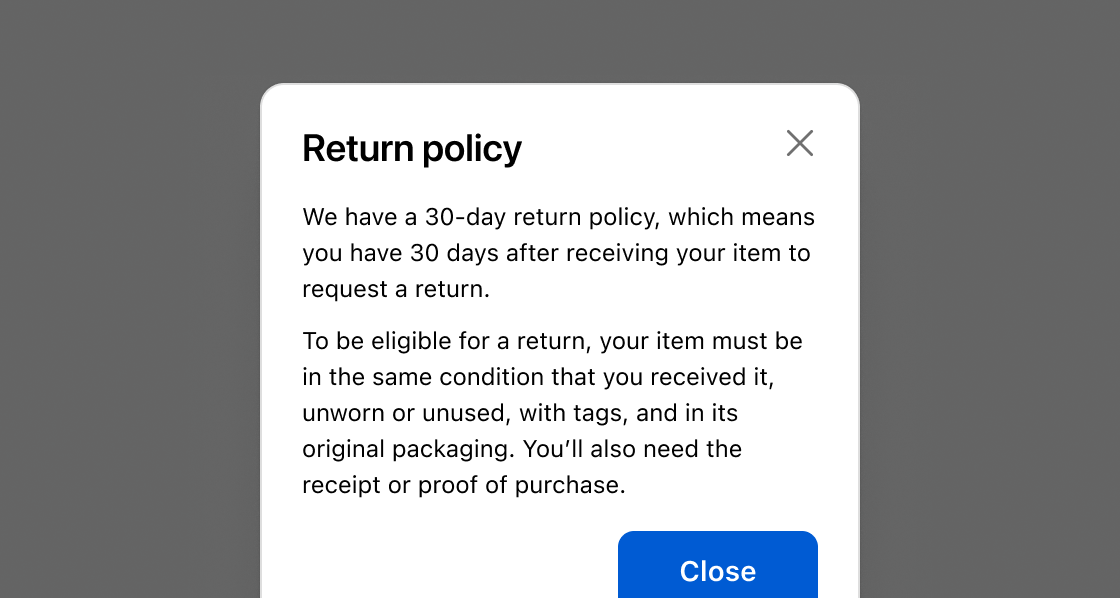
Show store policy details without leaving the checkout page. This example opens a modal with return policy text and a close button.Display a return policy
html
Anchor to Confirm a destructive actionConfirm a destructive action
Ask buyers to confirm before cancelling an order or removing an item. This example uses a small modal with a warning, a critical-toned confirm button, and a cancel button.html
Anchor to Collect input with a formCollect input with a form
Collect buyer input without leaving the checkout page. This example shows a gift message form with text fields, a text area, a checkbox, and save and cancel buttons.html
Anchor to Best practicesBest practices
- Use for focused, specific tasks: Modals work best when buyers need to make a decision or acknowledge critical information. Don't use them for contextual tools or actions that could happen on the page directly.
- Write clear headings: Use concise titles that communicate the purpose of the modal, such as "Cancel this order?" or "Gift message."
- Size appropriately: Use
smallfor simple confirmations andbasefor forms or longer content. Avoid oversized modals for short messages. - Include a prominent call to action: Every modal should have a clear primary action so buyers know what to do next. Always include a secondary action or dismiss mechanism so buyers aren't trapped in the overlay.
- Use critical tone for destructive actions: Set
tone="critical"on the primary button when the action is irreversible, like cancelling an order. Describe what'll happen in the modal body before the buyer confirms. - Use specific action verbs: Label buttons with clear verbs like "Cancel order", "Save", or "Continue" rather than vague terms like "Yes", "OK", or "Submit."
- Don't nest modals: Avoid launching one modal from another. If the workflow requires multiple steps, reconsider the design.
- Use sparingly: Don't create unnecessary interruptions. Modals should be a last resort for important decisions during checkout.