Version 2025-07 is the last API version to support React-based UI components. Later versions use Polaris web components, native UI elements with built-in accessibility, better performance, and consistent styling with Shopify's design system. Check out the upgrade guide to upgrade your extension and avoid being blocked from updating your extension after October 1st 2026.
Customer account UI extensions
Build extensions that integrate into customer accounts on Shopify, including order status pages, profile sections, and order action buttons. For example, you can add loyalty program information, create subscription management interfaces, or enable customers to track shipments and request returns.
Anchor to Getting startedGetting started
Customer account UI extensions require a TOML configuration file and TSX (or JSX) files containing your extension code.
Use Shopify CLI to scaffold your extension with the essential configuration and files. You can alter the default configuration later to customize the way your customer account UI extension operates.
Generate scaffold


Anchor to Building your extensionBuilding your extension
Customer account UI extensions are made up of three interconnected parts: targets that determine where your extension appears in the customer account interface, target APIs that provide access to customer and order data, and UI components that define which interface elements you can use.
Anchor to Targets: Choose where your extension appearsTargets: Choose where your extension appears
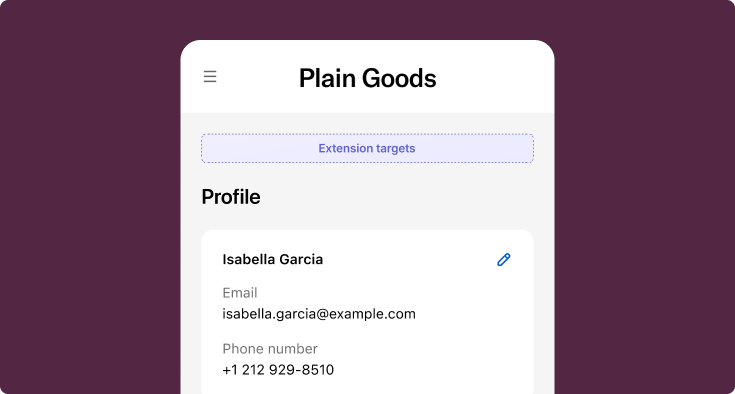
Targets define where your extensions appear within the customer account interface and what capabilities they have. There are three types of targets:
| Target type | Description |
|---|---|
| Block | Render at merchant-defined locations within customer account pages. Merchants control placement using the checkout and accounts editor. Use to display custom content that works independently of specific page features. |
| Full page | Create custom pages with dedicated routes in the customer account. Merchants can add customer-account.page.render targets to the customer account navigation menu. Order-specific customer-account.order.page.render targets can't be added to the menu. Use to build standalone experiences like loyalty dashboards or subscription management interfaces. |
| Static | Render at fixed locations tied to specific page features, such as order action buttons or announcement banners. These targets only appear when their associated page feature is present. Use when your extension's functionality depends on a specific page element. |


Anchor to Target APIs: Define what your extension doesTarget APIs: Define what your extension does
Your extension might display order tracking information, show loyalty points and rewards, enable one-click reordering, or provide subscription management tools.
Use target APIs to access the data and functionality you need for each scenario. For example, the Order API gives you order details and status, the Authenticated Account API provides customer identity, and the Localization API handles language and country settings.


Order API: Access order data
React
import {
  reactExtension,
  useOrder,
  Card,
  Text,
} from '@shopify/ui-extensions-react/customer-account';

export default reactExtension(
  'customer-account.order-status.block.render',
  () => <Extension />,
);

function Extension() {
  const order = useOrder();

  if (order) {
    return (
      <Card>
        <Text>Order {order.name}</Text>
        <Text appearance="subdued">ID: {order.id}</Text>
      </Card>
    );
  }

  return <Text>Loading order...</Text>;
}
JavaScript
import {
  extension,
  Card,
  Text,
} from '@shopify/ui-extensions/customer-account';

export default extension(
  'customer-account.order-status.block.render',
  (root, {order}) => {
    const card = root.createComponent(Card, {}, [
      root.createComponent(Text, {}, `Order ${order.current?.name}`),
      root.createComponent(Text, {appearance: 'subdued'}, `ID: ${order.current?.id}`),
    ]);
    root.appendChild(card);

    order.subscribe((updatedOrder) => {
      // Update UI when order changes
    });
  },
);
Anchor to UI components: Design your interfaceUI components: Design your interface
These components are built with remote-ui. For the equivalents used in newer API versions, see web components.
UI components are the building blocks that you use to display data and trigger API functions.
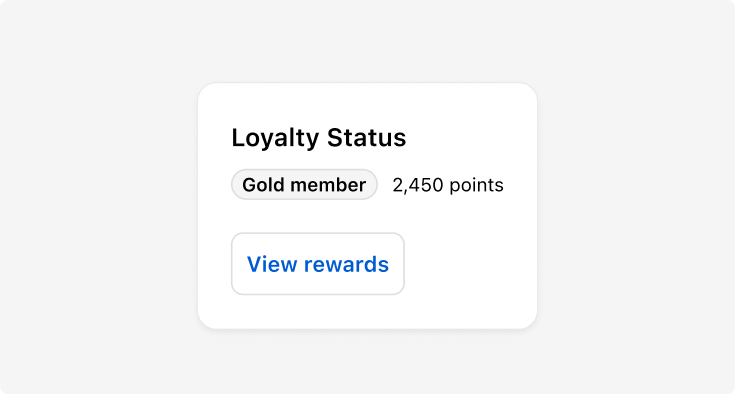
Components are available as React components or JavaScript objects, imported from @shopify/ui-extensions-react/customer-account or @shopify/ui-extensions/customer-account. You can use individual components for simple displays, or combine the BlockStack, Card, Badge, and Button components to build richer interfaces like a loyalty status display.


Stack component: Display loyalty information
React
import {
  reactExtension,
  useNavigate,
  Card,
  BlockStack,
  InlineStack,
  Heading,
  Badge,
  Text,
  Button,
} from '@shopify/ui-extensions-react/customer-account';

export default reactExtension(
  'customer-account.order-status.block.render',
  () => <Extension />,
);

function Extension() {
  const navigate = useNavigate();

  return (
    <Card>
      <BlockStack>
        <Heading>Loyalty Status</Heading>
        <InlineStack>
          <Badge tone="info">Gold Member</Badge>
          <Text>2,450 points</Text>
        </InlineStack>
        <Button onPress={() => navigate('extension:loyalty-page/rewards')}>
          View Rewards
        </Button>
      </BlockStack>
    </Card>
  );
}
JavaScript
import {
  extension,
  Card,
  BlockStack,
  InlineStack,
  Heading,
  Badge,
  Text,
  Button,
} from '@shopify/ui-extensions/customer-account';

export default extension(
  'customer-account.order-status.block.render',
  (root, {navigation}) => {
    const card = root.createComponent(Card, {}, [
      root.createComponent(BlockStack, {}, [
        root.createComponent(Heading, {}, 'Loyalty Status'),
        root.createComponent(InlineStack, {}, [
          root.createComponent(Badge, {tone: 'info'}, 'Gold Member'),
          root.createComponent(Text, {}, '2,450 points'),
        ]),
        root.createComponent(
          Button,
          {onPress: () => navigation.navigate('extension:loyalty-page/rewards')},
          'View Rewards',
        ),
      ]),
    ]);
    root.appendChild(card);
  },
);
Anchor to ConfigurationConfiguration
Customer account UI extensions rely on a shopify.extension.toml file that contains the extension's configuration.
This includes the extension name, type, API version, and targeting definitions.
The name value is what displays to merchants in certain contexts, so consider this value carefully.
We recommend that the api_version reflects the latest supported API version.
Anchor to PropertiesProperties
Customer account UI extensions use the following configuration properties:
api_version required
The version of the API that's being used for the extension. If provided in the [[extensions]] array, then the specified API version is used instead of the root level api_version.
[[extensions]] required
The name of the array that contains all extensions listed in the TOML file. Contains the following properties:
-
type: required The extension type. For customer account UI extensions, useui_extension. -
name: required The merchant-facing name of the extension.Limitations:
- 5 characters minimum.
- 50 characters maximum.
-
handle: required The unique internal identifier for the extension. After you create a draft version of the extension, or deploy an extension, you can't change thehandlevalue.Limitations:
- Allowed characters:
a-z,A-Z,0-9,-,_. - 100 characters maximum.
- Must be unique within the app.
- Allowed characters:
-
uid: requiredThe extension user identifier. An app-scoped identifier that
shopify app deployuses to determine whether an extension is being created, updated, or deleted.uidis created and managed by Shopify: it's generated automatically when you scaffold the extension with Shopify CLI, so you don't need to set or edit it manually. It must be unique within the app. -
description: optional The merchant-facing description of the extension.
[[extensions.targeting]] required
The name of the array that contains a target and its associated module. Contains the following properties:
-
target: requiredAn identifier that specifies where you're injecting your extension into the customer account interface.
-
module: requiredThe path to the JavaScript or TypeScript file that contains your extension code.
You can define multiple targets in a single configuration file, but each target must point to a separate module file. For block targets, you can also define the default placement. See the targets overview for more details.
[extensions.capabilities] optional
Defines the capabilities associated with your extension.
| Capability | Description |
|---|---|
api_access | Allows your extension to query the Storefront API. |
network_access | Allows your extension to make external network calls. |
collect_buyer_consent | Allows your extension to collect buyer consent for policies like SMS marketing. |
[[extensions.metafields]] optional
Define metafields your extension needs access to. Use [[extensions.metafields]] for metafields needed by all targets, or [[extensions.targeting.metafields]] for target-specific metafields.
All customer account UI extension targets can read and write to metafields using the Customer Account API. Order status targets can also read metafields using the Metafields API.
Customer account UI extensions support metafields on the following resources:
| Resource | Description |
|---|---|
cart | The cart associated with the checkout. |
customer | The customer associated with the order. |
order | The order being viewed. |
company | The company for B2B orders. |
companyLocation | The company's location for B2B orders. |
product | The products in the order. |
shop | The shop associated with the order. |
variant | The product variants in the order. |
Refer to the available metafield data types.
Extensions can also read app-owned metafields, which is useful when your app needs to control the data and visibility of the metafield. Your extension can access app-owned metafields that it requests in its TOML file using the $app format, and only those belonging to its parent app.
When you access app-owned metafields, you must use the $app format. The fully qualified reserved namespace format, such as app--{your-app-id}[--{optional-namespace}], isn't supported.
When you access app-owned metafields, you must use the $app format. The fully qualified reserved namespace format, such as app--{your-app-id}[--{optional-namespace}], isn't supported.
Learn more about using metafields in customer account UI extensions.
[extensions.settings] optional
Settings let merchants configure your extension from the checkout and customer accounts editor. Each settings definition can include up to 20 settings. All setting inputs are optional. Build your extension so it still works if the merchant hasn't set a value.
Each field in [[extensions.settings.fields]] accepts the following properties:
-
key: required The identifier for the setting. The configured value is exposed under this key at runtime. -
type: required The setting type. Determines what input the merchant sees and how the value is validated. Supported types:boolean,single_line_text_field,multi_line_text_field,number_integer,number_decimal,date,date_time, andvariant_reference. -
name: required The display name shown to the merchant in the editor. -
description: optional Help text displayed to the merchant in the editor. -
validations: optional Constraints on the input that Shopify validates, such as a minimum length or a regex pattern. Include each validation using itsnameand a correspondingvalue. The available options depend on the setting'stype. For the full list of validation options and examples, refer to Validation options.
shopify.extension.toml
If your extension accesses customer data, then your app must have protected customer data access approved before it can go live.
If your extension accesses customer data, then your app must have protected customer data access approved before it can go live.
Anchor to App authenticationApp authentication
Use app authentication when your extension needs to fetch data from your own backend service. For example, you might need to display a customer's loyalty status or log extension interactions to an external analytics system.
To enable network access, add network_access = true to your extension's capabilities and request access in the Partner Dashboard. Your server must include Access-Control-Allow-Origin: * in response headers because UI extensions run in a Web Worker with a null origin.
Use fetch to call your backend and pass a session token to authenticate the request. If you don't need data from an external source, then consider using metafields as an alternative to network calls.
Make requests to your app's backend
React
import {useState, useEffect} from 'react';
import {
  reactExtension,
  useSessionToken,
  Card,
  Text,
} from '@shopify/ui-extensions-react/customer-account';

export default reactExtension(
  'customer-account.order-status.block.render',
  () => <Extension />,
);

async function getLoyaltyPoints(sessionToken) {
  const res = await fetch('https://your-app.com/api/loyalty', {
    headers: {
      Authorization: `Bearer ${sessionToken}`,
    },
  });
  return res.json();
}

function Extension() {
  const sessionToken = useSessionToken();
  const [points, setPoints] = useState(null);

  useEffect(() => {
    async function fetchPoints() {
      const token = await sessionToken.get();
      const data = await getLoyaltyPoints(token);
      setPoints(data.points);
    }
    fetchPoints();
  }, [sessionToken]);

  return (
    <Card>
      <Text>Loyalty points: {points ?? 'Loading...'}</Text>
    </Card>
  );
}
JavaScript
import {
  extension,
  Card,
  Text,
} from '@shopify/ui-extensions/customer-account';

async function getLoyaltyPoints(sessionToken) {
  const res = await fetch('https://your-app.com/api/loyalty', {
    headers: {
      Authorization: `Bearer ${sessionToken}`,
    },
  });
  return res.json();
}

export default extension(
  'customer-account.order-status.block.render',
  async (root, {sessionToken}) => {
    const token = await sessionToken.get();
    const data = await getLoyaltyPoints(token);

    const card = root.createComponent(Card, {}, [
      root.createComponent(Text, {}, `Loyalty points: ${data.points}`),
    ]);
    root.appendChild(card);
  },
);
Anchor to Direct API accessDirect API access
Use direct API access when your extension needs to query Shopify data in real-time. For example, you might want to display related products, fetch the customer's order history, or retrieve the customer's profile information.
Customer account extensions provide two ways to query Shopify data:
- Customer Account API: Query customer data including profile information, order history, and saved addresses using
fetch()with theshopify://protocol. Requests to the Customer Account API are automatically authenticated and don't require additional capabilities. - Storefront API: Query products, collections, metaobjects, and other storefront data using the
querymethod fromuseApi(). Enable theapi_accesscapability to make authenticated requests without manually managing tokens. If you need to call your own backend or other external services, use thenetwork_accesscapability instead.


Query Shopify data directly
Customer Account API
import {useState, useEffect} from 'react';
import {
  reactExtension,
  Banner,
  Text,
} from '@shopify/ui-extensions-react/customer-account';

const API_VERSION = '2025-07';

export default reactExtension(
  'customer-account.order-status.block.render',
  () => <Extension />,
);

function Extension() {
  const [customerName, setCustomerName] = useState('');

  useEffect(() => {
    fetch(`shopify://customer-account/api/$2025-07/graphql.json`, {
      method: 'POST',
      headers: {'Content-Type': 'application/json'},
      body: JSON.stringify({
        query: `{ customer { firstName lastName } }`,
      }),
    })
      .then((res) => res.json())
      .then(({data}) => {
        if (data.customer) {
          setCustomerName(`${data.customer.firstName} ${data.customer.lastName}`);
        }
      })
      .catch(console.error);
  }, []);

  if (!customerName) return null;
  return (
    <Banner>
      <Text>Welcome back, {customerName}!</Text>
    </Banner>
  );
}
Storefront API
import {useState, useEffect} from 'react';
import {
  reactExtension,
  useApi,
  Card,
  Text,
} from '@shopify/ui-extensions-react/customer-account';

export default reactExtension(
  'customer-account.order-status.block.render',
  () => <Extension />,
);

function Extension() {
  const {query} = useApi();
  const [data, setData] = useState(null);

  useEffect(() => {
    query(
      `query ($first: Int!) {
        products(first: $first) {
          nodes {
            id
            title
          }
        }
      }`,
      {variables: {first: 5}},
    )
      .then(({data}) => setData(data))
      .catch(console.error);
  }, [query]);

  return (
    <Card>
      <Text>
        {data?.products?.nodes.map((node) => node.title).join(', ') ?? 'Loading...'}
      </Text>
    </Card>
  );
}
Anchor to Custom protocolsCustom protocols
Customer account UI extensions support custom protocols for navigating to customer account pages, other extensions, and routes within your extension without hardcoding full URLs. The following custom protocols are supported.
Anchor to Shopify protocolShopify protocol
Use the shopify:customer-account protocol when you want to construct a URL with a root of customer accounts. This allows you to link directly to customer account pages like orders, profile, or addresses.
shopify:customer-account
Link to orders page
<Link to="shopify:customer-account/orders">View all orders</Link>Link to profile page
<Link to="shopify:customer-account/profile">View profile</Link>Anchor to Extension protocolExtension protocol
Use the extension: protocol to navigate between extensions within the same application. The handle identifies the target extension to navigate to.
extension:
Link to full-page extension
<Link to={`extension:${extension.handle}/${path}`}>
  View details
</Link>
Order-specific extension
<Link to={`extension:${extension.handle}/customer-account.order.page.render/${orderId}/${path}`}>
  View order details
</Link>
Anchor to Relative URLsRelative URLs
Relative URLs are relative to your extension and are useful when you want to link to a route within your extension.
/relative/urls
Anchor to Testing and deploymentTesting and deployment
After you've built your extension, test it thoroughly and deploy it to production.
Anchor to Local testingLocal testing
To run your extension locally during development, start a dev server using Shopify CLI. The dev command creates a preview of your extension on your chosen dev store. If your extension is built on an app with a backend, then this command also serves your backend locally using a Cloudflare tunnel.
The dev server automatically reloads your extension when you make changes to your code, so you can test updates in real-time.
Start development server
Testing customer account UI extensions requires a dev store with customer accounts enabled and test customer accounts created.
Anchor to DeploymentDeployment
When you're ready to go live, deploy your extension to production using Shopify CLI.
The Shopify CLI deploy command builds your extension bundle and uploads everything to Shopify. If your extension is built on an app with a backend, then you need to deploy your app to a hosting service first. Shopify hosts only your extension's code.
Your compiled UI extension bundle can't exceed 64 KB, or 128 KB for full-page customer account extensions. Shopify enforces this limit at deployment to ensure fast loading times and optimal performance. Learn how to analyze and reduce your bundle size.
Your compiled UI extension bundle can't exceed 64 KB, or 128 KB for full-page customer account extensions. Shopify enforces this limit at deployment to ensure fast loading times and optimal performance. Learn how to analyze and reduce your bundle size.
Deploy your extension
Anchor to VersioningVersioning
Polaris reference docs follow Shopify's API versioning policy. Each stable version is supported for a minimum of 12 months. Older versions continue to work, they just won't have dedicated docs on Shopify.dev. Shopify CLI already prevents deploys targeting API versions older than 12 months, so we recommend keeping your extensions on a supported version.
Anchor to SecuritySecurity
Customer account UI extensions are a safe and secure way to customize the appearance and functionality of the customer account pages without compromising the security of customer data.
- They run in an isolated sandbox, separate from the customer account page and other UI extensions.
- They don't have access to sensitive payment information or the customer account page itself (HTML or other assets).
- They are limited to specific UI components and APIs that are exposed by the platform.
- They have limited access to global web APIs.
- Apps that wish to access protected customer data must submit an application and are subject to strict security guidelines and review processes by Shopify.
Anchor to Error handlingError handling
To handle errors in your extension, add an unhandledrejection listener for promise rejections or an error listener for other exceptions like JavaScript runtime errors or failures to load a resource.
You can also use third-party error-reporting libraries. However, these libraries might require extra configuration because UI extensions run inside of a Web Worker which doesn't have access to window or the DOM. You'll typically need to disable default integrations and manually attach error listeners to self.
The third-party tool example shown uses Sentry. To install and initialize this tool, follow their browser JavaScript guide. We recommend disabling the default integrations to make sure the tool runs within a Web Worker. You'll need to add event listeners manually.
You must request network access to transmit errors to a third-party service.
You must request network access to transmit errors to a third-party service.
Error handling examples
Using a listener
// For unhandled promise rejections
self.addEventListener('unhandledrejection', (event) => {
console.warn('event unhandledrejection', event.reason);
});

// For other exceptions
self.addEventListener('error', (event) => {
console.warn('event error', event.error);
});
Sentry (React)
import {
reactExtension,
Banner,
} from '@shopify/ui-extensions-react/customer-account';
import {
BrowserClient,
captureException,
defaultStackParser,
getCurrentScope,
makeFetchTransport,
} from '@sentry/browser';

const sentryClient = new BrowserClient({
dsn: 'https://examplePublicKey@o0.ingest.sentry.io/0',
transport: makeFetchTransport,
stackParser: defaultStackParser,
integrations: [],
});
getCurrentScope().setClient(sentryClient);
sentryClient.init();

self.addEventListener('unhandledrejection', (event) => {
captureException(event.reason);
});

self.addEventListener('error', (event) => {
captureException(event.error);
});

export default reactExtension(
'customer-account.order-status.block.render',
() => <Extension />,
);

function Extension() {
return <Banner>Your extension</Banner>;
}
Sentry (JS)
import {
extension,
Banner,
} from '@shopify/ui-extensions/customer-account';
import {
BrowserClient,
captureException,
defaultStackParser,
getCurrentScope,
makeFetchTransport,
} from '@sentry/browser';

const sentryClient = new BrowserClient({
dsn: 'https://examplePublicKey@o0.ingest.sentry.io/0',
transport: makeFetchTransport,
stackParser: defaultStackParser,
integrations: [],
});
getCurrentScope().setClient(sentryClient);
sentryClient.init();

self.addEventListener('unhandledrejection', (event) => {
captureException(event.reason);
});

self.addEventListener('error', (event) => {
captureException(event.error);
});

export default extension(
'customer-account.order-status.block.render',
(root) => {
root.appendChild(
  root.createComponent(
    Banner,
    undefined,
    'Your extension',
  ),
);
},
);
Anchor to Tutorials and resourcesTutorials and resources
Deepen your understanding of customer account UI extensions with these resources.


