---
title: Section
description: >-
The section component groups related content into clearly-defined thematic
areas with consistent styling and structure. Use section to organize page
content into logical blocks, each with its own heading and visual container.
api_version: 2026-07
source_url:
html: >-
https://shopify.dev/docs/api/customer-account-ui-extensions/2026-07-rc/web-components/layout-and-structure/section
md: >-
https://shopify.dev/docs/api/customer-account-ui-extensions/2026-07-rc/web-components/layout-and-structure/section.md
api_name: customer-account-ui-extensions
---
# Section
The section component groups related content into clearly-defined thematic areas with consistent styling and structure. Use section to organize page content into logical blocks, each with its own heading and visual container.
Sections automatically adapt their styling based on nesting depth and adjust heading levels to maintain meaningful, accessible page hierarchies. For simple visual separation without headings, use [divider](https://shopify.dev/docs/api/customer-account-ui-extensions/2026-07-rc/web-components/layout-and-structure/divider).
Section heading levels and visual styling (borders, backgrounds) are determined automatically by nesting depth and can't be overridden. Only buttons are supported in the `primary-action` and `secondary-actions` slots.
### Support Targets (24)
### Supported targets
* [customer-account.footer.render-after](https://shopify.dev/docs/api/customer-account-ui-extensions/2026-07-rc/targets/footer#footer-render-after-)
* [customer-account.order-index.announcement.render](https://shopify.dev/docs/api/customer-account-ui-extensions/2026-07-rc/targets/order-actions#order-index-announcement-)
* [customer-account.order-index.block.render](https://shopify.dev/docs/api/customer-account-ui-extensions/2026-07-rc/targets/order-actions#order-index-block-)
* [customer-account.order-status.announcement.render](https://shopify.dev/docs/api/customer-account-ui-extensions/2026-07-rc/targets/order-status#order-status-announcement-)
* [customer-account.order-status.block.render](https://shopify.dev/docs/api/customer-account-ui-extensions/2026-07-rc/targets/order-status#order-status-block-)
* [customer-account.order-status.cart-line-item.render-after](https://shopify.dev/docs/api/customer-account-ui-extensions/2026-07-rc/targets/order-status#cart-line-item-render-after-)
* [customer-account.order-status.cart-line-list.render-after](https://shopify.dev/docs/api/customer-account-ui-extensions/2026-07-rc/targets/order-status#cart-line-list-render-after-)
* [customer-account.order-status.customer-information.render-after](https://shopify.dev/docs/api/customer-account-ui-extensions/2026-07-rc/targets/order-status#customer-information-render-after-)
* [customer-account.order-status.fulfillment-details.render-after](https://shopify.dev/docs/api/customer-account-ui-extensions/2026-07-rc/targets/fulfillment-status#fulfillment-status-targets)
* [customer-account.order-status.payment-details.render-after](https://shopify.dev/docs/api/customer-account-ui-extensions/2026-07-rc/targets/payments-and-returns#payments-and-returns-targets)
* [customer-account.order-status.return-details.render-after](https://shopify.dev/docs/api/customer-account-ui-extensions/2026-07-rc/targets/payments-and-returns#return-details-render-after-)
* [customer-account.order-status.unfulfilled-items.render-after](https://shopify.dev/docs/api/customer-account-ui-extensions/2026-07-rc/targets/fulfillment-status#unfulfilled-items-render-after-)
* [customer-account.order.action.menu-item.render](https://shopify.dev/docs/api/customer-account-ui-extensions/2026-07-rc/targets/order-actions#order-action-menu-item-)
* [customer-account.order.action.render](https://shopify.dev/docs/api/customer-account-ui-extensions/2026-07-rc/targets/order-actions#order-action-)
* [customer-account.order.page.render](https://shopify.dev/docs/api/customer-account-ui-extensions/2026-07-rc/targets/full-page#order-specific-full-page-)
* [customer-account.page.render](https://shopify.dev/docs/api/customer-account-ui-extensions/2026-07-rc/targets/full-page#customer-account-full-page-)
* [customer-account.profile.addresses.render-after](https://shopify.dev/docs/api/customer-account-ui-extensions/2026-07-rc/targets/profile-page-default#profile-page-default-targets-)
* [customer-account.profile.announcement.render](https://shopify.dev/docs/api/customer-account-ui-extensions/2026-07-rc/targets/profile-page-default#profile-announcement-)
* [customer-account.profile.block.render](https://shopify.dev/docs/api/customer-account-ui-extensions/2026-07-rc/targets/profile-page-default#profile-block-)
* [customer-account.profile.company-details.render-after](https://shopify.dev/docs/api/customer-account-ui-extensions/2026-07-rc/targets/profile-page-b2b#profile-page-b2b-targets-)
* [customer-account.profile.company-location-addresses.render-after](https://shopify.dev/docs/api/customer-account-ui-extensions/2026-07-rc/targets/profile-page-b2b#company-location-addresses-render-after-)
* [customer-account.profile.company-location-payment.render-after](https://shopify.dev/docs/api/customer-account-ui-extensions/2026-07-rc/targets/profile-page-b2b#company-location-payment-render-after-)
* [customer-account.profile.company-location-staff.render-after](https://shopify.dev/docs/api/customer-account-ui-extensions/2026-07-rc/targets/profile-page-b2b#company-location-staff-render-after-)
* customer-account.profile.payment.render-after
#### Use cases
* **Order details**: Group shipping information, payment details, and line items into clearly labeled sections within an order page.
* **Account settings**: Organize profile fields, notification preferences, and security settings into separate sections with headings.
* **Loyalty programs**: Create a section for rewards information with a heading, point balance, and a "Redeem" action button.
* **Subscription management**: Display subscription details, billing history, and delivery schedule in distinct sections with relevant actions.
***
## Properties
Configure the following properties on the section component.
* **accessibilityLabel**
**string**
A label announced by assistive technologies that describes the purpose or contents of the element. Only set this when the element's visible content doesn't provide enough context on its own.
* **heading**
**string**
A title that describes the content of the section.
* **id**
**string**
A unique identifier for the element. Use this to target the element with CSS, JavaScript, or accessibility attributes. The `id` must be unique within the document.
### Slots
The section component supports slots for additional content placement within the component. Learn more about [using slots](https://shopify.dev/docs/api/polaris/using-polaris-web-components#slots).
* **primary-action**
**HTMLElement**
The main call-to-action for the section. Accepts a single [button](https://shopify.dev/docs/api/customer-account-ui-extensions/2026-07-rc/web-components/actions/button) component.
* **secondary-actions**
**HTMLElement**
Additional actions for the section. Accepts one or more [button](https://shopify.dev/docs/api/customer-account-ui-extensions/2026-07-rc/web-components/actions/button) components.
***
## Examples
### Group related content with a heading
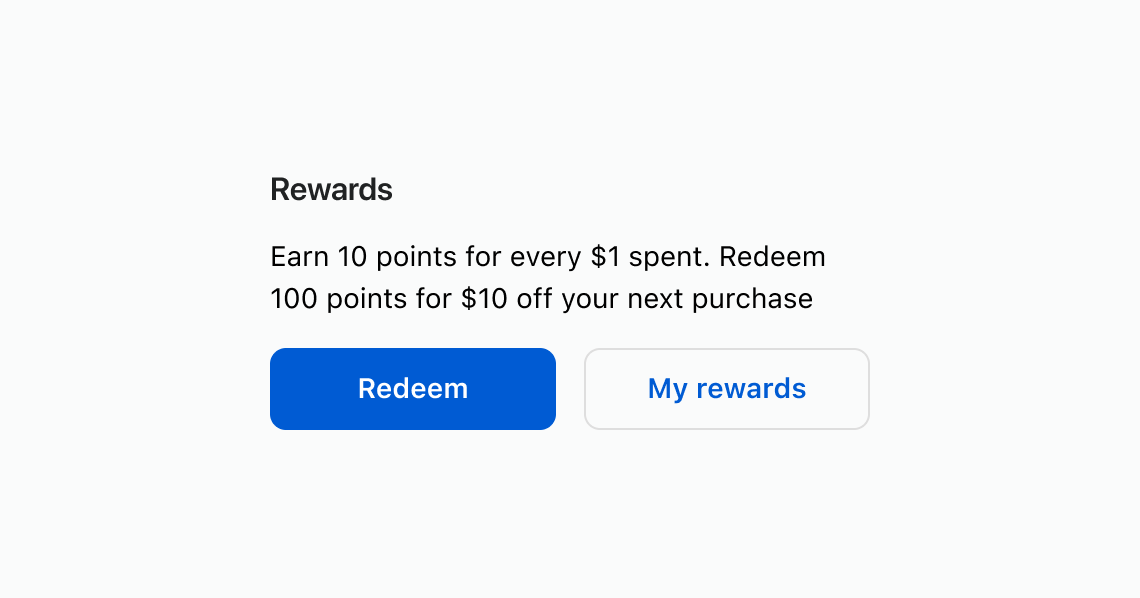
Use a section to wrap related content under a descriptive heading. This example shows a rewards section with descriptive text and action buttons.
## Group related content with a heading
## html
```html
Earn 10 points for every $1 spent. Redeem 100 points for $10 off your next purchase
Redeem
My rewards
```
### Add section-level actions
Place buttons in the `primary-action` and `secondary-actions` slots to add contextual actions to a section. This example shows a rewards section with "Redeem" and "View history" buttons.
## html
```html
Redeem
View history
You have 1,250 points available.
Earn 10 points for every $1 spent.
```
### Nest sections for content hierarchy
Nest sections to create visual and semantic hierarchy. Heading levels adjust automatically based on nesting depth. This example groups shipping and payment details inside an outer order details section.
## html
```html
Order #1042 — Placed March 15, 2026
Jane Smith
123 Main St
Toronto, ON M5V 2H1
Visa ending in 4242
```
***
## Best practices
* **Describe each section with a clear heading**: Use concise, sentence-case headings that reflect the section's purpose so customers can scan the page quickly.
* **Provide an accessible name when no heading exists**: If a visual heading isn't appropriate, set `accessibilityLabel` so assistive technologies can identify the section.
* **Align actions to the section's content**: Only include primary and secondary actions that relate directly to the content in that section.
* **Limit and prioritize actions**: Keep the number of actions small to reduce noise and emphasize what matters most.
* **Keep layout consistent**: Maintain consistent spacing and structure between sections across the page for a coherent experience.
***