---
title: Product details
description: >-
The product details screen appears when merchants search for a product, scan a
barcode, or browse inventory during a transaction. This screen displays
product information including pricing, inventory levels, variants, and product
specifications that merchants need to serve customers.
api_version: 2024-10
api_name: pos-ui-extensions
source_url:
html: >-
https://shopify.dev/docs/api/pos-ui-extensions/2024-10/targets/product-details
md: >-
https://shopify.dev/docs/api/pos-ui-extensions/2024-10/targets/product-details.md
---
# Product details
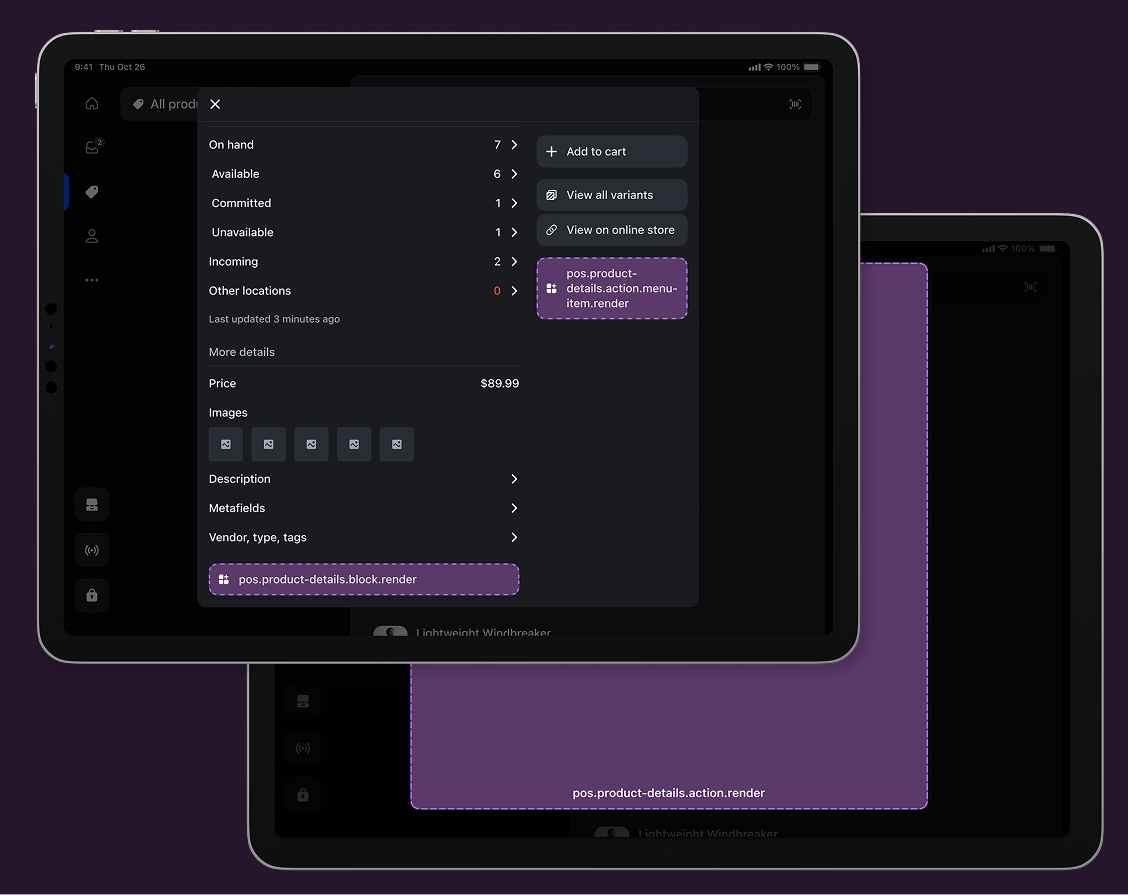
The product details screen appears when merchants search for a product, scan a barcode, or browse inventory during a transaction. This screen displays product information including pricing, inventory levels, variants, and product specifications that merchants need to serve customers.
### Use cases
* **Product information:** Display specifications, care instructions, and detailed descriptions.
* **Inventory management:** Adjust stock levels, update pricing, and configure variants.
* **Sales optimization:** Show bundling suggestions, upselling opportunities, and product recommendations.
* **External integrations:** Connect with inventory systems, PIM (Product Information Management) tools, or supplier platforms.
***
## Product details targets
Use these targets for product management capabilities, inventory workflows, or integration with external systems for product information and analytics.
### Product details block target
`pos.product-details.block.render`
Renders a custom information section within the product details screen. Use this target for displaying supplementary product data like detailed specifications, inventory status, or related product recommendations alongside standard product details.
Extensions at this target appear as persistent blocks within the product details interface and support interactive elements that can launch modal workflows using `api.action.presentModal()` for more complex product operations.
### Support Components (11) APIs (9)
### Supported components
* [Badge](https://shopify.dev/docs/api/pos-ui-extensions/2024-10/ui-components/feedback-and-status-indicators/badge)
* [Button](https://shopify.dev/docs/api/pos-ui-extensions/2024-10/ui-components/actions/button)
* [DatePicker](https://shopify.dev/docs/api/pos-ui-extensions/2024-10/ui-components/forms/datepicker)
* [Dialog](https://shopify.dev/docs/api/pos-ui-extensions/2024-10/ui-components/feedback-and-status-indicators/dialog)
* [Icon](https://shopify.dev/docs/api/pos-ui-extensions/2024-10/ui-components/media-and-visuals/icon)
* [Image](https://shopify.dev/docs/api/pos-ui-extensions/2024-10/ui-components/media-and-visuals/image)
* [POSBlock](https://shopify.dev/docs/api/pos-ui-extensions/2024-10/ui-components/layout-and-structure/posblock)
* [POSBlockRow](https://shopify.dev/docs/api/pos-ui-extensions/2024-10/ui-components/layout-and-structure/posblockrow)
* [Stack](https://shopify.dev/docs/api/pos-ui-extensions/2024-10/ui-components/layout-and-structure/stack)
* [Text](https://shopify.dev/docs/api/pos-ui-extensions/2024-10/ui-components/layout-and-structure/text)
* [TimePicker](https://shopify.dev/docs/api/pos-ui-extensions/2024-10/ui-components/forms/timepicker)
### Available APIs
* [Action API](https://shopify.dev/docs/api/pos-ui-extensions/2024-10/target-apis/standard-apis/action-api)
* [Cart API](https://shopify.dev/docs/api/pos-ui-extensions/2024-10/target-apis/contextual-apis/cart-api)
* [Connectivity API](https://shopify.dev/docs/api/pos-ui-extensions/2024-10/target-apis/platform-apis/connectivity-api)
* [Device API](https://shopify.dev/docs/api/pos-ui-extensions/2024-10/target-apis/platform-apis/device-api)
* [Locale API](https://shopify.dev/docs/api/pos-ui-extensions/2024-10/target-apis/standard-apis/locale-api)
* [Product API](https://shopify.dev/docs/api/pos-ui-extensions/2024-10/target-apis/contextual-apis/product-api)
* [Product Search API](https://shopify.dev/docs/api/pos-ui-extensions/2024-10/target-apis/standard-apis/product-search-api)
* [Session API](https://shopify.dev/docs/api/pos-ui-extensions/2024-10/target-apis/standard-apis/session-api)
* [Toast API](https://shopify.dev/docs/api/pos-ui-extensions/2024-10/target-apis/standard-apis/toast-api)
Examples
### Examples
* #### Add a product details block
##### Description
Display custom information within the product details screen as a persistent block. This example shows how to create blocks that show supplementary product data like detailed specifications, inventory status, or related recommendations with interactive elements.
##### React
```tsx
import React from 'react';
import {
Text,
useApi,
reactExtension,
POSBlock,
POSBlockRow,
} from '@shopify/ui-extensions-react/point-of-sale';
const Block = () => {
const api = useApi<'pos.product-details.block.render'>();
return (
{'This is a block extension'}{`Product ID for this product: ${api.product.id}`}
);
};
export default reactExtension('pos.product-details.block.render', () => (
));
```
##### TS
```ts
import {
POSBlock,
Text,
POSBlockRow,
extension,
} from '@shopify/ui-extensions/point-of-sale';
export default extension('pos.product-details.block.render', (root, api) => {
const block = root.createComponent(POSBlock, {
action: {title: 'Open action', onPress: api.action.presentModal},
});
const mainText = root.createComponent(Text);
mainText.append('This is a block extension');
const subtitleText = root.createComponent(Text);
subtitleText.append(`Product ID for this product: ${api.product.id}`);
const blockMainRow = root.createComponent(POSBlockRow);
blockMainRow.append(mainText);
const blockSubtitleRow = root.createComponent(POSBlockRow);
blockSubtitleRow.append(subtitleText);
block.append(blockMainRow);
block.append(blockSubtitleRow);
root.append(block);
});
```
### Product details action (menu item) target
`pos.product-details.action.menu-item.render`
Renders a single interactive button component as a menu item in the product details action menu. Use this target for product-specific operations like inventory adjustments, product analytics, or integration with external product management systems.
Extensions at this target can access the product identifier through the Product API to perform product-specific operations. Menu items typically invoke `api.action.presentModal()` to launch the companion [modal](#product-details-action-modal-) for complete product workflows.
### Support Components (1) APIs (9)
### Supported components
* [Button](https://shopify.dev/docs/api/pos-ui-extensions/2024-10/ui-components/actions/button)
### Available APIs
* [Action API](https://shopify.dev/docs/api/pos-ui-extensions/2024-10/target-apis/standard-apis/action-api)
* [Cart API](https://shopify.dev/docs/api/pos-ui-extensions/2024-10/target-apis/contextual-apis/cart-api)
* [Connectivity API](https://shopify.dev/docs/api/pos-ui-extensions/2024-10/target-apis/platform-apis/connectivity-api)
* [Device API](https://shopify.dev/docs/api/pos-ui-extensions/2024-10/target-apis/platform-apis/device-api)
* [Locale API](https://shopify.dev/docs/api/pos-ui-extensions/2024-10/target-apis/standard-apis/locale-api)
* [Product API](https://shopify.dev/docs/api/pos-ui-extensions/2024-10/target-apis/contextual-apis/product-api)
* [Product Search API](https://shopify.dev/docs/api/pos-ui-extensions/2024-10/target-apis/standard-apis/product-search-api)
* [Session API](https://shopify.dev/docs/api/pos-ui-extensions/2024-10/target-apis/standard-apis/session-api)
* [Toast API](https://shopify.dev/docs/api/pos-ui-extensions/2024-10/target-apis/standard-apis/toast-api)
Examples
### Examples
* #### Create a product details action menu item
##### Description
Add an interactive menu item to the product details action menu for product-specific operations. This example shows how to create a menu item that accesses product data and launches modal workflows for tasks like inventory adjustments, product analytics, or external system integrations.
##### React
```tsx
import React from 'react';
import {
reactExtension,
Button,
useApi,
} from '@shopify/ui-extensions-react/point-of-sale';
const ButtonComponent = () => {
const api = useApi<'pos.product-details.action.menu-item.render'>();
return