Version 2025-07 is the last API version to support React-based UI components. Later versions use web components, native UI elements with built-in accessibility, better performance, and consistent styling with Shopify's design system. Check out the upgrade guide to upgrade your extension.
Order details
The order details screen appears when merchants access a completed transaction for customer service, refunds, or order fulfillment tasks. This screen displays transaction information including customer details, payment data, line items, and fulfillment status for completed sales.
Anchor to Use casesUse cases
- Fulfillment tracking: Display status, tracking numbers, and special handling instructions.
- Order processing: Launch workflows for gift wrapping, packaging, or delivery scheduling.
- Order modifications: Adjust line items, apply discounts, or update customer information.
- Post-sale actions: Process reprints, refunds, exchanges, or customer communications.
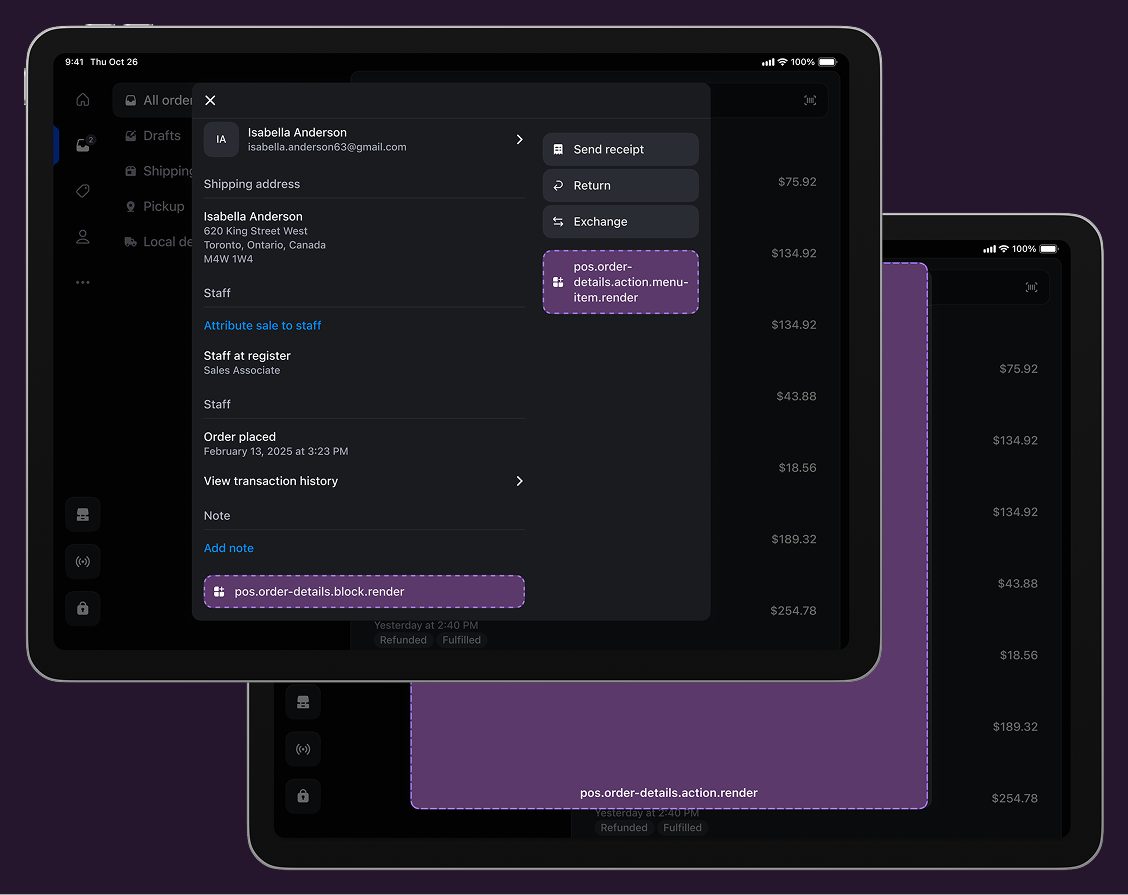
Anchor to Order details targetsOrder details targets
Use these targets for order management capabilities, fulfillment workflows, or tools for order processing and analysis during transactions.
Anchor to Order details block ,[object Object]Order details block target
pos.order-details.block.render
Renders a custom information section within the order details screen. Use this target for displaying supplementary order data like fulfillment status, tracking numbers, or custom order analytics alongside standard order details.
Extensions at this target appear as persistent blocks within the order details interface and support interactive elements that can launch modal workflows using api.action.presentModal() for more complex order operations.
Examples
Add an order details block
Description
Display custom information within the order details screen as a persistent block. This example shows how to create blocks that show supplementary order data like fulfillment status, tracking numbers, or custom analytics with interactive elements that can launch modal workflows.
React
import React from 'react';

import {
  Text,
  useApi,
  reactExtension,
  POSBlock,
  POSBlockRow,
} from '@shopify/ui-extensions-react/point-of-sale';

const Block = () => {
  const api = useApi<'pos.order-details.block.render'>();
  return (
    <POSBlock action={{title: 'Open action', onPress: api.action.presentModal}}>
      <POSBlockRow>
        <Text>{'This is a block extension'}</Text>
        <Text>{`Order ID: ${api.order.id}`}</Text>
      </POSBlockRow>
    </POSBlock>
  );
};

export default reactExtension('pos.order-details.block.render', () => (
  <Block />
));
TS
import {
  POSBlock,
  Text,
  POSBlockRow,
  extension,
} from '@shopify/ui-extensions/point-of-sale';

export default extension('pos.order-details.block.render', (root, api) => {
  const block = root.createComponent(POSBlock, {
    action: {title: 'Open action', onPress: api.action.presentModal},
  });

  const mainText = root.createComponent(Text);
  mainText.append('This is a block extension');

  const subtitleText = root.createComponent(Text);
  subtitleText.append(`Order ID: ${api.order.id}`);

  const blockMainRow = root.createComponent(POSBlockRow);
  blockMainRow.append(mainText);

  const blockSubtitleRow = root.createComponent(POSBlockRow);
  blockSubtitleRow.append(subtitleText);
  block.append(blockMainRow);
  block.append(blockSubtitleRow);

  root.append(block);
});
pos.order-details.action.menu-item.render
Renders a single interactive button component as a menu item in the order details action menu. Use this target for order-specific operations like reprints, refunds, exchanges, or launching fulfillment workflows.
Extensions at this target can access the order identifier through the Order API to perform order-specific operations. Menu items typically invoke api.action.presentModal() to launch the companion modal for complete order workflows.
Supported components
Supported components
Examples
Create an order details action menu item
Description
Add an interactive menu item to the order details action menu for order-specific operations. This example shows how to create a menu item that accesses order data and launches modal workflows for tasks like reprints, refunds, exchanges, or fulfillment processes.
React
import React from 'react';
import {
  reactExtension,
  Button,
  useApi,
} from '@shopify/ui-extensions-react/point-of-sale';

const ButtonComponent = () => {
  const api = useApi<'pos.order-details.action.menu-item.render'>();

  return <Button onPress={() => api.action.presentModal()} />;
};

export default reactExtension(
  'pos.order-details.action.menu-item.render',
  () => <ButtonComponent />,
);
TS
import {Button, extension} from '@shopify/ui-extensions/point-of-sale';

export default extension(
  'pos.order-details.action.menu-item.render',
  (root, api) => {
    const button = root.createComponent(Button, {
      onPress: () => {
        api.action.presentModal();
      },
    });

    root.append(button);
  },
);
Anchor to Order details action (modal) ,[object Object]Order details action (modal) target
pos.order-details.action.render
Renders a full-screen modal interface launched from order details menu items. Use this target for complex order workflows that require forms, multi-step processes, or detailed information displays beyond what a simple button can provide.
Extensions at this target have access to order data through the Order API and support workflows with multiple screens, navigation, and interactive components.
Supported components
Supported components
Examples
Create an order details action modal
Description
Build a full-screen modal launched from order details menu items for complex order workflows. This example demonstrates creating modals with multiple screens and interactive components, enabling forms, multi-step processes, or detailed information displays with full order data access.
React
import React from 'react';

import {
  Text,
  Screen,
  ScrollView,
  useApi,
  Navigator,
  reactExtension,
} from '@shopify/ui-extensions-react/point-of-sale';

const Modal = () => {
  const api = useApi<'pos.order-details.action.render'>();
  return (
    <Navigator>
      <Screen name="OrderDetailsAction" title="Order Details Action">
        <ScrollView>
          <Text>{`Order ID: ${api.order.id}`}</Text>
        </ScrollView>
      </Screen>
    </Navigator>
  );
};

export default reactExtension('pos.order-details.action.render', () => (
  <Modal />
));
TS
import {
  Navigator,
  Screen,
  ScrollView,
  Text,
  extension,
} from '@shopify/ui-extensions/point-of-sale';

export default extension('pos.order-details.action.render', (root, api) => {
  const navigator = root.createComponent(Navigator);
  const screen = root.createComponent(Screen, {
    name: 'OrderDetailsAction',
    title: 'Order Details Action',
  });
  const scrollView = root.createComponent(ScrollView);
  const text = root.createComponent(Text);

  text.append(`ID for current order screen: ${api.order.id}`);
  scrollView.append(text);
  screen.append(scrollView);
  navigator.append(screen);
  root.append(navigator);
});
Anchor to Best practicesBest practices
- Show clear action confirmations: Show clear success or error messages that specify which order was affected and what change was made. Use messages like "Order #1001 updated successfully," "Tracking number added to order," or "Unable to process - order not found" to provide immediate feedback.
- Ensure order continuity: Ensure that order-related changes integrate properly with the overall transaction and order lifecycle, such as updated order status, applied additional discounts, and recorded fulfillment actions.
- Handle error states gracefully: Communicate order data limitations clearly rather than showing generic error messages. If your extension accesses or modifies order information, ensure you handle data responsibly, display only necessary information, and provide clear messaging about any data collection, processing, or sharing that occurs through your extension functionality.
- Write clear and action-oriented labels: Use action-oriented labels that specify what will happen for this particular order, with descriptive titles that indicate the information type. Use "Add tracking number" or "Fulfillment Status" instead of generic labels like "Order options" or "Order App."
- Show status and contextual data: Show current order status, relevant metrics, and action eligibility to support fulfillment decisions, such as fulfillment status and tracking, "Priority order - expedited shipping," and payment and refund history.
Anchor to LimitationsLimitations
-
You can only render one Button component for each POS UI extension using the action (menu item) target.
-
Order data is read-only through the Order API, which provides only the order ID, name, and customer ID. To access additional order information or modify order data, use external API calls or integrate with the Admin API through your app backend.