---
title: Receipts
description: >-
The receipt appears as the printed or digital output that customers receive
after completing a transaction. This receipt displays transaction details,
payment information, and store branding, providing the last touchpoint in the
customer experience.
api_version: 2025-10
api_name: pos-ui-extensions
source_url:
html: 'https://shopify.dev/docs/api/pos-ui-extensions/2025-10/targets/receipts'
md: 'https://shopify.dev/docs/api/pos-ui-extensions/2025-10/targets/receipts.md'
---
# Receipts
**Beta:**
Receipt targets are part of the POS UI extensions [feature preview](https://shopify.dev/docs/api/feature-previews). This feature preview is available on an invite-only basis and requires POS UI extensions version 2025-04 or higher and POS app version 9.31.0 or later.
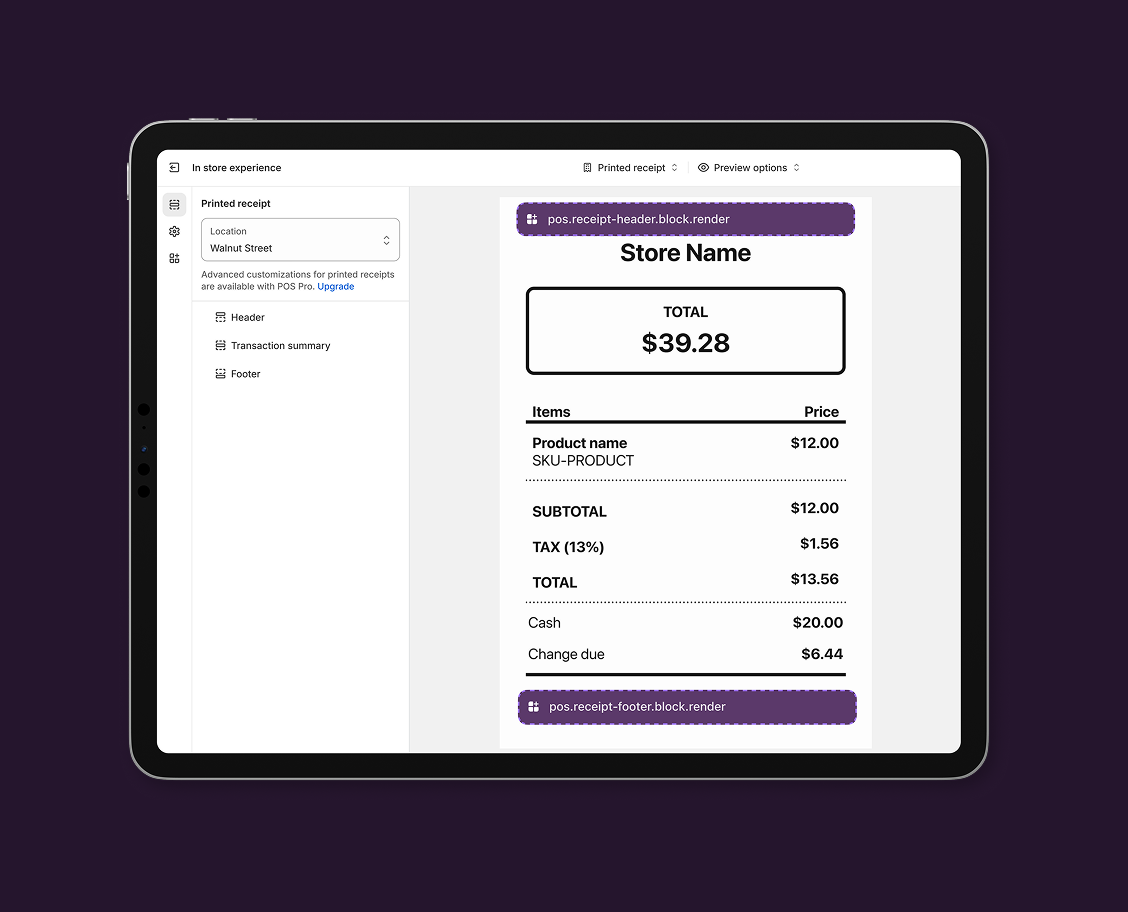
The receipt appears as the printed or digital output that customers receive after completing a transaction. This receipt displays transaction details, payment information, and store branding, providing the last touchpoint in the customer experience.
### Use cases
* **Custom branding:** Add logos, promotional messages, and store-specific information.
* **Transaction details:** Display order details, loyalty program details, and return policies.
* **Compliance information:** Include terms of service, regulatory disclosures, and store policies.
* **Customer engagement:** Integrate survey links, social media, and marketing campaigns.
***
## Receipts targets
Use these targets for receipt customization, branding, or integration with external systems for customer engagement and compliance.
### Receipt block (header) target
`pos.receipt-header.block.render`
Renders a custom section in the header of printed receipts. Use this target for adding custom branding, logos, promotional messages, or store-specific information at the top of receipts.
Extensions at this target appear in the receipt header area and support limited components optimized for print formatting, including text content for information display.
### Support Components (3) APIs (1)
### Supported components
* [Pos block](https://shopify.dev/docs/api/pos-ui-extensions/2025-10/web-components/layout-and-structure/pos-block)
* Qr code
* [Text](https://shopify.dev/docs/api/pos-ui-extensions/2025-10/web-components/layout-and-structure/text)
### Available APIs
* [Storage API](https://shopify.dev/docs/api/pos-ui-extensions/2025-10/target-apis/platform-apis/storage-api)
Examples
### Examples
* ####
##### Description
Add a custom section to the header of printed receipts for branding or important information. This example shows how to create a header block that displays text content optimized for print formatting, useful for store branding, promotional messages, or important notices at the top of receipts.
##### jsx
```jsx
import {render} from 'preact';
export default async () => {
render(, document.body);
};
const Extension = () => {
const {transaction} = shopify;
const qrCodeValue =
transaction.transactionType === 'Exchange'
? `exampleExchange=${encodeURIComponent(transaction.exchangeId ?? '')}`
: `exampleOrder=${encodeURIComponent(transaction.orderId ?? '')}`;
return (
Transaction type: {transaction.transactionType}
Total tax ({transaction.taxTotal.currency}): {transaction.taxTotal.amount}
);
};
```
### Receipt block (footer) target
`pos.receipt-footer.block.render`
Renders a custom section in the footer of printed receipts. Use this target for adding contact details, return policies, social media links, or customer engagement elements like survey links or marketing campaigns at the bottom of receipts.
Extensions at this target appear in the receipt footer area and support limited components optimized for print formatting, including text content for information display.
### Support Components (3) APIs (1)
### Supported components
* [Pos block](https://shopify.dev/docs/api/pos-ui-extensions/2025-10/web-components/layout-and-structure/pos-block)
* Qr code
* [Text](https://shopify.dev/docs/api/pos-ui-extensions/2025-10/web-components/layout-and-structure/text)
### Available APIs
* [Storage API](https://shopify.dev/docs/api/pos-ui-extensions/2025-10/target-apis/platform-apis/storage-api)
Examples
### Examples
* ####
##### Description
Add a custom section to the footer of printed receipts for contact information, policies, or marketing. This example shows how to create a footer block that displays text content optimized for print formatting, useful for return policies, social media links, or customer engagement elements.
##### jsx
```jsx
import {render} from 'preact';
export default async () => {
render(, document.body);
};
const Extension = () => {
const {transaction} = shopify;
const qrCodeValue =
transaction.transactionType === 'Exchange'
? `exampleExchange=${encodeURIComponent(transaction.exchangeId ?? '')}`
: `exampleOrder=${encodeURIComponent(transaction.orderId ?? '')}`;
return (
Transaction type: {transaction.transactionType}
Total tax ({transaction.taxTotal.currency}): {transaction.taxTotal.amount}
);
};
```
***
## Best practices
* **Include relevant content that adds value:** Include information that adds value to the customer's receipt and supports post-transaction engagement, like store contact information, return policy details, and loyalty program status.
* **Use clear and concise formatting:** Use concise, well-formatted text that prints clearly and is easy to read on receipt paper, like "Visit us: store.example.com," "Returns: 30-day policy," and "Follow us @storename."
* **Provide useful contact information:** Include useful contact and engagement information that helps customers connect with your store after their purchase, like store website and hours, customer service contact, and social media handles.
* **Optimize for print format:** Design receipt content that works well with printers and receipt paper limitations. Receipt extensions are specifically designed for print output and have different constraints than screen-based extensions. Ensure your content is concise, uses appropriate formatting, and provides value to customers who will interact with the printed receipt.
* **Keep messaging brief and focused:** Keep text brief and focused, as receipt space is limited and content should be easily scannable. Use "Returns within 30 days" or "Scan for rewards" instead of lengthy text like "Please visit our website to learn more about our comprehensive return policy" or "Download our mobile app for exclusive offers and rewards."
* **Use transaction data for context:** Use transaction data to provide relevant, personalized information when appropriate, like transaction type-specific messaging, "Exchange ID: #1001," and tax information display.
***
## Limitations
* Receipt extensions support only a limited set of components optimized for print formatting: [POS block](https://shopify.dev/docs/api/pos-ui-extensions/2025-10/web-components/layout-and-structure/pos-block) and [text](https://shopify.dev/docs/api/pos-ui-extensions/2025-10/web-components/layout-and-structure/text).
* Receipt extensions have access to transaction data through `TransactionCompleteWithReprintData` and the [Storage API](https://shopify.dev/docs/api/pos-ui-extensions/2025-10/target-apis/platform-apis/storage-api), but can't access other POS UI extensions APIs or perform interactive operations.
***