---
title: Home screen (smart grid)
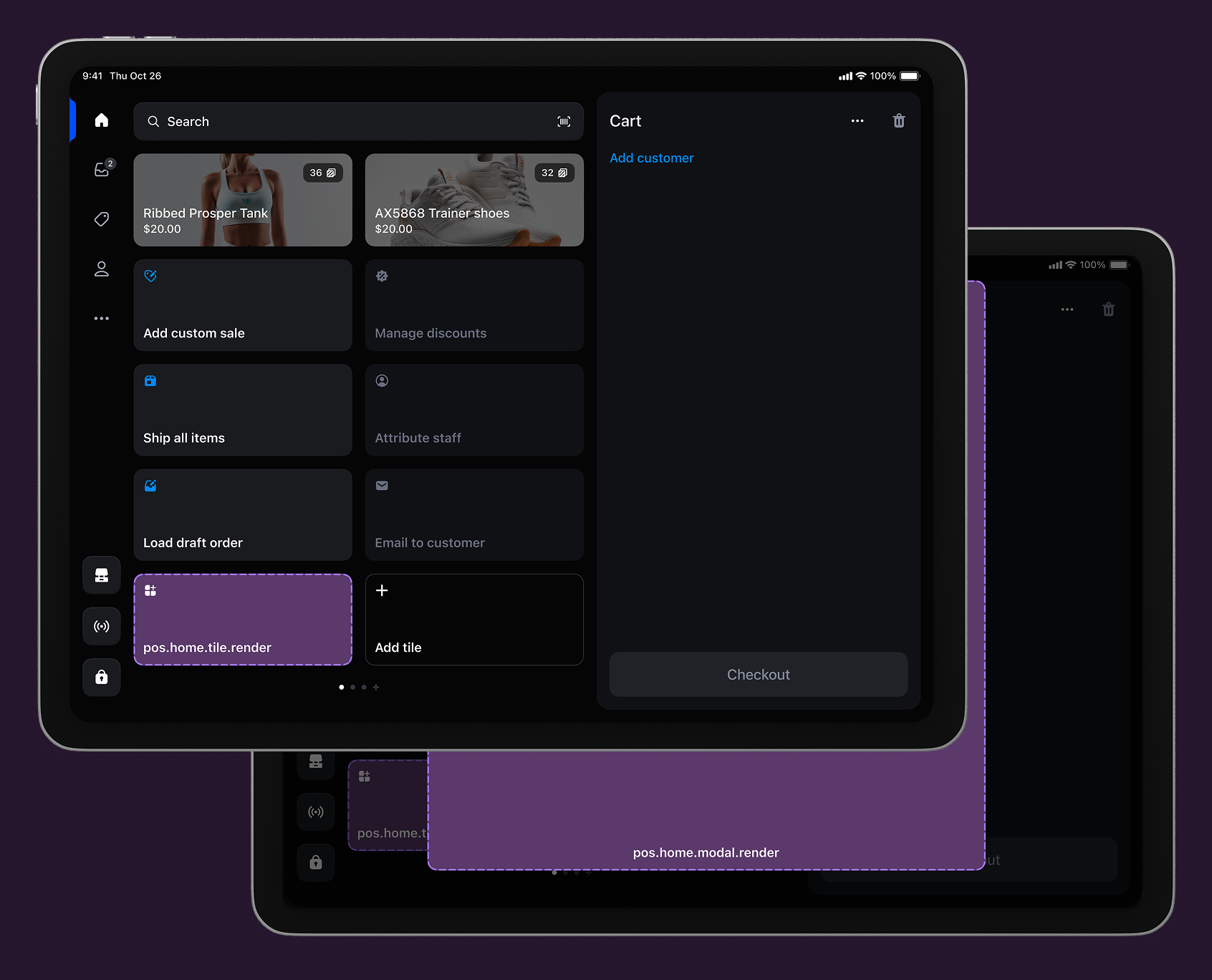
description: The smart grid is the first screen merchants see when they open the POS app. It provides quick access to essential functions and serves as the starting point for merchant activities.
api_version: 2025-10
api_name: pos-ui-extensions
source_url:
html: https://shopify.dev/docs/api/pos-ui-extensions/latest/targets/home-screen
md: https://shopify.dev/docs/api/pos-ui-extensions/latest/targets/home-screen.md
---
# Home screen (smart grid)
The smart grid is the first screen merchants see when they open [the POS app](https://apps.shopify.com/shopify-pos). It provides quick access to essential functions and serves as the starting point for merchant activities.
### Use cases
* **Sales analytics:** Display summaries and launch detailed reporting dashboards.
* **Inventory management:** Access scanning tools, stock alerts, and bulk operations.
* **Customer engagement:** Launch profile management and enrollment workflows.
* **Promotions:** Configure discounts and manage campaign status.
***
## Home screen targets
Use these targets for high-frequency actions, status displays, or entry points to workflows that merchants need daily.
### Home screen tile target
`pos.home.tile.render`
Renders a single interactive tile component on the POS home screen's smart grid. The tile appears once during home screen initialization and remains persistent until navigation occurs. Use this target for high-frequency actions, status displays, or entry points to workflows that merchants need daily.
Extensions at this target can dynamically update properties like enabled state and badge values in response to cart changes or device conditions. Tiles typically invoke `shopify.action.presentModal()` to launch the companion [modal](#home-screen-action-modal-) for complete workflows.
Support
Components (1)
APIs (11)
### Supported components
* [Tile](https://shopify.dev/docs/api/pos-ui-extensions/2025-10/polaris-web-components/actions/tile)
### Available APIs
* [Action API](https://shopify.dev/docs/api/pos-ui-extensions/2025-10/target-apis/standard-apis/action-api)
* [Cart API](https://shopify.dev/docs/api/pos-ui-extensions/2025-10/target-apis/contextual-apis/cart-api)
* [Connectivity API](https://shopify.dev/docs/api/pos-ui-extensions/2025-10/target-apis/platform-apis/connectivity-api)
* [Device API](https://shopify.dev/docs/api/pos-ui-extensions/2025-10/target-apis/platform-apis/device-api)
* [Locale API](https://shopify.dev/docs/api/pos-ui-extensions/2025-10/target-apis/standard-apis/locale-api)
* [PinPad API](https://shopify.dev/docs/api/pos-ui-extensions/2025-10/target-apis/platform-apis/pinpad-api)
* [Print API](https://shopify.dev/docs/api/pos-ui-extensions/2025-10/target-apis/platform-apis/print-api)
* [Product Search API](https://shopify.dev/docs/api/pos-ui-extensions/2025-10/target-apis/standard-apis/product-search-api)
* [Session API](https://shopify.dev/docs/api/pos-ui-extensions/2025-10/target-apis/standard-apis/session-api)
* [Storage API](https://shopify.dev/docs/api/pos-ui-extensions/2025-10/target-apis/platform-apis/storage-api)
* [Toast API](https://shopify.dev/docs/api/pos-ui-extensions/2025-10/target-apis/standard-apis/toast-api)
Examples
### Examples
* ####
##### Description
Add an interactive tile to the POS home screen smart grid for high-frequency actions. This example shows how to create a persistent tile that can dynamically update its enabled state and badge values, providing merchants with quick access to daily workflows and status displays.
##### jsx
```jsx
import {render} from 'preact';
export default async () => {
render(, document.body);
};
const Extension = () => {
return (
{
shopify.action.presentModal();
}}
/>
);
};
```
### Home screen action (modal) target
`pos.home.modal.render`
Renders a full-screen modal interface launched from smart grid tiles. The modal appears when users tap a companion [tile](#home-screen-tile-). Use this target for complete workflow experiences that require more space and functionality than the tile interface provides, such as multi-step processes, detailed information displays, or complex user interactions.
Extensions at this target support full navigation hierarchies with multiple screens, scroll views, and interactive components to handle sophisticated workflows.
Support
Components (28)
APIs (11)
### Supported components
* [Badge](https://shopify.dev/docs/api/pos-ui-extensions/2025-10/polaris-web-components/feedback-and-status-indicators/badge)
* [Banner](https://shopify.dev/docs/api/pos-ui-extensions/2025-10/polaris-web-components/feedback-and-status-indicators/banner)
* [Box](https://shopify.dev/docs/api/pos-ui-extensions/2025-10/polaris-web-components/layout-and-structure/box)
* [Button](https://shopify.dev/docs/api/pos-ui-extensions/2025-10/polaris-web-components/actions/button)
* [ChoiceList](https://shopify.dev/docs/api/pos-ui-extensions/2025-10/polaris-web-components/forms/choicelist)
* [Clickable](https://shopify.dev/docs/api/pos-ui-extensions/2025-10/polaris-web-components/actions/clickable)
* [DateField](https://shopify.dev/docs/api/pos-ui-extensions/2025-10/polaris-web-components/forms/datefield)
* [DatePicker](https://shopify.dev/docs/api/pos-ui-extensions/2025-10/polaris-web-components/forms/datepicker)
* [DateSpinner](https://shopify.dev/docs/api/pos-ui-extensions/2025-10/polaris-web-components/forms/datespinner)
* [Divider](https://shopify.dev/docs/api/pos-ui-extensions/2025-10/polaris-web-components/layout-and-structure/divider)
* [EmailField](https://shopify.dev/docs/api/pos-ui-extensions/2025-10/polaris-web-components/forms/emailfield)
* [Heading](https://shopify.dev/docs/api/pos-ui-extensions/2025-10/polaris-web-components/layout-and-structure/heading)
* [Icon](https://shopify.dev/docs/api/pos-ui-extensions/2025-10/polaris-web-components/media-and-visuals/icon)
* [Image](https://shopify.dev/docs/api/pos-ui-extensions/2025-10/polaris-web-components/media-and-visuals/image)
* [Modal](https://shopify.dev/docs/api/pos-ui-extensions/2025-10/polaris-web-components/feedback-and-status-indicators/modal)
* [NumberField](https://shopify.dev/docs/api/pos-ui-extensions/2025-10/polaris-web-components/forms/numberfield)
* [PosBlock](https://shopify.dev/docs/api/pos-ui-extensions/2025-10/polaris-web-components/layout-and-structure/posblock)
* [Page](https://shopify.dev/docs/api/pos-ui-extensions/2025-10/polaris-web-components/layout-and-structure/page)
* [PosBlock](https://shopify.dev/docs/api/pos-ui-extensions/2025-10/polaris-web-components/layout-and-structure/posblock)
* [ScrollBox](https://shopify.dev/docs/api/pos-ui-extensions/2025-10/polaris-web-components/layout-and-structure/scrollbox)
* [SearchField](https://shopify.dev/docs/api/pos-ui-extensions/2025-10/polaris-web-components/forms/searchfield)
* [Section](https://shopify.dev/docs/api/pos-ui-extensions/2025-10/polaris-web-components/layout-and-structure/section)
* [Stack](https://shopify.dev/docs/api/pos-ui-extensions/2025-10/polaris-web-components/layout-and-structure/stack)
* [Text](https://shopify.dev/docs/api/pos-ui-extensions/2025-10/polaris-web-components/layout-and-structure/text)
* [TextArea](https://shopify.dev/docs/api/pos-ui-extensions/2025-10/polaris-web-components/forms/textarea)
* [TextField](https://shopify.dev/docs/api/pos-ui-extensions/2025-10/polaris-web-components/forms/textfield)
* [TimeField](https://shopify.dev/docs/api/pos-ui-extensions/2025-10/polaris-web-components/forms/timefield)
* [TimePicker](https://shopify.dev/docs/api/pos-ui-extensions/2025-10/polaris-web-components/forms/timepicker)
### Available APIs
* [Cart API](https://shopify.dev/docs/api/pos-ui-extensions/2025-10/target-apis/contextual-apis/cart-api)
* [Connectivity API](https://shopify.dev/docs/api/pos-ui-extensions/2025-10/target-apis/platform-apis/connectivity-api)
* [Device API](https://shopify.dev/docs/api/pos-ui-extensions/2025-10/target-apis/platform-apis/device-api)
* [Locale API](https://shopify.dev/docs/api/pos-ui-extensions/2025-10/target-apis/standard-apis/locale-api)
* [PinPad API](https://shopify.dev/docs/api/pos-ui-extensions/2025-10/target-apis/platform-apis/pinpad-api)
* [Print API](https://shopify.dev/docs/api/pos-ui-extensions/2025-10/target-apis/platform-apis/print-api)
* [Product Search API](https://shopify.dev/docs/api/pos-ui-extensions/2025-10/target-apis/standard-apis/product-search-api)
* [Scanner API](https://shopify.dev/docs/api/pos-ui-extensions/2025-10/target-apis/platform-apis/scanner-api)
* [Session API](https://shopify.dev/docs/api/pos-ui-extensions/2025-10/target-apis/standard-apis/session-api)
* [Storage API](https://shopify.dev/docs/api/pos-ui-extensions/2025-10/target-apis/platform-apis/storage-api)
* [Toast API](https://shopify.dev/docs/api/pos-ui-extensions/2025-10/target-apis/standard-apis/toast-api)
Examples
### Examples
* ####
##### Description
Build a complete workflow experience launched from a smart grid tile. This example demonstrates creating a full-screen modal with navigation, multiple screens, and interactive components for sophisticated workflows that require more space than the tile interface provides.
##### jsx
```jsx
import {render} from 'preact';
export default async () => {
render(, document.body);
};
const Extension = () => {
return (
Welcome to the extension!
);
};
```
***
## Best practices
* **Provide immediate feedback with visual state changes:** Update tile appearance immediately when underlying data changes—like real-time tile updates, dynamic badge values, and enabled state changes—to give users confidence that the system responds to their actions.
* **Show clear confirmations in modals:** Show clear success or error messages after completing actions in modals to confirm actions were processed successfully. Use specific messages like "Discount applied successfully" or "Error: Invalid coupon code".
* **Use toast notifications for quick feedback:** Use toast messages for successful actions or error states without disrupting workflows, like "Settings saved" or "Connection failed - try again."
* **Handle error states gracefully:** Communicate unavailable functionality instead of leaving users to guess what's wrong. If your extension depends on network connectivity, cart contents, or user permissions, show these states through disabled tiles, informative modal messages, or helpful error text that explains what users need to do next.
* **Write clear and action-oriented titles:** Choose action-oriented, specific titles that clearly describe what will happen, with matching modal titles and specific button labels. Use titles like "Apply loyalty discount" or "Apply 10% discount" instead of generic labels like "Loyalty app" or "Apply."
* **Provide contextual information to support decisions:** Show eligibility requirements, current status, or helpful context through subtitles, modal content, and badge values to support decision-making, like displaying "Orders over $50," order details, or notification counts.
***
## Limitations
You can only render one [`Tile`](https://shopify.dev/docs/api/pos-ui-extensions/2025-10/polaris-web-components/actions/tile) component for each POS UI extension.
***