---
title: Connect UI extensions to your app's backend
description: Learn how to connect UI extensions to your app's backend.
source_url:
  html: 'https://shopify.dev/docs/apps/build/admin/actions-blocks/connect-app-backend'
  md: >-
    https://shopify.dev/docs/apps/build/admin/actions-blocks/connect-app-backend.md
api_name: admin-extensions
---

# Connect UI extensions to your app's backend

This guide is the fourth part of a five-part tutorial series that describes how to build UI extensions that display as actions and blocks in Shopify admin. Before starting this guide, you'll need to build or copy the code for the issue tracker UI extensions from the [previous section](https://shopify.dev/docs/apps/build/admin/actions-blocks/connect-admin-extensions) of the tutorial.

So far you've used [direct API access](https://shopify.dev/docs/api/admin-extensions#direct-api-access) to interact with the GraphQL Admin API. However, your app may have data or functionality that can only be accessed from your app's backend. This tutorial will demonstrate how to fetch data from your app's backend in an admin UI extension.

To demonstrate this, we'll build a new **Generate issue** button that populates an issue's title and description with suggested values from the app's backend.
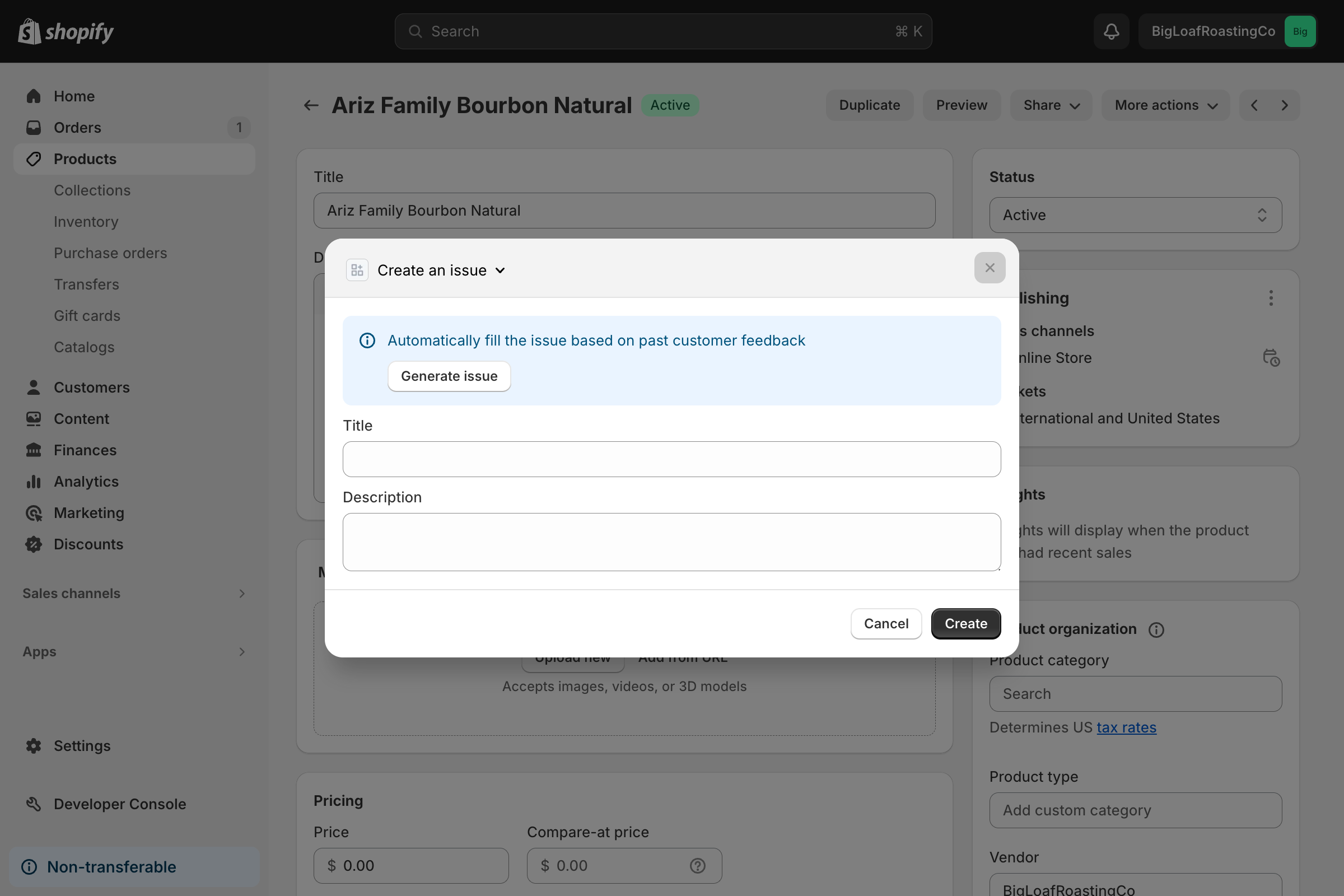
![An issue title and description automatically generated with an admin action UI extension.](https://shopify.dev/assets/assets/admin/admin-actions-and-block/connect-extension-and-backend/connect-extension-and-backend-CttSeFHK.png)

## What you'll learn

In this tutorial, you'll learn how to do the following tasks:

* Create a resource route in the React Router app template that an admin UI extension can use to fetch data

* Update your UI extension, so that your action can fetch the data when a merchant presses a button

* Run the UI extensions locally and test them on a dev store

## Requirements

[Tutorials](https://shopify.dev/docs/apps/admin/admin-actions-and-blocks)

You've completed or copied the code from the [admin action tutorial](https://shopify.dev/docs/apps/build/admin/actions-blocks/build-admin-action), the [admin block tutorial](https://shopify.dev/docs/apps/build/admin/actions-blocks/build-admin-block), and the [tutorial about connecting admin UI extensions](https://shopify.dev/docs/apps/build/admin/actions-blocks/connect-admin-extensions).

## Project

[View on GitHub](https://github.com/Shopify/example-admin-action-and-block-preact)

## Create a new resource route that returns data

Create a [resource route](https://reactrouter.com/how-to/resource-routes) in your app, by creating a new route file that doesn't export a default component. This route will return suggested issue titles and descriptions.

When you're returning data from this route, you should wrap the response with the [`cors` helper](https://shopify.dev/docs/api/shopify-app-react-router/latest/authenticate/admin#example-cors) that's returned from the [`authenticate.admin()` function](https://shopify.dev/docs/api/shopify-app-react-router/latest/authenticate/admin#authenticate.admin).

Shopify extensions are hosted on a separate domain, so this route is inaccessible if you don't set the correct CORS headers with this method.

Create and return a list of product issues from your new route.

## /app/routes/api.recommendedProductIssue.js

```javascript
import { authenticate } from "../shopify.server";


export const loader = async ({ request }) => {
  // The authenticate.admin method returns a CORS method to automatically wrap responses so that extensions, which are hosted on extensions.shopifycdn.com, can access this route.
  const { cors } = await authenticate.admin(request);


  const productIssues = [
    { title: "Too big", description: "The product was too big." },
    { title: "Too small", description: "The product was too small." },
    {
      title: "Just right",
      description:
        "The product was just right, but the customer is still unhappy.",
    },
  ];


  // Get the product Id from the request
  const url = new URL(request.url);
  const productId = url.searchParams.get("productId");
  const splitStr = productId.split("/");
  const idNumber = parseInt(splitStr[splitStr.length - 1], 10);


  // Our proprietary machine learning algorithm automatically determines the best product issue :).
  const issue = productIssues[idNumber % productIssues.length];


  // Wrap the response in the CORS method so that the extension can access it
  return cors(Response.json({ productIssue: issue }));
};
```

## Call the route from your UI extension's action

Now that your app has an API to return a suggestion, you can call it from the app's admin action UI extension and use the provided data to populate the extension's title and description fields.

Admin UI extensions can [make calls to your app's backend](https://shopify.dev/docs/api/admin-extensions#app-authentication) by using `fetch()`. The extension automatically adds the correct authorization header, manages session tokens, and resolves any relative paths against your app's `app_url`.

## src/ActionExtension.jsx

```jsx
import { render } from "preact";
import { useCallback, useEffect, useState } from "preact/hooks";
import { getIssues, updateIssues } from "./utils";


export default async () => {
  render(<Extension />, document.body);
}


function generateId(allIssues) {
  return !allIssues?.length ? 0 : allIssues[allIssues.length - 1].id + 1;
}


function validateForm({ title, description }) {
  return {
    isValid: Boolean(title) && Boolean(description),
    errors: {
      title: !title,
      description: !description,
    },
  };
}


function Extension() {
  const { close, data, intents, i18n } = shopify;
  const issueId = intents?.launchUrl
    ? new URL(intents?.launchUrl)?.searchParams?.get("issueId")
    : null;
  const [loadingInfo, setLoadingInfo] = useState(issueId ? true : false);
  const [loadingRecommended, setLoadingRecommended] = useState(false);
  const [issue, setIssue] = useState({
    title: "",
    description: "",
    id: issueId,
  });
  const [allIssues, setAllIssues] = useState([]);
  const [formErrors, setFormErrors] = useState(null);
  const [isEditing, setIsEditing] = useState(false);


  const { title, description } = issue;


  useEffect(() => {
    getIssues(data.selected[0].id).then((issues) => {
      setLoadingInfo(false);
      setAllIssues(issues || []);
    });
    // eslint-disable-next-line react-hooks/exhaustive-deps
  }, []);


  const getIssueRecommendation = useCallback(async () => {
    // Get a recommended issue title and description from your app's backend
    setLoadingRecommended(true);
    // fetch is automatically authenticated and the path is resolved against your app's URL
    const res = await fetch(
      `api/recommendedProductIssue?productId=${data.selected[0].id}`,
    );
    setLoadingRecommended(false);


    if (!res.ok) {
      console.error("Network error");
    }
    const json = await res.json();
    console.log({ json });
    if (json?.productIssue) {
      // If you get an recommendation, then update the title and description fields
      setIssue(json?.productIssue);
    }
  }, [data.selected]);


  const onSubmit = useCallback(async () => {
    const { isValid, errors } = validateForm(issue);
    setFormErrors(errors);


    if (isValid) {
      const newIssues = [...allIssues];
      if (isEditing) {
        // Find the index of the issue that you're editing
        const editingIssueIndex = newIssues.findIndex(
          (listIssue) => listIssue.id == issue.id,
        );
        // Overwrite that issue's title and description with the new ones
        newIssues[editingIssueIndex] = {
          ...issue,
          title: issue.title,
          description: issue.description,
        };
      } else {
        // Add a new issue at the end of the list
        newIssues.push({
          id: generateId(allIssues),
          title: issue.title,
          description: issue.description,
          completed: false,
        });
      }


      // Commit changes to the database
      await updateIssues(data.selected[0].id, newIssues);
      // Close the modal using the 'close' API
      close();
    }
  }, [issue, data.selected, allIssues, close, isEditing]);


  useEffect(() => {
    if (issueId) {
      // If opened from the block extension, then find the issue that's being edited
      const editingIssue = allIssues.find(({ id }) => `${id}` === issueId);
      if (editingIssue) {
        // Set the issue's ID in the state
        setIssue(editingIssue);
        setIsEditing(true);
      }
    } else {
      setIsEditing(false);
    }
  }, [issueId, allIssues]);


  if (loadingInfo) {
    return <></>;
  }


  return (
    <s-admin-action
      heading={
        isEditing
          ? i18n.translate("edit-issue-heading")
          : i18n.translate("create-issue-heading")
      }
    >
      <s-button slot="primary-action" onClick={onSubmit}>
        {isEditing
          ? i18n.translate("issue-save-button")
          : i18n.translate("issue-create-button")}
      </s-button>


      <s-button slot="secondary-actions" onClick={close}>
        {i18n.translate("issue-cancel-button")}
      </s-button>


      {/*Create a banner to let the buyer auto fill the issue with the
      recommendation from the backend*/}


      <s-stack direction="block">
        <s-banner>
          <s-stack direction="block">
            <s-text>{i18n.translate("issue-generate-banner-text")}</s-text>
            <s-stack direction="inline">
              <s-button
                disabled={loadingRecommended}
                onClick={getIssueRecommendation}
              >
                {i18n.translate("issue-generate-button")}
              </s-button>
              {loadingRecommended && <s-spinner />}
            </s-stack>
          </s-stack>
        </s-banner>
      </s-stack>


      <s-text-field
        value={title}
        error={
          formErrors?.title ? i18n.translate("issue-title-error") : undefined
        }
        onChange={(event) =>
          setIssue((prev) => ({ ...prev, title: (/** @type {HTMLInputElement} */ (event.target)).value }))
        }
        label={i18n.translate("issue-title-label")}
        maxLength={50}
      />
      <s-box padding-block-start="large">
        <s-text-area
          value={description}
          error={
            formErrors?.description
              ? i18n.translate("issue-description-error")
              : undefined
          }
          onChange={(event) =>
            setIssue((prev) => ({ ...prev, description: (/** @type {HTMLInputElement} */ (event.target)).value }))
          }
          label={i18n.translate("issue-description-label")}
          max-length={300}
        />
      </s-box>
    </s-admin-action>
  );
}
```

## Test the UI extension

After you've updated the UI extension, test it with the following steps:

1. Navigate to your app directory:

   ## Terminal

   ```bash
   cd <directory>
   ```

2. To build and preview your app, either start or restart your server with the following command:

   ## Terminal

   ```bash
   shopify app dev
   ```

3. Press `p` to open the Dev Console.

4. In the extension list for your app, click on the preview link for the issue tracker UI extension. The product details page opens. If you don't have a product in your store, then you need to create one.

5. To launch your UI extension, in the top right of the page click the **More actions** dropdown list and select your UI extension.

![A merchant automatically generating an issue title and description in an admin action UI extension.](https://shopify.dev/assets/assets/admin/admin-actions-and-block/connect-extension-and-backend/connect-extension-and-backend-CttSeFHK.png)

1. In the banner, click **Generate issue**. The issue's title and description are populated with data from your app's backend.

## /app/routes/api.recommendedProductIssue.js

```javascript
import { authenticate } from "../shopify.server";


export const loader = async ({ request }) => {
  // The authenticate.admin method returns a CORS method to automatically wrap responses so that extensions, which are hosted on extensions.shopifycdn.com, can access this route.
  const { cors } = await authenticate.admin(request);


  const productIssues = [
    { title: "Too big", description: "The product was too big." },
    { title: "Too small", description: "The product was too small." },
    {
      title: "Just right",
      description:
        "The product was just right, but the customer is still unhappy.",
    },
  ];


  // Get the product Id from the request
  const url = new URL(request.url);
  const productId = url.searchParams.get("productId");
  const splitStr = productId.split("/");
  const idNumber = parseInt(splitStr[splitStr.length - 1], 10);


  // Our proprietary machine learning algorithm automatically determines the best product issue :).
  const issue = productIssues[idNumber % productIssues.length];


  // Wrap the response in the CORS method so that the extension can access it
  return cors(Response.json({ productIssue: issue }));
};
```

## src/ActionExtension.jsx

```jsx
import { render } from "preact";
import { useCallback, useEffect, useState } from "preact/hooks";
import { getIssues, updateIssues } from "./utils";


export default async () => {
  render(<Extension />, document.body);
}


function generateId(allIssues) {
  return !allIssues?.length ? 0 : allIssues[allIssues.length - 1].id + 1;
}


function validateForm({ title, description }) {
  return {
    isValid: Boolean(title) && Boolean(description),
    errors: {
      title: !title,
      description: !description,
    },
  };
}


function Extension() {
  const { close, data, intents, i18n } = shopify;
  const issueId = intents?.launchUrl
    ? new URL(intents?.launchUrl)?.searchParams?.get("issueId")
    : null;
  const [loadingInfo, setLoadingInfo] = useState(issueId ? true : false);
  const [loadingRecommended, setLoadingRecommended] = useState(false);
  const [issue, setIssue] = useState({
    title: "",
    description: "",
    id: issueId,
  });
  const [allIssues, setAllIssues] = useState([]);
  const [formErrors, setFormErrors] = useState(null);
  const [isEditing, setIsEditing] = useState(false);


  const { title, description } = issue;


  useEffect(() => {
    getIssues(data.selected[0].id).then((issues) => {
      setLoadingInfo(false);
      setAllIssues(issues || []);
    });
    // eslint-disable-next-line react-hooks/exhaustive-deps
  }, []);


  const getIssueRecommendation = useCallback(async () => {
    // Get a recommended issue title and description from your app's backend
    setLoadingRecommended(true);
    // fetch is automatically authenticated and the path is resolved against your app's URL
    const res = await fetch(
      `api/recommendedProductIssue?productId=${data.selected[0].id}`,
    );
    setLoadingRecommended(false);


    if (!res.ok) {
      console.error("Network error");
    }
    const json = await res.json();
    console.log({ json });
    if (json?.productIssue) {
      // If you get an recommendation, then update the title and description fields
      setIssue(json?.productIssue);
    }
  }, [data.selected]);


  const onSubmit = useCallback(async () => {
    const { isValid, errors } = validateForm(issue);
    setFormErrors(errors);


    if (isValid) {
      const newIssues = [...allIssues];
      if (isEditing) {
        // Find the index of the issue that you're editing
        const editingIssueIndex = newIssues.findIndex(
          (listIssue) => listIssue.id == issue.id,
        );
        // Overwrite that issue's title and description with the new ones
        newIssues[editingIssueIndex] = {
          ...issue,
          title: issue.title,
          description: issue.description,
        };
      } else {
        // Add a new issue at the end of the list
        newIssues.push({
          id: generateId(allIssues),
          title: issue.title,
          description: issue.description,
          completed: false,
        });
      }


      // Commit changes to the database
      await updateIssues(data.selected[0].id, newIssues);
      // Close the modal using the 'close' API
      close();
    }
  }, [issue, data.selected, allIssues, close, isEditing]);


  useEffect(() => {
    if (issueId) {
      // If opened from the block extension, then find the issue that's being edited
      const editingIssue = allIssues.find(({ id }) => `${id}` === issueId);
      if (editingIssue) {
        // Set the issue's ID in the state
        setIssue(editingIssue);
        setIsEditing(true);
      }
    } else {
      setIsEditing(false);
    }
  }, [issueId, allIssues]);


  if (loadingInfo) {
    return <></>;
  }


  return (
    <s-admin-action
      heading={
        isEditing
          ? i18n.translate("edit-issue-heading")
          : i18n.translate("create-issue-heading")
      }
    >
      <s-button slot="primary-action" onClick={onSubmit}>
        {isEditing
          ? i18n.translate("issue-save-button")
          : i18n.translate("issue-create-button")}
      </s-button>


      <s-button slot="secondary-actions" onClick={close}>
        {i18n.translate("issue-cancel-button")}
      </s-button>


      {/*Create a banner to let the buyer auto fill the issue with the
      recommendation from the backend*/}


      <s-stack direction="block">
        <s-banner>
          <s-stack direction="block">
            <s-text>{i18n.translate("issue-generate-banner-text")}</s-text>
            <s-stack direction="inline">
              <s-button
                disabled={loadingRecommended}
                onClick={getIssueRecommendation}
              >
                {i18n.translate("issue-generate-button")}
              </s-button>
              {loadingRecommended && <s-spinner />}
            </s-stack>
          </s-stack>
        </s-banner>
      </s-stack>


      <s-text-field
        value={title}
        error={
          formErrors?.title ? i18n.translate("issue-title-error") : undefined
        }
        onChange={(event) =>
          setIssue((prev) => ({ ...prev, title: (/** @type {HTMLInputElement} */ (event.target)).value }))
        }
        label={i18n.translate("issue-title-label")}
        maxLength={50}
      />
      <s-box padding-block-start="large">
        <s-text-area
          value={description}
          error={
            formErrors?.description
              ? i18n.translate("issue-description-error")
              : undefined
          }
          onChange={(event) =>
            setIssue((prev) => ({ ...prev, description: (/** @type {HTMLInputElement} */ (event.target)).value }))
          }
          label={i18n.translate("issue-description-label")}
          max-length={300}
        />
      </s-box>
    </s-admin-action>
  );
}
```

### Next steps

[Conditionally hide blocks and actions\
\
](https://shopify.dev/docs/apps/build/admin/actions-blocks/hide-extensions)

[Complete the next guide in this tutorial series to conditionally hide UI extensions.](https://shopify.dev/docs/apps/build/admin/actions-blocks/hide-extensions)

[Admin UI extension APIs\
\
](https://shopify.dev/docs/api/admin-extensions)

[Learn about the admin UI extension APIs.](https://shopify.dev/docs/api/admin-extensions)

[Participate\
\
](https://github.com/Shopify/ui-extensions)

[File any issues or feature requests on the UI Extensions GitHub repository.](https://github.com/Shopify/ui-extensions)

[Deploy\
\
](https://shopify.dev/docs/apps/deployment/app-versions)

[Learn how to deploy your UI extensions to merchants.](https://shopify.dev/docs/apps/deployment/app-versions)
