Authenticate an app for stores in your organization
This tutorial shows how to use the client credentials grant to get access tokens for a server-side app acting on stores in your own Shopify organization. Of the three grants, it takes the least setup: your app exchanges its own client ID and secret for a token, with no redirect flow to implement.
With a client credentials grant, you won't see a token in the Shopify admin. Instead, you request tokens programmatically when you need them.
If you're building apps for other merchants, use Shopify CLI, which handles authentication automatically. To learn how authentication works for other common approaches, see About app authentication.
If you're building apps for other merchants, use Shopify CLI, which handles authentication automatically. To learn how authentication works for other common approaches, see About app authentication.
Anchor to What you'll learnWhat you'll learn
In this tutorial, you'll learn how to do the following tasks:
- Find your app credentials in the Dev Dashboard
- Exchange credentials for an access token programmatically
- Use the access token to call Shopify APIs
Requirements
You've created an app in the Dev Dashboard.
You've selected the access scopes your app needs on your app's version in the Dev Dashboard.
You've installed your app on your store.
Project
Anchor to Get your credentialsGet your credentials
Find your Client ID and Client secret in the Dev Dashboard. These credentials identify your app when requesting access tokens.
Keep your Client secret secure. Set it as an environment variable rather than putting it in a file you might commit, and never commit secrets to version control. In production, read it from your platform's environment configuration or a secret manager.
Keep your Client secret secure. Set it as an environment variable rather than putting it in a file you might commit, and never commit secrets to version control. In production, read it from your platform's environment configuration or a secret manager.
Anchor to Locate your credentialsLocate your credentials
- Open your app in the Dev Dashboard.
- Go to Settings.
- Copy your Client ID and Client secret.
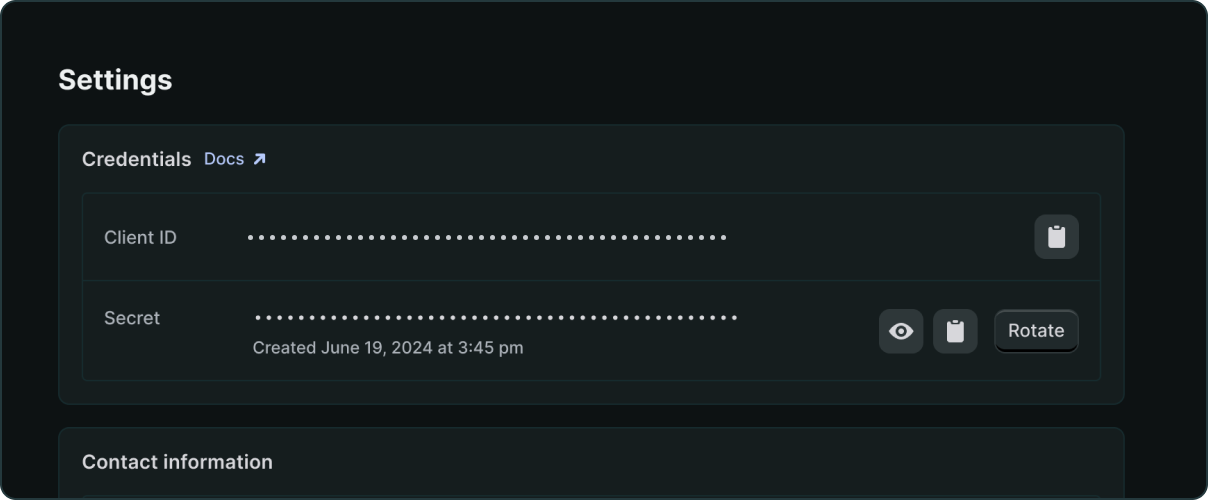
Anchor to Set your credentials as environment variablesSet your credentials as environment variables
Keep your credentials out of your code so that you can't commit them and can use different values per environment.
Anchor to Add your credentialsAdd your credentials
The example code reads three variables from the environment. SHOPIFY_SHOP is your store's myshopify.com subdomain, without .myshopify.com:
The examples also read a .env file when one is present, and environment variables take precedence over it. If you use a .env file, add it to your .gitignore.
Anchor to Request an access tokenRequest an access token
Use your credentials to make a programmatic request to Shopify's token endpoint.
Anchor to Exchange credentials for a tokenExchange credentials for a token
The code reads your credentials from the environment and exchanges them for an access token. Tokens expire after 24 hours, so the example caches the token and refreshes it before expiry rather than requesting a new one per call.
Token response format
access_token: The token to include in API requests. Store this securely.scope: The access scopes granted to your app. The token request doesn't ask for scopes, so this is a readback of what you selected on your app's version in the Dev Dashboard. If a scope you need is missing, release a new version with it and approve the change on the store.expires_in: Seconds until expiration. Always 86399 (24 hours).
Troubleshooting
Anchor to [object Object], errorshop_not_permitted error
shop_not_permitted errorProblem: You receive the error Oauth error shop_not_permitted: Client credentials cannot be performed on this shop.
Solution: The client credentials grant only works when the app and the store belong to the same Shopify organization. "Same organization" means both appear under the same org in the Dev Dashboard. Owning a store or having it installed doesn't automatically place it in your org.
To verify:
- Open the Dev Dashboard and click Apps. Confirm your app is listed.
- Click Dev stores in the sidebar and confirm your target store appears in the list. If the store isn't listed, it's not in this organization.
- Check that your
SHOPIFY_SHOPvalue matches the store's*.myshopify.comsubdomain exactly (without.myshopify.com).
Common causes:
- Dev store created outside the Dev Dashboard: If you created a dev store from the Shopify admin rather than from the Dev Dashboard, it won't be in your org. Create a new dev store from the Dev stores page in the Dev Dashboard instead.
- Multiple organizations: If you have access to more than one organization, the app and store might be in different ones. Check the organization ID in the URL (
dev.shopify.com/dashboard/<org-id>) and verify both the app and store are under the same one. - Acting on another organization's stores: Client credentials can't reach a store outside your organization, including a client's store. Distribute your app to that store with custom distribution so that a merchant installs it, then use token exchange if your app runs inside the Shopify admin, or the authorization code grant if it runs outside. Shopify CLI handles OAuth for you.
Anchor to External tool asks you to "copy a token"External tool asks you to "copy a token"
Problem: Some external tools ask you to copy a token or provide a "Shopify API key." These tools expect the older authentication flow.
Solution: Contact the tool vendor about updating their integration to use OAuth.
Anchor to "Invalid API key or access token" error"Invalid API key or access token" error
Problem: You're sending your client_id or client_secret directly to the GraphQL Admin API.
Solution: First exchange your credentials for an access_token using the token endpoint, then use that token in your API requests.
Anchor to Make API requestsMake API requests
Include the access_token in the X-Shopify-Access-Token header when calling Shopify APIs.
Anchor to Query the GraphQL Admin APIQuery the Graph
Use the access token to authenticate requests to any Shopify API. This example queries products using the GraphQL Admin API.


Anchor to Tutorial complete!Tutorial complete!
You've successfully authenticated your Dev Dashboard app using the client credentials grant and made API requests.
Anchor to Next stepsNext steps


Find your client ID and secret, secure them, and rotate your client secret.
Manage access scopes

Find the scopes that common resources need, and where to declare them for a Dev Dashboard app.
GraphQL Admin API

Start building with the GraphQL Admin API.
Monitor app performanceAccess logs and metrics to understand and optimize your app's performance.