Build a Discount Function that rejects invalid codes
In this tutorial, you'll build a Shopify Function that rejects discount codes with custom error messages by performing custom validation logic.
Anchor to What you'll learnWhat you'll learn
In this tutorial, you'll learn how to do the following tasks:
- Use the Shopify CLI to add a Discount Function to an app
- Query entered discount codes in your Function input
- Implement custom validation logic for discount codes
- Return rejection operations with custom error messages
- Use GraphiQL to create a discount and configure it to work with your Function
- Test discount code rejections in checkout
- Review Function execution logs for rejected discount codes
- Deploy your Function to Shopify
Requirements
Create an app that has the write_discounts access scopes, using the latest version of Shopify CLI.
Install Node.js 22 or higher.
On Windows, Rust requires the Microsoft C++ Build Tools. Make sure to select the Desktop development with C++ workload when installing the tools.
wasm32-unknown-unknown targetTo ensure compatibility with the latest version of Rust, install the wasm32-unknown-unknown target.
Project


Anchor to Create the Discount FunctionCreate the Discount Function
To create a Discount Function that can reject invalid discount codes, you'll use the Shopify CLI, which generates starter code for your Function.
- Navigate to your app's directory:
Terminal
cd directory - Run the following command to create a new Discount Function:
Terminal
shopify app generate extension --template discount --name discount-rejection-function-rs - Choose the language that you want to use. For this tutorial, select
Rust.
Anchor to Review the Discount Function configurationReview the Discount Function configuration
The shopify.extension.toml file defines the Discount Function's metadata, targets, and build configuration.
Anchor to TargetsTargets
The [[extensions.targeting]] sections define the Function targets. Each section includes a target, input_query, and export property.
The target property defines where the Function is applied.
For simplicity in this tutorial, we will focus exclusively on the cart.lines.discounts.generate.run target. You can remove the following:
- Remove
cart.delivery-options.discounts.generate.runtarget from theshopify.extension.tomlfile. - Remove the target's associated files
./src/cart_delivery_options*
- Remove
pub mod cart_delivery_options_discounts_generate_run;from thesrc/main.rsfile and its associated schema typegen block#[query("src/cart_delivery_options_discounts_generate_run.graphql")].
For simplicity in this tutorial, we will focus exclusively on the cart.lines.discounts.generate.run target. You can remove the following:
- Remove
cart.delivery-options.discounts.generate.runtarget from theshopify.extension.tomlfile. - Remove the target's associated files
./src/cart_delivery_options*
- Remove
pub mod cart_delivery_options_discounts_generate_run;from thesrc/main.rsfile and its associated schema typegen block#[query("src/cart_delivery_options_discounts_generate_run.graphql")].
The input_query property is the path to the Function's input query file. This file defines the Function's input parameters, including the enteredDiscountCodes field that you'll use for validation.
The export property specifies the build entrypoint that will run for a specified target. This will usually be the function name of your main export.
Depending on your app type, you might have to define the [extensions.ui] or [extensions.ui.paths] section.
Refer to Build a discounts UI with admin UI extensions or Build a discounts UI with React Router to learn more about building UIs to configure Functions.
Depending on your app type, you might have to define the [extensions.ui] or [extensions.ui.paths] section.
Refer to Build a discounts UI with admin UI extensions or Build a discounts UI with React Router to learn more about building UIs to configure Functions.
Anchor to Update your Function to reject invalid discount codesUpdate your Function to reject invalid discount codes
Rejecting invalid discount codes allows to provide a custom error message to the customer when a discount code is not meeting validation rules.
Anchor to Update your input query to include entered discount codesUpdate your input query to include entered discount codes
Update your cart_lines_discounts_generate_run.graphql file to query the enteredDiscountCodes field.
enteredDiscountCodes returns an array of active discount codes. Each code includes a rejectable boolean indicating whether your Function can reject this discount code.
Anchor to Implement discount rejection logicImplement discount rejection logic
Update your cart_lines_discounts_generate_run Function to implement custom validation logic and return rejection operations.
This example keeps only the last entered discount code with the INF- prefix.
Anchor to Review the rejection operationReview the rejection operation
The enteredDiscountCodesReject operation has the following structure:
To reject multiple discount codes with different messages, you can return multiple rejection operations.
Automatic discount Functions can only reject discount codes that are part of the enteredDiscountCodes input and are rejectable.
The message in the rejection operation displays in checkout and should be localized. See more about providing localized content.
The message in the rejection operation displays in checkout and should be localized. See more about providing localized content.
Anchor to Start your app to preview changesStart your app to preview changes
-
Save your updated configuration TOML file.
-
Start
app devif it's not already running:Terminal
shopify app devThe configuration TOML file changes will be applied automatically on the development store.
Anchor to Create a discount in your storeCreate a discount in your store
In this step, you'll use GraphiQL to create an automatic discount. This discount will be linked to your Function that validates and rejects discount codes.
Anchor to Open the GraphiQL interface for the GraphQL Admin APIOpen the Graphi
- Open the GraphiQL interface by pressing
gin the terminal window where you started your app. - On the GraphiQL interface, for API Version, select the latest stable release.
Anchor to Get the handle of your FunctionGet the handle of your Function
-
Use your function handle in GraphQL mutations instead of querying for the function ID.
Your function handle is defined in
shopify.extension.tomlashandle:shopify.extension.toml
[[extensions]]name = "discount-rejection-function"handle = "discount-rejection-function-rs"type = "function"uid = "3d664979-ccd6-e9dd-4497-41289ece62373715032a"NoteIf you're upgrading to API version 2025-10 or later, you no longer need to query for function IDs. Use your stable function handle instead, which remains consistent across environments.
Note:If you're upgrading to API version 2025-10 or later, you no longer need to query for function IDs. Use your stable function handle instead, which remains consistent across environments.
Anchor to Create the discountCreate the discount
To create a discount in your store, use the discountAutomaticAppCreate mutation. Discount rejection operations are only supported for automatic discounts.
- For
functionHandle, provide the Function handle from the previous step. - Add
PRODUCT,ORDERor bothdiscountClassesto your discount input.
You should receive a GraphQL response that includes the ID of the created discount.
If the response includes any userErrors, then review them, check that your mutation and functionHandle are correct, and try the request again.
Troubleshooting
If you receive a Could not find Function error, then confirm the following:
shopify app devis running.- The function handle is correct.
- Your app has the
write_discountsaccess scope.
Anchor to Test discount code rejectionsTest discount code rejections
Anchor to Create codes that can be rejectedCreate codes that can be rejected
To test your function's rejection logic, you'll need to create two discount codes.
Create two product or order discount codes (for example, INF-ALICE and INF-BOB). Both codes must:
- Use the prefix
INF- - Be set to combine with all other discounts
Anchor to Reject discount codes in checkoutReject discount codes in checkout
- Create a cart and navigate to checkout.
- Enter one of the two discount codes so it applies to the cart.
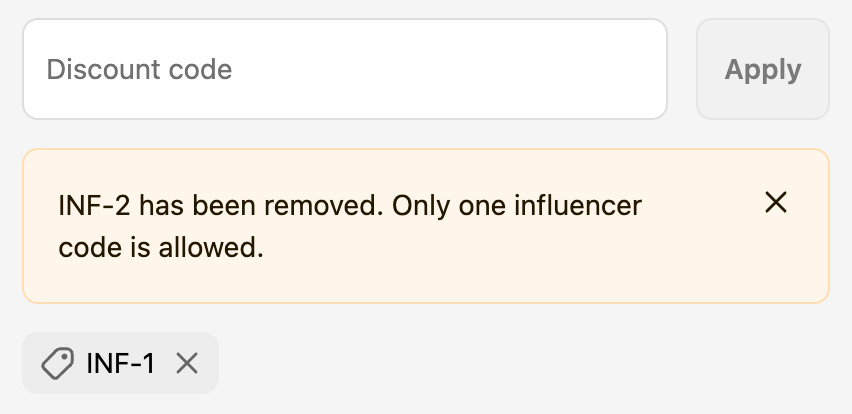
- Enter the other discount code. This new code applies and the former code is rejected. When a discount code is rejected, a message displays as a warning banner in checkout.
Anchor to Review the Function executionReview the Function execution
-
In the terminal where
shopify app devis running, review your Function executions.When testing Functions on development stores, the
devoutput shows Function executions, debug logs you've added, and a link to a local file containing full execution details. -
In a new terminal window, use the Shopify CLI command
app function replayto replay a Function execution locally. This lets you debug your Function without triggering it again on Shopify.Terminal
shopify app function replay -
Select the Function execution from the top of the list. Press
qto quit when you are finished debugging.
In the Function run logs, you'll see:
- The entered discount codes that were queried
- The rejection operations returned with the custom message
Anchor to Deploy your appDeploy your app
When you're ready to release your changes to users, you can create and release an app version. An app version is a snapshot of your app configuration and all extensions.
-
Navigate to your app directory.
-
Run the following command.
Optionally, you can provide a name or message for the version using the
--versionand--messageflags.Terminal
shopify app deploy
Releasing an app version replaces the current active version that's served to stores that have your app installed. It might take several minutes for app users to be upgraded to the new version.
If you want to create a version, but avoid releasing it to users, then run the deploy command with a --no-release flag.
You can release the unreleased app version using Shopify CLI's release command, or through the Dev Dashboard.
If you want to create a version, but avoid releasing it to users, then run the deploy command with a --no-release flag.
You can release the unreleased app version using Shopify CLI's release command, or through the Dev Dashboard.
Anchor to Tutorial complete!Tutorial complete!
You've successfully created a Discount Function that can reject invalid discount codes and display a custom error message. This gives customers clear explanations for why their discount codes don't work.Anchor to Next StepsNext Steps


Add configuration to your discounts experience using metafields and build a user interface for your Function.Add network access to your discount Function


Learn how to add network access to your discount Function to query an external system for discount code validation.Review the UX guidelines


Review the UX guidelines to learn how to implement discounts in user interfaces.Consult the Shopify Functions API references


Consult the API references for Shopify FunctionsLearn more about deploying app versions


Learn more about deploying app versions to Shopify