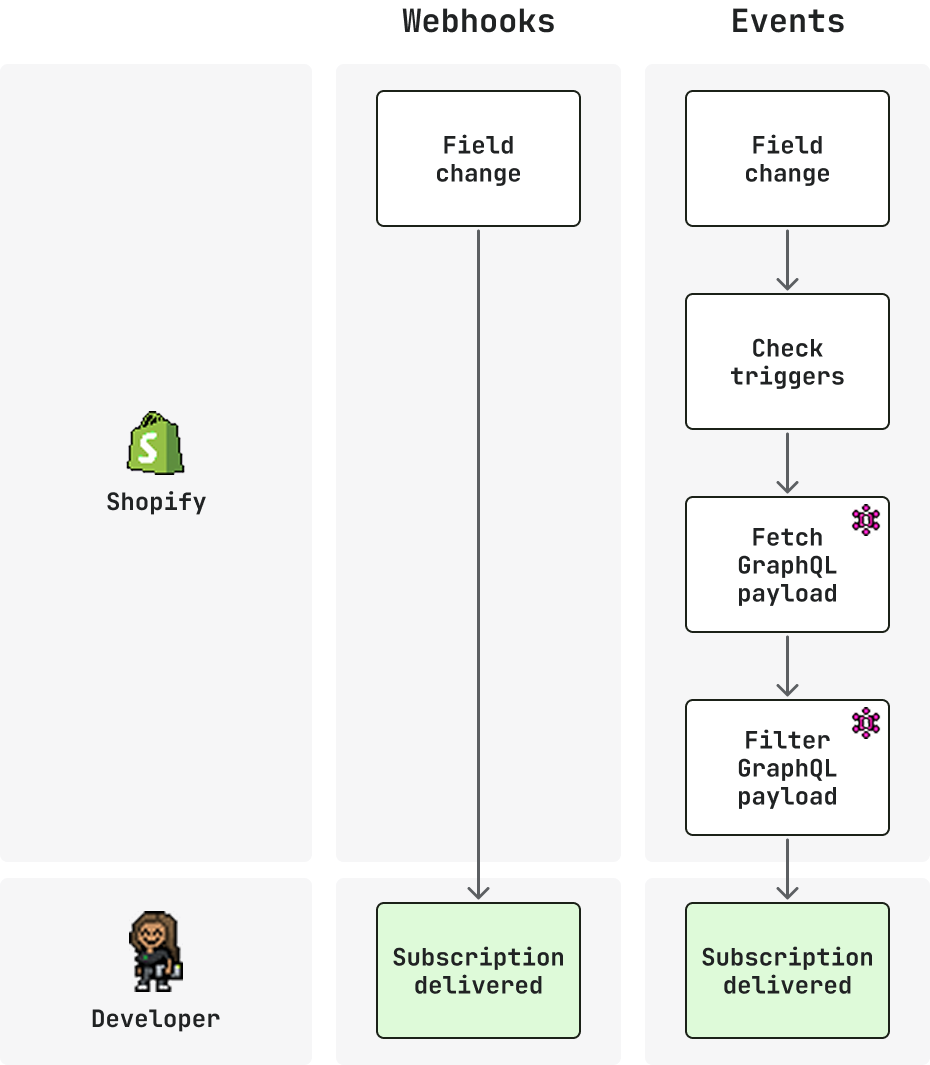
--- title: About Events and webhooks description: >- Events is Shopify's next-generation subscription mechanism for store changes. Webhooks remain fully supported. Use both side by side in shopify.app.toml. source_url: html: 'https://shopify.dev/docs/apps/build/events-webhooks' md: 'https://shopify.dev/docs/apps/build/events-webhooks.md' --- # Events and webhooks Shopify offers two mechanisms for subscribing to changes to commerce resources: Events and webhooks. Events is Shopify's next-generation subscription mechanism. It gives you field-level triggers, conditional filters, and custom GraphQL payloads. It supports precise subscriptions for specific GraphQL Admin objects, with control over what qualifies and what data arrives. You receive only the data you need, only when you need it. Webhooks have broad coverage across all Shopify resources, with flexible delivery destinations and support for API-managed subscriptions. **Developer preview:** Events is in developer preview on the [`unstable`](https://shopify.dev/docs/api/usage/versioning#making-requests-to-an-api-version) API version, available today for a subset of topics. Use Events for early testing ahead of a stable release and broader topic coverage. For production, use webhooks. Webhooks remain fully supported, cover all Shopify resources, and can be defined alongside Events subscriptions in the same `shopify.app.toml`. Adopt Events topic by topic while keeping your existing webhook coverage in place. As Events expands topic coverage, it will become the primary subscription mechanism, with [migration guides](https://shopify.dev/docs/apps/build/events/migrate-from-webhooks) provided for each topic. Check the [Events reference](https://shopify.dev/docs/api/events) to see which topics are supported today. ## How it works The subscription workflow is the same for both Events and webhooks: * **Define a subscription**: Declare a topic and where to send deliveries. * **Filter deliveries**: Narrow which changes qualify. * **Receive a delivery**: Shopify sends a payload when a qualifying change happens. * **Verify deliveries**: Confirm the HMAC signature and deduplicate with unique IDs. * **Use the delivery**: Act on the payload in your Shopify app handlers. Where Events and webhooks diverge is in how much control you have over each stage. Events adds field-level triggers and conditional suppression to the filter stage, and a custom GraphQL query to shape the received payload. Webhooks covers a broader set of topics, and supports shop-specific subscriptions managed through the GraphQL Admin API. **Note:** Events and webhooks can coexist in the same `shopify.app.toml`. Use Events for supported topics and webhooks for everything else. As topic coverage expands, migrate subscriptions one at a time. ![Illustration of timeline for both Events and classic webhooks](https://shopify.dev/assets/assets/images/apps/webhooks-events/events-webhooks-DFFC02fh.png) ## Events Subscribe to topics with field-level triggers, custom GraphQL Admin API queries, and query filters. The following capabilities set Events apart from webhooks: * **Configuration:** `shopify.app.toml` only * **Topic format:** `topic = "Product"` + `actions = ["update"]` * **Field filtering:** `triggers` narrow updates to specific field changes * **Delivery filtering:** `query_filter` to suppress deliveries based on query results * **Payload shape:** Defined by your Custom GraphQL query * **Supported topics:** Subset of Shopify resources while in developer preview Define subscriptions in your app configuration file and receive deliveries only when the data you care about changes. [**Learn more ->**](https://shopify.dev/docs/apps/build/events) ##### shopify.app.toml ```toml [events] api_version = "unstable" [[events.subscription]] handle = "my_product_events" topic = "Product" actions = ["update"] triggers = ["product.variants.price"] uri = "/events/app/products-update" query = """ query price_change($productId: ID!, $variantsId: ID!){ productVariant(id: $variantsId) { id price } product(id: $productId) { status } } """ query_filter = "product.status:'ACTIVE'" ``` ##### Response ```json { "topic": "Product", "action": "update", "handle": "my_product_events", "data": { "productVariant": { "id": "gid://shopify/ProductVariant/456", "price": "24.99" }, "product": { "status": "ACTIVE" } }, "fields_changed": [ "product[id: 'gid://shopify/Product/123'].variants[id: 'gid://shopify/ProductVariant/456'].price" ], "query_variables": { "productId": "gid://shopify/Product/123", "variantsId": "gid://shopify/ProductVariant/456" } } ``` ## Webhooks Subscribe to any Shopify resource using topic strings. The following capabilities set webhooks apart from Events: * **Configuration:** `shopify.app.toml` or GraphQL Admin API * **Topic format:** `products/update` string * **Field filtering:** `include_fields` trim the payload to specific fields * **Delivery filtering:** `filter` to suppress deliveries using search syntax * **Payload shape:** Fixed, REST-shaped payload * **Supported topics:** All Shopify resources Define subscriptions in your app configuration file or manage them dynamically through the GraphQL Admin API. [**Learn more ->**](https://shopify.dev/docs/apps/build/webhooks) ##### shopify.app.toml ```toml [webhooks] api_version = "2026-04" [[webhooks.subscriptions]] topics = ["products/update"] uri = "/webhooks/products-update" include_fields = ["id", "status", "variants.id", "variants.price"] filter = "status:active" ``` ##### Response ```json { "id": 9554194432293, "status": "active", "variants": [ { "id": 123456789, "price": "29.99" } ] } ``` ## Subscribe to data on Shopify Dive deeper with these resources to accelerate development. #### [Create an Events subscription](https://shopify.dev/docs/apps/build/events/get-started) Set up your first Events subscription and process deliveries in your app. #### [Create webhook subscription](https://shopify.dev/docs/apps/build/webhooks/get-started) Set up your first webhook subscription and handle incoming deliveries. #### [Events reference](https://shopify.dev/docs/api/events) Browse supported topics, delivery structure, and filtering options for Events. #### [Webhook reference](https://shopify.dev/docs/api/webhooks) Browse the full list of webhook topics and their payload schemas. #### [Migrate to Events](https://shopify.dev/docs/apps/build/events/migrate-from-webhooks) Convert an existing webhook subscription to Events and start using triggers, queries, and delivery filtering.