About catalogs in Markets
A catalog is a set of products that's published and priced for certain customers based on specified conditions. For example, you can make a catalog of products for customers who are browsing the online store from Canada and the United States.
In this guide, you'll learn how to use catalogs to help merchants sell in different contexts, and some considerations for using catalogs to publish and price products.
Anchor to How it worksHow it works
A catalog represents a list of products to be published in a specified context, such as for international customers, certain business-to-business (B2B) customers, or customers on certain sales channels.
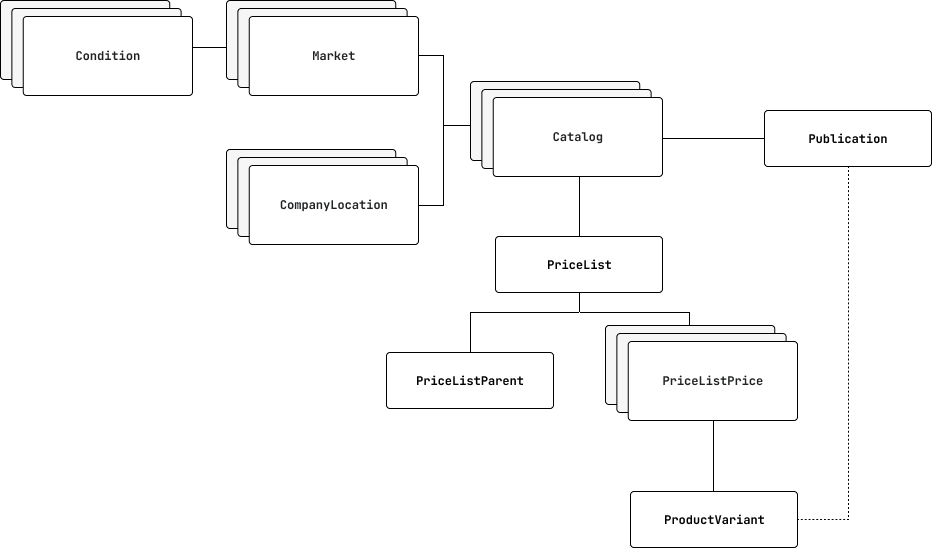
A Catalog has a Publication field that determines which products are visible to the customer when they visit the online store and checkout.
Each Catalog interface also has a priceList field that determines any price adjustments for its eligible contexts, such as a Market or a CompanyLocation for business-to-business (B2B) customers.
Anchor to Price listsPrice lists
For each PriceList, a PriceListParent can be used to control prices using percentage adjustments. You can use the PriceListPrice object to represent a final, fixed price for a single product variant.
If you use the PriceListPrice field to configure a fixed price for a product variant, then the fixed price takes precedence over any other adjustments that are defined at the price list level. For more information about how prices are determined, refer to Pricing prioritization.
Anchor to Specialized catalog patternsSpecialized catalog patterns
Catalogs support flexible configuration patterns that allow you to separate pricing and publication concerns. This flexibility can dramatically reduce the number of catalogs needed for complex scenarios.
Anchor to Pricing-only catalogsPricing-only catalogs
A pricing-only catalog is a catalog without an associated publication. You can create one by calling the catalogCreate mutation and omitting the publicationId field.
Pricing-only catalogs are simpler than regular catalogs and are often the better choice if you do not need to manage publications. They are more efficient and easier to maintain for most pricing use cases.
When a pricing-only catalog is assigned to a market or company location, product availability is determined by the sales channel publication (such as products published to the Online Store channel). The catalog only controls pricing through its price list.
Anchor to Publication-only catalogsPublication-only catalogs
A publication-only catalog is a catalog without an associated price list. You can create one by calling the catalogCreate mutation and omitting the priceListId field.
Publication-only catalogs are useful when you want to manage which products are visible to customers without applying custom pricing. When a publication-only catalog is assigned to a market or company location, customers see:
- Products: Only products published in the catalog's publication.
- Prices: Store default prices converted to the market's currency using multi-currency rules.
Publication-only catalogs are ideal when:
- You have fewer product assortments than price variations.
- You want to control product availability independently from pricing.
- You're implementing the two-catalog pattern described below.
Anchor to Full catalogsFull catalogs
A full catalog has both a price list and a publication. This is the traditional approach where a single catalog controls both pricing and product availability for a specific context.
Anchor to Two-catalog pattern for scaleTwo-catalog pattern for scale
Merchants with many price lists and product assortments can assign multiple catalogs to the same market or company location. This pattern separates pricing concerns from publication concerns, dramatically reducing catalog count.
For a detailed explanation and code examples of this pattern, see the two-catalog pattern in the main catalogs guide.
Anchor to API objects and relationshipsAPI objects and relationships
Before you start implementing catalogs, we recommend familiarizing yourself with the following API objects and their relationships:
| API object | Description |
|---|---|
Catalog | A set of products and prices that's published to a specified context, such as a market or B2B company location. |
Market | A group of one or more regions, company locations or retail locations to target sales. By creating a market, you can configure distinct, localized shopping experiences for customers. For example, you can configure currency, domains and languages, prices, published products, and theme customizations. |
MarketConditions | An attribute that qualifies a buyer for a market. For example, the region a buyer is located in, the company location they are purchasing on behalf of, or the retail location. |
CompanyLocation | A specified location or branch for a B2B company that can be targeted with a configured catalog of products and prices. To use B2B APIs and features, your store must be on a plan that supports B2B capabilities. |
Publication | A group of products that's published to a catalog. When a publication is associated with a catalog, customers that belong to the associated market or company location have access to view and purchase only the products within the publication. Prices and adjustments from the price list apply to the associated published products. When a publication isn't associated with a catalog, and the catalog is associated with a market or company location, then the published products are determined by the sales channel. For example, if a customer uses the online store and their catalog doesn't have an associated publication, then their product selection is all products that are published to the online store sales channel. |
PriceList | A list of prices for different products that are displayed to the customer if they belong to an eligible context. If a customer is eligible for multiple price lists, then the displayed price list follows the pricing prioritization rules. |
PriceListParent | The price adjustment rule, such as a percentage increase or decrease, that's applied to the product's or product variant's initial price. Adjustments can either reduce the initial prices with the You can also use the
|
PriceListPrice | The price of one product variant that's associated with the price list. The origin type of a price list price indicates whether the price list price is
|
ProductVariant | The variant that's associated with a price list and belongs to a publication. |
Anchor to Pricing prioritizationPricing prioritization
Price lists are displayed to customers through the online store and checkout based on their eligible catalogs. A catalog represents certain criteria about the customer that must be true for a price list to apply.
With the Markets API, you can manage multiple market conditions associated with a single buyer. For example, a buyer can be a Canadian customer and a B2B customer, and there can be multiple markets that meet both conditions in different ways.
When resolving a price for a product in a given buyer context, we first need to determine which catalogs are applicable to the buyer's context, this is done by first prioritizing the markets that a buyer is in:
- Catalogs that are directly connected to the buyer's company location
- Company Location Markets
- A Company Location Market Catalog that matches specific company locations
- A Company Location Market Catalog that matches all company locations
- Region Markets
- A Market Catalog that matches specific regions
- A Market Catalog that matches all regions
- App Catalogs (e.g. The Online Store)
For more information about how markets are prioritized, refer to Market inheritance.
After you've assessed which catalogs are applicable to the buyer's context, you can identify the catalogs that apply.
- Only catalogs of the highest precedence are considered in catalog resolution. For example, if a buyer is logged into a B2B customer account, then only applicable B2B catalogs are considered.
- If no catalogs are assigned to the highest precedence of the buyer, then Shopify defaults to the next most specific precedence. In this case, if a buyer is logged into a B2B customer account, but there are no company location catalogs defined, then Shopify falls back to region markets.
In the case of a tie the lowest price is used.
For example, you might have the following same markets - both with the same level of specificity - with two products.
| Market name | Price list ID | Product A price | Product B price |
|---|---|---|---|
| Canada and United States | 1 | $20 | $10 |
| Canada and Mexico | 2 | $15 | $12 |
A buyer in Canada receives the price for Product A from Canada and Mexico, and the price for Product B from Canada and United Stated because they have the lowest price.
After the price list is applied, pricing is determined by priority as described in the following diagram:
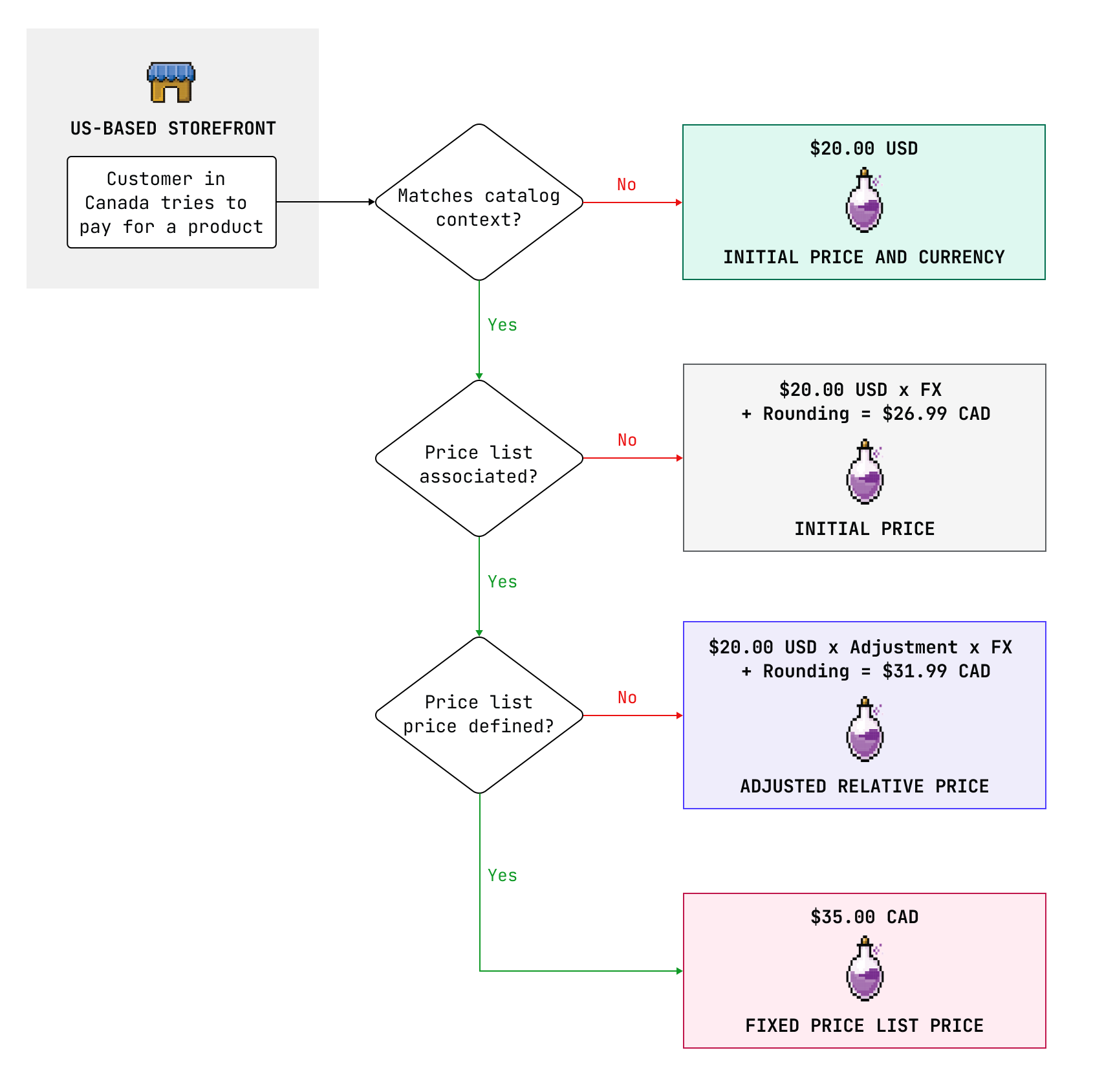
In the example scenario depicted in the diagram, a US-based merchant configures a price list for a Canadian market with the currency CAD that applies different pricing for Canadian customers:
- If the customer doesn't match a catalog's context, then the given price is the initial price (the product variant price) in the original currency.
- If a price list isn't associated with the catalog, then the initial price is applied using the selected currency rules. The example uses a foreign exchange rate of 1.3.
- If a
PriceListPriceisn't defined, then an adjusted relative price is calculated using thePriceListParentobject. Adjusted prices work in conjunction with exchange rules and rounding. In the example, the merchant sets a rounding rule to 0.99 for all currencies. A price adjustment of 20% applies in addition to the foreign exchange rate of 1.3. The price is calculated as $20 * 1.3 * 1.2 = $31.99. - If a
PriceListPriceis defined, then a specific fixed price is applied for the product. This price applies irrespective of foreign exchange rules or rounding.
When the market has multiple catalogs, the user receives the lowest price that's associated with those catalogs, whether it's a fixed or adjusted relative price.
When the market has multiple catalogs, the user receives the lowest price that's associated with those catalogs, whether it's a fixed or adjusted relative price.
Anchor to Foreign exchange and rounding rulesForeign exchange and rounding rules
If the customer's market doesn't match the store currency and a price list isn't associated with their catalog, then foreign exchange and rounding are applied to the initial price using either automatic or manual multi-currency rules.
However, if the customer's market doesn't match the store currency, and an adjusted relative price has been applied through the price list parent, then foreign exchange and rounding are applied along with the adjustment. If a fixed price list price is applicable, then foreign exchange and rounding aren't applied because the prices are already in the desired currency.
Foreign exchange and rounding are applicable to product variants and the adjusted relative price. Foreign exchange and rounding aren't applicable to fixed price list prices.
Foreign exchange and rounding are applicable to product variants and the adjusted relative price. Foreign exchange and rounding aren't applicable to fixed price list prices.
Anchor to ConsiderationsConsiderations
- Multiple catalogs can be assigned to multiple markets.
- Catalogs can be assigned to either a market or to a company location directly.
- Market types have different levels of priority, with more specific markets having higher priority for pricing.
- If a buyer's context matches multiple markets of the same priority, then the price is determined by the lowest price within those markets' catalogs. This enables the two-catalog pattern.
- If a buyer's context matches a single market with multiple catalogs, then the price is determined by the lowest price within the market's catalogs.
- Price adjustments are only applied to products that are included in applicable publication catalogs.
Anchor to Developer tools and resourcesDeveloper tools and resources
Explore the following developer tools and resources to learn more about building with catalogs:


