---
title: 'Admin, installation, and OAuth performance'
description: >-
Learn how to improve the performance of apps embedded in the Shopify admin,
and for your OAuth flow.
source_url:
html: 'https://shopify.dev/docs/apps/build/performance/admin-installation-oauth'
md: 'https://shopify.dev/docs/apps/build/performance/admin-installation-oauth.md'
---
# Admin, installation, and OAuth performance
These guidelines apply to [apps in the Shopify admin](https://shopify.dev/docs/apps/build/app-surfaces#embedded-app-pages) only.
***
## Improve your app's loading performance
Loading performance is an important part of the user experience when using apps in the Shopify admin. When your app is slow to load, it dissuades users from adopting it, increases bounce rates, and decreases overall usage.
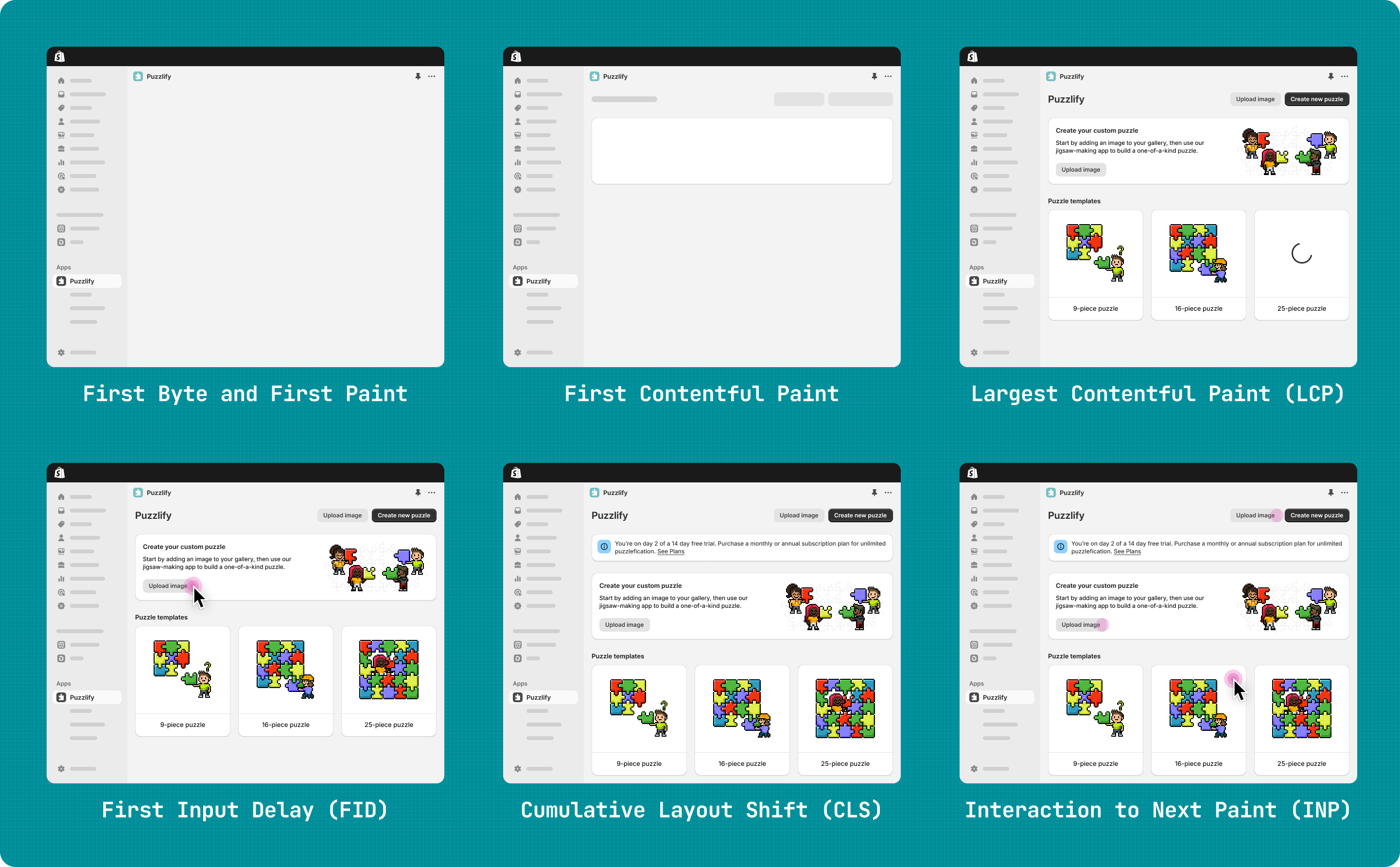
You can also improve your app's loading experience by minimizing visual noise, such as layout shifts, and clearly indicating loading progress. As a result, users perceive your app as faster and more responsive, even if the loading time doesn't change. Refer to [Using Polaris web components](https://shopify.dev/docs/api/polaris/using-polaris-web-components) for a complete guide on designing a high-quality experience.
### Measure your app's loading performance
Shopify uses Web Vitals to measure your app's performance in the Shopify admin. Each time a user loads your app, we gather and save the Web Vitals metrics in order to better understand the user experience. To learn more about Web Vitals, you can refer to the introduction on [web.dev](https://web.dev/vitals/).
**Note:**
To enable Shopify to gather Web Vitals metrics, you might need to update to the latest version of App Bridge by adding the [App Bridge script](https://shopify.dev/docs/api/app-home#getting-started) to your app's `head`. The App Bridge script can exist alongside App Bridge installed as a packaged dependency and does not require a full migration.
Updating your app to a version that supports admin performance tracking is a prerequisite to reaching [Built for Shopify](https://shopify.dev/docs/apps/store/built-for-shopify) status.
Shopify's Web Vitals package measures your app's performance each time a merchant launches your app through any route. Although Shopify doesn't modify scores provided by Web Vitals, there are some differences in how they're recorded in embedded apps compared to standard web development:
* Embedded apps run in iFrames, so tools like [Lighthouse](https://shopify.dev/docs/storefronts/themes/tools/lighthouse-ci) might not accurately capture performance.
* To normalize collecting metrics across different application stacks, Shopify records Web Vitals events in a separate runtime from your application.
To help you use performance data and ensure your app is performing optimally, Shopify provides the following key features:
* The ability to monitor Web Vitals in real-time
* Tools for debugging
The following sections describe how you can use these features to enhance your app's performance.
#### Monitor Web Vitals
The Web Vitals API allows you to access performance metrics directly in your app, giving you real-time insights into your app's performance. You can implement it using the following code:
```html
```
The callback is called with Web Vitals data, allowing you to send it to your own server for analysis. Your app also receives country-level geo information for each web vitals event:
* This field lets you understand performance based on location, enabling region-specific debugging and optimizations.
* No additional setup required to receive country-level information. Existing callbacks automatically receive the country field.
* Apps can segment performance by geography for more accurate diagnostics.
By monitoring these metrics, you can identify performance issues as they occur and make necessary optimizations.
#### Debugging Web Vitals
While monitoring provides ongoing insights, sometimes you need to dig deeper to understand specific performance issues. To help with this, Shopify provides a debugging tool for Web Vitals.
To enable detailed logging of Web Vitals as they're recorded and saved, add the `shopify-debug` meta flag to your application's head:
```html
```
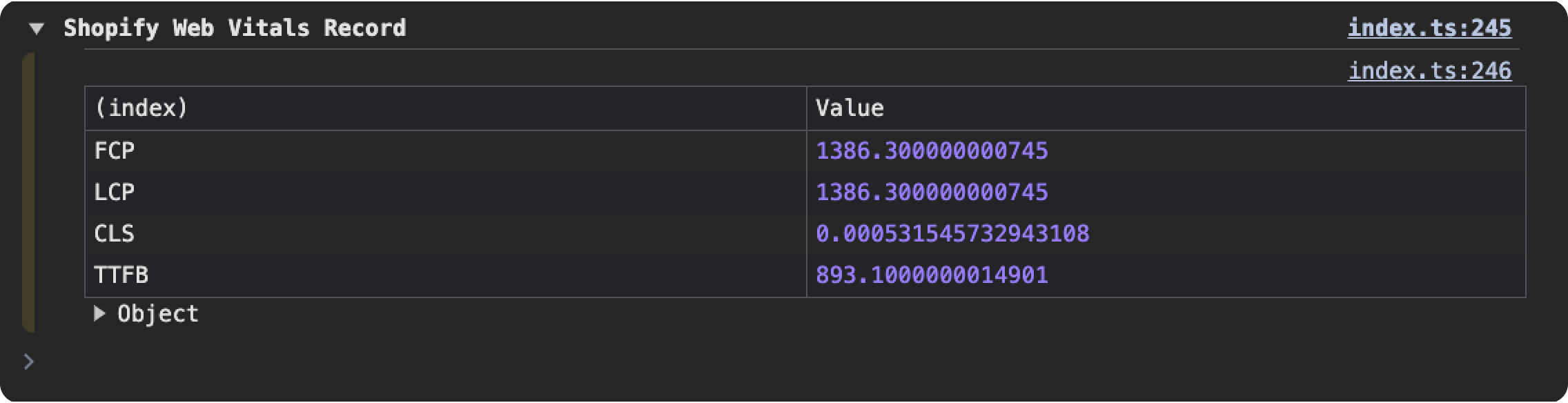
The debug flag enables two sets of console logs that provide valuable information about your app's performance:
* Real-time logs directly from Web Vitals, including attribution data for slow-loading elements or inefficient routines

* Send-time logs showing the final values recorded by Shopify
**Note:**
If you use another tool to measure your page's performance, it might take measurements more frequently. For example, some tools might measure the performance of each navigation between pages of your app. This can cause discrepancies between the values displayed in the Partner Dashboard and the metrics gathered by these tools.
***
## Built for Shopify performance criteria
Apps that meet the mandatory criteria on this page, and meet other applicable criteria, are eligible for [Built for Shopify](https://shopify.dev/docs/apps/launch/built-for-shopify) status in the Shopify App Store.
### Largest Contentful Paint
[Largest Contentful Paint (LCP)](https://web.dev/lcp/) measures the time from when a user begins loading your page to when the largest image or block of text is displayed. It tracks how quickly your app can display its main content to users.
**Mandatory:**
75% of the time, your app should have a Largest Contentful Paint of 2.5 seconds or less, measured over a 28 day period.
### Cumulative Layout Shift
[Cumulative Layout Shift (CLS)](https://web.dev/cls/) measures your app's visual stability. Unstable user interfaces can be frustrating for users, especially when an element, such as a button, that they're trying to interact with moves suddenly. Cumulative Layout Shift quantifies these kinds of disruptive experiences so you can identify and remove them.
**Mandatory:**
75% of the time, your app should have a Cumulative Layout Shift of 0.1 or less, measured over a 28 day period.
### Interaction to Next Paint
[Interaction to Next Paint](https://web.dev/inp/) measures a page's overall responsiveness to user interactions by observing the latency of all click, tap and keyboard interactions that occur throughout the lifespan of a user's visit to a page. A low INP score means your app is able to quickly respond to all, or the vast majority, of user interactions. Interaction to Next Paint is only collected for apps using the latest version of App Bridge.
**Mandatory:**
75% of the time, your app should have an Interaction to Next Paint of 200 milliseconds or less, measured over a 28 day period.
***
## Optimize your OAuth flow
Because [authorization](https://shopify.dev/docs/apps/build/authentication-authorization) is the first interaction that users have with your app UI, you should make sure that it's a positive experience. Follow these best practices for optimizing your OAuth performance to make your app authorization process smoother, faster, and more polished.
Shopify strongly recommends you use [the React Router app template](https://github.com/Shopify/shopify-app-template-react-router), which already has OAuth implemented, and [API libraries](https://shopify.dev/docs/api) that include methods that simplify the implementation process. Using the React Router app template helps to ensure that your implementation is complete, and that your app follows our OAuth best practices that are outlined here. You can build an app using the React Router app template by initializing an app using Shopify CLI. [Learn more](https://shopify.dev/docs/apps/build/scaffold-app).
If you don't want to use an app template, then you can use the same API libraries that the templates use to implement OAuth in your own app, or you can implement OAuth yourself. To follow Shopify best practices, all embedded apps should use the grant type called [token exchange](https://shopify.dev/docs/apps/build/authentication-authorization/access-tokens/token-exchange). Token exchange is a more efficient way to authorize embedded apps, and requires only a session token to be exchanged for an access token. This eliminates the need for multiple redirects, and improves performance. To use token exchange, you need to update your app to [use Shopify CLI to manage your app's configuration](https://shopify.dev/docs/apps/build/cli-for-apps/app-configuration). Doing so automatically enables [Shopify managed installation](https://shopify.dev/docs/apps/build/authentication-authorization/app-installation) for your app, dramatically improving the user experience for installation and scope updates and eliminating the need for your app to handle these flows.
***