Extending Shopify POS with UI extensions
With Shopify POS UI extensions, you can add custom functionality directly into Shopify's point-of-sale interface. For example, you can offer loyalty program enrollment at checkout, or apply custom discounts based on what customers are purchasing.
This guide explains how POS UI extensions work. For a step-by-step tutorial to help you start building, see Getting started with POS UI extensions.
Anchor to BenefitsBenefits
Apps built with POS UI extensions provide:
- Native performance: Extensions render as native components for faster load times.
- Consistent design: Automatically match Shopify's design system and receive updates.
- Guided development: Use pre-built components and defined targets.
- Cross-platform compatibility: Offer an identical experience across iOS and Android platforms.
Anchor to What you can buildWhat you can build
Apps built with POS UI extensions can help merchants at every stage of the purchase process:
- Discount and promotion apps: Apply custom discounts, loyalty rewards, and special offers.
- Inventory management tools: Alert merchants to low inventory, show real-time product availability across all physical stores, or suggest ship-from-store options.
- Customer relationship apps: Update customers' profiles and purchase histories or send personalized emails or text messages after a purchase.
- Payment and checkout enhancements: Build custom payment flows, customize receipts, or manage gift card balances.
- Analytics and reporting: Display real-time sales data, staff performance metrics, and business insights.
Anchor to How it worksHow it works
POS UI extensions are built with Polaris, Shopify's unified system for building app interfaces. They're made up of three interconnected parts: targets that determine where your extension appears in the POS interface, target APIs that provide access to data and functionality based on your chosen target, and web components that define which interface elements you can use.
Anchor to TargetsTargets
Targets define where in the Shopify POS interface your custom UI appears and what types of UI components you can render there. You can think of defining a target as creating a container at a particular location in the POS UI, into which you can render web components. There are three types of targets:
- Tiles: Used to display tiles on the smart grid.
- Actions: Used to launch modals or full-screen views from menu item buttons.
- Blocks: Used to display custom sections within screens.
For example, the target pos.product-details.block.render creates a hook on the product details screen where you can render a custom section.
Actions have two varieties: menu item and modal. Use these together to create buttons that launch modals: use an .action.menu-item.render target to render a button in a menu, and then use the corresponding .action.render target to render a modal when the button is tapped.
You define the targets for your extension in its configuration file. To see a full list of the targets you can define, and to learn more about using them, see the POS UI extensions reference.
Anchor to Target APIsTarget APIs
Target APIs read data and perform operations in Shopify POS like updating cart details, applying discounts, or showing a toast. Many of these APIs are reactive; you can subscribe to changes using standard Preact hooks and automatically perform operations or update your UI when the underlying data changes.
Available APIs vary by target type. To see which APIs can be used with which targets, and what operations each API supports, see the POS UI extensions reference.
Extensions can also query the GraphQL Admin API directly using standard fetch() calls. You can use the GraphQL Admin API to perform operations like looking up a customer's order history with the orders query, or checking the availability of products at other locations with the inventoryItem or product queries.
Anchor to Web componentsWeb components
Components are the building blocks you use to render your custom UI in the POS interface. Shopify's UI toolkit provides a wide range of web components like buttons, tiles, and modals that match the Shopify POS design system. You can combine components and nest them inside each other. For example, a modal can contain buttons, text, forms, and media.
To add a UI component to the POS app interface, you write code that renders that component in the target where you want it to appear. The components you can use with a target depend on that target's type. For example, tile targets like pos.home.tile.render can only render a tile.
To see which components your chosen targets support, see the POS UI extensions reference.
Anchor to Extension-only and server-hosted appsExtension-only and server-hosted apps
Some extensions don't need an app hosted on a server—all the functionality runs on the merchant's device within the extension itself. We call these extension-only apps. You can follow an example to build an extension-only app in the getting started tutorial. Here's how data flows through an an extension-only app:
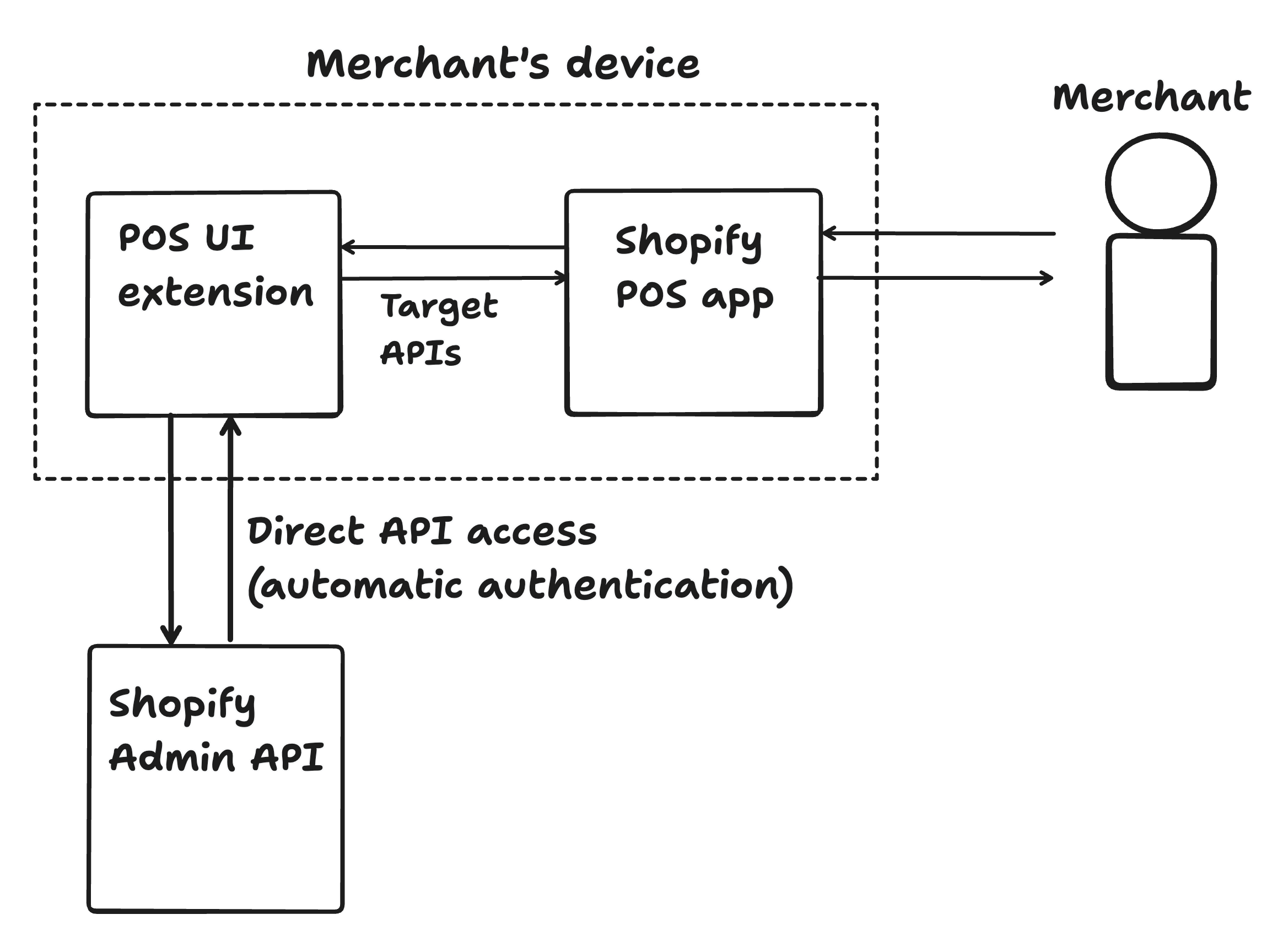
Extension-only apps have some limitations though. If you want to do any of the following, you'll need to implement a backend by hosting an app on a server that your extension connects to:
- Make calls to Shopify APIs other than the Admin API
- Integrate with external services or third-party APIs
- Store secrets or sensitive business logic
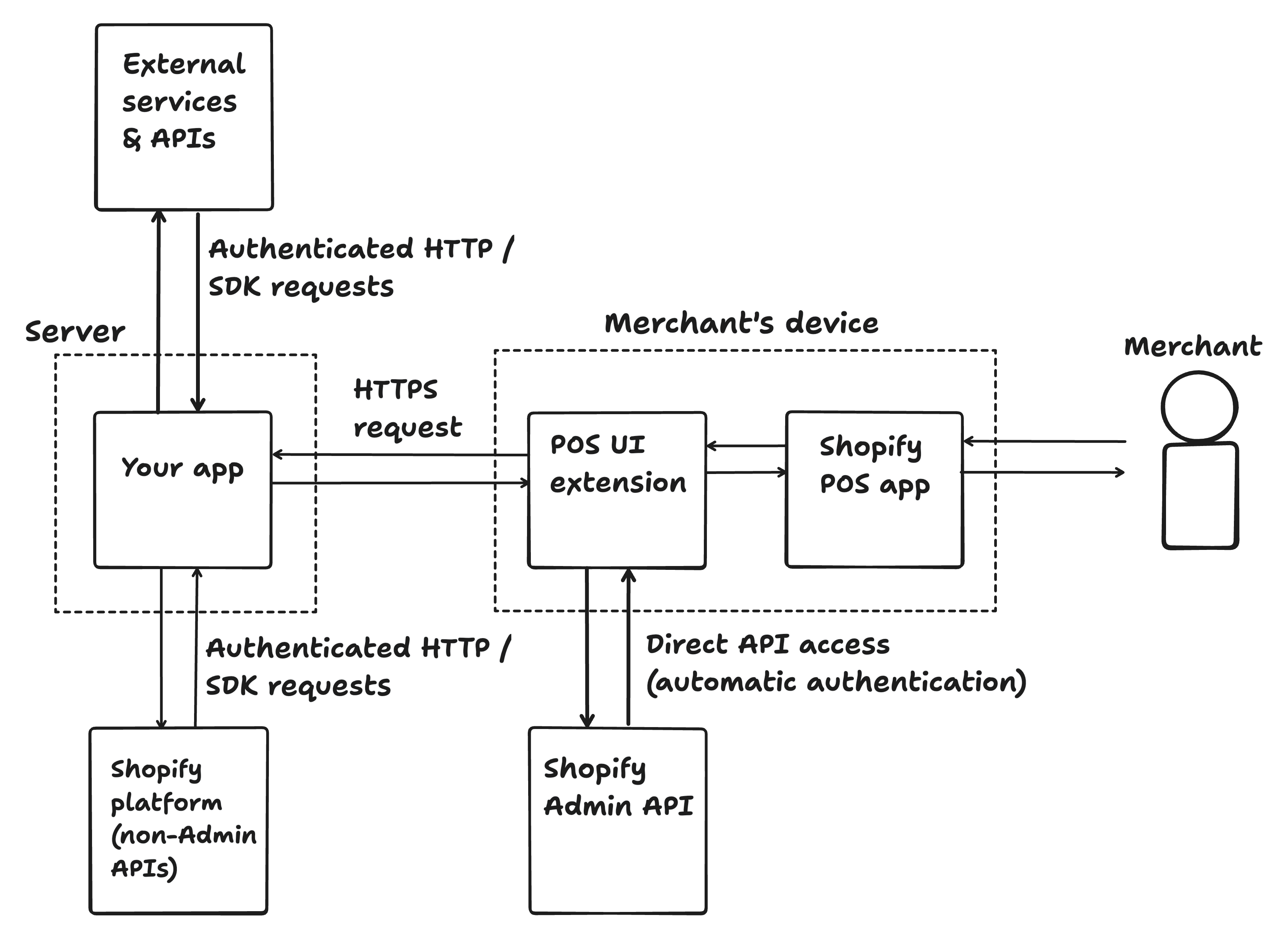
POS UI extensions are client-side JavaScript applications, like React or Vue apps. Follow the same client-side and server-side patterns you'd use in traditional web applications, and keep secrets and business logic in your server-hosted app.
The following diagram illustrates the flow of data between a POS UI extension, Shopify POS, the Shopify platform, and a server-hosted app. To follow an example of building an extension that uses a server-hosted app, see Build a print UI extension.
Anchor to Build for Point of SaleBuild for Point of Sale
The following guides walk through common use cases for POS UI extensions. For the full reference, see POS UI extensions.
Anchor to Extension typesExtension types


Anchor to DiscountsDiscounts
Let merchants apply custom discounts at checkout in person. See all discounts guides.


Anchor to Purchase optionsPurchase options
Let merchants sell subscriptions in person (requires POS app version 10.13+). See all purchase options guides.


Anchor to Next stepsNext steps
- Follow the Getting started with POS UI extensions tutorial to build your first POS UI extension.
- Explore the POS UI extensions reference for available targets, target APIs, and web components.