---
title: Create the UI for a pre-order and Try Before You Buy (TBYB) app
description: >-
Learn how to add functionality to your app that can help merchants create
pre-orders.
source_url:
html: >-
https://shopify.dev/docs/apps/build/purchase-options/deferred/create-deferred-purchase-app/create-ui
md: >-
https://shopify.dev/docs/apps/build/purchase-options/deferred/create-deferred-purchase-app/create-ui.md
---
# Create the UI for a pre-order and Try Before You Buy (TBYB) app
Previously, you set up the foundation of your app. You're now ready to add app components that can help merchants create their pre-orders.
On the app page, you want to add functionality that enables merchants to do the following tasks:
* Set the pre-order name
* Configure the delivery, inventory, and billing policies for the pre-order
* Select products that will have the pre-order
You'll use [Polaris](https://shopify.dev/docs/api/polaris) and [App Bridge](https://shopify.dev/docs/api/app-home/web-components) to build the user interface. You'll use GraphQL Admin API mutations and queries to create and retrieve pre-orders.
At the end of this tutorial, you'll have an understanding on how to create pre-orders. This app will be simple, but you'll learn where to find resources to build more complex features on your own.
**Note:**
The sample app in this tutorial is assigned with a `PRE_ORDER` category. When you create your own app, you can assign a category based on the app's purpose. For more information, refer to [Selling plans category](https://shopify.dev/docs/apps/build/purchase-options/deferred#selling-plan-categories).
***
## What you'll learn
In this tutorial, you'll learn how to do the following tasks:
* Add new routes to your app's server that call the Shopify Admin API
* Add UI to create a pre-order
* Test your app on a dev store
This tutorial is not intended to give you a full example on how to build a pre-order application, but more a reference starter.
***
## Requirements
* Complete the [Getting started](https://shopify.dev/docs/apps/build/purchase-options/deferred/create-deferred-purchase-app/start-building) tutorial to set up the foundation of your app.
* Familiarize yourself with [selling plans](https://shopify.dev/docs/apps/build/purchase-options) and [pre-orders and try before you buy](https://shopify.dev/docs/apps/build/purchase-options/deferred).
***
## Step 1: Create the pre-order creation route
Create a file `app.create.jsx` under `app/routes`. This file will create the route `/app/create` that will let you create a pre-order.
## app/routes/app.create.jsx
## Create pre-order route
```jsx
import { Form, useActionData, useNavigation } from "react-router";
import { useState } from "react";
import { authenticate } from "../shopify.server";
import db from "../db.server";
export const action = async ({ request }) => {
const { admin } = await authenticate.admin(request);
const formData = await request.formData();
const title = formData.get("title");
const productId = formData.get("productId");
const variantId = formData.get("variantId");
const startDate = formData.get("startDate");
const endDate = formData.get("endDate");
if (!title || !productId || !variantId || !startDate || !endDate) {
return json(
{ error: "All fields are required" },
{ status: 400 }
);
}
try {
await db.preOrder.create({
data: {
title,
productId,
variantId,
startDate: new Date(startDate),
endDate: new Date(endDate),
shopDomain: admin.shop.domain,
},
});
return { success: true };
} catch (error) {
return { error: error.message }, { status: 500 };
}
};
export default function CreatePreOrder() {
const nav = useNavigation();
const actionData = useActionData();
const [selectedProduct, setSelectedProduct] = useState(null);
const [selectedVariant, setSelectedVariant] = useState(null);
const isLoading = nav.state === "submitting";
return (
);
}
```
This code creates a basic form to create pre-orders. The form includes fields for:
* Pre-order title
* Start date
* End date
* Product ID
* Variant ID
When submitted, it will:
1. Validate that all required fields are present
2. Create a new pre-order record in the database
3. Show success/error messages accordingly
**Info:**
For now, we're using simple text inputs for product and variant IDs. In a later step, we'll add proper product selection using the Shopify API.
***
## Step 2: Create app components
Create the following app components:
* [name](#create-the-name-component)
* [checkout charge](#create-the-checkout-charge-component)
* [product picker](#create-the-product-picker-component)
**Tip:**
We recommend keeping your app component files in the `app/components` folder.
### Create the name component
Create a component that enables merchants to set the pre-order name. The name component includes the following Polaris components:
* [Section](https://shopify.dev/docs/api/app-home/web-components/layout-and-structure/section)
* [Text field](https://shopify.dev/docs/api/app-home/web-components/forms/text-field)

In your `app/routes/app.create.jsx` file, add the following code:
## app/routes/app.create.jsx
```jsx
import { useState } from "react";
export default function Index() {
const [sellingPlanName, setSellingPlanName] = useState("");
const handleSellingPlanNameChange = (newValue) => {
setSellingPlanName(newValue);
};
return (
handleSellingPlanNameChange(e.target.value)}
required
/>
);
}
```
### Create the checkout charge component
When merchants create a pre-order, they can decide the initial charge when customers check out. The type of charge can be set with a `PERCENTAGE` or `PRICE` type. Learn more about [selling plan checkout charge types](https://shopify.dev/docs/api/admin-graphql/latest/enums/SellingPlanCheckoutChargeType) and [selling plan checkout charge values](https://shopify.dev/docs/api/admin-graphql/2024-01/unions/SellingPlanCheckoutChargeValue).
The checkout charge component includes the following Polaris components:
* [Section](https://shopify.dev/docs/api/app-home/web-components/layout-and-structure/section)
* [Text field](https://shopify.dev/docs/api/app-home/web-components/forms/text-field)
* [Date picker](https://shopify.dev/docs/api/app-home/web-components/forms/date-picker)
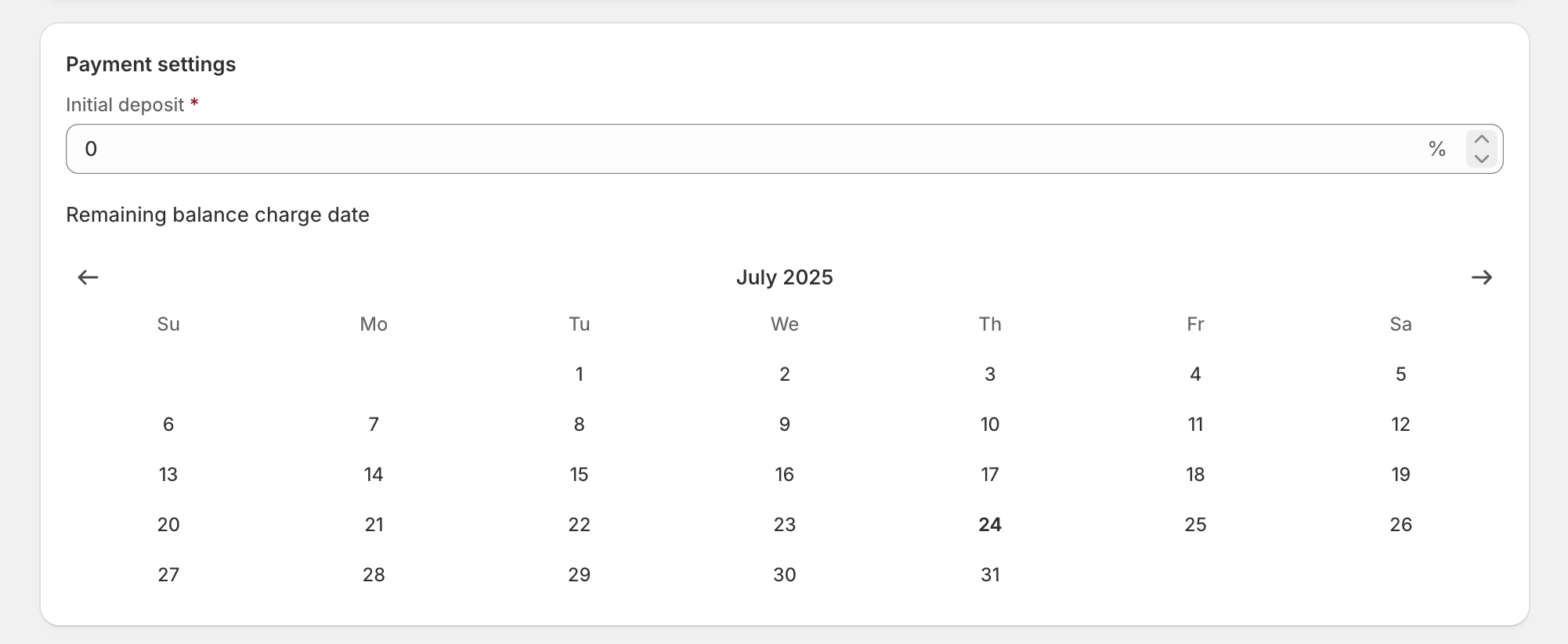
In the `app/components` folder, create the file `checkoutCharge.jsx`.
## app/components/CheckoutCharge.jsx
```jsx
export default function CheckoutCharge({
selectedDates,
setSelectedDates,
initialCheckoutCharge,
setInitialCheckoutCharge,
isLoading,
}) {
return (
setInitialCheckoutCharge(e.target.value)}
min="0"
max="100"
disabled={isLoading}
required
/>
{initialCheckoutCharge < 100 && (
Remaining balance charge date
)}
);
}
```
### Create the product picker component
Create a component that enables merchants to select products that will have the pre-order. The product selection component includes the [Resource Picker API](https://shopify.dev/docs/api/app-home/apis/resource-picker).
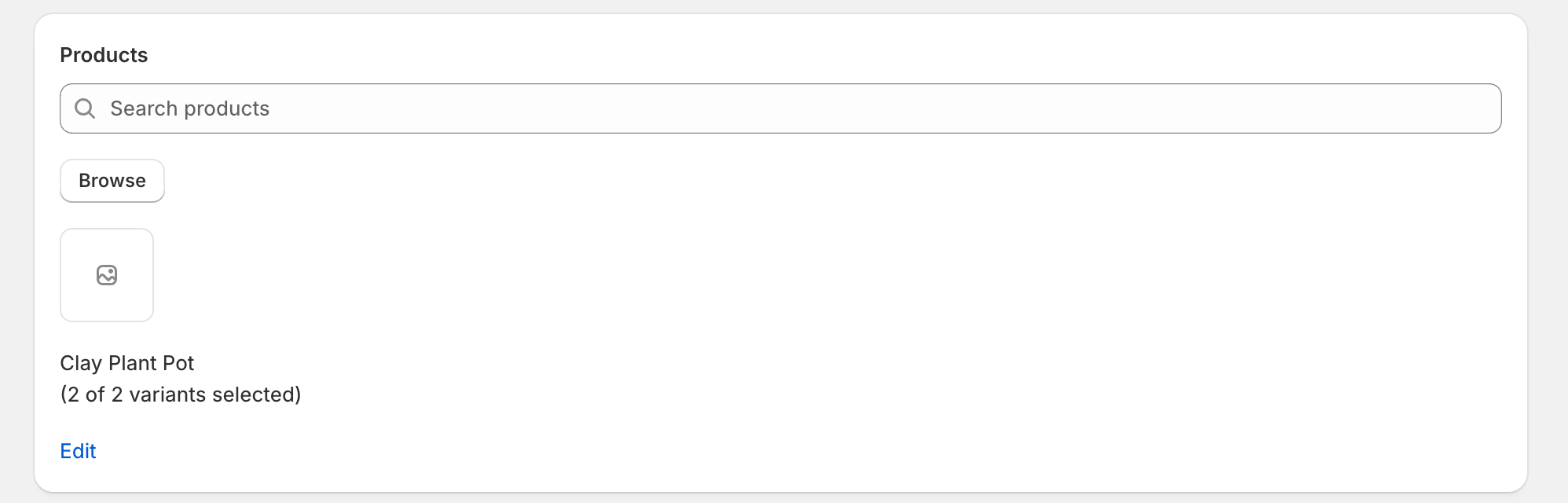
In the `app/components` folder, create the file `ProductPicker.jsx`.
## app/components/ProductPicker.jsx
```jsx
export default function ProductPicker({
selectedProducts,
setSelectedProducts,
isLoading,
}) {
async function selectProducts(selectedProductIds, searchQuery) {
const selectedItems = await window.shopify.resourcePicker({
selectionIds: selectedProductIds,
multiple: true,
query: searchQuery,
type: "product",
action: "select",
});
if (selectedItems) {
setSelectedProducts(selectedItems);
}
}
return (
selectProducts([], "")} disabled={isLoading}>
Browse
{selectedProducts && selectedProducts.length > 0 && (
{selectedProducts.map(
({ id, images, variants, title, totalVariants }, index) => {
const hasImage = images && images.length;
return (
{title}
{totalVariants !== undefined ? (
({variants?.length || totalVariants} of{" "}
{totalVariants} variants selected)
) : null}
selectProducts(selectedProducts)}
>
Edit
);
},
)}
)}
);
}
```
***
## Step 3: Action to create the pre-order
The next step is to create the `action` that will make it possible to create the pre-order with all the information we are gathering with the previous created components. Add the action inside your `app/routes/app.create.jsx` file. The following action is currently showing a working example on how to use the [sellingPlanGroupCreate](https://shopify.dev/docs/api/admin-graphql/latest/mutations/sellingPlanGroupCreate) mutation to create a pre-order, this example can also be updated to create a Try before you buy.
## app/routes/app.create.jsx
```jsx
export const action = async ({ request }) => {
const { admin } = await authenticate.admin(request);
const form = await request.formData();
const sellingPlanName = form.get("sellingPlanName");
const initialCheckoutCharge = form.get("initialCheckoutCharge");
const selectedProducts = form.get("selectedProducts");
const selectedProductsArray = selectedProducts
? selectedProducts.split(",")
: [];
const selectedDates = form.get("selectedDates");
const haveRemainingBalance = Number(initialCheckoutCharge) < 100;
const response = await admin.graphql(
`#graphql
mutation sellingPlanGroupCreate($input: SellingPlanGroupInput!, $resources: SellingPlanGroupResourceInput!) {
sellingPlanGroupCreate(input: $input, resources: $resources) {
sellingPlanGroup {
id
}
userErrors {
field
message
}
}
}`,
{
variables: {
input: {
name: sellingPlanName,
merchantCode: "Pre-order",
options: ["pre-order"],
position: 1,
sellingPlansToCreate: [
{
name: "Pre-order with deposit",
options: "Pre-order with deposit",
category: "PRE_ORDER",
billingPolicy: {
fixed: {
checkoutCharge: {
type: "PERCENTAGE",
value: {
percentage: Number(initialCheckoutCharge),
},
},
remainingBalanceChargeTrigger: haveRemainingBalance
? "EXACT_TIME"
: "NO_REMAINING_BALANCE",
remainingBalanceChargeExactTime: haveRemainingBalance
? new Date(selectedDates).toISOString()
: null,
},
},
deliveryPolicy: {
fixed: {
fulfillmentTrigger: "UNKNOWN",
},
},
inventoryPolicy: {
reserve: "ON_FULFILLMENT",
},
},
],
},
resources: {
productIds: selectedProductsArray,
},
},
},
);
const responseJson = await response.json();
const userErrors = responseJson.data?.sellingPlanGroupCreate?.userErrors;
if (userErrors && userErrors.length > 0) {
return {
errors: userErrors.map(error => error.message).join(', ')
};
}
return {
sellingPlanGroup:
responseJson.data?.sellingPlanGroupCreate?.sellingPlanGroup?.id,
};
```
***
## Step 4: Complete create page
The following code illustrate the complete code for the `app/routes/app.create.jsx` file. We use the [Toast API](https://shopify.dev/docs/api/app-home/apis/toast) to add feedback when a merchant is creating a new pre-order.
## app/routes/app.create.jsx
```jsx
import { useState, useEffect } from "react";
import { useActionData, useNavigation, useSubmit, useNavigate } from "react-router";
import { authenticate } from "../shopify.server";
import ProductPicker from "../components/ProductPicker";
import CheckoutCharge from "../components/CheckoutCharge";
import { boundary } from "@shopify/shopify-app-react-router/server";
export const action = async ({ request }) => {
const { admin } = await authenticate.admin(request);
const form = await request.formData();
const sellingPlanName = form.get("sellingPlanName");
const initialCheckoutCharge = form.get("initialCheckoutCharge");
const selectedProducts = form.get("selectedProducts");
const selectedProductsArray = selectedProducts
? selectedProducts.split(",")
: [];
const selectedDates = form.get("selectedDates");
const haveRemainingBalance = Number(initialCheckoutCharge) < 100;
const response = await admin.graphql(
`#graphql
mutation sellingPlanGroupCreate($input: SellingPlanGroupInput!, $resources: SellingPlanGroupResourceInput!) {
sellingPlanGroupCreate(input: $input, resources: $resources) {
sellingPlanGroup {
id
}
userErrors {
field
message
}
}
}`,
{
variables: {
input: {
name: sellingPlanName,
merchantCode: "Pre-order",
```
***
## Next steps
The code that you just created is only a first step to create a complete pre-order or Try before you buy app. You can use the following API object to improve your application:
* [SellingPlanCheckoutCharge](https://shopify.dev/docs/api/admin-graphql/2024-01/objects/SellingPlanCheckoutCharge) that will let you decide how customers are charged with pre-order and TBYB.
* [SellingPlanFixedBillingPolicy](https://shopify.dev/docs/api/admin-graphql/2024-01/objects/SellingPlanFixedBillingPolicy) that will let you decide how customers will handle the remain balance customer will need to pay for a pre-order and TBYB
* [SellingPlanFixedDeliveryPolicy](https://shopify.dev/docs/api/admin-graphql/2024-01/objects/SellingPlanFixedDeliveryPolicy) that will let you decide how fulfillment will work with you pre-order and TBYB.
* [SellingPlanInventoryPolicy](https://shopify.dev/docs/api/admin-graphql/2024-01/objects/SellingPlanInventoryPolicy) that will let you decide how the inventory will update with you pre-order and TBYB.
***