Scheduled publishing
Merchants can schedule products to be published to a sales channel at a specific datetime. Common use cases include product drops and timed sales, where merchants want to reserve sufficient inventory to meet spikes in customer demand.
Anchor to Validation workflowValidation workflow
If your channel app requires products to meet requirements before they can display to customers, then you need to validate products before their scheduled publication datetime. This gives merchants time to update products and resubmit them for validation. Otherwise, the channel validates the products at the scheduled datetime, and any updates required might delay their publication.
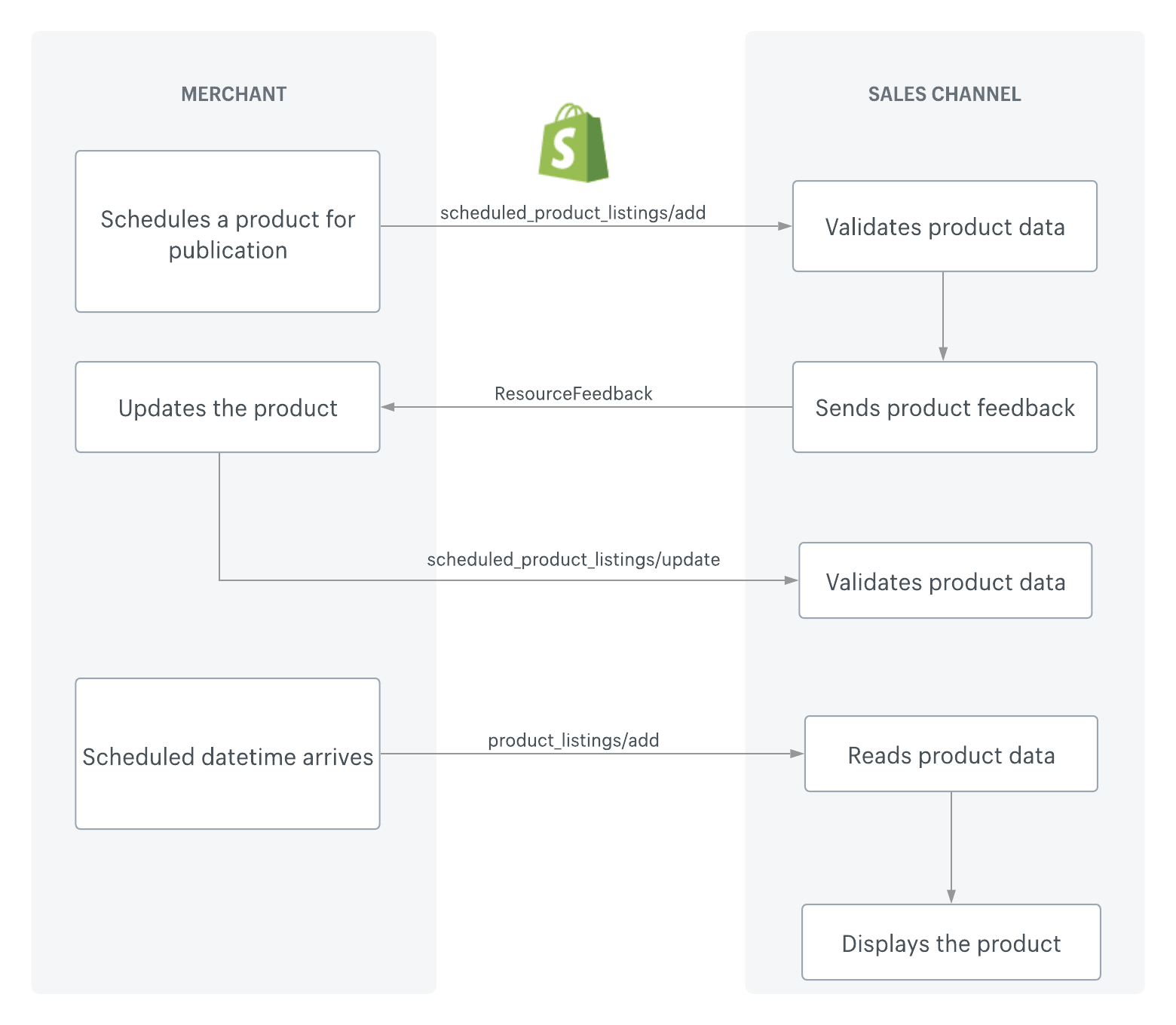
The following is the recommended workflow for channels that include validation:
- A merchant schedules a product to be published on the channel app at a specified datetime.
- Shopify sends a
scheduled_product_listings/addevent to the channel app. - The channel app validates the product against requirements for displaying it on the channel.
- If the product fails validation, then the channel app sends feedback to the merchant using the
ResourceFeedbackobject. - The merchant updates the product to meet the requirements.
- Shopify sends a
scheduled_product_listings/updateevent to the channel app. - The channel app validates the product against the requirements.
- At the scheduled datetime, Shopify sends a
product_listings/addevent. - The channel app reads the product data and displays the product.
Anchor to RequirementsRequirements
- You've completed the getting started tutorials.
- Your app requires the
read_product_listingsaccess scope and theread_publicationsaccess scope.
Anchor to Step 1: Identify products that are scheduled for publicationStep 1: Identify products that are scheduled for publication
Request resourcePublicationsV2 with onlyPublished: false on the GraphQL Admin API's Product object. Setting onlyPublished to false includes publications that are scheduled for the future, not only the ones that are currently published.
By default, the connection returns the product's publications to every app sales channel, not only yours. Find the node whose publication.id matches your channel's publication. If that node has a publishDate in the future and isPublished is false, then the product is scheduled to display on your channel at the specified datetime.
POST /api/{api_version}/graphql.json
GraphQL query
{
  products(first: 10) {
    edges {
      node {
        title
        resourcePublicationsV2(first: 10, onlyPublished: false) {
          nodes {
            publication {
              id
            }
            publishDate
            isPublished
          }
        }
      }
    }
  }
}
JSON response
{
   "data":{
      "products":{
         "edges":[
            {
               "node":{
                  "title":"Baseball",
                  "resourcePublicationsV2":{
                     "nodes":[
                        {
                           "publication":{
                              "id":"gid://shopify/Publication/2"
                           },
                           "publishDate":"2021-09-23T17:30:00Z",
                           "isPublished":false
                        }
                     ]
                  }
               }
            },
            {
               "node":{
                  "title":"Soccer ball",
                  "resourcePublicationsV2":{
                     "nodes":[
                        {
                           "publication":{
                              "id":"gid://shopify/Publication/2"
                           },
                           "publishDate":"2021-09-10T17:30:00Z",
                           "isPublished":true
                        }
                     ]
                  }
               }
            }
         ]
      }
   }
}
Anchor to Step 2: Subscribe to webhooksStep 2: Subscribe to webhooks
This step is only required if the channel validates products against requirements before displaying them.
This step is only required if the channel validates products against requirements before displaying them.
Shopify's SCHEDULED_PRODUCT_LISTINGS webhooks notify channels when products are scheduled to be published.
The following is an example payload: