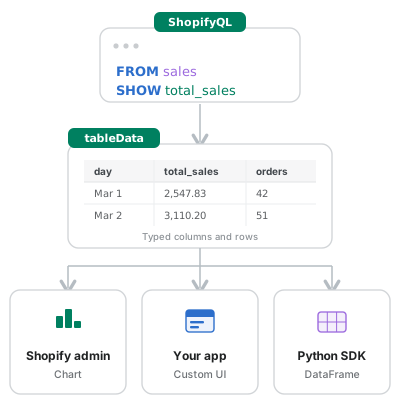
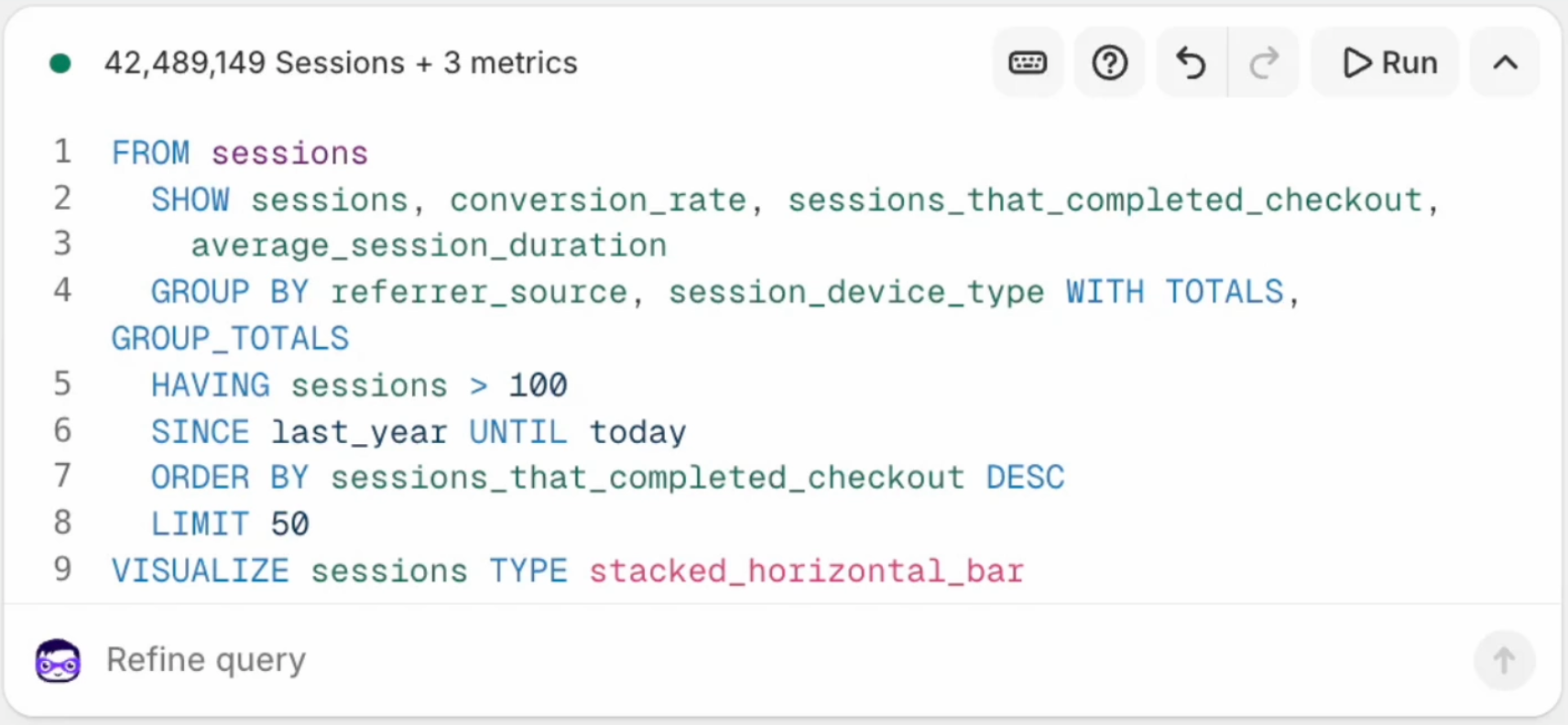
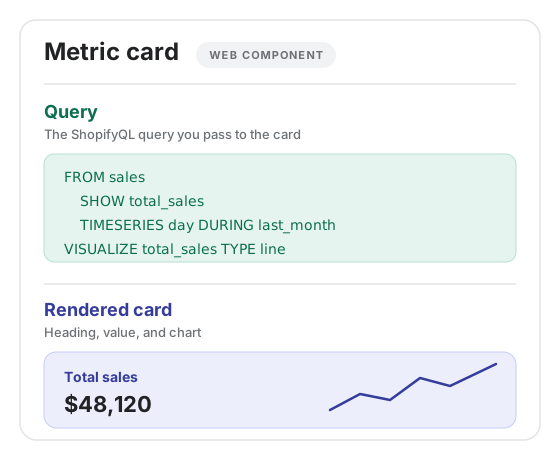
--- title: About ShopifyQL description: >- Learn about ShopifyQL, Shopify's query language for analytics and segmentation. source_url: html: 'https://shopify.dev/docs/apps/build/shopifyql' md: 'https://shopify.dev/docs/apps/build/shopifyql.md' --- ExpandOn this page * [How Shopify​QL works](https://shopify.dev/docs/apps/build/shopifyql.md#how-shopifyql-works) * [Where you can use Shopify​QL](https://shopify.dev/docs/apps/build/shopifyql.md#where-you-can-use-shopifyql) * [Key capabilities](https://shopify.dev/docs/apps/build/shopifyql.md#key-capabilities) * [Common query patterns](https://shopify.dev/docs/apps/build/shopifyql.md#common-query-patterns) * [Best practices](https://shopify.dev/docs/apps/build/shopifyql.md#best-practices) * [Next steps](https://shopify.dev/docs/apps/build/shopifyql.md#next-steps) # About ShopifyQL ShopifyQL is Shopify's commerce-focused query language that powers analytics and customer segmentation across the platform. Use ShopifyQL to build custom reports, analyze store performance, and gain insights from your merchant data. Unlike general-purpose SQL, ShopifyQL abstracts away database complexity and provides built-in support for common commerce patterns like time-series analysis, currency handling, and multi-store reporting. ShopifyQL enables you to: * Query store data across sales, orders, products, customers, and sessions. * Analyze trends with built-in time-series support and date range comparisons. * Build visualizations directly within queries for charts and tables. * Create customer segments using sophisticated filtering and matching patterns. *** ## How Shopify​QL works ShopifyQL queries follow a declarative structure where you specify what data you want rather than how to retrieve it. The language handles joins, aggregations, and data formatting automatically. ### Basic query structure Every ShopifyQL query requires two keywords: [`FROM`](https://shopify.dev/docs/api/shopifyql#from-and-show) to specify the data source, and [`SHOW`](https://shopify.dev/docs/api/shopifyql#from-and-show) to select the metrics and dimensions to display: ## ShopifyQL query ```shopifyql FROM sales SHOW total_sales ``` ### Adding dimensions and filters Break down metrics by dimensions using [`GROUP BY`](https://shopify.dev/docs/api/shopifyql#group-by), and filter results using [`WHERE`](https://shopify.dev/docs/api/shopifyql#where): ## ShopifyQL query ```shopifyql FROM sales SHOW total_sales, product_title WHERE billing_country = 'United States' GROUP BY product_title ORDER BY total_sales DESC LIMIT 10 ``` ### Time-based analysis ShopifyQL provides powerful time-based filtering with [`SINCE`](https://shopify.dev/docs/api/shopifyql#since-and-until), [`UNTIL`](https://shopify.dev/docs/api/shopifyql#since-and-until), and [`DURING`](https://shopify.dev/docs/api/shopifyql#during) keywords: ## ShopifyQL query ```shopifyql FROM sales SHOW total_sales DURING last_month TIMESERIES day ``` Compare periods using [`COMPARE TO`](https://shopify.dev/docs/api/shopifyql#compare-to): ## ShopifyQL query ```shopifyql FROM sales SHOW net_sales DURING this_quarter TIMESERIES month COMPARE TO previous_year WITH PERCENT_CHANGE ``` *** ## Where you can use Shopify​QL ShopifyQL is available through multiple surfaces across Shopify: [Shopify admin\ \ ](https://shopify.dev/docs/apps/build/shopifyql/shopify-admin) [Access ShopifyQL through the code editor in the Shopify admin with syntax highlighting, autocompletion, and real-time visualization.](https://shopify.dev/docs/apps/build/shopifyql/shopify-admin) [GraphQL Admin API\ \ ](https://shopify.dev/docs/apps/build/shopifyql/graphql-admin-api) [Build apps that query analytics data programmatically using the `shopifyqlQuery` endpoint.](https://shopify.dev/docs/apps/build/shopifyql/graphql-admin-api) [Python SDK and CLI\ \ ](https://shopify.dev/docs/apps/build/shopifyql/python-sdk-and-cli) [Access ShopifyQL data through a dedicated Python SDK with pandas integration designed for analytics workflows.](https://shopify.dev/docs/apps/build/shopifyql/python-sdk-and-cli) *** ## Key capabilities ### Data sources ShopifyQL supports querying from multiple data models: | Table | Description | | - | - | | `sales` | Transaction and revenue data. | | `orders` | Order information and fulfillment. | | `products` | Product catalog and inventory. | | `customers` | Customer profiles and segments. | | `sessions` | Storefront visitor sessions. | Query multiple tables in a single query with implicit joins: ## ShopifyQL query ```shopifyql FROM sales, sessions SHOW day, total_sales, sessions SINCE last_month GROUP BY day ``` ### Time dimensions ShopifyQL abstracts date handling with built-in time dimensions: | Dimension | Description | | - | - | | `second`, `minute`, `hour` | Sub-day granularity. | | `day`, `week`, `month`, `quarter`, `year` | Calendar periods. | | `hour_of_day`, `day_of_week` | Cyclical time patterns. | | `week_of_year`, `month_of_year` | Annual patterns. | ### Named date ranges Use intuitive named ranges instead of calculating dates: ## ShopifyQL query ```shopifyql FROM sales SHOW total_sales DURING bfcm2024 COMPARE TO bfcm2023 ``` Available named ranges include: `today`, `yesterday`, `this_week`, `last_week`, `this_month`, `last_month`, `this_quarter`, `last_quarter`, `this_year`, `last_year`, `this_weekend`, `last_weekend`, and `bfcm{year}`. ### Visualizations Embed visualization instructions directly in queries: ## ShopifyQL query ```shopifyql FROM sales SHOW total_sales GROUP BY product_title VISUALIZE total_sales TYPE bar MAX 10 ``` Supported visualization types: * Charts: `bar`, `line`, `stacked_bar`, `stacked_area`, `donut`, `histogram` * Tables: `table`, `list`, `list_with_dimension_values` * Specialized: `funnel`, `heatmap` ### Multi-store reporting Organizations with multiple stores can query across their entire portfolio using `FROM ORGANIZATION`: ## ShopifyQL query ```shopifyql FROM ORGANIZATION sales SHOW total_sales ``` Break down results by store using the `shop_name` dimension: ## ShopifyQL query ```shopifyql FROM ORGANIZATION sales SHOW total_sales GROUP BY shop_name ``` Filter to specific stores using `shop_id`: ## ShopifyQL query ```shopifyql FROM ORGANIZATION sales SHOW total_sales WHERE shop_id IN (10002, 20023, 24211) GROUP BY shop_name ``` Multi-store queries use the currency and timezone of the current store by default. Override these with `WITH CURRENCY` and `WITH TIMEZONE`: ## ShopifyQL query ```shopifyql FROM ORGANIZATION sales SHOW total_sales WITH CURRENCY 'USD', TIMEZONE 'America/New_York' ``` ### TOP N analysis Control result cardinality with per-dimension limits: ## ShopifyQL query ```shopifyql FROM sales SHOW total_sales GROUP BY month, TOP 5 product_title WITH TOTALS ``` Use `OVERALL` for cross-dimension top items, and `ONLY` to exclude the "Other" bucket: ## ShopifyQL query ```shopifyql FROM sales SHOW total_sales GROUP BY ONLY TOP 3 product_title OVERALL, TOP 3 shipping_country ``` *** ## Common query patterns ### Sales performance by period ## ShopifyQL query ```shopifyql FROM sales SHOW gross_sales, net_sales, total_sales, orders SINCE startOfYear(-1y) UNTIL today TIMESERIES month ORDER BY month ``` ### Top products with comparison ## ShopifyQL query ```shopifyql FROM sales SHOW total_sales, product_title DURING this_month GROUP BY product_title COMPARE TO previous_month ORDER BY total_sales DESC LIMIT 10 WITH PERCENT_CHANGE ``` ### Regional breakdown ## ShopifyQL query ```shopifyql FROM sales SHOW total_sales WHERE billing_country IN ('United States', 'Canada') GROUP BY billing_country, billing_region ORDER BY total_sales DESC WITH TOTALS, GROUP_TOTALS ``` ### Customer acquisition trends ## ShopifyQL query ```shopifyql FROM customers SHOW new_customers, returning_customers SINCE -12w UNTIL today TIMESERIES week VISUALIZE new_customers, returning_customers TYPE stacked_area ``` ### Product performance funnel ## ShopifyQL query ```shopifyql FROM sessions SHOW sessions, product_views, add_to_carts, checkouts, orders GROUP BY product_title HAVING orders > 0 ORDER BY sessions DESC LIMIT 20 VISUALIZE sessions, product_views, add_to_carts, checkouts, orders TYPE funnel ``` *** ## Best practices ### Query optimization * **Use appropriate date ranges**: Narrow your `SINCE`/`UNTIL` range to only the data you need. * **Limit dimensions**: Each `GROUP BY` dimension increases query complexity. * **Filter early**: Apply `WHERE` conditions to reduce the data set before aggregation. * **Use `LIMIT`**: Restrict result sets, especially for exploration queries. ### Readable queries * **Use aliases**: Give metrics descriptive names with `AS`. * **Format consistently**: Place each keyword on its own line for complex queries. * **Add comments**: Document complex logic with `--` single-line or `/* */` block comments. ## ShopifyQL query ```shopifyql -- Top selling products by category FROM sales SHOW total_sales AS "Revenue", orders AS "Order Count", total_sales / orders AS "Average Order Value" WHERE product_type IS NOT NULL GROUP BY product_type, product_title HAVING total_sales > 1000 ORDER BY total_sales DESC LIMIT 25 ``` *** ## Next steps * Explore the [ShopifyQL syntax reference](https://shopify.dev/docs/api/shopifyql) for complete keyword documentation. * Access the language reference for Shopify's [segment query language](https://shopify.dev/docs/api/shopifyql/segment-query-language-reference). * Get started with the [ShopifyQL Python SDK](https://github.com/Shopify/shopifyql-py) for data analysis workflows. * Learn about [metafields and metaobjects](https://shopify.dev/docs/apps/build/custom-data) for extending data models. *** * [How Shopify​QL works](https://shopify.dev/docs/apps/build/shopifyql.md#how-shopifyql-works) * [Where you can use Shopify​QL](https://shopify.dev/docs/apps/build/shopifyql.md#where-you-can-use-shopifyql) * [Key capabilities](https://shopify.dev/docs/apps/build/shopifyql.md#key-capabilities) * [Common query patterns](https://shopify.dev/docs/apps/build/shopifyql.md#common-query-patterns) * [Best practices](https://shopify.dev/docs/apps/build/shopifyql.md#best-practices) * [Next steps](https://shopify.dev/docs/apps/build/shopifyql.md#next-steps)