Sidekick app extensions
Sidekick is the AI assistant built into Shopify. It helps merchants get things done without leaving their flow. Your app can connect its data and workflows using app extensions. Sidekick can search your app’s data, answer questions with your app’s context, and take merchants straight to the right page in your app.
You can also let Sidekick assist directly inside your app. Define safe, scoped actions—like editing an email template, creating a product review, or updating a support issue—and Sidekick will suggest changes and bring up the right UI, but merchants stay in control of what gets updated. This guide shows you how to expose data sources and actions, handle authentication and permissions, and test your integration in development.
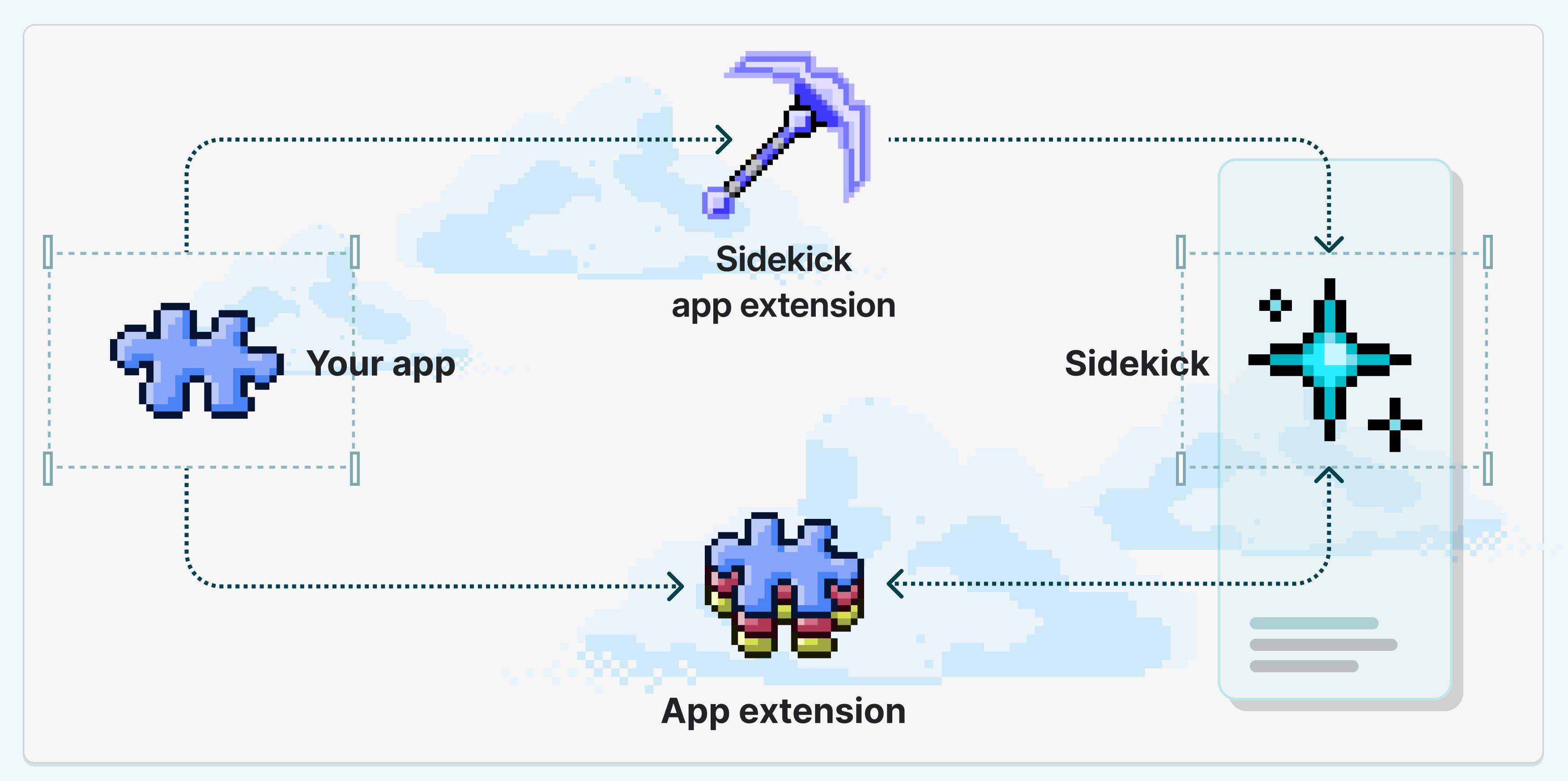
Sidekick currently supports integrations with up to 20 apps for each user on a store.
Sidekick currently supports integrations with up to 20 apps for each user on a store.
Anchor to How Shopify's platform powers tools & app extensionsHow Shopify's platform powers tools & app extensions
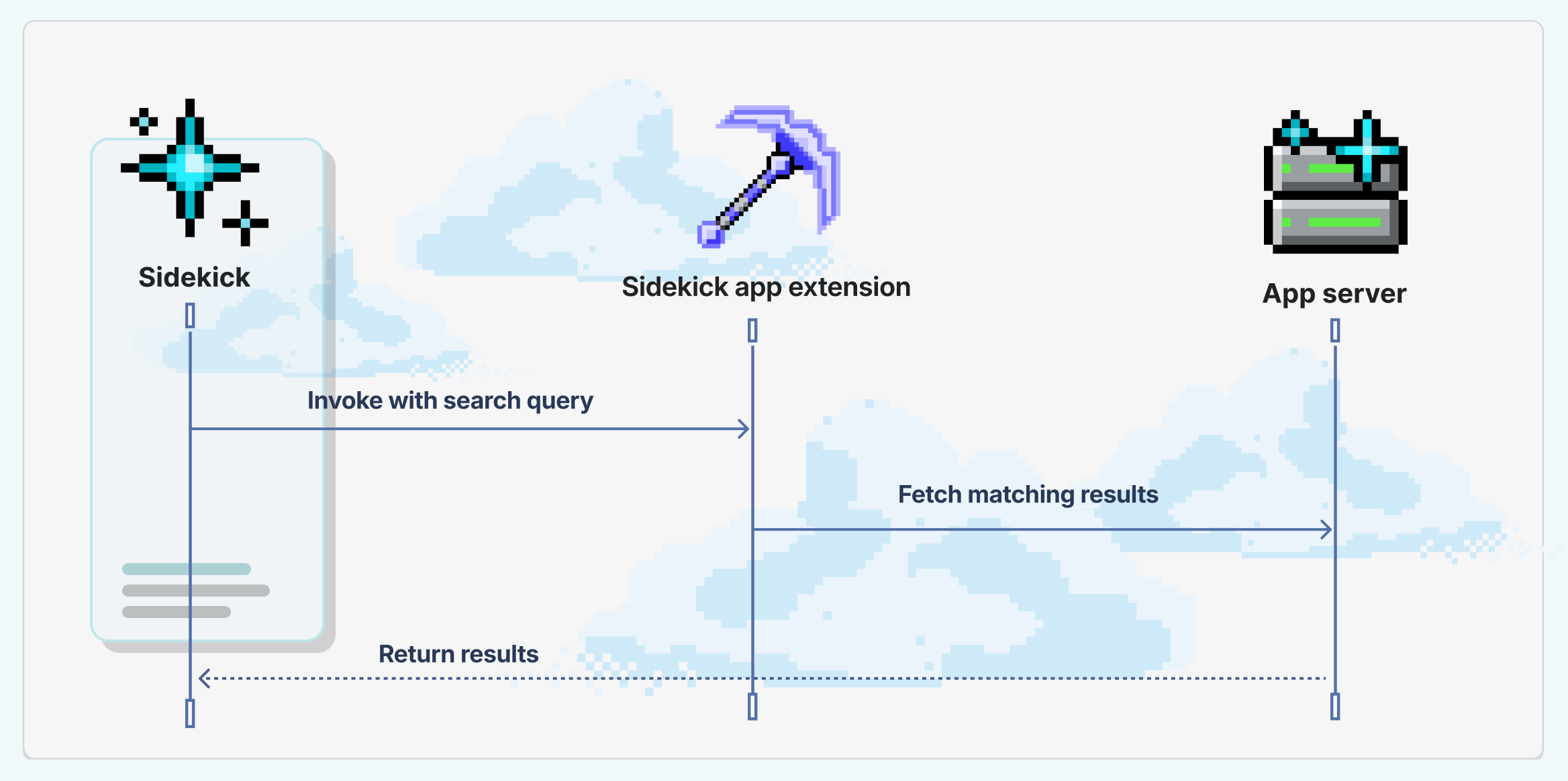
When a merchant invokes an app extension, Shopify's platform powers the interaction. The app extension is executed in the Shopify sandbox, and has access to the same APIs as your app. The app extension returns the result to Sidekick, and Sidekick displays the result to the merchant.
Anchor to Example: Search in an email appExample: Search in an email app
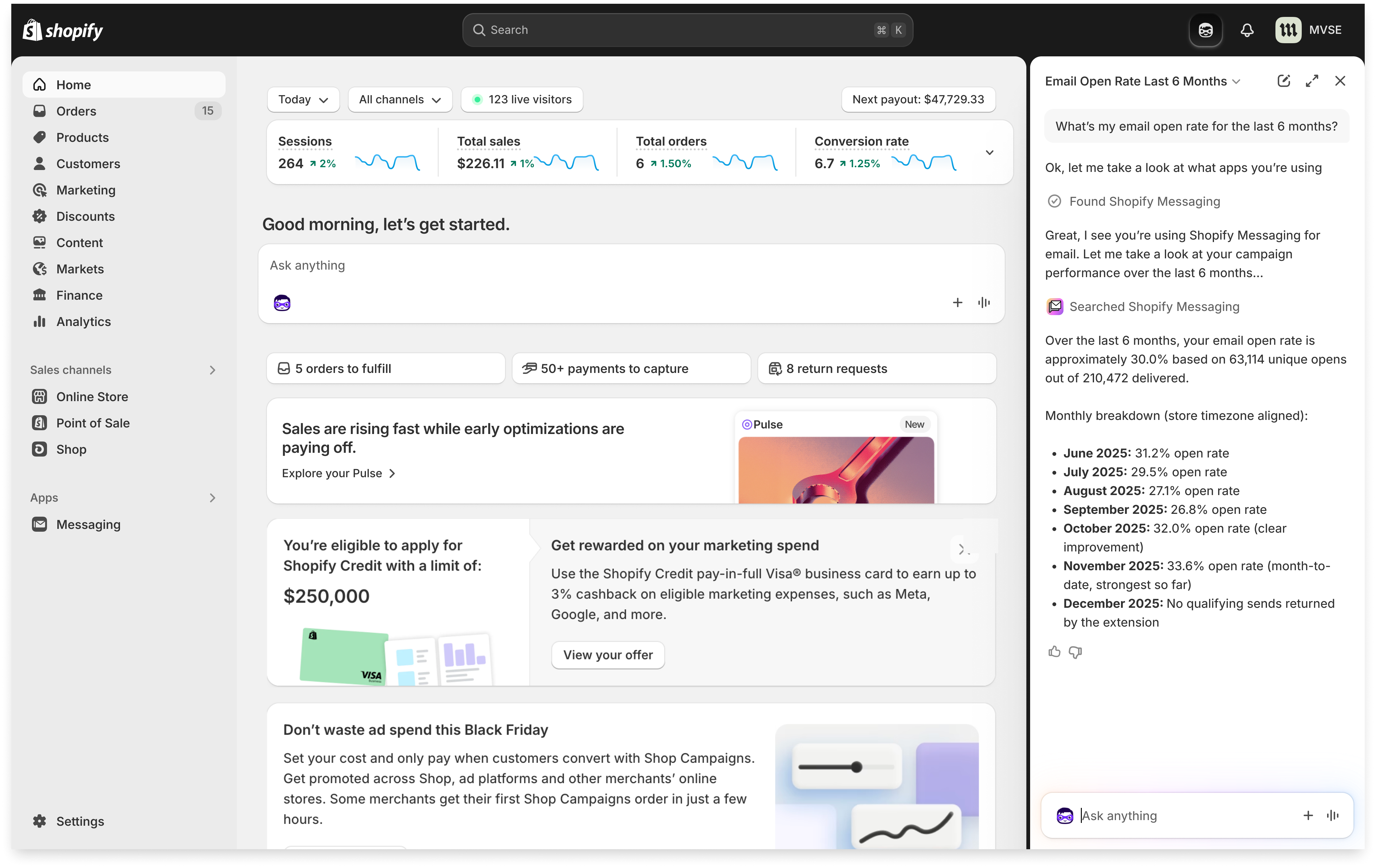
In this example, a merchant can ask Sidekick to find the best performing subject lines in their email campaigns. Sidekick searches using the app extension in the Shopify Messaging app, then returns the best results. Clicking on an option invokes the app, navigated right to the correct result.
Anchor to Expose data to SidekickExpose data to Sidekick
Use an extension to expose data in your app. By providing your app's data in an extension, Sidekick can search your app's data to get tailored results. Merchants can get value from your app just by working with Sidekick, while also staying in their flow.


Anchor to Expose actions to SidekickExpose actions to Sidekick
Use an extension to expose actions in your app. By providing your app's actions in an extension, Sidekick can take the merchant to the right page in your app to perform the action.
Anchor to Add an extensions summary to your appAdd an extensions summary to your app
When your app has one or more Sidekick-eligible extensions, you must provide an extensions_summary in your shopify.app.toml. This is a developer-written, consolidated summary of what your app's Sidekick extensions can do. Sidekick uses this summary to route merchant questions to the correct app.
The extensions_summary is separate from the description field in individual shopify.extension.toml files. While each extension's description explains what that specific extension does, the extensions_summary provides a high-level overview of all your app's Sidekick capabilities in one place.
Anchor to Configure your extensions summaryConfigure your extensions summary
Add the extensions_summary field under the [sidekick] section in your shopify.app.toml:
shopify.app.toml
The extensions_summary field is required if your app has any Sidekick-eligible extensions. Omitting this field produces a validation error when you deploy.
The extensions_summary field is required if your app has any Sidekick-eligible extensions. Omitting this field produces a validation error when you deploy.
The extensions_summary field has a 256-token limit.
The extensions_summary field has a 256-token limit.
Anchor to What makes a good extensions summaryWhat makes a good extensions summary
A good extensions_summary:
- Describes the actions your Sidekick extensions support (for example, Search, Create, Edit)
- Includes the domain or entity types they cover (for example, Email campaigns, SMS campaigns)
- Is specific enough for Sidekick to match merchant questions to your app
A poor extensions_summary:
- Is generic or vague (for example, "My sidekick summary" or "Tools for your app")
- Doesn't mention the specific operations or data types your extensions handle
Anchor to ExamplesExamples
Do: Be specific about what operations your extensions support and what domain they cover.
Don't: Use generic descriptions that don't help Sidekick understand your app's capabilities.
Anchor to Writing effective extension descriptionsWriting effective extension descriptions
The description field in your shopify.extension.toml is how Sidekick decides whether your extension is relevant to a merchant's question. A vague or generic description means Sidekick won't know when to use your extension, and merchants will have to explicitly name your app to invoke it.
Write your description as if you're telling Sidekick exactly what your extension can do. Be specific about the domain, the type of data or actions it covers, and the kinds of merchant questions it can answer.
Anchor to What makes a good descriptionWhat makes a good description
A good description:
- Names the specific domain your extension covers (for example, "email campaigns", "product reviews", "shipping rates")
- Describes the concrete tasks or queries it supports
A poor description:
- Is generic or could apply to any app (for example, "Search extension for your app")
- Doesn't mention the specific data or actions the extension provides
- Uses internal or technical jargon that doesn't match how merchants talk
Anchor to ExamplesExamples
The following examples show the difference between descriptions that work well and descriptions that don't.
Do: Be specific about what your extension does and what data it covers.
Don't: Use generic descriptions that could apply to any app.
The same guidance applies to individual tool descriptions in your tools.json file. Each tool's description field should clearly state what the tool does and what kind of input it expects, so Sidekick can choose the right tool for the merchant's request.
Anchor to Content and safety policyContent and safety policy
To keep merchants safe, Sidekick reviews your extension's content at two points:
- At deploy: extension and tool descriptions, instructions, and input schemas are validated.
- At runtime: the response data your tools return to Sidekick is checked before it's used in the conversation.
App or content that fails a check is blocked, so designing within the policy keeps your extension reliably available to merchants. The guidance below outlines best practices for your extensions.
- Describe what your extension and tools do clearly and factually.
- Return structured data that matches the tool's declared purpose — records, lists, counts, IDs, and statuses.
- Keep data extensions read-only. Mutations belong in action extensions, where the merchant confirms the change.
Anchor to Don'tDon't
- Try to redefine who Sidekick is, steer its decision-making, or bypass the merchant's confirmation when Sidekick acts on their behalf. Writing
instructions.mdthat describes how your tools work together is welcome — behavioral overrides are not. - Use Sidekick to sell. Upsells, plan-upgrade nudges, competitor comparisons, false urgency, and fabricated endorsements are not allowed.
- Include promotional content or filler unrelated to the tool's purpose.
- Include embedded directives, credentials, or customer data the caller didn't request.
Anchor to Sidekick event logs in developmentSidekick event logs in development
When you preview your app in development, Shopify scans your Sidekick extensions against the policy and records the outcome as a Sidekick event in your app's logs in the Dev Dashboard. This lets you confirm whether your extension integrated successfully with Sidekick or was blocked.
Each Sidekick event shows:
- A status of
OKwhen your extension passed and is available to merchants, orErrorwhen it was blocked and won't appear in Sidekick. - The scan target (
extensions/security_scan) and the time it ran.
You can review the content and safety policy section for the best practices above and update your extension.
Fixing the issue and saving triggers a hot reload, which automatically reruns the scan and writes a new Sidekick event. You'll see a fresh OK or Error result for your latest changes in the Dev Dashboard, under your app's logs, without restarting.
Anchor to Email notifications after you deployEmail notifications after you deploy
On each deploy, Shopify scans your Sidekick app extensions. The deploy scan doesn't log a Sidekick event in the Dev Dashboard. If we block an extension after deployment, we will notify you by email.
- If you don't receive an email, the scan passed and your extension is available to merchants.
- Shopify sends one email for each blocked app version. Deploy a new version after you fix the extension to get a new result.
Anchor to LimitsLimits
The following limits are enforced when you deploy your app extension or when Sidekick invokes it at runtime:
| Resource | Limit |
|---|---|
| Extension description | 256 tokens |
Extensions summary (shopify.app.toml) | 256 tokens |
| Instructions | 2,048 tokens |
| Intents per app | 5 |
| Query string | 500 characters |
| Response size | 4,000 tokens |
| Response time | App data: 1 second, App actions: 3 seconds |
| Tool description | 512 characters |
| Tool name | 64 characters |
| Tools per app | 20, across all extensions |
Apps can register multiple shopify/Discount intents for the same action. For example, an app can define more than one create discount intent when each intent is backed by a different discount function.
Discount intents count toward your app's overall intent limit.
Anchor to BenefitsBenefits
Anchor to More ways for merchants to use your appMore ways for merchants to use your app
Merchants can interact with your app in new ways, and get even more unique value. App extensions you register for your app can be invoked inline during other scenarios, helping merchants keep their place and never lose what they’re working on.
Anchor to Awareness across ShopifyAwareness across Shopify
Sidekick and the Shopify admin can suggest your app when its registered intents can help a merchant get things done. Your app can be in front of new audiences, just in time when the merchant can get the most out of it.
Anchor to Sidekick & apps gain new powersSidekick & apps gain new powers
As merchants interact with Sidekick and other apps that utilize your app's intents, your app becomes more useful and even more powerful. Merchants can get value from your app just by working with Sidekick, while also staying in their flow.