Webhooks delivery structure
Each qualifying change sends a webhook delivery to the destination configured in your subscription's uri.
Shopify supports webhook delivery through HTTPS, Amazon EventBridge, and Google Cloud Pub/Sub. See Subscription fields to configure your destination.
For HTTPS destinations, Shopify sends an HTTP POST with a JSON payload in the request body and delivery metadata in HTTP headers. For Amazon EventBridge and Google Cloud Pub/Sub, delivery metadata accompanies the payload in the message.
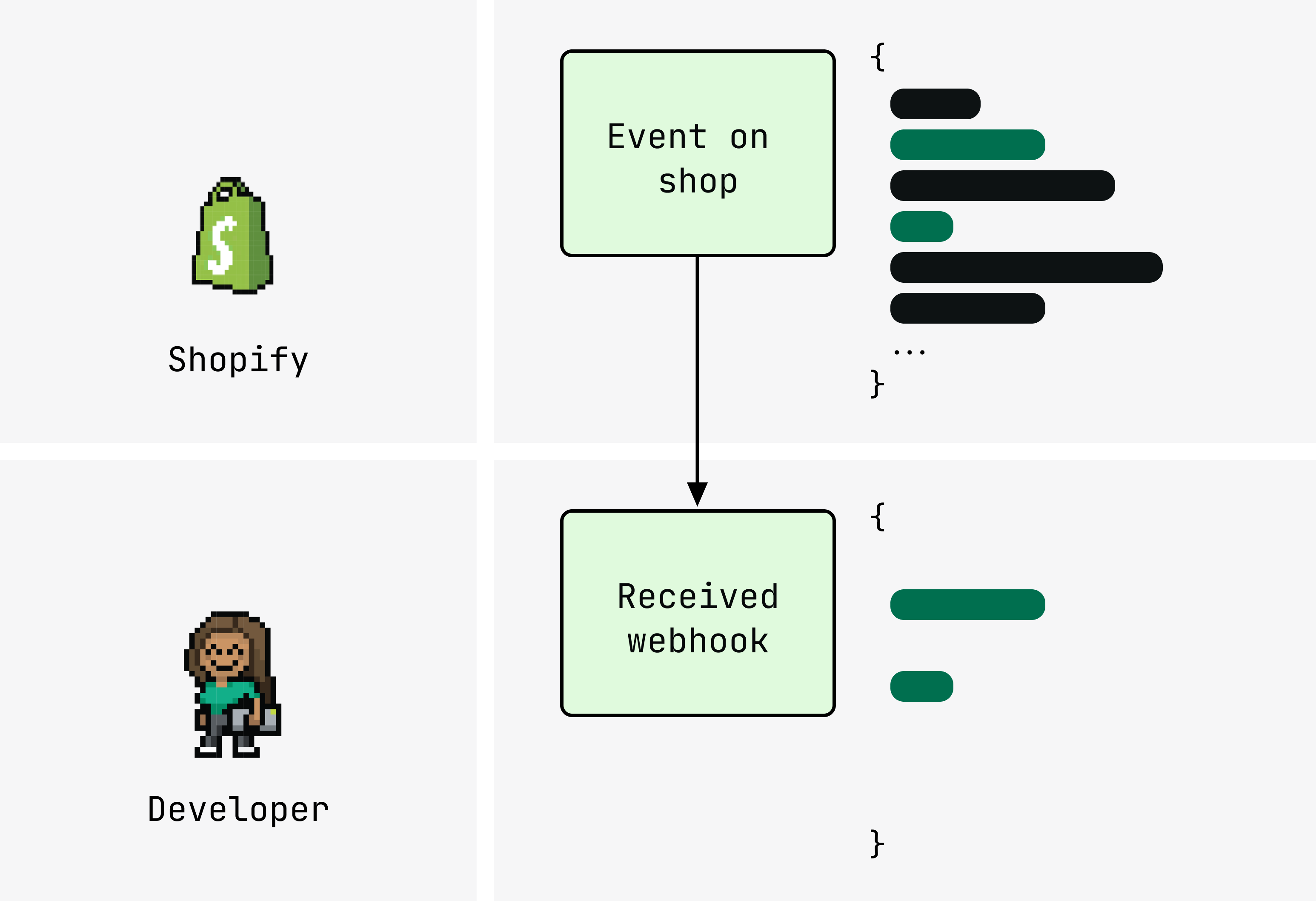
By default, the payload contains the full REST resource for the topic.
Add include_fields to receive only the specific fields your app needs.
Anchor to PayloadPayload
By default, the JSON payload contains the full REST resource for the subscribed topic. The shape and fields depend on the topic. See the Webhooks reference for the payload structure of each topic. Amazon EventBridge and Google Cloud Pub/Sub messages include additional delivery metadata beyond these example payloads.
Example payload (products/update)
Anchor to HeadersHeaders
HTTPS deliveries include the following HTTP headers. Treat header names as case-insensitive in your code, as HTTP/2 often lowercases them.
For Amazon EventBridge and Google Cloud Pub/Sub, delivery metadata accompanies the payload in the message. These delivery methods don't require HMAC verification.
| Header | Description |
|---|---|
X-Shopify-Topic | The topic name (for example, products/update). |
X-Shopify-Hmac-Sha256 | Base64-encoded HMAC signature for verifying the delivery came from Shopify. HTTPS only. |
X-Shopify-Shop-Domain | The myshopify.com domain of the store that triggered the event. |
X-Shopify-API-Version | The API version used to serialize the payload. |
X-Shopify-Webhook-Id | A unique composite key per delivery. Use to identify and deduplicate individual deliveries. |
X-Shopify-Triggered-At | Timestamp of when Shopify triggered the delivery. |
X-Shopify-Event-Id | A unique ID shared across all deliveries produced by the same merchant action. |
X-Shopify-Name (optional) | Developer-supplied subscription name, set via the name field in your subscription. |
Anchor to [object Object]include_fields
include_fieldsinclude_fields is an optional array of field paths on a webhook subscription.
When set, the delivery payload includes only the specified fields instead of the full resource.
Without include_fields, every delivery includes the complete resource payload:
Without include_fields
shopify.app.toml
[webhooks]
api_version = "2026-10"

[[webhooks.subscriptions]]
topics = ["products/update"]
uri = "https://your-app.example.com/webhooks/products"
{} Response
{
  "id": 9554194432293,
  "title": "T-Shirt",
  "status": "active",
  "vendor": "My Store",
  "product_type": "Shirts",
  "updated_at": "2025-04-22T14:30:00-05:00",
  "variants": [
    {
      "id": 123456789,
      "title": "Default Title",
      "price": "29.99",
      "sku": "TSHIRT-001",
      "taxable": true,
      "updated_at": "2025-04-22T14:30:00-05:00"
    }
  ],
  "tags": "cotton, comfortable"
}
Adding include_fields narrows the payload to only the specified fields.
You denote nested fields using a period (for example, variants.price).
You can also set include_fields using the includeFields input in the webhookSubscriptionCreate mutation.
With include_fields
shopify.app.toml
[webhooks]
api_version = "2026-10"

[[webhooks.subscriptions]]
topics = ["products/update"]
uri = "https://your-app.example.com/webhooks/products"
include_fields = ["id", "variants.id", "variants.price", "updated_at"]
{} Response
{
  "id": 9554194432293,
  "variants": [
    {
      "id": 123456789,
      "price": "29.99"
    }
  ],
  "updated_at": "2025-04-22T14:30:00-05:00"
}
Anchor to DebouncingDebouncing
When include_fields reduces the payload to a small set of fields, multiple qualifying events might produce identical payloads. Shopify debounces deliveries with identical payloads that arrive within a short time window, dropping the later one. For example, a subscription to orders/updated with include_fields = ["id", "line_items.title"] would debounce consecutive price changes, since neither the order ID nor line item titles change between them.
To prevent debouncing, include a field that always has a unique value. For example, updated_at changes with every update, ensuring no two consecutive deliveries are identical.
Anchor to Combining with ,[object Object]Combining with filter
filterWhen both filter and include_fields are set, all fields referenced in the filter expression must also appear in include_fields.
shopify.app.toml
See Delivery filtering for filter syntax and examples.
Anchor to ExampleExample
Suppose you want deliveries only when an active product in the Music or Movies category has a variant priced above $100. The following subscription combines include_fields to narrow the payload and filter to gate delivery:
Active high-price music or movies product
shopify.app.toml
[webhooks]
api_version = "2026-10"

[[webhooks.subscriptions]]
topics = ["products/update"]
uri = "https://your-app.example.com/webhooks/products"
include_fields = ["id", "status", "product_type", "variants.id", "variants.price", "updated_at"]
filter = "status:active AND (product_type:Music OR product_type:Movies) AND variants.price:>=100"
{} Response
{
  "id": 9554194432293,
  "status": "active",
  "product_type": "Music",
  "variants": [
    {
      "id": 123456789,
      "price": "129.99"
    }
  ],
  "updated_at": "2025-04-22T15:00:00-05:00"
}
Anchor to Next stepsNext steps
- Delivery filtering: Gate deliveries with
filterexpressions. - Verify deliveries: HMAC verification and deduplication.