These pages refer to Hydrogen versions 2026-04 and earlier. For versions 2026-10 and later, refer to the latest Hydrogen docs. If you're not using the latest version of Hydrogen, then we recommend that you migrate your storefront. To learn more, refer to Migrate to the latest version of Hydrogen.
Migrate Hydrogen analytics tracking
This guide explains how to maintain reliable Shopify Analytics data for your Hydrogen integration without using the shopify_y (unique visitor) and shopify_s (session) cookies, which will be deprecated on April 30, 2026.
It includes instructions on how to migrate analytics tracking for different types of Hydrogen apps (React Router/Remix) deployed to Oxygen or to another host.
If you don't migrate your analytics tracking before April 30, 2026, then the data for your integration's visitors and session attributions won't be reported accurately in Shopify Analytics.
If you don't migrate your analytics tracking before April 30, 2026, then the data for your integration's visitors and session attributions won't be reported accurately in Shopify Analytics.
Anchor to What's changingWhat's changing
Shopify will stop setting shopify_y and shopify_s cookies on April 30, 2026. Hydrogen now provides utilities that give you access to equivalent tracking values:
uniqueTokenreplaces_yvisitTokenreplaces_s
These values aren't meant to be read from browser cookies directly. Instead, fetch them using Hydrogen's utilities so they continue to provide data as privacy models evolve.
Anchor to Step 1: Update your Hydrogen buildStep 1: Update your Hydrogen build
Choose one of the following approaches based on how you've deployed Hydrogen:
The steps you need to take will be different if you have a custom headless setup.
The steps you need to take will be different if you have a custom headless setup.
Anchor to Hydrogen deployed to OxygenHydrogen deployed to Oxygen
In this case, only one step is required: run the Hydrogen CLI upgrade command (shopify hydrogen upgrade) to upgrade Hydrogen to the latest minor in your line (2024.7–2025.7).
You don't need to make any server-side changes on Oxygen.
For code examples, refer to our default skeleton template.
Anchor to Hydrogen deployed to other hostsHydrogen deployed to other hosts
In this case, you need to make two small changes:
- Run the Hydrogen CLI upgrade command (
shopify hydrogen upgrade) to upgrade Hydrogen to the latest minor in your line (2024.7–2025.7). - Use Hydrogen's web-standard request handler so headers and cookies flow correctly through your domain. Choose the approach below based on your host's Web Fetch API support.
Anchor to If your host supports Web Fetch API (Request/Response)If your host supports Web Fetch API (Request/Response)
Use Hydrogen's createRequestHandler directly as your server entry point. No adapter is required.
server.ts
Anchor to If your host doesn't support Web Fetch API (Request/Response)If your host doesn't support Web Fetch API (Request/Response)
You can adapt Node.js requests to the Web Fetch API using a package such as @remix-run/node-fetch-server (which is used by React Router's Node.js adapter), and then pass the request to Hydrogen's createRequestHandler:
server.ts
Anchor to Step 2: Validate your changesStep 2: Validate your changes
After you update your Hydrogen build, validate that your analytics tracking has been set up correctly.
- Open your Shopify storefront.
- Add a product to the cart, and then check out.
- If cookies are enabled (meaning there's tracking consent), then you should see a
produce_batchevent. The payload hascustom_storefront_customer_tracking/1.2. - If cookies aren't enabled (meaning there's no tracking consent), then you won't see a
produce_batchevent with a payload ofcustom_storefront_customer_tracking/1.2.
In the following example, _shopify_s matches the deprecated_visit_token value and _shopify_y matches the unique_token value.
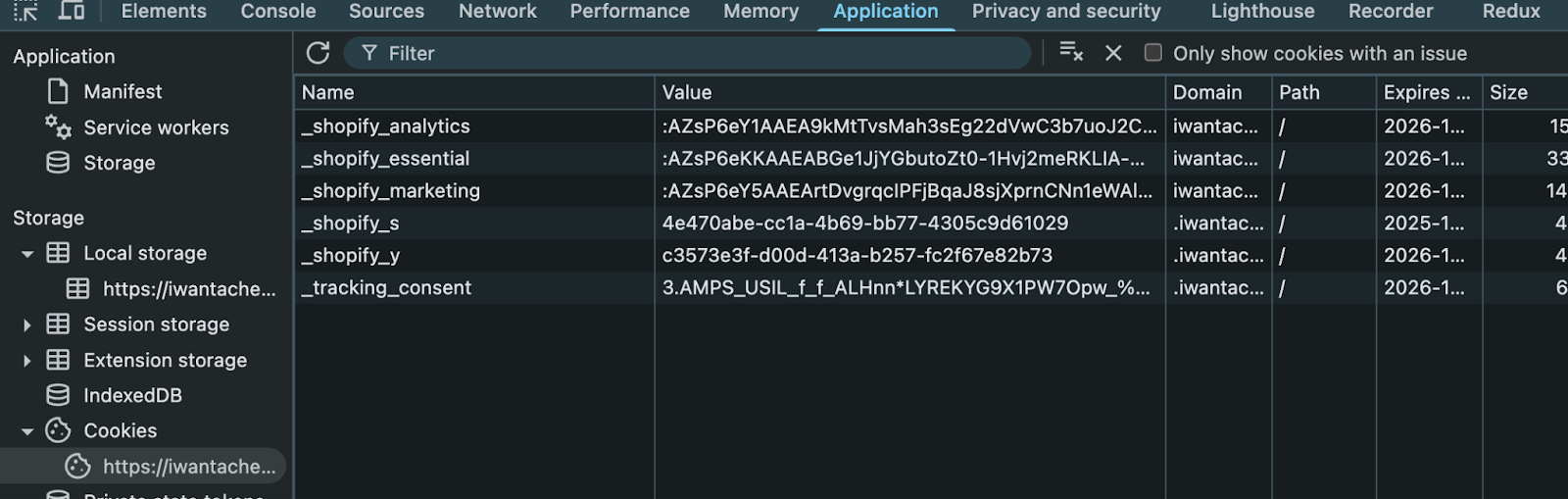
The exact payload fields might vary depending on which events fire.