---
title: cart
description: >-
  Learn about the Shopify theme blog template, which provides an overview of the
  contents of a customer’s cart.
source_url:
  html: 'https://shopify.dev/docs/storefronts/themes/architecture/templates/cart'
  md: 'https://shopify.dev/docs/storefronts/themes/architecture/templates/cart.md'
api_name: liquid
---

# cart

The `cart` template renders the `/cart` page, which provides an overview of the contents of a customer’s cart. The overview is typically shown in a table format with a row for each line item.

**Tip:**

Refer to the [cart template](https://github.com/Shopify/dawn/blob/main/templates/cart.json), its [items section](https://github.com/Shopify/dawn/blob/main/sections/main-cart-items.liquid), and its [footer section](https://github.com/Shopify/dawn/blob/main/sections/main-cart-footer.liquid) in Dawn for an example implementation.
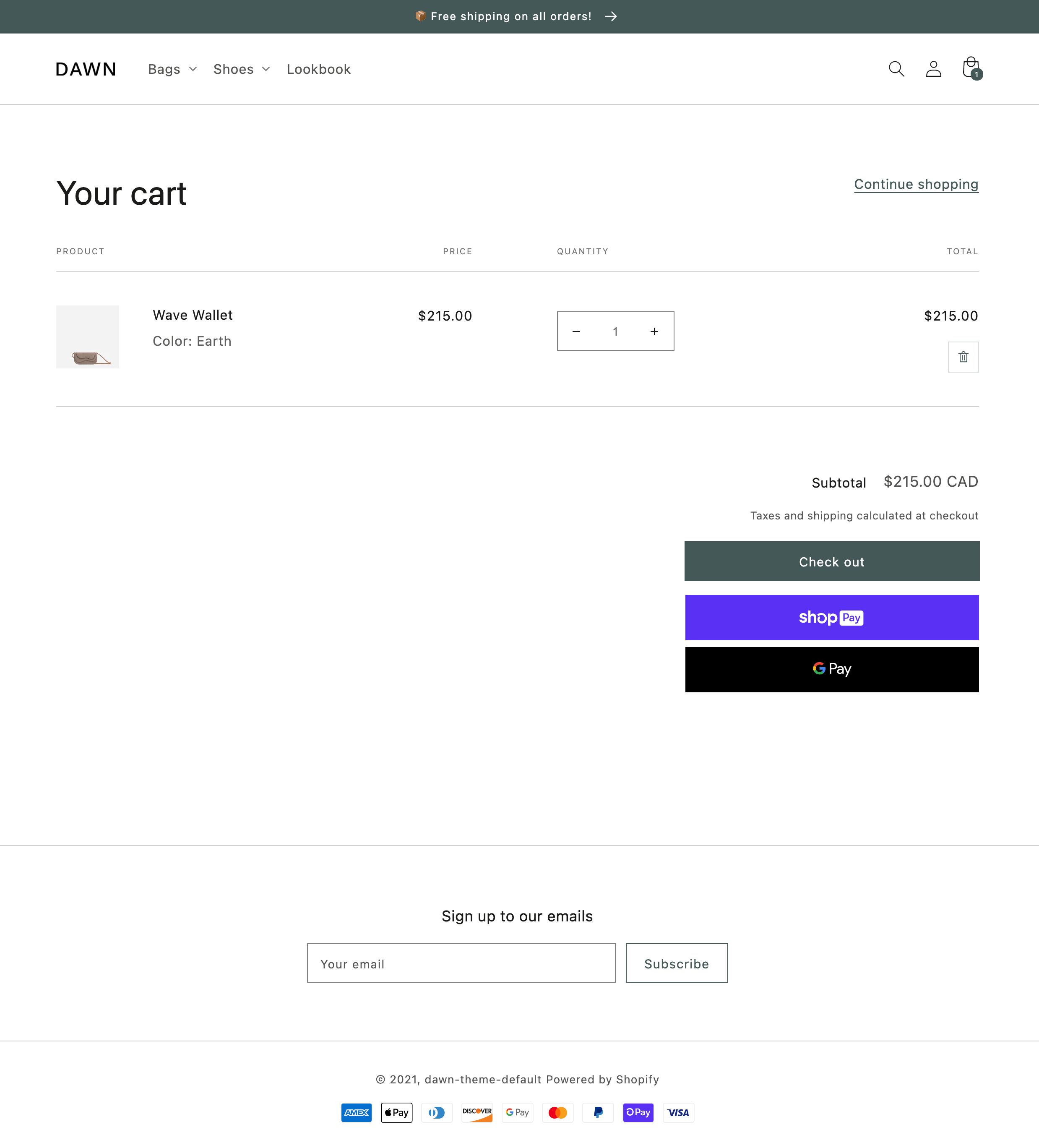
![An example of the cart template in Dawn](https://shopify.dev/assets/assets/images/themes/templates/cart-6bNn0ahy.png)

***

## Location

The `cart` template is located in the `templates` directory of the theme:

```text
└── theme
  ├── layout
  ├── templates
  |   ...
  |   ├── cart.json
  |   ...
  ...
```

***

## Content

You should include the [cart object](#the-cart-object) in your `cart` template or a section inside of the template.

### The cart object

You can access the Liquid [`cart` object](https://shopify.dev/docs/api/liquid/objects/cart) to display the cart details.

***

## Usage

When working with the `cart` template, you should familiarize yourself with the following:

* [Using cart line items](#cart-line-items)
* [Letting customers proceed to checkout from the cart](#proceed-to-checkout)
* [Providing an option to remove line items from the cart](#remove-line-items-from-the-cart)
* [Updating line item quantities](#update-line-item-quantities)
* [Showing discounts](#show-cart-and-line-item-discounts)
* [Using cart notes and attributes](#support-cart-notes-and-attributes)
* [Displaying line item properties in the cart](#display-line-item-properties)

**Tip:**

If you're using a JSON template, then any HTML or Liquid code needs to be included in a [section](https://shopify.dev/docs/storefronts/themes/architecture/sections) that's referenced by the template.

### Cart line items

A [line\_item](https://shopify.dev/docs/api/liquid/objects/line_item) is a single line in a shopping cart that records which variant of a product was added, and the associated quantity. For example, if a customer adds both a `size medium` and `size large` of the same `t-shirt` to their cart, then each t-shirt has its own line item.

The `cart` template should include a table where each line item has a row:

## Example

```liquid
{% for item in cart.items %}
  <!-- line item info -->
{% endfor %}
```

### Proceed to checkout

To let customers proceed to checkout from the cart, you need to output the cart line items inside a `<form>` element. The form element needs to have attributes of `action="{{ routes.cart_url }}"` and `method="post"`.

The form element also needs to include an `<input />` with attributes of `type="submit"` and `name="checkout"`. This input triggers proceeding to checkout.

## Example

```liquid
<form action="{{ routes.cart_url }}" method="post">
  {% for item in cart.items %}
    <!-- line item info -->
  {% endfor %}


  <input type="submit" name="checkout" value="Checkout" />
</form>
```

### Remove line items from the cart

You should give customers the option to remove a line item from their cart. You can do this by including an `<a>` element with each line item, whose `href` attribute references the `url_to_remove` attribute of the [line\_item object](https://shopify.dev/docs/api/liquid/objects/line_item):

## Example

```liquid
{% for item in cart.items %}
  <!-- line item info -->


  <a href="{{ item.url_to_remove }}">Remove</a>
{% endfor %}
```

**Tip:**

Refer to the [Cart API](https://shopify.dev/docs/api/ajax/reference/cart#post-locale-cart-change-js) to learn more about changing the cart using JavaScript.

### Update line item quantities

You should give customers the option to update line item quantities in their cart. You can do this by including an `<input />` element with each line item that has the attributes of `name="updates[]"` and `value="{{ line_item.quantity}}"`:

## Example

```liquid
{% for item in cart.items %}
  <!-- line item info -->


  <input type="text" name="updates[]" value="{{ item.quantity }}" />
{% endfor %}
```

To actually trigger an update when a quantity input is changed, you can include an `<input />` with an attribute of `type="submit"` in the cart `<form>`:

## Example

```html
<input type="submit" value="Update cart" />
```

Submitting the form with this input will reload the page with updated quantities.

**Tip:**

Refer to the `/{locale}/cart/update` endpoint of the [Cart API](https://shopify.dev/docs/api/ajax/reference/cart#post-locale-cart-update-js) to learn more about updating the cart using JavaScript.

### Show cart and line item discounts

Because discounts can apply to an entire cart or to individual line items, you should show discounts with the cart total summary and individual line item displays. To learn more about discounts and how to build discount displays, refer to [Discounts](https://shopify.dev/docs/storefronts/themes/pricing-payments/discounts).

### Support cart notes and attributes

You can give customers the option to include additional information with their order through cart [notes](#cart-notes) and [attributes](#cart-attributes).

#### Cart notes

To capture a cart note, include an HTML input, commonly a `<textarea>`, with the attributes `name="note"` and `form="cart"` in the `main-cart-footer.liquid` file:

## main-cart-footer.liquid

```html
<textarea name="note" form="cart"></textarea>
```

This value is accessible through the `note` attribute of the [cart object](https://shopify.dev/docs/api/liquid/objects/cart#cart-note).

#### Cart attributes

To capture a cart attribute, include an HTML input with the attributes `name="attributes[attribute-name]"` and `form="cart"` in the `main-cart-footer.liquid` file:

## main-cart-footer.liquid

```liquid
<p>
  <label>Please let us know your favorite color</label>


  <input type="text" name="attributes[Favorite color]" form="cart" value="{{ cart.attributes['Favorite color'] }}" />
</p>
```

Any values are accessible through the `attributes` attribute of the [cart object](https://shopify.dev/docs/api/liquid/objects/cart#cart-attributes).

### Display line item properties

When items are added to the cart, they can have [line item properties](https://shopify.dev/docs/api/liquid/objects/line_item#line_item-properties) included with them. You can display these properties on the cart page by looping through each property:

## Example

```liquid
{% for item in cart.items %}
  <!-- line item info -->


  {% unless item.properties == empty %}
    {% for property in item.properties %}
      {{ property.first }}:


      {% if property.last contains '/uploads/' %}
        <a href="{{ property.last }}">{{ property.last | split: '/' | last }}</a>
      {% else %}
        {{ property.last }}
      {% endif %}
    {% endfor %}
  {% endunless %}
{% endfor %}
```

**Tip:**

If two of the same item are added to the cart, but have unique line item properties, then they’ll be split into separate line items.

### Remote products

Products from other stores may be present in the cart, if a store has opted in to displaying remote products on their storefront. No theme changes are required to support this. Remote products in the cart will contain the store name in the title to signify that they are from a different store. You can identify remote products by the presence of [`product.remote_details`](https://shopify.dev/docs/api/liquid/objects/remote_product#remote_product-remote_details) or [`remote:true`](https://shopify.dev/docs/api/ajax/reference/cart#json-of-a-cart-with-remote-products) on the cart line items.

**Caution:**

Themes must use Liquid's [`cart.items`](https://shopify.dev/docs/api/liquid/objects/cart#cart-items) or the [Cart Ajax API](https://shopify.dev/docs/api/ajax/reference/cart) to be compatible with remote products. The [Storefront API](https://shopify.dev/docs/api/storefront/latest/queries/cart) will not distinguish between remote and owned products. Support for this is coming soon.

***
