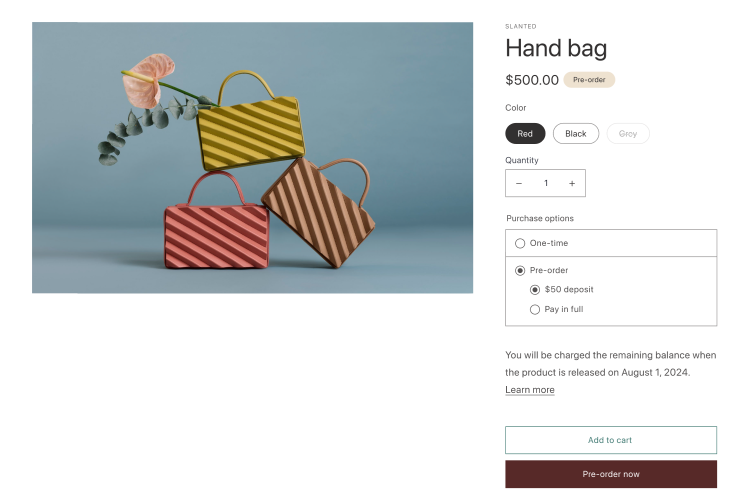
--- title: Pre-orders and Try Before You Buy (TBYB) description: Learn how to support pre-orders and try before you buy in your theme. source_url: html: 'https://shopify.dev/docs/storefronts/themes/pricing-payments/preorder-tbyb' md: >- https://shopify.dev/docs/storefronts/themes/pricing-payments/preorder-tbyb.md --- ExpandOn this page * [How it works](https://shopify.dev/docs/storefronts/themes/pricing-payments/preorder-tbyb.md#how-it-works) * [Implementing pre-orders and TBYB in a theme](https://shopify.dev/docs/storefronts/themes/pricing-payments/preorder-tbyb.md#implementing-pre-orders-and-tbyb-in-a-theme) # Pre-orders and Try Before You Buy (TBYB) Merchants are able to offer various options for purchasing goods and services at checkout through a pre-order or TBYB app. For example, customers can pre-order a product delivery, pay nothing upfront, and have it delivered a month later. Only once delivered will the customer be charged. Tip To be eligible to use Shopify subscriptions, merchants must meet the [qualifying criteria](https://help.shopify.com/en/manual/products/purchase-options/subscriptions/setup#eligibility-requirements). *** ## How it works To enable pre-orders, apps create [selling plan groups](https://shopify.dev/docs/api/liquid/objects/selling_plan_group), within which they create [selling plans](https://shopify.dev/docs/api/liquid/objects/selling_plan). These selling plans are linked to products and product variants. For example, a selling plan group called "Pre-order" can offer selling plans that enable the customer to choose the amount they pay at the time of purchase. Merchants can offer multiple optional selling plans to customers, or specify a required selling plan for a product, such as "pre-order-only" offers. ![Product page with a pre-order option.](https://shopify.dev/assets/assets/images/themes/pre-order-D6OiHR0E.png) *** ## Implementing pre-orders and TBYB in a theme You can use Liquid and JavaScript to integrate pre-orders and TBYB into your theme. You should also review the UX guidelines for pre-orders and TBYB to ensure a great user experience. [Add pre-orders and TBYB to your theme\ \ ](https://shopify.dev/docs/storefronts/themes/pricing-payments/preorder-tbyb/add-preorder-tbyb-to-your-theme) [Learn more about how to integrate pre-orders and TBYB into your theme.](https://shopify.dev/docs/storefronts/themes/pricing-payments/preorder-tbyb/add-preorder-tbyb-to-your-theme) [Pre-orders and TBYB UX guidelines\ \ ](https://shopify.dev/docs/storefronts/themes/pricing-payments/preorder-tbyb/preorder-tbyb-ux-guidelines) [Learn how to build a pre-order or TBYB experience and style components in your theme.](https://shopify.dev/docs/storefronts/themes/pricing-payments/preorder-tbyb/preorder-tbyb-ux-guidelines) *** * [How it works](https://shopify.dev/docs/storefronts/themes/pricing-payments/preorder-tbyb.md#how-it-works) * [Implementing pre-orders and TBYB in a theme](https://shopify.dev/docs/storefronts/themes/pricing-payments/preorder-tbyb.md#implementing-pre-orders-and-tbyb-in-a-theme)