About webhooks
When your app needs information about specific events that have occurred on a shop, it can subscribe to Shopify webhook topics as a mechanism for receiving near-real-time data about these events.
Shopify webhooks are useful for keeping your app in sync with Shopify data, or as a trigger to perform an additional action after that event has occurred. They're also a performant alternative to continuously polling for changes to a shop's data.
This guide provides a quick primer on when to use APIs compared to webhooks, as well as key terminology and behaviors that are specific to Shopify webhooks.
Anchor to What you can buildWhat you can build
- Send notifications about changes in inventory levels to inventory management clients and pagers.
- Inform shipping companies about changes in orders, returns, or refunds.
- Remove customer data from a database for app uninstalls.
- Integrate data about orders with accounting software.
- Update a product's warranty price based on changes to the product's price.
Anchor to How it worksHow it works
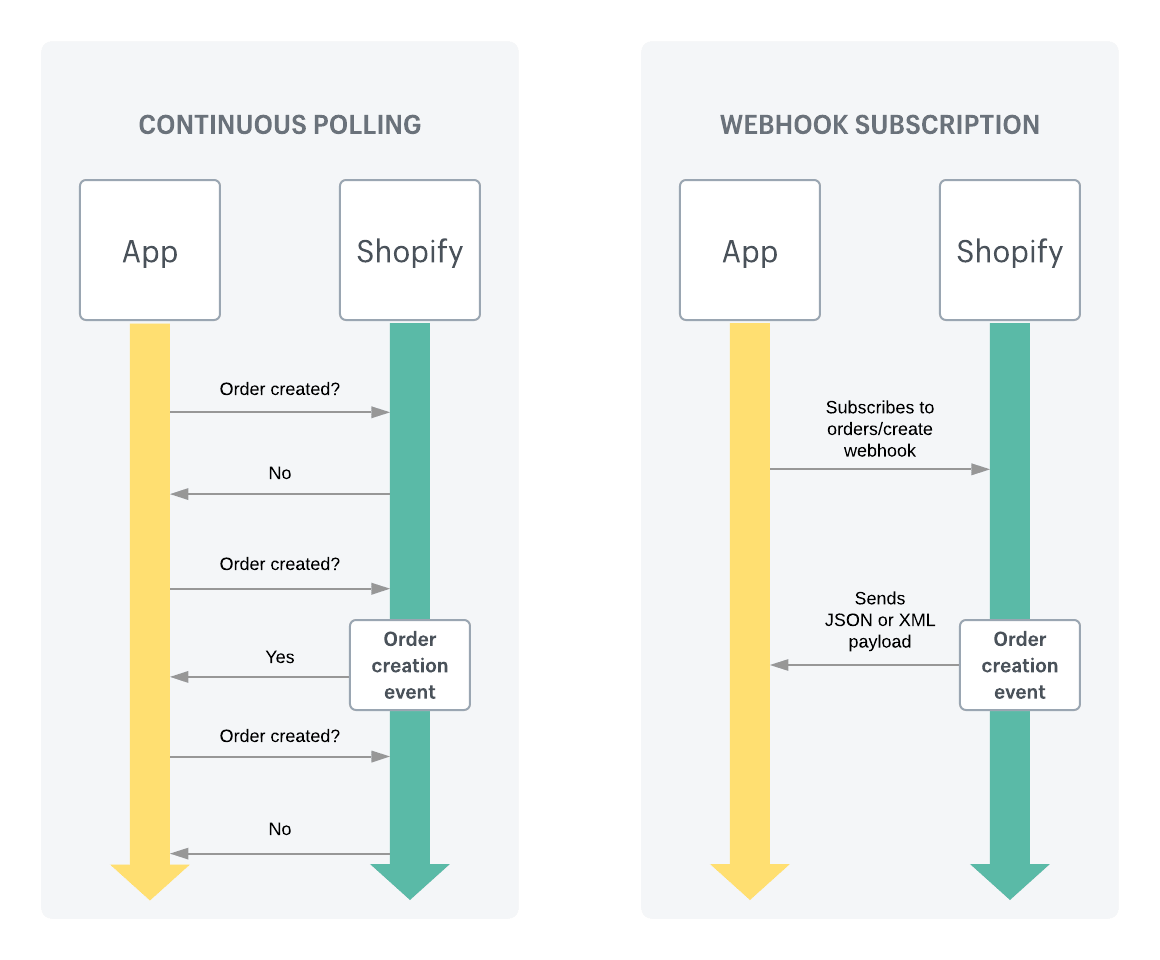
The following example uses the orders/create webhook topic to illustrate the difference between polling an API for data about events, versus subscribing to a webhook topic to receive data about events.
-
The app subscribes to the
orders/createtopic for a shop and listens for order creation events. -
The app specifies an endpoint to receive webhooks for the
orders/createtopic. For example, this might be an HTTPS endpoint hosted by the app server. This endpoint is where the app listens for webhooks. -
Suppose now that an order is created from that shop.
-
This triggers a webhook to be published to the
orders/createtopic. -
Shopify sends that webhook, which includes headers and an order payload, to the specified subscription endpoint.
You declare a subscription in shopify.app.toml or using the GraphQL Admin API to tell Shopify which topic to watch and where to send deliveries.
The four core concepts are:
- Manage subscriptions: Configure which topics your app subscribes to, and where deliveries are sent.
- Delivery filtering: Use
filterandinclude_fieldsto narrow which deliveries qualify and what each payload contains. - Delivery structure: Understand the payload format and headers included with each delivery.
- Verify deliveries: Verify HMAC signatures and ignore duplicate deliveries using
X-Shopify-Webhook-Id.
Webhooks and Events can run side by side in your app, with subscriptions configured in the same shopify.app.toml. For topics supported by Events, you can choose either Events or webhooks. See Events and webhooks to compare, or migrate a subscription.
Webhooks and Events can run side by side in your app, with subscriptions configured in the same shopify.app.toml. For topics supported by Events, you can choose either Events or webhooks. See Events and webhooks to compare, or migrate a subscription.
Anchor to Key terminologyKey terminology
Anchor to Webhook subscriptionWebhook subscription
A subscription declares which topic to watch and where to send deliveries: a URL, Google Pub/Sub URI, or Amazon EventBridge ARN. See Manage subscriptions.
Anchor to Webhook topicWebhook topic
A topic identifies the resource and action that qualifies a delivery. For example, products/create fires when a new product is created. See Manage subscriptions for the full list of supported topics and required scopes.
Anchor to HeadersHeaders
Each delivery includes metadata headers such as X-Shopify-Topic, X-Shopify-Webhook-Id, and X-Shopify-Hmac-Sha256. See Delivery structure for the full headers reference.
Anchor to What to expectWhat to expect
Below are some key things to remember when working with webhooks.
Anchor to Ordering event dataOrdering event data
As with other webhook systems, Shopify doesn't guarantee ordering within a topic, or across different topics for the same resource. For example, it's possible that a products/update webhook might be delivered before a products/create webhook.
Shopify recommends using timestamps provided in the header (X-Shopify-Triggered-At) or in the payload itself (updated_at) to organize webhooks.
Anchor to Implement reconciliation jobsImplement reconciliation jobs
Your app shouldn't rely on receiving data from Shopify webhooks. Webhook delivery isn't always guaranteed, and your app can miss or mishandle events for other reasons, such as handler failures or downtime. For redundancy, use reconciliation jobs to periodically fetch data from Shopify so that your app stays consistent with Shopify's data.
You could do this in the background, or offer reconciliation and syncing options to the user. For example, the UI of your app could contain a button that triggers a manual reconciliation process by calling the relevant API endpoint, and fetching the requested data.
Many GraphQL queries support updated_at filter parameters. Use these filters to build a job that fetches all objects updated since the last time the job ran.


