---
title: Intents API
description: >-
The Intents API launches Shopify's native admin interfaces for creating and
editing resources. When your extension calls an intent, merchants complete
their changes using the standard Shopify admin UI, and your app receives the
result.
api_version: v1.0
source_url:
html: >-
https://shopify.dev/docs/api/app-home/latest/apis/user-interface-and-interactions/intents-api
md: >-
https://shopify.dev/docs/api/app-home/latest/apis/user-interface-and-interactions/intents-api.md
api_name: app-home
---
# Intents API
**Info:**
App Bridge isn't versioned with Polaris. App Bridge APIs and web components are identical in every App Home reference version.
The Intents API launches Shopify's native admin interfaces for creating and editing resources. When your extension calls an intent, merchants complete their changes using the standard Shopify admin UI, and your app receives the result. This means you don't need to build custom forms.
Use this API to build workflows like adding products to collections, creating multiple related resources in a sequence (like a product, collection, and discount for a promotion), opening specific resources for editing, or launching discount creation with pre-selected types.
### Use cases
* **Resource creation:** Invoke admin workflows to create products, collections, discounts, or other Shopify resources.
* **Resource editing:** Open existing Shopify resources for editing using their admin workflows.
* **Workflow completion:** Await the result of an intent to determine whether the merchant completed or cancelled the operation.
* **Admin consistency:** Use native Shopify admin workflows instead of building custom forms for resource management.
### invoke method
The `invoke` method launches a Shopify admin workflow for creating or editing resources. The method returns a promise that resolves to an activity handle you can await to get the workflow result.
The method accepts either:
* **String query:** `${action}:${type},${value}` with optional second parameter (`IntentQueryOptions`)
* **Object:** Properties for `action`, `type`, `value`, and `data`
### IntentQueryOptions parameters
Optional parameters for the `invoke` method when using the string query format:
* **`value`** (`string`): The resource identifier for edit operations (for example, `'gid://shopify/Product/123'`). Required when editing existing resources. Omit for create operations.
* **`data`** (`{ [key: string]: unknown }`): Additional context required by specific resource types. For example, discounts require a type, variants require a product ID, and metaobjects require a definition type.
### Supported resources
The following tables show which resource types you can create or edit, and what values you need to pass for `value` and `data` for each operation.
#### Article
[Articles](https://shopify.dev/docs/api/admin-graphql/latest/objects/Article) are blog posts published on the Online Store. Use this to create or edit articles for merchant blogs.
| Action | Type | Value | Data |
| - | - | - | - |
| `create` | `shopify/Article` | — | — |
| `edit` | `shopify/Article` | `gid://shopify/Article/{id}` | — |
#### Catalog
[Catalogs](https://shopify.dev/docs/api/admin-graphql/latest/interfaces/Catalog) are product groupings that organize products for different markets or channels. Use this to create or edit catalogs for B2B or multi-market selling.
| Action | Type | Value | Data |
| - | - | - | - |
| `create` | `shopify/Catalog` | — | `{ selectedMarketId?: string }` |
| `edit` | `shopify/Catalog` | `gid://shopify/Catalog/{id}` | — |
The optional `selectedMarketId` is a market's numeric ID (for example, `'123'` from `gid://shopify/Market/123`). Pass it to pre-select that market when the catalog creation workflow opens.
#### Collection
[Collections](https://shopify.dev/docs/api/admin-graphql/latest/objects/Collection) are groups of products organized manually or by automated rules. Use this to create or edit product collections.
| Action | Type | Value | Data |
| - | - | - | - |
| `create` | `shopify/Collection` | — | — |
| `edit` | `shopify/Collection` | `gid://shopify/Collection/{id}` | — |
#### Customer
[Customers](https://shopify.dev/docs/api/admin-graphql/latest/objects/Customer) are profiles with contact information, order history, and metadata. Use this to create or edit customer accounts.
| Action | Type | Value | Data |
| - | - | - | - |
| `create` | `shopify/Customer` | — | — |
| `edit` | `shopify/Customer` | `gid://shopify/Customer/{id}` | — |
#### Delivery profile
[Delivery profiles](https://shopify.dev/docs/api/admin-graphql/latest/objects/DeliveryProfile) define shipping rates and rules for products across locations and zones. Use this to create or edit shipping configurations for different product groups.
| Action | Type | Value | Data |
| - | - | - | - |
| `create` | `shopify/DeliveryProfile` | — | — |
| `edit` | `shopify/DeliveryProfile` | `gid://shopify/DeliveryProfile/{id}` | — |
#### Discount
[Discounts](https://shopify.dev/docs/api/admin-graphql/latest/objects/DiscountNode) are price reductions applied to products, orders, or shipping. Use this to create or edit discount codes and automatic discounts. Creating discounts requires specifying a discount type.
| Action | Type | Value | Data |
| - | - | - | - |
| `create` | `shopify/Discount` | — | `{ type: 'amount-off-product' \| 'amount-off-order' \| 'buy-x-get-y' \| 'free-shipping' }` |
| `edit` | `shopify/Discount` | `gid://shopify/DiscountNode/{id}` | — |
**Note:** For edit intents, pass a discount GID. Use \\gid://shopify\/Discount\Node\/{id}\\ as the canonical value. If you use a method-specific GID, match it to the discount method: use \\gid://shopify\/Discount\Code\Node\/{id}\\ for discount codes and \\gid://shopify\/Discount\Automatic\Node\/{id}\\ for automatic discounts.
#### File
[Files](https://shopify.dev/docs/api/admin-graphql/latest/interfaces/File) are images, videos, 3D models, and other media uploaded to the store. Use the `pick` action to let merchants choose existing files. The workflow resolves with the selected file IDs in `response.data.ids`.
| Action | Type | Value | Data |
| - | - | - | - |
| `pick` | `shopify/File` | — | `{ mediaTypes?: ('MediaImage' \| 'Video' \| 'GenericFile' \| 'Model3d' \| 'ExternalVideo')[], multiSelect?: boolean, selectedFiles?: string[], unselectedFiles?: string[] }` |
The `data` options are all optional: `mediaTypes` restricts the picker to specific file types, `multiSelect` allows selecting more than one file, and `selectedFiles`/`unselectedFiles` control which files are pre-selected when the picker opens.
#### Location
[Locations](https://shopify.dev/docs/api/admin-graphql/latest/objects/Location) are physical or virtual places where merchants store inventory and fulfill orders. Use this to create or edit locations for managing stock and fulfillment.
| Action | Type | Value | Data |
| - | - | - | - |
| `create` | `shopify/Location` | — | — |
| `edit` | `shopify/Location` | `gid://shopify/Location/{id}` | — |
#### Market
[Markets](https://shopify.dev/docs/api/admin-graphql/latest/objects/Market) are geographic regions with customized pricing, languages, and domains. Use this to create or edit markets for international selling.
| Action | Type | Value | Data |
| - | - | - | - |
| `create` | `shopify/Market` | — | — |
| `edit` | `shopify/Market` | `gid://shopify/Market/{id}` | — |
#### Menu
[Menus](https://shopify.dev/docs/api/admin-graphql/latest/objects/Menu) are navigation structures for the Online Store. Use this to create or edit menu structures and links.
| Action | Type | Value | Data |
| - | - | - | - |
| `create` | `shopify/Menu` | — | — |
| `edit` | `shopify/Menu` | `gid://shopify/Menu/{id}` | — |
#### Metafield definition
[Metafield definitions](https://shopify.dev/docs/api/admin-graphql/latest/objects/MetafieldDefinition) are schemas that define custom data fields for resources. Use this to create or edit metafield definitions that merchants can use to add structured data to products, customers, and other resources.
| Action | Type | Value | Data |
| - | - | - | - |
| `create` | `shopify/MetafieldDefinition` | — | `{ ownerType: MetafieldOwnerType }` |
| `edit` | `shopify/MetafieldDefinition` | `gid://shopify/MetafieldDefinition/{id}` | `{ ownerType: MetafieldOwnerType }` |
The `ownerType` is required and sets which resource the metafield definition attaches to. Matching is case-insensitive. The supported values are `PRODUCT`, `PRODUCTVARIANT`, `COLLECTION`, `CUSTOMER`, `ORDER`, `DRAFTORDER`, `COMPANY`, `COMPANY_LOCATION`, `LOCATION`, `TRANSFER`, `PAGE`, `BLOG`, `ARTICLE`, `MARKET`, and `SHOP`. These are the subset of the [`MetafieldOwnerType`](https://shopify.dev/docs/api/admin-graphql/latest/enums/MetafieldOwnerType) enum that the admin metafield UI supports.
#### Metaobject
[Metaobjects](https://shopify.dev/docs/api/admin-graphql/latest/objects/Metaobject) are custom structured data entries based on metaobject definitions. Use this to create or edit metaobject instances that store complex custom data. Requires a definition type.
| Action | Type | Value | Data |
| - | - | - | - |
| `create` | `shopify/Metaobject` | — | `{ type: string, displayName?: string }` |
| `edit` | `shopify/Metaobject` | `gid://shopify/Metaobject/{id}` | `{ type: string }` |
The `type` is required and identifies the metaobject definition the entry belongs to (for example, `'shopify--color-pattern'` for a standard definition, or your own definition's type). On `create`, the optional `displayName` pre-fills the entry's display name.
#### Metaobject definition
[Metaobject definitions](https://shopify.dev/docs/api/admin-graphql/latest/objects/MetaobjectDefinition) are schemas that define the structure for metaobjects. Use this to create or edit metaobject definitions that determine the fields and data types for custom structured data.
| Action | Type | Value | Data |
| - | - | - | - |
| `create` | `shopify/MetaobjectDefinition` | — | `{ metaobjectDefinition?: object }` |
| `edit` | `shopify/MetaobjectDefinition` | — | `{ type: 'my_metaobject_definition_type' }` |
On `create`, the optional `metaobjectDefinition` object pre-fills the new definition's fields. On `edit`, `type` is required and identifies the definition to open.
#### Page
[Pages](https://shopify.dev/docs/api/admin-graphql/latest/objects/Page) are static content pages for the Online Store. Use this to create or edit pages like About Us, Contact, or custom informational pages.
| Action | Type | Value | Data |
| - | - | - | - |
| `create` | `shopify/Page` | — | — |
| `edit` | `shopify/Page` | `gid://shopify/Page/{id}` | — |
#### Product
[Products](https://shopify.dev/docs/api/admin-graphql/latest/objects/Product) are items sold in the store with pricing, inventory, and variants. Use this to create or edit products.
| Action | Type | Value | Data |
| - | - | - | - |
| `create` | `shopify/Product` | — | — |
| `edit` | `shopify/Product` | `gid://shopify/Product/{id}` | — |
#### Product variant
[Product variants](https://shopify.dev/docs/api/admin-graphql/latest/objects/ProductVariant) are specific combinations of product options like size and color. Use this to create or edit product variants. Creating variants requires a parent product ID.
| Action | Type | Value | Data |
| - | - | - | - |
| `create` | `shopify/ProductVariant` | — | `{ productId: 'gid://shopify/Product/{id}' }` |
| `edit` | `shopify/ProductVariant` | `gid://shopify/ProductVariant/{id}` | `{ productId: 'gid://shopify/Product/{id}' }` |
**Note:** When editing products with variants, query the \\\product.has\Only\Default\Variant\\\ field first. If \true\, then use the \\shopify\/Product\\ edit intent. If \false\, then use the \\shopify\/Product\Variant\\ edit intent for specific variants.
#### Settings
Settings are the configuration options for the store. Use this to invoke and edit settings.
| Action | Type | Value | Data |
| - | - | - | - |
| `edit` | `settings/GiftCardExpiration` | — | — |
| `edit` | `settings/LocationDefault` | — | — |
| `edit` | `settings/NotificationsSenderEmail` | — | — |
| `edit` | `settings/NotificationsStaff` | — | — |
| `edit` | `settings/OrderIdFormat` | — | — |
| `edit` | `settings/OrderProcessing` | — | — |
| `edit` | `settings/PaymentCaptureMethod` | — | — |
| `edit` | `settings/StoreDefaults` | — | — |
| `edit` | `settings/StoreDetails` | — | — |
* **request**
**IntentRequestApi**
**required**
The current intent request as a subscribable.
When the app isn't running inside an intent workflow, the current value is `null`.
* **invoke**
**{ (query: IntentQuery): Promise\; (intentURL: string, options?: IntentQueryOptions): Promise\; }**
Invoke an intent using the object syntax.
Invoke an intent using the URL syntax.
URL format: `action:type[,value][?params]`.
* **response**
**IntentResponseApi**
If in an intent workflow, provides mechanisms to resolve the intent with a given response.
### IntentQuery
* action
```ts
IntentAction
```
* data
Additional data required for certain intent types. For example: - Discount creation requires { type: 'amount-off-product' | 'amount-off-order' | 'buy-x-get-y' | 'free-shipping' } - ProductVariant creation requires { productId: 'gid://shopify/Product/123' } - Metaobject creation requires { type: 'shopify--color-pattern' }
```ts
{ [key: string]: unknown; }
```
* type
```ts
IntentType
```
* value
The resource identifier for edit actions (e.g., 'gid://shopify/Product/123').
```ts
string
```
### IntentAction
Supported actions that can be performed on resources. - \`create\`: Opens a creation workflow for a new resource - \`edit\`: Opens an editing workflow for an existing resource (requires \`value\` parameter)
```ts
'create' | 'edit'
```
### IntentType
Supported resource types that can be targeted by intents.
```ts
'settings/LocationDefault' | 'settings/OrderIDFormat' | 'settings/OrderProcessing' | 'settings/StoreDefaults' | 'settings/StoreDetails' | 'shopify/Article' | 'shopify/Catalog' | 'shopify/Collection' | 'shopify/Customer' | 'shopify/Discount' | 'shopify/Location' | 'shopify/Market' | 'shopify/Menu' | 'shopify/MetafieldDefinition' | 'shopify/Metaobject' | 'shopify/MetaobjectDefinition' | 'shopify/Page' | 'shopify/Product' | 'shopify/ProductVariant'
```
### IntentActivity
Activity handle for tracking intent workflow progress.
* complete
A Promise that resolves when the intent workflow completes, returning the response.
```ts
Promise
```
### IntentResponse
Response object returned when the intent workflow completes.
```ts
ClosedIntentResponse | SuccessIntentResponse | ErrorIntentResponse
```
### ClosedIntentResponse
User dismissed or closed the workflow without completing it.
* code
```ts
'closed'
```
### SuccessIntentResponse
Successful intent completion.
* code
```ts
'ok'
```
* data
```ts
{ [key: string]: unknown; }
```
### ErrorIntentResponse
Failed intent completion.
* code
```ts
'error'
```
* issues
```ts
Issue[]
```
* message
```ts
string
```
### Issue
A structured issue describing a validation or workflow error.
* code
A machine-readable error code for this issue. Use this for programmatic error handling or logging.
```ts
string
```
* message
A description of what's wrong with this field. Display this to help merchants understand how to fix the error.
```ts
string
```
* path
The path to the field that has an error (for example, \`\['product', 'title']\`). Use this to identify which field caused the validation failure.
```ts
string[]
```
### IntentQueryOptions
Options for invoking intents when using the query string format.
* data
Additional data required for certain intent types. For example: - Discount creation requires { type: 'amount-off-product' | 'amount-off-order' | 'buy-x-get-y' | 'free-shipping' } - ProductVariant creation requires { productId: 'gid://shopify/Product/123' } - Metaobject creation requires { type: 'shopify--color-pattern' }
```ts
{ [key: string]: unknown; }
```
* value
The resource identifier for edit actions (e.g., 'gid://shopify/Product/123').
```ts
string
```
### IntentRequestApi
* subscribe
```ts
(callback: (value: IntentRequest) => void) => () => void
```
* value
```ts
IntentRequest | null
```
### IntentRequest
* action
```ts
string
```
* data
```ts
{ [key: string]: unknown; }
```
* type
```ts
string
```
* value
```ts
unknown
```
### IntentResponseApi
* closed
If in an intent workflow, resolves the intent with a closed response.
```ts
() => Promise
```
* error
If in an intent workflow, resolves the intent with an error response and the provided message and issues, if any.
```ts
(message: string, issues?: Issue[]) => Promise
```
* ok
If in an intent workflow, resolves the intent with a success response and the provided data, if any.
```ts
(data?: { [key: string]: unknown; }) => Promise
```
### IntentResponse
The result returned when an intent workflow completes. Check the `code` property to determine the outcome:
* `'ok'`: The merchant completed the workflow successfully.
* `'error'`: The workflow failed due to validation or other errors.
* `'closed'`: The merchant cancelled without completing.
**`ClosedIntentResponse | SuccessIntentResponse | ErrorIntentResponse`**
### ClosedIntentResponse
* **code**
**'closed'**
### ErrorIntentResponse
* **code**
**'error'**
* **issues**
**Issue\[]**
* **message**
**string**
### SuccessIntentResponse
* **code**
**'ok'**
* **data**
**{ \[key: string]: unknown; }**
### request
When your app is opened through an app intent (for example, via an [`admin.app.intent.link`](https://shopify.dev/docs/apps/build/sidekick/build-app-actions) target), the platform delivers the incoming intent to your embedded app in two complementary ways:
* **`shopify.intents.request`**: The default path, and the one to use in client-side code. A subscribable that exposes the current intent request to your app. Read the current request synchronously from `shopify.intents.request.value`. When your app isn't running inside an intent workflow, the value is `null`. Use `shopify.intents.request.subscribe(callback)` to react to changes if the host updates the current intent without reloading the iframe (for example, when a single-page app navigates between intent targets).
* **`?intent=`**: On the initial page load, the same payload is appended to your app's URL as a single `intent` query parameter. Use this only for server-side rendering, where App Bridge isn't available yet: read it from the incoming request URL in, for example, a Remix loader or Next.js `getServerSideProps`. In client-side code, read `shopify.intents.request` and subscribe to updates instead, because the query parameter is only present on the initial page load and goes stale if the host updates the current intent without reloading the iframe.
Both paths expose the same `action`, `type`, `value`, and `data` fields. The exact contents of `data` differ slightly between the two paths. See the `data` row of the table for details.
| Field | Type | Description |
| - | - | - |
| `action` | `string` | The operation the merchant is performing (for example, `'create'` or `'edit'`). |
| `type` | `string` | The intent type declared under `[[extensions.targeting.intents]]` in your extension's `shopify.extension.toml`. See [Register your extension as an intent](https://shopify.dev/docs/apps/build/sidekick/build-app-actions#register-your-extension-as-an-intent). For example, `application/email`. |
| `value` | `unknown` | The primary resource identifier when present. The exact shape is defined by your intent schema's `value` field; for an `application/email` intent that might be a campaign ID like `'42'`. Optional. |
| `data` | `{ [key: string]: unknown }` | Additional input fields defined by your intent's schema. **From `shopify.intents.request.value`:** the raw `data` from the original invocation, with no merging. **From the URL `intent=` JSON:** the same `data`, additionally merged with any input-schema fields whose `mapTo` is `'form_data'` (or the schema default). Fields declared with `mapTo: 'query_param'` arrive as separate query parameters on the launch URL (not inside the `intent=` JSON); fields with `mapTo: 'param'` land in the URL path. Optional. |
> Note: Read the intent payload once on load and store it in your app's state, or subscribe to it if your app stays mounted across intent transitions. The request tells you what to render. The merchant then completes the workflow in your UI, and you report the result through [`shopify.intents.response`](#response-methods).
>
> The URL `intent=` JSON may include additional internal fields beyond the four documented above. Those are runtime-only and not part of the public contract; treat them as Shopify-internal and don't rely on them in your app.
### response methods
The `response` methods resolve an app intent from inside the extension that's handling it. When your extension implements an app intent (for example, through an [`admin.app.intent.link`](https://shopify.dev/docs/apps/build/sidekick/build-app-actions) target), call one of these methods to return control to the invoker with the appropriate outcome.
* **`ok(data?)`**: Resolves the intent with a success response. The optional `data` object is returned to the invoker as `response.data`.
* **`error(message, issues?)`**: Resolves the intent with an error response. The `message` describes the failure, and `issues` is an optional array of Standard Schema validation issues.
* **`closed()`**: Resolves the intent as closed, indicating the merchant cancelled the workflow without completing it.
Each method returns a promise that resolves once the response has been delivered.
* **closed**
**() => Promise\**
**required**
If in an intent workflow, resolves the intent with a closed response.
* **error**
**(message: string, issues?: Issue\[]) => Promise\**
**required**
If in an intent workflow, resolves the intent with an error response and the provided message and issues, if any.
* **ok**
**(data?: { \[key: string]: unknown; }) => Promise\**
**required**
If in an intent workflow, resolves the intent with a success response and the provided data, if any.
Examples
## Preview
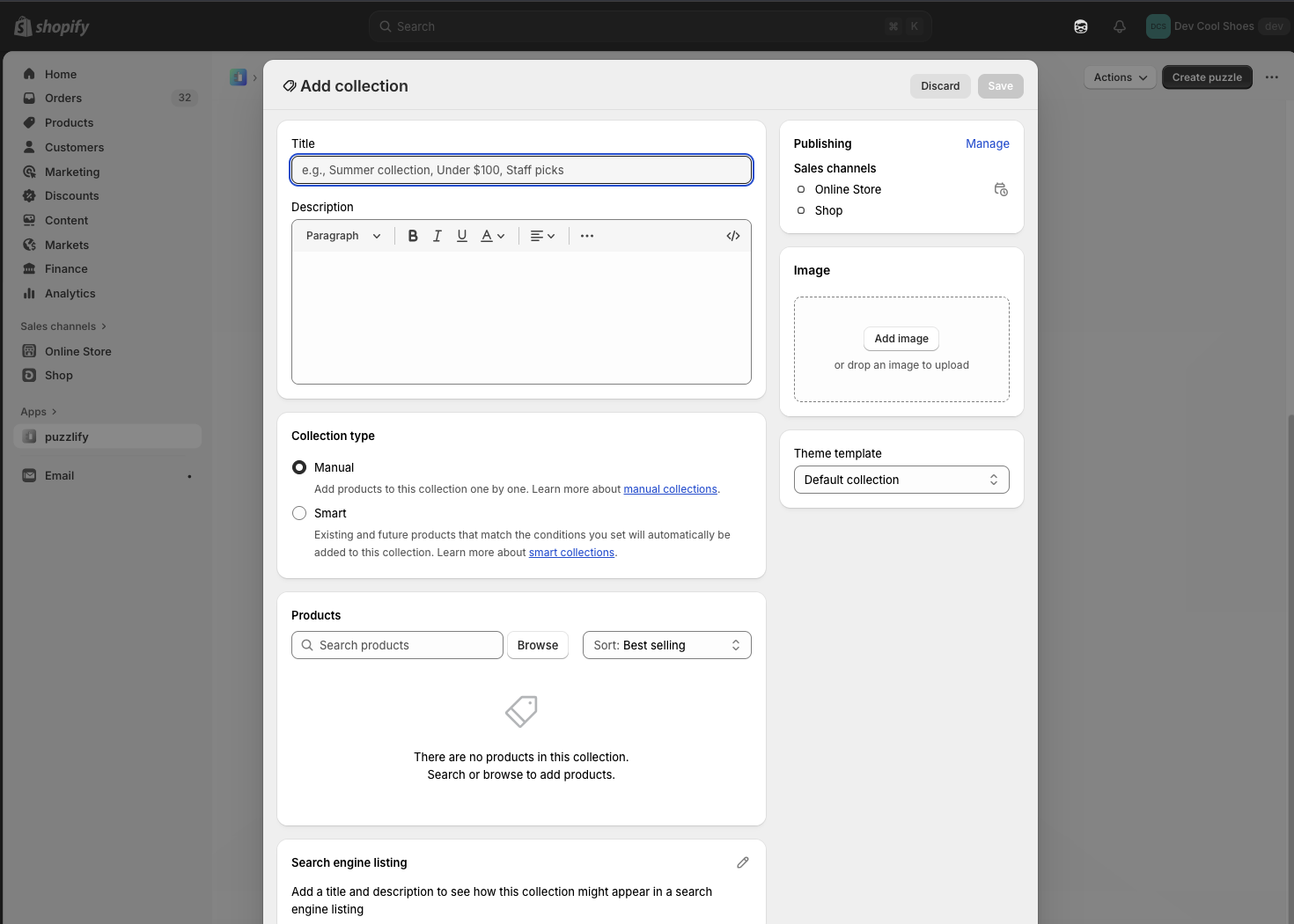
### Examples
* ####
##### Description
Launch the collection creation workflow in the Shopify admin. The merchant completes the form using the standard Shopify admin UI, and your app receives the result when the workflow completes.
##### js
```js
const activity = await shopify.intents.invoke('create:shopify/Collection');
const response = await activity.complete;
if (response.code === 'ok') {
console.log('Collection created:', response.data);
} else if (response.code === 'closed') {
console.log('Creation cancelled by user');
} else if (response.code === 'error') {
console.log('Error:', response.message);
}
```
* ####
##### Description
Launch the article creation workflow in the Shopify admin. The merchant writes and publishes the article using the standard Shopify admin UI, and your app receives the result when the workflow completes.
##### js
```js
const activity = await shopify.intents.invoke('create:shopify/Article');
const response = await activity.complete;
if (response.code === 'ok') {
console.log('Article created:', response.data);
} else if (response.code === 'closed') {
console.log('Creation cancelled by user');
} else if (response.code === 'error') {
console.log('Error:', response.message);
}
```
* ####
##### Description
Open an existing article for editing in the Shopify admin. Pass the article's GID (for example, \`gid://shopify/Article/123456789\`) as the value. Your app receives the updated data when the merchant saves their changes.
##### js
```js
const activity = await shopify.intents.invoke('edit:shopify/Article', {
value: 'gid://shopify/Article/123456789',
});
const response = await activity.complete;
if (response.code === 'ok') {
console.log('Article updated:', response.data);
} else if (response.code === 'closed') {
console.log('Edit cancelled by user');
} else if (response.code === 'error') {
console.log('Error:', response.message);
}
```
* ####
##### Description
Launch the catalog creation workflow in the Shopify admin. The merchant completes the form using the standard Shopify admin UI, and your app receives the result when the workflow completes.
##### js
```js
const activity = await shopify.intents.invoke('create:shopify/Catalog');
const response = await activity.complete;
if (response.code === 'ok') {
console.log('Catalog created:', response.data);
} else if (response.code === 'closed') {
console.log('Creation cancelled by user');
} else if (response.code === 'error') {
console.log('Error:', response.message);
}
```
* ####
##### Description
Open an existing catalog for editing in the Shopify admin. Pass the catalog's GID as the value. Your app receives the updated data when the merchant saves their changes.
##### js
```js
const activity = await shopify.intents.invoke('edit:shopify/Catalog', {
value: 'gid://shopify/Catalog/123456789',
});
const response = await activity.complete;
if (response.code === 'ok') {
console.log('Catalog updated:', response.data);
} else if (response.code === 'closed') {
console.log('Edit cancelled by user');
} else if (response.code === 'error') {
console.log('Error:', response.message);
}
```
* ####
##### Description
Open an existing collection for editing in the Shopify admin. Pass the collection's GID as the value. Your app receives the updated data when the merchant saves their changes.
##### js
```js
const activity = await shopify.intents.invoke('edit:shopify/Collection', {
value: 'gid://shopify/Collection/987654321',
});
const response = await activity.complete;
if (response.code === 'ok') {
console.log('Collection updated:', response.data);
} else if (response.code === 'closed') {
console.log('Edit cancelled by user');
} else if (response.code === 'error') {
console.log('Error:', response.message);
}
```
* ####
##### Description
Launch the customer creation workflow in the Shopify admin. The merchant completes the form using the standard Shopify admin UI, and your app receives the result when the workflow completes.
##### js
```js
const activity = await shopify.intents.invoke('create:shopify/Customer');
const response = await activity.complete;
if (response.code === 'ok') {
console.log('Customer created:', response.data);
} else if (response.code === 'closed') {
console.log('Creation cancelled by user');
} else if (response.code === 'error') {
console.log('Error:', response.message);
}
```
* ####
##### Description
Open an existing customer for editing in the Shopify admin. Pass the customer's GID as the value. Your app receives the updated data when the merchant saves their changes.
##### js
```js
const activity = await shopify.intents.invoke('edit:shopify/Customer', {
value: 'gid://shopify/Customer/456789123',
});
const response = await activity.complete;
if (response.code === 'ok') {
console.log('Customer updated:', response.data);
} else if (response.code === 'closed') {
console.log('Edit cancelled by user');
} else if (response.code === 'error') {
console.log('Error:', response.message);
}
```
* ####
##### Description
Launch the delivery profile creation workflow in the Shopify admin. The merchant configures shipping zones, rates, and product assignments using the standard Shopify admin UI, and your app receives the result when the workflow completes.
##### js
```js
const activity = await shopify.intents.invoke('create:shopify/DeliveryProfile');
const response = await activity.complete;
if (response.code === 'ok') {
console.log('Delivery profile created:', response.data);
}
```
* ####
##### Description
Open an existing delivery profile for editing in the Shopify admin. Pass the delivery profile's GID as the value. Your app receives the updated data when the merchant saves their changes.
##### js
```js
const activity = await shopify.intents.invoke('edit:shopify/DeliveryProfile', {
value: 'gid://shopify/DeliveryProfile/123456789',
});
const response = await activity.complete;
if (response.code === 'ok') {
console.log('Delivery profile updated:', response.data);
}
```
* ####
##### Description
Launch the discount creation workflow in the Shopify admin. You must specify the discount type in the \`data\` parameter. Valid types are \`'amount-off-product'\`, \`'amount-off-order'\`, \`'buy-x-get-y'\`, and \`'free-shipping'\`. Your app receives the result when the merchant completes the workflow.
##### js
```js
const activity = await shopify.intents.invoke('create:shopify/Discount', {
data: {type: 'amount-off-product'},
});
const response = await activity.complete;
if (response.code === 'ok') {
console.log('Discount created:', response.data);
} else if (response.code === 'closed') {
console.log('Creation cancelled by user');
} else if (response.code === 'error') {
console.log('Error:', response.message);
}
```
* ####
##### Description
Open an existing discount for editing in the Shopify admin. Pass the discount GID as the value. Your app receives the updated data when the merchant saves their changes.
##### js
```js
const activity = await shopify.intents.invoke('edit:shopify/Discount', {
value: 'gid://shopify/DiscountNode/123456789',
});
const response = await activity.complete;
if (response.code === 'ok') {
console.log('Discount updated:', response.data);
} else if (response.code === 'closed') {
console.log('Edit cancelled by user');
} else if (response.code === 'error') {
console.log('Error:', response.message);
}
```
* ####
##### Description
Open the file picker so the merchant can choose existing files from the store. Use the \`data\` options to filter by media type, allow multiple selection, or pre-select files. The workflow resolves with the selected file IDs in \`response.data.ids\`.
##### js
```js
const activity = await shopify.intents.invoke('pick:shopify/File', {
data: {mediaTypes: ['MediaImage'], multiSelect: true},
});
const response = await activity.complete;
if (response.code === 'ok') {
console.log('Selected file IDs:', response.data.ids);
} else if (response.code === 'closed') {
console.log('Selection cancelled by user');
} else if (response.code === 'error') {
console.log('Error:', response.message);
}
```
* ####
##### Description
Create a new location. Opens the location creation workflow.
##### js
```js
const activity = await shopify.intents.invoke('create:shopify/Location');
const response = await activity.complete;
if (response.code === 'ok') {
console.log('Location created:', response.data);
}
```
* ####
##### Description
Edit an existing location. Requires a location GID.
##### js
```js
const activity = await shopify.intents.invoke('edit:shopify/Location', {
value: 'gid://shopify/Location/123456789',
});
const response = await activity.complete;
if (response.code === 'ok') {
console.log('Location updated:', response.data);
}
```
* ####
##### Description
Edit the default location.
##### js
```js
const activity = await shopify.intents.invoke('edit:settings/LocationDefault');
const response = await activity.complete;
if (response.code === 'ok') {
console.log('Settings updated:', response.data);
}
```
* ####
##### Description
Launch the market creation workflow in the Shopify admin. The merchant completes the form using the standard Shopify admin UI, and your app receives the result when the workflow completes.
##### js
```js
const activity = await shopify.intents.invoke('create:shopify/Market');
const response = await activity.complete;
if (response.code === 'ok') {
console.log('Market created:', response.data);
} else if (response.code === 'closed') {
console.log('Creation cancelled by user');
} else if (response.code === 'error') {
console.log('Error:', response.message);
}
```
* ####
##### Description
Open an existing market for editing in the Shopify admin. Pass the market's GID as the value. Your app receives the updated data when the merchant saves their changes.
##### js
```js
const activity = await shopify.intents.invoke('edit:shopify/Market', {
value: 'gid://shopify/Market/123456789',
});
const response = await activity.complete;
if (response.code === 'ok') {
console.log('Market updated:', response.data);
} else if (response.code === 'closed') {
console.log('Edit cancelled by user');
} else if (response.code === 'error') {
console.log('Error:', response.message);
}
```
* ####
##### Description
Launch the menu creation workflow in the Shopify admin. The merchant completes the form using the standard Shopify admin UI, and your app receives the result when the workflow completes.
##### js
```js
const activity = await shopify.intents.invoke('create:shopify/Menu');
const response = await activity.complete;
if (response.code === 'ok') {
console.log('Menu created:', response.data);
} else if (response.code === 'closed') {
console.log('Creation cancelled by user');
} else if (response.code === 'error') {
console.log('Error:', response.message);
}
```
* ####
##### Description
Open an existing menu for editing in the Shopify admin. Pass the menu's GID as the value. Your app receives the updated data when the merchant saves their changes.
##### js
```js
const activity = await shopify.intents.invoke('edit:shopify/Menu', {
value: 'gid://shopify/Menu/123456789',
});
const response = await activity.complete;
if (response.code === 'ok') {
console.log('Menu updated:', response.data);
} else if (response.code === 'closed') {
console.log('Edit cancelled by user');
} else if (response.code === 'error') {
console.log('Error:', response.message);
}
```
* ####
##### Description
Launch the metafield definition creation workflow in the Shopify admin. You must specify the owner type in the \`data\` parameter (for example, \`'product'\`). Your app receives the result when the merchant completes the workflow.
##### js
```js
const activity = await shopify.intents.invoke(
'create:shopify/MetafieldDefinition',
{data: {ownerType: 'product'}},
);
const response = await activity.complete;
if (response.code === 'ok') {
console.log('Metafield definition created:', response.data);
} else if (response.code === 'closed') {
console.log('Creation cancelled by user');
} else if (response.code === 'error') {
console.log('Error:', response.message);
}
```
* ####
##### Description
Open an existing metafield definition for editing in the Shopify admin. Pass the metafield definition's GID as the value and the owner type in the \`data\` parameter. Your app receives the updated data when the merchant saves their changes.
##### js
```js
const activity = await shopify.intents.invoke(
'edit:shopify/MetafieldDefinition',
{
value: 'gid://shopify/MetafieldDefinition/123456789',
data: {ownerType: 'product'},
},
);
const response = await activity.complete;
if (response.code === 'ok') {
console.log('Metafield definition updated:', response.data);
} else if (response.code === 'closed') {
console.log('Edit cancelled by user');
} else if (response.code === 'error') {
console.log('Error:', response.message);
}
```
* ####
##### Description
Launch the metaobject creation workflow in the Shopify admin. You must specify the metaobject type in the \`data\` parameter (for example, \`'shopify--color-pattern'\`). Your app receives the result when the merchant completes the workflow.
##### js
```js
const activity = await shopify.intents.invoke('create:shopify/Metaobject', {
data: {type: 'shopify--color-pattern'},
});
const response = await activity.complete;
if (response.code === 'ok') {
console.log('Metaobject created:', response.data);
} else if (response.code === 'closed') {
console.log('Creation cancelled by user');
} else if (response.code === 'error') {
console.log('Error:', response.message);
}
```
* ####
##### Description
Open an existing metaobject for editing in the Shopify admin. Pass the metaobject's GID as the value and the metaobject type in the \`data\` parameter. Your app receives the updated data when the merchant saves their changes.
##### js
```js
const activity = await shopify.intents.invoke('edit:shopify/Metaobject', {
value: 'gid://shopify/Metaobject/123456789',
data: {type: 'shopify--color-pattern'},
});
const response = await activity.complete;
if (response.code === 'ok') {
console.log('Metaobject updated:', response.data);
} else if (response.code === 'closed') {
console.log('Edit cancelled by user');
} else if (response.code === 'error') {
console.log('Error:', response.message);
}
```
* ####
##### Description
Launch the metaobject definition creation workflow in the Shopify admin. The merchant completes the form using the standard Shopify admin UI, and your app receives the result when the workflow completes.
##### js
```js
const activity = await shopify.intents.invoke(
'create:shopify/MetaobjectDefinition',
);
const response = await activity.complete;
if (response.code === 'ok') {
console.log('Metaobject definition created:', response.data);
} else if (response.code === 'closed') {
console.log('Creation cancelled by user');
} else if (response.code === 'error') {
console.log('Error:', response.message);
}
```
* ####
##### Description
Open an existing metaobject definition for editing in the Shopify admin. Pass the metaobject definition type in the \`data\` parameter. Your app receives the updated data when the merchant saves their changes.
##### js
```js
const activity = await shopify.intents.invoke(
'edit:shopify/MetaobjectDefinition',
{data: {type: 'my_metaobject_definition_type'}},
);
const response = await activity.complete;
if (response.code === 'ok') {
console.log('Metaobject definition updated:', response.data);
} else if (response.code === 'closed') {
console.log('Edit cancelled by user');
} else if (response.code === 'error') {
console.log('Error:', response.message);
}
```
* ####
##### Description
Launch the page creation workflow in the Shopify admin. The merchant completes the form using the standard Shopify admin UI, and your app receives the result when the workflow completes.
##### js
```js
const activity = await shopify.intents.invoke('create:shopify/Page');
const response = await activity.complete;
if (response.code === 'ok') {
console.log('Page created:', response.data);
} else if (response.code === 'closed') {
console.log('Creation cancelled by user');
} else if (response.code === 'error') {
console.log('Error:', response.message);
}
```
* ####
##### Description
Open an existing page for editing in the Shopify admin. Pass the page's GID as the value. Your app receives the updated data when the merchant saves their changes.
##### js
```js
const activity = await shopify.intents.invoke('edit:shopify/Page', {
value: 'gid://shopify/Page/123456789',
});
const response = await activity.complete;
if (response.code === 'ok') {
console.log('Page updated:', response.data);
} else if (response.code === 'closed') {
console.log('Edit cancelled by user');
} else if (response.code === 'error') {
console.log('Error:', response.message);
}
```
* ####
##### Description
Launch the product creation workflow in the Shopify admin. The merchant completes the form using the standard Shopify admin UI, and your app receives the result when the workflow completes.
##### js
```js
const activity = await shopify.intents.invoke('create:shopify/Product');
const response = await activity.complete;
if (response.code === 'ok') {
console.log('Product created:', response.data);
} else if (response.code === 'closed') {
console.log('Creation cancelled by user');
} else if (response.code === 'error') {
console.log('Error:', response.message);
}
```
* ####
##### Description
Open an existing product for editing in the Shopify admin. Pass the product's GID as the value. Your app receives the updated data when the merchant saves their changes.
##### js
```js
const activity = await shopify.intents.invoke('edit:shopify/Product', {
value: 'gid://shopify/Product/123456789',
});
const response = await activity.complete;
if (response.code === 'ok') {
console.log('Product updated:', response.data);
} else if (response.code === 'closed') {
console.log('Edit cancelled by user');
} else if (response.code === 'error') {
console.log('Error:', response.message);
}
```
* ####
##### Description
Launch the product variant creation workflow in the Shopify admin. You must specify the parent product's GID in the \`data\` parameter. Your app receives the result when the merchant completes the workflow.
##### js
```js
const activity = await shopify.intents.invoke('create:shopify/ProductVariant', {
data: {productId: 'gid://shopify/Product/123456789'},
});
const response = await activity.complete;
if (response.code === 'ok') {
console.log('Product variant created:', response.data);
} else if (response.code === 'closed') {
console.log('Creation cancelled by user');
} else if (response.code === 'error') {
console.log('Error:', response.message);
}
```
* ####
##### Description
Open an existing product variant for editing in the Shopify admin. Pass the variant's GID as the value and the parent product's GID in the \`data\` parameter. Your app receives the updated data when the merchant saves their changes.
##### js
```js
const activity = await shopify.intents.invoke('edit:shopify/ProductVariant', {
value: 'gid://shopify/ProductVariant/123456789',
data: {productId: 'gid://shopify/Product/123456789'},
});
const response = await activity.complete;
if (response.code === 'ok') {
console.log('Product variant updated:', response.data);
} else if (response.code === 'closed') {
console.log('Edit cancelled by user');
} else if (response.code === 'error') {
console.log('Error:', response.message);
}
```
* ####
##### Description
Invoke and edit store details.
##### js
```js
const activity = await shopify.intents.invoke('edit:settings/StoreDetails');
const response = await activity.complete;
if (response.code === 'closed') {
console.log('Settings closed:', response.data);
}
```
* ####
##### Description
Invoke and edit store defaults.
##### js
```js
const activity = await shopify.intents.invoke('edit:settings/StoreDefaults');
const response = await activity.complete;
if (response.code === 'ok') {
console.log('Settings updated:', response.data);
}
```
* ####
##### Description
Invoke and edit order ID format.
##### js
```js
const activity = await shopify.intents.invoke('edit:settings/OrderIdFormat');
const response = await activity.complete;
if (response.code === 'ok') {
console.log('Settings updated:', response.data);
}
```
* ####
##### Description
Invoke and edit order processing.
##### js
```js
const activity = await shopify.intents.invoke('edit:settings/OrderProcessing');
const response = await activity.complete;
if (response.code === 'ok') {
console.log('Settings updated:', response.data);
}
```
* ####
##### Description
Invoke and edit the gift card expiration policy for the store.
##### js
```js
const activity = await shopify.intents.invoke('edit:settings/GiftCardExpiration');
const response = await activity.complete;
if (response.code === 'ok') {
console.log('Settings updated:', response.data);
}
```
* ####
##### Description
Invoke and edit the payment capture method for the store.
##### js
```js
const activity = await shopify.intents.invoke('edit:settings/PaymentCaptureMethod');
const response = await activity.complete;
if (response.code === 'ok') {
console.log('Settings updated:', response.data);
}
```
* ####
##### Description
Invoke and edit the sender email address used for customer notifications.
##### js
```js
const activity = await shopify.intents.invoke('edit:settings/NotificationsSenderEmail');
const response = await activity.complete;
if (response.code === 'ok') {
console.log('Settings updated:', response.data);
}
```
* ####
##### Description
Invoke and edit the staff notification settings for the store.
##### js
```js
const activity = await shopify.intents.invoke('edit:settings/NotificationsStaff');
const response = await activity.complete;
if (response.code === 'ok') {
console.log('Settings updated:', response.data);
}
```
* ####
##### Description
From inside an app intent, resolve the intent with a success, error, or closed response. Call \`shopify.intents.response.ok(data)\` when the merchant completes the workflow, \`shopify.intents.response.error(message)\` when it fails, or \`shopify.intents.response.closed()\` when the merchant cancels. The invoking surface receives the matching \[\`IntentResponse\`]\(#intentresponse).
##### js
```js
// Inside an embedded app route that's been registered as an admin link
// intent (see /docs/apps/build/sidekick/build-app-actions), resolve the
// intent by calling one of the response methods when the merchant
// finishes the workflow.
async function handleSave(formValues) {
try {
const result = await saveEmailCampaign(formValues);
await shopify.intents.response.ok({campaignId: result.id});
} catch (error) {
await shopify.intents.response.error(error.message);
}
}
async function handleCancel() {
await shopify.intents.response.closed();
}
```
* ####
##### Description
Read the incoming intent payload from \`shopify.intents.request.value\` when your app is opened as an app intent. Use the \`action\`, \`type\`, \`value\`, and \`data\` fields to drive your initial render. The value is \`null\` outside an intent workflow. Use \`shopify.intents.request.subscribe(callback)\` if your app stays mounted across intent transitions and you need to react to updates.
##### js
```js
// Read the incoming intent payload when your app is opened as an app
// intent. The current value is available synchronously at
// `shopify.intents.request.value`. It's `null` when the app isn't
// running inside an intent workflow.
const request = shopify.intents.request?.value;
if (request) {
// request.action — the operation (for example, 'create' or 'edit')
// request.type — the intent type declared in shopify.extension.toml
// request.value — the primary resource identifier when present
// request.data — fields defined by the intent's input schema
renderEmailComposer({
action: request.action,
campaignId: request.value,
subject: request.data?.subject,
recipient: request.data?.recipient,
});
}
// If your app stays mounted across intent transitions (for example, a
// single-page app navigating between intent targets), subscribe to
// changes instead.
const unsubscribe = shopify.intents.request?.subscribe((next) => {
if (next) renderEmailComposer({action: next.action, campaignId: next.value});
});
```
* ####
##### Description
Read the incoming intent payload from the launch URL when server-side rendering, before App Bridge is available. The platform appends the payload as a URL-encoded JSON \`intent\` query parameter on the initial page load. Use this only for server-side rendering; in client-side code, read \`shopify.intents.request\` and subscribe to updates instead.
##### js
```js
// Read the incoming intent payload when server-side rendering. When your
// app is launched via an app intent, the platform appends the payload to
// the landing URL as a URL-encoded JSON `intent` query parameter on the
// initial page load.
//
// Use this only for server-side rendering, where App Bridge isn't
// available yet — for example in a Remix loader or Next.js
// `getServerSideProps`, parsing the incoming request URL (`requestUrl`
// below). In client-side code, read `shopify.intents.request` and
// subscribe to updates instead: the query parameter is only present on
// the initial page load.
// The base is only needed when `requestUrl` is relative. Remix's
// `request.url` is absolute, but Next.js hands you a path like
// `/app/customers?intent=...`. The base itself is never read.
const params = new URL(requestUrl, 'https://apps.example.com').searchParams;
const rawIntent = params.get('intent');
if (rawIntent) {
const request = JSON.parse(rawIntent);
renderEmailComposer({
action: request.action,
campaignId: request.value,
subject: request.data?.subject,
recipient: request.data?.recipient,
});
}
```
***