Version 2025-07 is the last API version to support React-based UI components. Later versions use Polaris web components, native UI elements with built-in accessibility, better performance, and consistent styling with Shopify's design system. Check out the upgrade guide to upgrade your extension and avoid being blocked from updating your extension after October 1st 2026.
Profile page (default)
Profile page (default) extensions render on the Profile page in customer accounts. These targets are available for all customers (non-B2B) and help customers manage their account and see updates that matter to them.
Anchor to Use casesUse cases
- Custom profile fields: Collect additional information from customers using customer metafields, such as birthday, size preferences, or communication preferences.
- Address management: Display supplementary address information or validation notices alongside the customer's saved addresses.
- Announcements: Show dismissible announcements at the top of the Profile page, such as promotional offers, surveys, or account update reminders.
- Custom profile content: Add app-specific content blocks to the Profile page, such as loyalty programs, subscription preferences, or account-specific tools.
- Customer engagement: Surface contextual messages or calls-to-action to encourage customers to update their profile or engage with your app.
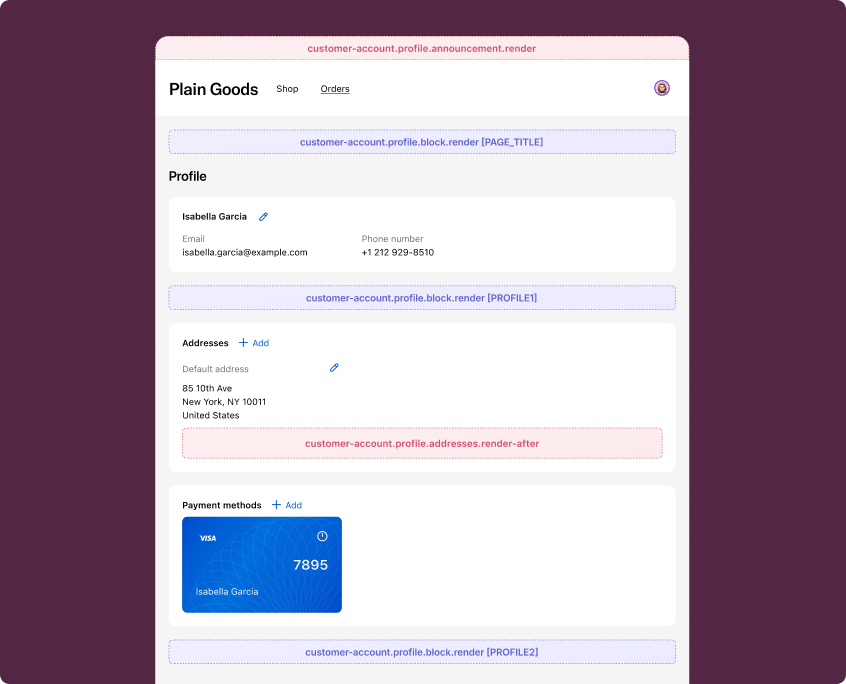
Anchor to Profile page (default) targetsProfile page (default) targets
Profile page (default) targets render on the Profile page for all customers. They're useful for adding address-related content, announcements, and custom content blocks.
Anchor to Addresses (render after) ,[object Object]Addresses (render after) target
customer-account.profile.addresses.render-after
Renders after the addresses section on the Profile page. This target doesn't show to B2B customers.
Use this target to display supplementary address information, such as address validation notices or delivery preferences. This target gives you access to the Authenticated Account API.
Supported components
- Avatar
- Badge
- Banner
- Block
Layout - Block
Spacer - Block
Stack - Button
- Card
- Checkbox
- Choice
- Choice
List - Clipboard
Item - Customer
Account Action - Date
Field - Date
Picker - Disclosure
- Divider
- Drop
Zone - Form
- Grid
- Grid
Item - Heading
- Heading
Group - Icon
- Image
- Image
Group - Inline
Layout - Inline
Spacer - Inline
Stack - Link
- List
- List
Item - Map
- Map
Marker - Map
Popover - Menu
- Modal
- Page
- Payment
Icon - Phone
Field - Popover
- Pressable
- Product
Thumbnail - Progress
- QRCode
- Resource
Item - Scroll
View - Select
- Sheet
- Skeleton
Image - Skeleton
Text - Skeleton
Text Block - Spinner
- Stepper
- Switch
- Tag
- Text
- Text
Block - Text
Field - Toggle
Button - Toggle
Button Group - Tooltip
- View
Supported components
- Avatar
- Badge
- Banner
- Block
Layout - Block
Spacer - Block
Stack - Button
- Card
- Checkbox
- Choice
- Choice
List - Clipboard
Item - Customer
Account Action - Date
Field - Date
Picker - Disclosure
- Divider
- Drop
Zone - Form
- Grid
- Grid
Item - Heading
- Heading
Group - Icon
- Image
- Image
Group - Inline
Layout - Inline
Spacer - Inline
Stack - Link
- List
- List
Item - Map
- Map
Marker - Map
Popover - Menu
- Modal
- Page
- Payment
Icon - Phone
Field - Popover
- Pressable
- Product
Thumbnail - Progress
- QRCode
- Resource
Item - Scroll
View - Select
- Sheet
- Skeleton
Image - Skeleton
Text - Skeleton
Text Block - Spinner
- Stepper
- Switch
- Tag
- Text
- Text
Block - Text
Field - Toggle
Button - Toggle
Button Group - Tooltip
- View
Examples
Description
Show a banner after the addresses section informing customers about address validation.
React
import {
  reactExtension,
  Banner,
} from '@shopify/ui-extensions-react/customer-account';

export default reactExtension(
  'customer-account.profile.addresses.render-after',
  () => <Extension />,
);

function Extension() {
  return (
    <Banner status="info">
      We verify all shipping addresses to ensure accurate delivery. If your
      address can't be verified, you may be contacted to confirm details.
    </Banner>
  );
}
TS
import {
  Banner,
  extension,
} from '@shopify/ui-extensions/customer-account';

export default extension(
  'customer-account.profile.addresses.render-after',
  (root) => {
    root.appendChild(
      root.createComponent(
        Banner,
        {status: 'info'},
        `We verify all shipping addresses to ensure accurate delivery. If your address can't be verified, you may be contacted to confirm details.`,
      ),
    );
  },
);
Description
Display delivery preference options after the addresses section. This example provides a way for customers to set delivery instructions for their saved addresses.
React
import {
  reactExtension,
  BlockStack,
  Heading,
  Link,
  Text,
} from '@shopify/ui-extensions-react/customer-account';

export default reactExtension(
  'customer-account.profile.addresses.render-after',
  () => <Extension />,
);

function Extension() {
  return (
    <BlockStack spacing="base">
      <Heading>Delivery preferences</Heading>
      <Text>
        Set your default delivery instructions for all saved addresses. These
        preferences will apply to future orders.
      </Text>
      <Link to="https://your-app.com/delivery-preferences">
        Manage delivery preferences
      </Link>
    </BlockStack>
  );
}
TS
import {
  BlockStack,
  extension,
  Heading,
  Link,
  Text,
} from '@shopify/ui-extensions/customer-account';

export default extension(
  'customer-account.profile.addresses.render-after',
  (root) => {
    root.appendChild(
      root.createComponent(BlockStack, {spacing: 'base'}, [
        root.createComponent(Heading, undefined, 'Delivery preferences'),
        root.createComponent(
          Text,
          undefined,
          'Set your default delivery instructions for all saved addresses. These preferences will apply to future orders.',
        ),
        root.createComponent(
          Link,
          {to: 'https://your-app.com/delivery-preferences'},
          'Manage delivery preferences',
        ),
      ]),
    );
  },
);
Anchor to Announcement ,[object Object]Announcement target
customer-account.profile.announcement.render
Renders a dismissible announcement at the top of the Profile page.
Use this target to display promotional messages, surveys, or account-related notices. The platform wraps your extension content in a dismissible announcement container, so you render your content directly using standard components.
Supported components
- Avatar
- Badge
- Banner
- Block
Layout - Block
Spacer - Block
Stack - Button
- Card
- Checkbox
- Choice
- Choice
List - Clipboard
Item - Customer
Account Action - Date
Field - Date
Picker - Disclosure
- Divider
- Drop
Zone - Form
- Grid
- Grid
Item - Heading
- Heading
Group - Icon
- Image
- Image
Group - Inline
Layout - Inline
Spacer - Inline
Stack - Link
- List
- List
Item - Map
- Map
Marker - Map
Popover - Menu
- Modal
- Page
- Payment
Icon - Phone
Field - Popover
- Pressable
- Product
Thumbnail - Progress
- QRCode
- Resource
Item - Scroll
View - Select
- Sheet
- Skeleton
Image - Skeleton
Text - Skeleton
Text Block - Spinner
- Stepper
- Switch
- Tag
- Text
- Text
Block - Text
Field - Toggle
Button - Toggle
Button Group - Tooltip
- View
Supported components
- Avatar
- Badge
- Banner
- Block
Layout - Block
Spacer - Block
Stack - Button
- Card
- Checkbox
- Choice
- Choice
List - Clipboard
Item - Customer
Account Action - Date
Field - Date
Picker - Disclosure
- Divider
- Drop
Zone - Form
- Grid
- Grid
Item - Heading
- Heading
Group - Icon
- Image
- Image
Group - Inline
Layout - Inline
Spacer - Inline
Stack - Link
- List
- List
Item - Map
- Map
Marker - Map
Popover - Menu
- Modal
- Page
- Payment
Icon - Phone
Field - Popover
- Pressable
- Product
Thumbnail - Progress
- QRCode
- Resource
Item - Scroll
View - Select
- Sheet
- Skeleton
Image - Skeleton
Text - Skeleton
Text Block - Spinner
- Stepper
- Switch
- Tag
- Text
- Text
Block - Text
Field - Toggle
Button - Toggle
Button Group - Tooltip
- View
Examples
Description
Show a dismissible announcement at the top of the Profile page with a promotional message and a link.
React
import {
  reactExtension,
  InlineStack,
  Link,
  Text,
} from '@shopify/ui-extensions-react/customer-account';

export default reactExtension(
  'customer-account.profile.announcement.render',
  () => <Extension />,
);

function Extension() {
  return (
    <InlineStack>
      <Text>Complete your profile to unlock exclusive member discounts.</Text>
      <Link to="https://your-app.com/rewards">
        Learn more
      </Link>
    </InlineStack>
  );
}
TS
import {
  extension,
  InlineStack,
  Link,
  Text,
} from '@shopify/ui-extensions/customer-account';

export default extension(
  'customer-account.profile.announcement.render',
  (root) => {
    root.appendChild(
      root.createComponent(InlineStack, undefined, [
        root.createComponent(
          Text,
          undefined,
          'Complete your profile to unlock exclusive member discounts.',
        ),
        root.createComponent(
          Link,
          {to: 'https://your-app.com/rewards'},
          'Learn more',
        ),
      ]),
    );
  },
);
Description
Display a dismissible announcement that opens a survey modal. This example uses a [Link](/docs/api/customer-account-ui-extensions/2025-07/components/actions/link) with an overlay prop to trigger a [Modal](/docs/api/customer-account-ui-extensions/2025-07/components/overlays/modal) for collecting customer feedback.
React
import {
  reactExtension,
  BlockStack,
  Button,
  InlineStack,
  Link,
  Modal,
  Text,
  TextField,
} from '@shopify/ui-extensions-react/customer-account';

export default reactExtension(
  'customer-account.profile.announcement.render',
  () => <Extension />,
);

function Extension() {
  return (
    <InlineStack>
      <Text>Help us improve your experience.</Text>
      <Link
        overlay={
          <Modal
            title="Tell us about your experience"
            padding
          >
            <BlockStack>
              <Text>
                We'd love to hear how we can improve your account experience.
              </Text>
              <TextField
                multiline={4}
                label="What could we do better?"
              />
              <Button>Submit feedback</Button>
            </BlockStack>
          </Modal>
        }
      >
        Take a quick survey
      </Link>
    </InlineStack>
  );
}
TS
import {
  BlockStack,
  Button,
  extension,
  InlineStack,
  Link,
  Modal,
  Text,
  TextField,
} from '@shopify/ui-extensions/customer-account';

export default extension(
  'customer-account.profile.announcement.render',
  (root) => {
    const modalFragment = root.createFragment();
    modalFragment.appendChild(
      root.createComponent(
        Modal,
        {
          title: 'Tell us about your experience',
          padding: true,
        },
        [
          root.createComponent(BlockStack, undefined, [
            root.createComponent(
              Text,
              undefined,
              `We'd love to hear how we can improve your account experience.`,
            ),
            root.createComponent(TextField, {
              multiline: 4,
              label: 'What could we do better?',
            }),
            root.createComponent(Button, undefined, 'Submit feedback'),
          ]),
        ],
      ),
    );

    root.appendChild(
      root.createComponent(InlineStack, undefined, [
        root.createComponent(
          Text,
          undefined,
          'Help us improve your experience.',
        ),
        root.createComponent(
          Link,
          {overlay: modalFragment},
          'Take a quick survey',
        ),
      ]),
    );
  },
);
Anchor to Profile block ,[object Object]Profile block target
customer-account.profile.block.render
Renders a block extension target on the Profile page. This target renders for all customers, including B2B customers.
Merchants can choose to place this extension in any of the supported locations. To preview your extension in each supported location, use the placement reference for that location as a URL parameter.
Supported components
- Avatar
- Badge
- Banner
- Block
Layout - Block
Spacer - Block
Stack - Button
- Card
- Checkbox
- Choice
- Choice
List - Clipboard
Item - Customer
Account Action - Date
Field - Date
Picker - Disclosure
- Divider
- Drop
Zone - Form
- Grid
- Grid
Item - Heading
- Heading
Group - Icon
- Image
- Image
Group - Inline
Layout - Inline
Spacer - Inline
Stack - Link
- List
- List
Item - Map
- Map
Marker - Map
Popover - Menu
- Modal
- Page
- Payment
Icon - Phone
Field - Popover
- Pressable
- Product
Thumbnail - Progress
- QRCode
- Resource
Item - Scroll
View - Select
- Sheet
- Skeleton
Image - Skeleton
Text - Skeleton
Text Block - Spinner
- Stepper
- Switch
- Tag
- Text
- Text
Block - Text
Field - Toggle
Button - Toggle
Button Group - Tooltip
- View
Supported components
- Avatar
- Badge
- Banner
- Block
Layout - Block
Spacer - Block
Stack - Button
- Card
- Checkbox
- Choice
- Choice
List - Clipboard
Item - Customer
Account Action - Date
Field - Date
Picker - Disclosure
- Divider
- Drop
Zone - Form
- Grid
- Grid
Item - Heading
- Heading
Group - Icon
- Image
- Image
Group - Inline
Layout - Inline
Spacer - Inline
Stack - Link
- List
- List
Item - Map
- Map
Marker - Map
Popover - Menu
- Modal
- Page
- Payment
Icon - Phone
Field - Popover
- Pressable
- Product
Thumbnail - Progress
- QRCode
- Resource
Item - Scroll
View - Select
- Sheet
- Skeleton
Image - Skeleton
Text - Skeleton
Text Block - Spinner
- Stepper
- Switch
- Tag
- Text
- Text
Block - Text
Field - Toggle
Button - Toggle
Button Group - Tooltip
- View
Examples
Description
Show a custom content block on the Profile page that displays loyalty points information. This example renders for all customers, including B2B customers.
React
import {
  reactExtension,
  BlockStack,
  Heading,
  Link,
  Text,
} from '@shopify/ui-extensions-react/customer-account';

export default reactExtension(
  'customer-account.profile.block.render',
  () => <Extension />,
);

function Extension() {
  return (
    <BlockStack spacing="base">
      <Heading>Loyalty program</Heading>
      <Text>
        You're a valued member of our loyalty program. Check your points
        balance and available rewards.
      </Text>
      <Link to="https://your-app.com/loyalty">
        View rewards
      </Link>
    </BlockStack>
  );
}
TS
import {
  BlockStack,
  extension,
  Heading,
  Link,
  Text,
} from '@shopify/ui-extensions/customer-account';

export default extension(
  'customer-account.profile.block.render',
  (root) => {
    root.appendChild(
      root.createComponent(BlockStack, {spacing: 'base'}, [
        root.createComponent(Heading, undefined, 'Loyalty program'),
        root.createComponent(
          Text,
          undefined,
          `You're a valued member of our loyalty program. Check your points balance and available rewards.`,
        ),
        root.createComponent(
          Link,
          {to: 'https://your-app.com/loyalty'},
          'View rewards',
        ),
      ]),
    );
  },
);
Description
Add a custom section to the Profile page with app-specific content. This block extension renders for all customers and can be placed in any supported location by the merchant.
React
import {
  reactExtension,
  BlockStack,
  Button,
  Heading,
  Text,
  useApi,
} from '@shopify/ui-extensions-react/customer-account';

export default reactExtension(
  'customer-account.profile.block.render',
  () => <Extension />,
);

function Extension() {
  const {toast} = useApi();

  return (
    <BlockStack spacing="base">
      <Heading>Subscription preferences</Heading>
      <Text>
        Manage your email and notification preferences for order updates,
        promotions, and account activity.
      </Text>
      <Button onPress={() => toast.show('Preferences updated')}>
        Update preferences
      </Button>
    </BlockStack>
  );
}
TS
import {
  BlockStack,
  Button,
  extension,
  Heading,
  Text,
} from '@shopify/ui-extensions/customer-account';

export default extension(
  'customer-account.profile.block.render',
  (root, {toast}) => {
    root.appendChild(
      root.createComponent(BlockStack, {spacing: 'base'}, [
        root.createComponent(Heading, undefined, 'Subscription preferences'),
        root.createComponent(
          Text,
          undefined,
          'Manage your email and notification preferences for order updates, promotions, and account activity.',
        ),
        root.createComponent(
          Button,
          {onPress: () => toast.show('Preferences updated')},
          'Update preferences',
        ),
      ]),
    );
  },
);
Anchor to Best practicesBest practices
- Keep content contextual: Profile page extensions render alongside customer profile management UI, so content should be directly relevant to the customer's profile or account.
- Use standard components for announcement targets: The
customer-account.profile.announcement.rendertarget wraps your content in a dismissible announcement container. Render your content directly using standard components like InlineStack, Text, and Link. - Avoid heavy rendering: These targets render inline within the Profile page. Avoid complex layouts or large data fetches that could cause layout shifts. Use Banner or lightweight BlockStack layouts for the best experience.
Anchor to LimitationsLimitations
- Addresses target visibility: The
customer-account.profile.addresses.render-aftertarget doesn't show to B2B customers. If you need to extend addresses for B2B customers, usecustomer-account.profile.company-location-addresses.render-afterinstead. - Announcement dismissibility: The
customer-account.profile.announcement.rendertarget renders a dismissible announcement. Once dismissed by the customer, the announcement won't reappear until the next page visit. - Block placement: The
customer-account.profile.block.rendertarget is a block extension whose placement is controlled by the merchant. You can't programmatically control where it appears on the page.