About subscriptions
Subscriptions enable customers to purchase products on a recurring basis. For example, customers can do the following:
-
Pay-per-delivery subscription: Pay for products for each delivery. New orders are created at regular intervals. This option is also known as "Subscribe and save".
-
Pre-paid subscription: Make a single payment upfront and receive products on a regular cadence until the order is fulfilled.
Subscription apps enable developers and merchants to build subscription experiences directly into Shopify's ecosystem. This guide describes what a subscription is, subscription APIs, migration to subscription APIs, and limitations for subscription apps.
Anchor to Overview of merchant and buyer experiencesOverview of merchant and buyer experiences
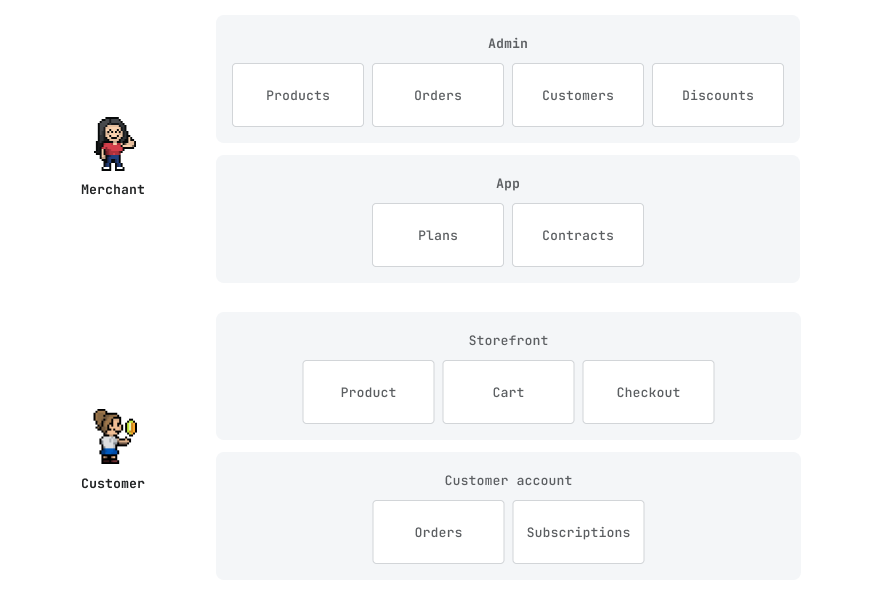
Subscriptions are deeply integrated across merchant and customer experiences. Here's a high-level overview:
Anchor to How do subscriptions work?How do subscriptions work?
Subscriptions include policy configurations and subscription contracts.
Anchor to Policy configurationsPolicy configurations
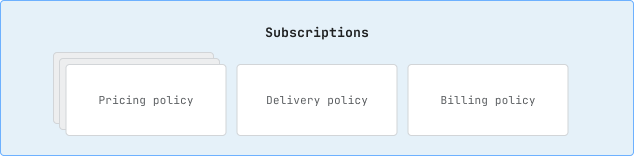
A subscription includes delivery, pricing, and billing policies. This enables you to build more flexible and extensible apps that support various ways to sell and buy products.
Learn more about policies and selling plans.
Anchor to Subscription contractsSubscription contracts
A subscription contract is the agreement between a customer and a merchant over a specific term for recurring purchases over a set or undefined period of time.
Learn more about subscription contracts.
Anchor to Subscription APIsSubscription APIs
Shopify provides the following APIs to help you build and manage subscriptions in your app:
-
Selling plan APIs: Create and manage various ways to sell and buy products.
-
Subscription contract APIs: Create and manage subscription agreements between a customer and merchant.
-
Customer payment method APIs: Store payment methods that can be used to pay for future orders without requiring the customer to manually go through checkout.
-
Subscription contract calculation APIs: Create and edit subscription contracts through an asynchronous calculate, poll, and commit flow.
Anchor to Migrating to use the Subscription APIs?Migrating to use the Subscription APIs?
If you already have a subscription app and need to migrate to use Subscription APIs, then refer to the Subscription API migration guide.
If your existing subscription app uses Stripe to process subscription payments, refer to Migrate customer information to Shopify.
If your app uses the SubscriptionDraft API to create or edit contracts, then refer to the SubscriptionContractCalculation API migration guide to move to the calculate, poll, and commit flow.
Anchor to Developer tools and resourcesDeveloper tools and resources
To help you build and manage purchase options, Shopify offers the following developer tools and resources.
| Tools/Resources | Description |
|---|---|
| App extensions | Surfaces your app's purchase options in the Shopify admin |
| App proxy | Fetches data from an app proxy server to display on a page of the online store. By using an app proxy, customers can have a seamless experience managing their existing agreements under the shop's domain. |
| Storefront Liquid drops and properties | Allows you to integrate purchase options into a store's theme |
Anchor to Legacy subscription appsLegacy subscription apps
If you have merchants that are dependent on features in your legacy subscription app that are currently unresolved limitations of the subscription APIs, then any existing installs can continue to use your app.
All new installs and apps should use the new Subscription APIs.
Anchor to Subscriptions on Shopify POSSubscriptions on Shopify POS
Anchor to POS supportPOS support
- Shopify POS app version 10.13 or later
- POS UI extensions API version 2025-10 or later
- Shopify Payments enabled
- Shopify POS app version 10.13 or later
- POS UI extensions API version 2025-10 or later
- Shopify Payments enabled
Merchants can sell subscriptions through Shopify Point of Sale (POS). This enables customers to purchase subscription products in-store with the same subscription experience they have online.
Anchor to POS limitationsPOS limitations
The following limitations apply to subscriptions on Shopify POS:
- Managing existing selling plan contracts must be done through the online store. You can't manage contracts directly on POS.
- Ship and carry out orders aren't supported with subscriptions on POS.
- Split payment capabilities aren't supported with subscriptions on POS.
- Shipping selling plans outside of the shipping zone isn't supported because custom rates can't be applied when calculating recurring shipping rates.
- Subscriptions on POS require Shopify Payments. POS stores that don't use Shopify Payments can't sell subscriptions.
- Subscription-only products are not supported on POS.
Anchor to Building subscription apps for POSBuilding subscription apps for POS
To support subscriptions on POS, subscription apps need to build a POS UI extension that uses the Cart API to add selling plans to products.
The POS UI extensions API version 2025-10 introduces new methods for managing selling plans:
addLineItemSellingPlan: Adds a selling plan to a line item in the cart.removeLineItemSellingPlan: Removes a selling plan from a line item.
The LineItem interface also includes new fields to support selling plans:
requiresSellingPlan: Indicates if a product must have a selling planhasSellingPlanGroups: Indicates if a product has available selling planssellingPlan: The currently applied selling plan
Attempting to use selling plan APIs in POS UI extensions versions earlier than 2025-10, or on POS app versions earlier than 10.13, results in blocked checkouts. Ensure your system meets the version requirements.
Attempting to use selling plan APIs in POS UI extensions versions earlier than 2025-10, or on POS app versions earlier than 10.13, results in blocked checkouts. Ensure your system meets the version requirements.
For more information, refer to the POS UI extensions reference.
Anchor to Subscriptions on draft ordersSubscriptions on draft orders
Anchor to Draft order supportDraft order support
- GraphQL Admin API version 2027-01 or later
- The
write_draft_ordersaccess scope
- GraphQL Admin API version 2027-01 or later
- The
write_draft_ordersaccess scope
Merchants can add subscription products to draft orders in the Shopify admin and send the invoice to the customer. Apps can do the same with the GraphQL Admin API. When the customer pays the invoice at checkout, Shopify creates the order and the subscription contract.
Anchor to Draft order limitationsDraft order limitations
- Draft orders that have selling plans can't be completed with
draftOrderComplete. The customer completes the draft order by paying the invoice at checkout. - Draft orders support only recurring subscription selling plans. Fixed-billing selling plans, such as pre-order and try before you buy (TBYB) plans, aren't supported.
- B2B draft orders don't support selling plans.
- Custom line items can't have a selling plan.
- Line items that have a selling plan can't use
priceOverrideorgeneratePriceOverride.
Anchor to Building subscription apps for draft ordersBuilding subscription apps for draft orders
To add a selling plan to a draft order, set sellingPlanId on DraftOrderLineItemInput for a variant line item in the draftOrderCreate, draftOrderUpdate, or draftOrderCalculate mutation.
To read the applied selling plan, query sellingPlanApplication on DraftOrderLineItem or CalculatedDraftOrderLineItem. The value is a snapshot from the last time the draft order was saved or calculated. At checkout, Shopify uses the selling plan's current terms, so the price that the customer pays might differ from the snapshot.
To collect payment, share the draft order's invoiceUrl with the customer, or send the invoice with the draftOrderInvoiceSend mutation.
The subscription contract belongs to the app that owns the selling plan group, even if the merchant or a different app created the draft order. Only that app receives the subscription_contracts/create webhook.
Anchor to UX guidelinesUX guidelines
For information on UX guidelines, refer to the Subscription UX guidelines.
Anchor to Next stepsNext steps
-
Learn about the different methods of authenticating and authorizing apps with Shopify's platform.
-
Use Events and webhooks to stay in sync with Shopify or execute code after a specific event occurs in a shop.
-
Learn how to use metafields to share additional information about Shopify resources with your app.
-
Learn about the structure of an app built with Shopify CLI.
-
Refer to the Shopify Partners Blog for more information about why we built this feature and how to get started.