Node
An object with an ID field to support global identification, in accordance with the Relay specification. This interface is used by the node and nodes queries.
Anchor to Types implemented inTypes implemented in
- AbandonedCheckout (AbandonedCheckout)
- AbandonedCheckoutLineItem (AbandonedCheckoutLineItem)
- Abandonment (Abandonment)
- AddAllProductsOperation (AddAllProductsOperation)
- AdditionalFee (AdditionalFee)
- AnalyticsAnnotation (AnalyticsAnnotation)
- AnalyticsTarget (AnalyticsTarget)
- App (App)
- AppCatalog (AppCatalog)
- AppCredit (AppCredit)
- AppInstallation (AppInstallation)
- AppPurchaseOneTime (AppPurchaseOneTime)
- AppRevenueAttributionRecord (AppRevenueAttributionRecord)
- AppSubscription (AppSubscription)
- AppUsageRecord (AppUsageRecord)
- Article (Article)
- BasicEvent (BasicEvent)
- Blog (Blog)
- BulkOperation (BulkOperation)
- BusinessEntity (BusinessEntity)
- CalculatedOrder (CalculatedOrder)
- CartTransform (CartTransform)
- CashDrawer (CashDrawer)
- CashManagementCustomReasonCode (CashManagementCustomReasonCode)
- CashManagementDefaultReasonCode (CashManagementDefaultReasonCode)
- CashManagementSystemReasonCode (CashManagementSystemReasonCode)
- CashTrackingAdjustment (CashTrackingAdjustment)
- CashTrackingSession (CashTrackingSession)
- CatalogCsvOperation (CatalogCsvOperation)
- Channel (Channel)
- ChannelDefinition (ChannelDefinition)
- ChannelInformation (ChannelInformation)
- CheckoutAndAccountsConfiguration (CheckoutAndAccountsConfiguration)
- CheckoutAndAccountsConfigurationOverride (CheckoutAndAccountsConfigurationOverride)
- CheckoutProfile (CheckoutProfile)
- Collection (Collection)
- CollectionConditionsSource (CollectionConditionsSource)
- CollectionSubCollectionsSource (CollectionSubCollectionsSource)
- Comment (Comment)
- CommentEvent (CommentEvent)
- Company (Company)
- CompanyAddress (CompanyAddress)
- CompanyContact (CompanyContact)
- CompanyContactRole (CompanyContactRole)
- CompanyContactRoleAssignment (CompanyContactRoleAssignment)
- CompanyLocation (CompanyLocation)
- CompanyLocationCatalog (CompanyLocationCatalog)
- CompanyLocationStaffMemberAssignment (CompanyLocationStaffMemberAssignment)
- ConsentPolicy (ConsentPolicy)
- CurrencyExchangeAdjustment (CurrencyExchangeAdjustment)
- Customer (Customer)
- CustomerAccountAppExtensionPage (CustomerAccountAppExtensionPage)
- CustomerAccountNativePage (CustomerAccountNativePage)
- CustomerPaymentMethod (CustomerPaymentMethod)
- CustomerSegmentMembersQuery (CustomerSegmentMembersQuery)
- CustomerVisit (CustomerVisit)
- DeliveryCarrierService (DeliveryCarrierService)
- DeliveryCondition (DeliveryCondition)
- DeliveryCountry (DeliveryCountry)
- DeliveryCustomization (DeliveryCustomization)
- DeliveryLocationGroup (DeliveryLocationGroup)
- DeliveryMethod (DeliveryMethod)
- DeliveryMethodDefinition (DeliveryMethodDefinition)
- DeliveryParticipant (DeliveryParticipant)
- DeliveryProfile (DeliveryProfile)
- DeliveryProfileItem (DeliveryProfileItem)
- DeliveryPromiseParticipant (DeliveryPromiseParticipant)
- DeliveryPromiseProvider (DeliveryPromiseProvider)
- DeliveryProvince (DeliveryProvince)
- DeliveryRateDefinition (DeliveryRateDefinition)
- DeliveryZone (DeliveryZone)
- DiscountAutomaticBxgy (DiscountAutomaticBxgy)
- DiscountAutomaticNode (DiscountAutomaticNode)
- DiscountCodeNode (DiscountCodeNode)
- DiscountNode (DiscountNode)
- DiscountRedeemCodeBulkCreation (DiscountRedeemCodeBulkCreation)
- Domain (Domain)
- DraftOrder (DraftOrder)
- DraftOrderLineItem (DraftOrderLineItem)
- DraftOrderTag (DraftOrderTag)
- Duty (Duty)
- ExchangeLineItem (ExchangeLineItem)
- ExternalVideo (ExternalVideo)
- Fulfillment (Fulfillment)
- FulfillmentConstraintRule (FulfillmentConstraintRule)
- FulfillmentEvent (FulfillmentEvent)
- FulfillmentHold (FulfillmentHold)
- FulfillmentLineItem (FulfillmentLineItem)
- FulfillmentOrder (FulfillmentOrder)
- FulfillmentOrderDestination (FulfillmentOrderDestination)
- FulfillmentOrderLineItem (FulfillmentOrderLineItem)
- FulfillmentOrderMerchantRequest (FulfillmentOrderMerchantRequest)
- GenericFile (GenericFile)
- GiftCard (GiftCard)
- GiftCardCashOutTransaction (GiftCardCashOutTransaction)
- GiftCardCreditTransaction (GiftCardCreditTransaction)
- GiftCardDebitTransaction (GiftCardDebitTransaction)
- IdentityProviderSubject (IdentityProviderSubject)
- InventoryAdjustmentGroup (InventoryAdjustmentGroup)
- InventoryItem (InventoryItem)
- InventoryItemMeasurement (InventoryItemMeasurement)
- InventoryLevel (InventoryLevel)
- InventoryPurchaseOrder (InventoryPurchaseOrder)
- InventoryPurchaseOrderLineItem (InventoryPurchaseOrderLineItem)
- InventoryQuantity (InventoryQuantity)
- InventoryShipment (InventoryShipment)
- InventoryShipmentLineItem (InventoryShipmentLineItem)
- InventoryTransfer (InventoryTransfer)
- InventoryTransferLineItem (InventoryTransferLineItem)
- LineItem (LineItem)
- LineItemGroup (LineItemGroup)
- Location (Location)
- MailingAddress (MailingAddress)
- Market (Market)
- MarketCatalog (MarketCatalog)
- MarketingActivity (MarketingActivity)
- MarketingEvent (MarketingEvent)
- MarketRegionCountry (MarketRegionCountry)
- MarketRegionSubdivision (MarketRegionSubdivision)
- MarketRelationship (MarketRelationship)
- MarketWebPresence (MarketWebPresence)
- MediaImage (MediaImage)
- Menu (Menu)
- Metafield (Metafield)
- MetafieldDefinition (MetafieldDefinition)
- Metaobject (Metaobject)
- MetaobjectDefinition (MetaobjectDefinition)
- Model3d (Model3d)
- OnlineStoreTheme (OnlineStoreTheme)
- Order (Order)
- OrderAdjustment (OrderAdjustment)
- OrderAttributionDefinition (OrderAttributionDefinition)
- OrderCancelJobResult (OrderCancelJobResult)
- OrderCreateMandatePaymentJobResult (OrderCreateMandatePaymentJobResult)
- OrderDisputeSummary (OrderDisputeSummary)
- OrderEditSession (OrderEditSession)
- OrderTransaction (OrderTransaction)
- Page (Page)
- PaymentCustomization (PaymentCustomization)
- PaymentMandate (PaymentMandate)
- PaymentSchedule (PaymentSchedule)
- PaymentTerms (PaymentTerms)
- PaymentTermsTemplate (PaymentTermsTemplate)
- PointOfSaleDevice (PointOfSaleDevice)
- PointOfSaleDevicePaymentSession (PointOfSaleDevicePaymentSession)
- PriceList (PriceList)
- Product (Product)
- ProductBundleOperation (ProductBundleOperation)
- ProductDeleteOperation (ProductDeleteOperation)
- ProductDuplicateOperation (ProductDuplicateOperation)
- ProductFeed (ProductFeed)
- ProductOption (ProductOption)
- ProductOptionValue (ProductOptionValue)
- ProductSetOperation (ProductSetOperation)
- ProductTaxonomyNode (ProductTaxonomyNode)
- ProductVariant (ProductVariant)
- ProductVariantComponent (ProductVariantComponent)
- Publication (Publication)
- PublicationResourceOperation (PublicationResourceOperation)
- QuantityPriceBreak (QuantityPriceBreak)
- Refund (Refund)
- RefundShippingLine (RefundShippingLine)
- RequestedOrderEdit (RequestedOrderEdit)
- RequestedOrderEditLineItem (RequestedOrderEditLineItem)
- Return (Return)
- ReturnableFulfillment (ReturnableFulfillment)
- ReturnLineItem (ReturnLineItem)
- ReturnPolicyProfile (ReturnPolicyProfile)
- ReturnReasonDefinition (ReturnReasonDefinition)
- ReverseDelivery (ReverseDelivery)
- ReverseDeliveryLineItem (ReverseDeliveryLineItem)
- ReverseFulfillmentOrder (ReverseFulfillmentOrder)
- ReverseFulfillmentOrderDisposition (ReverseFulfillmentOrderDisposition)
- ReverseFulfillmentOrderLineItem (ReverseFulfillmentOrderLineItem)
- Rollout (Rollout)
- RolloutTreatment (RolloutTreatment)
- SaleAdditionalFee (SaleAdditionalFee)
- SavedSearch (SavedSearch)
- ScriptTag (ScriptTag)
- Segment (Segment)
- SellingPlan (SellingPlan)
- SellingPlanGroup (SellingPlanGroup)
- ServerPixel (ServerPixel)
- ShippingLabel (ShippingLabel)
- ShippingLabelPurchaseResult (ShippingLabelPurchaseResult)
- Shop (Shop)
- ShopAddress (ShopAddress)
- ShopifyPaymentsAccount (ShopifyPaymentsAccount)
- ShopifyPaymentsBalanceTransaction (ShopifyPaymentsBalanceTransaction)
- ShopifyPaymentsBankAccount (ShopifyPaymentsBankAccount)
- ShopifyPaymentsDispute (ShopifyPaymentsDispute)
- ShopifyPaymentsDisputeEvidence (ShopifyPaymentsDisputeEvidence)
- ShopifyPaymentsDisputeFileUpload (ShopifyPaymentsDisputeFileUpload)
- ShopifyPaymentsDisputeFulfillment (ShopifyPaymentsDisputeFulfillment)
- ShopifyPaymentsPayout (ShopifyPaymentsPayout)
- ShopPolicy (ShopPolicy)
- StaffMember (StaffMember)
- StandardMetafieldDefinitionTemplate (StandardMetafieldDefinitionTemplate)
- StoreCreditAccount (StoreCreditAccount)
- StoreCreditAccountCreditTransaction (StoreCreditAccountCreditTransaction)
- StoreCreditAccountDebitRevertTransaction (StoreCreditAccountDebitRevertTransaction)
- StoreCreditAccountDebitTransaction (StoreCreditAccountDebitTransaction)
- StorefrontAccessToken (StorefrontAccessToken)
- SubscriptionBillingAttempt (SubscriptionBillingAttempt)
- SubscriptionContract (SubscriptionContract)
- SubscriptionDraft (SubscriptionDraft)
- TaxonomyAttribute (TaxonomyAttribute)
- TaxonomyCategory (TaxonomyCategory)
- TaxonomyChoiceListAttribute (TaxonomyChoiceListAttribute)
- TaxonomyMeasurementAttribute (TaxonomyMeasurementAttribute)
- TaxonomyValue (TaxonomyValue)
- TenderTransaction (TenderTransaction)
- TransactionFee (TransactionFee)
- UnverifiedReturnLineItem (UnverifiedReturnLineItem)
- UrlRedirect (UrlRedirect)
- UrlRedirectImport (UrlRedirectImport)
- Validation (Validation)
- Video (Video)
- WebhookSubscription (WebhookSubscription)
- WebPixel (WebPixel)
- •OBJECT
An incomplete checkout where the customer added items and provided contact information but didn't complete the purchase. Tracks the customer's cart contents, pricing details, addresses, and timestamps to enable recovery campaigns and abandonment analytics.
The checkout includes a recovery URL that merchants can send to customers to resume their purchase.
objects preserve the originalProductselections, quantities, and pricing at the time of abandonment.Show fields
- •OBJECT
A single line item in an abandoned checkout.
Show fields
- •OBJECT
Tracks a customer's incomplete shopping journey, whether they abandoned while browsing products, adding items to cart, or during checkout. Provides data about the customer's behavior and products they interacted with.
The abandonment includes fields that indicate whether the customer has completed any orders or draft orders after the abandonment occurred. It also tracks when emails were sent and how long since the customer's last activity across different abandonment types.
Show fields
- •OBJECT
Represents an operation publishing all products to a publication.
Show fields
- •OBJECT
Additional fees applied to an
Orderbeyond the standard product and shipping costs. Additional fees typically include duties, import fees, or other special handling charges that need separate tracking from regularobjects.Each fee includes its name, price in both shop and presentment currencies, and any applicable taxes broken down by
.Show fields
- •OBJECT
An annotation for a notable event on a shop's analytics timeline.
Show fields
- •OBJECT
Represents a merchant-defined goal for a specific analytics metric over a date range. Merchants use analytics targets to track progress toward business objectives, such as reaching a total sales amount or a number of orders within a given period.
Each target is associated with a single metric and can optionally include filter expressions to narrow the evaluated data. Use the
query to retrieve targets, and the,, andmutations to manage them.Show fields
- •OBJECT
A Shopify application that extends store functionality. Apps integrate with Shopify through APIs to add features, automate workflows, or connect external services.
Provides metadata about the app including its developer information and listing details in the Shopify App Store. Use the
installationfield to determine if the app is currently installed on the shop and access installation-specific details like grantedobjects. Checkbefore installation to identify any prerequisites that must be met.Show fields
- •OBJECT
A catalog that defines the publication associated with an app.
Show fields
- •OBJECT
Represents monetary credits that merchants can apply toward future app purchases, subscriptions, or usage-based billing within their Shopify store. App credits provide a flexible way to offer refunds, promotional credits, or compensation without processing external payments.
For example, if a merchant experiences service downtime, an app might issue credits equivalent to the affected billing period. These credits can apply to future charges, reducing the merchant's next invoice or extending their subscription period.
Use the
object to:- Issue refunds for service interruptions or billing disputes
- Provide promotional credits for new merchant onboarding
- Compensate merchants for app-related issues or downtime
- Create loyalty rewards or referral bonuses within your billing system
- Track credit balances and application history for accounting purposes
For comprehensive billing strategies and credit management patterns, see the subscription billing guide.
Show fields
- •OBJECT
An app installed on a shop. Each installation tracks the permissions granted to the app through
objects, along with billing subscriptions andMetafieldobjects.The installation provides metafields that only the owning
Appcan access. These metafields store app-specific configuration that merchants and other apps can't modify. The installation also provides URLs for launching and uninstalling the app, along with any activeobjects orpurchases.Show fields
- •OBJECT
Represents a one-time purchase of app services or features by a merchant, tracking the transaction details and status throughout the billing lifecycle. This object captures essential information about non-recurring charges, including price and merchant acceptance status.
One-time purchases are particularly valuable for apps offering premium features, professional services, or digital products that don't require ongoing subscriptions. For instance, a photography app might sell premium filters as one-time purchases, while a marketing app could charge for individual campaign setups or advanced analytics reports.
Use the
object to:- Track the status of individual feature purchases and service charges
- Track payment status for premium content or digital products
- Access purchase details to enable or disable features based on payment status
The purchase status indicates whether the charge is pending merchant approval, has been accepted and processed, or was declined. This status tracking is crucial for apps that need to conditionally enable features based on successful payment completion.
Purchase records include creation timestamps, pricing details, and test flags to distinguish between production charges and development testing. The test flag ensures that development and staging environments don't generate actual charges while maintaining realistic billing flow testing.
For detailed implementation patterns and billing best practices, see the one-time-charges page.
Show fields
- •OBJECT
Tracks revenue that was captured outside of Shopify's billing system but needs to be attributed to the app for comprehensive revenue reporting and partner analytics. This object enables accurate revenue tracking when apps process payments through external systems while maintaining visibility into total app performance.
External revenue attribution is essential for apps that offer multiple payment channels or process certain transactions outside Shopify's billing infrastructure. For example, an enterprise app might process large custom contracts through external payment processors, or a marketplace app could handle direct merchant-to-merchant transactions that still generate app commissions.
Use the
object to:- Report revenue from external payment processors and billing systems
- Track commission-based earnings from marketplace or referral activities
- Maintain comprehensive revenue analytics across multiple payment channels
- Ensure accurate partner revenue sharing and commission calculations
- Generate complete financial reports that include all app-generated revenue streams
- Support compliance requirements for external revenue documentation
Each attribution record includes the captured amount, external transaction timestamp, and idempotency keys to prevent duplicate reporting. The record type field categorizes different revenue streams, enabling detailed analytics and reporting segmentation.
Revenue attribution records are particularly important for apps participating in Shopify's partner program, as they ensure accurate revenue sharing calculations and comprehensive performance metrics. The captured timestamp reflects when the external payment was processed, not when the attribution record was created in Shopify.
For detailed revenue attribution values, see the AppRevenueAttributionType enum.
Show fields
- •OBJECT
A recurring billing agreement that associates an
Appwith a merchant's shop. Each subscription contains one or moreobjects that define the pricing structure. The pricing structure can include recurring charges, usage-based pricing, or both.The subscription tracks billing details including the current period end date, trial days, and
.Merchants must approve subscriptions through a confirmation URL before billing begins. Test subscriptions allow developers to verify billing flows without actual charges.
Learn more about subscription billing and testing charges.
Show fields
- •OBJECT
Store usage for app subscriptions with usage pricing.
Show fields
- •OBJECT
An article that contains content, author information, and metadata. Articles belong to a
Blogand can include HTML-formatted body text, summary text, and an associated image. Merchants publish articles to share content, drive traffic, and engage customers.Articles can be organized with tags and published immediately or scheduled for future publication using the
timestamp. The API manages comments on articles when the blog's comment policy enables them.Show fields
- •OBJECT
Basic events chronicle resource activities such as the creation of an article, the fulfillment of an order, or the addition of a product.
General events
Action Description createThe item was created. destroyThe item was destroyed. publishedThe item was published. unpublishedThe item was unpublished. updateThe item was updated. Order events
Order events can be divided into the following categories:
- Authorization: Includes whether the authorization succeeded, failed, or is pending.
- Capture: Includes whether the capture succeeded, failed, or is pending.
- Email: Includes confirmation or cancellation of the order, as well as shipping.
- Fulfillment: Includes whether the fulfillment succeeded, failed, or is pending. Also includes cancellation, restocking, and fulfillment updates.
- Order: Includess the placement, confirmation, closing, re-opening, and cancellation of the order.
- Refund: Includes whether the refund succeeded, failed, or is pending.
- Sale: Includes whether the sale succeeded, failed, or is pending.
- Void: Includes whether the void succeeded, failed, or is pending.
Action Message Description The customer, unsuccessfully, tried to authorize: .Authorization failed. The funds cannot be captured. Authorization for is pending.Authorization pending. The customer successfully authorized us to capture: .Authorization was successful and the funds are available for capture. cancelledOrder was cancelled by .The order was cancelled. We failed to capture: .The capture failed. The funds cannot be transferred to the shop. Capture for is pending.The capture is in process. The funds are not yet available to the shop. We successfully captured: The capture was successful and the funds are now available to the shop. closedOrder was closed. The order was closed. confirmedReceived a new order: by.The order was confirmed. We cancelled from being fulfilled by the third party fulfillment service.Fulfillment for one or more of the line_items failed. We submitted to the third party service.One or more of the line_items has been assigned to a third party service for fulfillment. We successfully fulfilled line_items. Fulfillment was successful for one or more line_items. email was sent to the customer.An email was sent to the customer. placedOrder was placed. An order was placed by the customer. Order was re-opened. An order was re-opened. We failed to refund .The refund failed. The funds are still with the shop. Refund of is still pending.The refund is in process. The funds are still with shop. We successfully refunded .The refund was successful. The funds have been transferred to the customer. We restocked .One or more of the order's line items have been restocked. The customer failed to pay .The sale failed. The funds are not available to the shop. The is pending.The sale is in process. The funds are not yet available to the shop. We successfully captured .The sale was successful. The funds are now with the shop. updatewas updated.The order was updated. We failed to void the authorization. Voiding the authorization failed. The authorization is still valid. Authorization void is pending. Voiding the authorization is in process. The authorization is still valid. We successfully voided the authorization. Voiding the authorization was successful. The authorization is no longer valid. Show fields
- •OBJECT
A blog for publishing articles in the online store. Stores can have multiple blogs to organize content by topic or purpose.
Each blog contains articles with their associated comments, tags, and metadata. The comment policy controls whether readers can post comments and whether moderation is required. Blogs use customizable URL handles and can apply alternate templates for specialized layouts.
Show fields
- •OBJECT
An asynchronous operation that exports large datasets or imports data in bulk. Create bulk operations using bulkOperationRunQuery to export data or bulkOperationRunMutation to import data.
After creation, check the
statusfield to track progress. When completed, theurlfield contains a link to download results in JSONL format. Thefield shows the running total of processed objects, whiletracks only root-level objects in nested queries.If an operation fails but retrieves partial data, then the
field provides access to incomplete results.Noteurlandvalues expire after seven days.Note:urlandvalues expire after seven days.Note: <code>url</code> and <code><span class="PreventFireFoxApplyingGapToWBR">partial<wbr/>Data<wbr/>Url</span></code> values expire after seven days.
Show fields
- •OBJECT
A legal entity through which a merchant operates. Each business entity contains its own
, company information, and can be associated with its own.Marketobjects can be assigned to a business entity to determine payment processing andOrderattribution.Every shop must have one primary business entity. Additional entities enable international operations by establishing legal presence in multiple countries.
Learn more about managing multiple legal entities.
Show fields
- •OBJECT
An order during an active edit session with all proposed changes applied but not yet committed. When you begin editing an order with the
mutation, the system creates athat shows how theOrderwill look after your changes. The calculated order tracks the original order state and all staged modifications (added or removedobjects, quantity adjustments, discount changes, andupdates). Use the calculated order to preview the financial impact of edits before committing them with themutation.Learn more about editing existing orders.
Show fields
- •OBJECT
A deployed cart transformation function that actively modifies how products appear and behave in customer carts. Cart transforms enable sophisticated merchandising strategies by programmatically merging, expanding, or updating cart line items based on custom business logic.
Use the
object to:- Monitor active bundling and cart modification logic
- Track transform function deployment status and configuration
- Manage error handling behavior for cart processing failures
- Coordinate multiple transforms when running complex merchandising strategies
- Analyze transform performance and customer interaction patterns
Each cart transform links to a specific Shopify Function that contains the actual cart modification logic. The
setting determines whether cart processing should halt when the transform encounters errors, or whether it should allow customers to proceed with unmodified carts. This flexibility ensures merchants can balance feature richness with checkout reliability.Transform functions operate during cart updates, product additions, and checkout initiation, providing multiple touchpoints to enhance the shopping experience. They integrate seamlessly with existing cart APIs while extending functionality beyond standard product catalog capabilities.
The function ID connects to your deployed function code, while the configuration settings control how the transform behaves in different scenarios. Multiple transforms can work together, processing cart modifications in sequence to support complex merchandising workflows.
Learn more about customized bundles, and about the Cart Transform Function API.
Show fields
- •OBJECT
A cash drawer for cash management.
Show fields
- •OBJECT
Custom reason code.
Show fields
- •OBJECT
Default reason code.
Show fields
- •OBJECT
System reason code.
Show fields
- •OBJECT
Tracks an adjustment to the cash in a cash tracking session for a point of sale device over the course of a shift.
Show fields
- •OBJECT
Tracks the balance in a cash drawer for a point of sale device over the course of a shift.
Show fields
- •OBJECT
A catalog csv operation represents a CSV file import.
Show fields
- •OBJECT
A connection between a Shopify shop and an external selling platform that supports product syndication and optionally order ingestion. Each channel binds a merchant's account on a specific platform — such as Amazon, eBay, Google, or a point-of-sale system — to the shop, establishing the publishing destination for product feeds.
Sales Channel applications use
to establish channels after merchant authentication, and can manage multiple channel connections per app. Each channel is bound to a channel specification that declares the platform's regional coverage, capabilities, and requirements.Use channels to manage where catalog items are syndicated, track publication status across platforms, and control
Productvisibility for different selling destinations.Show fields
- •OBJECT
A specific selling surface within a sales channel platform. A channel definition identifies where products can be sold. Definitions can represent entire platforms (like Facebook or TikTok) or specific sales channels within those platforms, such as Instagram Shops, Instagram Shopping, or TikTok Live.
Each definition includes the parent
Channelname and subchannel name to indicate the selling surface hierarchy.Show fields
- •OBJECT
Identifies the sales channel and
Appfrom which anOrderoriginated. Provides attribution details such as the specific platform (Facebook Marketplace, Instagram Shopping) or marketplace where the order was placed.Links to the app that manages the channel and optional
details that specify the exact sub-channel or selling surface.Show fields
- •OBJECT
A checkout and account configuration packages branding settings, UI extensions, and overrides for a shop's checkout.
Show fields
- •OBJECT
A checkout and account configuration override modifies a parent configuration for specific markets.
Show fields
- •OBJECT
A checkout profile defines the branding settings and the UI extensions for a store's checkout. A checkout profile could be published or draft. A store might have at most one published checkout profile, which is used to render their live checkout. The store could also have multiple draft profiles that were created, previewed, and published using the admin checkout editor.
Show fields
- •OBJECT
The
Collectionobject represents a group of products that merchants can organize to make their stores easier to browse and help customers find related products. Collections serve as the primary way to categorize and display products across online stores, sales channels, and marketing campaigns.The
Collectionobject provides information to:- Organize products by category, season, or promotion.
- Automate product grouping using rules (for example, by tag, type, or price).
- Configure product sorting and display order (for example, alphabetical, best-selling, price, or manual).
- Manage collection visibility and publication across sales channels.
- Add rich descriptions, images, and metadata to enhance discovery.
NoteNote: Collections are unpublished by default. To make them available to customers, use the <a href="https://shopify.dev/docs/api/admin-graphql/latest/mutations/publishablePublish"><code><span class="PreventFireFoxApplyingGapToWBR">publishable<wbr/>Publish</span></code></a> mutation after creation.
Collections can be displayed in a store with Shopify's theme system through Liquid templates and can be customized with template suffixes for unique layouts. They also support advanced features like translated content, resource feedback, and contextual publication for location-based catalogs.
Learn about using metafields with collection conditions.
Show fields
- •OBJECT
A collection source that uses conditions and selections to determine which products are included.
Show fields
- •OBJECT
A collection source whose membership comes from one or more referenced collections (sub-collections).
Sub-collection sources are always non-shareable. Sharing a sub-collection source across owners is not supported because the collection references are owner-bound.
Show fields
- •OBJECT
A comment on an article.
Show fields
- •OBJECT
A comment that staff members add to the timeline of
Order,,Customer,,Company,, orobjects. Staff use comments to document internal notes, communicate with team members, and track important information about these types.The comment includes information like the
who authored it, when it was created, and whether it's editable or deletable. Comments can have file attachments and reference related objects likeProductorobjects through embeds.Show fields
- •OBJECT
A business entity that purchases from the shop as part of B2B commerce. Companies organize multiple locations and contacts who can place orders on behalf of the organization.
objects can have custom pricing throughCatalogandconfigurations.Show fields
- •OBJECT
Represents a billing or shipping address for a company location.
Show fields
- •OBJECT
A person who acts on behalf of a
Companyto make B2B purchases. Company contacts are associated withCustomeraccounts and can place orders on behalf of their company.Each contact can be assigned to one or more
objects with specific roles that determine their permissions and access to catalogs, pricing, and payment terms configured for those locations.Show fields
- •OBJECT
The role for a company contact.
Show fields
- •OBJECT
The CompanyContactRoleAssignment describes the company and location associated to a company contact's role.
Show fields
- •OBJECT
A location or branch of a
Companythat's a customer of the shop. Company locations enable B2B customers to manage multiple branches with distinct billing and shipping addresses, tax settings, and checkout configurations.Each location can have its own
Catalogobjects that determine which products are published and their pricing. Thedetermines checkout behavior including, and whether orders require merchant review. B2B customers select which location they're purchasing for, which determines the applicable catalogs, pricing,values, and checkout settings for theirOrderobjects.Show fields
- •OBJECT
A list of products with publishing and pricing information associated with company locations.
Company location catalogs can include an optional publication to control product visibility and a price list to customize pricing. When a publication isn't associated with the catalog, product availability is determined by the sales channel.
Show fields
- •OBJECT
A representation of store's staff member who is assigned to a company location of the shop. The staff member's actions will be limited to objects associated with the assigned company location.
Show fields
- •OBJECT
A consent policy describes the level of consent that the merchant requires from the user before actually collecting and processing the data.
Show fields
- •OBJECT
Represents a currency exchange adjustment applied to an order transaction.
Show fields
- •OBJECT
Information about a customer of the shop, such as the customer's contact details, purchase history, and marketing preferences.
Tracks the customer's total spending through the
field and provides access to associated data such as payment methods and subscription contracts.CautionOnly use this data if it's required for your app's functionality. Shopify will restrict access to scopes for apps that don't have a legitimate use for the associated data.
Caution:Only use this data if it's required for your app's functionality. Shopify will restrict access to scopes for apps that don't have a legitimate use for the associated data.
Caution: Only use this data if it's required for your app's functionality. Shopify will restrict <a href="https://shopify.dev/api/usage/access-scopes">access to scopes</a> for apps that don't have a legitimate use for the associated data.
Show fields
- •OBJECT
An app extension page for the customer account navigation menu.
Show fields
- •OBJECT
A native page for the customer account navigation menu.
Show fields
- •OBJECT
A customer's saved payment method. Stores the payment instrument details and billing information for recurring charges.
Show fields
- •OBJECT
A job to determine a list of members, such as customers, that are associated with an individual segment.
Show fields
- •OBJECT
A customer's session on the online store. Tracks how the
Customerarrived at the store, including the landing page, referral source, and any associated marketing campaigns.The visit captures attribution data such as
UTMParameters, referral codes, and thethat drove the session. This information helps merchants understand which marketing efforts successfully bring customers to their store.Show fields
- •OBJECT
A carrier service (also known as a carrier calculated service or shipping service) provides real-time shipping rates to Shopify. Some common carrier services include Canada Post, FedEx, UPS, and USPS. The term carrier is often used interchangeably with the terms shipping company and rate provider.
Using the CarrierService resource, you can add a carrier service to a shop and then provide a list of applicable shipping rates at checkout. You can even use the cart data to adjust shipping rates and offer shipping discounts based on what is in the customer's cart.
Requirements for accessing the CarrierService resource
To access the CarrierService resource, add the
permission to your app's requested scopes. For more information, see API access scopes.Your app's request to create a carrier service will fail unless the store installing your carrier service meets one of the following requirements:
- It's on the Advanced Shopify plan or higher.
- It's on the Shopify plan with yearly billing, or the carrier service feature has been added to the store for a monthly fee. For more information, contact Shopify Support.
- It's a development store that isn't on the Basic plan.
NoteIf a store changes its Shopify plan, then the store's association with a carrier service is deactivated if the store no long meets one of the requirements above.
Note:If a store changes its Shopify plan, then the store's association with a carrier service is deactivated if the store no long meets one of the requirements above.
Note: If a store changes its Shopify plan, then the store's association with a carrier service is deactivated if the store no long meets one of the requirements above.
Providing shipping rates to Shopify
When adding a carrier service to a store, you need to provide a POST endpoint rooted in the
property where Shopify can retrieve applicable shipping rates. The callback URL should be a public endpoint that expects these requests from Shopify.Example shipping rate request sent to a carrier service
{"rate": {"origin": {"country": "CA","postal_code": "K2P1L4","province": "ON","city": "Ottawa","name": null,"address1": "150 Elgin St.","address2": "","address3": null,"phone": null,"fax": null,"email": null,"address_type": null,"company_name": "Jamie D's Emporium"},"destination": {"country": "CA","postal_code": "K1M1M4","province": "ON","city": "Ottawa","name": "Bob Norman","address1": "24 Sussex Dr.","address2": "","address3": null,"phone": null,"fax": null,"email": null,"address_type": null,"company_name": null},"items": [{"name": "Short Sleeve T-Shirt","sku": "","quantity": 1,"grams": 1000,"price": 1999,"vendor": "Jamie D's Emporium","requires_shipping": true,"taxable": true,"fulfillment_service": "manual","properties": null,"product_id": 48447225880,"variant_id": 258644705304}],"currency": "USD","locale": "en","order_totals": {"subtotal_price": "1999","total_price": "2199","discount_amount": "150"},"customer": {"id": 207119551,"tags": ["VIP", "wholesale"]}}}{ "rate": { "origin": { "country": "CA", "postal_code": "K2P1L4", "province": "ON", "city": "Ottawa", "name": null, "address1": "150 Elgin St.", "address2": "", "address3": null, "phone": null, "fax": null, "email": null, "address_type": null, "company_name": "Jamie D's Emporium" }, "destination": { "country": "CA", "postal_code": "K1M1M4", "province": "ON", "city": "Ottawa", "name": "Bob Norman", "address1": "24 Sussex Dr.", "address2": "", "address3": null, "phone": null, "fax": null, "email": null, "address_type": null, "company_name": null }, "items": [{ "name": "Short Sleeve T-Shirt", "sku": "", "quantity": 1, "grams": 1000, "price": 1999, "vendor": "Jamie D's Emporium", "requires_shipping": true, "taxable": true, "fulfillment_service": "manual", "properties": null, "product_id": 48447225880, "variant_id": 258644705304 }], "currency": "USD", "locale": "en", "order_totals": { "subtotal_price": "1999", "total_price": "2199", "discount_amount": "150" }, "customer": { "id": 207119551, "tags": ["VIP", "wholesale"] } } }Example response
{"rates": [{"service_name": "canadapost-overnight","service_code": "ON","total_price": "1295","description": "This is the fastest option by far","currency": "CAD","min_delivery_date": "2013-04-12 14:48:45 -0400","max_delivery_date": "2013-04-12 14:48:45 -0400"},{"service_name": "fedex-2dayground","service_code": "2D","total_price": "2934","currency": "USD","min_delivery_date": "2013-04-12 14:48:45 -0400","max_delivery_date": "2013-04-12 14:48:45 -0400"},{"service_name": "fedex-priorityovernight","service_code": "1D","total_price": "3587","currency": "USD","min_delivery_date": "2013-04-12 14:48:45 -0400","max_delivery_date": "2013-04-12 14:48:45 -0400","metafields": [{"key": "tracking_url","value": "abc123","namespace": "carrier_service_metadata","type": "single_line_text_field"}]}]}{ "rates": [ { "service_name": "canadapost-overnight", "service_code": "ON", "total_price": "1295", "description": "This is the fastest option by far", "currency": "CAD", "min_delivery_date": "2013-04-12 14:48:45 -0400", "max_delivery_date": "2013-04-12 14:48:45 -0400" }, { "service_name": "fedex-2dayground", "service_code": "2D", "total_price": "2934", "currency": "USD", "min_delivery_date": "2013-04-12 14:48:45 -0400", "max_delivery_date": "2013-04-12 14:48:45 -0400" }, { "service_name": "fedex-priorityovernight", "service_code": "1D", "total_price": "3587", "currency": "USD", "min_delivery_date": "2013-04-12 14:48:45 -0400", "max_delivery_date": "2013-04-12 14:48:45 -0400", "metafields": [ { "key": "tracking_url", "value": "abc123", "namespace": "carrier_service_metadata", "type": "single_line_text_field" } ] } ] }The
address3,fax,, andfields are returned by specific ActiveShipping providers. For API-created carrier services, you should use only the following shipping address fields:address1address2cityzipprovincecountry
Other values remain as
nulland are not sent to the callback URL.Response fields
When Shopify requests shipping rates using your callback URL, the response object
ratesmust be a JSON array of objects with the following fields. Required fields must be included in the response for the carrier service integration to work properly.Field Required Description Yes The name of the rate, which customers see at checkout. For example: Expedited Mail.descriptionYes A description of the rate, which customers see at checkout. For example: Includes tracking and insurance.Yes A unique code associated with the rate that must be consistent across requests. For example: .currencyYes The currency of the shipping rate. Yes The total price expressed in subunits. If the currency doesn't use subunits, then the value must be multiplied by 100. For example: for 5.00 CAD,for 1000 JPY.No Whether the customer must provide a phone number at checkout. No The earliest delivery date for the displayed rate. No The latest delivery date for the displayed rate to still be valid. metafieldsNo An array of metafield objects to attach custom metadata to the shipping rate. Special conditions
- To indicate that this carrier service cannot handle this shipping request, return an empty array and any successful (20x) HTTP code.
- To force backup rates instead, return a 40x or 50x HTTP code with any content. A good choice is the regular 404 Not Found code.
- Redirects (30x codes) will only be followed for the same domain as the original callback URL. Attempting to redirect to a different domain will trigger backup rates.
- There is no retry mechanism. The response must be successful on the first try, within the time budget listed below. Timeouts or errors will trigger backup rates.
- The
must be stable and consistent across requests for the same shipping option. It should not contain dynamic values like session IDs, timestamps, or request-specific identifiers. Use metafields for passing dynamic or session-specific data.
Response Timeouts
The read timeout for rate requests are dynamic, based on the number of requests per minute (RPM). These limits are applied to each shop-app pair. The timeout values are as follows.
RPM Range Timeout Under 1500 10s 1500 to 3000 5s Over 3000 3s NoteThese values are upper limits and should not be interpretted as a goal to develop towards. Shopify is constantly evaluating the performance of the platform and working towards improving resilience as well as app capabilities. As such, these numbers may be adjusted outside of our normal versioning timelines.
Note:These values are upper limits and should not be interpretted as a goal to develop towards. Shopify is constantly evaluating the performance of the platform and working towards improving resilience as well as app capabilities. As such, these numbers may be adjusted outside of our normal versioning timelines.
Note: These values are upper limits and should not be interpretted as a goal to develop towards. Shopify is constantly evaluating the performance of the platform and working towards improving resilience as well as app capabilities. As such, these numbers may be adjusted outside of our normal versioning timelines.
Server-side caching of requests
Shopify provides server-side caching to reduce the number of requests it makes. Any shipping rate request that identically matches the following fields will be retrieved from Shopify's cache of the initial response:
- variant IDs
- default shipping box weight and dimensions
- variant quantities
- carrier service ID
- origin address
- destination address
- item weights and signatures
If any of these fields differ, or if the cache has expired since the original request, then new shipping rates are requested. The cache expires 15 minutes after rates are successfully returned. If an error occurs, then the cache expires after 30 seconds. The fields and cache duration are subject to change without notice.
Show fields
- •OBJECT
A condition that must pass for a delivery method definition to be applied to an order.
Show fields
- •OBJECT
A country that is used to define a shipping zone.
Show fields
- •OBJECT
A delivery customization.
Show fields
- •OBJECT
A location group is a collection of locations. They share zones and delivery methods across delivery profiles.
Show fields
- •OBJECT
Information about the delivery method selected for a
. Includes the method type, expected delivery timeframe, and any additional information needed for delivery.The delivery method stores details from checkout such as the carrier, branded promises like Shop Promise, and the delivery option name shown to the buyer. Additional information like delivery instructions or contact phone numbers helps fulfill the
Ordercorrectly.Show fields
- •OBJECT
A method definition contains the delivery rate and the conditions that must be met for the method to be applied.
Show fields
- •OBJECT
A participant defines carrier-calculated rates for shipping services with a possible merchant-defined fixed fee or a percentage-of-rate fee.
Show fields
- •OBJECT
A shipping profile that defines shipping rates for specific
Productobjects andobjects. Delivery profiles determine which products can ship from whichLocationobjects to which zones, and at what rates.Profiles can associate with
objects to provide custom shipping rules for subscriptions, such as free shipping or restricted delivery zones. The default profile applies to all products that aren't assigned to other profiles.Learn more about building delivery profiles.
Show fields
- •OBJECT
A product and the subset of associated variants that are part of this delivery profile.
Show fields
- •OBJECT
Returns enabled delivery promise participants.
Show fields
- •OBJECT
A delivery promise provider. Currently restricted to select approved delivery promise partners.
Show fields
- •OBJECT
A region that is used to define a shipping zone.
Show fields
- •OBJECT
The merchant-defined rate of the DeliveryMethodDefinition.
Show fields
- •OBJECT
A zone is a group of countries that have the same shipping rates. Customers can order products from a store only if they choose a shipping destination that's included in one of the store's zones.
Show fields
- •OBJECT
The
object lets you manage buy X get Y discounts (BXGY) that are automatically applied on a cart and at checkout. BXGY discounts incentivize customers by offering them additional items at a discounted price or for free when they purchase a specified quantity of items.The
object stores information about automatic BXGY discounts that apply to specific products and variants, collections, or all items in a cart.Learn more about working with Shopify's discount model, including limitations and considerations.
NoteNote: The <a href="https://shopify.dev/docs/api/admin-graphql/latest/objects/DiscountCodeBxgy"><code><span class="PreventFireFoxApplyingGapToWBR">Discount<wbr/>Code<wbr/>Bxgy</span></code></a> object has similar functionality to the <code><span class="PreventFireFoxApplyingGapToWBR">Discount<wbr/>Automatic<wbr/>Bxgy</span></code> object, but customers need to enter a code to receive a discount.</p> <p>API versions prior to <code>2025-10</code> only return automatic discounts with <code>context</code> set to <code>all</code>, discounts with other values are filtered out.
Show fields
- •OBJECT
The
object enables you to manage automatic discounts that are applied when an order meets specific criteria. You can create amount off, free shipping, or buy X get Y automatic discounts. For example, you can offer customers a free shipping discount that applies when conditions are met. Or you can offer customers a buy X get Y discount that's automatically applied when customers spend a specified amount of money, or a specified quantity of products.Learn more about working with Shopify's discount model, including related queries, mutations, limitations, and considerations.
Show fields
- •OBJECT
The
object enables you to manage code discounts that are applied when customers enter a code at checkout. For example, you can offer discounts where customers have to enter a code to redeem an amount off discount on products, variants, or collections in a store. Or, you can offer discounts where customers have to enter a code to get free shipping. Merchants can create and share discount codes individually with customers.Learn more about working with Shopify's discount model, including related queries, mutations, limitations, and considerations.
Show fields
- •OBJECT
The
object enables you to manage discounts, which are applied at checkout or on a cart.Discounts are a way for merchants to promote sales and special offers, or as customer loyalty rewards. Discounts can apply to orders, products, or shipping, and can be either automatic or code-based. For example, you can offer customers a buy X get Y discount that's automatically applied when purchases meet specific criteria. Or, you can offer discounts where customers have to enter a code to redeem an amount off discount on products, variants, or collections in a store.
Learn more about working with Shopify's discount model, including related mutations, limitations, and considerations.
Show fields
- •OBJECT
The properties and status of a bulk discount redeem code creation operation.
Show fields
- •OBJECT
A unique string that represents the address of a Shopify store on the Internet.
Show fields
- •OBJECT
An order that a merchant creates on behalf of a customer. Draft orders are useful for merchants that need to do the following tasks:
- Create new orders for sales made by phone, in person, by chat, or elsewhere. When a merchant accepts payment for a draft order, an order is created.
- Send invoices to customers to pay with a secure checkout link.
- Use custom items to represent additional costs or products that aren't displayed in a shop's inventory.
- Re-create orders manually from active sales channels.
- Sell products at discount or wholesale rates.
- Take pre-orders.
For draft orders in multiple currencies
is the source of truth for what a customer is going to be charged andis an estimate of what the merchant might receive in their shop currency.Caution: Only use this data if it's required for your app's functionality. Shopify will restrict access to scopes for apps that don't have a legitimate use for the associated data.
Draft orders created on or after April 1, 2025 will be automatically purged after one year of inactivity.
Show fields
- •OBJECT
A line item in a draft order. Line items are either
objects or custom items created manually with specific pricing and attributes.Each line item includes quantity, pricing, discounts, tax information, and custom attributes. For bundle products, the line item includes components that define the individual products within the bundle.
Show fields
- •OBJECT
Represents a draft order tag.
Show fields
- •OBJECT
The duty details for a line item.
Show fields
- •OBJECT
An item for exchange.
Show fields
- •OBJECT
Represents a video hosted outside of Shopify.
Show fields
- •OBJECT
A shipment of one or more items from an
Order. Tracks whichobjects ship, their quantities, and the shipment's tracking information.Includes tracking details such as the carrier, tracking numbers, and URLs. The fulfillment connects to both the original order and any associated
objects.objects record milestones throughout the shipment lifecycle, from creation through delivery.Multiple fulfillments can exist for a single order when items either ship separately or from different locations.
Show fields
- •OBJECT
A fulfillment constraint rule.
Show fields
- •OBJECT
A tracking event that records the status and location of a fulfillment at a specific point in time. Each event captures details such as the status (for example, in transit, out for delivery, delivered) and any messages associated with the event.
Fulfillment events provide a chronological history of a package's journey from shipment to delivery. They include timestamps, geographic coordinates, and estimated delivery dates to track fulfillment progress.
Show fields
- •OBJECT
A fulfillment hold currently applied on a fulfillment order.
Show fields
- •OBJECT
A line item from an
Orderthat's included in aFulfillment. Links the fulfillment to specific items from the original order, tracking how many units were fulfilled.NoteThe discounted total excludes order-level discounts, showing only line-item specific discount amounts.
Note:The discounted total excludes order-level discounts, showing only line-item specific discount amounts.
Note: The discounted total excludes order-level discounts, showing only line-item specific discount amounts.
Show fields
- •OBJECT
The FulfillmentOrder object represents either an item or a group of items in an Order that are expected to be fulfilled from the same location. There can be more than one fulfillment order for an order at a given location.
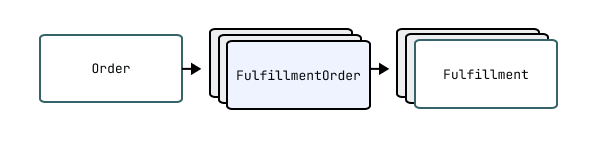
Fulfillment orders represent the work which is intended to be done in relation to an order. When fulfillment has started for one or more line items, a Fulfillment is created by a merchant or third party to represent the ongoing or completed work of fulfillment.
See below for more details on creating fulfillments.
NoteShopify creates fulfillment orders automatically when an order is created. It is not possible to manually create fulfillment orders.
See below for more details on the lifecycle of a fulfillment order.
Note:Shopify creates fulfillment orders automatically when an order is created. It is not possible to manually create fulfillment orders.
See below for more details on the lifecycle of a fulfillment order.
Note: Shopify creates fulfillment orders automatically when an order is created. It is not possible to manually create fulfillment orders.</p> <p><a href="#the-lifecycle-of-a-fulfillment-order">See below for more details on the lifecycle of a fulfillment order</a>.
Retrieving fulfillment orders
Fulfillment orders from an order
All fulfillment orders related to a given order can be retrieved with the Order.fulfillmentOrders connection.
API access scopes govern which fulfillments orders are returned to clients. An API client will only receive a subset of the fulfillment orders which belong to an order if they don't have the necessary access scopes to view all of the fulfillment orders.
Fulfillment orders assigned to the app for fulfillment
Fulfillment service apps can retrieve the fulfillment orders which have been assigned to their locations with the assignedFulfillmentOrders connection. Use the
argument to control whether all assigned fulfillment orders should be returned or only those where a merchant has sent a fulfillment request and it has yet to be responded to.The API client must be granted the
access scope to access the assigned fulfillment orders.All fulfillment orders
Apps can retrieve all fulfillment orders with the fulfillmentOrders query. This query returns all assigned, merchant-managed, and third-party fulfillment orders on the shop, which are accessible to the app according to the fulfillment order access scopes it was granted with.
The lifecycle of a fulfillment order
Fulfillment Order Creation
After an order is created, a background worker performs the order routing process which determines which locations will be responsible for fulfilling the purchased items. Once the order routing process is complete, one or more fulfillment orders will be created and assigned to these locations. It is not possible to manually create fulfillment orders.
Once a fulfillment order has been created, it will have one of two different lifecycles depending on the type of location which the fulfillment order is assigned to.
The lifecycle of a fulfillment order at a merchant managed location
Fulfillment orders are completed by creating fulfillments. Fulfillments represents the work done.
For digital products a merchant or an order management app would create a fulfilment once the digital asset has been provisioned. For example, in the case of a digital gift card, a merchant would to do this once the gift card has been activated - before the email has been shipped.
On the other hand, for a traditional shipped order, a merchant or an order management app would create a fulfillment after picking and packing the items relating to a fulfillment order, but before the courier has collected the goods.
Learn about managing fulfillment orders as an order management app.
The lifecycle of a fulfillment order at a location which is managed by a fulfillment service
For fulfillment orders which are assigned to a location that is managed by a fulfillment service, a merchant or an Order Management App can send a fulfillment request to the fulfillment service which operates the location to request that they fulfill the associated items. A fulfillment service has the option to accept or reject this fulfillment request.
Once the fulfillment service has accepted the request, the request can no longer be cancelled by the merchant or order management app and instead a cancellation request must be submitted to the fulfillment service.
Once a fulfillment service accepts a fulfillment request, then after they are ready to pack items and send them for delivery, they create fulfillments with the fulfillmentCreate mutation. They can provide tracking information right away or create fulfillments without it and then update the tracking information for fulfillments with the fulfillmentTrackingInfoUpdate mutation.
Learn about managing fulfillment orders as a fulfillment service.
API access scopes
Fulfillment orders are governed by the following API access scopes:
- The
andaccess scopes grant access to fulfillment orders assigned to merchant-managed locations. - The
andaccess scopes are intended for fulfillment services. These scopes grant access to fulfillment orders assigned to locations that are being managed by fulfillment services. - The
andaccess scopes grant access to fulfillment orders assigned to locations managed by other fulfillment services.
Fulfillment service app access scopes
Usually, fulfillment services have the
access scope and don't have theoraccess scopes. The app will only have access to the fulfillment orders assigned to their location (or multiple locations if the app registers multiple fulfillment services on the shop). The app will not have access to fulfillment orders assigned to merchant-managed locations or locations owned by other fulfillment service apps.Order management app access scopes
Order management apps will usually request
andaccess scopes. This will allow them to manage all fulfillment orders on behalf of a merchant.If an app combines the functions of an order management app and a fulfillment service, then the app should request all access scopes to manage all assigned and all unassigned fulfillment orders.
Notifications about fulfillment orders
Fulfillment services are required to register a self-hosted callback URL which has a number of uses. One of these uses is that this callback URL will be notified whenever a merchant submits a fulfillment or cancellation request.
Both merchants and apps can subscribe to the fulfillment order webhooks to be notified whenever fulfillment order related domain events occur.
Show fields
- The
- •OBJECT
Represents the destination where the items should be sent upon fulfillment.
Show fields
- •OBJECT
Associates an order line item with the quantities that require fulfillment as part of a fulfillment order. Each Fulfillment Order Line Item object tracks the total quantity to fulfill and the remaining quantity yet to be fulfilled, along with details about the line item being fulfilled and pricing information.
The line item provides additional fulfillment data including whether the item requires shipping. Financial summaries show pricing details with discounts applied, while warning messages alert merchants to any issues that might affect fulfillment.
Show fields
- •OBJECT
A request made by the merchant or an order management app to a fulfillment service for a fulfillment order.
Show fields
- •OBJECT
Represents any file other than HTML.
Show fields
- •OBJECT
A gift card that customers use as a payment method. Stores the initial value, current balance, and expiration date.
You can issue gift cards to a specific
Customeror send them to awith a personalized message. The card tracks its transaction history throughandrecords. You can create and deactivate gift cards using theandmutations, respectively.NoteAfter a gift card is deactivated, it can't be used for further purchases or re-enabled.
Note:After a gift card is deactivated, it can't be used for further purchases or re-enabled.
Note: After a gift card is deactivated, it can't be used for further purchases or re-enabled.
Show fields
- •OBJECT
A cash out transaction where the gift card balance was redeemed for cash.
Show fields
- •OBJECT
A credit transaction which increases the gift card balance.
Show fields
- •OBJECT
A debit transaction which decreases the gift card balance.
Show fields
- •OBJECT
Represents a customer's identity provider subject identifier.
Show fields
- •OBJECT
Records a batch of inventory changes made together in a single operation. Tracks which
Apporinitiated the changes, when they occurred, and why they were made.Provides an audit trail through its reason and reference document URI. The reference document URI links to the source that triggered the adjustment, such as an
Order,, or external system event. Use thechangesfield to retrieve the specific quantity adjustments for each inventory state at affected locations.Show fields
- •OBJECT
An inventory item represents the inventory for a product variant. It holds the stock keeping unit (SKU), whether quantities are tracked, shipping requirements, and customs information.
Use the
field to get the inventory level for each location that stocks the item, and the level'squantitiesfield to read its inventory quantities by name. Quantity names represent the inventory states that merchants use to track inventory.Learn more about inventory object relationships.
Show fields
- •OBJECT
Weight information for an
when packaged. Provides the weight specification used for inventory management and shipping calculations. Learn more about managing inventory.Show fields
- •OBJECT
The quantities of an inventory item at a specific location. Each inventory level connects one
to oneLocation, tracking multiple quantity states like available, on-hand, incoming, and committed.The
quantitiesfield provides access to different inventory states. Learn more about inventory states and relationships.Show fields
- •OBJECT
A purchase order represents an agreement from a merchant to buy goods or services from a supplier. While the agreement is captured on the merchant's side as a purchase order, it’s recorded as a sales order on the supplier side.
Show fields
- •OBJECT
Represents a line item belonging to an inventory purchase order. This is a simplified view of the purchase order line item for inventory management purposes.
Show fields
- •OBJECT
The
object lets you manage and track inventory quantities for specific states. Inventory quantities represent different states of items such as available for purchase, committed to orders, draft orders, transfers, or shipments, reserved by the merchant, incoming from suppliers, or set aside for quality control or safety stock.You can use inventory levels to manage where inventory items are stocked. You can also make inventory adjustments to apply changes to inventory quantities.
Inventory quantities can be managed by a merchant or by fulfillment services that handle inventory tracking. Learn more about working with Shopify's inventory management system.
Show fields
- •OBJECT
Represents an inventory shipment.
Show fields
- •OBJECT
Represents a single line item within an inventory shipment.
Show fields
- •OBJECT
Tracks the movement of
objects betweenLocationobjects. A transfer includes origin and destination information,objects with quantities, and shipment details.Transfers progress through multiple
statuses. The transfer maintainsobjects of location details to preserve historical data even if locations change or are deleted later.Show fields
- •OBJECT
Represents a line item belonging to an inventory transfer.
Show fields
- •OBJECT
The
object represents a single product or service that a customer purchased in an order. Each line item is associated with a product variant and can have multiple discount allocations. Line items contain details about what was purchased, including the product variant, quantity, pricing, and fulfillment status.Use the
object to manage the following processes:- Track the quantity of items ordered, fulfilled, and unfulfilled.
- Calculate prices, including discounts and taxes.
- Manage fulfillment through fulfillment services.
- Manage returns and exchanges.
- Handle subscriptions and recurring orders.
Line items can also include custom attributes and properties, allowing merchants to add specific details about each item in an order. Learn more about managing orders and fulfillment.
Show fields
- •OBJECT
The information for line items that are part of a bundle. When a bundle is purchased, each component line item references its
through thefield to maintain the relationship with the bundle.The parent bundle's product, variant, and custom attributes enable apps to group and display bundle components in order management systems, transactional emails, and other contexts where understanding the bundle structure is needed.
Learn more about product bundles.
Show fields
- •OBJECT
A physical location where merchants store and fulfill inventory. Locations include retail stores, warehouses, popups, dropshippers, or other places where inventory is managed or stocked.
Active locations can fulfill online orders when configured with shipping rates, local pickup, or local delivery options. Locations track inventory quantities for products and process order fulfillment. Third-party apps using
can create and manage their own locations.Show fields
- •OBJECT
A physical mailing address. For example, a
Customer's default address and anOrder's billing address are both mailing addresses. Stores standard address components, customer name information, and company details.The address includes geographic coordinates (
latitudeandlongitude). You can format addresses for display using theformattedfield with options to include or exclude name and company information.Show fields
- •OBJECT
A merchant-defined group of buyers identified by conditions such as their region, retail location, or company location. Each market allows configuration of a distinct, localized buyer experience. Customizations include, but are not limited to, currency, pricing and product availability, web presence, and content translations.
Show fields
- •OBJECT
A catalog for managing product availability and pricing for specific
Marketcontexts. Each catalog links to one or more markets. The catalog can optionally include aPublicationto control whichProductobjects customers see, and afor market-specific pricing adjustments. When a publication isn't associated with the catalog, product availability is determined by the sales channel.Use catalogs to create distinct shopping experiences for different geographic regions or customer segments.
Learn more about building a catalog and managing markets.
Show fields
- •OBJECT
The marketing activity resource represents marketing that a merchant created through an app.
Show fields
- •OBJECT
Represents actions that market a merchant's store or products.
Show fields
- •OBJECT
A country which comprises a market.
Show fields
- •OBJECT
A subdivision of a country which comprises a market.
Show fields
- •OBJECT
Represents a parent/child relationship between two markets.
Show fields
- •OBJECT
The market’s web presence, which defines its SEO strategy. This can be a different domain (e.g.
example.ca), subdomain (e.g.ca.example.com), or subfolders of the primary domain (e.g.). Each web presence comprises one or more language variants. If a market does not have its own web presence, it is accessible on the shop’s primary domain via country selectors.Note: while the domain/subfolders defined by a market’s web presence are not applicable to custom storefronts, which must manage their own domains and routing, the languages chosen here do govern the languages available on the Storefront API for the countries in this market.
Show fields
- •OBJECT
The
object represents an image hosted on Shopify's content delivery network (CDN). Shopify CDN is a content system that serves as the primary way to store, manage, and deliver visual content for products, variants, and other resources across the Shopify platform.The
object provides information to:- Store and display product and variant images across online stores, admin interfaces, and mobile apps.
- Retrieve visual branding elements, including logos, banners, favicons, and background images in checkout flows.
- Retrieve signed URLs for secure, time-limited access to original image files.
Each
object provides both the processed image data (with automatic optimization and CDN delivery) and access to the original source file. The image processing is handled asynchronously, so images might not be immediately available after upload. Thestatusfield indicates when processing is complete and the image is ready for use.The
object implements theMediainterface alongside other media types, like videos and 3D models.Learn about managing media for products, product variants, and asynchronous media management.
Show fields
- •OBJECT
Navigation menus that organize links into logical structures to guide customers through a store. Menus serve as the backbone of store navigation, making it easy for customers to find products, pages, and other content through organized hierarchical links.
For example, a merchant might create a main navigation menu with top-level categories like "Products," "About Us," and "Contact," where each category can contain nested menu items linking to specific collections, pages, or external resources.
Use the
Menuobject to:- Build and customize store navigation structures
- Organize hierarchical menu systems with nested items
- Work with default menus that can't be deleted
- Access menu items for building navigation
Menus can be designated as default navigation elements (like main menu or footer), which can't be deleted and have restricted handle updates. The handle provides a unique identifier that themes can reference, while the items collection enables nested navigation structures.
Each menu contains menu items that can link to various resource types. This flexibility lets merchants create navigation experiences that guide customers through their store.
Show fields
- •OBJECT
Metafields enable you to attach additional information to a Shopify resource, such as a Product or a Collection. For more information about where you can attach metafields refer to HasMetafields. Some examples of the data that metafields enable you to store are specifications, size charts, downloadable documents, release dates, images, or part numbers. Metafields are identified by an owner resource, namespace, and key. and store a value along with type information for that value.
Show fields
- •OBJECT
Defines the structure, validation rules, and permissions for
Metafieldobjects attached to a specific owner type. Each definition establishes a schema that metafields must follow, including the data type and validation constraints.The definition controls access permissions across different APIs, determines whether the metafield can be used for filtering or as a collection condition, and can be constrained to specific resource subtypes.
Show fields
- •OBJECT
An instance of custom structured data defined by a
. Metaobjects store reusable data that extends beyond Shopify's standard resources, such as product highlights, size charts, or custom content sections.Each metaobject includes fields that match the field types and validation rules specified in its definition, which also determines the metaobject's capabilities, such as storefront visibility, publishing and translation support.
Metafieldscan reference metaobjects to connect custom data withProductobjects,Collectionobjects, and other Shopify resources.Show fields
- •OBJECT
Defines the structure and configuration for a custom data type in Shopify. Each definition specifies the fields, validation rules, and capabilities that apply to all
Metaobjectentries created from it.The definition includes field definitions that determine what data to store, access controls for the Shopify admin and Storefront APIs, and capabilities such as publishability and translatability. You can track which
Apporcreated the definition and optionally base it on a.Show fields
- •OBJECT
Represents a Shopify hosted 3D model.
Show fields
- •OBJECT
A theme for display on the storefront. Themes control the visual appearance and functionality of the online store through templates, stylesheets, and assets that determine how products, collections, and other content display to customers.
Each theme has a role that indicates its status. Main themes are live on the storefront, unpublished themes are inactive, demo themes require purchase before publishing, and development themes are temporary for previewing during development. The theme includes translations for multi-language support.
Show fields
- •OBJECT
The
Orderobject represents a customer's request to purchase one or more products from a store. Use theOrderobject to handle the complete purchase lifecycle from checkout to fulfillment.Use the
Orderobject when you need to:- Display order details on customer account pages or admin dashboards.
- Create orders for phone sales, wholesale customers, or subscription services.
- Update order information like shipping addresses, notes, or fulfillment status.
- Process returns, exchanges, and partial refunds.
- Generate invoices, receipts, and shipping labels.
The
Orderobject serves as the central hub connecting customer information, product details, payment processing, and fulfillment data within the GraphQL Admin API schema.NoteOnly the last 60 days' worth of orders from a store are accessible from the
Orderobject by default. If you want to access older records, then you need to request access to all orders. If your app is granted access, then you can add the,, andscopes.Note:Only the last 60 days' worth of orders from a store are accessible from the
Orderobject by default. If you want to access older records, then you need to request access to all orders. If your app is granted access, then you can add the,, andscopes.Note: Only the last 60 days' worth of orders from a store are accessible from the <code>Order</code> object by default. If you want to access older records, then you need to <a href="https://shopify.dev/docs/api/usage/access-scopes#orders-permissions">request access to all orders</a>. If your app is granted access, then you can add the <code><span class="PreventFireFoxApplyingGapToWBR">read<wbr/>_all<wbr/>_orders</span></code>, <code><span class="PreventFireFoxApplyingGapToWBR">read<wbr/>_orders</span></code>, and <code><span class="PreventFireFoxApplyingGapToWBR">write<wbr/>_orders</span></code> scopes.
CautionOnly use orders data if it's required for your app's functionality. Shopify will restrict access to scopes for apps that don't have a legitimate use for the associated data.
Caution:Only use orders data if it's required for your app's functionality. Shopify will restrict access to scopes for apps that don't have a legitimate use for the associated data.
Caution: Only use orders data if it's required for your app's functionality. Shopify will restrict <a href="https://shopify.dev/docs/api/usage/access-scopes#requesting-specific-permissions">access to scopes</a> for apps that don't have a legitimate use for the associated data.
Learn more about building apps for orders and fulfillment.
Show fields
- •OBJECT
An order adjustment accounts for the difference between a calculated and actual refund amount.
Show fields
- •OBJECT
An attribution definition that an app can use to label orders it routes to a shop. Definitions can be supplied declaratively via the
extension or created dynamically per-shop via the Admin API. Learn more in the order attribution guide.Show fields
- •OBJECT
A job to determine the result of an order cancellation request.
Show fields
- •OBJECT
A job result for tracking the status of a mandate payment request on an order.
Show fields
- •OBJECT
A summary of the important details for a dispute on an order.
Show fields
- •OBJECT
An edit session for an order.
Show fields
- •OBJECT
The
object represents a payment transaction that's associated with an order. An order transaction is a specific action or event that happens within the context of an order, such as a customer paying for a purchase or receiving a refund, or other payment-related activity.Use the
object to capture the complete lifecycle of a payment, from initial authorization to final settlement, including refunds and currency exchanges. Common use cases for using theobject include:- Processing new payments for orders
- Managing payment authorizations and captures
- Processing refunds for returned items
- Tracking payment status and errors
- Managing multi-currency transactions
- Handling payment gateway integrations
Each
object has akindthat defines the type of transaction and astatusthat indicates the current state of the transaction. The object stores detailed information about payment methods, gateway processing, and settlement details.Learn more about payment processing and payment gateway integrations.
Show fields
- •OBJECT
A standalone content page in the online store. Pages display HTML-formatted content for informational pages like "About Us", contact information, or shipping policies.
Each page has a unique handle for URL routing and supports custom template suffixes for specialized layouts. Pages can be published or hidden, and include creation and update timestamps.
Show fields
- •OBJECT
A payment customization.
Show fields
- •OBJECT
A payment instrument and the permission the owner of the instrument gives to the merchant to debit it.
Show fields
- •OBJECT
Represents the payment schedule for a single payment defined in the payment terms.
Show fields
- •OBJECT
Payment conditions for an
Orderor, including when payment is due and how it's scheduled. Payment terms are created from templates that specify net terms (payment due after a certain number of days) or fixed schedules with specific due dates. You can optionally provide custom payment schedules using.Each payment term contains one or more
, which you can access through thefield. Payment schedules contain detailed information for each payment installment.Learn more about payment terms.
Show fields
- •OBJECT
Represents the payment terms template object.
Show fields
- •OBJECT
Represents a mobile device that Shopify Point of Sale has been installed on.
Show fields
- •OBJECT
Tracks the payment activity for a point of sale device.
Show fields
- •OBJECT
A list that defines pricing for product variants. Price lists override default product prices with either fixed prices or percentage-based adjustments.
Each price list associates with a
Catalogto determine which customers see the pricing. The catalog's context rules control when the price list applies, such as for specific markets, company locations, or apps.Learn how to support different pricing models.
Show fields
- •OBJECT
The
Productobject lets you manage products in a merchant’s store.Products are the goods and services that merchants offer to customers. They can include various details such as title, description, price, images, and options such as size or color. You can use product variants to create or update different versions of the same product. You can also add or update product media. Products can be organized by grouping them into a collection.
Learn more about working with Shopify's product model, including limitations and considerations.
Show fields
- •OBJECT
An entity that represents details of an asynchronous ProductBundleCreate or ProductBundleUpdate mutation.
By querying this entity with the productOperation query using the ID that was returned when the bundle was created or updated, this can be used to check the status of an operation.
The
statusfield indicates whether the operation isCREATED,ACTIVE, orCOMPLETE.The
productfield provides the details of the created or updated product.The
field provides mutation errors that occurred during the operation.Show fields
- •OBJECT
An entity that represents details of an asynchronous ProductDelete mutation.
By querying this entity with the productOperation query using the ID that was returned when the product was deleted, this can be used to check the status of an operation.
The
statusfield indicates whether the operation isCREATED,ACTIVE, orCOMPLETE.The
field provides the ID of the deleted product.The
field provides mutation errors that occurred during the operation.Show fields
- •OBJECT
An entity that represents details of an asynchronous ProductDuplicate mutation.
By querying this entity with the productOperation query using the ID that was returned when the product was duplicated, this can be used to check the status of an operation.
The
statusfield indicates whether the operation isCREATED,ACTIVE, orCOMPLETE.The
productfield provides the details of the original product.The
field provides the details of the new duplicate of the product.The
field provides mutation errors that occurred during the operation.Show fields
- •OBJECT
A product feed.
Show fields
- •OBJECT
A product attribute that customers can choose from, such as "Size", "Color", or "Material".
Productobjects use options to define the different variations available for purchase. Each option has a name and a set of possible values that combine to createobjects.The option includes its display position, associated values, and optional
for structured data. Options support translations for international selling and track whichobjects that variants actively use versus unused values that exist without associated variants.Show fields
- •OBJECT
A specific value for a
, such as "Red" or "Blue" for a "Color" option. Each value can be assigned toobjects to create different versions of aProduct.The value tracks whether any variants currently use it through the
field. Values can include visual representations through swatches that display colors or images. When linked to aMetafield, theprovides additional structured data for the option value.Show fields
- •OBJECT
An entity that represents details of an asynchronous ProductSet mutation.
By querying this entity with the productOperation query using the ID that was returned when the product was created or updated, this can be used to check the status of an operation.
The
statusfield indicates whether the operation isCREATED,ACTIVE, orCOMPLETE.The
productfield provides the details of the created or updated product.The
field provides mutation errors that occurred during the operation.Show fields
- •OBJECT
Represents a Shopify product taxonomy node.
Show fields
- •OBJECT
The
object represents a version of a product that comes in more than one option, such as size or color. For example, if a merchant sells t-shirts with options for size and color, then a small, blue t-shirt would be one product variant and a large, blue t-shirt would be another.Use the
object to manage the full lifecycle and configuration of a product's variants. Common use cases for using theobject include:- Tracking inventory for each variant
- Setting unique prices for each variant
- Assigning barcodes and SKUs to connect variants to fulfillment services
- Attaching variant-specific images and media
- Setting delivery and tax requirements
- Supporting product bundles, subscriptions, and selling plans
A
is associated with a parentProductobject.serves as the central link between a product's merchandising configuration, inventory, pricing, fulfillment, and sales channels within the GraphQL Admin API schema. Each variant can reference other GraphQL types such as:: Used for inventory trackingImage: Used for variant-specific images: Used for subscriptions and selling plans
Learn more about Shopify's product model.
Show fields
- •OBJECT
A product variant component that is included within a bundle.
These are the individual product variants that make up a bundle product, where each component has a specific required quantity.
Show fields
- •OBJECT
A group of products and collections that are published to an app.
Each publication manages which products and collections display on its associated
Channel. Merchants can automatically publish products when they're created ifis enabled, or manually control publication through publication records.Publications support scheduled publishing through future publish dates for online store channels, allowing merchants to coordinate product launches and promotional campaigns. The
catalogfield links to pricing and availability rules specific to that publication's context.Show fields
- •OBJECT
A bulk update operation on a publication.
Show fields
- •OBJECT
Quantity price breaks lets you offer different rates that are based on the amount of a specific variant being ordered.
Show fields
- •OBJECT
The
Refundobject represents a financial record of money returned to a customer from an order. It provides a comprehensive view of all refunded amounts, transactions, and restocking instructions associated with returning products or correcting order issues.The
Refundobject provides information to:- Process customer returns and issue payments back to customers
- Handle partial or full refunds for line items with optional inventory restocking
- Refund shipping costs, duties, and additional fees
- Issue store credit refunds as an alternative to original payment method returns
- Track and reconcile all financial transactions related to refunds
Each
Refundobject maintains detailed records of what was refunded, how much was refunded, which payment transactions were involved, and any inventory restocking that occurred. The refund can include multiple components such as product line items, shipping charges, taxes, duties, and additional fees, all calculated with proper currency handling for international orders.Refunds are always associated with an order and can optionally be linked to a return if the refund was initiated through the returns process. The refund tracks both the presentment currency (what the customer sees) and the shop currency for accurate financial reporting.
NoteThe existence of a
Refundobject doesn't guarantee that the money has been returned to the customer. The actual financial processing happens through associatedobjects, which can be in various states, such as pending, processing, success, or failure. To determine if money has actually been refunded, check the status of the associated transactions.Note:The existence of a
Refundobject doesn't guarantee that the money has been returned to the customer. The actual financial processing happens through associatedobjects, which can be in various states, such as pending, processing, success, or failure. To determine if money has actually been refunded, check the status of the associated transactions.Note: The existence of a <code>Refund</code> object doesn't guarantee that the money has been returned to the customer. The actual financial processing happens through associated <a href="https://shopify.dev/docs/api/admin-graphql/latest/objects/OrderTransaction"><code><span class="PreventFireFoxApplyingGapToWBR">Order<wbr/>Transaction</span></code></a> objects, which can be in various states, such as pending, processing, success, or failure. To determine if money has actually been refunded, check the <a href="https://shopify.dev/docs/api/admin-graphql/latest/objects/OrderTransaction#field-OrderTransaction.fields.status">status</a> of the associated transactions.
Learn more about managing returns, refunding duties, and processing refunds.
Show fields
- •OBJECT
A shipping line item that's included in a refund.
Show fields
- •OBJECT
A buyer-initiated request to edit unfulfilled line items on an order.
Show fields
- •OBJECT
A line item included in a buyer-initiated requested order edit.
Show fields
- •OBJECT
The
Returnobject represents the intent of a buyer to ship one or more items from an order back to a merchant or a third-party fulfillment location. A return is associated with an order and can include multiple return line items. Each return has a status, which indicates the state of the return.Use the
Returnobject to capture the financial, logistical, and business intent of a return. For example, you can identify eligible items for a return and issue customers a refund for returned items on behalf of the merchant.Learn more about providing a return management workflow for merchants. You can also manage exchanges, reverse fulfillment orders, and reverse deliveries on behalf of merchants.
Show fields
- •OBJECT
A delivered order that's eligible to be returned to the merchant. Provides the items from completed fulfillments that customers can select when initiating a return.
Use returnable fulfillments to determine which items are eligible for return before creating a
Returnwith themutation. The line items show quantities that are available for return.Learn more about building return management workflows.
Show fields
- •OBJECT
An item that a customer returns from a fulfilled order. Links to the original
and tracks quantities through the return process.The line item includes the customer's reason for returning the item and any additional notes. It also tracks processing status with separate quantities for items that are processable, processed, refundable, and refunded. You can apply optional restocking fees to cover handling costs.
Learn more about creating a return.
Show fields
- •OBJECT
A return policy profile.
Show fields
- •OBJECT
A standardized reason for returning an item.
- Shopify offers an expanded library of return reasons available to all merchants
- For each product, Shopify suggests a curated subset of reasons based on the product's category
- Suggested reasons aren't the only valid options. When creating a return via the API, you can use any reason from the full library.
Show fields
- •OBJECT
A reverse delivery is a post-fulfillment object that represents a buyer sending a package to a merchant. For example, a buyer requests a return, and a merchant sends the buyer a shipping label. The reverse delivery contains the context of the items sent back, how they're being sent back (for example, a shipping label), and the current state of the delivery (tracking information).
Show fields
- •OBJECT
The details about a reverse delivery line item.
Show fields
- •OBJECT
A group of one or more items in a return that will be processed at a fulfillment service. There can be more than one reverse fulfillment order for a return at a given location.
Show fields
- •OBJECT
The details of the arrangement of an item.
Show fields
- •OBJECT
The details about a reverse fulfillment order line item.
Show fields
- •OBJECT
A rollout on a shop. Merchants use rollouts to run sales events, permanent launches, and A/B tests by serving treatments to a configured share of buyers.
Show fields
- •OBJECT
A treatment in a rollout. Each treatment receives a share of the rollout's traffic and makes a set of changes to resources for the buyers it serves.
Show fields
- •OBJECT
The additional fee details for a line item.
Show fields
- •OBJECT
A representation of a search query in the Shopify admin used on resource index views. Preserves complex queries with search terms and filters, enabling merchants to quickly access frequently used data views. For example, a saved search can be applied to the product index table to filter products. The query string combines free-text search terms with structured filters to narrow results based on resource attributes.
The search applies to a specific resource type such as
Customer,Product,Order, orCollectionobjects.Show fields
- •OBJECT
- Theme app extensions
If your app integrates with a Shopify theme and you plan to submit it to the Shopify App Store, you must use theme app extensions instead of Script tags. Script tags can only be used with vintage themes. Learn more.
Theme app extensions:If your app integrates with a Shopify theme and you plan to submit it to the Shopify App Store, you must use theme app extensions instead of Script tags. Script tags can only be used with vintage themes. Learn more.
A script tag represents remote JavaScript code that is loaded into the pages of a shop's storefront or the Order status page of checkout.
Show fields
- •OBJECT
A group of customers that meet specific criteria defined through ShopifyQL query conditions. Common use cases for segments include customer analytics, targeted marketing campaigns, and automated discount eligibility.
The segment's
queryfield contains ShopifyQL conditions that determine membership, such as purchase history, location, or engagement patterns. Tracks when the segment was created withand when it was last modified with.Show fields
- •OBJECT
How a product can be sold and purchased through recurring billing or deferred purchase options. Defines the specific terms for subscriptions, pre-orders, or try-before-you-buy offers, including when to bill customers, when to fulfill orders, and what pricing adjustments to apply.
Each selling plan has billing, delivery, and pricing policies that control the purchase experience. The plan's
optionsandcategoryhelp merchants organize and report on different selling strategies. Plans are grouped within athat associates them withProductandobjects.CautionSelling plans and associated records are automatically deleted 48 hours after a merchant uninstalls the
Appthat created them. Back up these records if you need to restore them later.Caution:Selling plans and associated records are automatically deleted 48 hours after a merchant uninstalls the
Appthat created them. Back up these records if you need to restore them later.Caution: Selling plans and associated records are automatically deleted 48 hours after a merchant uninstalls the <a href="https://shopify.dev/docs/api/admin-graphql/latest/objects/App"><code>App</code></a> that created them. Back up these records if you need to restore them later.
Learn more about selling plans.
Show fields
- •OBJECT
A selling method that defines how products can be sold through purchase options like subscriptions, pre-orders, or try-before-you-buy. Groups one or more
objects that share the same selling method and options.The group provides buyer-facing labels and merchant-facing descriptions for the selling method. Associates
Productandobjects with selling plan groups to offer them through these purchase options.CautionSelling plan groups and their associated records are automatically deleted 48 hours after a merchant uninstalls the
Appthat created them. Back up these records if you need to restore them later.Caution:Selling plan groups and their associated records are automatically deleted 48 hours after a merchant uninstalls the
Appthat created them. Back up these records if you need to restore them later.Caution: Selling plan groups and their associated records are automatically deleted 48 hours after a merchant uninstalls the <a href="https://shopify.dev/docs/api/admin-graphql/latest/objects/App"><code>App</code></a> that created them. Back up these records if you need to restore them later.
Show fields
- •OBJECT
A server pixel stores configuration for streaming customer interactions to an EventBridge or PubSub endpoint.
Show fields
- •OBJECT
The optional shipping label for this fulfillment.
Show fields
- •OBJECT
Tracks the progress of an asynchronous shipping label purchase request.
Show fields
- •OBJECT
The central configuration and settings hub for a Shopify store. Access business information, operational preferences, feature availability, and store-wide settings that control how the shop operates.
Includes core business details like the shop name, contact emails, billing address, and currency settings. The shop configuration determines customer account requirements, available sales channels, enabled features, payment settings, and policy documents. Also provides access to shop-level resources such as staff members, fulfillment services, navigation settings, and storefront access tokens.
Show fields
- •OBJECT
An address for a shop.
Show fields
- •OBJECT
Financial account information for merchants using Shopify Payments. Tracks current balances across all supported currencies, payout schedules, and
records.The account includes configuration details such as
objects for receivingtransfers, statement descriptors that appear on customer credit card statements, and thethat determines when funds transfer to your bank. Access balance transactions to review individual charges, refunds, and adjustments that affect your account balance. Query payouts to track money movement between your Shopify Payments balance and bank accounts.Show fields
- •OBJECT
A transaction that contributes to a Shopify Payments account balance. Records money movement from charges, refunds, payouts, adjustments, or other payment activities. Includes the gross amount, processing fees, and resulting net amount that affects the account balance. Links to the source of the transaction and associated
details, with optional references toOrderobjects or adjustment reasons when applicable.Show fields
- •OBJECT
A bank account that can receive payouts.
Show fields
- •OBJECT
A dispute occurs when a buyer questions the legitimacy of a charge with their financial institution.
Show fields
- •OBJECT
The evidence associated with the dispute.
Show fields
- •OBJECT
The file upload associated with the dispute evidence.
Show fields
- •OBJECT
The fulfillment associated with dispute evidence.
Show fields
- •OBJECT
A transfer of funds between a merchant's Shopify Payments balance and their
. Provides the net amount, issue date, and current.The payout includes a
that breaks down fees and gross amounts by transaction type, such as charges, refunds, and adjustments. Theindicates whether funds move into the bank account (deposit) or back to Shopify Payments (withdrawal).Show fields
- •OBJECT
Policy that a merchant has configured for their store, such as their refund or privacy policy.
Show fields
- •OBJECT
A user account that can access the Shopify admin to manage store operations. Includes personal information and account status.
You can assign staff members to
objects for B2B operations, limiting their actions to those locations.Show fields
- •OBJECT
Standard metafield definition templates provide preset configurations to create metafield definitions. Each template has a specific namespace and key that we've reserved to have specific meanings for common use cases.
Refer to the list of standard metafield definitions.
Show fields
- •OBJECT
A store credit account contains a monetary balance that can be redeemed at checkout for purchases in the shop. The account is held in the specified currency and has an owner that cannot be transferred.
The account balance is redeemable at checkout only when the owner is authenticated via new customer accounts authentication.
Show fields
- •OBJECT
A credit transaction which increases the store credit account balance.
Show fields
- •OBJECT
A debit revert transaction which increases the store credit account balance. Debit revert transactions are created automatically when a store credit account debit transaction is reverted.
Store credit account debit transactions are reverted when an order is cancelled, refunded or in the event of a payment failure at checkout. The amount added to the balance is equal to the amount reverted on the original credit.
Show fields
- •OBJECT
A debit transaction which decreases the store credit account balance.
Show fields
- •OBJECT
A token that delegates unauthenticated access scopes to clients that need to access the Storefront API. Storefront access tokens enable headless storefronts and custom applications to interact with a store on behalf of customers without requiring authentication.
The token provides specific permissions, such as reading
Productdata, managing carts, or creatingCustomeraccounts. An app can have a maximum of 100 active storefront access tokens for eachShop.Learn more about building with the Storefront API.
Show fields
- •OBJECT
A record of an execution of the subscription billing process. Billing attempts use idempotency keys to avoid duplicate order creation.
When a billing attempt completes successfully, it creates an
Order. The attempt includes associated payment transactions and any errors that occur during billing. If 3D Secure authentication is required, thefield provides the redirect URL for customer verification.Show fields
- •OBJECT
A subscription contract that defines recurring purchases for a customer. Each contract specifies what products to deliver, when to bill and ship them, and at what price.
The contract includes
andthat control the frequency of charges and fulfillments.items define the products, quantities, and pricing for each recurringOrder. The contract tracksrecords, payment status, and generated orders throughout its lifecycle.Appinstances manage contracts through various status transitions including active, paused, failed, cancelled, or expired states.Learn more about building subscription contracts and updating subscription contracts.
Show fields
- •OBJECT
The
object represents a draft version of a subscription contract before it's committed. It serves as a staging area for making changes to an existing subscription or creating a new one. The draft allows you to preview and modify various aspects of a subscription before applying the changes. This object is deprecated in favor of the SubscriptionContractCalculation API.Use the
object to:- Add, remove, or modify subscription lines and their quantities
- Manage discounts (add, remove, or update manual and code-based discounts)
- Configure delivery options and shipping methods
- Set up billing and delivery policies
- Manage customer payment methods
- Add custom attributes and notes to generated orders
- Configure billing cycles and next billing dates
- Preview the projected state of the subscription
Each
object maintains a projected state that shows how the subscription will look after the changes are committed. This allows you to preview the impact of your modifications before applying them. The draft can be associated with an existing subscription contract (for modifications) or used to create a new subscription.The draft remains in a draft state until it's committed, at which point the changes are applied to the subscription contract and the draft is no longer accessible.
Learn more about how subscription contracts work and how to build, update, and combine subscription contracts.
Show fields
- •OBJECT
A Shopify product taxonomy attribute.
Show fields
- •OBJECT
A product category within Shopify's standardized product taxonomy. Provides hierarchical organization through parent-child relationships, with each category tracking its ancestors, children, and level in the taxonomy tree.
Categories include attributes specific to their product type and navigation properties like whether they're root, leaf, or archived categories. The taxonomy enables consistent product classification across Shopify and integrated marketplaces.
Show fields
- •OBJECT
A Shopify product taxonomy choice list attribute.
Show fields
- •OBJECT
A Shopify product taxonomy measurement attribute.
Show fields
- •OBJECT
Represents a Shopify product taxonomy value.
Show fields
- •OBJECT
A TenderTransaction represents a transaction with financial impact on a shop's balance sheet. A tender transaction always represents actual money movement between a buyer and a shop. TenderTransactions can be used instead of OrderTransactions for reconciling a shop's cash flow. A TenderTransaction is immutable once created.
Show fields
- •OBJECT
Transaction fee related to an order transaction.
Show fields
- •OBJECT
An unverified return line item.
Show fields
- •OBJECT
The URL redirect for the online store.
Show fields
- •OBJECT
A request to import a
URLRedirectobject into the Online Store channel. Apps can use this to query the state of anrequest.For more information, see
url-redirects.Show fields
- •OBJECT
A server-side validation that enforces business rules before customers complete their purchases. Each validation links to a
that implements the validation logic.Validations run on Shopify's servers and are enforced throughout the checkout process. Validation errors always block checkout progress. The
setting determines whether runtime exceptions, like timeouts, also block checkout. Tracks runtime exception history for the validation function and supports custom data throughMetafieldobjects.Show fields
- •OBJECT
Represents a Shopify hosted video.
Show fields
- •OBJECT
A webhook subscription is a persisted data object created by an app using the REST Admin API or GraphQL Admin API. It describes the topic that the app wants to receive, and a destination where Shopify should send webhooks of the specified topic. When an event for a given topic occurs, the webhook subscription sends a relevant payload to the destination. Learn more about the webhooks system.
Show fields
- •OBJECT
The
object enables you to manage JavaScript code snippets that run on an online store and collect behavioral data for marketing campaign optimization and analytics.Learn how to create a web pixel extension to subscribe your app to events that are emitted by Shopify.
Show fields