Resource Picker API
App Bridge isn't versioned with Polaris. App Bridge APIs and web components are identical in every App Home reference version.
App Bridge isn't versioned with Polaris. App Bridge APIs and web components are identical in every App Home reference version.
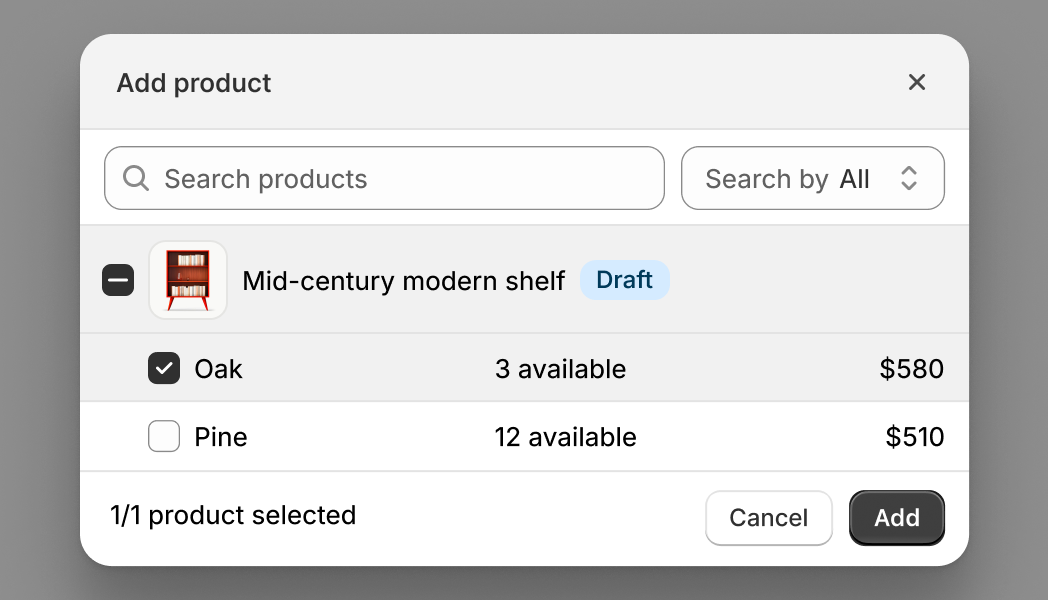
The Resource Picker API lets merchants search for and select products, collections, or product variants. Use this API when your app needs merchants to choose Shopify resources to work with. The resource picker returns detailed resource information including IDs, titles, images, and metadata.
If you need to pick app-specific resources like product reviews, email templates, or subscription options, use the Picker API instead.
If you need to pick app-specific resources like product reviews, email templates, or subscription options, use the Picker API instead.
Anchor to Use casesUse cases
- Product selection: Help users find and select products from the store catalog.
- Collection selection: Allow users to pick collections for promotions, automations, or display.
- Variant selection: Enable selection of specific product variants for targeted operations.
- Permission-aware: Select resources that both the app and the user have permissions to access.
Anchor to InputsInputs
The object defines how the resource picker behaves, including which resource type to display, selection limits, filters, and preselected items.
- Anchor to typetypetypeResourceTypeResourceTyperequiredrequired
The type of Shopify resource to select:
'product'for products,'variant'for specific product variants, or'collection'for collections. This determines what appears in the picker and what data structure is returned.- Anchor to actionactionaction'add' | 'select''add' | 'select'Default: 'add'Default: 'add'
The action verb that appears in the title as the primary action of the resource picker. "Add" prompts merchants that they are appending to an existing list, while "select" they'll choose a resource for a specific purpose or replacing selections.
- Anchor to filterfilterfilterFiltersFilters
Filtering options that control which resources appear in the resourcepicker. Use filters to restrict resources by publication status, include or exclude variants, or apply custom search criteria. This helps merchants find relevant items faster.
- Anchor to multiplemultiplemultipleboolean | numberboolean | numberDefault: falseDefault: false
Whether to allow selecting multiple items of a specific type. If a number is provided, limit selections to that maximum. When
typeis'product', merchants can still select multiple variants from a single product even whenmultipleisfalse.- Anchor to queryqueryquerystringstringDefault: ''Default: ''
Initial GraphQL search query for filtering resources available in the resource picker. See search syntax for more information. This is displayed in the search bar when the picker is opened and can be edited by users. For most use cases, you should use the
filter.queryoption instead which doesn't show the query in the UI.- Anchor to selectionIdsselection
Idsselection Ids BaseResource[]BaseResource[]Default: []Default: [] Resources that should be preselected when the picker is opened. Use this for edit workflows to show what products are already in a bundle, collection, or promotional set. Merchants can see current selections and modify them before confirming.
Filters
Filter options that control which resources appear in the resource picker. Use filters to restrict the available resources based on publication status, resource type, or custom search criteria.
- archived
Whether to include archived products in the picker. When `false`, archived products are hidden. When `undefined`, archived products appear with an archived badge. Only applies when `type` is `'product'`. Use this to prevent selecting discontinued products.
boolean | undefined - draft
Whether to include draft products in the picker. When `false`, draft products are hidden. When `undefined`, draft products appear with a draft badge. Only applies when `type` is `'product'`. Use this to prevent selecting products that aren't ready for use.
boolean | undefined - hidden
Whether to include products that aren't published on any sales channels. When `false`, only products published to at least one sales channel appear in the picker. Use this to ensure merchants only select products that customers can purchase.
boolean - query
A GraphQL search query that filters the available resources without showing the query in the picker's search bar. Merchants won't see or edit this filter. See [search syntax](/docs/api/usage/search-syntax) for the query format. Use this to programmatically restrict resources based on attributes like tags, vendor, or product type (for example, `"tag:featured"` or `"vendor:Acme"`).
string - variants
Whether to show product variants in the picker. When `false`, merchants can only select products, not individual variants. Only applies when `type` is `'product'`. Use this to simplify selection when you only need product-level data.
boolean
BaseResource
A resource structure that can optionally include associated variants. Use this type for specifying preselected items in the resource picker when you need to include variant selections.
- id
The resource identifier in GraphQL global ID format (for example, `gid://shopify/Product/123`).
string - variants
An array of variant resources to preselect along with the main resource. Only applicable when the main resource is a product that has variants you want to preselect.
Resource[]
Resource
The base resource structure with a unique identifier.
- id
The resource identifier in GraphQL global ID format (for example, `gid://shopify/Product/123`).
string
Anchor to Return payloadReturn payload
The resource picker returns an array of selected resources when the merchant confirms their selection, or undefined if they cancel. The resource structure in the array varies based on the type option: products include variants and images, collections include rule sets, and variants include pricing and inventory data.
- Anchor to when type is "collection":when type is "collection":when type is "collection":Collection[]Collection[]
- Anchor to when type is "product":when type is "product":when type is "product":Product[]Product[]
- Anchor to when type is "variant":when type is "variant":when type is "variant":ProductVariant[]ProductVariant[]
Collection
A collection resource selected from the resource picker. Collections are groups of products organized by manual curation or automated rules. Use collection data to access product groupings, organizational information, and collection metadata.
- availablePublicationCount
The number of sales channels where this collection can be published. Use this to understand the collection's potential reach across different storefronts.
number - description
The collection description as plain text without HTML formatting. Use this when you need the description without markup.
string - descriptionHtml
The collection description formatted as HTML. Use this to display rich text descriptions with formatting and styling in your UI.
string - handle
The URL-friendly unique identifier used in collection URLs (for example, `'summer-collection'` in `/collections/summer-collection`). Use this to generate collection links or match URL paths.
string - id
The collection's unique global identifier (GID). Use this ID for collection-related GraphQL operations.
string - image
The featured image displayed for the collection. Use this for collection thumbnails, headers, or preview images.
ResourceImage | null - productsAutomaticallySortedCount
The count of products automatically added to the collection based on automation rules. Use this to understand how many products match the collection's criteria.
number - productsCount
The total number of products in the collection, including both manually added and automatically included products. Use this to show collection size or for pagination.
number - productsManuallySortedCount
The count of products manually added by the merchant. Use this to understand how much manual curation the collection has.
number - publicationCount
The number of sales channels where the collection is currently published. Use this to check the collection's actual visibility across storefronts.
number - ruleSet
The automation rules that determine which products are automatically included. Present only for automated (smart) collections. When `null`, the collection is manually curated. Use this to understand the collection's filtering logic.
RuleSet | null - seo
Search engine optimization metadata for the collection. Use this to understand how the collection appears in search engine results.
{ description?: string; title?: string; } - sortOrder
The default sort order that determines how products are arranged in the collection. This controls the product sequence customers see on the storefront.
CollectionSortOrder - storefrontId
The Storefront API identifier for this collection. Use this ID when making Storefront API queries for this collection.
string - templateSuffix
The theme template suffix for using custom theme templates (for example, `'featured'` to use `collection.featured.liquid`). When `null`, uses the default collection template.
string | null - title
The collection's display name shown to merchants and customers. Use this as the primary collection identifier in lists and displays.
string - updatedAt
ISO 8601 timestamp when the collection was last updated. Use this to track changes, sync with external systems, or show freshness indicators.
string
ResourceImage
An image associated with a product, variant, or collection. Use image data to display thumbnails, galleries, or product previews in your extension.
- altText
Alternative text describing the image for screen readers and accessibility. This text appears when images fail to load. Use descriptive alt text to make your extension accessible.
string - id
The unique identifier for the image file. Use this ID for image-related GraphQL operations.
string - originalSrc
The full URL to the original image file. Use this URL to display the image in your extension UI.
string
RuleSet
A set of rules that determine which products are automatically included in a collection. Use this to understand how an automated collection populates itself with products.
- appliedDisjunctively
The logical operator for combining multiple rules. When `true`, products are included if they match ANY rule (OR logic). When `false`, products must match ALL rules (AND logic). Use this to understand the collection's filtering strategy.
boolean - rules
An array of rules that define product inclusion criteria. Each rule checks a different product attribute. Products are added to the collection based on how these rules are combined (see `appliedDisjunctively`).
CollectionRule[]
CollectionRule
A single rule that defines product inclusion criteria for an automated collection. Rules filter products based on their attributes to automatically populate a collection.
- column
The product field to evaluate (for example, `'title'`, `'tag'`, `'vendor'`, or `'product_type'`). This determines which product attribute the rule checks.
string - condition
The value to compare against. For example, if checking tags, this might be `'summer'` or `'featured'`. The product attribute must match this condition value according to the relation.
string - relation
The comparison operator that determines how the field is matched (for example, `'equals'`, `'contains'`, `'starts_with'`, `'ends_with'`, `'not_equals'`). This defines the matching logic between the column and condition.
string
CollectionSortOrder
The sort order that determines how products appear in a collection. This controls the default product arrangement that customers see when viewing the collection on the storefront.
- Manual
Products arranged in the custom order set by the merchant. Use this when merchants have manually organized products for specific merchandising.
MANUAL - BestSelling
Products sorted by sales volume, with best-sellers first. Use this to highlight popular products.
BEST_SELLING - AlphaAsc
Products sorted alphabetically by title from A to Z. Use this for easy browsing of product names.
ALPHA_ASC - AlphaDesc
Products sorted alphabetically by title from Z to A. Use this for reverse alphabetical ordering.
ALPHA_DESC - PriceDesc
Products sorted by price from highest to lowest. Use this to show premium or expensive items first.
PRICE_DESC - PriceAsc
Products sorted by price from lowest to highest. Use this to show affordable options first.
PRICE_ASC - CreatedDesc
Products sorted by creation date with newest products first. Use this to highlight recently added items.
CREATED_DESC - Created
Products sorted by creation date with oldest products first. Use this for chronological ordering.
CREATED - MostRelevant
Products sorted by search relevance based on query terms. Use this when the collection is filtered by search.
MOST_RELEVANT
Product
A product configuration.
- handle
The URL-friendly unique identifier used in product URLs (for example, `'blue-t-shirt'`).
string - hasOnlyDefaultVariant
Whether the product has only the default variant with no custom options. When `true`, the product has no size, color, or other option variations.
boolean - id
The product's unique global identifier (GID).
string - onlineStoreUrl
The URL to view this product on the online store. Use this to create "View in store" links.
string - options
Product options that define how variants differ (for example, Size, Color, Material). Each option has an ID, name, position, and array of possible values.
{ id: string; name: string; position: number; values: string[]; }[] - productCategory
The standardized product category taxonomy. Use this for product classification in search and organization.
string - productComponents
An array of component products that make up this bundle. Each component represents a product included in the bundle configuration.
ProductComponent[] - productType
The product category or type used for organization (for example, "T-Shirt", "Shoes").
string - status
The publication status indicating whether the product is active (published), archived (discontinued), or draft (unpublished).
'ACTIVE' | 'ARCHIVED' | 'DRAFT' - title
The product's display name shown to merchants and customers.
string - totalInventory
The total available inventory summed across all variants and locations.
number - totalVariants
The total number of variants this product has.
number
ProductComponent
A component product that is part of a bundle. Represents an individual product included in a bundle configuration.
- componentVariantsCount
The count of variants from this product that are used as bundle components. Use this to understand how many variants are configured in bundles.
number - featuredImage
The featured image displayed for this component product with ID, URL, and alt text properties. Use this for showing component previews in bundle configuration interfaces.
{ id?: string | null; url?: string | null; altText?: string | null; } | null - id
The component product's unique global identifier (GID).
string - nonComponentVariantsCount
The count of variants from this product that aren't used in any bundles. Use this to identify available variants for adding to bundle configurations.
number - productUrl
The admin URL for this component product. Use this to create links to the product's details page in the admin.
string - title
The product's display name. Use this to show which product is included in the bundle.
string - totalVariants
The total number of variants this component product has. Use this to determine if variant selection is needed for this component.
number
ProductVariant
A product variant configuration.
- barcode
The barcode, UPC, or ISBN number for the variant.
string - compareAtPrice
The original price before any discounts or markdowns.
string - displayName
A human-readable display name that combines the product title with the variant's option values (for example, "T-Shirt - Medium / Blue").
string - id
The variant's unique global identifier (GID).
string - price
The current selling price for this variant.
string - productVariantComponents
An array of component variants that make up this bundle variant. Each component represents a product variant included in the bundle.
ProductVariantComponent[] - selectedOptions
The option values that define this specific variant with name and value pairs (for example, Size: Large, Color: Blue).
{ name: string; value: string; }[] - sku
The Stock Keeping Unit (SKU) identifier for inventory tracking.
string - taxable
Whether this variant is subject to taxes. When `true`, applicable taxes are calculated at checkout.
boolean - taxCode
The harmonized system (HS) tax code for international shipping and customs.
string - title
The display name showing only the variant's option values (for example, "Medium / Blue").
string - weight
The physical weight of the variant as a number.
number
ProductVariantComponent
A component variant that is part of a product bundle. Represents an individual product variant included in a bundle configuration.
- displayName
A human-readable display name that combines the product title with the variant's option values (for example, "T-Shirt - Medium / Blue").
string - id
The component variant's unique global identifier (GID).
string - image
The image displayed for this component variant with ID, URL, and alt text properties. Use this for showing component previews in bundle configuration interfaces.
{ id?: string | null; url?: string | null; altText?: string | null; } | null - productVariantUrl
The admin URL for this product variant. Use this to create links to the variant's details page in the admin.
string - selectedOptions
The option values that define this specific component variant with name and value pairs (for example, Size: Large, Color: Blue).
{ name: string; value: string; }[] - sku
The Stock Keeping Unit (SKU) identifier for this component variant.
string - title
The display name showing only the variant's option values (for example, "Medium / Blue").
string
js
Preview
Examples
Description
Select products from the store catalog. This example opens a product resource picker and handles the selection response. The resource picker returns an array of product objects with GIDs, titles, and handles.
js
const selected = await shopify.resourcePicker({type: 'product'});Description
Select collections or variants. This example selects collections instead of individual products by setting `type: "collection"`, or selects specific product variants by setting `type: "variant"`. Use collection mode for choosing product groupings, such as homepage featured collection carousels, navigation menu builders, or promotional campaigns. Use variant mode for choosing individual SKUs, useful for inventory tools, variant-specific promotions, or shipment builders.
Collections
const selected = await shopify.resourcePicker({type: 'collection'});Product variants
const selected = await shopify.resourcePicker({type: 'variant'});Description
Preselect products. This example opens the resource picker with products already selected by passing GIDs to the `selectionIds` option. Use this to pre-populate the picker with current selections for edit workflows, showing what products are already in a bundle, collection, or promotional set. Merchants can see current selections and modify them before confirming.
js
const selected = await shopify.resourcePicker({
  type: 'product',
  selectionIds: [
    {
      id: 'gid://shopify/Product/12345',
      variants: [
        {
          id: 'gid://shopify/ProductVariant/1',
        },
      ],
    },
    {
      id: 'gid://shopify/Product/67890',
    },
  ],
});
Description
Set action verb. This example customizes the resource picker button text by setting the `action` option to "add" or "select". "Add" suggests appending to an existing list, while "select" implies choosing for a specific purpose or replacing selections. This subtle language difference improves clarity for different workflow contexts.
js
const selected = await shopify.resourcePicker({
  type: 'product',
  action: 'select',
});
Description
Limit selection count. This example controls how many products merchants can select. Set `multiple: true` for unlimited selection useful for mass product taggers, bulk inventory tools, or export utilities. Set `multiple` to a number like `5` to limit selection count for bundle builders with item limits, featured product sections, or promotional campaigns with maximum product counts.
Unlimited selectable items
const selected = await shopify.resourcePicker({
  type: 'product',
  multiple: true,
});
Maximum selectable items
const selected = await shopify.resourcePicker({
  type: 'product',
  multiple: 5,
});
Description
Filter resources. This example filters the resource picker to show only specific products using the `filter` option. Use `variants: false` to hide variant information, `hidden: false` to exclude hidden products, `draft: false` to exclude draft products, or `archived: false` to exclude archived products. Combine filters to restrict the picker to live, customer-visible products.
js
const selected = await shopify.resourcePicker({
  type: 'product',
  filter: {
    hidden: true,
    variants: false,
    draft: false,
    archived: false,
  },
});
Description
Apply a filter query. This example applies a custom GraphQL search query using the `query` property in filters. The query runs server-side and is not visible to merchants. Use it to programmatically restrict results (for example, `vendor:Acme` or `tag:sale`) without exposing the filter logic.
js
const selected = await shopify.resourcePicker({
  type: 'product',
  filter: {
    query: 'Sweater',
  },
});
Description
Handle selection payload. This example handles the selection payload returned by the resource picker. When merchants confirm their selection, the picker returns an array of resource objects. When merchants cancel, it returns `undefined` rather than an empty array. Check for `undefined` explicitly to distinguish between cancellation and an empty selection.
js
const selected = await shopify.resourcePicker({type: 'product'});

if (selected) {
  console.log(selected);
} else {
  console.log('Picker was cancelled by the user');
}
Description
Start with search query. This example starts the resource picker with a pre-filled search query by passing the `query` option. This initializes the picker with a search term already entered, helpful when you know what merchants are likely looking for. Merchants can modify the query, but starting with relevant results saves time in large catalogs.
js
const selected = await shopify.resourcePicker({
  type: 'product',
  query: 'Sweater',
});