Address
Checkout provides built-in address autocomplete for a supported list of countries. These targets let you connect your own address service to extend coverage to additional countries or use a provider your app already integrates with.
Anchor to Use casesUse cases
- Expand address coverage: Use an external address service such as Google Places, HERE, or Loqate to provide autocomplete for countries that Shopify doesn't cover by default.
- Postal code lookup: Return matching addresses when buyers type a postal code, letting them select a result without manually entering their street.
- Find delivery coordinates: Return
latitudeandlongitudealongside address fields for delivery routing, zone pricing, or time-in-transit estimates.
Anchor to Address targetsAddress targets
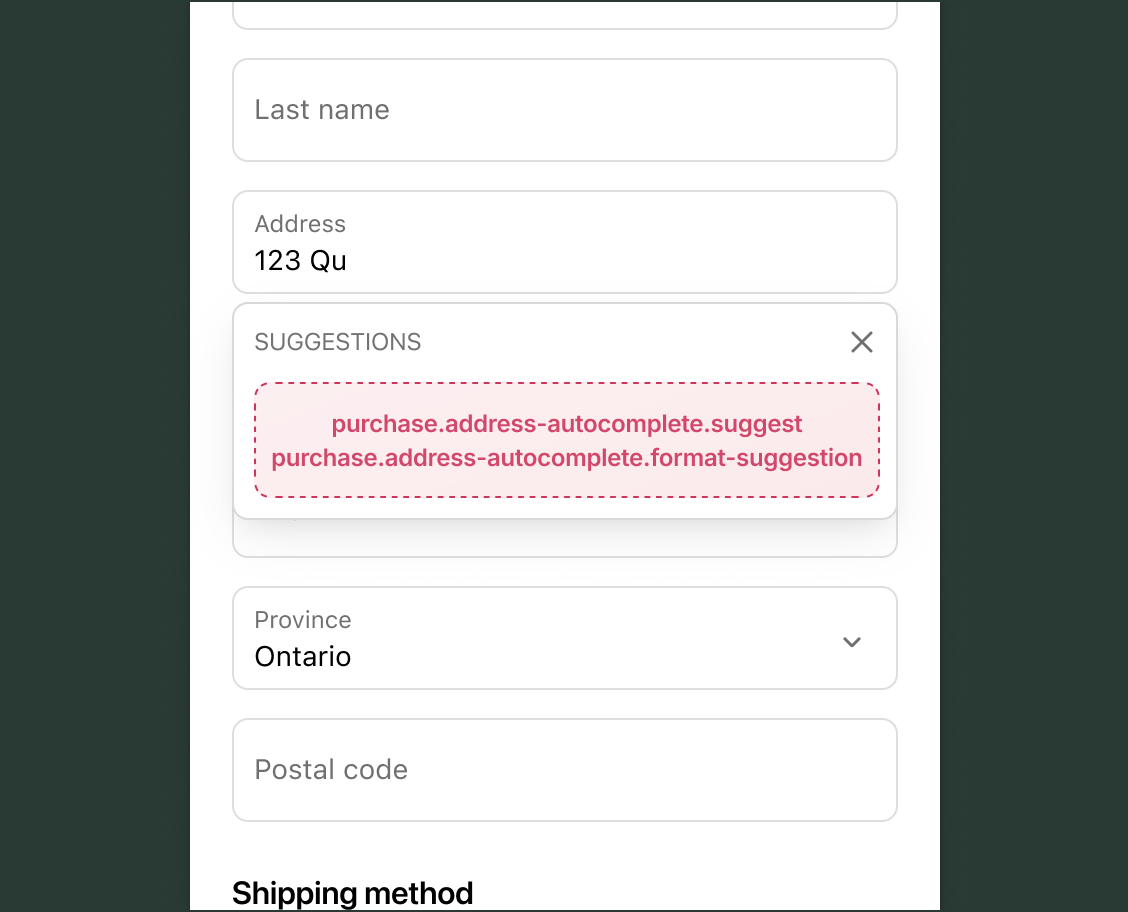
Use these targets to return address suggestions as buyers type and resolve a selected suggestion into a complete address.
The suggest target is required and runs each time a buyer types in a field. The format-suggestion target is optional and runs when a buyer selects a result. If you use both targets, they must be declared in the same shopify.extension.toml file.
Both targets are JavaScript extensions built with the ui-extensions library. They receive buyer input and return structured data rather than rendering UI components. To learn more, see the address autocomplete tutorial.
Anchor to Suggest address completions ,[object Object]Suggest address completions target
purchase.address-autocomplete.suggest
Runs when a buyer types in the first field of the address form, which is either address1 or zip, depending on the buyer's country. The target receives the current input value, field name, and the selected country code when available. Each suggestion you return requires a label and can include matchedSubstrings to highlight matching text in the dropdown.
Include a formattedAddress with each suggestion to populate address fields when a buyer selects one, or include an id so the format-suggestion target can fetch the complete address. You can pass shopify.signal to any fetch calls. The signal aborts when the buyer navigates away from the address field or when the debounced query value changes.
js
Examples
Suggest addresses from an external service
Description
Fetch address suggestions from your own service as a buyer types their address. This example reads the current input value and country code, calls an external API, and returns up to five formatted suggestions.
js
export default async function extension() {
  const {field, value, selectedCountryCode = ''} = shopify.target;

  try {
    const response = await fetch(
      `https://your-app.example.com/api/address-suggestions?query=${encodeURIComponent(value)}&field=${encodeURIComponent(field)}&country=${encodeURIComponent(selectedCountryCode)}`,
      {signal: shopify.signal},
    );

    const {data} = await response.json();
    const suggestions = data.map((suggestion) => {
      return {
        id: suggestion.id,
        label: suggestion.label,
        matchedSubstrings: suggestion.matchedSubstrings,
        formattedAddress: {
          address1: suggestion.address1,
          address2: suggestion.address2,
          city: suggestion.city,
          zip: suggestion.zip,
          provinceCode: suggestion.provinceCode,
          countryCode: suggestion.countryCode,
          latitude: suggestion.latitude,
          longitude: suggestion.longitude,
        },
      };
    });

    return {
      suggestions: suggestions.slice(0, 5),
    };
  } catch {
    return {suggestions: []};
  }
}
Limit suggestions to supported countries
Description
Skip suggestions when the buyer's country isn't covered by your address service. This example checks `selectedCountryCode` against an allowlist and returns an empty result for unsupported countries, avoiding unnecessary fetches.
js
export default async function extension() {
  const {field, value, selectedCountryCode = ''} = shopify.target;

  const SUPPORTED_COUNTRIES = ['CA', 'US', 'MX', 'BR'];

  if (!SUPPORTED_COUNTRIES.includes(selectedCountryCode)) {
    return {suggestions: []};
  }

  try {
    const response = await fetch(
      `https://your-app.example.com/api/address-suggestions?query=${encodeURIComponent(value)}&field=${encodeURIComponent(field)}&country=${encodeURIComponent(selectedCountryCode)}`,
      {signal: shopify.signal},
    );
    const {data} = await response.json();
    return {
      suggestions: data.slice(0, 5).map((suggestion) => ({
        id: suggestion.id,
        label: suggestion.label,
      })),
    };
  } catch {
    return {suggestions: []};
  }
}
Anchor to Format a selected suggestion ,[object Object]Format a selected suggestion target
purchase.address-autocomplete.format-suggestion
Formats the suggestion the buyer selected from the purchase.address-autocomplete.suggest target into a complete address. Use this target when your address service returns partial suggestions that require a second request to resolve.
This target receives target.selectedSuggestion, which includes the suggestion's id, label, and any matchedSubstrings from the suggest target. It must return a fully formatted address.
js
Examples
Resolve a selected suggestion to a full address
Description
Fetch the complete address details for a suggestion the buyer selected. This example uses the suggestion's unique identifier to call your service and returns a formatted address that populates the checkout address fields.
js
export default async function extension() {
  const {selectedSuggestion} = shopify.target;

  const response = await fetch(
    `https://your-app.example.com/api/fetch-address?id=${selectedSuggestion.id}`,
  );
  if (!response.ok) throw new Error('Address lookup failed');

  const {
    address1,
    address2,
    city,
    zip,
    provinceCode,
    countryCode,
  } = await response.json();

  return {
    formattedAddress: {
      address1,
      address2,
      city,
      zip,
      provinceCode,
      countryCode,
    },
  };
}
Return delivery coordinates with the resolved address
Description
Include `latitude` and `longitude` in the formatted address so checkout can use coordinates for delivery routing, zone pricing, or time-in-transit estimates. This example returns coordinates alongside the standard address fields. Accessing `latitude` and `longitude` requires [level 2 protected customer data access](/docs/apps/launch/protected-customer-data).
js
export default async function extension() {
  const {selectedSuggestion} = shopify.target;

  const response = await fetch(
    `https://your-app.example.com/api/fetch-address?id=${selectedSuggestion.id}`,
  );
  if (!response.ok) throw new Error('Address lookup failed');

  const {
    address1,
    address2,
    city,
    zip,
    provinceCode,
    countryCode,
    latitude,
    longitude,
  } = await response.json();

  return {
    formattedAddress: {
      address1,
      address2,
      city,
      zip,
      provinceCode,
      countryCode,
      latitude,
      longitude,
    },
  };
}
Anchor to Best practicesBest practices
- Format labels clearly: Return a complete, human-readable address string for each suggestion's
label, such as151 O'Connor St, Ottawa, ON K2P 2L8, Canada. Shopify displays the label exactly as returned and doesn't parse it. Incomplete or abbreviated labels make it difficult for buyers to identify their address in the dropdown. - Use a stable
idfor two-step lookups: If you're using theformat-suggestiontarget, set a stableidon each suggestion that maps to the address in your service. Theformat-suggestiontarget receives the full suggestion object, including theid, which you can use to look up and return the complete address.